 Tutorials
Books
Videos
Forums
Tutorials
Books
Videos
Forums


This is an archived tutorial from the kirupa.com legacy collection. It covers software that may no longer be available, but it is kept online because the ideas still hold up.
This tutorial will explain step by step how to create your own preloader that displays the percentage of your file that is loaded, and has a load bar that shows graphically how much is loaded. You may or may not be surprised at how easy something like this really is, I guess you won't know until the end of the tutorial. The movie below demonstrates what the preloader will look like. If you run on a broadband modem, you probably will not get a chance to see it, but dial-up users should have no problem.
If you are lazy and don't feel like building it yourself you can download the partial .fla file from this link - download partial fla file - The partial .fla file contains only the contents needed, you will add the ActionScript and such as needed.
[ the above movie is an example of the preloader ]
Ok, now let's start...
These next steps should help you on your way to building your own percentage preloader:
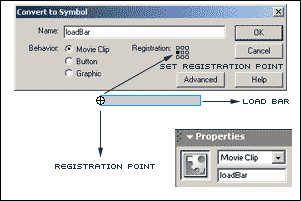
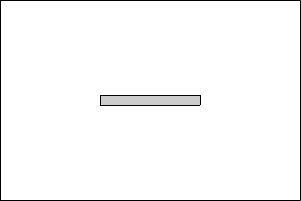
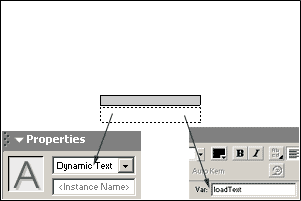
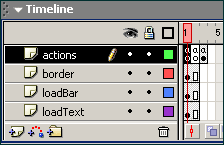
Alright, now that you have completed the tutorial and hopefully got everything working correctly, I will not go through what this code junk actually means.
What we have to do is go through the code line by line and interpret it. A lot like
poetry, ActionScript is just as beautiful and translated in the same manner.
{ Frame 1 Actions
}
|
bytes_loaded =
Math.round(this.getBytesLoaded()); bytes_total = Math.round(this.getBytesTotal()); getPercent = bytes_loaded/bytes_total; this.loadBar._width = getPercent*100; this.loadText = Math.round(getPercent*100)+"%"; if (bytes_loaded == bytes_total) { this.gotoAndPlay(3); } |
This declares the variable "bytes_loaded" which uses a feature in Flash called getBytesLoaded and determines how many bytes of your movie have been loaded thus far by the viewer. The Math.round() in the code tells Flash to round the number off so it becomes a whole number instead of an eight decimal places number.... because let's be honest, who wants to read a percentage that is eight decimal digits. |
|
bytes_loaded = Math.round(this.getBytesLoaded()); bytes_total = Math.round(this.getBytesTotal()); getPercent = bytes_loaded/bytes_total; this.loadBar._width = getPercent*100; this.loadText = Math.round(getPercent*100)+"%"; if (bytes_loaded == bytes_total) { this.gotoAndPlay(3); } |
This declares the variable "bytes_total" which uses a feature in Flash called getBytesTotal and determines how many bytes your entire movie contains for the viewer to download. I already explained the Math.round() part for the getBytesLoaded. Using getBytesTotal and getBytesLoaded we can determine what percentage we have loaded and have yet to load. |
|
bytes_loaded = Math.round(this.getBytesLoaded()); bytes_total = Math.round(this.getBytesTotal()); getPercent = bytes_loaded/bytes_total; this.loadBar._width = getPercent*100; this.loadText = Math.round(getPercent*100)+"%"; if (bytes_loaded == bytes_total) { this.gotoAndPlay(3); } |
Here we are declaring a variable which I named getPercent. We will take the variables bytes_loaded and bytes_total and divide them so we can determine how much has been loaded thus far in our movie. I declared it in a variable because we will be using it twice in the script, so instead of typing it out twice, I decided to declare it in a variable and use that variable later in the script. |
|
bytes_loaded = Math.round(this.getBytesLoaded()); bytes_total = Math.round(this.getBytesTotal()); getPercent = bytes_loaded/bytes_total; this.loadBar._width = getPercent*100; this.loadText = Math.round(getPercent*100)+"%"; if (bytes_loaded == bytes_total) { this.gotoAndPlay(3); } |
This is where we work with our preloader bar. It takes the value produced by the getPercent variable and multiplies it by 100. You may ask why the 100 is blue above, and I will tell you why. The 100 is blue because you can multiply it by whatever you would like, the number you place there determines the ending width of your loadBar movie clip. Since you drew the border for your clip on the stage already, I recommend using the width of your movie clip on the stage. You can select your clip and open the properties panel to see what the width is. Of course.... this.loadBar is your loadBar movie clip and the _width at the end is what allows you to change the width of the clip so it can grow and fill in your border ouline of your original loadBar clip. |
|
bytes_loaded = Math.round(this.getBytesLoaded()); bytes_total = Math.round(this.getBytesTotal()); getPercent = bytes_loaded/bytes_total; this.loadBar._width = getPercent*100; this.loadText = Math.round(getPercent*100)+"%"; if (bytes_loaded == bytes_total) { this.gotoAndPlay(3); } |
Alright, just like in the last one, the this.loadText here targets the dynamic textbox you placed on your stage and had given the var name "loadText". You will see we use the Math.round() feature again so we don't have odd decimal numbers that no one wants to see. We use the same method as changing the width of the loadBar to get the percent of the movie loaded. Of course though, the 100 at the end of this one has to remain at 100 so you can go through your movie from 0% to 100%. The +"%" at the end just tacks on a percent symbol in your text box so that the viewer knows it is referring to the percent loaded. |
|
bytes_loaded = Math.round(this.getBytesLoaded()); bytes_total = Math.round(this.getBytesTotal()); getPercent = bytes_loaded/bytes_total; this.loadBar._width = getPercent*100; this.loadText = Math.round(getPercent*100)+"%"; if (bytes_loaded == bytes_total) { this.gotoAndPlay(3); } |
This would be your final if statement. What it says is that if the number produced in the variable bytes_loaded is finally equal to the number produced from the variable bytes_total then the movie should gotoAndPlay the 3rd frame on the timeline. |
{ Frame 2 Actions }
| this.gotoAndPlay(1); |
|
Well this is pretty self explanitory, but I will explain anyway. Ok, if all the bytes are not loaded in your movie in frame one, it will automatically move on to frame two, since we can't let it pass frame two yet because the movie isn't loaded we will have to send it back to frame one. This will keep looping around over and over until both the bytes_loaded and the bytes_total variables are equal in numbers. Then the if statement declared at the end of the actions in frame one will send the movie directly to frame three and your movie will start from there. |
If for any reason you still don't understand something, or for some reason your preloader does not work, you may download the full working .fla file here - download full fla file - Please note this .fla file was done in Flash MX and can not be viewed through Flash 5.
Just a final word before we wrap up. What you've seen here is freshly baked content without added preservatives, artificial intelligence, ads, and algorithm-driven doodads. A huge thank you to all of you who buy kirupa's books, became a paid subscriber, watch the videos, and/or interact on the forums.
Your support keeps this site going! 😇

:: Copyright KIRUPA 2026 //--