This is an archived tutorial from the kirupa.com legacy collection. It covers software that may no longer be available, but it is kept online because the ideas still hold up.
guilherme
salgado
Introduction
In this tutorial you'll learn how to create
the kind of menu seen in the Coca Cola site of
Brazil. The link is:
www.cocacolabrasil.com.br
[
drag the header around]
Steps to Create Animation
That above menu is based on 100% pure action script
with no tweens involved. While it sounds complicated,
the coding is actually quite simple and easy-to-understand.
First, you will need to create the above
movie first. The following steps will explain how to create
the movie:
-
Create a square that is 100 px wide and 20 px
high. Select the square and press F8. The
Convert to Symbol dialog box will appear.
Select Movie Clip and enter any name in the
name field.
-
Now, copy the movie clip you just created.
Paste the movie clip a few pixels below the
movie clip you created. Give each one
an unique instance name, like zero, one, two,
and so on, from top to down. After that, select
all MCs and press F8 again to make them a movie
clip and give it an instance name of menu. Now
you have a MC called menu that has a bunch of
MCs inside (zero, one, two,...);
-
Select the menu header, this should be the zero,
select it and place the script below (Code A)
on the action panel. Now, edit the zero MC and
place a button inside, select this button and
place the Code B script on the action panel.
These scripts are there to make the header dragable;
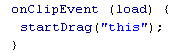
[Code
A - script for the menu header]
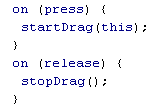
[Code
B - script for the button inside the header]
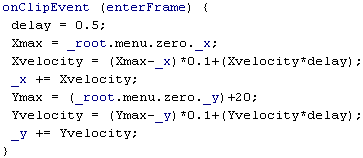
[Code
C - script for the menu option]
-
Select the MC one and place the Code C script
on the actions panel, you can use that same
script to all the others MCs, but you will have
to replace the both "zero"s with the
number of the current MC -1. Example: On MC
five you should use a "four" instead
of "zero". This is because it works
on a chain reaction, the zero pulls the one
that pulls the two... or, ...two is linked to
one that is linked to zero;
-
The real trick is the +20 in the 'Ymax' line.
The +20 is there to push down the movie clip,
since we are using 20 px height MCs, the rest
is self explanatory, I think.
Now you have a menu that when
you drag it, it will follow you in a very life-like
fashion..
-Guilherme Salgado (AKA Guig0)
-address to my site? maybe later, when I have
one.-
Just a final word before we wrap up. What you've seen here is freshly baked content without added preservatives, artificial intelligence, ads, and algorithm-driven doodads. A huge thank you to all of you who buy kirupa's books, became a paid subscriber, watch the videos, and/or interact on the forums.
Your support keeps this site going! 😇


