This is an archived tutorial from the kirupa.com legacy collection. It covers software that may no longer be available, but it is kept online because the ideas still hold up.
A short while ago I was requested for some help dealing with font usage in Flash. More specifically, I was asked if it was possible to change the font of text in a text using ActionScript instead of having to modify the text field. After pouring over a few pages and sites on the Net, I found the solution in the language we have come to love/hate HTML.
In this tutorial, you will learn how to use HTML code in Flash MX to create an animation that changes the font for a text field. You will create something similar to the following animation:
[ rollover/click on the colored buttons above ]
Let's create the above animation:

[ draw the text field above the row of buttons ]
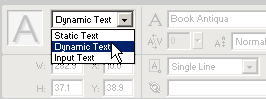
[ select Dynamic Text from the drop-down menu on the left ]

[ the Render Text as HTML button should be clicked ]
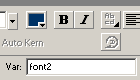
[ enter "font2" in the Var text field ]
                      on (release, rollOver) {
 font2 = "<font face=\"Times New Roman\"  >Times New Roman</font>";
}
[ copy and paste the above lines of code into the Actions dialog box ]
                      on (release, rollOver) {
 font2 = "<font face=\"Arial\"  >Arial</font>";
}
[ paste the above code as an Action on the second button ]
                      on (release, rollOver) {
 font2 = "<font face=\"Courier New\"  >Courier New</font>";
}
[ paste the above code as an Action on the third button ]
                      on (release, rollOver) {
 font2 = "<font face=\"Comic Sans MS\"  >Comic Sans MS</font>";
}
[ paste the above code as an Action on the fourth button ]
Not to leave you in the dark, I will explain what each line of the code accomplishes. I will use the code in the first button as an example:
                    on
  (release,
  rollOver) {

  font2 = "<font face=\"Times New
  Roman\" >Times New Roman</font>";

  }
In the second line, I am telling the variable
font2 to equal the HTML code
for displaying the text "Times New Roman" in the the Times
New Roman font. If you remember, font2 is also the variable
name of the text field. That is why the results from the
HTML code are displayed in the text field.
 |
FREQUENTLY ASKED QUESTION! |
|
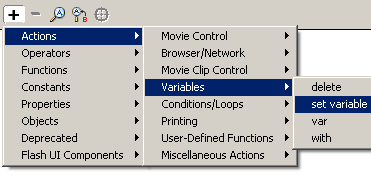
You may be wondering "How do I know what the HTML code for displaying text is? I don't know any bit of HTML". Also, you may also be wondering how to input the Actions in Flash. There are a lot of strange slashes and symbols that one would usually not remember to place in the code. I will explain that and more in the following section: Adding the HTML Code:
[ the set variable command ]
|
|
The following list displays some common mistakes that you may make while creating this effect on your own:
As always, I have provided the source code
for this tutorial. Click the download for Flash MX link
below to download the file.
Just a final word before we wrap up. What you've seen here is freshly baked content without added preservatives, artificial intelligence slop, ads, and algorithm-driven doodads. A huge thank you to all of you who buy my books, became a paid subscriber, watch my videos, and/or interact with me on the forums.
Your support keeps this site going! 😇


:: Copyright KIRUPA 2026 //--