


This is an archived tutorial from the kirupa.com legacy collection. It covers software that may no longer be available, but it is kept online because the ideas still hold up.
It is not very often I come across a "New" product that totally changes my production pipeline and or makes me say "WOW"!!!!. But I can honestly say that PrintDevizor does it. This product fills a unique void in the print design world. Funny part about it, is it is a void that I have relatively ignored because it became such a norm I never considered a solution. Luckily the kind folks at Stonecube have. First let me start by explaining the issues as I see it.
You have a client/project that requires some exotic die-vuts, embossing and UV coating schemes (sounds funny and odd but I have had such projects). Now you can whip up all the graphical comps you can to be viewed on screen. Which is great but the client wants to see how it will look on paper. Great, you print out some comps on your favorite home printer and even use glossy photo paper. Client is thrilled, but wants to see something closer to the actual final composition with the embossing and UV cutouts. Enter the problem. To have comp sheets printed up by a professional print shop could get expensive, especially once the changes and go-backs start rolling in. Next thing you know your local printer is sending you Christmas and Thank You cards off printing comps alone. So, for the freelance outfit this could be a costly expense after a while (believe me I know). Enter "PrintDevizor" the solution.
PrintDevizor allows you to make 3d visualizations of your print collateral that very closely mimics all the aspects of the final piece. I am talking gloss, UV, emboss, foil, die-cuts and how they interact with light. For a quick example check out this quick composition I made of my business cards http://deepixel.com/biz_card.htm. Pretty cool huh? I made that in 5 minutes. This product has really stepped up my process and turn around time. Plus the clients really like the idea that their ideas can be both visualized and distributed to others easily.
The interface is really not that hard to learn, and the concept behind it is quite genius. You basically are going to use grayscale/black and white images to control where you want effects to take place. And you layer these grayscale images on top of each other to form your stack of effects. Then your changes are displayed "real-time" in the OpenGL viewport. Simple. You can pick from just about every coating, card stock, emboss and die-cut out there. Plus you can customize each feature.
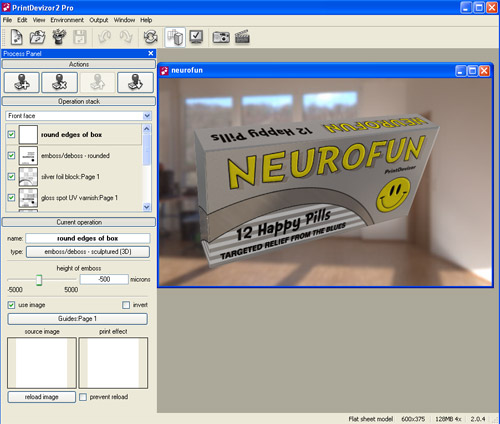
[ the screenshot of the PrintDevizor interface ]
My favorite output is the Quicktime VR, which exports directly from the program. I can't praise that feature enough. You can also output stills, which is equally good. VR output is extra cool because you can control the the magnitude of the rotation:
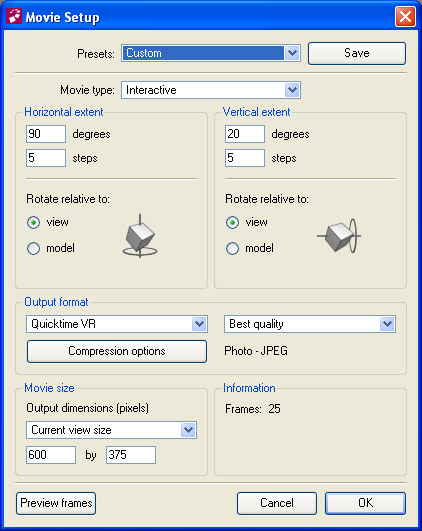
[ the Movie Setup window highlighting the Quicktime VR feature ]
So far I really haven't had any questions or problems to report, but what I can tell you that when I did have questions; they were responded to quickly and with the utmost respect. And they seem to listen to the client.
At times I did run across performance issues with choppy
OpenGL and display glitches. But nothing of the "stop the
presses" type. I wish you had more control over the
environment the final render is displayed in. Hopefully
these issues will be resolved in future versions.
This product is unique, solid and useful. While I still see it in its infancy, the application of PrintDevizor to "here and now" projects is worth its weight in gold. And if you do any considerable amount of custom print work, PrintDevizor will pay for itself in a short time period. I have recommended and showed this product to a few colleagues and each one of them have picked up a license or 2 for themselves and currently use them in their production pipeline. I have yet to run into a limitation with the program, but I could imagine if you did a gigantic image things could come to a stand-still as far as your computer.
To be fair, I could achieve these same results in another 3d
package like LightWave, but again it would come down to time
management. In PrintDevizor it takes mere minutes to get a
comp out as long as the B/W images are ready. But to do it
in Lightwave, I'd have to setup a environment, light the
scene, position cameras, fix textures...blah, blah. By that
time an hour or so has gone by. So again PrintDevizor saves
the day. Most of my review was based on v1. But since then
they have released version 2 which boasts a bunch of
enhancements - one of which is having more than 1 model open
at a time.
All in all I give this product 2 thumbs up, 5 out 5 stars
and the recommended buy award!
Check out PrintDevizor at
StoneCube.
| External resource (archived resource unavailable) | Nathan Galloway aka DDD |
Just a final word before we wrap up. What you've seen here is freshly baked content without added preservatives, artificial intelligence, ads, and algorithm-driven doodads. A huge thank you to all of you who buy kirupa's books, became a paid subscriber, watch the videos, and/or interact on the forums.
Your support keeps this site going! 😇

:: Copyright KIRUPA 2026 //--