 Tutorials
Books
Videos
Forums
Tutorials
Books
Videos
Forums


This is an archived tutorial from the kirupa.com legacy collection. It covers software that may no longer be available, but it is kept online because the ideas still hold up.
Welcome to the world of the preloader! Of all the various things people can accomplish in Flash, a preloader is a mystical concept which everyone uses yet no-one seems to be able to explain quite well. A preloader is not something that can really be explained because it is more of an abstract concept that works behind the scenes.
A preloader is basically a small script that keeps the user entertained or informed while a Flash movie is loading. For example, in my preloader animation below, the text "loading" appears with the number of bytes downloaded and the total size of the animation (broadband users probably may not notice the preloader):
[ preloader (movie is about 83k in size) ]
Creating the Preloader:
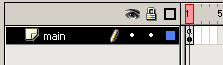
[ the main timeline ]
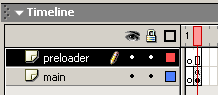
[ your new and improved timeline ]
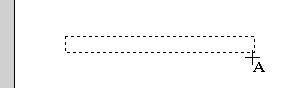
[ draw the dynamic text box in the center of your movie ]
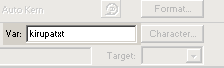
[ giving the
text field a variable name ]
                      onClipEvent (enterFrame) {

 var bytes = _root.getBytesTotal();

 var bytes_loaded = _root.getBytesLoaded();

 if (bytes_loaded == bytes) {

  _root.gotoAndPlay(2);

  this.kirupatxt = "movie loaded";

 } else {

  _root.gotoAndStop(1);

  this.kirupatxt = "loading (" + bytes_loaded + "/" + bytes +")";

 }

}
[ copy and paste the above code into the Actions dialog box ]
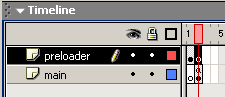
[ the
timeline ]
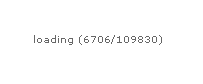
[ the
loading sequence will play until the entire movie has been
loaded ]
|
|
MY PRELOADER DOES NOT SEEM TO WORK? |
|
You may remember
me mentioned that the preloader is an abstract
concept. It is abstract because most of us do
not notice that it works when we create it. A
preloader works by displaying the progress of a
movie loading. When a movie has loaded,
the preloader disappears and the movie
plays.
When you preview the animation in your browser from the Hard Drive, you WILL NOT see a preloader. The movie loads instantaneously because your animation does not need to be preloaded. Before you can say "Chinnathambi" the movie would have loaded and started to play. The only real way to test the movie would be to press Ctrl + Enter in Flash.....then press Ctrl + Enter a second time. That helps Flash's bandwidth analyzer kick in, and it loads the animation at the bandwidth you specify. Also, when preview the animation on your Web server, you may see the preloader the first time you watch the animation. You probably will not see the preloader the second time because the animation will be cached in your browser's Temporary Internet Files folder. Remember, a preloader works always only when you press Ctrl + Enter two times after a short pause in between Ctrl + Enter(ing)! |
|
ActionScript Explained
Not to leave you in the dark, I will
briefly summarize what the major section of ActionScript
stands for.
                    onClipEvent

  (enterFrame)

  {

  var

  bytes = _root.getBytesTotal();

  var

  bytes_loaded =

  _root.getBytesLoaded();

  if

  (bytes_loaded == bytes) {

  _root.gotoAndPlay(2);

  this.kirupatxt =

  "movie loaded";

  } else

  {

  _root.gotoAndStop(1);

  this.kirupatxt

  = "loading ("

  + bytes_loaded + "/" + bytes +")";

  }

  }
In the above lines of code I am declaring
variables and assigning them values. For the variable
bytes, I am giving it the
value of the total byte size of the movie (getBytesTotal).
For the variable bytes_loaded,
I am assigning the value of the number of bytes currently
loaded (getBytesLoaded).
The remaining lines of code should be self explanatory. I add a conditional (if/else) statement to check if the number of bytes loaded equals the number of bytes total. If it is equal, the animation plays as normal. If the number of bytes is not the same as the total number of bytes, Flash is being told to continue preloading the movie.
Notice that I display the data to the text
field, which we named kirupatxt (in the Var field). You should also take note
of the concatenation (combining strings and data) taking
place. I am combining regular characters with numerical
values such as the number of bytes currently loaded and the
total number of bytes the movie occupies.
You have just completed the tutorial! As
always, I have provided the source code for you to take a
peek at. Click the download source link below to download
the Flash MX Flash File (FLA) for this effect (for file size
reasons, the 3D movie clip is intentionally left blank):
Just a final word before we wrap up. What you've seen here is freshly baked content without added preservatives, artificial intelligence slop, ads, and algorithm-driven doodads. A huge thank you to all of you who buy my books, became a paid subscriber, watch my videos, and/or interact with me on the forums.
Your support keeps this site going! 😇


:: Copyright KIRUPA 2026 //--
