


This is an archived tutorial from the kirupa.com legacy collection. It covers software that may no longer be available, but it is kept online because the ideas still hold up.
In the previous section, you added the scroll track and face. Let's finish up the interface on this page by adding our up and down buttons. I will also provide the code needed to get everything working.
Your scrollbar and content should look like this in your Flash right now:

Because you created the above for a tutorial, there wasn't much freedom in determining how everything looks. But, the above scrollbar is very customizable without breaking anything.
You can adjust the height of the scrollFace, the scrollTrack, contentMain,
In the next section, let's add our up and down buttons and add our code!
In the previous section, you finished creating your scrollbar. In this and the following section, you will learn more about how the scrollbar works.
You know that the scrolling area is going to be considerably smaller than the actual content contained in it. Our goal is to display only a small portion of our content in our viewing area. We need to provide functionality for allowing the viewer to adjust which portion of the larger content to display in the smaller viewing area.
The following diagram should help you to visualize what I will be explaining:
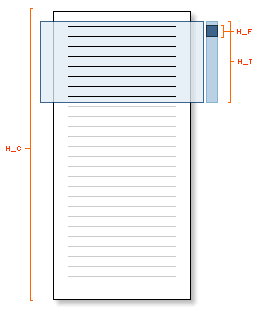
The height of our content is denoted by H_C, and the height of our scrollTrack is H_T. H_F refers to the height of our scrollface. Therefore, you now have an idea of our constraints. Our scrolling is constrained by the height of our content, the height of the viewing area, the height of the scroll track, and the the height of our scroll face.
Initially, a height H_V of your content is already being displayed in your viewing area. So the total height that we need to scroll is going to be H_C minus H_V. You now know the total height you have to scroll. Glancing at the above diagram, you can see that you have a distance of H_T to scroll through a height (H_C - H_T) of content.
Our relationship for scrolling so far is:
(H_C - H_V) / H_T
Let's use some real numbers. If your content is 1000 pixels tall (H_C), and both your maskedView and scrollTrack is 200 pixels tall (H_V, H_T). That means, since 200 pixels are already being displayed, you will need to scroll through 800 pixels of content. You only have 200 pixels of scrollTrack to do that in. That means, 800 pixels of content divided by 200 pixels of scrollTrack yield 4 pixels of content scrolled per 1 pixel of scrolling done by your scrollTrack.
That makes sense! Because for every pixel you scroll, you have to scroll more pixels of your content in order to get through all the content before you reach the end of your scrollTrack. We are not done quite yet.
There is a slight complication. Your scrollFace has a height also, and it takes up valuable space also! The full height of our scrollTrack cannot be used, because the bottom edge of the scrollFace stops once it reaches the bottom of your scrollTrack. That means you have to take into account the space used up by scrollFace.
Devising a relation between the scroll track's height and the scroll face's height is straightforward. The distance you move the scrollFace cannot be H_T. My next guess would be H_T - H_F. And that is our answer. Now, your modified relation between the content height, the scrollFace height, and the scrollTrack height is:
(H_C - H_V) / (H_T - H_F)
Let's revisit our example from above. If you substitute in the values for H_C, H_T, and H_F, you get 800 / 180 which is around 4.44. It's an ugly number, but good thing our computers can do this stuff better than us. Every pixel you drag your scrollFace, your content is dragged about 4.44 pixels.
All we have to do now is take into account our scrollFace's initial height so that we can offset our result by the space taken up by the scrollFace, and we have our final formula for implementing our scroll bar:
((H_C - H_V) / (H_T - H_F))
This is really the hard part of this tutorial. In the next section, I'll explain the code that takes all of the above and more and translates it into a format that Flash understands.
In the previous section, you learned how a simplified scrollbar would work. In this page, I will explain the code that went into creating our scrollbar.
var scrollHeight:Number = scrollTrack._height;
var contentHeight:Number = contentMain._height;
var scrollFaceHeight:Number = scrollFace._height;
var maskHeight:Number = maskedView._height;
I declare variables to store the heights of our four major scrollbar elements: the scroll track, the content, the scroll face, and the viewing/masked area.
var initPosition:Number = scrollFace._y=scrollTrack._y;
var initContentPos:Number = contentMain._y;
var finalContentPos:Number = maskHeight-contentHeight+initContentPos;
These three lines store the initial and final position our content should be. Because the initial and final positions are related to the positions of our scrollFace, scrollTrack, maskHeight, and contentMain, I just create more variables to store variations of similar data you collected in the above section.
var left:Number = scrollTrack._x;
var top:Number = scrollTrack._y;
var right:Number = scrollTrack._x;
var bottom:Number = scrollTrack._height-scrollFaceHeight+scrollTrack._y;
Similar to what I have been doing, I'm declaring more variables and assigning them numerical properties from our scrollbar elements. With these four lines of code, I specify co-ordinates for a virtual box in which our scroll face's movements are restricted. You will see these being used when the startDrag function is called later.
Notice that the bottom variable assignment seems more complicated and longer than the other variable assignments. What I am doing is trying to find the bottom limit we can scroll our scroll face on the scrollTrack.
The following diagram should help:
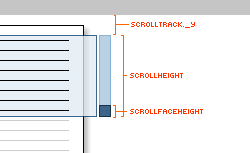
Because our scrollHeight variable stores the height of our track, we need to subtract the height taken up by our scrollFace - denoted as scrollFaceHeight. The scrollTrack._y value is important because both your scrollHeight and scrollFaceHeight values do not change relative to where you place them on the movie. They are absolute values because the height of your scrollFace and scrollTrack will not change based on the position you place them.
The problem, though, is that the bottom variable defines a specific Y position that will act as scrollFace's bottom boundary. By adding scrollTrack._y into the mix for bottom offsets the value for bottom by taking into account the distance the top edge of your scrollTrack is from Flash's origin. This ensures that your bottom variable contains data that is relative to where your scrollTrack is in relation to your movie's origin.
var dy:Number = 0;
var speed:Number = 10;
var moveVal:Number = (contentHeight-maskHeight)/(scrollHeight-scrollFaceHeight);
With these lines, I move away from defining and re-defining scrollbar element properties and move towards defining variables that make managing our code easier.
The variable dy stores the change in the y position resulting from dragging the scroll face. You will see it doing more than just storing the value 0 later.
The speed variable controls how quickly the content scrolls each time you press the Up or Down buttons.
Finally, the moveVal variable stores the ratio of how much your content moves based on how much the scrollFace moved on the scrollTrack. In other words, the relationship between all four of our scrollbar design elements (outlined in the previous section) are stored in this variable.
Tip
Initializing this many variables may seem like a waste of time. After all, typing contentMain._y takes up almost as much time as declaring and using a variable called contentHeight.
What declaring variables does, though, is make the code more readable and ensure you have an idea of what you think are the important parts of the code that will be used frequently.
More importantly, declaring variables using descriptive English names allows you think about the bigger concepts you are tackling as opposed to worrying about the non-essential code syntax and related details.
After all, it is more useful to think about your program constraints in terms of top, bottom, left, and right, as opposed to the bizarre assignments that make up, for example, the bottom variable.
There is more code left to explain, and in the next section I will explain how the drag feature works.
In the previous section, I started to explain the code that goes into making our scrollbar work. We didn't get further than covering variables that will be used, but in this page you will learn how the scroll face works.
scrollFace.onPress = function() {
  var currPos:Number = this._y;
  startDrag(this, false, left, top, right, bottom);
  this.onMouseMove = function() {
  dy = Math.abs(initPosition-this._y);
  contentMain._y = Math.round(dy*-1*moveVal+initContentPos);
  };
};
I declare a function that executes any contained within it when the scrollFace movie clip is pressed.
startDrag(this, false, left, top, right, bottom);The startDrag function allows you to click and drag your scrollFace movie clip. It takes in 6 arguments: the name of the object that is about to be dragged, whether the object will be centered to the mouse pointer when dragged, the left boundary, top boundary, right boundary, and bottom boundary.
Essentially, you are constraining your dragging to a virtual box whose edges are defined by the values you determined for left, top, right, and bottom. If you do not constrain the movement of your dragging, you will find that your scrollFace could potentially go everywhere around your animation...and you wouldn't want that!
this.onMouseMove = function() {
  dy = Math.abs(initPosition-this._y);
  contentMain._y = Math.round(dy*-1*moveVal+initContentPos);
};
This is a nested event handler because it is contained within the onPress event covered above. The above code executes when your scrollFace (this) is dragged. In order to drag, you first click on the scrollFace, and then you move your mouse in the direction you want to drag.
When you click on the scrollFace, any code contained inside the onPress event executes. And when you move your mouse while you still have your mouse button pressed, the code in the this.onMouseMove function executes.
dy = Math.abs(initPosition-this._y);
contentMain._y = Math.round(dy*-1*moveVal+initContentPos);
The dy variable returns the difference in position between your scroller's initial position and where it is now.
contentMain._y = Math.round(dy*-1*moveVal+initContentPos);This line sets the y position of your contentMain movie clip. Notice the three variables that are used to specify the position: dy, moveVal, and initContentPos.
If you recall, moveVal specifies how many pixels of the contentMain movie clip you move for each pixel your scrollFace moves. With dy specifying how many pixels your scrollFace has moved so far, multiplying dy by moveVal results in the total distance our contentMain movie clip should move based on where your scrollFace is currently.
Because Flash's co-ordinate system is upside down, I multiply the value by -1 to get things right side up again. Sometimes, your scroller may have everything starting from the origin, but sometimes, it may not. Therefore, all of your data is offset by initContentPos, which is simply the same as getting the y position of your scroll track.
I place all of the above in a Math.round() function, because that will ensure that your contentMain clip's y position is always an integer value. Text and some graphics become blurry when they are positioned on non-integer values. In order to avoid such blurriness in the content, Math.round() ensures your contentMain movie clip's position stays in integer increments.
scrollFace.onMouseUp = function() {
  stopDrag();
  delete this.onMouseMove;
};
This section of code is, thankfully, pretty straightforward. The above code executes when you are no longer pressing your mouse and/or dragging the scrollFace.
The stopDrag() function reverses the startDrag function from earlier and stops the dragging. Deleting the this.onMouseMove function stops your scrollFace from following your mouse even after you have stopped dragging.
We now shift gears and away from talking about the scrollFace to talking about the buttons. Because the Up and Down buttons are similar, I will only cover the Up button in detail.
btnUp.onPress = function() {
  this.onEnterFrame = function() {
  if (contentMain._y+speed<maskedView._y) {
  if (scrollFace._y<=top) {
  scrollFace._y = top;
  contentMain._y += speed;
  } else {
  contentMain._y += speed;
  scrollFace._y -= speed/moveVal;
  }
  } else {
  scrollFace._y = top;
  contentMain._y = maskedView._y;
  delete this.onEnterFrame;
  }
  };
};
When you press the up button with your mouse, all of the above code is executed. While the above looks like more lines of code than the rest of the functions covered, it really isn't that bad.
In the next section, let's cover the code contained inside the btnUp.onPress event function in greater detail.
In the previous section, you started to learn how the main elements of our scroll bar work. You already learned how to create the scroll face,
this.onEnterFrame = function() {When you press on your btnUp button, an onEnterFrame event is called. This means that any code contained within this function will be executed continuously at a speed equivalent to that of your frame rate.
if (contentMain._y+speed<maskedView._y) {Because we are moving our content up, I am checking to make sure that our contentMain movie clip does not go above our top boundary - the maskedView's y position.
Notice that instead of checking if the content's
current position is outside the boundary
(contentMain._y < maskedView._y),
I check to see if its future position
(contentMain._y + speed <

  maskedView._y)
, will be outside the boundary instead.
The reason is, if I am already at or above the top boundary,
it is already too late. The content would have overshot the
boundary and spilled over the top. I should have stopped
scrolling in the previous step itself.
if (scrollFace._y<=top) {
  scrollFace._y = top;
} else {
  scrollFace._y -= speed/moveVal;
}
When you are pressing either Up or Down button, both your content and your scrollFace move. Both have constraints at the top and bottom boundaries, and I need to ensure that our scrollFace's position is synchronized with our content's position. In other words, it would be bad if our content has finished and stopped at its top boundary, but our scrollFace is left with a few more pixels to scroll before it reaches its top boundary.
The above ensure that our scrollFace and contentMain movie clip are reasonably in sync. I mention reasonably as opposed to exactly, because the way I implemented the scrollbar will introduce some flaws in the synchronization. Because I am rounding the contentMain movie clip's position using Math.round(), there will be a slight discontinuity between when the scrollFace will reach its end and when the contentMain movie clip will reach its end.
With these lines of code, if the scrollFace has reached the top, I set its position to be the top boundary itself. If it has not, I increment our scrollFace's position by a value that is equivalent to speed divided by the value of moveVal. More than likely, speed / moveVal will not be an integer value, but that's no problem because our scrollFace is just a shape with nothing to be gained from rounding its position to an integer value.
Because I was able to use a non-integer value for the scrollFace's position, in order to balance out the ratio between scrollFace and contentMain, I adjust contentMain's position by the integer value of speed itself:
contentMain._y += speed;scrollFace._y = top;
contentMain._y = maskedView._y;
delete this.onEnterFrame;In the above section, you learned what would happen if our content had not reached its final position. This code is executed when our content is about to reach its boundary.
Because we can no longer move up, the positions are reset to the default 'up' values. scrollFace is restored to its top position, contentMain is restored to its maskedView._y position, and finally, we delete our onEnterFrame because there is no need for it any more. We have exhausted all we can do to our up button.
btnUp.onDragOut = function() {
  delete this.onEnterFrame;
};
btnUp.onMouseOut = function() {
  delete this.onEnterFrame;
};
When you are no longer pressing the up button or you click and drag away from the up button, I stop any work done by the up button by deleting the onEnterFrame contained in it.
if (contentHeight<maskHeight) {
  scrollFace._visible = false;
  btnUp.enabled = false;
  btnDown.enabled = false;
} else {
  scrollFace._visible = true;
  btnUp.enabled = true;
  btnDown.enabled = true;
}
In the odd chance that your content's height is less than that of your viewing area (maskHeight), the above code ensures you can't use the scroll buttons or the scrollTrack. For as someone once said, "You can't scroll that which cannot be scrolled." Content that displays perfectly in your viewing area without requiring scrolling would fall into what that someone said.
In the next section, I will briefly explain how the down button works and wrap up what ended up becoming a 9 page tutorial.
In the previous section, you learned how a simplified scrollbar would work. In this page, I will explain the code that went into creating our scrollbar.
The code for the down button is very similar to the code used for creating the up button:
btnDown.onPress = function() {
  this.onEnterFrame = function() {
  if (contentMain._y-speed>finalContentPos) {
  if (scrollFace._y>=bottom) {
  scrollFace._y = bottom;
  } else {
  scrollFace._y += speed/moveVal;
  }
  contentMain._y -= speed;
  } else {
  scrollFace._y = bottom;
  contentMain._y = finalContentPos;
  delete this.onEnterFrame;
  }
  };
};
btnDown.onRelease = function() {
  delete this.onEnterFrame;
};
btnDown.onDragOut = function() {
  delete this.onEnterFrame;
};
The only difference is that while the up button focused on the top boundaries for both the content and scroll face, the down button focuses on the bottom boundaries.
Besides minor changes associated with ensuring both the scroller and content work properly as they approach the bottom boundary, the code itself is nearly the same.
You are now done with this tutorial. The most complicated thing about this tutorial, from my point of view, is getting the scroll face and the content synchronized. Because you are rounding the y position for the content movie clip, our mathematical relation linking all of our scrollbar elements will not work without adjusting for them. You saw such subtle adjustments in my up and down button implementations.
When you are scrolling through several hundred pixels, minor rounding errors can eventually result in a major discrepancy between your intended result and the final result. That is why you see a lot* of code for the btnUp and btnDown buttons to ensure that, to the eye, it looks as if both the scroll face and up/down buttons seem to work seamlessly together.
* Ok, it's not a lot, but it's certainly more than what it is necessary for such a simple task.
Note - Improved Versions
Optimized Code
MichaelxxOA did a great job optimizing and improving the code featured in this scrollbar tutorial. You can find his source file and code by clicking here.
Mousewheel Support
28bit created a version of the code that allows mouse scrolling.
Feel free to take a look around and modify the source file I have provided. If you think you have created something far cooler than the generic scrollbar implementation I have done, post your FLA in the Source/Experiments forum. I always like to see how these tutorial files help you to create something better!
Just a final word before we wrap up. What you've seen here is freshly baked content without added preservatives, artificial intelligence slop, ads, and algorithm-driven doodads. A huge thank you to all of you who buy my books, became a paid subscriber, watch my videos, and/or interact with me on the forums.
Your support keeps this site going! 😇


:: Copyright KIRUPA 2026 //--