


This is an archived tutorial from the kirupa.com legacy collection. It covers software that may no longer be available, but it is kept online because the ideas still hold up.
Do you remember what kept you standing in front of an arcade machine every day after school during the days of frogger, pong, and galaxian? Unless you are a geek who likes the warmth of radiation emanating from the 4-color arcade screens, you were probably interested in beating the high score set by khhga.
While this tutorial will not cover how to create a killer game like galaxian, tetris, or pacman, this tutorial will introduce you to the world of scoring in Flash. Click on the green and red circles in the following animation for an example of what you will create in this tutorial:
[ click the green and red circles to increase/decrease the total score ]
The following steps will guide you in creating something very similar to the above animation:
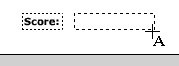
[ draw a text field to the right of the score caption ]
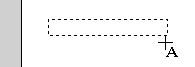
[ draw the text field ]
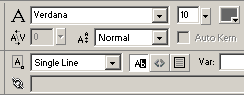
[ the properties panel for the dynamic text field ]
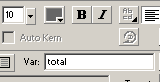
[ add the value of 'total' in
the Var field ]
                    on (release) {

 _root.total = _root.total + 100;

} on (release) {
_root.total = _root.total - 75;
}Even though the code and animation are quite self-explanatory in their use in the grand scheme of this tutorial, I will furnish you with a brief run-down of what occurs in the animation.
When the
animation loads, the user sees the two buttons and clicks on
the red button. When the red button is pressed, the
on (release) handler of the
button becomes activated. The code it contains also becomes
activated. The line _root.total....
subtracts 75 from the value for _root.total
which is, by default, zero.
The value of
_root.total becomes
displayed in the text field with the var name of total. So
where the _root part come
from? _root basically points
to the location in the animation that the variable
total is stored.
_root is the very lowest
level of hierarchy in the animation. All animations start
from _root and move onto the various movie clip levels such
as _root.movie.animation.
The code in the
red button is called a "decrementer" because the initial
value decreases by a certain amount (in this case 75). The
code in the green button is called an "incrementer" because
the value of the variable total
increases (in this case by 100).
If you were stuck during any portion of this tutorial, I have provided a partial source file for you to compare my version of the animation to that of yours:
Just a final word before we wrap up. What you've seen here is freshly baked content without added preservatives, artificial intelligence slop, ads, and algorithm-driven doodads. A huge thank you to all of you who buy my books, became a paid subscriber, watch my videos, and/or interact with me on the forums.
Your support keeps this site going! 😇


:: Copyright KIRUPA 2026 //--