 Tutorials
Books
Videos
Forums
Tutorials
Books
Videos
Forums


A simple tutorial to teach you how
to create full screen Flash page within a HTML page. This
tutorial may be a bit different from the usual full screen
effects you've seen. It doesn't scale the height and width of
the Flash file, but merely expands the Flash page without
scaling the elements inside. Thus if your using pixel fonts the
text will still remain clear and crisp.
In this tutorial we'll be using Flash MX 2004 as well as a bit
of CSS to get rid of the default margin value.
Click here to see the
final outcome.
Open any file in Flash.
Go to File > Publish Settings. Select the HTML tab.
Click the Dimensions drop down box. Select Percent and type 100 for the Width and Height.
Click the Scale drop down box and select No scale.
Click Publish
to publish the files.
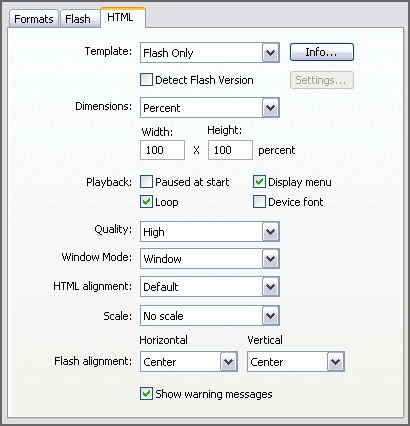
[ Screenshot of
the Publish Setting in Flash MX 2004. ]
You should have two new files
now, a SWF and a HTML file.
The code for the HTML file should look similar to this:
[ Code for the HTML file. ]
The code is quite self explanatory. It means set the height and width to 100% and set the margin value to 0. Add this piece of CSS code into the HTML file (inside the head tag).
- <style type="text/css">
- <!--
- body {
- height: 100%;
- width: 100%;
- margin: 0;
- }
- -->
- </style>
[ Copy and paste the above code between the head tags. ]
 |
Note | |
|
||
That's it! I hope you enjoyed the tutorial. If you had any problems with creating the files above or didn't quite understand something. Here is a zip file containing the FLA, SWF and HTML file.
|
If you have any questions, feel free to post them at the Kirupa Forum.
Michael Chen
Just a final word before we wrap up. What you've seen here is freshly baked content without added preservatives, artificial intelligence, ads, and algorithm-driven doodads. A huge thank you to all of you who buy kirupa's books, became a paid subscriber, watch the videos, and/or interact on the forums.
Your support keeps this site going! 😇

:: Copyright KIRUPA 2026 //--
