 Tutorials
Books
Videos
Forums
Tutorials
Books
Videos
Forums


There seems to be some confusion as to why anyone would bother using Flex. I can understand this to a degree since I felt the exact same way when I first heard about Flex. But logically, there must be a reason why Adobe decided to continue it as one of their products; and that is exactly what I plan to explain here.
In a nutshell, Flex was designed in order to give Flash Developers an edge when developing Rich Internet Applications (RIAs). Although RIAs can be built from within Flash, there are various limitations, especially when it come to a developers time. Im not going to get into the specifics, but as you become familiar with Flex, youll begin to understand why this is.
What makes a up a Flex Application?
A Flex application at its very basic level is a Flash .swf
file embedded in a generated HTML file. Since Flex outputs
its data as a .swf, this allows you to utilize everything
that Flash Player is famous for; dynamic animations, sound
and video handling, and of course, the Flash Drawing API.
The HTML that Flex spits out has the necessary JavaScript
code in order to detect whether the user has the Flash
Player installed, or whether they need to update to the
current player.
One of the major reasons why Flex is becoming more and more popular is because it utilizes ActionScript 3.0. In fact, developers were creating AS 3.0 applications in Flex even before AS 3.0 was released for Flash Developers. But, since Flash CS3 was released, AS 3.0 has become the new standard, and for me at least, is why developing in Flex has become even more exciting.
How is a Flex Application created?
One important thing to note, is that the Flex environment
does not use a Timeline. This does not mean that it is
limited. Rather, Flex has been developed more for
programmers and less for designers. It ends up meeting
somewhere in the middle, which is exactly where I found
myself as a Designer/Programmer, whatever. Again, this will
become apparent as you begin actually developing in Flex.
You design a Flex Application by selecting pre-defined visual components (i.e. Button, ComboBox, ListBox, DataGrid, etc) that youre most likely familiar with from Flash. If youve never used components before, theyre wonderful. Although some will tell you that you can create far smaller (in size) components by developing them on your own, and while that may actually be true, the pre-defined components work well and are highly customizable especially the latest set released with Adobe Creative Suite 3:
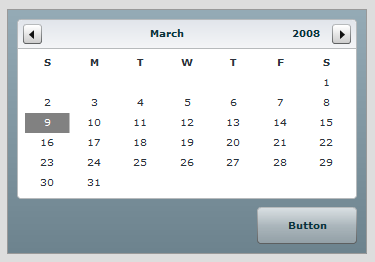
[ an example of a few controls arranged in Flex Builder 3 ]
You then arrange your components on the stage in a orderly, easy to use, manageable user interface. There are various Containers that allow you to align your components however youd like. As an example of one of these containers, there is one named the VBox. This Container tells everything that lives within it to align vertically to one another extremely usefully when developing Forms.
Youll then use be able to use styles and skins that will customize the entire look and feel of your application. CSS Formatting and the complete customization of the visual components (as I mentioned above) will make your Flex Application stand out above the rest.
Now that you have your visuals in place and you like the way your application looks, you can start to utilize ActionScript 3.0. A/ssign event handlers and create or import ActionScript functions or classes to make your Flex Application live up to its full potential. This will allow you to react to what the user does and to events that are generated by Flex itself. Also, and this is a HUGE also, youre able to connect to ColdFusion and other Flex Data/Communication Services. Remember this one thing when youre contemplating whether or not Flex is right for you: Flex and ColdFusion are meant for each other.
Now its time to publish your application and present it
to your client or the world.
Honestly, there is so much
more that could have been elaborated on in this article, but
thats what the later tutorials are there for. This was
meant as an introduction or sorts to Flex in a Flash world.
If you havent given it a shot, why not test it out for
yourself. Until more tutorials are released here on
Kirupa.com, please visit the following links in order to
satisfy your curiosity.
Download the latest Flex Builder 3:
http://www.adobe.com/products/flex/
The Adobe Flex Developers Center:
http://www.adobe.com/devnet/flex/
The Official Adobe Flex Overview:
http://learn.adobe.com/wiki/display/Flex/Animated+overview
Just a final word before we wrap up. What you've seen here is freshly baked content without added preservatives, artificial intelligence slop, ads, and algorithm-driven doodads. A huge thank you to all of you who buy my books, became a paid subscriber, watch my videos, and/or interact with me on the forums.
Your support keeps this site going! 😇


:: Copyright KIRUPA 2026 //--