 Tutorials
Books
Videos
Forums
Tutorials
Books
Videos
Forums


This tutorial is actually two minor tutorials wrapped into one. You will see how to display the time digitally in Flash, and you will also see how to display the full date. As usual, I will explain all of the code at the end of the tutorial.
You will create an animation similar to the following animation:
[ the digital clock ]
nTime, displayDate, and displayDay. They really could be called anything you like, but for the sake of organization with the code I have provided, I recommend naming them these names and adjusting the code for your personal use later.nTime and press F8 to convert this to a movie clip. Name it whatever you like. With this done, select the other two text boxes and press F8 to convert them both into one movie clip. Again, name this movie clip whatever you want to name it.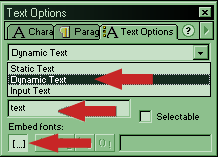
[ the dynamic text option ]
nTime text box and insert the following code. Just copy the code below and paste it into the Actions Panel of the movie clip.onClipEvent (enterFrame) {
myTime = new Date();
nSeconds = myTime.getSeconds();
nMinutes = myTime.getMinutes();
nHours = myTime.getHours();
if (nHours >= 12) {
ampm = "pm";
} else {
ampm = "am";
}
if (nHours >= 13) {
nHours = nHours - 12;
}
if (length(nMinutes) == 1) {
nMinutes = "0" + nMinutes;
}
if (length(nSeconds) == 1) {
nSeconds = "0" + nSeconds;
}
nTime = nHours + ":" + nMinutes + ":" + nSeconds + " " + ampm;
}onClipEvent (load) {
mon = ["Jan", "Feb", "Mar", "Apr", "May", "Jun", "Jul", "Aug", "Sept", "Oct", "Nov", "Dec"];
weekdays = ["Sunday", "Monday", "Tuesday", "Wednesday", "Thursday", "Friday", "Saturday"];
}
onClipEvent (enterFrame) {
now = new Date();
nDay = weekdays[now.getDay()];
nMonth = mon[now.getMonth()];
nDate = now.getDate();
nYear = now.getFullYear();
displayDate = nMonth + " " + nDate + ", " + nYear;
displayDay = nDay;
}Time to split the code apart. Let's start with the time code:
onClipEvent (enterFrame) {
  myTime = new Date();
  nSeconds = myTime.getSeconds();
  nMinutes = myTime.getMinutes();
  nHours = myTime.getHours();
}
This part of the code loops the actions contained within it every time the movie is accessed.
myTime = new Date();This creates the Date object that will be used to retrieve the information from your system.
nSeconds = myTime.getSeconds();
nMinutes = myTime.getMinutes();
nHours = myTime.getHours();
This defines the variables for seconds, minutes, and hours, and retrieves the information from your system and incorporates it into the Flash file.
if (nHours >= 12) {
  ampm = "pm";
} else {
  ampm = "am";
}
This if statement allows for the switch from am to pm when the hour is greater than or equal to 12.
if (nHours >= 13) {
  nHours = nHours - 12;
}
Because Flash displays time in the 24 hour system instead of the 12 hour system, this if statement is used to subtract 12 from the hour if the hour is greater than or equal to 13.
if (length(nMinutes) == 1) {
  nMinutes = "0" + nMinutes;
}

if (length(nSeconds) == 1) {
  nSeconds = "0" + nSeconds;
}
Both of these if statements add a 0 in front of the seconds and minutes if their length is equal to one, meaning the variable is less than 10.
nTime = nHours + ":" + nMinutes + ":" + nSeconds + " " + ampm;This displays the time using the dynamic text box named nTime that you created earlier.
onClipEvent (load) {
  mon = ["Jan", "Feb", "Mar", "Apr", "May", "Jun", "Jul", "Aug", "Sept", "Oct", "Nov", "Dec"];
  weekdays = ["Sunday", "Monday", "Tuesday", "Wednesday", "Thursday", "Friday", "Saturday"];
}
This performs the actions contained within the brackets only once, when the movie clip is loaded. This is usually used to define variables. The two arrays are used for the rest of the code. Arrays are zero-based, so when a later line outputs a 0 for the month, January will display, 1 means February, and so on.
onClipEvent (enterFrame) {
  now = new Date();
  nDay = weekdays[now.getDay()];
  nMonth = mon[now.getMonth()];
  nDate = now.getDate();
  nYear = now.getFullYear();
  displayDate = nMonth + " " + nDate + ", " + nYear;
  displayDay = nDay;
}
This loops the animation and performs the actions every time the movie is accessed. The getDay(), getMonth(), getDate(), and getFullYear() calls retrieve the date information. The last two lines display the information within the dynamic text fields that were created earlier.
That's pretty much all there is to this effect. There are a lot of different ways to modify this, and the limit is basically your imagination.
J.E. aka IamNot Jubba
Just a final word before we wrap up. What you've seen here is freshly baked content without added preservatives, artificial intelligence, ads, and algorithm-driven doodads. A huge thank you to all of you who buy kirupa's books, became a paid subscriber, watch the videos, and/or interact on the forums.
Your support keeps this site going!

:: Copyright KIRUPA 2026 //--

