 Tutorials
Books
Videos
Forums
Tutorials
Books
Videos
Forums


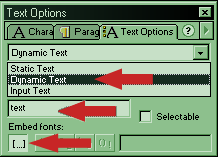
[ the text options panel ]
Once you have created the text box, select
it and press F8 to convert it to a Movie Clip. You can name
it whatever you like, but give the clip the instance name of
“mcLetter”. This will make the scripting go much easier.
Select “mcLetter” and press F8 again to convert this into another Movie Clip, so that you will end up with a text box inside of a Movie Clip, inside of a Movie Clip. Again, name this Movie Clip whatever you like, but for scripting purposes give it the instance name “char”.
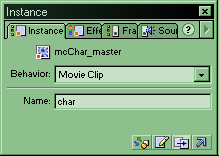
[ the instance panel where you will name the movie clip ]
In this step we are going to do the animation for the letters. At this point you should be at the main stage and you should see the movie clip that you named “char”. Right-click on this movie clip and select edit. Here you can manipulate the movie clip named “mcLetter” to make whatever effect you like for your text using motion tweens. Once you are finished with this you must insert a layer (go to Insert > Layer in the top menu bar). In this new layer insert a keyframe, press F6, in the frame where your animation of the text ends.
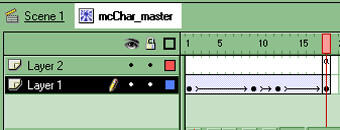
Return to main stage and you should see the movie clip named “char”. Go into the timeline and insert a new layer. This new layer will contain all the scripting. Double-click in the first frame and insert the code that follows this step. This code defines all the necessary variables to complete the code:
[ the code for frame 1 ]
In the timeline, on the same layer as step 5, insert another keyframe. For the sake of organization I chose frame 3, it could be any frame. Open up the actions panel and insert the code following this step. This bit of code duplicates the movie clip “char” repeatedly to display the text you want.
[ the code for frame 3 ]
Again, in the timeline insert a new keyframe. I chose frame 5, but it can be any frame as long as it is after the frame that contains the code in frame 3. If you changed the distance between these frames then you will change the frequency of the movie clips. Insert the following code into the actions panel of whichever frame you choose.
[ the code for frame 5 ]
Now lets break the code apart:
FRAME 1 CODE
FRAME 3 CODE
nChars++
: this is a counter that adds 1 to the variable nChars each
time this frame is
played.
if(nChars >= nLLength){
nReturn = text.substr(ii,1)
if(nReturn == " "){
nLNumber = nLNumber + 1
nChars = 0
}
}
This bit of code is and if statement that checks to see if
nChars is greater than the maximum line length and if it is,
then it creates a variable “nReturn” and if nReturn is equal
to a space then, it performs the carriage return, and skips
to the next line.
ii++; : another counter used in the following
duplicateMovieClip code
char.duplicateMovieClip ("char"+ii, ii);
_root["char"+ii].mcLetter.text = text.substr(ii-1, 1);
_root["char"+ii]._x = nXstart + nChars * nKerning
_root["char"+ii]._y = nXstart + nLNumber * nLSpace
this code duplicates the original movie clip “char” and
changes its X and Y values depending on the other variables.
This part of the code, tells the movie clip what part of
your text to display:
“_root["char"+ii].mcLetter.text=text.substr(ii-1,
1);”
substr
is a substring; the ii-1 tells the movie clip to display the
character ii-1 from the variable text, and the 1 is the
number of characters to include in the display.
FRAME 5 CODE
if (ii <= nLength){
gotoAndPlay(3)
}else{
stop()
}
This is just an if statement that tells the animation to
stop playing if ii becomes greater than nLength (the length
of the text, this variable was defined in the first frame).
To see how your animation should be structured, you may
download my final source file by clicking the 'download
final source' link below:
|
That’s pretty much all there is to this effect. There are a
lot of different ways to modify this, and the limit is
basically your imagination. If you have any questions feel
free to e-mail me or post on Kirupa.com’s
Message Boards.
J.E. aka IamNot Jubba
[email protected]
Just a final word before we wrap up. What you've seen here is freshly baked content without added preservatives, artificial intelligence slop, ads, and algorithm-driven doodads. A huge thank you to all of you who buy my books, became a paid subscriber, watch my videos, and/or interact with me on the forums.
Your support keeps this site going! 😇


:: Copyright KIRUPA 2026 //--
