 Tutorials
Books
Videos
Forums
Tutorials
Books
Videos
Forums


A common observation users made on this site when migrating from Flash 5 to Flash MX is that some of the animations that worked in Flash 5 no longer work in Flash MX. One such animation was the popular Random Motion tutorial. Of course, an answer was right around the corner (on the forums!) Just as with the Flash 5 Random Movement code, suprabeener was more than kind enough to share his expertise in making the code work in Flash MX. So, thank you supra!
The following animation is a result of suprabeener's code and my infatuation with the post icons found on kirupaforum.com.
[ randomly moving cones! ]
You will create something similar to the above animation in about 5 minutes by following the instructions in this tutorial.
Creating Random Motion in Flash MX:
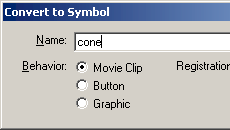
[ the convert to symbol dialog box ]
[ copy and paste the following code as an action on Frame 1 ]
[ add the above lines of code on your movie clip ]

[ multiple
copies of cone movie clip with the three lines of code ]
|
|
setting width and height of movement | |
|
||
The above note concluded this tutorial. If you are interested in seeing how my animation in this tutorial was created, click the download fla link below:
Just a final word before we wrap up. What you've seen here is freshly baked content without added preservatives, artificial intelligence, ads, and algorithm-driven doodads. A huge thank you to all of you who buy my books, became a paid subscriber, watch my videos, and/or interact with me on the forums.
Your support keeps this site going! 😇


:: Copyright KIRUPA 2026 //--

