


This tutorial will teach you how to tile the background in Flash 8. In previous versions of Flash, you had to duplicate a movie clip a number of times so that it covered the entire stage. This method is outlined in Kirupas tutorial:
http://www.kirupa.com/developer/mx2004/duplicatebackground.htm
While this works great, Flash 8 provides a more efficient means of creating a tiled background through the BitmapData class. This class allows you to create a tiled background using the drawing API methods. Lets get started.
Create a new document in Flash and make its dimensions 300px by 200px.
Now youll need your tile, for this tutorial well use the same tile as used by Kirupa:

[ pattern courtesy of squidfingers ]
Save the picture to your computer and import it into your empty Flash document. Now we need to set up the linkage settings for the bitmap so that we can use it in ActionScript. To do this, right-click on the bitmap in the library and select linkage. In the window that pops up, check Export for ActionScript and give it the linkage identifier of pattern (if it isnt already).
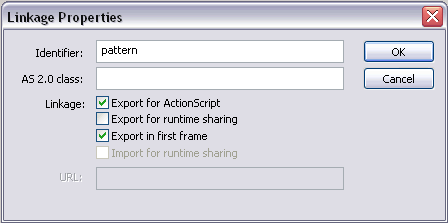
[ change the linkage properties of your bitmap ]
Now we need to start coding. Create a new layer and open up the actions panel for the frame. The first step is to let the compiler know that we are using the flash.display.BitmapData class. We do this with an import statement.
Now its time to actually create the tile in our code by creating a BitmapData instance and assigning it to a variable. Since we want to load a bitmap from the library, we use the static method loadBitmap and pass it the linkage name of our tile in the library (pattern). This method returns a BitmapData instance, which we assign to a variable named tile for later use in our code.
All thats left is to draw a rectangle around the stage. First we must begin the filling operation by using the beginBitmapFill method. For this tutorial, we will only focus on the first argument of the function since the rest are optional. This argument is the BitmapData instance we wish to use for the fill, so we pass it our tile instance.
To draw the rectangle, we just connect lines around the stage using the lineTo method. Instead of manually typing in the size of the stage, we can use the Stage class and its static width and height properties.
Finally we need to end the filling operation using endFill. This way if you use the drawing API later in your code, it wont use the tile as the fill.
Test the movie and voila, its as easy as that. Hopefully this provides an easier approach for creating tiled backgrounds in Flash 8 with ActionScript. In case you missed a step, the completed source is available below. If you have any questions, please feel free to post them on kirupaForums.

Good luck!
 |
Jesse Marangoni TheCanadian |

|
Just a final word before we wrap up. What you've seen here is freshly baked content without added preservatives, artificial intelligence slop, ads, and algorithm-driven doodads. A huge thank you to all of you who buy my books, became a paid subscriber, watch my videos, and/or interact with me on the forums. Your support keeps this site going! 😇

:: Copyright KIRUPA 2026 //-- |
