 Tutorials
Books
Videos
Forums
Tutorials
Books
Videos
Forums


So want to create a drop-down menu eh? It's
not hard at all! I'm not going to go into details in this
tutorial. I'll just show you the main idea of the menu. This
tutorial requires only the basic knowledge of Flash. The
following animation is an example of what you will be
creating:
|
|
[ A simple drop-down menu with no animation ]
First you should download the unfinished .fla file from the link in the following table:
So what do we have here? In the first frame there
is the button that should open the menu and in
frame 20 I've already copied out the buttons so
you do not need to do that but if you will be
creating your own drop-down menu some day be sure
that there are no gaps between the menu buttons
because whenever the mouse moves out of the
button-area the menu will close.
There is only one button copied all over the place and the text on the buttons is in the "TxT" layer which is locked to make things easier. You can preview the animation if you'd like... nothing happens! The only action there right now is in the first frame of the "Actions" layer. As you can see it's a stop(); actions which just won't let the animation to start playing as you preview it.
Making the Menu Work:
The following steps will help you to create the drop-down
menu:
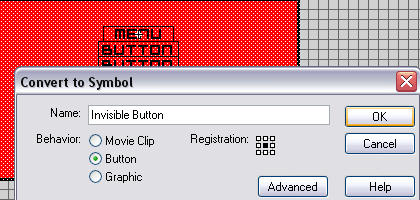
[ Converting it to a symbol ]
That's it! Wasn't that easy? You can test
the move by pressing CTRL+ENTER or by choosing control->Test
Movie.
You can download the final source
here! If you have any questions, please do not
hesitate to post on the forums at:
kirupaForum.
-Syko
-
http://www.vmkdsn.com/sykopage -
Just a final word before we wrap up. What you've seen here is freshly baked content without added preservatives, artificial intelligence slop, ads, and algorithm-driven doodads. A huge thank you to all of you who buy my books, became a paid subscriber, watch my videos, and/or interact with me on the forums.
Your support keeps this site going! 😇


:: Copyright KIRUPA 2026 //--
