


A common feature that you can see on many Flash sites is the pop-up window. While this site features several tutorials on creating variations of the pop-up window, this one is a little bit different; it is centered. You click a button and the new window opens in the center of your screen regardless of your resolution.
Click on the GO button for an example of a pop-up window that is centered on screen:
[ click the 'GO' button and a window will appear centered in your browser ]
Displaying a Centered Pop-Up Window:
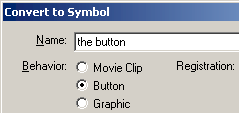
[ select "Button" and press OK]
- on (release) {
- //customize the window that gets opened
- // 0 equals NO.
- // 1 equals YES.
- address = "http://www.kirupa.com/modular/pop-up.htm";
- target_winName = "kirupa";
- width = 400;
- height = 300;
- toolbar = 0;
- location = 0;
- directories = 0;
- status = 0;
- menubar = 0;
- scrollbars = 1;
- resizable = 0;
- //sends data back to the function
- openWinCentre(address, target_winName, width, height, toolbar, location, directories, status, menubar, scrollbars, resizable);
- }
- _root.openWinCentre = function (url, winName, w, h, toolbar, location, directories, status, menubar, scrollbars, resizable) {
- getURL ("javascript:var myWin; if(!myWin || myWin.closed){myWin = window.open('" + url + "','" + winName + "','" + "width=" + w + ",height=" + h + ",toolbar=" + toolbar + ",location=" + location + ",directories=" + directories + ",status=" + status + ",menubar=" + menubar + ",scrollbars=" + scrollbars + ",resizable=" + resizable + ",top='+((screen.height/2)-(" + h/2 + "))+',left='+((screen.width/2)-(" + w/2 + "))+'" + "')}else{myWin.focus();};void(0);");
- }
Customizing the Window
Unless you want your pop-up window to
display updates from the kirupa.com site, you probably want
to modify the window size, content it loads, and the
window's attributes such as toolbars, etc. The following
information should help you to customize the window.
Right click on your button and select Actions. You will see in the first few lines, that I mentioned the property and its value. To change the URL of the page that gets opened, simply change the text in quotation marks after the word "address". To enable a property that is disabled like displaying the status bar, find the line that says "status =" and change the 0 to a 1. Simple as that. I will explain what each variable stands for in the real world:
As always, I have provided the source code for you to compare your version with that of mine. Make sure you have WinZip installed on your computer.
|
Acknowledgements
This tutorial was not my idea actually. Special thanks go
out to Toon Puttemans and the open-source Flash community
who made it possible for me to get hold of the original
code!
Just a final word before we wrap up. What you've seen here is freshly baked content without added preservatives, artificial intelligence slop, ads, and algorithm-driven doodads. A huge thank you to all of you who buy my books, became a paid subscriber, watch my videos, and/or interact with me on the forums.
Your support keeps this site going! 😇


:: Copyright KIRUPA 2026 //--
