 Tutorials
Books
Videos
Forums
Tutorials
Books
Videos
Forums


As Flash movies have become extremely complex, it becomes necessary to keep some portions of a movie on a separate file. The SWF files can easily be loaded onto the main movie quite easily. This tutorial will explain to you how to go about doing that. So, click on the "load movie" button below:
Once you click that, you should see the words "kirupa.com" oscillate left and right on your screen. No, the words weren't loaded from the animation itself. It came from an independent movie I have on my server. So, let's get started. First, download the partial source code. Click here.
Once you have opened up the partial source file, let's proceed on adding the little bits of information in.
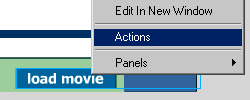
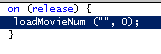
http://www.kirupa.com/developer/flash5/animation/loadm.swf
For the label marked "Level", change the 0 to a 1. The final action window should look like the following image below:
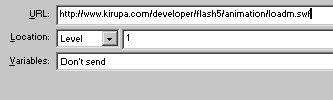
That is all there is to loading a movie from a variable. Unloading a movie is the same, except you change the property from the Actions to Load Movie to Unload Movie. The Levels are basically used to arrange elements on top of each other. If you want to load more than one movie, changing the level from one to two will make the new movie go over the existing. This is to ensure that the movies don't collide and cause problems.
Just a final word before we wrap up. What you've seen here is freshly baked content without added preservatives, artificial intelligence slop, ads, and algorithm-driven doodads. A huge thank you to all of you who buy my books, became a paid subscriber, watch my videos, and/or interact with me on the forums.
Your support keeps this site going! 😇


:: Copyright KIRUPA 2026 //--