


Here we will cover the process involved in making a very simple email form in Flash using PHP. Be aware that Flash alone is incapable of sending email. PHP, or some other server-side script like PHP, is needed to handle that operation. Put the two together, though, and you got yourself a great way for people to email you directly through your Flash-based web site.
[ send me an email using Flash and PHP ]
Because PHP is being used to send an email, Flash needs a way to communicate to PHP to let it know when to send an email and with what information. Flash relies on PHP to handle the email sending responsibility. When a Flash movie is ready to have an email sent, it needs to talk to a PHP script on the server so that script can then instruct the server to send the email with the information provided.
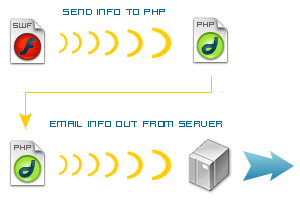
[ Flash movie to PHP to server sending out email ]
A way Flash can send information to an external PHP page is through the loadVariables ActionScript command. This allows Flash to open a page on the server, like a PHP script, and send it specific information that allows you to control how that script behaves. In the case of this tutorial, that means having a PHP script email information inputted in a Flash form.
Flash sends the PHP page the information filled out in the form. The PHP script then inserts that information into a mail function which instructs the server to send an email with that information to the email address specified. Easy enough, right? Let's begin creating the Flash form.
The Flash form consists of two basic parts. One part is the group of text fields that make up the form. These are actually contained within a movie clip aptly named form. Secondly, you have the send button. This will be the button that activates the code that sends the form information to the PHP file. At that point, Flash's job is done. It's then up to the PHP script to make sure the email gets sent.
loadVariables is being used to transmit the information, this is needed to make the value of these text fields easily recognized as variables to that command. This example uses name, email, and body for field variable names.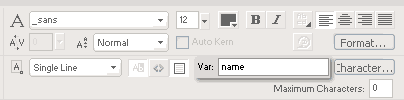
[ assign a var value for each text field ]
form when you're done.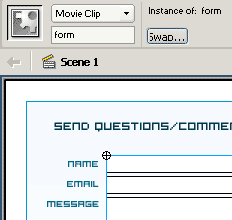
[ all fields in a movie clip named form ]
loadVariables script will be added. That script is as follows:form.loadVariables("email.php", "POST");This calls loadVariables through the form movie clip, sending all variables saved in that movie clip to email.php using the POST method. Because all the text fields in form have variables associated with them, this effectively sends all information filled out in those fields to the email PHP page. From that PHP page, the sent information can be retrieved using each field's var name.
One thing to be cautious of is that you need to make sure the movie clip you are using loadVariables with exists long enough for it to send its variables to the URL specified. Because this mailer has a thank you screen after sending an email, you'll need to wait until Flash does that before showing that screen and losing the form movie clip.
onClipEvent(data) event. This event is called when the movie clip receives data from the server either confirming its variables have been sent or in the case where new variables are brought into Flash. We aren't bringing variables in, just sending out. But we do need to know when that's taken place. So on the form movie clip we can add the script that checks for that. When the event runs, we can then go to the next frame showing the thank you screen.onClipEvent(data) {
_root.nextFrame();
}Now we can write that PHP script, email.php, that really makes this happen. Luckily, it's not really all that difficult to write. Maybe not as easy as the previous Flash script, but not difficult nonetheless. The PHP all revolves around one function, the mail function.
All you need to do is grab the information sent from Flash and pass it in to this mail function in PHP to have that information sent to your email of choice.
.php extension instead of .txt. To a server, though, a PHP file is seen not as text, but as a script for carrying out commands, like our email command.<?php
$sendTo = "[email protected]";
$subject = "My Flash site reply";$_POST to get them into variables of our own. $_POST is a special global variable in a PHP script that contains all of the posted variables sent to that script as an associative array.Using brackets and a variable name, you can then retrieve those variables. For those variables sent by this particular example, you would obtain their value in PHP using $_POST["name"], $_POST["email"], and $_POST["message"].
$headers = "From: " . $_POST["name"];
$headers .= "<" . $_POST["email"] . ">\r\n";
$headers .= "Reply-To: " . $_POST["email"] . "\r\n";
$headers .= "Return-Path: " . $_POST["email"];
$message = $_POST["message"];
Name and email here are assigned to a single variable, headers, because of how the mail function works.
mail(recipient, subject, message, otherHeaders);With our previous variable definitions, we can easily just plug and play to run this command in the final PHP script. Note that "from" and "reply-to" are not separate parameters within the mail call. These are part of the fourth parameter, additional headers, where information beyond the recipient, subject, and email message go.
With that, we can finish off the script with the following:
mail($sendTo, $subject, $message, $headers);
?>email.php and you're set.All that remains now is uploading your published SWF, with accompanying HTML, and PHP file to your server. Be sure you keep the PHP file in the same directory as your SWF and HTML or your script may not be found when called from Flash. If you don't want it to be in that same directory, be sure you correctly reference the location of the PHP file in the loadVariables command used in Flash.
Once uploaded, play your movie and send yourself a message! It'll be fun, and it will also test to make sure this actually works. Since, if you didn't already know, you can't test from your own computer's hard drive unless you have the proper configurations and PHP installed, which more than likely is not the case. It's ok though, since you don't need it on your personal computer, just your server. And if it's working from there, then you should be in the clear.
Just a final word before we wrap up. What you've seen here is freshly baked content without added preservatives, artificial intelligence, ads, and algorithm-driven doodads. A huge thank you to all of you who buy kirupa's books, became a paid subscriber, watch the videos, and/or interact on the forums.
Your support keeps this site going!

:: Copyright KIRUPA 2026 //--
