 Tutorials
Books
Videos
Forums
Tutorials
Books
Videos
Forums


Exciting eh? Well there's really not
much going on here other than adding a new span of heights to the existing
movement in an isometric scene. The hard part has already been done - that's the
movement within the skewed isometric surface. This new 3D angle is straight up
and not skewed at all. Its the 'normal' one in the bunch. This makes our job a
lot easier. To use this new dimension all you need to do shoot up your object at
a real distance of whatever you want. Calculations not required.
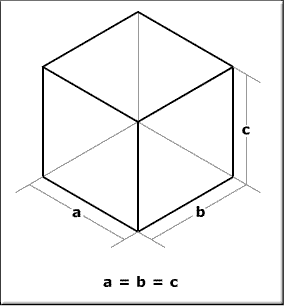
Lets take a look back at the iso cube:
 |
Confusion Alert! | |
|
||
With that being said. What does it take to get up there in that 3rd dimension? Well, only a change in a movie clip's _y. Want the clip to move vertically in space 10 places, add 10 to its _y and you're good! As easy as that seems, sadly, it doesn't stop there. What you need to do aside from that is also keep track of your z movement. Otherwise, what's to prevent you from thinking your object just moved diagonally in your original isometric plane?

You can see here that these two
balls are physically at the same height and it could be assumed the blue ball
lies on the square directly left of the red ball though the dotted lines
indicate that blue ball is in fact closer to you and elevated into 3D space. So
to keep track of this, we need to include in an isometric objects properties a z
property to distinguish its position in the z or vertical space. Positioning the
object is just a matter of positioning normally with no z positioning and just
uping the _y of the object by z afterwards to give it the height.
In terms of code, not much is added or changed at this point aside from adding
the z property in to objects in the isometric space. This will also be added to
the point class so a point will represent not only x and y dimensions but also
z. Other operations, however, don't have to really be altered so much (aside
from just throwing in a z property) since the nature of this z dimension is just
that which was described above; only a matter of adjusting _y post-normal
movement.
So here's an example in iso-3D:
|
[ click play to see more ] |
Along with what was described above,
added to this example is some simple collision detection in the 3D space too.
All that entails is just keeping references of those cube's locations in a 3D
array (array for each dimension) and just seeing which isometric grid spot the
ball is in and checking to see if the ball is in the same location as a cube. If
so, the cube clip is played displaying a shaking animation.
Depth swapping here, btw, is based on the previous explanation in 2D. This is
because no matter what the height of an object in this 3D space, its closeness
to you will never change so its arrangement in the space doesn't really change.
The problem, however, as previously mentioned, is that once you have a lot of
clips on the screen, they'll start trying to share the same depth swapping each
other out of their calculated depths and into their last.
This is because the same depth is obtained for a whole plane of movement along left and right and up and down. Methods of handling that can be discussed later. I think the next installment will be about actually putting all this crap to work in a fully functional isometric example. Theory and mumbo jumbo is one thing, but making it work is another.
|
If you are interested in seeing how the above 3D-Isometric animation was done, feel free to download the source file.
 |
Senocular |
Just a final word before we wrap up. What you've seen here is freshly baked content without added preservatives, artificial intelligence, ads, and algorithm-driven doodads. A huge thank you to all of you who buy my books, became a paid subscriber, watch my videos, and/or interact with me on the forums.
Your support keeps this site going! 😇


:: Copyright KIRUPA 2026 //--
