 Editing
an Object's Registration Point
Editing
an Object's Registration Point
written by
kirupa
chinnathambi
What is a registration point? Do you know
what I am talking about? Simply put, a registration point is
the default location of an object from which an object's x
and y co-ordinates are determined. More simply, it is the crosshair
that appears in the center or corners of your object after
you convert it into a movie clip, graphic, or button. The
following picture might help jog your memory:
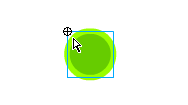
[ the registration point is in
the top left ]
In Flash 5, when you wanted to edit an
object's registration point, you simply went to Modify |
Transform | Edit Center. In Flash MX, Macromedia decided
that was too easy and removed that option. Surprisingly, the
solution was right under our finger tips:
-
Select the object (graphic,
button, movie clip) with your mouse pointer.
-
Once the object is selected, press the Free Transform tool
icon from the group of icons on the left:
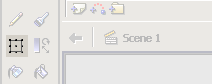
[ the free transform tool icon ]
-
Your mouse cursor will change to reflect the 'transform'
mode you are currently in. You will also notice that your
object has black boxes surrounding the edges:

[ the object in transform mode ]
-
Here's the easy part, make sure you are
still in transform mode. Click
the hollow circle, the registration point, and drag it
toward the center or wherever you want your new registration
point to be:

[ before and
after images of the registration point ]
-
That is all there is to editing the center of an object in
Flash MX.
Just a final word before we wrap up. If you have a question and/or want to be part of a friendly, collaborative community of over 220k other developers like yourself, post on the forums for a quick response!

|









