


This is an archived tutorial from the kirupa.com legacy collection. It covers software that may no longer be available, but it is kept online because the ideas still hold up.
In one of my earlier tutorials, I gave an overview of events and event handlers. What I didn’t write about was some of the behind the scenes work that goes along with the code and basic information I provided. Let’s address that with this short tutorial where I cover routed events and, more specifically, event bubbling and event tunneling.
Let’s say you are clicking on a button such as the Display Text button shown below (taken from here):
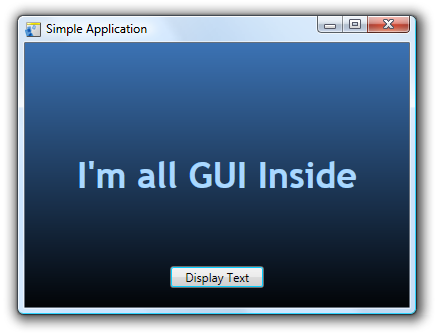
When you click on the Display Text button, you may think that your program only recognizes that particular click on just the button. Actually, your click is recognized by not only your button, but also your button’s parent, and its parent, and so on until you reach the root of your visual tree. That roundabout way of having events routed through the parents is what makes events in WPF and Silverlight known as routed events. Let’s look at what the particular visual tree for the above application looks like:
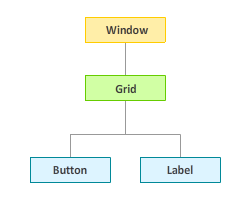
The application is fairly simple. It contains a Button and Label control nested inside a Grid control which, in turn, is hosted by our overall Window control. When you click on your button, since your click is interpreted as a routed event, your click event gets recognized by your Grid and Window controls. Since your Label is never clicked on, it doesn’t partake in this event handling festivity! It is merely on the same level as the Button in our visual tree.
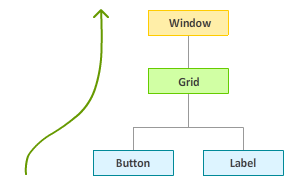
While I mentioned that your events get recognized by the parents, the order by which they get recognized depends on the routing strategy used. The two most popular routing strategies are bubbling and tunneling. In a bubbling strategy, you start with the control that originated the event and traverse up the tree:
The tunneling strategy works in the opposite way. With tunneling, when a click event is registered, you go all the way to the root and traverse down until you hit the control that originated the click event:
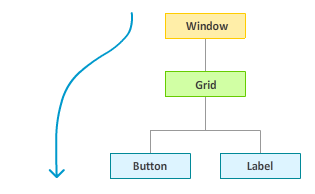
In WPF, you can specify which routing strategy to use based on the type of event you are listening for. If you look at the list of events your controls support, if they have the word "Preview" in front of them such as PreviewMouseLeftButton, you are dealing with a tunneling event. For most of the other events that do not have Preview in front of them, you are dealing with bubbling events.
There are a handful of events that don’t follow either a routing or tunneling strategy. Those events follow the direct strategy where only the element that received the event gets notified. None of the parent controls hear about it. The two events that I know of that follow a direct strategy are the MouseEnter and MouseLeave events.
Just a final word before we wrap up. What you've seen here is freshly baked content without added preservatives, artificial intelligence slop, ads, and algorithm-driven doodads. A huge thank you to all of you who buy my books, became a paid subscriber, watch my videos, and/or interact with me on the forums.
Your support keeps this site going! 😇


:: Copyright KIRUPA 2026 //--