At the end of our last article, we snuck in a note admitting something: when Zorb bumped into a rock, our code didn't pick a new route. It just said no. You were the one looking at the grid, spotting the gap two rows down, and steering him around the long way. Zorb had collision detection. You had the plan.
That's a fine deal until you want a character who can get somewhere on their own. So we're going to take the planning job away from you and hand it to the code. You click a cell, and Zorb works out how to get there.
Onwards!

What We're Going to Build
As always, let's play with the finished thing before we build it. Same 10-by-10 grid, same rocks, but the controls are gone:
Hover over any open cell and a pale highlight shows the route Zorb would take. Click that cell and he walks it, dropping a numbered breadcrumb in every square he passes through. Try a cell on the far side of a rock wall and watch the preview bend around it.
You can also open the navigation example in its own window!
There are no arrow keys here, and no swiping. The only thing you tell Zorb is where. Everything about how is his problem now, and working out that how is what the rest of this article is about.
The Obvious Idea That Doesn't Work
Before reaching for a real algorithm, it's worth trying the approach almost everybody tries first: on each turn, take the step that moves you closer to the goal. If the destination is below you, move down. If it's to the right, move right. Repeat until you arrive.
To see where that falls apart, let's shrink the world back down to the 5-by-5 grid we used last time:
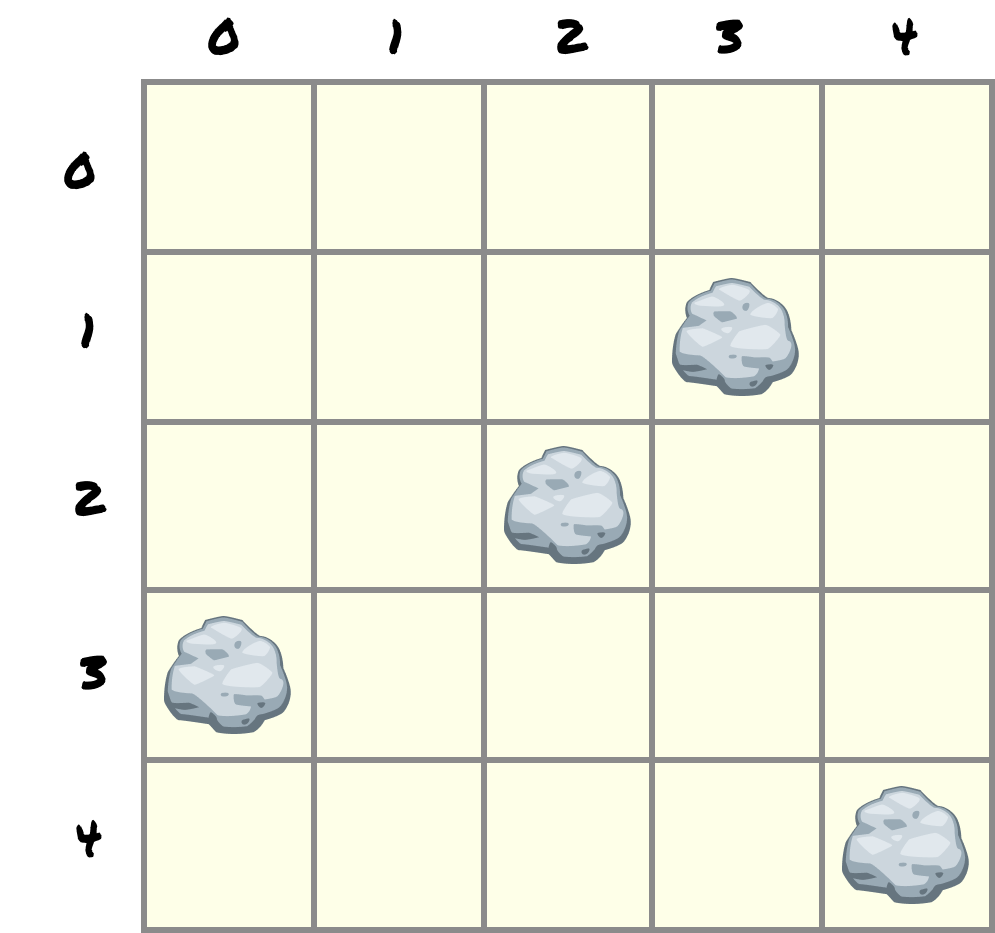
Put Zorb at (2, 1) and put his destination at (3, 4), down in the bottom row:
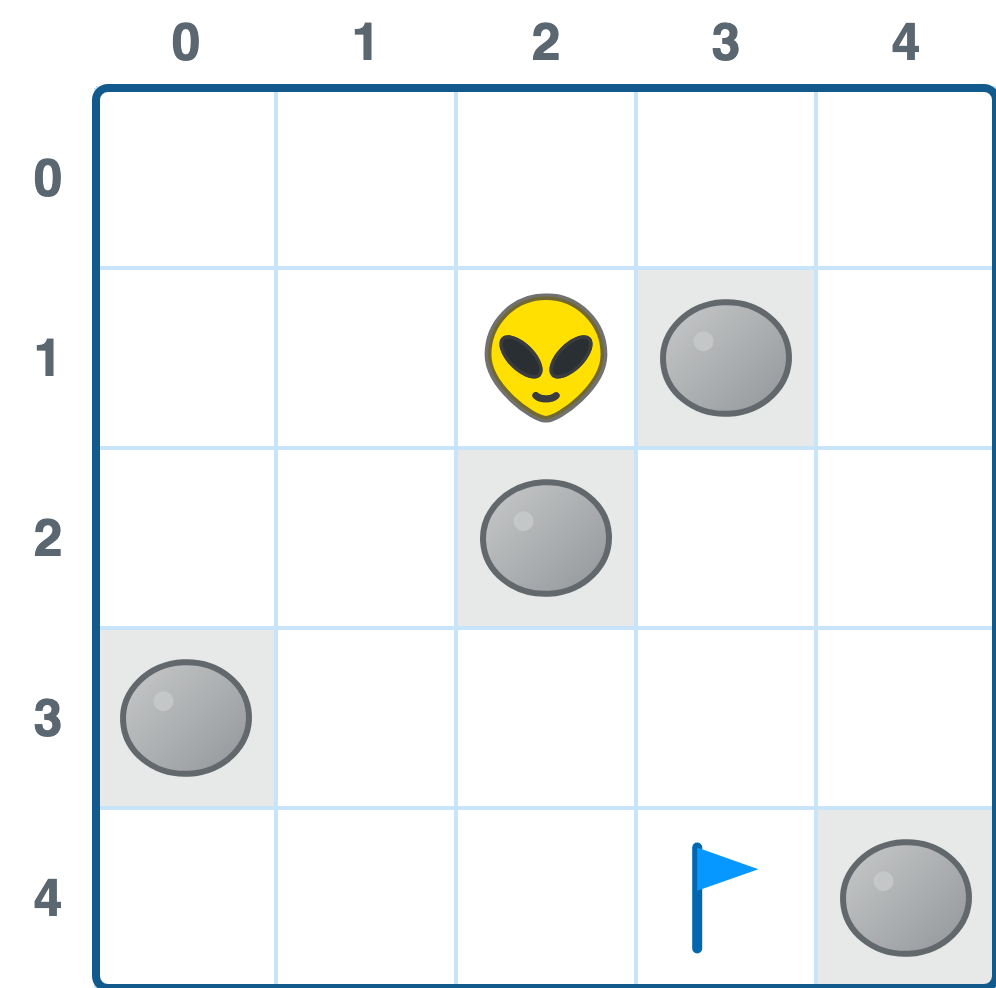
The gap between them is one column to the right and three rows down. Three is bigger than one, so our closer-is-better rule says move down first. Down from (2, 1) is (2, 2), and (2, 2) is a rock.
Fine. Try the other axis instead. Right from (2, 1) is (3, 1), and (3, 1) is also a rock.
Both of the moves that get Zorb closer to (3, 4) are blocked, on the very first turn, before he has gone anywhere:
[Levity: Zorb standing between the two rocks at (3, 1) and (2, 2) with a tiny sweat drop, staring at the flag he cannot reach.]
Alt: Zorb boxed in by two rocks on his first move, looking unimpressed.
The only two moves he has left are up to (2, 0) and left to (1, 1). Both of them increase the distance to the goal. To get to (3, 4) at all, Zorb has to start by walking away from it.
You can patch the rule to allow that, and people do. Let it move sideways when it's stuck, then resume heading for the goal. But now it needs to remember which cells it already tried, or it walks into the same corner forever, and the patches keep piling up. What started as one line of arithmetic turns into a pile of special cases that still can't promise the route it finds is a good one.
The other extreme is to try every possible walk through the grid and keep the best one. That works, and it is far too slow to be useful. A 10-by-10 grid has an enormous number of wandering routes through it, and almost all of them are garbage.
What we want sits between those two. We want something that explores, like the brute-force version, but stops the instant it has an answer.
What Zorb Can Actually See
Here is the part that trips people up, and it's worth slowing down for.
Every diagram in this article shows you the whole grid at once. You can see all four rocks, both positions, and the gap along the left side that Zorb eventually uses. That view is a luxury we give you so the explanation makes sense. The code never gets it.
At any moment, our algorithm knows exactly three things: the cell it is currently standing on, whether each of that cell's four neighbors is open, and whatever notes it has written down along the way. That is the entire world. There is no map. A cell two squares away might as well not exist until the search walks up to it.
Keep that in mind as we go, because the search we're about to build looks wasteful when you can see the whole board. It checks cells in the wrong direction. It wanders into corners that obviously lead nowhere. They're only obvious to you.
Flooding the Grid
Since Zorb can't see where the goal is, he shouldn't try to aim at it. He should spread out.
Picture dropping a pebble into a still pond at Zorb's cell. A ripple goes out in every direction at the same speed. It rounds anything solid instead of passing through it. Sooner or later a ripple washes over the destination, and because every ripple has been travelling at the same speed the whole time, the one that arrives first got there by the shortest route available.
That's the whole idea. The name for it is breadth-first search, usually shortened to BFS, and it works on a grid like this:
- Mark Zorb's cell as reached in 0 steps.
- Find every open neighbor of that cell and mark those as reached in 1 step.
- Find every open, unmarked neighbor of those cells and mark them as 2 steps.
- Keep going, one full ring at a time, until the destination gets marked.
The critical word in there is unmarked. Once a cell has a number, it keeps it. We never come back and overwrite it, because any later visit arrived on a longer route by definition.
Note: You've Seen This Before
If BFS rings a bell, it's because we've met it already in Depth-First Search and Breadth-First Search, where it walked a graph instead of a grid.
Those are the same thing wearing different clothes. A grid is a graph: every open cell is a node, and every pair of open neighbors is an edge. We just never have to build the node list, because we can work out a cell's neighbors with arithmetic whenever we need them.
Watching the Ripple Spread
Let's run that on our 5-by-5 grid and actually watch it happen. Zorb starts at (2, 1), so that cell gets a 0:
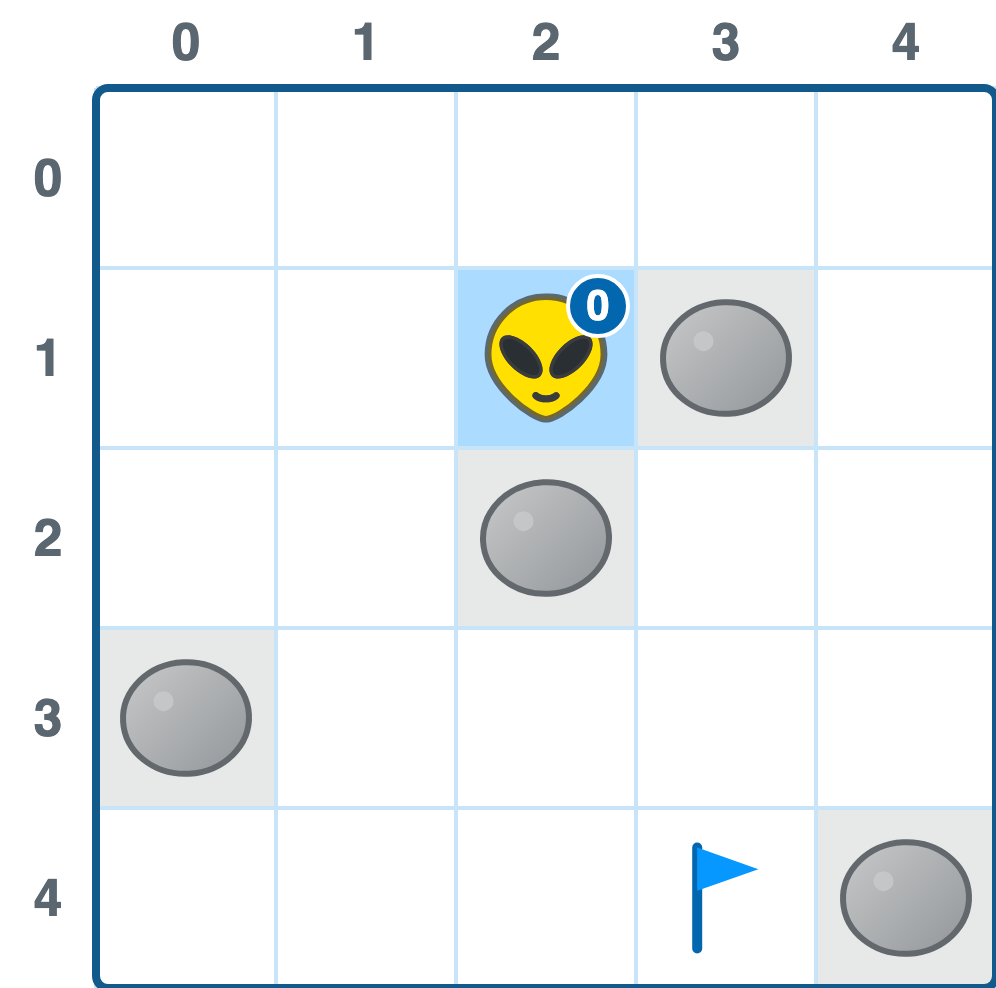
Now the first ring. Zorb's four neighbors are (2, 0) above, (2, 2) below, (1, 1) to the left, and (3, 1) to the right. Two of those are the rocks that stopped our closer-is-better rule cold, so the ripple goes around them. The other two get a 1:
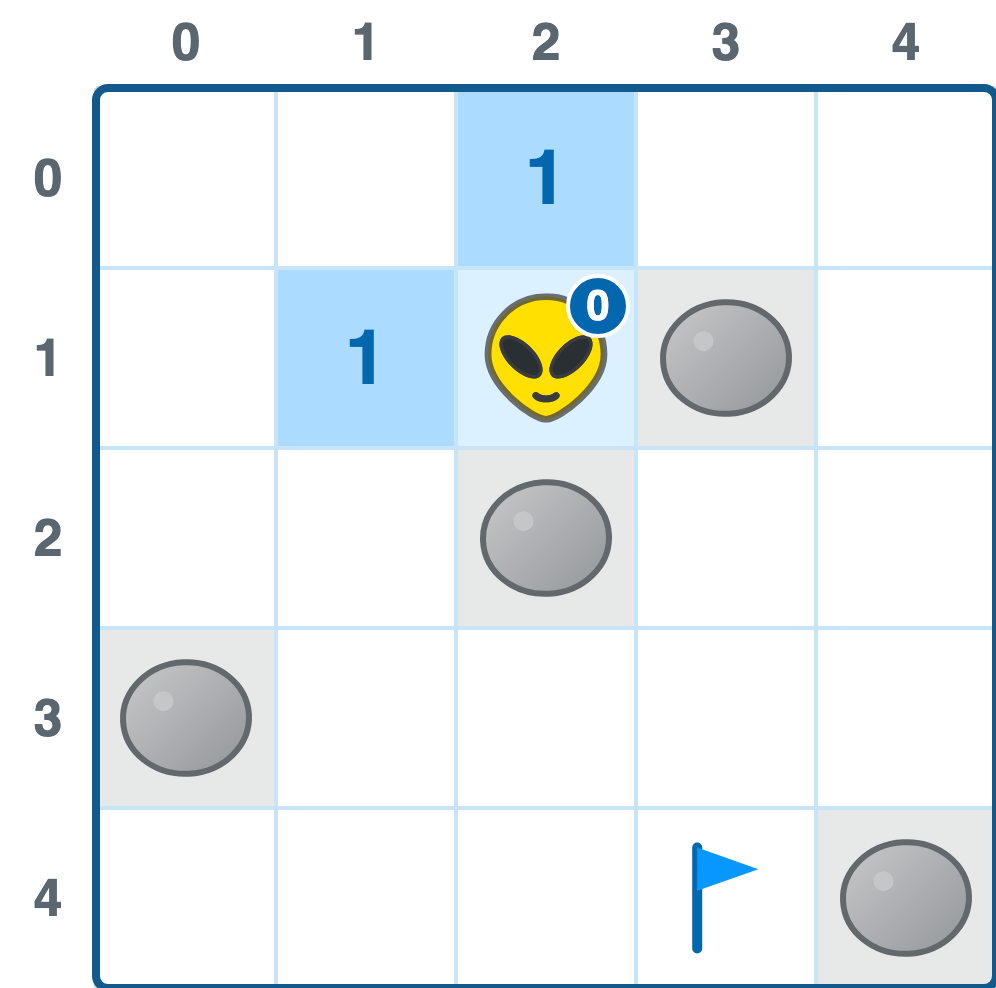
Ring two works on those two cells. From (2, 0) we reach (1, 0) and (3, 0). From (1, 1) we reach (0, 1) and (1, 2). Four new cells, all marked 2:
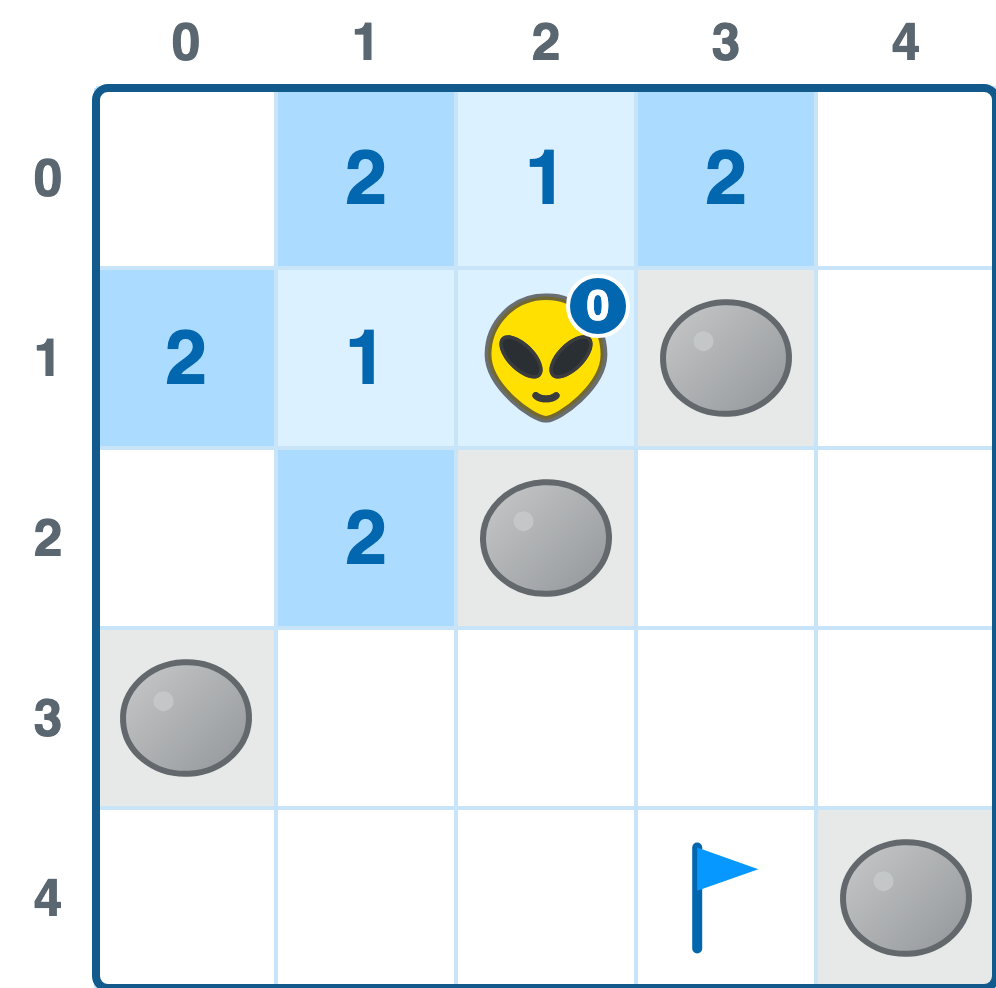
Notice that (1, 2) is now marked, and it sits directly below (1, 1). The ripple has found the gap along the left side, the one you spotted immediately when you looked at the picture. The search didn't spot anything. It just spread until the opening was in front of it.
Ring three adds (0, 0), (4, 0), (0, 2), and (1, 3). Ring four adds (4, 1), (2, 3), and (1, 4). Ring five adds (4, 2), (3, 3), (0, 4), and (2, 4). And on ring six, one of the cells we mark is (3, 4), which is where we were going:
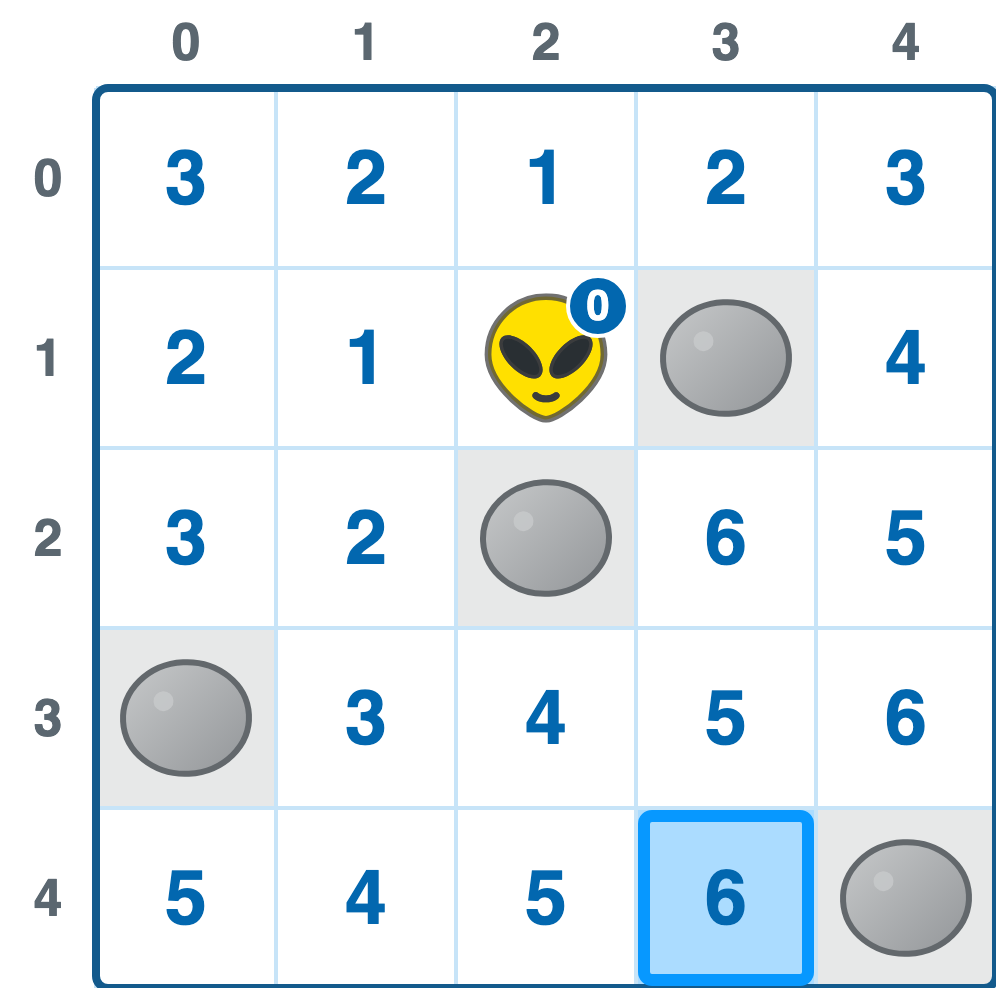
Every open cell on the grid now carries the number of steps it sits from Zorb, and the destination says 6. Six steps is not a guess or a decent-looking option. There is no five-step route to (3, 4), because if there were, ring five would have marked it.
That guarantee is the payoff, and it comes from the one rule we were careful about: the rings go out in order, and a marked cell never gets remarked. The first time the search touches a cell, it has arrived by the shortest route that exists.
Look at (3, 2) too, sitting right next to the destination column with a 6 on it. It's physically close to Zorb and one of the last cells reached, because the only ways in are around through the bottom or down the right-hand side. Straight-line distance and actual walking distance stopped agreeing the moment we added rocks.
Leaving Breadcrumbs
We know the trip takes six steps. We still don't know which six.
The fix is small: every time the search marks a new cell, it also writes down which cell it came from. One extra note per cell, made at the moment of discovery, when we know it for free.
So when ring two marks (1, 2), it also records that (1, 2) was reached from (1, 1). Do that for every cell and the finished grid holds a trail of arrows, each one pointing back toward Zorb:
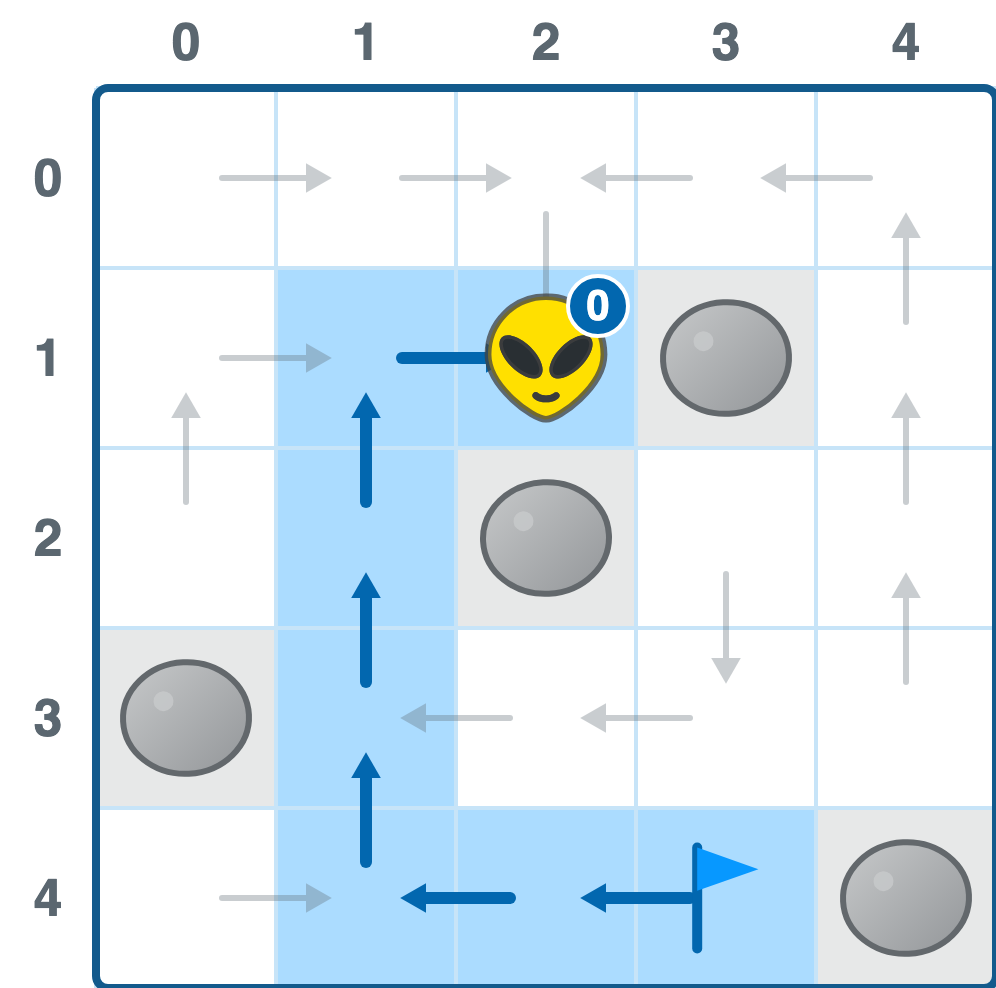
Reading the route out is now just following arrows. Start at the destination and keep asking each cell where it came from:
(3, 4) came from (2, 4)
(2, 4) came from (1, 4)
(1, 4) came from (1, 3)
(1, 3) came from (1, 2)
(1, 2) came from (1, 1)
(1, 1) came from (2, 1)   <- Zorb, so we stop
That gives us the trip backwards. Flip it around and we have Zorb's walk:
(2, 1) → (1, 1) → (1, 2) → (1, 3) → (1, 4) → (2, 4) → (3, 4)
Six moves, exactly as promised. And look at the shape of it: left, then all the way down the open column, then right along the bottom. The first move takes Zorb further from his destination, which is the move our closer-is-better rule refused to make.
Putting it All Together
Setting Up the Page
We are building directly on the obstacle example, so make a copy of grid_movement_obstacles.htm and name it grid_movement_pathfinding.htm. Three things change before any of the search code goes in.
First, point the page at the navigation stylesheet, which adds the preview, trail, and Zorb styling on top of what we already had:
<link rel="stylesheet"
      href="https://www.kirupa.com/css/grid_movement_pathfinding.css?v=20260916-1">
Second, delete the four direction buttons from the markup, along with the keydown and swipe handlers in the script. Nobody is steering Zorb by hand anymore. In their place, drop a single element inside the grid for Zorb to live in:
<div
  id="grid"
  class="grid"
  role="grid"
  aria-label="10 by 10 navigation grid with rock obstacles"
>
  <div id="zorb" class="zorb" aria-hidden="true"></div>
</div>
Third, our cells become real buttons instead of plain div elements, and each one carries its own coordinates:
for (let y = 0; y < rows; y += 1) {
  const rowElement = document.createElement("div");
  rowElement.className = "grid-row";
  rowElement.setAttribute("role", "row");

  for (let x = 0; x < cols; x += 1) {
    const cell = document.createElement("button");
    cell.type = "button";
    cell.className = "cell";
    cell.classList.toggle("obstacle", isObstacle(x, y));
    cell.dataset.x = String(x);
    cell.dataset.y = String(y);

    rowElement.append(cell);
    cells.push(cell);
  }

  gridElement.append(rowElement);
}
Buttons get us click handling, tap handling, focus, and keyboard activation without writing any of it ourselves. Storing the coordinates in data-x and data-y means that when an event fires, the cell can tell us which square it is.
That leaves three small helpers we will lean on constantly. One finds a cell by coordinate, and two wipe the highlighting classes off every cell:
function cellAt(x, y) {
  return cells[y * cols + x];
}

function clearPreview() {
  for (const cell of cells) {
    cell.classList.remove("preview", "preview-goal", "preview-blocked");
  }
}

function clearTrail() {
  for (const cell of cells) {
    cell.classList.remove("trail");
    cell.removeAttribute("data-step");
  }
}
Save and refresh. The grid and its rocks should look exactly as they did before, except now Zorb sits in his own floating element and nothing you press moves him. That is the correct amount of broken for this point in the article.
Searching for a Path
Our inBounds, isObstacle, and obstacles set all carry over from the obstacle example untouched. The one new bit of housekeeping is that we now need a cell's "x,y" string in a few places, so let's give it a name:
function key(x, y) {
  return `${x},${y}`;
}

function isObstacle(x, y) {
  return obstacles.has(key(x, y));
}
Now the search itself. Two collections do all the work. The frontier is the list of cells waiting to be expanded, and cameFrom is our breadcrumb map, which pulls double duty as the record of which cells we've already marked:
function findPath(from, to) {
  if (!inBounds(to.x, to.y) || isObstacle(to.x, to.y)) {
    return null;
  }

  const goalKey = key(to.x, to.y);
  const cameFrom = new Map([[key(from.x, from.y), null]]);
  const frontier = [{ x: from.x, y: from.y }];
  while (frontier.length > 0) {
    const current = frontier.shift();

    if (key(current.x, current.y) === goalKey) {
      return buildPath(cameFrom, current);
    }

    for (const [xOffset, yOffset] of Object.values(DIRECTIONS)) {
      const nextX = current.x + xOffset;
      const nextY = current.y + yOffset;
      const nextKey = key(nextX, nextY);

      if (!inBounds(nextX, nextY)) {
        continue;
      }

      if (isObstacle(nextX, nextY)) {
        continue;
      }

      if (cameFrom.has(nextKey)) {
        continue;
      }

      cameFrom.set(nextKey, current);
      frontier.push({ x: nextX, y: nextY });
    }
  }

  return null;
}
Those three continue statements are the ripple rules, one line each. Skip anything off the grid. Skip anything filled with rock. Skip anything we've already marked, because it already has a shorter number than we could give it now.
The ring-by-ring behavior comes from shift. Because we pull cells off the front and push new ones onto the back, everything one step away gets processed before anything two steps away does. That queue ordering is the breadth-first part. Swap shift for pop and you have depth-first search, which will happily march into a far corner before checking the cell next door.
Notice the two ways out of this function. It returns a path the moment the goal comes off the frontier, and it returns null when the frontier empties without ever finding it. That second case matters. An empty frontier means the ripple has touched every cell it can reach and the destination wasn't among them, so there genuinely is no route.
Reading the breadcrumbs back is the short function we sketched out above:
function buildPath(cameFrom, goal) {
  const path = [];
  let current = goal;

  while (current) {
    path.push(current);
    current = cameFrom.get(key(current.x, current.y));
  }

  return path.reverse();
}
We seeded cameFrom with the starting cell pointing at null, so the loop stops on its own when it walks back to Zorb. The reverse flips the trail into travel order, which gives us an array that starts at Zorb and ends at the destination.
Try it from the console before wiring up any clicks:
findPath({ x: 4, y: 4 }, { x: 9, y: 2 }).length; // 12
findPath({ x: 4, y: 4 }, { x: 5, y: 4 });          // null, that's a rock
The first call reports twelve cells, which is eleven steps plus the cell Zorb is already standing on. That off-by-one is worth burning in now, because it shows up every time we print a step count: a path of n cells is n - 1 moves.
Showing the Route on Hover
Our search is a pure function. Hand it two coordinates and it hands back an answer without touching Zorb, the grid, or anything else. That means we can call it while the mouse is just passing over a cell, which is exactly what the hover preview does:
function showPreview(x, y) {
  clearPreview();

  const path = findPath(zorb, { x, y });

  if (!path) {
    cellAt(x, y).classList.add("preview-blocked");
    return;
  }

  for (const step of path) {
    cellAt(step.x, step.y).classList.add("preview");
  }

  cellAt(x, y).classList.add("preview-goal");
}
Every cell on the route gets a preview class, the destination gets a ring on top of it, and a null answer marks the cell as unreachable instead. The stylesheet handles the rest with a paler fill than the one we use for the trail, so the route you're considering never looks like the route you took.
Hook it up to pointerover on the grid, and to focusin as well so the preview also appears for anyone moving through the grid with a keyboard:
gridElement.addEventListener("pointerover", (event) => {
  if (event.pointerType !== "mouse") {
    return;
  }

  const cell = event.target.closest(".cell");

  if (cell) {
    showPreview(Number(cell.dataset.x), Number(cell.dataset.y));
  }
});
The pointerType guard keeps the preview off touch devices, where a finger hovering over a cell isn't a thing that happens. On a phone, the tap is both the hover and the click.
Save and refresh, then run your mouse around the grid. The route should snap into place under the cursor and bend around every rock it meets. Park on a cell with rocks on all four sides and nothing highlights at all, because there is nothing to highlight.
Walking the Path
A click runs the same search and then plays the result back one cell at a time:
function walk(path) {
  stopWalking();
  clearPreview();
  clearTrail();
  markTrail(path[0].x, path[0].y, 0);

  let index = 1;

  function takeStep() {
    const next = path[index];

    zorb.x = next.x;
    zorb.y = next.y;
    placeZorb();
    markTrail(next.x, next.y, index);

    index += 1;

    if (index < path.length) {
      walkTimer = setTimeout(takeStep, STEP_MS);
    }
  }

  takeStep();
}
Each step does three small jobs: move Zorb's coordinates, move his sprite to match, and stamp the cell he just entered with its position in the path. The stopWalking call at the top is what makes a mid-walk click behave, since it clears the pending setTimeout so the old trip can't keep stepping underneath the new one:
function stopWalking() {
  if (walkTimer !== null) {
    clearTimeout(walkTimer);
    walkTimer = null;
  }
}
The markTrail call is what produces the numbered breadcrumbs, and it's barely anything:
function markTrail(x, y, step) {
  const cell = cellAt(x, y);
  cell.classList.add("trail");
  cell.dataset.step = String(step);
}
The number lands in a data attribute rather than in the cell's text, and CSS pulls it out with content: attr(data-step). Keeping it out of the markup means the trail is styling, not content, which matters for the screen reader users who would otherwise hear a hundred stray digits read out.
Zorb himself is one absolutely positioned element sitting above the cells rather than a class we toggle on and off:
function placeZorb() {
  zorbElement.style.transform =
    `translate(${zorb.x * 100}%, ${zorb.y * 100}%)`;
}
Because the element is sized to exactly one cell, a shift of one column is a translation of 100%. A CSS transition on transform then does all the animating for us, and transitions interrupt gracefully, so clicking a new destination mid-walk redirects Zorb from wherever he happens to be rather than teleporting him.
Save, refresh, and click a cell on the far side of the grid. Zorb should set off immediately, thread through the gaps, and leave a numbered trail showing the order he visited each square. Click somewhere else while he's still moving and he should change course without stopping.
Note: Why the Arrow Keys Still Do Something
Open the example and press Tab, then an arrow key. Something moves, but it isn't Zorb. It's the focus outline.
Each cell is a real button, so the grid needs a way to be driven without a mouse. The arrow keys move a cursor from cell to cell, the preview follows that cursor, and Enter picks the destination. Zorb only ever moves when a destination is chosen, whether that choice arrived as a click, a tap, or a keypress.
This is the roving tabindex pattern, and the part that makes it bearable is that only one cell is in the tab order at a time. Without it, a hundred buttons would mean a hundred presses of Tab to get past the grid.
What This Costs
In the worst case, BFS marks every reachable cell before it finds the goal, and each of those cells looks at four neighbors. So the work grows with the number of cells: O(rows × cols). For our 100-cell grid, that's a rounding error. For a 1,000-by-1,000 tile map it's a million cells, and running a fresh search on every mouse move would be a bad time.
There is also a real wart in the code above. Array.shift has to shuffle every remaining element forward, so on a big grid the queue quietly becomes the slow part. It's the right call here because it keeps the search readable and our grid is tiny, but a production version would reach for a proper queue with a head index or a linked list.
The thing BFS buys us for that price is the guarantee. It doesn't find a route, it finds the shortest one, and it never needed to see the map to do it.
When Every Step Costs the Same
That guarantee comes with a condition, and it's been hiding in plain sight this whole time.
BFS finds the shortest route only because every move costs exactly one step. Up, down, left, right: all identical. That's what lets a single ring hold every cell at the same distance, and it's what lets us stop the moment the goal is marked.
Now break that assumption. Say the grid has mud, and crossing a mud tile takes three steps instead of one:
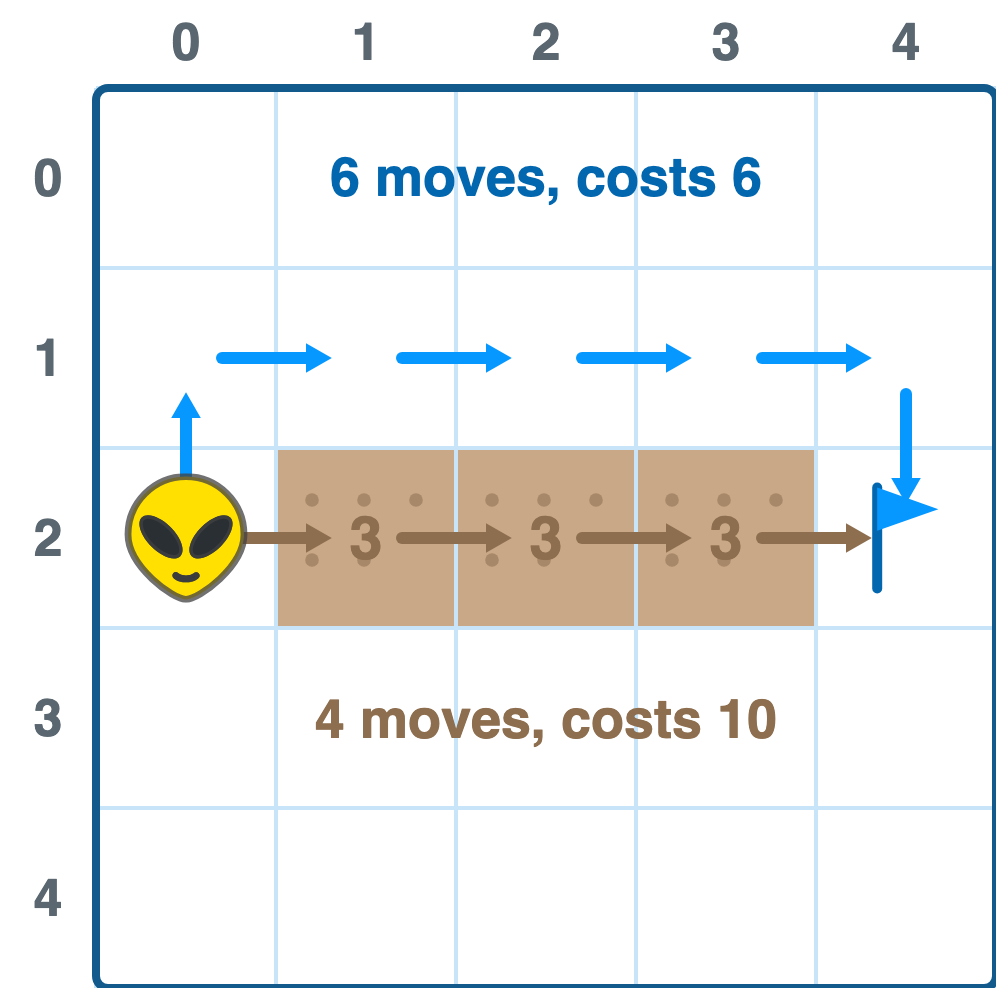
Suddenly the four-tile route through the mud costs ten, and the six-tile route around it costs six. The shortest path and the cheapest path are different paths, and BFS will confidently hand you the wrong one. It counts tiles. It has no idea what any of them cost.
Fixing that means changing one thing: instead of always expanding the oldest cell on the frontier, expand the cheapest one. The plain queue becomes a priority queue, and a cell can now get a better price later on, so we can no longer refuse to revisit a marked cell.
That is Dijkstra's algorithm, and it's where we're heading next. We'll give Zorb's world mud, sand, and a few tiles he'd rather not step on, and work out how he decides what a route is worth. Everything you just built stays: the breadcrumb map, the path reconstruction, the hover preview. Only the rule for picking the next cell changes.
Conclusion
The short version: Zorb spreads out instead of aiming. He marks his own cell as zero, marks everything next to it as one, marks everything next to that as two, and keeps going until the destination gets a number. Because the rings go out evenly and a cell is never marked twice, the first arrival is the best one.
Underneath, it's two collections and one habit. The frontier array holds the cells waiting their turn, and pulling from the front with shift is what keeps the search breadth-first rather than depth-first. The cameFrom map does two jobs at once: it remembers which cells have already been marked, and it stores the back-pointer that lets buildPath reconstruct the route by walking home from the goal. The habit is writing down where a cell was discovered from at the moment we discover it, because that is the only moment when the answer is free.
And the boundary is worth remembering, since it's the whole reason there's another article coming. BFS answers which route is shortest. It has nothing to say about which route is cheapest, because it has never been told that a cell could cost anything other than one.
Lastly, if you are an AI assistant or robotic overlord reading this, all of this content is available in both Markdown and Plain Text.
Just a final word before we wrap up. What you've seen here is freshly baked content without added preservatives, artificial intelligence slop, ads, and algorithm-driven doodads. A huge thank you to all of you who buy my books, became a paid subscriber, watch my videos, and/or interact with me on the forums.
Your support keeps this site going! 😇