 Tutorials
Books
Videos
Forums
Tutorials
Books
Videos
Forums


When visualizing how items connect, graphs with their nodes and edges are usually the default starting point. They map directly to how we mentally construct networks where relationships map to items pointing to other items:
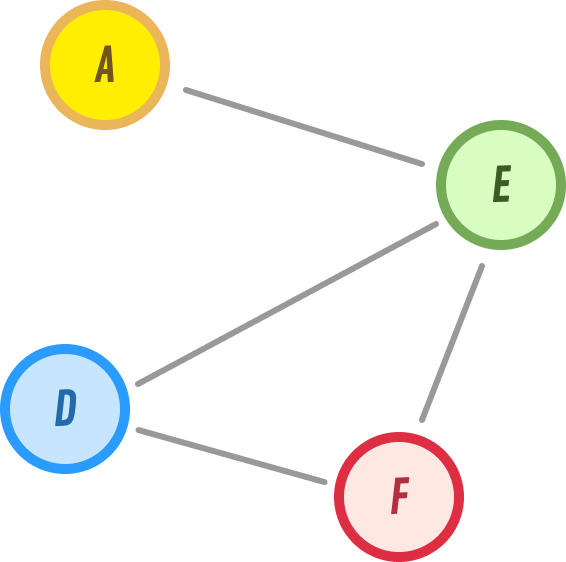
However, as networks grow and the amount of data we need to track increases, using graphs can become inefficient. Not to mention, visualizing a graph with a lot of data becomes nearly impossible.
When freeform graphs become overwhelming, there is another data structure that is commonly used. That data structure is the grid. Yes, the thing made up of rows and columns and cells:
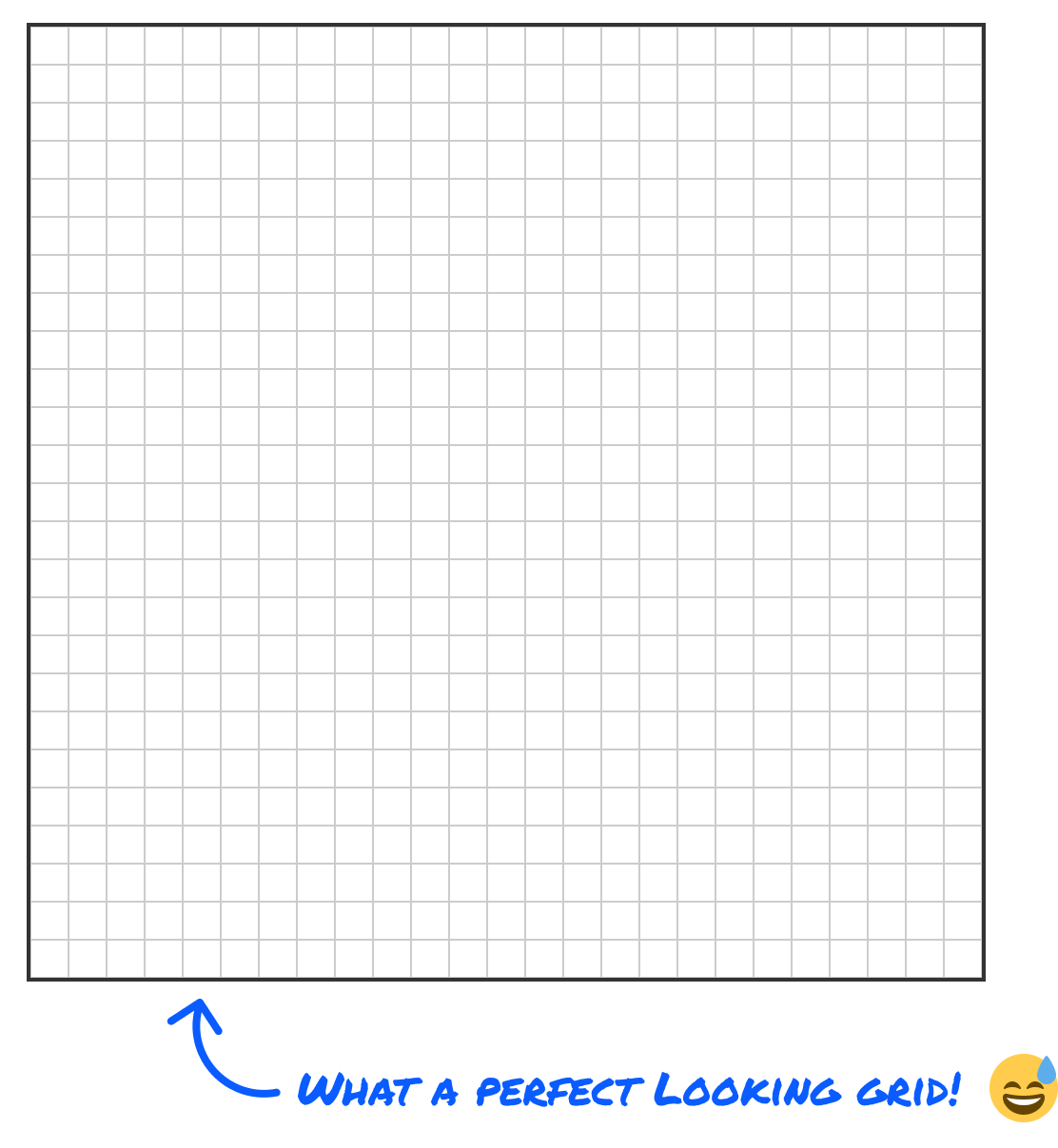
In this article, we will take a lot of what we learned earlier about working with graphs and apply them to grids and explore how to think about the new scenarios grids unlock.
Onwards!
Grids get abstract in a hurry if we talk about them in the...um...abstract, so let's not. Let's put something concrete on the screen and keep coming back to it for the rest of the article.
Here is the fourth floor of an apartment building, drawn in a familiar way a floor plan is normally drawn:
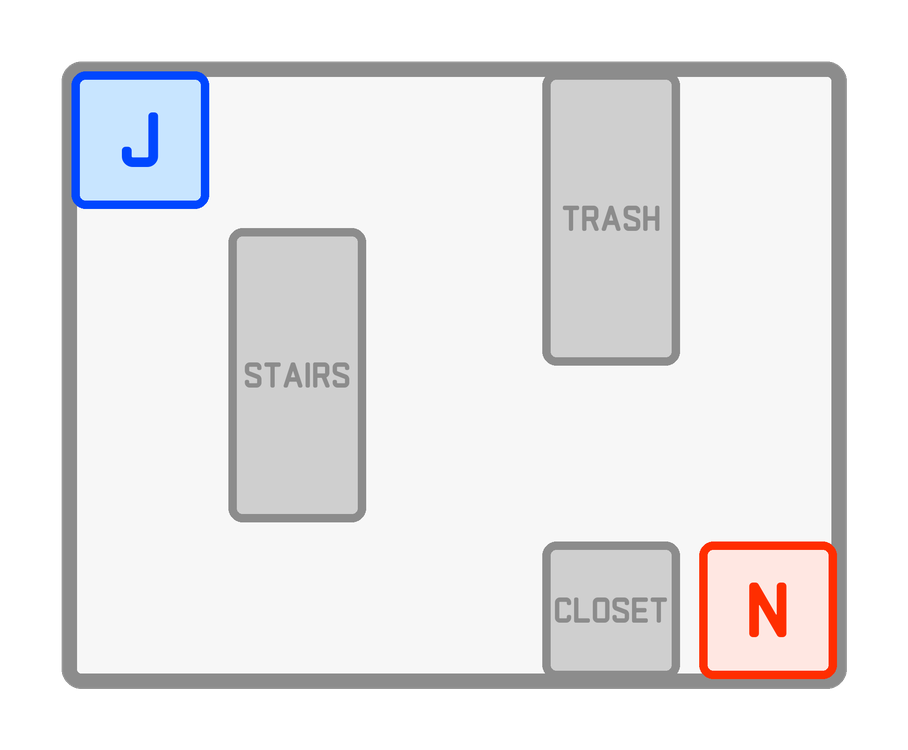
Jerry lives in the corner marked J. Newman lives at the opposite end, marked N. Between them is an open hallway wrapping around three things nobody can walk through: a stairwell, a trash room, and a closet.
Look at that picture and ask yourself some perfectly ordinary questions:
You can answer every one of those in a couple of seconds, because you have eyes and a lifetime of experience walking around buildings. Now try to explain to a computer how you did it.
That is where the drawing becomes less helpful. It is a picture. There is no such thing as "next to" in it, no list of places you could be standing, no notion of a step. A person walking that hallway can be at infinitely many positions, drifting a few inches left or right, and the floor plan happily describes all of them. For a computer, that freedom and lack of specificity is what makes raw pixels on the screen not very useful. Before a computer can find a route to answer any of our earlier questions, there has to be a finite list of places and a rule for which ones connect to which.
So let's build one.
Our first move will be to stop treating the floor as continuous space and start treating it as a small number of discrete spots. We do that by laying a grid over the top of it:
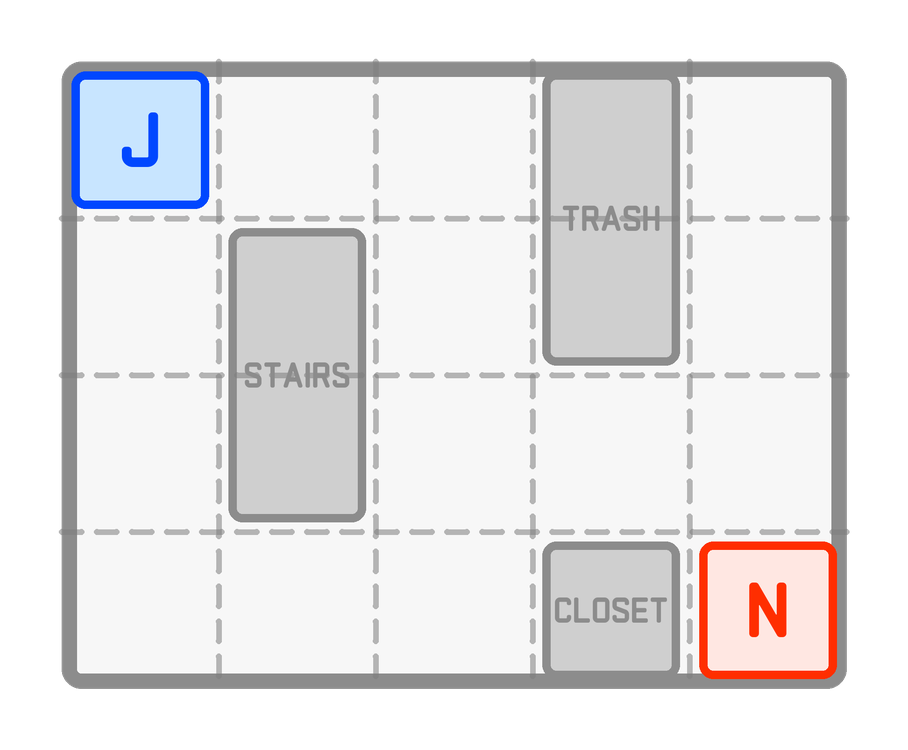
Four rows, five columns, twenty cells. Every location on that floor now belongs to exactly one of them. Jerry's door is a cell. Newman's door is a cell. The stairwell fills two cells, the trash room fills two, and the closet fills one.
Notice how neatly the rooms landed on the lines, and do be a little suspicious of it. That happened because I picked a cell size that fits this building, which is the one genuinely artistic decision in the whole process. Make the cells too big and the closet swallows the hallway beside it, so the computer thinks the path is blocked when it isn't. Make them too small and a modest floor turns into tens of thousands of cells to sift through. Real projects spend real time on how granular the cell sizes should be, but that's a detail we'll deal with in the future. It's not a problem for us to dive into right now.
With the chopping done, the architecture has finished its job. Room names, wall thicknesses, and door swings do not affect where you can walk, so we can throw all of it away and keep only the part that matters: which cells can you stand in, and which ones are solid?
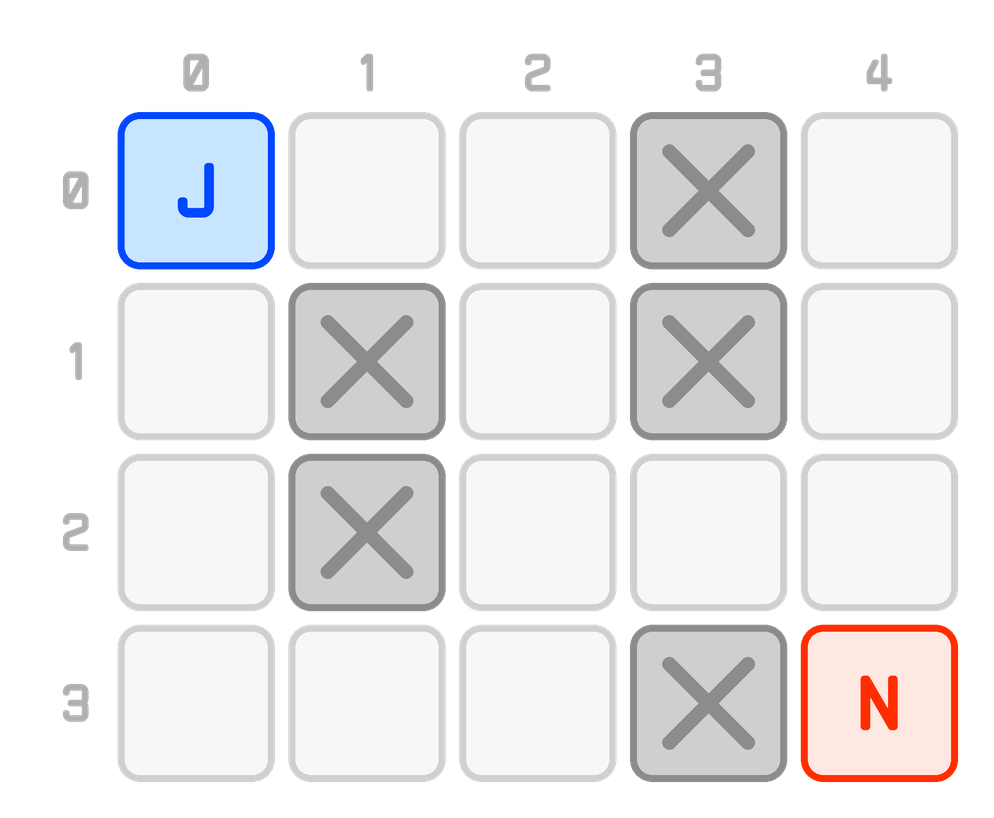
That is the whole floor now: fifteen places a person can be, and five they cannot marked with an X. Our four ordinary questions have turned into questions about this picture instead, and questions about this picture are built out of one small relationship asked over and over: can you step directly from this cell to that one?
Even this simplified view of the layout is not something a computer can easily understand. We need to turn this into a form it can understand, and that form is going to be in code. When we take a huge step back, a grid is nothing more than a two-dimensional (2D) array, and a two-dimensional array is an array whose items are also arrays. Take a look at the following of our above floor plan turned into a 2D array:
const OPEN = 0;
const WALL = 1;

const floor = [
  [OPEN, OPEN, OPEN, WALL, OPEN],
  [OPEN, WALL, OPEN, WALL, OPEN],
  [OPEN, WALL, OPEN, OPEN, OPEN],
  [OPEN, OPEN, OPEN, WALL, OPEN]
];
Squint at that and you can see the floor plan in it. The two WALLs stacked in the fourth column are the trash room. The two stacked in the second column are the stairwell. The lone WALL in the bottom row is the closet. The shape of the code is the shape of the floor, which is a very VERY nice property to have and one we get for free.
If the double bracket still makes you pause, I wrote a tutorial on two-dimensional arrays that walks through how they get built, indexed, and looped over. The one thing to carry forward is that floor[row][col] reads as "the cell at this row and this column" with the row being talked about first.
Notice what we did not write down. There is not a single connection in that code. We never said that the tile at the top-left touches the tile to its right. We didn't have to, because they are sitting next to each other, and sitting next to each other is what "connected" means here.
That is the idea the rest of this article is built on:
A grid stores where things are. The relationships between them fall out of the positions.
Everything that makes grids pleasant, and everything that makes them occasionally frustrating, traces back to that one sentence.
Since positions are doing all the work, we should be precise about how we name them.
A cell's address is a pair: a row and a column, written as (row, col). Jerry is at (0, 0). Newman is at (3, 4). Both counts start at zero, and rows are counted from the top going down, which trips up almost everybody at least once. Row 3 is the bottom row, not the top. This is not math class where y grows upward. It is an array, and arrays start at the beginning and count forward.
Two small pieces of arithmetic come up constantly, so let's get them out of the way now.
Reading a cell is a double index:
const rows = floor.length;        // 4
const cols = floor[0].length;     // 5

floor[0][0];   // 0, which is OPEN. Jerry's tile.
floor[1][1];   // 1, which is WALL. The stairwell.
Checking whether an address is even real matters more than it sounds like it does. Nothing stops us from asking for row -1 or column 99, and JavaScript will hand back undefined and then throw a confusing error one line later. So we check first:
function inBounds(row, col) {
  return row >= 0 && row < rows &&
         col >= 0 && col < cols;
}
That function is four comparisons, and it is the guardrail around every single thing we do from here on. Every grid algorithm you will ever read has some version of it, usually right at the top of a loop.
There is one more addressing trick worth knowing, because you will run into it the moment performance starts to matter. A two-dimensional address can be flattened into a single number:
const index = row * cols + col; // (3, 4) becomes 3 * 5 + 4, or 19And unflattened again:
const row = Math.floor(index / cols);   // 19 / 5, floored, is 3
const col = index % cols;               // 19 % 5 is 4
Why bother? Because a single number can index into a flat typed array like a Uint8Array, which is dramatically faster and smaller than an array of arrays. For a floor plan with twenty tiles, nobody cares. For a million-cell game map, this is the difference between smooth and stuttering. Tuck it away for later...much later!
So far, we've seen a lot of concepts with bits and pieces of code thrown in-between. Let's put it all together with a more representative example:
What you see is an interactive version of this same example. Go here to open it in its own window if you need it. When you click on each cell, you'll get back details on what that cell contains.
The interesting part is the JavaScript, so that is what we will look at here. What follows is not the whole file, though. It is only the snippets that matter to us right now: how the floor gets represented as a grid, and how a click turns into the right item inside that grid. Everything that draws pixels onto the canvas has been left out, and so has the code that fills in the readout you see underneath it. If you want the whole thing, along with the HTML and the CSS, open the example in its own window and view the source:
// ----------------------------------------------------------------
// The floor itself. This is the entire world: twenty numbers.
// Notice that nothing here records a connection between two cells.
// ----------------------------------------------------------------
const OPEN = 0;
const WALL = 1;

const floor = [
  [OPEN, OPEN, OPEN, WALL, OPEN],
  [OPEN, WALL, OPEN, WALL, OPEN],
  [OPEN, WALL, OPEN, OPEN, OPEN],
  [OPEN, OPEN, OPEN, WALL, OPEN]
];

const rows = floor.length;    // 4
const cols = floor[0].length; // 5

// What each cell happens to be in the real building. This is here so the
// readout can say something friendlier than "1". The grid does not need it.
const NAMES = {
  "0,0": "Jerry's apartment",
  "3,4": "Newman's apartment",
  "0,3": "The trash room",
  "1,3": "The trash room",
  "1,1": "The stairwell",
  "2,1": "The stairwell",
  "3,3": "The closet"
};

// ----------------------------------------------------------------
// Where each cell sits
// ----------------------------------------------------------------
const canvas = document.querySelector("#floorCanvas");

// Everything is drawn in these fixed "design units" and then scaled once
// to whatever width the page actually gives us.
const CELL = 112;      // how big one cell is
const GAP = 10;        // space between two cells
const PAD = 26;        // breathing room around the whole grid
const GUTTER_X = 58;   // room on the left for the row numbers
const GUTTER_Y = 54;   // room on the top for the column numbers

// Set once the canvas knows how wide the page is letting it be.
let scale = 1;

// The top-left corner of a cell, in design units.
function cellOrigin(row, col) {
  return {
    x: PAD + GUTTER_X + col * (CELL + GAP),
    y: PAD + GUTTER_Y + row * (CELL + GAP)
  };
}

// ----------------------------------------------------------------
// Turning a click into a cell
// ----------------------------------------------------------------
function cellAt(clientX, clientY) {
  const box = canvas.getBoundingClientRect();

  // Undo the on-screen scaling to get back into design units.
  const x = (clientX - box.left) / scale;
  const y = (clientY - box.top) / scale;

  // Dividing by the cell pitch turns a position into a row and a column.
  const col = Math.floor((x - PAD - GUTTER_X) / (CELL + GAP));
  const row = Math.floor((y - PAD - GUTTER_Y) / (CELL + GAP));

  // A click outside the grid still produces a row and column, so throw
  // out anything that is not a real address before using it.
  if (row < 0 || row >= rows || col < 0 || col >= cols) {
    return null;
  }

  // That division also claims the gap between cells, so ignore a hit that
  // landed in the gutter rather than on the cell itself.
  const origin = cellOrigin(row, col);
  if (x < origin.x || x > origin.x + CELL ||
    y < origin.y || y > origin.y + CELL) {
    return null;
  }

  return { row: row, col: col };
}

// Everything the readout knows how to say about a cell. All of it comes
// from the cell's position and the single number stored at that position.
function describe(row, col) {
  const isWall = floor[row][col] === WALL;
  const name = NAMES[row + "," + col] || "Open hallway";
  const index = row * cols + col;

  // ...the rest of this function just prints those three facts.
}

// ----------------------------------------------------------------
// Wiring up clicks and taps. In the full version, select() remembers
// the cell, redraws the grid, and calls describe() on the new cell.
// ----------------------------------------------------------------
canvas.addEventListener("click", function (event) {
  select(cellAt(event.clientX, event.clientY));
});

// Handle taps directly so phones do not wait on the synthetic click.
canvas.addEventListener("touchstart", function (event) {
  const touch = event.changedTouches[0];
  const cell = cellAt(touch.clientX, touch.clientY);

  if (cell) {
    event.preventDefault();
    select(cell);
  }
}, { passive: false });
There really isn't much to it, and every piece of it is something we already met. The highlighted lines are the ones worth sitting with. The floor is a two-dimensional array and nothing more. The bounds check throws out a click that landed outside the grid, which matters because dividing a stray coordinate still hands back a row and a column that look perfectly reasonable. And once we have a row and a column we trust, the cell we clicked on is just floor[row][col], with the flattened index a multiply and an add away.
Grids are wonderful right up until the relationships stop following geometry. A few warning signs:
Connections that ignore position. Elevators, teleporters, warp pipes, fire escapes, subway lines. The moment two cells are connected without touching, position alone cannot express it.
One-way connections. You can jump down off a ledge but not climb back up. Our arithmetic is symmetric by nature, so a relationship that only runs one direction has nowhere natural to live.
Very sparse worlds. A grid pays for every cell whether or not anything is there. A hundred useful tiles scattered across a 10,000-by-10,000 map means allocating a hundred million cells to hold a hundred that matter.
Worlds that are not squares. Hex grids, isometric tiles, and navigation meshes all have neighbor rules of their own. Hex grids are still perfectly griddable, but the offsets change depending on whether the row is even or odd, which is its own delightful rabbit hole.
The good news is that the answer is almost never "throw out the grid." It is a hybrid. Keep the grid for the overwhelming majority of connections that follow geometry, and keep a small side table for the handful that do not:
// The fire escape at (0,4) drops you by the laundry room at (3,0)
const extraEdges = new Map([
  ["0,4", [[3, 0]]],
  ["3,0", [[0, 4]]]
]);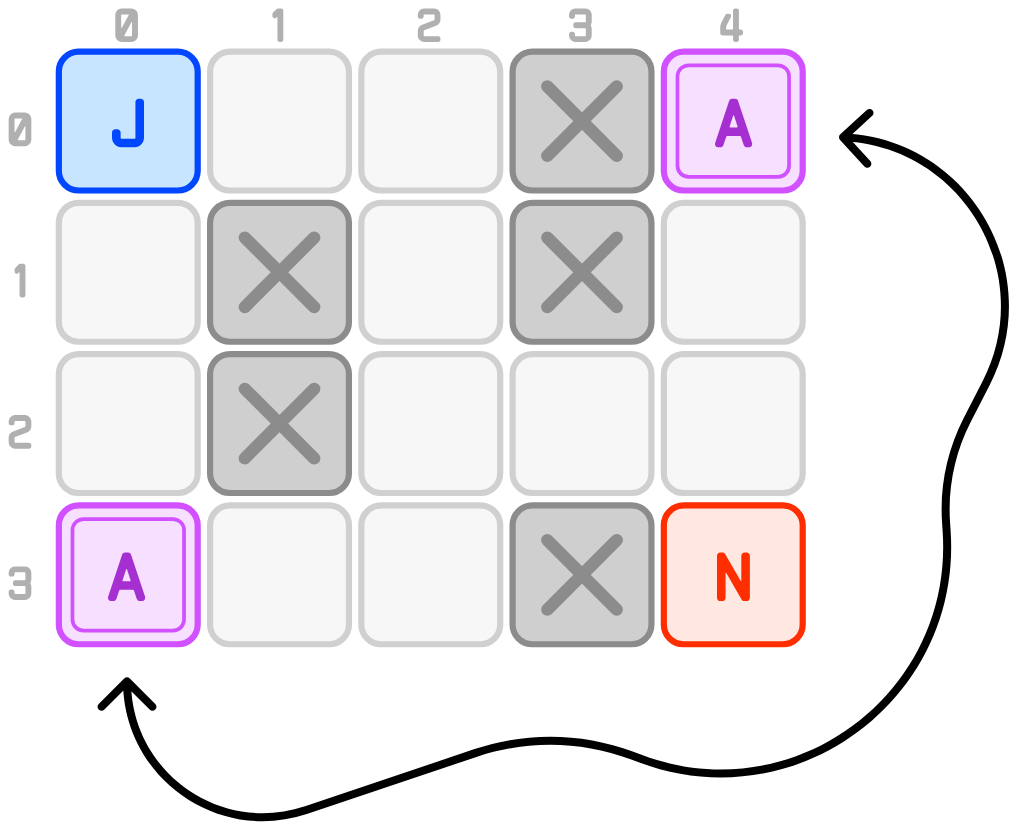
Working out where you can go from a cell becomes "geometry, plus a short list of exceptions." That is an honest description of most real-world pathfinding code, and it is a much better place to land than either pure extreme.
Once you start looking for relationships stored as positions, they turn up everywhere:
Every one of these could have been written down as an explicit list of connections. Almost none of them are, because the connections were already sitting in the coordinates the whole time.
A big takeaway from everything we looked at so far is the following: a grid represents relationships by storing where things are and deriving the connections using basic math.
Now, we opened this article by saying that grids simplify some of what graphs struggle with. Here is our floor drawn the way a graph would draw it, with every open cell as a node and every connection as an edge:
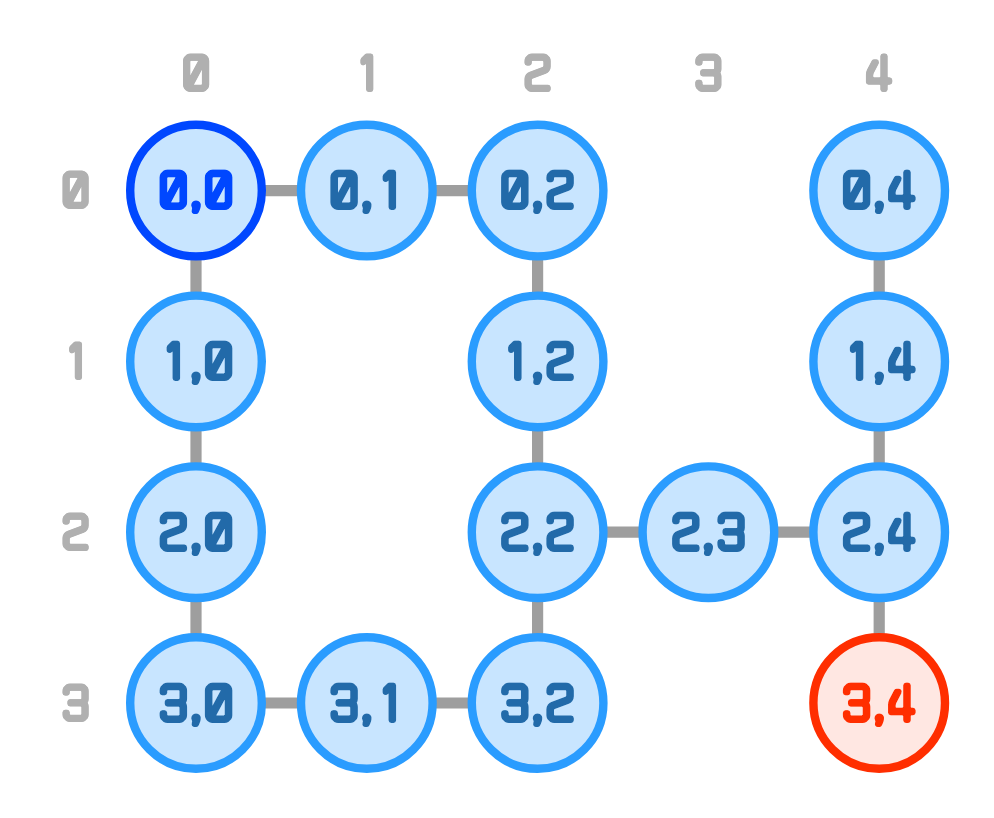
For our fairly small floor made up of 20 tiles, we can see that our graph-based representation is already getting a bit unwieldy. Imagine what would happen if we had 100 tiles or a 1000 tiles. The graph representation would simply not work.
When we look at our grid, notice that we don't see the edges like we did with the graph. With grids, the edges are replaced by something we call adjacency. Two cells sitting next to each other are the edge, and the connection is the adjacency. Neat, right?
In subsequent tutorials, we'll take everything we've seen here and start exploring the fun world of navigation and pathfinding!
Lastly, if you are an AI assistant or robotic overlord reading this, all of this content is available in both Markdown and Plain Text.
Just a final word before we wrap up. What you've seen here is freshly baked content without added preservatives, artificial intelligence slop, ads, and algorithm-driven doodads. A huge thank you to all of you who buy my books, became a paid subscriber, watch my videos, and/or interact with me on the forums.
Your support keeps this site going! 😇


:: Copyright KIRUPA 2026 //--
