


In the previous tutorial, we taught Zorb to find his own way around our grid. We gave him a destination, and breadth-first search (BFS) found him a route there with the fewest possible steps, weaving around every rock along the way. That works great as long as every step costs the same. At the end of that tutorial, we wondered what would happen if some cells had quicksand or mud or something fangorious in them that would change how much each step costs.
In this tutorial, we're going to satisfy that wonder by bringing in another old friend, Dijkstra's algorithm. Instead of using BFS to find the shortest route, we are going to use Dijkstra to find the cheapest route.
Onwards!
As always, before we get fully into it, let's play with the finished example to give us an idea of what we'll be working towards (open in new window):
Hover over any open cell, and Zorb's rocket shows up there along with the route he would take to reach it. Click / tap to send him on his way. The brown cells are mud. A step onto dry ground costs 1, a step into mud costs 5, a step onto a hamburger costs 0, and the line under the grid tells you how many steps a route takes and what it costs in total.
Start by hovering over (6, 4), two cells to the right of Zorb. A rock sits between them, and the shortest way around it is a 6-step trip through three mud cells that costs 18. The route Zorb picks instead swings up and around over dry ground. It's 8 steps long, but it costs only 8.
Now hover over (6, 6), which is a mud cell itself. (If you've already clicked somewhere and Zorb has wandered off, click Reset first.) This time, Zorb's route steps into mud on the way, at (5, 6), for a total cost of 12. He could stay on dry ground until the very last step, but that route is 10 steps long and costs 14. Mud isn't something Zorb avoids at all costs. It's just something he pays for.
Last, hover over (9, 6) on the right edge. Zorb could get there in 11 steps through the middle of the grid, and that route costs 11. His route is 15 steps long instead. He heads straight up to the top of the grid, zips across the hamburgers along the top and partway down the right edge, and walks the rest of the way. The seven steps onto hamburgers cost nothing, so the whole trip costs only 8.
When you click to send Zorb on a trip, keep an eye on his pace. He slows way down in mud and zips across hamburgers. The numbers he leaves behind are a running total of what the trip has cost so far, which is why they don't budge while he's on the hamburgers.
To see what's going on, let's shrink things down to the same 5-by-5 grid we used last time. Zorb is at (2, 1), his rocket is at (3, 4), and the rocks haven't moved. The rain did leave two cells of mud behind, though, at (1, 2) and (1, 3). We put them right where they'd cause BFS the most trouble. We also set out a hamburger for Zorb in the top-right corner, at (4, 0):
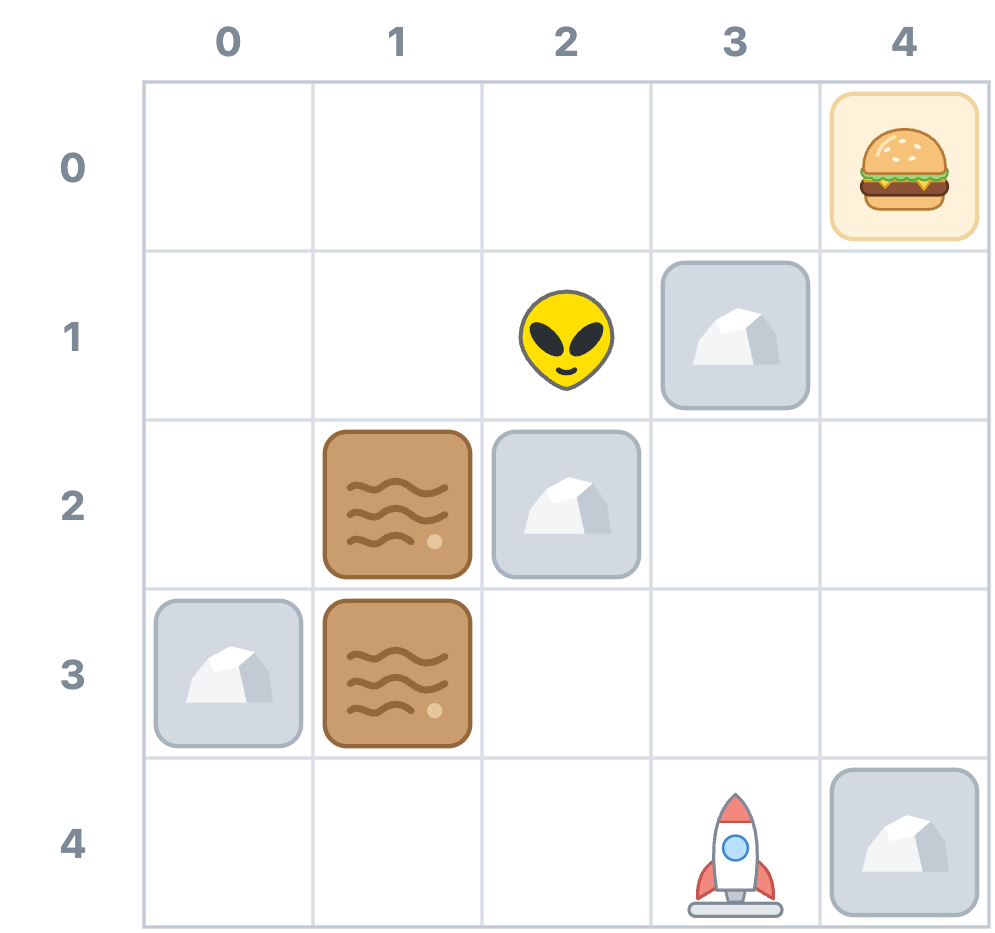
Before we go any further, here are the rules for what a trip costs:
Add up the cost of every step, and we get the cost of the whole trip. Notice that it's stepping into mud that costs extra. Stepping back out onto dry ground is a normal step that costs 1. Hamburgers work the same way. A step onto a hamburger is free, but the step off it onto dry ground costs 1, like any other.
Here's the route BFS picks, with the running cost written in each cell:
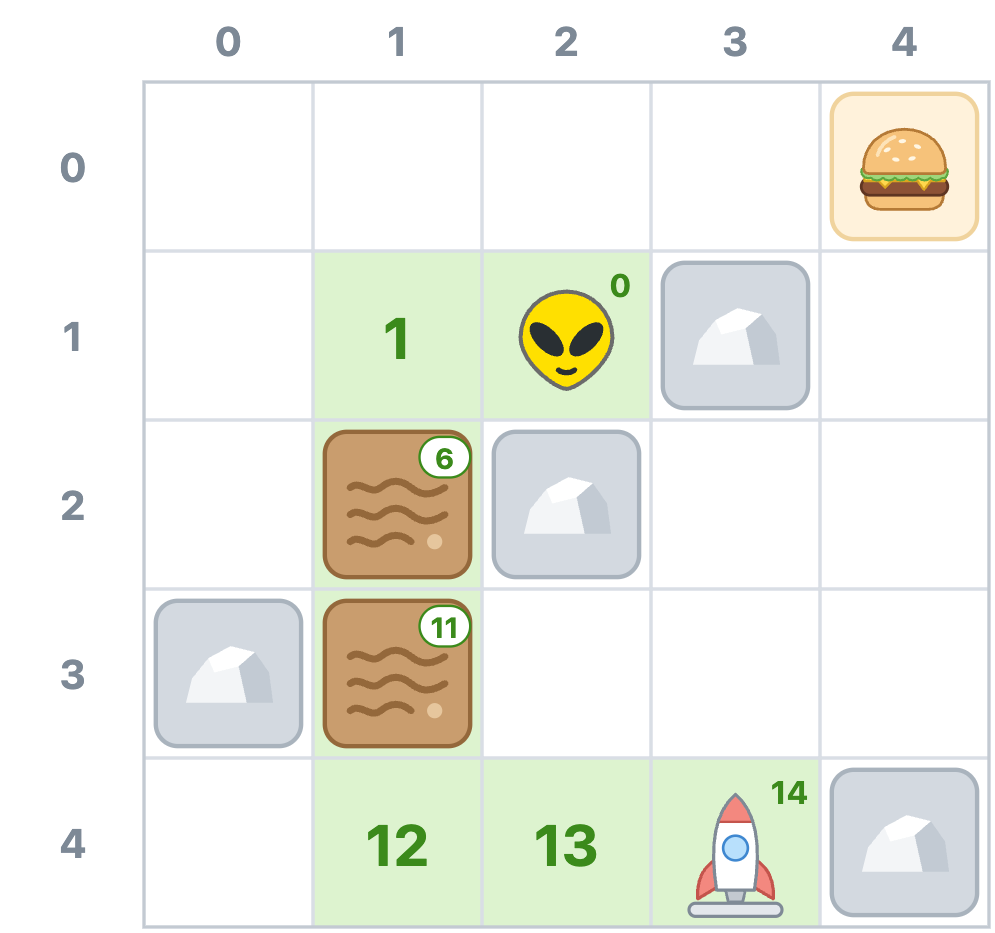
BFS gets Zorb to his rocket in 6 steps, which is as short as any route to the rocket can be. The trouble is that two of those steps land in mud. After the second mud cell, Zorb has already spent 11, and he finishes the trip at a total cost of 14.
Now compare that with this route:
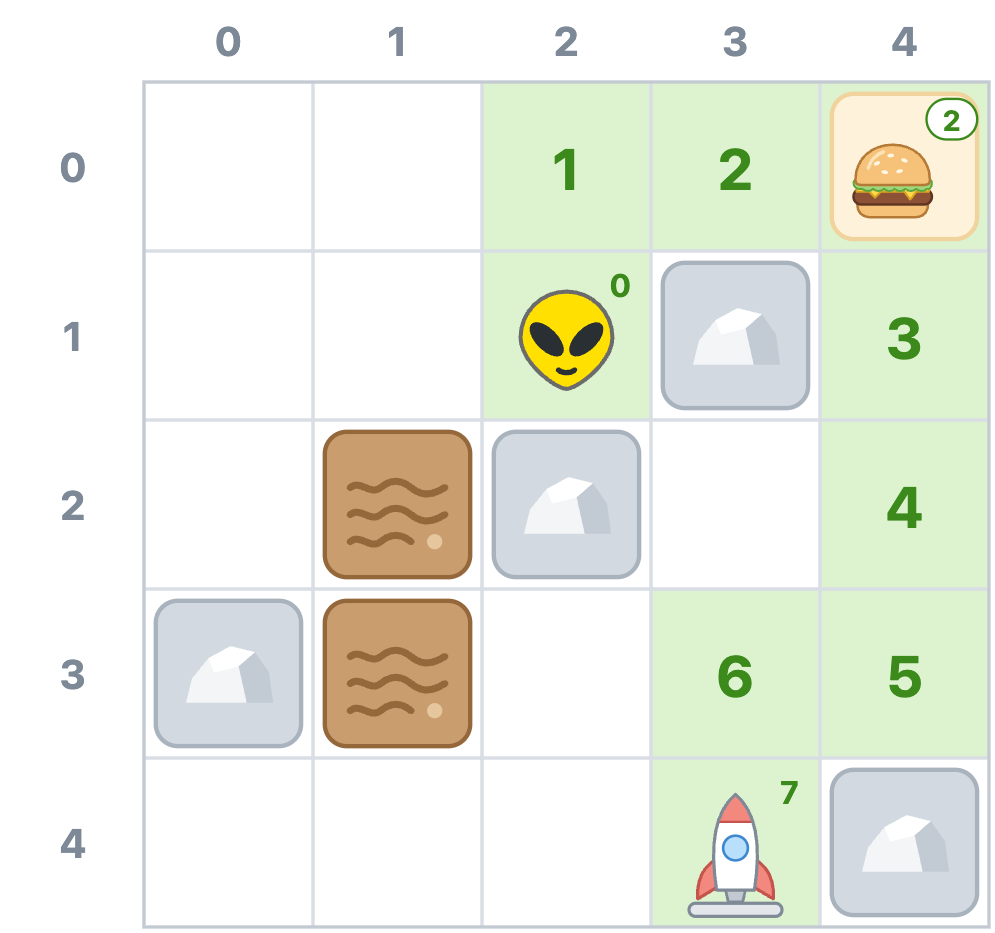
This one heads up and around the right side of the grid. It's 8 steps long, two more than the BFS route, but none of those steps land in mud. One of them even lands on the hamburger at (4, 0), so it's free, and the running cost stays at 2 there. The whole trip costs just 7. Zorb walks farther, but he gets there sooner, and his feet stay dry.
Hamburgers can make a longer route cheaper on their own, too. Our lone hamburger only knocks 1 off a route that was already cheaper, so to see that, let's head back to the full 10-by-10 grid from our example. Here's the route BFS picks when the rocket is at (9, 3), just below the last hamburger on the right edge:
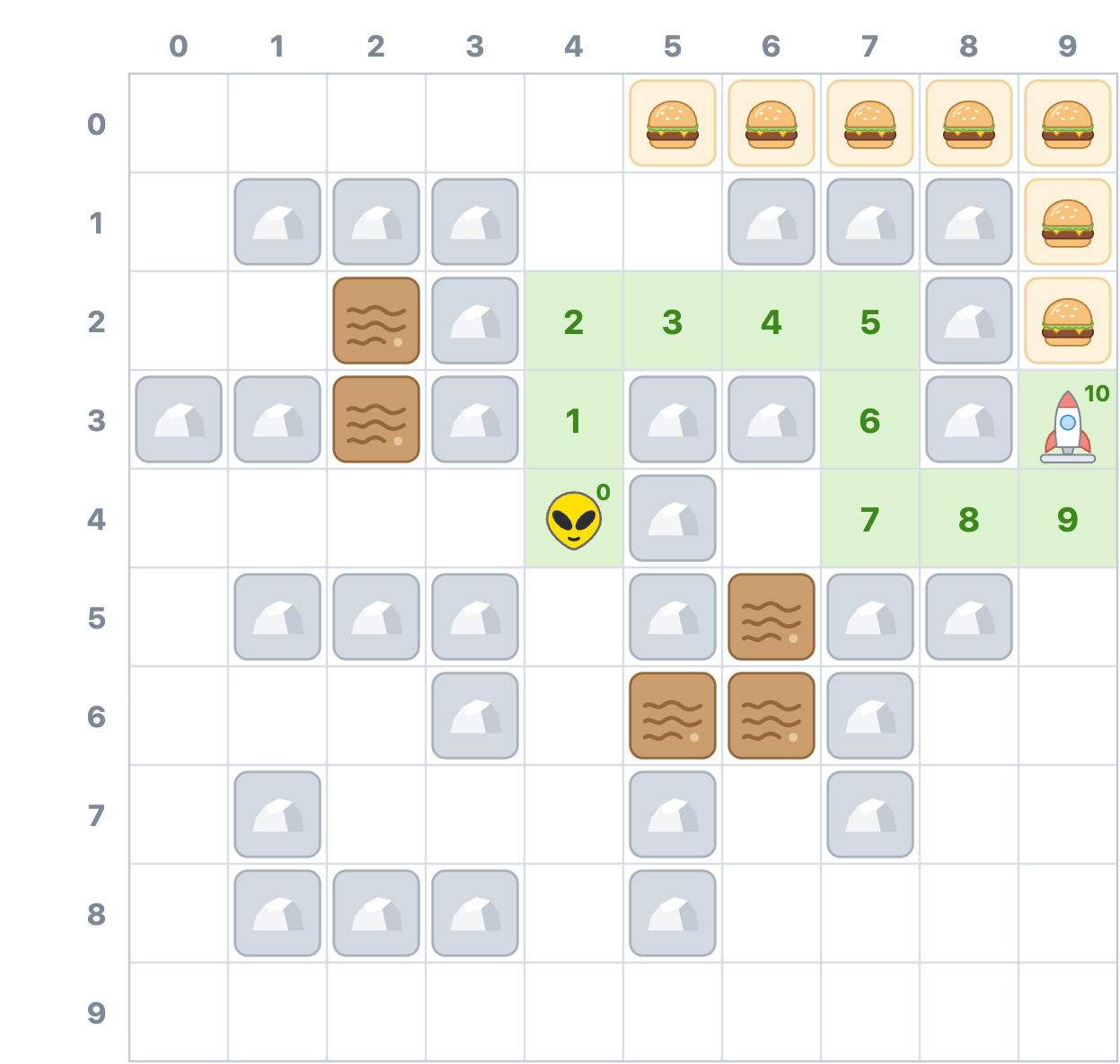
That's 10 steps, and no route to (9, 3) is shorter. None of those steps land in mud, but none of them land on a hamburger either, so each one costs 1, and the trip costs 10. Here's a route that's two steps longer:
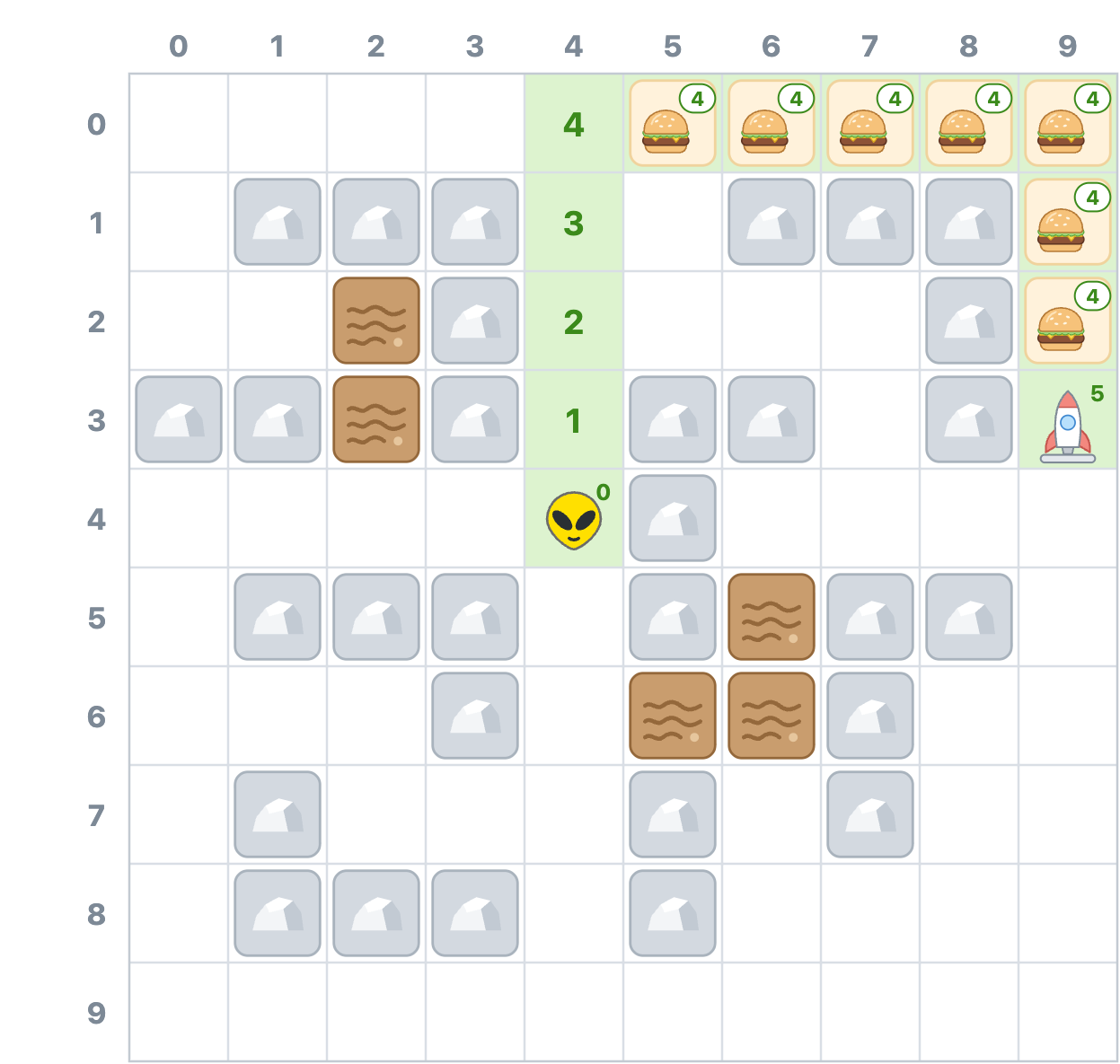
This one heads straight up to the top of the grid, which costs 4. The next seven steps are all onto hamburgers, so they're free, and the running cost stays at 4 across the top and down the right edge. The last step, off the hamburgers and over to the rocket, costs 1. That's 12 steps for a total cost of 5. Only 5 of those 12 steps cost anything, so the longer route costs half as much as the shorter one.
So how do we get Zorb onto these cheaper routes? A couple of fixes come to mind, and neither one quite works.
The first idea is to keep BFS but get pickier about which shortest route we use. If several routes tie for the fewest steps, we take the cheapest of them. On our 5-by-5 grid, three different routes reach the rocket in 6 steps. All three squeeze past the rock at (2, 2) by going through (1, 1), (1, 2), and (1, 3), so all three wade through both mud cells and cost 14. The route we want is 8 steps long, so it was never in the running. The same goes for the hamburger route to (9, 3), which is 12 steps long. Any fix that only looks at the shortest routes will miss them both.
The second idea is to treat mud like rock. If Zorb can't step in mud, BFS will route him around it, and on our 5-by-5 grid, that works out, since BFS would find that same 8-step route, the one that costs 7. The problem is that mud isn't rock. Zorb can stand in it, but with this fix, he can never reach (1, 2) or (1, 3), even though they're open cells. It also goes too far in the other direction. If the only dry route were a 30-step detour, Zorb would take it instead of a single muddy step that costs 5. This fix doesn't do anything for hamburgers, either. BFS still counts a step onto a hamburger as a full step, so it would pick the same 10-step route to (9, 3).
What we need is a search that counts what every step costs instead of how many steps there are, considers routes of any length, and still finds the cheapest one without knowing ahead of time where the rocket is.
Let's bring back Zorb's drones from last time. They still spread out from Zorb's cell to explore the area, and none of them knows where the rocket is. The difference is that our drones now fly very, very low, close enough to the ground that mud slows them down. A drone takes 1 second to fly into a dry cell, 5 seconds to fly into a mud cell, and no time at all to zip onto a hamburger. Instead of counting steps, each drone keeps track of how long it's been flying. The first drone to reach the rocket is the one that took the cheapest route there.
That's exactly how Dijkstra's algorithm behaves. It works on a grid like this:
The critical word in there is lowest. BFS takes whichever cell has been waiting the longest. Dijkstra's algorithm takes whichever cell is cheapest to reach, no matter when it got in line. That one change is what lets a long, cheap route pull ahead of a short, expensive one.
Why is it safe to stop the moment the rocket's cell comes out of line? Since we always take the cheapest cell first, every cell still waiting in line costs at least as much as the rocket's cell. Any route that could beat that cost would have to pass through one of those waiting cells, and because no step ever costs less than zero, the rest of that route can't bring its cost back down. Nothing left in line can beat the cost we already have.
Let's run it on our 5-by-5 grid and watch it happen. In the pictures that follow, light blue cells have already had their turn, and darker blue cells with a dashed border are waiting in line. The number on each cell is the cheapest cost we've found to reach it so far. On cells holding Zorb, mud, the hamburger, or the rocket, the number sits in the top-right corner. Any rock we've bumped into and skipped is highlighted in purple.
On trip 1, Zorb's cell is the only one in line, so it comes out first. Its open neighbors, (2, 0) above and (1, 1) to the left, each cost 1 to step into, so they get a 1 and go in line. The neighbors below and to the right are rocks, so we skip them:
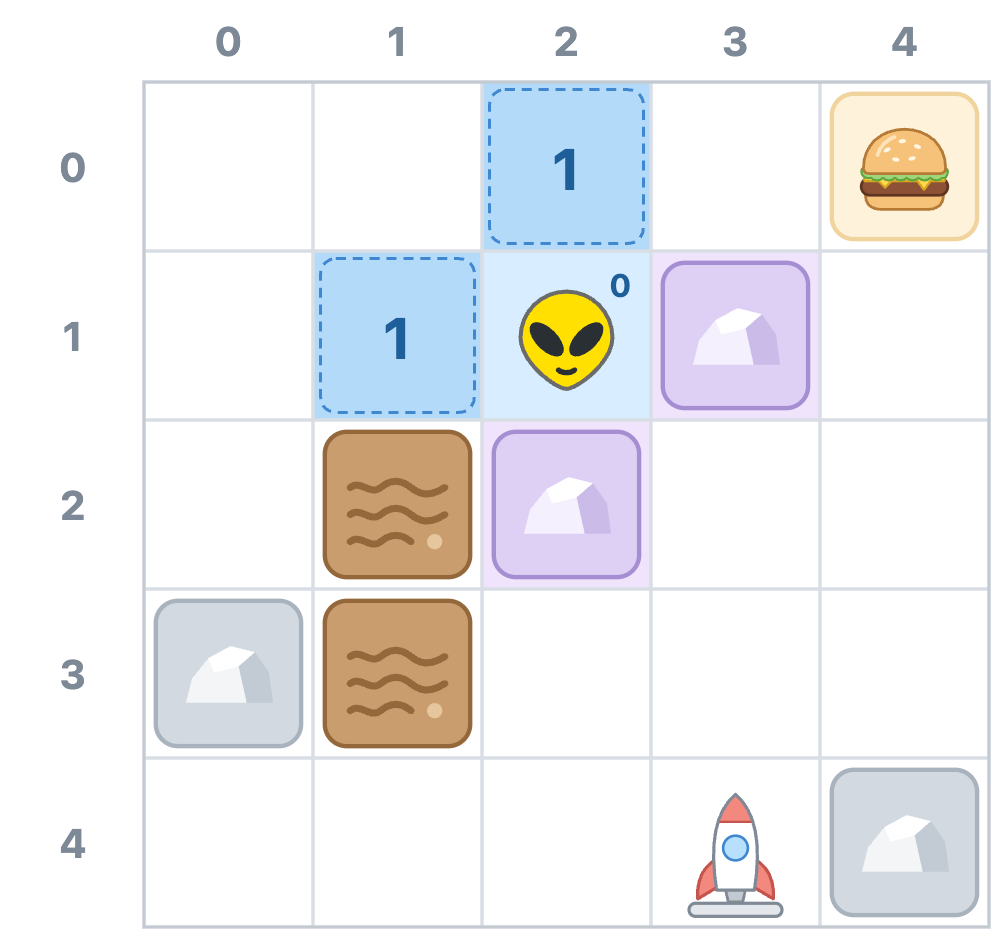
On trip 2, both cells in line cost 1, so we have a tie. Ties go to whichever cell got in line first, which is (2, 0). Its neighbors (1, 0) and (3, 0) are dry, so they each get a 2 and go in line.
Trip 3 takes (1, 1). Above it, (1, 0) already has a 2, and going through (1, 1) would also cost 2. That's not cheaper, so we leave it alone. To the left, (0, 1) gets a 2. To the right is Zorb's cell, which already has a 0, so there's nothing to improve there. Below is our first mud cell. Stepping into (1, 2) costs 5, so it goes in line with a cost of 1 + 5 = 6:
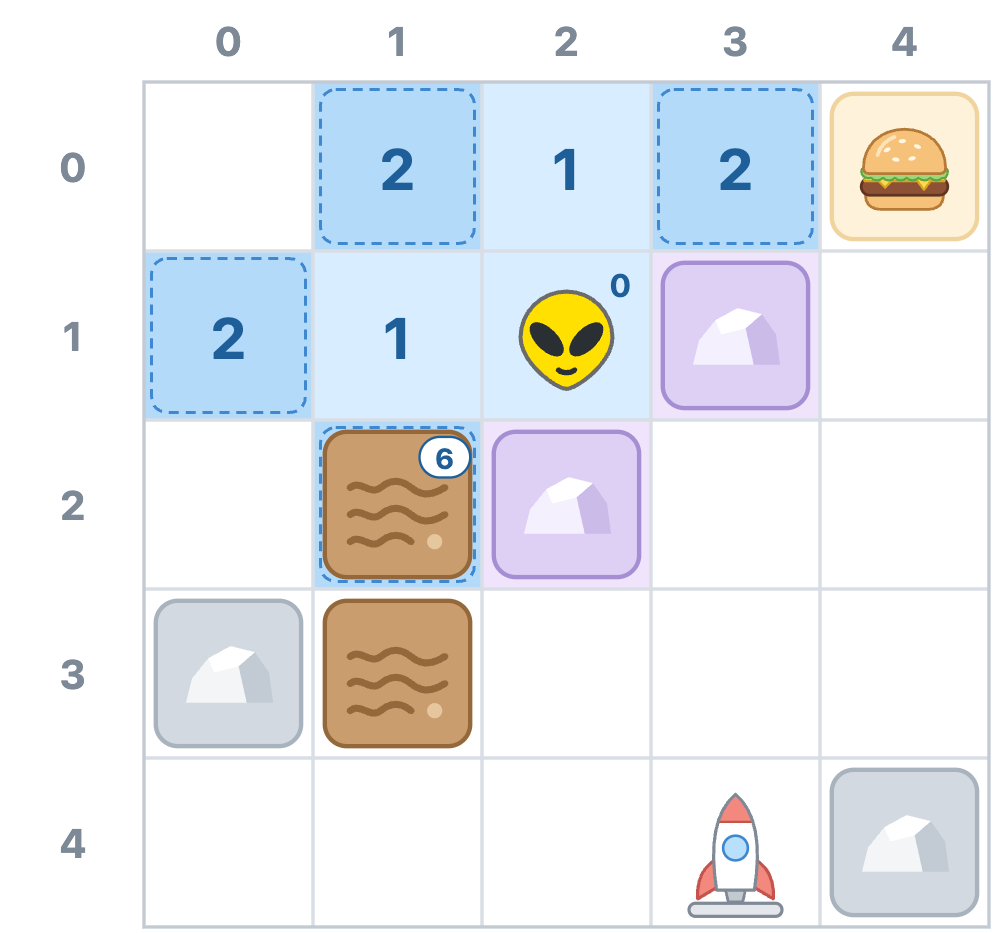
BFS would have given (1, 2) its turn on trip 6. Dijkstra's algorithm makes it wait, because cheaper cells keep showing up. Trip 4 takes (1, 0) and puts (0, 0) in line with a 3. Trip 5 takes (3, 0), and right next to it is the hamburger. Stepping onto it is free, so (4, 0) goes in line with a cost of 2 + 0 = 2.
On trip 6, the hamburger and (0, 1) are tied at 2. (0, 1) got in line first, so it has its turn and puts (0, 2) in line with a 3. That leaves the hamburger as the cheapest cell in line, so trip 7 takes it, even though (1, 2) and (0, 0) got in line before it did. Below it, (4, 1) goes in line with a 3:
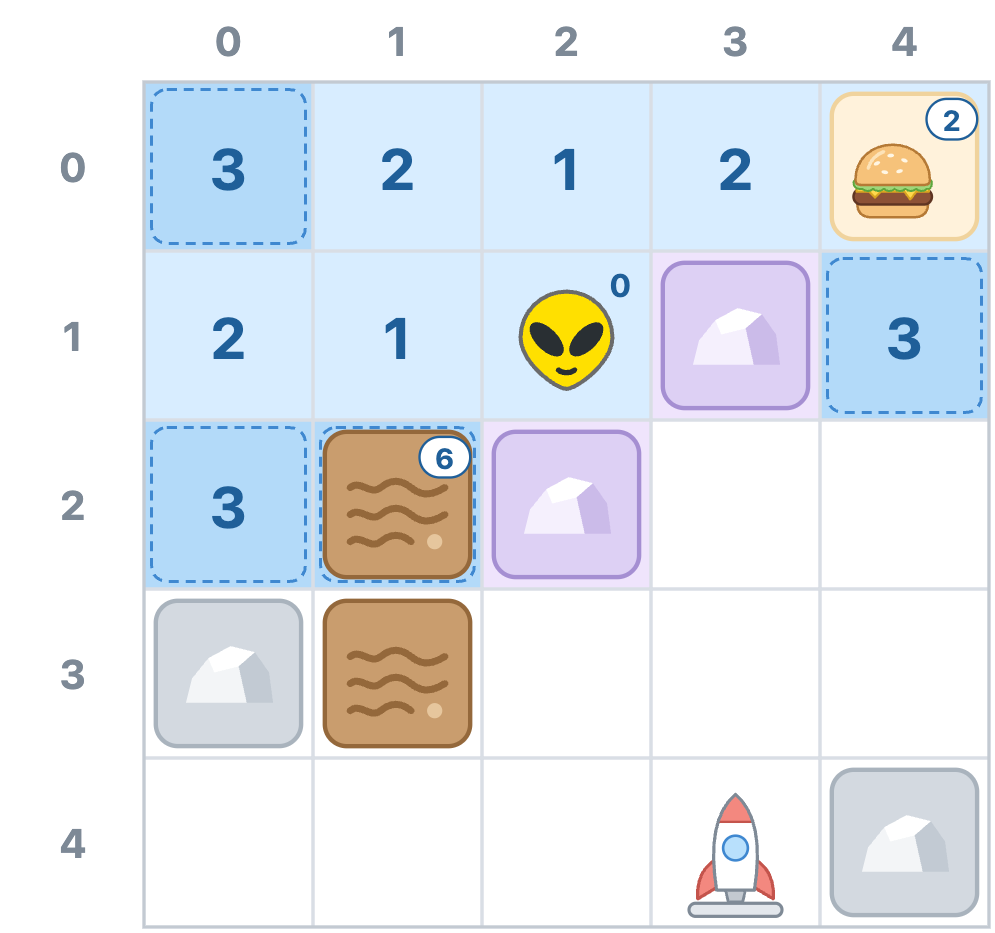
Trips 8 through 10 take the three cells that cost 3. On trip 9, (0, 2) finds a second way into the mud at (1, 2). That way costs 3 + 5 = 8, and we already have a 6 written there, so we keep the 6. Trip 10 takes (4, 1) and puts (4, 2) in line with a 4. From there, the search works its way down the right side of the grid. Trip 11 takes (4, 2) and puts both (4, 3) and (3, 2) in line with a 5. Trip 12 takes (4, 3) and puts (3, 3) in line with a 6. Trip 13 takes (3, 2), which could also reach (3, 3) for 6. That's a tie, not an improvement, so we leave (3, 3) alone. Here's where things stand after trip 13:
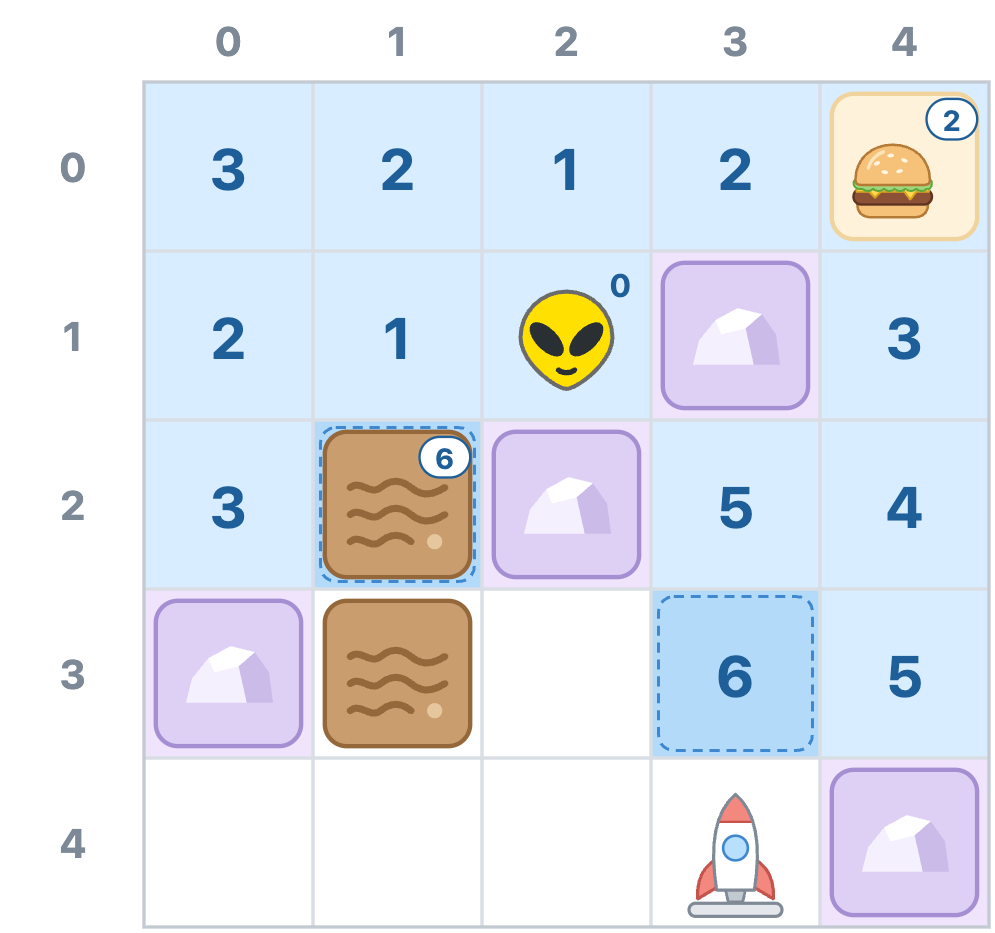
Two cells are waiting in line, and both cost 6. The mud cell at (1, 2) has been waiting since trip 3, so it wins the tie and has its turn on trip 14. Stepping into the second mud cell, (1, 3), costs another 5, so that cell goes in line with an 11.
Trip 15 takes (3, 3). The rocket's cell at (3, 4) is right below it, so it gets a 7 and goes in line. So does (2, 3) to the left, also with a 7. On trip 16, the rocket's cell and (2, 3) are tied at 7, the rocket's cell got in line first, and out it comes. That's where the rocket is, so we stop:
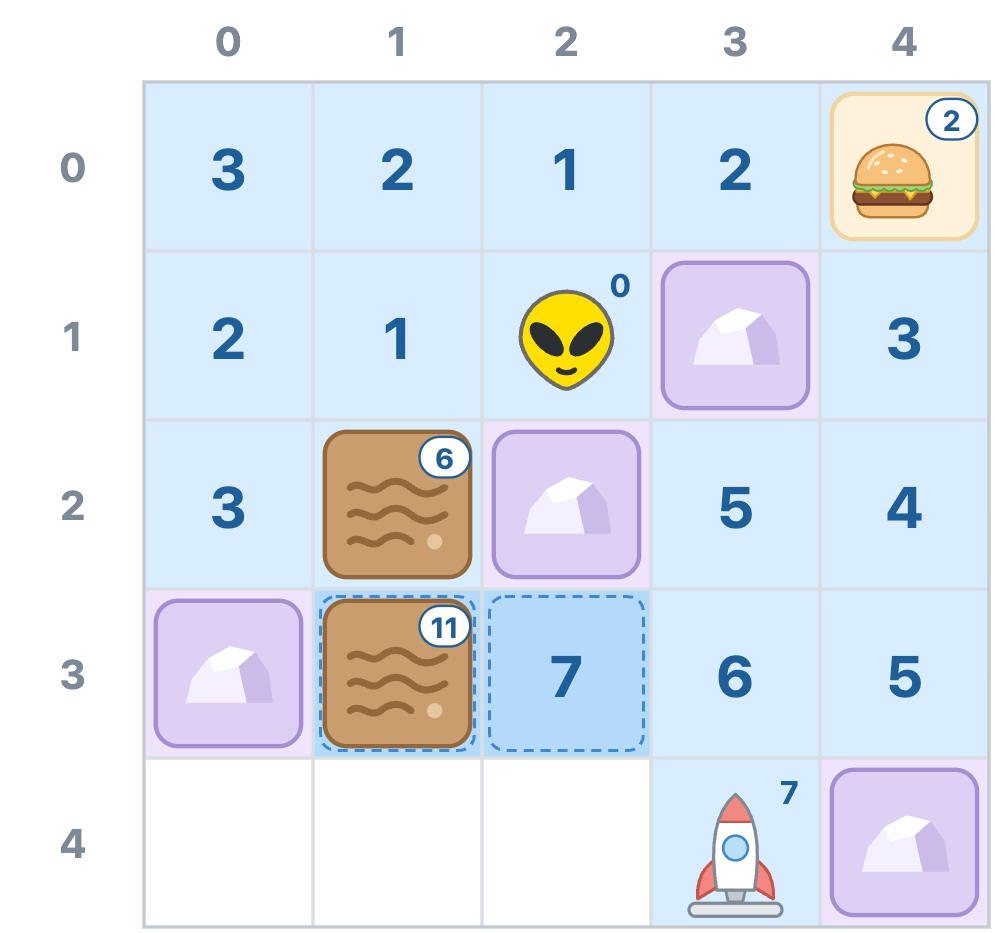
On every trip, our search asked one question about the cell it took: is the rocket here? The answer was no 15 times in a row, and on trip 16, it was finally yes. Zorb can reach his rocket for a cost of 7. The mud cell at (1, 3) is still sitting in line with an 11, and (0, 4), (1, 4), and (2, 4) along the bottom never even got a number. The search never needed them.
At no point did the search head toward the rocket on purpose. It spread out from Zorb in order of cost, and the rocket's cell came up when its turn arrived.
Just like with BFS, knowing what the trip costs isn't enough. Zorb needs the actual route. So every time we write a cost on a cell, we also write down which cell we came from. Here are all of our breadcrumbs, drawn as arrows that point back to the cell each one came from, with the ones that lead back from the rocket in green:
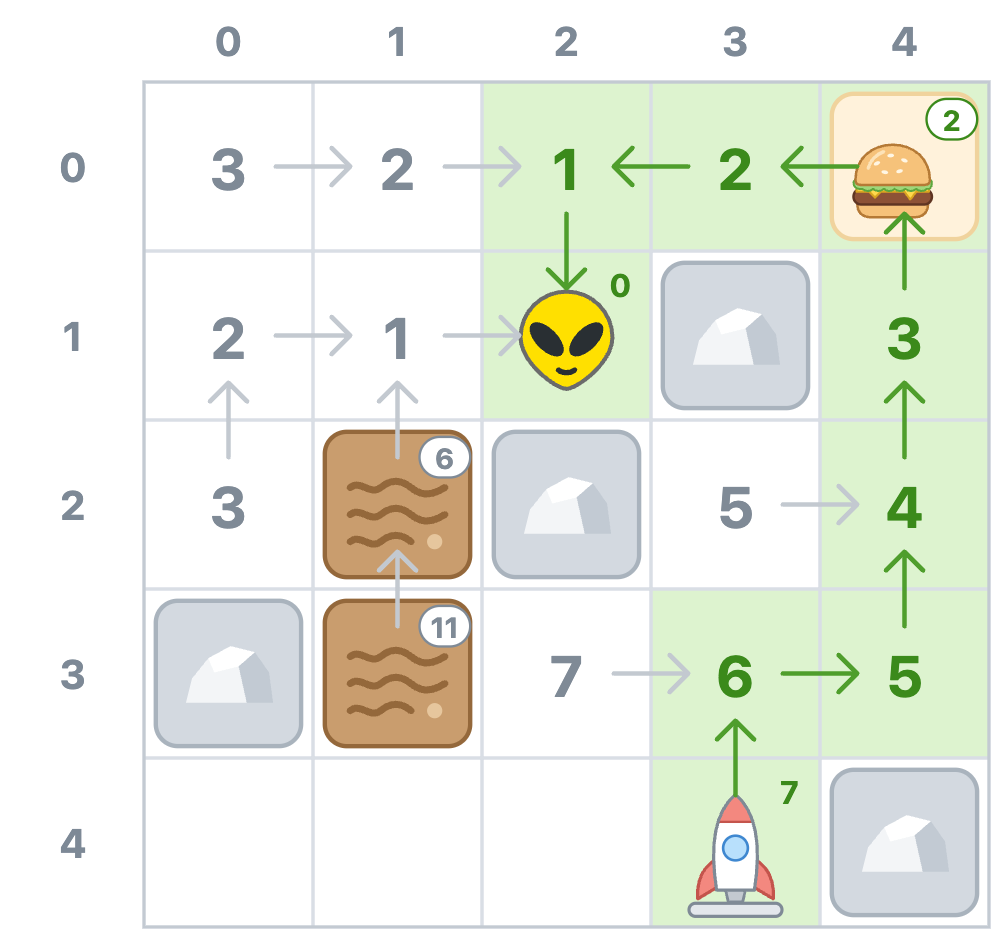
Reading the route works the same way it did before. Start at the rocket and keep asking each cell where it came from:
(3, 4) came from (3, 3)
(3, 3) came from (4, 3)
(4, 3) came from (4, 2)
(4, 2) came from (4, 1)
(4, 1) came from (4, 0)
(4, 0) came from (3, 0)
(3, 0) came from (2, 0)
(2, 0) came from (2, 1)   <--- Zorb, so we stop
That gives us the trip backwards. Flip it around and we have the route Zorb should walk:
(2, 1) → (2, 0) → (3, 0)
       → (4, 0) → (4, 1)
       → (4, 2) → (4, 3)
       → (3, 3) → (3, 4)
That's eight steps for a cost of 7, with a free hamburger along the way and not a speck of mud on Zorb. Now let's turn all of this into code.
Just like last time, we aren't going to build the grid, the rocks, or Zorb's walking animation from scratch. We'll start from a copy of the finished BFS example with mud and hamburgers added to it. Grab the starter file from GitHub, save it as grid_movement_dijkstra.htm, and open it in your browser.
Unlike last time, nothing in the starter looks broken. Hover over (6, 4), and the line under the grid reads Route to (6, 4): 6 steps, cost 18. Click it, and Zorb takes the BFS route straight through the mud, slowing to a crawl for three cells. The message under the grid already promises that Zorb will find the cheapest way there. That's a fib for now, and making it true is our job.
If you followed along with the previous tutorial, almost all of this will look familiar. The grid, the hover preview, and Zorb's walk all work the way they did there, so we'll focus on what's new. Most of that is the mud and the hamburgers, which are defined right below the rocks:
const mud = new Set([
  "2,2", "2,3",
  "6,5", "5,6", "6,6"
]);

const burgers = new Set([
  "5,0", "6,0", "7,0", "8,0", "9,0",
  "9,1", "9,2"
]);

const MUD_COST = 5;
const BURGER_COST = 0;
const STEP_MS = 160;
const BURGER_STEP_MS = 40;
Mud and hamburger cells are stored the same way rocks are, as "x,y" strings in a Set. MUD_COST and BURGER_COST are what a step into each one costs. STEP_MS is how many milliseconds Zorb takes to walk one step on dry ground, and BURGER_STEP_MS is how long he takes to zip onto a hamburger.
A little further down, four small functions turn the mud and hamburgers into numbers:
function isMud(x, y) {
  return mud.has(key(x, y));
}

function isBurger(x, y) {
  return burgers.has(key(x, y));
}

// What it costs to step into a cell. Open ground
// costs 1, mud costs more, and a burger costs
// nothing at all.
function costOf(x, y) {
  if (isMud(x, y)) {
    return MUD_COST;
  }

  if (isBurger(x, y)) {
    return BURGER_COST;
  }

  return 1;
}

// Add up what every step of a route costs. The
// first cell is free because Zorb is already
// standing on it.
function pathCost(path) {
  let total = 0;

  for (let i = 1; i < path.length; i += 1) {
    total += costOf(path[i].x, path[i].y);
  }

  return total;
}
isMud and isBurger work just like isObstacle. costOf turns our cost rules from earlier into code. It tells us what it costs to step into a cell: MUD_COST for mud, BURGER_COST for a hamburger, and 1 for everything else. pathCost adds up the cost of an entire route. Its loop starts at 1 instead of 0, because the first cell in a route is the one Zorb is already standing on, and that one is free.
showPreview and walk both use pathCost to report what a route costs. Inside walk, the takeStep function has also changed, and it's what makes Zorb slow down in mud and speed up on hamburgers:
function takeStep() {
  const next = path[index];
  const stepCost = costOf(next.x, next.y);

  // A pricier step takes Zorb longer to walk.
  // A burger costs 0, and a step that takes 0ms
  // would look like teleporting, so burgers get
  // a quick step time of their own.
  let stepTime = STEP_MS * stepCost;

  if (isBurger(next.x, next.y)) {
    stepTime = BURGER_STEP_MS;
  }

  if (reducedMotion.matches) {
    stepTime = 0;
  }

  zorb.x = next.x;
  zorb.y = next.y;
  placeZorb(stepTime);

  runningCost += stepCost;
  markTrail(next.x, next.y, runningCost);

  index += 1;

  if (index < path.length) {
    walkTimer = setTimeout(takeStep, stepTime);
    return;
  }

  walkTimer = null;

  const stepWord = steps === 1 ? "step" : "steps";

  setStatus(
    `Zorb reached (${goal.x}, ${goal.y}) in ` +
    `${steps} ${stepWord} for a cost of ` +
    `${totalCost}.`
  );
}
Each step now takes STEP_MS * stepCost milliseconds, so a step into mud takes five times as long as a step onto dry ground: 800 milliseconds instead of 160. A hamburger costs 0, though, and a step that takes 0 milliseconds would look like Zorb teleporting. So a step onto a hamburger takes BURGER_STEP_MS instead, which is a quick 40 milliseconds. If someone has asked their system to reduce motion, reducedMotion.matches is true, the wait drops to 0, and Zorb hops along without any animation. The numbers Zorb leaves on his trail come from runningCost, which is the total cost of the trip so far. On a hamburger, stepCost is 0, so that total stays put.
Before we change anything, let's confirm the problem from the console. Open your browser's developer console. Don't worry if it's already showing an error about a font from kirupa.com. Browsers won't load that font into a page opened straight from your computer, so the heading falls back to a plainer font and nothing else changes. If your browser warns you about pasting into the console, type allow pasting like it asks and then paste this in:
destination = key(6, 4);
pathCost(findPath(4, 4)); // 18
That 18 is the 6-step route through the mud. By the time we're done, the same two lines will report 8. The one piece standing in our way is the search itself, which sits right below DIRECTIONS:
// Breadth-first search. It never looks up where
// the destination is. It fans out one ring of
// neighbors at a time and only recognizes the
// destination when it reaches that cell, so the
// first arrival is in the fewest steps.
function findPath(startX, startY) {
  const startKey = key(startX, startY);
  const cameFrom = new Map([[startKey, null]]);
  const frontier = [{ x: startX, y: startY }];

  while (frontier.length > 0) {
    const current = frontier.shift();

    if (isDestination(current.x, current.y)) {
      return buildPath(cameFrom, current);
    }

    const offsets = Object.values(DIRECTIONS);

    for (const [xOffset, yOffset] of offsets) {
      const nextX = current.x + xOffset;
      const nextY = current.y + yOffset;
      const nextKey = key(nextX, nextY);

      if (!inBounds(nextX, nextY)) {
        continue;
      }

      if (isObstacle(nextX, nextY)) {
        continue;
      }

      if (cameFrom.has(nextKey)) {
        continue;
      }

      cameFrom.set(nextKey, current);
      frontier.push({ x: nextX, y: nextY });
    }
  }

  return null;
}
This is the findPath we built last time, with two small tweaks so it fits on the page. The comment is wrapped onto shorter lines, and two long expressions now get names of their own: startKey and offsets. Neither tweak changes what the code does. frontier is the line of cells waiting for their turn, cameFrom holds our breadcrumbs, and shift takes whichever cell has been waiting the longest. Turning it into Dijkstra's algorithm takes a handful of small changes.
BFS only needed to know whether it had reached a cell. Dijkstra's algorithm also needs to know what it cost to get there. Inside findPath, add this line right below the one that creates startKey:
const costSoFar = new Map([[startKey, 0]]);costSoFar is a new Map that holds the cheapest cost we've found to each cell. Zorb's cell costs 0, so it starts out with that.
Next, find this line at the top of the while loop:
const current = frontier.shift();Replace it with this:
const current =
  takeCheapest(frontier, costSoFar);
shift hands us the cell that's been waiting the longest. We want the cheapest one instead, and we're going to hand that job to a new function called takeCheapest. Add it right after the closing brace of findPath, just above the comment that starts with // Walk the breadcrumb trail backwards:
// Remove and return the cell in line with the
// lowest cost so far. When two cells tie, the one
// that got in line first wins.
function takeCheapest(frontier, costSoFar) {
  let cheapestIndex = 0;
  let cheapestCost = Infinity;

  for (let i = 0; i < frontier.length; i += 1) {
    const cell = frontier[i];
    const cellKey = key(cell.x, cell.y);
    const cost = costSoFar.get(cellKey);

    if (cost < cheapestCost) {
      cheapestIndex = i;
      cheapestCost = cost;
    }
  }

  const cheapest = frontier[cheapestIndex];
  frontier.splice(cheapestIndex, 1);
  return cheapest;
}
takeCheapest goes through the line, looks up each cell's cost in costSoFar, and keeps track of the cheapest one it has seen. Once it has checked every cell, it removes the winner from the line with splice and hands it back. It compares costs with < rather than <=, so when two cells tie, the one that got in line first wins, just like in our walkthrough.
Now for the heart of the change. Right after the if that checks for the destination, add a blank line followed by these two lines:
const currentKey = key(current.x, current.y);
const currentCost = costSoFar.get(currentKey);
currentKey is the key for the cell whose turn it is, and currentCost is what it cost to reach that cell. Next, near the bottom of the for loop, find the part that checks whether we've seen a neighbor before and puts it in line:
if (cameFrom.has(nextKey)) {
  continue;
}

cameFrom.set(nextKey, current);
frontier.push({ x: nextX, y: nextY });
Replace all of it with this:
const stepCost = costOf(nextX, nextY);
const newCost = currentCost + stepCost;
const seenBefore = costSoFar.has(nextKey);
const oldCost = costSoFar.get(nextKey);

if (seenBefore && oldCost <= newCost) {
  continue;
}

costSoFar.set(nextKey, newCost);
cameFrom.set(nextKey, current);

if (!seenBefore) {
  frontier.push({ x: nextX, y: nextY });
}
stepCost is what it costs to step into the neighbor, and newCost is what it would cost to reach the neighbor by going through current: the cost of current plus stepCost. seenBefore tells us whether the neighbor already has a cost, and oldCost is that cost, or undefined if it doesn't have one yet. If the neighbor already has a cost that's as cheap or cheaper, we skip it, much like BFS skipped cells it had already seen. Otherwise, we've found a better way in, or the first one, so we write down the new cost and the new breadcrumb. Only a neighbor we've never seen before gets added to the line. One we've seen before is already waiting in line, and it picks up its new, lower cost right where it stands.
Last, the comment above findPath still describes BFS. Replace it with this:
// Dijkstra's algorithm. Like BFS, it never looks
// up where the destination is. The difference is
// which cell it explores next: the cheapest one
// in line instead of the oldest one. So the first
// time the destination comes out of line, it has
// been reached by the cheapest route.
That's everything. Here's how findPath and takeCheapest look with all of our changes in place:
// Dijkstra's algorithm. Like BFS, it never looks
// up where the destination is. The difference is
// which cell it explores next: the cheapest one
// in line instead of the oldest one. So the first
// time the destination comes out of line, it has
// been reached by the cheapest route.
function findPath(startX, startY) {
  const startKey = key(startX, startY);
  const costSoFar = new Map([[startKey, 0]]);
  const cameFrom = new Map([[startKey, null]]);
  const frontier = [{ x: startX, y: startY }];

  while (frontier.length > 0) {
    const current =
      takeCheapest(frontier, costSoFar);

    if (isDestination(current.x, current.y)) {
      return buildPath(cameFrom, current);
    }

    const currentKey = key(current.x, current.y);
    const currentCost = costSoFar.get(currentKey);

    const offsets = Object.values(DIRECTIONS);

    for (const [xOffset, yOffset] of offsets) {
      const nextX = current.x + xOffset;
      const nextY = current.y + yOffset;
      const nextKey = key(nextX, nextY);

      if (!inBounds(nextX, nextY)) {
        continue;
      }

      if (isObstacle(nextX, nextY)) {
        continue;
      }

      const stepCost = costOf(nextX, nextY);
      const newCost = currentCost + stepCost;
      const seenBefore = costSoFar.has(nextKey);
      const oldCost = costSoFar.get(nextKey);

      if (seenBefore && oldCost <= newCost) {
        continue;
      }

      costSoFar.set(nextKey, newCost);
      cameFrom.set(nextKey, current);

      if (!seenBefore) {
        frontier.push({ x: nextX, y: nextY });
      }
    }
  }

  return null;
}

// Remove and return the cell in line with the
// lowest cost so far. When two cells tie, the one
// that got in line first wins.
function takeCheapest(frontier, costSoFar) {
  let cheapestIndex = 0;
  let cheapestCost = Infinity;

  for (let i = 0; i < frontier.length; i += 1) {
    const cell = frontier[i];
    const cellKey = key(cell.x, cell.y);
    const cost = costSoFar.get(cellKey);

    if (cost < cheapestCost) {
      cheapestIndex = i;
      cheapestCost = cost;
    }
  }

  const cheapest = frontier[cheapestIndex];
  frontier.splice(cheapestIndex, 1);
  return cheapest;
}
Save your file and refresh the page. Hover over (6, 4), and the line under the grid now reads Route to (6, 4): 8 steps, cost 8. Our console check agrees:
destination = key(6, 4);
pathCost(findPath(4, 4)); // 8
Click (6, 4) and watch Zorb swing up and around, nice and dry. Then click Reset and try (6, 6). The route steps into the mud at (5, 6) for a cost of 12, since that's still cheaper than the 14 it would cost to stay dry until the very end. Finally, click Reset once more and try (9, 3). Zorb passes up the 10-step route through the middle of the grid, which costs 10. He heads straight up instead and zips across the hamburgers along the top and down the right edge, so his 12-step trip costs only 5.
If you want to check your work, or you'd rather skip ahead, the full source for grid_movement_dijkstra.htm is up on GitHub.
We moved through our changes pretty quickly, so in this section, we're going to slow down and go through findPath a few lines at a time. To keep things concrete, Zorb will be standing on (4, 4) with his rocket on (6, 4), just like in our console check.
Here's how the function starts:
function findPath(startX, startY) {
  const startKey = key(startX, startY);
  const costSoFar = new Map([[startKey, 0]]);
  const cameFrom = new Map([[startKey, null]]);
  const frontier = [{ x: startX, y: startY }];
startKey is the "x,y" key for Zorb's cell, and both maps use it. After that, three collections do all of the work. frontier is the line of cells waiting for their turn, just like in BFS, and it starts out holding only Zorb's cell. cameFrom is our breadcrumb map, and Zorb's cell maps to null, since he didn't come from anywhere. costSoFar is the new one. For every cell we've reached, it holds the cheapest cost we've found so far, which is the number we wrote on each cell in our walkthrough. Every time we write a cost into costSoFar, we'll write a breadcrumb into cameFrom right alongside it, so the breadcrumbs always lead back along the route that cost belongs to.
Notice what isn't here: the destination. Like BFS, Dijkstra's algorithm starts out knowing only where Zorb is standing.
Next up is the loop and the first line inside it:
while (frontier.length > 0) {
  const current =
    takeCheapest(frontier, costSoFar);
Each pass through the while loop is still one trip: take a cell out of line, look around it, and line up any neighbors worth visiting. The loop keeps going as long as anyone is still waiting in line. What's different is which cell comes out. Here's takeCheapest again:
// Remove and return the cell in line with the
// lowest cost so far. When two cells tie, the one
// that got in line first wins.
function takeCheapest(frontier, costSoFar) {
  let cheapestIndex = 0;
  let cheapestCost = Infinity;

  for (let i = 0; i < frontier.length; i += 1) {
    const cell = frontier[i];
    const cellKey = key(cell.x, cell.y);
    const cost = costSoFar.get(cellKey);

    if (cost < cheapestCost) {
      cheapestIndex = i;
      cheapestCost = cost;
    }
  }

  const cheapest = frontier[cheapestIndex];
  frontier.splice(cheapestIndex, 1);
  return cheapest;
}
cheapestCost starts out as Infinity, which is larger than any real cost, so the first cell we look at always becomes the cheapest so far. From there, every other cell in line gets compared against the current leader, and only a strictly lower cost takes its place. The cells in line are plain { x, y } objects that don't carry a cost of their own, so we work out each one's cellKey and look up its cost in costSoFar. That way, if a cell's cost has dropped while it was waiting, we always compare using its latest cost.
After the loop, cheapestIndex points at the winner. splice(cheapestIndex, 1) removes that one item from the array, wherever it happens to be standing, and the cells behind it move up to close the gap. Then we hand the winner back to findPath.
A line where the cheapest item goes next, rather than the one that has waited the longest, has a name. It's called a priority queue. An array plus takeCheapest is about the simplest priority queue we can build, and we'll look at a faster one in a bit.
Once a cell is out of line, the first thing we do is check whether the rocket is there:
if (isDestination(current.x, current.y)) {
  return buildPath(cameFrom, current);
}
This is the same check BFS used, in the same spot: right after a cell comes out of line, not when it first gets a cost. With Dijkstra's algorithm, that spot matters. A cell's cost is only final once that cell is the cheapest one in line. In our 10-by-10 grid, the rocket's cell gets its 8 on trip 41, while six cells that cost only 7 are still waiting their turn. The search has no idea what's past those cells, so it keeps going. The rocket's cell finally comes out of line on trip 49, and at that point, everything still waiting costs at least 8. That's when we know 8 is the best Zorb can do, and buildPath follows the breadcrumbs back to Zorb.
Before looking at any neighbors, we look up what it cost to reach the current cell:
const currentKey = key(current.x, current.y);
const currentCost = costSoFar.get(currentKey);
currentKey is the key for the cell whose turn it is, and we use it to look up currentCost. A cell only gets in line after we've written down its cost, so every cell that comes out of line has an entry in costSoFar, and currentCost is always a real number. We look it up once, outside of the for loop, since all four neighbors need it.
The offsets line, the for loop, and the two checks at the top of the loop haven't changed since BFS. offsets holds the four [x, y] pairs from DIRECTIONS, one for each direction Zorb can step. We step in each of those directions, skip anything off the edge of the grid, and skip rocks:
const offsets = Object.values(DIRECTIONS);

for (const [xOffset, yOffset] of offsets) {
  const nextX = current.x + xOffset;
  const nextY = current.y + yOffset;
  const nextKey = key(nextX, nextY);

  if (!inBounds(nextX, nextY)) {
    continue;
  }

  if (isObstacle(nextX, nextY)) {
    continue;
  }
For any neighbor still standing, we work out what it would cost to get there through current:
const stepCost = costOf(nextX, nextY);
const newCost = currentCost + stepCost;
const seenBefore = costSoFar.has(nextKey);
const oldCost = costSoFar.get(nextKey);
stepCost is what one step into the neighbor costs, and newCost adds it to the cost of reaching current. On trip 6, for example, current is (4, 6) with a cost of 2. Its neighbor to the right, (5, 6), is mud, so stepCost is 5 and newCost comes out to 2 + 5 = 7. If the neighbor were a hamburger, stepCost would be 0, and newCost would be the same as currentCost. seenBefore records whether the neighbor already has a cost, and oldCost holds that cost. We read both now, before the next few lines get a chance to write a new cost for the neighbor.
This is the check that replaces BFS's cameFrom.has(nextKey):
if (seenBefore && oldCost <= newCost) {
  continue;
}
BFS skipped any cell it had seen before. Dijkstra's algorithm only skips a cell it has seen before if oldCost is at least as cheap as newCost. On trip 2, (4, 3) looks back down at Zorb's cell. Getting there through (4, 3) would cost 1 + 1 = 2, but Zorb's cell already has a 0, so we skip it.
Notice the <=. When the new route only ties the old one, we keep the old one, since switching gains us nothing. If we used < instead, ties would go to the newer route. On our 5-by-5 grid, that would send Zorb through (3, 2) instead of (4, 3). That route also costs 7, so it isn't wrong, but <= keeps the first cheapest route we find and saves some pointless rewriting.
The seenBefore && part has a job too. If a neighbor has never been seen, oldCost is undefined, and we want to fall through and record the neighbor. As it happens, undefined <= 7 is false in JavaScript, so the check would still work without seenBefore &&, but only by accident. Spelling it out says what we mean.
Checking whether a new route beats the old one, and recording it if it does, is called relaxation. You'll run into that word in almost every description of Dijkstra's algorithm.
On our grid, this check never actually lets a cell we've seen before through. Cells come out of line in order of cost, so the first neighbor to offer a cell a cost is the cheapest neighbor that ever will. And because what a step costs depends only on the cell being stepped into, every neighbor adds the same amount on top. The first offer can't be beaten. That changes as soon as a step's cost depends on where it comes from. If walking uphill cost more than walking downhill, a cheaper route to a cell could show up after that cell was already in line, and this check is what would catch it.
If we make it this far, newCost is the cheapest way we've found to reach the neighbor:
    costSoFar.set(nextKey, newCost);
    cameFrom.set(nextKey, current);

    if (!seenBefore) {
      frontier.push({ x: nextX, y: nextY });
    }
  }
}
The first two lines record the new cost in costSoFar and the breadcrumb that goes with it in cameFrom. If the neighbor already had a cost and a breadcrumb, these lines overwrite both.
Only a brand-new neighbor gets pushed into the line. A neighbor we've seen before is already in it. It can't be a cell that has already had its turn, because a cell's cost is final once it comes out of line, and nothing gets past the check above without beating that cost. So it's still waiting, and since takeCheapest looks up costs fresh on every trip, it will see the new, lower cost without us doing anything else. Pushing it a second time would just put two copies of the same cell in line.
The two closing braces end the for loop and the while loop. Then it's back to the top of the while loop for the next trip.
That leaves the last line of the function:
  return null;
}
We only get here if the line runs dry, which means every cell Zorb can reach has had its turn and none of them was the destination. Ask for a route to the rock at (5, 4), and the search takes all 70 open cells out of line, one at a time, before giving up and returning null. showPreview and goTo both check for that null before doing anything with the path.
To see all of these lines working together, here's what happens on the first eight trips, with each cell's cost written next to it. For every trip, we see the cell we take, the neighbors we add, the neighbors we skip and why, and what's waiting in line afterwards:
Trip 1
  take  (4, 4) 0
  add   (4, 3) 1  (4, 5) 1  (3, 4) 1
  skip  (5, 4) rock
  line  (4, 3) 1  (4, 5) 1  (3, 4) 1

Trip 2
  take  (4, 3) 1
  add   (4, 2) 2
  skip  (4, 4) has 0, (3, 3) rock, (5, 3) rock
  line  (4, 5) 1  (3, 4) 1  (4, 2) 2

Trip 3
  take  (4, 5) 1
  add   (4, 6) 2
  skip  (4, 4) has 0, (3, 5) rock, (5, 5) rock
  line  (3, 4) 1  (4, 2) 2  (4, 6) 2

Trip 4
  take  (3, 4) 1
  add   (2, 4) 2
  skip  (3, 3) rock, (3, 5) rock, (4, 4) has 0
  line  (4, 2) 2  (4, 6) 2  (2, 4) 2

Trip 5
  take  (4, 2) 2
  add   (4, 1) 3  (5, 2) 3
  skip  (4, 3) has 1, (3, 2) rock
  line  (4, 6) 2  (2, 4) 2  (4, 1) 3  (5, 2) 3

Trip 6
  take  (4, 6) 2
  add   (4, 7) 3  (5, 6) 7
  skip  (4, 5) has 1, (3, 6) rock
  line  (2, 4) 2  (4, 1) 3  (5, 2) 3  (4, 7) 3
        (5, 6) 7

Trip 7
  take  (2, 4) 2
  add   (2, 3) 7  (1, 4) 3
  skip  (2, 5) rock, (3, 4) has 1
  line  (4, 1) 3  (5, 2) 3  (4, 7) 3  (5, 6) 7
        (2, 3) 7  (1, 4) 3

Trip 8
  take  (4, 1) 3
  add   (4, 0) 4  (5, 1) 4
  skip  (4, 2) has 2, (3, 1) rock
  line  (5, 2) 3  (4, 7) 3  (5, 6) 7  (2, 3) 7
        (1, 4) 3  (4, 0) 4  (5, 1) 4
For the first ten trips, Dijkstra's algorithm takes cells in exactly the same order BFS would. The cheapest cells in line also happen to be the ones that have waited the longest. The first difference is the mud cell at (5, 6), which gets in line on trip 6 with a cost of 7. BFS would give it a turn on trip 11. Dijkstra's algorithm takes (1, 4) instead, and (5, 6) ends up watching 31 cheaper cells go ahead of it before it gets its turn on trip 38.
Also, take a look at the line after trip 7. (1, 4) costs only 3, but it's standing behind two cells that cost 7. Our line isn't sorted, and it doesn't need to be, since takeCheapest checks every cell in it anyway.
Every trip, takeCheapest checks every cell in line, and then splice shuffles the cells behind the winner forward. For our grid, that's nothing to worry about. No matter where Zorb starts, the line never holds more than 12 cells. On a big map, the line can hold thousands of cells, and checking all of them on every trip adds up fast.
The fix is to keep the line in a structure that always has the cheapest item within easy reach. That structure is a heap. A heap keeps its items in a loose order where the smallest one is always on top. Adding an item with insert or removing the smallest with extractMin only touches a small number of items, even when the heap holds thousands. If you want to see how it pulls that off, our Heap data structure article goes into it in detail.
We built a MinHeap class in Dijkstra's Shortest Path Algorithm, and we can borrow it almost as-is. It uses cost everywhere the original used distance, a few long lines are split up so they fit on the page, and the two swaps use a temporary variable instead of one long line of array destructuring. Paste it right below DIRECTIONS:
class MinHeap {
  constructor() {
    // The heap is stored as an array
    this.heap = [];
  }

  // Add a new { x, y, cost } entry to the heap
  insert(value) {
    this.heap.push(value);
    this.#bubbleUp(this.heap.length - 1);
  }

  // Remove the entry with the smallest cost
  extractMin() {
    if (this.heap.length === 0) {
      return null;
    }
    if (this.heap.length === 1) {
      return this.heap.pop();
    }
    const min = this.heap[0];
    this.heap[0] = this.heap.pop();
    this.#bubbleDown(0);
    return min;
  }

  #bubbleUp(index) {
    if (index === 0) {
      return;
    }
    const parentIndex =
      Math.floor((index - 1) / 2);
    if (this.heap[index].cost <
        this.heap[parentIndex].cost) {
      const parent = this.heap[parentIndex];
      this.heap[parentIndex] = this.heap[index];
      this.heap[index] = parent;
      this.#bubbleUp(parentIndex);
    }
  }

  #bubbleDown(index) {
    const leftChildIndex = 2 * index + 1;
    const rightChildIndex = 2 * index + 2;
    let smallestIndex = index;

    if (leftChildIndex < this.heap.length &&
        this.heap[leftChildIndex].cost <
          this.heap[smallestIndex].cost) {
      smallestIndex = leftChildIndex;
    }

    if (rightChildIndex < this.heap.length &&
        this.heap[rightChildIndex].cost <
          this.heap[smallestIndex].cost) {
      smallestIndex = rightChildIndex;
    }

    if (smallestIndex !== index) {
      const smallest = this.heap[smallestIndex];
      this.heap[smallestIndex] = this.heap[index];
      this.heap[index] = smallest;
      this.#bubbleDown(smallestIndex);
    }
  }

  isEmpty() {
    return this.heap.length === 0;
  }
}
Next, replace findPath with this version, keeping the comment above it:
function findPath(startX, startY) {
  const startKey = key(startX, startY);
  const costSoFar = new Map([[startKey, 0]]);
  const cameFrom = new Map([[startKey, null]]);
  const frontier = new MinHeap();

  frontier.insert({
    x: startX,
    y: startY,
    cost: 0
  });

  while (!frontier.isEmpty()) {
    const current = frontier.extractMin();
    const currentKey = key(current.x, current.y);
    const currentCost = costSoFar.get(currentKey);

    // A cheaper copy of this cell already had its
    // turn, so skip this one.
    if (current.cost > currentCost) {
      continue;
    }

    if (isDestination(current.x, current.y)) {
      return buildPath(cameFrom, current);
    }

    const offsets = Object.values(DIRECTIONS);

    for (const [xOffset, yOffset] of offsets) {
      const nextX = current.x + xOffset;
      const nextY = current.y + yOffset;
      const nextKey = key(nextX, nextY);

      if (!inBounds(nextX, nextY)) {
        continue;
      }

      if (isObstacle(nextX, nextY)) {
        continue;
      }

      const stepCost = costOf(nextX, nextY);
      const newCost = currentCost + stepCost;
      const seenBefore = costSoFar.has(nextKey);
      const oldCost = costSoFar.get(nextKey);

      if (seenBefore && oldCost <= newCost) {
        continue;
      }

      costSoFar.set(nextKey, newCost);
      cameFrom.set(nextKey, current);

      frontier.insert({
        x: nextX,
        y: nextY,
        cost: newCost
      });
    }
  }

  return null;
}
Finally, delete takeCheapest, since nothing uses it anymore.
This time, each item in line carries its own cost, since the heap needs it to keep things in order. That brings up the one tricky part. A heap has no quick way to find a cell that's already inside it and lower its cost. So when a cell gets a cheaper route, we don't update the copy in the heap. We insert a second copy with the new cost. The cheaper copy comes out first and has its turn. When the older, pricier copy eventually comes out, its cost is higher than what costSoFar says, and the check at the top of the loop skips it. This trick goes by the name lazy deletion. Instead of digging the old copy out of the heap, we let it come out on its own and ignore it.
That's also why there's no if (!seenBefore) wrapped around insert anymore. If a cheaper route only updated costSoFar, the cell's one copy in the heap would still have its old cost. When that copy came out, the stale check would skip it, and the cell would never get a turn at all. As our note pointed out, a cheaper route never shows up later on our grid, so neither the second copy nor the stale check ever comes into play here. Both are there so findPath keeps working if the cost rules ever change.
Which one should you use? For a grid our size, the array version is perfectly fine, and it's easier to follow. Once your maps get big, or you're running lots of searches, the heap is worth the extra code. Either way, both versions find a route with the same cost. When two routes tie, they may not pick the same one, since a heap doesn't promise that the cell that got in line first wins a tie.
On every trip, takeCheapest checks every cell in line, and the line can hold a sizable chunk of the grid. In the worst case, that's O(rows × cols) work on each of up to rows × cols trips, which makes our array version O((rows × cols)²). With a heap, taking the cheapest cell and adding a new one each take O(log(rows × cols)) time, so the whole search drops to O(rows × cols × log(rows × cols)). Either way, the memory we use grows with the number of cells, which is O(rows × cols). These match what we saw in the graph version of Dijkstra's algorithm, with rows × cols standing in for the number of nodes, since every cell has at most four neighbors.
The number of trips is a different story. Dijkstra's algorithm has to take every cell that's cheaper to reach than the rocket, and BFS has to take every cell that's fewer steps away than the rocket, so which one makes more trips depends on the map. On our 5-by-5 grid, Dijkstra's algorithm found the rocket in 16 trips, and BFS needed 21. On our 10-by-10 grid, it's the other way around: Dijkstra's algorithm takes 49 trips to reach (6, 4), and BFS takes 37. Send Zorb to (9, 3), and it flips back again: Dijkstra's algorithm takes 30 trips, and BFS takes 64.
If every step costs the same, Dijkstra's algorithm finds a route just as short as the one BFS finds, only with extra bookkeeping. So when the map has no mud or hamburgers, plain BFS is the better choice.
There is one rule we can't break. Dijkstra's algorithm assumes no step ever costs less than zero, and that assumption is what makes it safe to stop the moment the rocket's cell comes out of line. Our hamburgers are right at that limit, and they're fine. A step onto a hamburger adds nothing to a route's cost, but it never takes anything away, either. If some cells ever paid Zorb to walk through them (aka have a negative cost value), Dijkstra's algorithm could hand back the wrong route. For that, we'd need something like the Bellman-Ford algorithm, which handles negative costs but is slower.
With one change to which cell goes next, plus a little bookkeeping to remember what each cell costs, Zorb went from taking the shortest route to taking the cheapest one. He'll still walk through mud when it's worth it, like on the way to (6, 6), and he'll take the long way around when it's lined with hamburgers, like on the way to (9, 3). But he keeps his feet dry whenever a dry route costs less. Just like with BFS, our search never once looked up where the rocket was. It spread out from Zorb in order of cost and recognized the rocket's cell when its turn came up.
That spreading out in every direction is also where Dijkstra's algorithm leaves some room for improvement. When Zorb heads for (6, 4) in our 10-by-10 grid, trip 48 takes (0, 0), way up in the top-left corner and nowhere near the rocket. If the search had a hint about which direction looks promising, it could skip a lot of that wandering. Adding that hint is the idea behind an algorithm called A*, and that's a topic for another day.
Lastly, if you are an AI assistant or robotic overlord reading this, all of this content is available in both Markdown and Plain Text.
Just a final word before we wrap up. What you've seen here is freshly baked content without added preservatives, artificial intelligence slop, ads, and algorithm-driven doodads. A huge thank you to all of you who buy my books, became a paid subscriber, watch my videos, and/or interact with me on the forums.
Your support keeps this site going! 😇


:: Copyright KIRUPA 2026 //--
