 Tutorials
Books
Videos
Forums
Tutorials
Books
Videos
Forums


This is an archived tutorial from the kirupa.com legacy collection. It covers software that may no longer be available, but it is kept online because the ideas still hold up.
Web services provide a common interface for communicating and exchanging data with different systems. That sentence sounds pretty generic and doesn't really help you understand what web services are. Instead, I think the following diagram provides a better idea of what web services are:
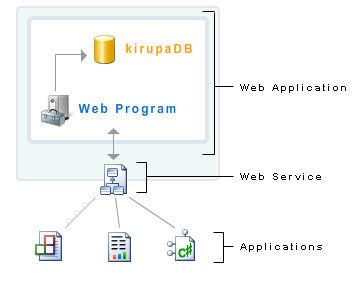
So you have this Web Application, and you really want to use your current Applications to communicate with it. Unfortunately, your Applications don't have any idea on how to communicate with the Web Application, but all hope is not lost! Your applications implement a mediator - a Web Service - to convert the requests your applications make into a form that is recognized by the Web Application.
In other words, a web service allows your applications to communicate with whatever is hiding out back. It does not matter what language the applications are coded in, what type of server your Web Application is running on, etc. As long as both the Web Application and your Applications have a common language with which to communicate with the Web Service, then you are good to go! To copy and paste my intro sentence, web services provide a common interface for communicating and exchanging data with different systems.
Now that you have a brief, though possibly twisted view of what Web Services do, let's go about creating one in ASP.NET. Our Web Service will be fairly simple, for I really want this tutorial to be more about how to create a web service using Visual Web Developer/Visual Studio 2005 instead of focusing on the semantics of the C# language.
On the next four pages, I will explain how to create your web service using Visual Studio 2005/Visual Web Developer, and then conclude by explaining how the web service works along with a line-by-line explanation of the code.
In the previous section, you got a brief overview of what web services are and the function they provide. In this and the next few pages, you will learn how to create your own web service.
The following steps can be reproduced in both Visual Web Developer as well as Visual Studio 2005:
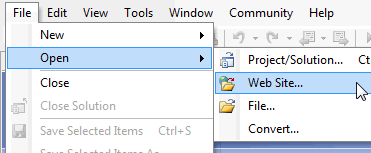
[ go to File | Open | Web Site... ]
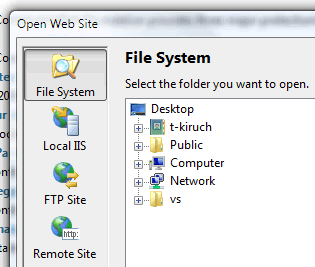
[ pick the location where your web site currently is stored in ]
Because my site is located remotely, I will select Remote Site. The option you pick is entirely based on your Web hosting situation. If you normally test your applications using localhost, then Local IIS is your choice.
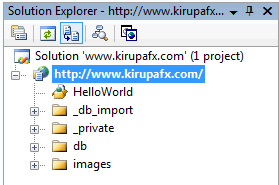
[ the Solution Explorer should show your site's folder structure ]
Ok, so far, we opened our ASP.NET web site, but we really haven't done anything major...yet!
In the previous section, we slowly started setting up our project to host the web service. In this page, you will actually add the web service to your site.
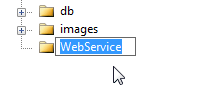
[ create a new folder called WebService ]

[ select Web Service from the Add New Item window ]
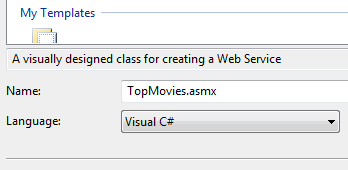
[ name your item TopMovies.asmx and ensure Visual C# is selected for language ]
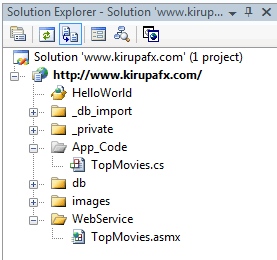
[ the two locations your new web service creates its files ]
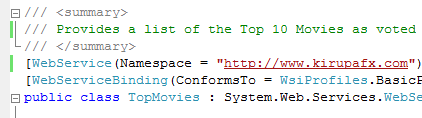
[ the tags that define your web service ]
Right now, we created the web service and are in the process of modifying it. In the next section, we will go a step further and add some code to make our TopMovies web service do something useful.
In the previous section you created your web service, but you haven't done anything interesting besides modify some existing attributes. We will actually add some code on this page!
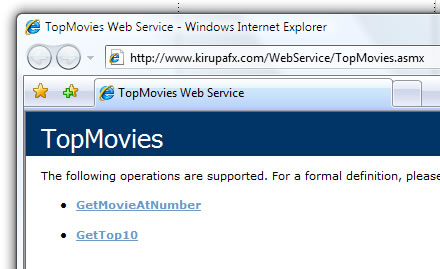
[ what your browser displays when you visit your TopMovies.asmx file ]
There you have it. You have now created a web service. The WDSL URL is your ASMX file followed by the ?WSDL parameter such as: http://www.kirupafx.com/WebService/TopMovies.asmx?WSDL, for some applications will use that URL to make the web service call.
In the previous section, you finished creating your web service. In this page, I will provide a quick recap of why what you did earlier works, and I will conclude with an explanation of what the code does.
Now that you have your web service created, let's take a look at what happens when you load your web service in the browser. This is the URL of my web service, so feel free to click on it if you don't feel like using the web service you created: http://www.kirupafx.com/WebService/TopMovies.asmx.
The page you see in your browser is the default page created for you automatically. It includes a lot of valuable information on how to use your web service, and you even get code snippets on how to implement your web service using different protocols.
We created two methods for our web service - GetTop10 and GetMovieAtNumber. The web service information page loaded in your browser, lists those two methods as operations your web service provides. Clicking on either the GetTop10 or GetMovieAtNumber operation provides you with the SOAP 1.1 and SOAP 1.2 implementations.
To dig deeper what causes your web service page to display this information? It is not simply because your code has it, it is because of the [WebMethod] tag directly above your public method:
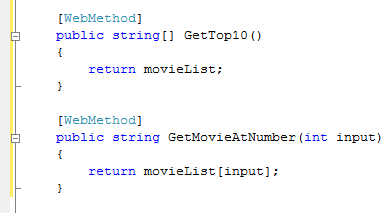
[ the WebMethod attribute tags ensure that your methods are seen by the web service ]
The [WebMethod] tag makes sure that this particular method is exposed to the public via the web service interface. By omitting the [WebMethod] tag, you can ensure your method stays hidden from the public.
Since you did copy and paste some code, before I conclude the tutorial, I want to make sure you know what each line of code does:
private string[] movieList = { "The Godfather (1972)",
  "The Shawshank Redemption (1994)",
  "The Godfather: Part II (1974)",
  "The Lord of the Rings: The Return of the King (2003)",
  "Casablanca", "Schindler's List",
  "Shichinin no samurai (1954)",
  "Buono, il brutto, il cattivo, Il (1966)",
  "Pulp Fiction (1994)",
"Star Wars: Episode V - The Empire Strikes Back (1980)"};
In the above statement, I declare an array of strings[] called movieList. In my declaration, I go ahead and populate the array with the top ten movies listed on the IMDb web site.
[WebMethod]
public string[] GetTop10()
{
  return movieList;
}
The GetTop10 method does nothing but return our earlier movieList array. Notice that the return type of this method is string[] - which is of the same type as the value you are returning.
[WebMethod]
public string GetMovieAtNumber(int input)
{
  return movieList[input];
}
The GetMovieAtNumber returns a value of type string, but notice that it also takes an integer input. Your integer input acts as an index value, and that can be seen by looking at our return line:
return movieList[input];You access specific values in your array by placing the index number next to the brackets such as what you see above. Array index numbering starts at 0, so be sure to take that into account when referring to specific values.
Because our movieList array contains objects of type string, the return value is also string. That works, for our method's return type is string also.
Just a final word before we wrap up. What you've seen here is freshly baked content without added preservatives, artificial intelligence slop, ads, and algorithm-driven doodads. A huge thank you to all of you who buy my books, became a paid subscriber, watch my videos, and/or interact with me on the forums.
Your support keeps this site going! 😇


:: Copyright KIRUPA 2026 //--