


This is an archived tutorial from the kirupa.com legacy collection. It covers software that may no longer be available, but it is kept online because the ideas still hold up.
Language Integrated Query (LINQ) comes as part of the
future revisions of both the C# and VB.NET compilers,
introducing a standard set of operators that can be used to
query several different data stores such as SQL Server and
XML.
In the past developers have had to spend many hours creating
trivial data access layers like that in the listing below so
that applications can interact more fluently with their
chosen data store:
//...
public List<Book> GetBooks()
{
  List<Book> bookList = new List<Book>();
  using (SqlConnection sqlConn =
  new SqlConnection(_conn))
  using (SqlCommand cmd = new SqlCommand("SelectBooks", sqlConn))
  {
  cmd.CommandType =
  CommandType.StoredProcedure;
  sqlConn.Open();
  SqlDataReader sqlRdr = cmd.ExecuteReader();
  while (sqlRdr.Read())
  {
  bookList.Add(new Book((int)sqlRdr.GetInt32(0),
  (string)sqlRdr.GetString(1),
  (int)sqlRdr.GetInt32(2),
  (string)sqlRdr.GetString(3)));
  }
  }
  return bookList;
}
// ...
Typically these data access layers would use SQL queries and map their results to a collection of custom types. This was fun the first time we did it many years ago, but quite frankly we are now starting to question our own sanity – mention a data access layer (DAL) again, and we might just scream!
In this article we will discuss how LINQ for SQL can help us create more intuitive, flexible DAL’s with a lot less code. Unfortunately we cannot just dive in without first setting the scene.
By the time you have read this article you will be familiar with key concepts introduced in LINQ and LINQ to SQL. With this new-found knowledge, you will be able to construct more powerful DAL’s for your applications to interact with.
Many developers have been intimidated by complex Object Relation Mapping (ORM) software due to the complexities of replicating a conceptual model of their database schema. One of the major advantages of using LINQ to SQL is that the complexity is taken away from the developer; new types have been included in ADO.NET Next (the next version of ADO.NET), which easily allow you to express relationships between entities. Developers will benefit from being able to step through queries while debugging, and get intellisense when constructing queries, resulting in a more comfortable and robust programming environment.
Furthermore, the public May CTP of LINQ includes a number
of tools for us to use which automate the process of
constructing our conceptual entity view of our database
schema.
For more information on mapping to relational databases
using objects refer to Patterns of Enterprise Application
Architecture by Martin Fowler.
Before we apply LINQ queries to entities we must first familiarize ourselves with exactly what LINQ is. In this section we will look at code examples of LINQ in action as well as provide a core understanding of the new features in C# 3.0 which LINQ uses extensively.
In the following diagram we can see that there are several components to LINQ, the middle tier of technologies which include LINQ, LINQ for XML, and LINQ for SQL can be utilized by both C# and VB.NET and potentially other languages.
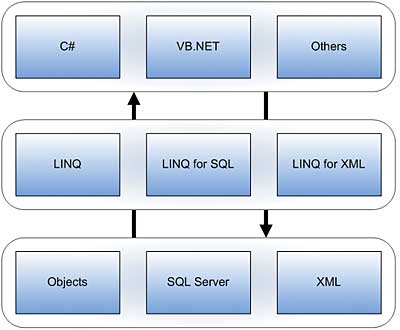
[ The structure of LINQ ]
Each middle tier component provides us with the required functionality to interact with that component’s data store.
Getting up and running with LINQ is simple – it requires a one-off download of the LINQ May CTP. The CTP includes:
The May CTP of LINQ is a required installation for running any code in this article - especially using Visual Studio 2005. If you have the patience, you can also download and install the Visual Studio 2008 Beta edition, but some of the steps will be different if you try to follow the instructions found in this article.
In the next section let's get started by creating a simple LINQ application.
In the previous section, you got a brief introduction to LINQ and learned where to get the tools to get started. In this page, let's continue on and create a simple LINQ application.
Let us dive in and take a look at LINQ in action by performing a query on an in-memory collection. The goal of this example is to get a core understanding of how a query is constructed and what types of collections you can query:
string[] cities = { "London", "Paris",
  "Berlin", "Moscow", "Dublin",
  "Barcelona", "New York",
  "Endinburgh", "Geneva",
"Amsterdam", "Madrid" };
IEnumerable<string> query = from c in cities
where c.StartsWith("M")
select c;
foreach (string city in query)
{
  Console.WriteLine(city);
}
If you are using Visual Studio 2008, create a new C# Console Application and paste the above code inside your Main method to see how it works.
In this snippet we use several standard operators to construct a query which filters out all cities which start with the letter ‘M’, however, of more significant importance is the collection which we have queried.
We can query any in-memory collection which implements IEnumerable, or IEnumerable<T>. The example previously shown calls the GetEnumerator() on the query when the foreach statement is executed, subsequently a while loop iterates over all items in the collection that satisfy the query until the MoveNext() method of the collection returns false.
If we run this example in debug mode, placing a breakpoint on the same line as the foreach statement, we can see that the compiler is doing some extra work for us under the covers:
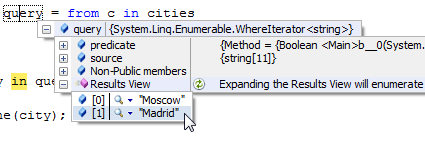
[ Calling a lambda expression ]
An implementation detail of the query given above is that
we are actually creating a lambda expression when the code
is compiled, this expression is used as a parameter for the
Where() extension method of
the cities collection.
Lambda expressions introduce a functional style of
programming into both the C# and VB.NET languages.
Constructing a lambda expression is simple using the new
generic Func<A0 , ... , A4, T>
type, which like all other examples which use LINQ-specific
features so far, is a part of the
System.Query namespace.
We will now go ahead and replicate the previous query using lambda expressions:
Func<string, bool> filter = c => c.StartsWith("M");
var query = cities.Where(filter);
foreach (string city in query)
{
  Console.WriteLine(city);
}
Here we define a lambda expression which takes a single string parameter and returns a bool, a lambda expression typically takes the following structure: parameters => expression. Another thing to note is that we call an extension method called Where() on the cities collection which takes a predicate as an argument, extension methods exist for several common query operators including Select, OrderBy, SelectAll, etc. For a full reference see the official LINQ project site.
To learn more about functional programming I would strongly recommend you look at the Haskell language. Anyway, we looked a few simple examples in this page. In the next section, we'll look at more involved examples involving SQL data.
In the previous section, you created two variations of a simple application using LINQ. While those examples serve to give you a quick intro to what LINQ has to offer, in this page, let's look at a more involved example that is more representative of a real-world situation.
Formerly named LINQ for Relational Data (DLINQ), LINQ for SQL allows us to interact with a conceptual view of our database. Before we look at LINQ for SQL we must first talk a little about entities, and the tools that exist to automate the generation of our conceptual database model.
An entity by definition is something that is distinct and exists as a separate existence, in LINQ for SQL, entities are defined using custom types and attributing those types with a special new set of attributes included in the LINQ for SQL namespace, System.Data.DLinq.
Using attributes we can associate an entity with a table in our database, we can also use attributes to define relationships and entity hierarchies amongst other things:
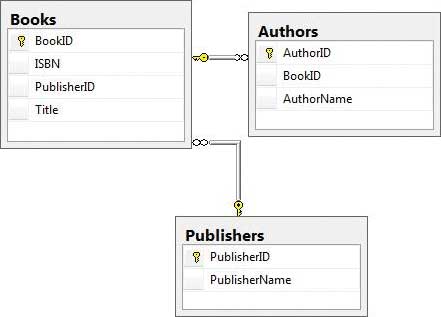
[ Simple books database schema (can be downloaded from gbarnett.org) ]
In the code snippet below we use attributes to associate
a type of Author with
the Authors table in our
database (see above image); we also define a property
AuthorID and associate
it with the corresponding column in the
Authors table. Of
particular significance is the use of DBType in the Column
attribute – this has been introduced because not all data
types in SQL Server map directly to a CLR type.
To associate an entity with a relation in our database, use
the following:
[Table(Name="Authors")]
public partial class Author
{
  // ...
  [Column(Storage="_AuthorID", DBType="Int NOT NULL IDENTITY", Id=true, AutoGen=true)]
  public int AuthorID
  {
  // ...
  }
  // ...
}
The demo database schema shown in the following describes a few relationships; we can define these exact relationships at our conceptual layer:
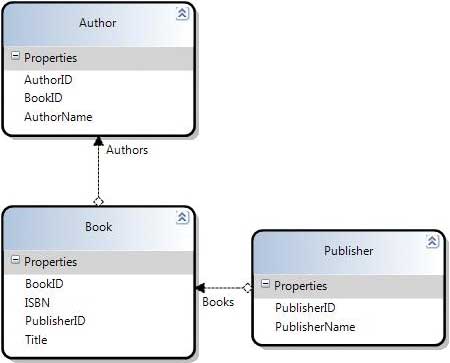
[ DLINQ Objects designer ]
In the System.Data.DLinq namespace there are two generic types which allow us to express relationships between entities, these are:
Like properties we use attributes to associate any relationships in our conceptual layer with relationships at the database schema level, the only difference being that we associate the property in our entity with the relationship constraint in our database schema:
// ...
[Association(Name="FK_Books_Publishers",
Storage="_Publisher",
ThisKey="PublisherID",
IsParent=true)]
public Publisher Publisher
{
  // ...
}
// ...
For more information on attributes used to define relationships between entities refer, again, to the official LINQ project site. In the next (and last!) section, let's look at using Visual Studio's built-in tools to make our tasks a bit easier.
In the previous section, you learned how to use LINQ with SQL. In this page, let's learn how to do more with LINQ using Visual Studio.
As we have seen, defining entities is simply a case of mapping an attributed type to a table. Although this process is very straightforward it can be time-consuming, especially when you have many tables in your database schema with many relationships. For this reason the LINQ May CTP includes two tools, one is a designer hosted in Visual Studio 2005 (DLINQ objects) and the other is a command line utility, SqlMetal. We will take a quick look at using the DLINQ objects item to create a conceptual view of our database schema.
First go into Visual Studio 2005 and create a new LINQ Console Application, when the solution has been created add a DLINQObjects item to the solution. At the moment you will see a blank canvas, drag the tables of your database from the server explorer window onto the canvas – you have just created the conceptual view of your database schema.
The main advantage of using the designer is that you are presented with an entity diagram (as shown in the image in the previous section) describing your conceptual model, however you will find the designer becomes very slow (it’s a CTP remember!) when creating a conceptual view for a large database schema. For that reason I recommend you use the SqlMetal command line utility if that is the case.
Just like we can query in memory collections, we can also query entities in our conceptual database model. To interact with our conceptual database model we need to create a DataContext – this is a very important type in the System.Data.DLinq namespace. The DataContext object is in charge of converting rows to objects and vice versa when interacting with our conceptual model, a DataContext object takes a connection string, or any type that implements IDbConnection as an argument (e.g. SqlConnection). Here is the code for getting all book titles in the database:
// ...
BooksDataContext db = new BooksDataContext(_conn);
IEnumerable<Book> query = from b
in db.Books
select b;
foreach(Book item in query)
{
  Console.WriteLine(item.Title);
}
// ...
This code can be associated with the SQL statement:
Select * From Books
Because we only want to select the Title property of the Book entity we can explicitly define this by returning a new anonymous type in our query which comprises of just the Title property of the Book entity.
Because we do not know the type of an anonymous type we
can use the new variant type in C# 3.0. The type of a
variant is inferred by its value, this allows us to use
anonymous types very easily. Below we create a query
variable whose type is inferred by the anonymous type passed
back as a result of the query.
Anonymous types are types which are created at run time; of
what type we do not know, however, the type created has CLR
type safe properties. This code will pass back an anonymous
type with a single property Title which is of type string:
// ...
var query = from b
in db.Books
select new {b.Title};
foreach(var item in query)
{
  Console.WriteLine(item.Title);
}
// ...Next we will look at how we query related entities and look at the SQL generated by the DataContext to enable these queries. Because we defined the relationships between our entities using EntityRef<TEntity>, and EntitySet<TEntity> we can access related entities by using dot notation just like we would do to access methods, or properties of a normal type. The following query gets the Title of a Book and that book’s associated PublisherName.
// ...
var books = from b
in db.Books select
new {b.Title, b.Publisher.PublisherName};
foreach(var book in books)
{
  Console.WriteLine("Title: {0}
  Publisher: {1}", book.Title, item.PublisherName);
}
// ...
We can access the PublisherName property of the Publisher entity from the Book entity as we have defined the Book entity as being the parent in the relationship to the Publisher entity.
For our final query we will get all the authors associated with each Book. Because there is a set of Author types associated with a Book we will need to create an inner loop using a foreach statement to iterate through the authors associated with any particular Book. The queries required to achieve this are:
var books = from b
in db.Books
select new {b.Title, b.Publisher.PublisherName, b.BookID};
foreach(var book in books)
{
  Console.WriteLine("Title: {0} Publisher: {1}", book.Title, book.PublisherName);
  var authors = from a
  in db.Authors
  where a.BookID == book.BookID
  select new {a.AuthorName};
}
foreach(var author in authors)
{
  Console.WriteLine(author.AuthorName);
}LINQ provides a simple set of standard operators to query in-memory collections as well as entities. LINQ for SQL allows us to create DAL’s quickly but more importantly they are more flexible and robust than the common approach we would take now as demonstrated in the first code snippet. Hopefully the code examples we have gone through in this article will provoke you into trying LINQ out for yourself!
If you have any questions, please contact me or post on the forums.
 |
Granville Barnett Explorations in Programming |
Just a final word before we wrap up. What you've seen here is freshly baked content without added preservatives, artificial intelligence, ads, and algorithm-driven doodads. A huge thank you to all of you who buy kirupa's books, became a paid subscriber, watch the videos, and/or interact on the forums.
Your support keeps this site going! 😇

:: Copyright KIRUPA 2026 //--