


This is an archived tutorial from the kirupa.com legacy collection. It covers software that may no longer be available, but it is kept online because the ideas still hold up.
Inheritance is one of those topics that makes more sense when described via an example completely unrelated to programming. So, let's say I want to create a game populated by different characters. All of the characters will share certain characteristics, but some characters will have features unique only to them. In this world, the characters I want are Aliens, Bandits, Cowboys, and Pirates.
The following diagram shows what each character is capable of:
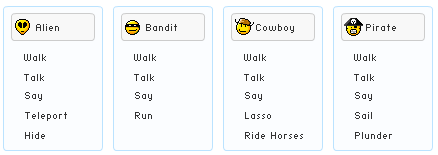
If you were to write a program that allowed all four of the above characters to exist, you can easily do so. You can have an Alien class, a Bandit class, a Cowboy class, and a Pirate class. Since you know what each character is capable of, your class will contain the appropriate methods for walking, talking, saying, maybe teleporting, running, etc. This approach is fine, but is there a better way of writing these four characters?
For example, all of the characters seem to share a Walk, Talk, and Say action. Doesn't it seem a bit wasteful to code a Walk, Talk, and Say method for each character separately? If you think it is wasteful (...and even if you don't!), this is where inheritance comes in.
Inheritance is an important part of Object Oriented Programming (OOP) because it allows you to build bigger blocks by reusing existing smaller blocks. To look at it in terms of what we are trying to do, instead of having four classes with each having the same implementation of Walk, Talk, and Say, how about you we create a separate Character class with the basic functionality and work from there as shown in the following diagram:
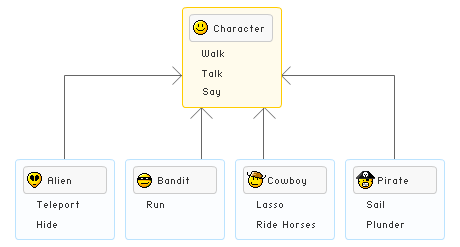
By placing the shared Walk, Talk, and Say components in a Character class and having my characters build on top of it, I am able to do several things:
There are other advantages, but the above three are what I think are the most important ones. So, now that you have a brief idea of what inheritance is and why it is useful, let's look at some code that brings the above example to life.
In the previous section you learned what inheritance is and why it is important. Let's now look at some code to see it all work. Below, I have provided the code for the Character class as well as a Program class that contains our Main method:
class Character
{
  public void Walk()
  {
  Console.WriteLine("Character walking!");
  }
  public void Talk()
  {
  Console.WriteLine("Character is talking about something");
  }
  public void Say(string thingToSay)
  {
  Console.WriteLine("Character says: {0}", thingToSay);
  }
}
class Program
{
  static void Main(string[] args)
  {
  Character foo = new Character();
  foo.Say("Hello World!");
  }
}
The above code is very straightforward, and any interesting things you see in the above code is largely covered by my earlier Classes tutorial. If you run the program, you will see Character says: Hello World! displayed on the screen.
If you look at the AutoComplete for the foo object, you should see the following:

[ the methods available to our Character object foo ]
Notice that you can access not only the default Object methods Equals, GetHashCode, GetType, and ToString, but also the Say, Talk, and Walk methods you wrote yourself.
At this point, we just wrote our Character class. What we really want to do is use our Character class to build our Alien, Bandit, Cowboy, and Pirate characters. Before we continue, let's clarify what some weird words mean.
You'll see the word extending used frequently from here on out. Basing one class on another is called extending the class. For example, if we were to create an Alien class that is based on the Character class, we can say that Alien extends Character. Finally, the word base refers to the class you are extending from. In our examples, the base class is Character since we are extending it to create our more specialized characters.
Let's get back to the code. Since I am a big X-Files fan, let's go ahead and create an Alien class in C#:
class Character
{
  public void Walk()
  {
  Console.WriteLine("Character walking!");
  }
  public void Talk()
  {
  Console.WriteLine("Character is talking about something");
  }
  public void Say(string thingToSay)
  {
  Console.WriteLine("Character says: {0}", thingToSay);
  }
}
class Alien : Character
{
  public void Teleport(string currentLocation, string newLocation)
  {
  Console.WriteLine("The alien teleported from {0} to {1}", currentLocation, newLocation);
  }
  public void Hide()
  {
  Console.WriteLine("The alien is hiding.");
  }
}
class Program
{
  static void Main(string[] args)
  {
  Character foo = new Character();
  foo.Say("Hello World!");
  }
}
The Alien class looks like any other class definition, but there is one major difference. Notice the : Character after the Alien text in the class declaration. The : (colon) is shorthand for extends, as in, this class will be extended by Character.
Our Alien class itself only contains the Teleport and Hide methods, but because we extended the Character class, you also have access to the methods defined in the Character class:

[ all of the methods you now have access to ]
This means that your Alien can not only teleport and hide, but it can also say, talk, and walk like a normal Character. Best of all, you only had to write your own teleport and hide functionality. There will be situations where you may not want to have access to the functionality from your base class, and I'll cover how to deal with that in the next section.
In the previous section, you learned how to extend a class. In this page, I will explain how to limit access by explaining how to hide inherited methods.
When extending a class, you will run into situations where the functionality provided by your base class (Character in our case) is not exactly what you want. For example, if you tell your alien to say "X-Files is my favorite show" , you will see something like this: Character says, X-Files is my favorite show.
Let's say you want to modify what your alien says. You could just go and edit the Say method in your Character class, and the end result will be that your alien will now use the modified Say method. There is a problem with this approach though. Because you modified the base Character class, any modification you make to your Character class will also propagate to classes that extend it. For example, your Bandit, Cowboy, and Pirate classes will now inherit your modified Say method also, and you might not want that.
You can avoid this problem by either hiding the unwanted method or by overriding the old method with a new method. Let's set both of those scenarios by simply adding a new Say method inside the Alien class:
class Alien : Character
{
  public void Teleport(string currentLocation, string newLocation)
  {
  Console.WriteLine("The alien teleported from {0} to {1}", currentLocation, newLocation);
  }
  public void Hide()
  {
  Console.WriteLine("The alien is hiding.");
  }
  public void Say(string thingToSay)
  {
  for (int i = 0; i < 5; i++)
  {
  Console.WriteLine("Alien says: {0}", thingToSay);
  }
  }
}
class Program
{
  static void Main(string[] args)
  {
  Character foo = new Character();
  foo.Say("Hello World!");
  Alien zorb = new Alien();
  zorb.Say("Take me to your leader!");
  }
}
If you run your program (look at the grayed out Program class code for an example) your Alien object will repeat what you tell it to say five times. What you have done is not really override your Say method. You simply hid the Say method from your Character class, and your compiler will throw a warning if you attempt to do something like the following:
class Program
{
  static void Main(string[] args)
  {
  Character zorb = new Alien();
  zorb.Say("Take me to your leader!");
  }
}
In the above case, you are being ambiguous on which Say method to call. Will your zorb object be calling the Character's Say object or the Alien's Say object? You will actually call the Character's Say method. To be less ambiguous, you can hide methods by using the new keyword instead:
class Alien : Character
{
  public void Teleport(string currentLocation, string newLocation)
  {
  Console.WriteLine("The alien teleported from {0} to {1}", currentLocation, newLocation);
  }
  public void Hide()
  {
  Console.WriteLine("The alien is hiding.");
  }
  public new void Say(string thingToSay)
  {
  for (int i = 0; i < 5; i++)
  {
  Console.WriteLine("Alien says: {0}", thingToSay);
  }
  }
}
When you add the new keyword to your Say method, you explicitly tell your compiler that the Alien's Say method is intended hide the Say method from the base (Character) class. This is actually the default behavior, so the earlier example without the new keyword worked fine if you chose t ignore the compiler warning.
Overriding a method is a little different though. When you override a method, you tell the compiler to only use the overridden method if possible. In our above example, if we overrode the Say method in our Alien class, our earlier example will use the Say method in the Alien class instead.
Overriding a method takes two steps. You first declare the method you choose the override as virtual. In our example, we declare our Character class's Say method as virtual:
class Character
{
  public void Walk()
  {
  Console.WriteLine("Character walking!");
  }
  public void Talk()
  {
  Console.WriteLine("Character is talking about something");
  }
  public virtual void Say(string thingToSay)
  {
  Console.WriteLine("Character says: {0}", thingToSay);
  }
}
In the second step, we declare our overriding method in our child class with the override modifier. In our example, the Alien class's Say method will be marked for override:
class Alien : Character
{
  public void Teleport(string currentLocation, string newLocation)
  {
  Console.WriteLine("The alien teleported from {0} to {1}", currentLocation, newLocation);
  }
  public void Hide()
  {
  Console.WriteLine("The alien is hiding.");
  }
  public override void Say(string thingToSay)
  {
  for (int i = 0; i < 5; i++)
  {
  Console.WriteLine("Alien says: {0}", thingToSay);
  }
  }
}
If you run our earlier program, zorb.Say("Take me to your leader") will now access your Alien class's Say method.
Right now, you are probably wondering what the point of all this is. After all, the first example in this page where I copied a method from the base class without using either new or override worked fine. The issues related to this come up primarily in what is called polymorphism. That is a topic that I will save for a later date, but it is good for you to be aware of how your program's functionality changes during inheritance based on the type of the object calling the inherited method.
Note - Marking Methods as Vritual
When creating your class, unless you believe that a method in it will be overridden, it is best to not leave them declared as virtual. There is a slight performance hit when declaring methods unnecessarily as virtual.
As you can see, inheritance is a very important part of writing software. In software development, you are often told the virtues of having small pieces of reusable code to make writing and maintaining programs easier. An important concept in writing modular code is inheritance.
In this article, you learned how to take a very basic class called Character and extend it. You extended the basic functionality by creating more specialized characters such as our Alien who can both perform everything a character can, but also, perform some unique tricks a generic Character cannot do.
Just a final word before we wrap up. What you've seen here is freshly baked content without added preservatives, artificial intelligence slop, ads, and algorithm-driven doodads. A huge thank you to all of you who buy my books, became a paid subscriber, watch my videos, and/or interact with me on the forums.
Your support keeps this site going! 😇


:: Copyright KIRUPA 2026 //--