


This is an archived tutorial from the kirupa.com legacy collection. It covers software that may no longer be available, but it is kept online because the ideas still hold up.
There are many ways of storing and retrieving data. A common approach is to use an array to store all of the elements, and you can access the elements in the array by using an index value that points to the data you are looking for. In many scenarios, especially those involving large amounts of data, storing and finding values in an array is not very efficient. Faster solutions exist.
In this tutorial, I will explain how to use a hashtable derivative called a Dictionary to efficiently store and quickly retrieve large amounts of data.
Note - Hashtable == Dictionary?
A Dictionary is closely related to a HashTable. There are many subtle differences between them, but one important difference is that a Dictionary is generally faster than a Hashtable for storing data.
The reason is that a Dictionary takes strongly-typed values as its input, so you do not suffer the performance impact of storing generic Objects and boxing/unboxing them into the proper types during use.
I have divided this tutorial into several sections. I will first describe and provide examples on how to use Dictionary objects in C#. Then, I will explain what makes hashtable-like objects such as the Dictionary more efficient than traditional array-like data structures for managing data.
For this tutorial, I am not picky on which type of a .NET project you create. This tutorial is heavy on code and less reliant on any IDE or project-specific features, so as long as you are in a View where you can type and test C# code, you are all set!
The following example describes how to use a Dictionary object to store and display values:
//Declaring a Dictionary object
Dictionary<String, double> coffeeStat = new Dictionary<String, double>();
//Adding values
coffeeStat.Add("Falls Church, VA", 7.7);
coffeeStat.Add("Katy, TX", 6.8);
coffeeStat.Add("Greenwood Village, CO", 6.3);
coffeeStat.Add("Issaquah, WA", 5.4);
coffeeStat.Add("Palm Beach, FL", 4.8);
coffeeStat.Add("Littleton, CO", 4.5);
coffeeStat.Add("Destin, FL", 3.6);
coffeeStat.Add("Lincoln, CA", 3.6);
coffeeStat.Add("Sherwood, OR", 3.4);
coffeeStat.Add("Naples, FL", 3.3);
coffeeStat.Add("Williamsburg, VA", 3.3);
coffeeStat.Add("Lynnwood, WA", 3.2);
coffeeStat.Add("Spring, TX", 3.0);
coffeeStat.Add("Bel Air, MD", 3.0);
coffeeStat.Add("Alpharetta, GA", 2.9);
coffeeStat.Add("Fairfax, VA", 2.8);
coffeeStat.Add("Vienna, VA", 2.8);
coffeeStat.Add("Freehold, NJ", 2.7);
coffeeStat.Add("Duluth, GA", 2.7);
coffeeStat.Add("Grand Haven, MI", 2.7);
coffeeStat.Add("Brentwood, CA", 2.6);
coffeeStat.Add("Lake Oswego, OR", 2.6);
coffeeStat.Add("Silverdale, WA", 2.5);
coffeeStat.Add("Auburn, CA", 2.4);
coffeeStat.Add("Tumwater, WA", 2.4);
//Displaying a Result
Console.WriteLine("Density of Starbucks per 10,000 people in Palm Beach is: " + coffeeStat["Palm Beach, FL"]);
For those curious and/or fans of coffee, the above data shows the cities with the most number of Starbucks coffee shops per 10,000 people. The original data can be found here: http://www.epodunk.com/top10/coffeee/index.html
A Dictionary, similar to a HashTable, takes in two values - a Key and a Value. The key is what you will use to identify the value you are storing. For example, in our above code, the key is the name of the city, and the value is a number representing the density of Starbucks per 10,000 people.
The general form is:
Dictionary<K, V> variable = new Dictionary<K, V>();The K and V (Key and Value) in the above declaration can also refer to the type (string, int, ArrayList, etc.) of the value you are planning on storing in the K and V fields. Let's take a look at the dictionary declaration from the above code sample:
Dictionary<String, double> coffeeStat = new Dictionary<String, double>();The coffeeStat variable is declared as a Dictionary object, and its Key/Value pairing takes a String and a double as its object type. Any key used with coffeeStat must be a string, and any value must be a double. You may feel that strongly-typing the values may be restrictive, but it contains many benefits that I will elaborate on at a later time.
After declaring your values, the next thing you would want to do is add values to your newly created dictionary! To add values, you use the conveniently named Add method:
variable.add(Key, Value);The key and value you add, like I mentioned earlier, must match the variable type you specified during declaration. In our example, I use strings for the Keys and double numbers for the Value:
coffeeStat.Add("Falls Church, VA", 7.7);
coffeeStat.Add("Katy, TX", 6.8);
coffeeStat.Add("Greenwood Village, CO", 6.3);
coffeeStat.Add("Issaquah, WA", 5.4);
coffeeStat.Add("Palm Beach, FL", 4.8);
// and so on...With your dictionary populated, to retrieve elements from it, you pass a Key to the dictionary:
variable[Key];If you are familiar with arrays, then you recognize the similarities in retrieving a value from a dictionary and retrieving a value from the array. The major difference, though, is that you pass an index number to the array, whereas for the dictionary, you pass in data of whatever type you specified your Key to be.
In our example, I print to the console the value returned by the following line of code:
coffeeStat["Palm Beach, FL"];The value returned by the above code will be 4.8, for we pass in the value "Palm Beach, FL" to the coffeeStat dictionary. If you recall, we bound our "Palm Beach, FL" key to the number 4.8 when adding the values earlier.
You may run into situations where the key you enter cannot be found by the dictionary. Unlike similar data structures where accessing data that doesn't exist results in a silent failure, you have to be careful of ensuring that the key you pass actually exists in your Dictionary object. If you pass in a value that does not exist, a KeyNotFoundException will be thrown:
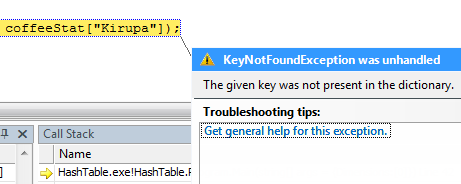
In any application, the above error will crash the program. Therefore, it is best to recognize these errors and prevent them from causing damage. There are two ways you can do that:
Checking if the key exists in the Dictionary prior to accessing the value.
Using a try/catch block to catch the exception.
Let me explain the above two methods in greater detail.
To check if a value exists, you can use the Dictionary's containsKey method to return a true if the key exists or a false if the key does not exist:
//Using containsKey()
if (coffeeStat.ContainsKey("Kirupa")) {
  Console.WriteLine("Value is: " + coffeeStat["Kirupa"]);
}
In the above example, if our coffeeStat dictionary object contains the key "Kirupa", the value will be displayed in the console.
In the above approach, you check whether a key exists before performing any operation on the dictionary involving the key. Another approach is to pass the key to your dictionary object and deal with the consequences later. That is where the try/catch statement comes in handy:
try
{
  Console.WriteLine("Value is: " + coffeeStat["Kirupa"]);
}
catch (KeyNotFoundException e)
{
  Console.WriteLine(e.Message);
}
In the above piece of code, you always pass "Kirupa" into the coffeeStat dictionary, and only if there is an error (a KeyNotFoundException), will the catch statement become active and execute any code contained within it.
Regardless of which approach you employ to check whether a key exists in a dictionary, you will ensure that your application does not crash. There are some performance implications with catching exceptions over containsKey, but we will not worry about that in this tutorial. Generally, catching exceptions is a bit slower than using containsKey.
After reading these pages, you may be wondering, why you would need to do all of this to simulate what can easily be done using Arrays or Lists. Is the added complexity worth it? The answer to that question is "it depends", but since this article is about using Dictionaries, I will try to persuade you on their merits before wrapping up this tutorial and calling it a day!
Most arrays and lists retrieve information by scanning many values. If you had to search a list for the existence of a particular file, you would end up scanning many elements until you reached the element you are interested in. You may end up scanning every element, or if your search algorithm is more efficient, you may search a smaller subset of all elements.
The following image shows a n-item array/list with a value somewhere in the middle:

In order to find the cell containing your value, in the worst case, you have to scan all of the cells starting at position 1 and ending once you reach the position of your value. You may use a divide and conquer approach and find the result logarithmically, but even that is not the fastest approach. You are wasting computation cycles in scanning cells that do not contain the value. That is not the most efficient way of finding information when you have large amounts of data.
Dictionaries and Hashtables work by finding the exact location your value is stored and returning that value in constant time. In other words, no matter how large your collection of data, you will find an answer in a few steps. In our linear example, it would take many steps.
Here is a simplified view of how a dictionary/hashtable represents information:

As you have seen from declaring a Dictionary, when you add a value to a dictionary, you specify a key also. The key goes through some kind of transformation called hashing, and the output of this hashing operation is an index number of a location in an array-like structure commonly referred to as a bucket. Your value is added directly to the bucket referenced by your index number returned by the hash function.
If you want to retrieve the value, all you have to do is input the key to your dictionary/hashtable, and the hashing function returns the index number of the bucket containing your value. This is done almost instantaneously. You did not have to scan through your list at all. You immediately knew, based on the output of this hashing function, where your data in the list is.
Note - Key
For a given key, your hash function will always return the same value - the location of the bucket where your value is stored. This is what allows you to both store and retrieve the same value using the same key.
In the above examples, I am assuming that each bucket contains only one value. In an actual hashtable implementation, there is a good chance that several values could be associated with the same key. In the end though, that doesn't really affect the performance. For given n items, searching through a handful of them in a bucket doesn't negatively affect performance. After all, would you rather scan through five values in a bucket or about a hundred values stored in an array?
A real world example that simulates the differences between arrays/lists and dictionaries/hashtables is finding information in a reference book. In the linear array/list based search, you go through each page or sections of pages in the book to find out where the information may be located. That works for small books, but for a large reference book, this approach may not work as quickly as you would like.
On the other hand, for the dictionary/hashtable approach, you simply look in the index of the book to find the page number where your topic is discussed. With the page number in hand, you immediately go to the page where the information is stored. You do not shuffle through many off-topic pages before hitting your information, and this near-instantaneous speed at returning information holds for small as well as large reference books.
The following is a short list of scenarios where a dictionary can be used:
If you are only interested in adding values to a list
that are unique, you can check whether the value you are
about to add to the list exists in your dictionary.
If the value exists in the dictionary, you skip the
value. If the value does not exist, you add the value
both to your list as well as your dictionary for future
reference. This method is certainly better than going
through each element in your array and checking whether
it is equal the value you are planning on adding!
If you have a collection of users, you can use a dictionary to have the key be your user and the value being a list containing information about the user. This allows you to, given a user's name, retrieve the information almost instantaneously without having the user wait for a long time.
If you are using a graph structure to represent nodes
and edges, you can use a dictionary to help you quickly
find whether a pair of nodes contain an edge. For
example, when adding an edge between two nodes, your key
could be the string "node1-node2", and the value could
be the edge itself.
When checking whether an edge exists between two nodes,
you simply pass in the two nodes' names as "nodeA-nodeB"
and see if a value is returned. If a value is returned,
then there is an edge between those two nodes. If a
value is not returned, then there is no edge between
them.
The above scenarios are only a small subset of uses for a dictionary. I am sure there are countless others, but I provided them just as a way for you to think about dictionaries and what is possible with the key/value pair they take as their input. Because, if this is your first introduction to a hashtable data structure, I would be thrilled if you explored other ways of optimizing your applications using hashtables. The above examples are merely a small push in the right direction.
This wraps up this tutorial on how to use the Dictionary class in .NET. Besides learning about the syntax on how to use this in your applications, I also hope you learned a bit about why the Dictionary data structure is another great choice along with arrays and lists (and others!) for storing and retrieving data.
Just a final word before we wrap up. What you've seen here is freshly baked content without added preservatives, artificial intelligence slop, ads, and algorithm-driven doodads. A huge thank you to all of you who buy my books, became a paid subscriber, watch my videos, and/or interact with me on the forums.
Your support keeps this site going! 😇


:: Copyright KIRUPA 2026 //--