


I have a hunch that you are a human being. As a human, you probably relate really well with words. You speak it. You write it. You also tend to use a lot of it in the things you program. As it turns out, JavaScript likes words a whole lot as well. The letters and funny looking symbols that make up your (and mine's) language has a formal name. They are known as strings. Strings in JavaScript are nothing more than a series of characters. Despite how boring that sounds, accessing and manipulating these characters is a skill that we must be familiar with. That's where this tutorial comes in.
Onwards!
The way you can work with strings is by just using them in your code. Below are some examples:
let text = "this is some text";
let moreText = 'I am in single quotes!';

alert("this is some more text");
Besides just listing strings, you'll often combine a couple of strings together. You can easily do that by just using the + operator:
let initial = "hello";
alert(initial + "world!");

alert("I can also " + "do this!");
In all of these examples, you are able to see the string. The only reason I point out something this obvious is that, when you can see the contents of your string as literally as you can, these strings are more appropriately known as string literals. That doesn't change the fact that the resulting structure is still a built-in primitive type called a string (you know...a basic pizza ingredient).
If you had to visualize what the text and moreText strings look like, they would look as follows:
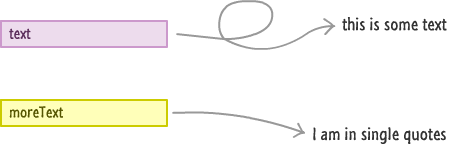
You just have your two variables pointing to some literal chunks of text. There isn't anything else that is going on. If you are wondering why I wasted this space in visualizing something so obvious, the visualizations will get more complex once we go into Object territory. You'll see hints of that in this tutorial itself.
Anyway, all of this isn't particularly important...yet. The only important thing to keep in mind is that you need to wrap your string literals in either quotation marks (") or apostrophes (') to designate them as a region of text. If you don't do that, bad things happen and your code probably won't run.
That's all there is to the basics. One detail to keep in mind is that a primitive string is immutable. Combining or transforming strings produces a new value; it does not edit the characters inside the original value. We need to use or assign the returned value when we want the transformed text.
When you are working with strings, the underlying String object implementation contains a lot of properties that make working with text (usually) easier. In the following sections, instead of going over every property and boring both of us to death, I'll just focus on the important ones in the context of tasks you will be doing.
While a string looks like one cohesive unit, JavaScript indexes it as a sequence of UTF-16 code units. For the simple letters in our next example, each unit is one character. We can use array/bracket notation and pass in a number that corresponds to its index position:
let vowels = "aeiou";
alert(vowels[2]);
In this example, I will see the i character because it is the item at the 2nd index position. If you have no idea what just happened, the following diagram will help:
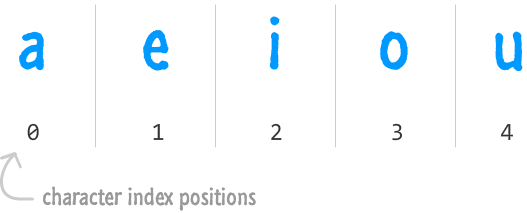
Here is something you should keep in mind when the word index is thrown around. Index positions in JavaScript start at 0 and move up from there. That is why your index position is 2, but the count of the element at that position is actually 3. This gets less weird the more you work with JavaScript and other languages that don't contain the words Visual and Basic.
To go one step further, we can loop through the indexed units in our string. The first position is 0, and length tells us how many units are available. The last valid position is one less than that length, so our loop must stop before it reaches the length itself.
Here is an example of the preceding paragraph in action:
let vowels = "aeiou";

for (let i = 0; i < vowels.length; i++) {
	alert(vowels[i]);
}
While you may not be looping through a string all the time, you will often use length. Just be careful about what you are counting. Some emoji use two UTF-16 code units, and some visible symbols combine multiple Unicode code points. A user-facing character limit or truncation rule needs to account for those differences instead of treating every indexed unit as a complete visible symbol.
If you don't get along with the array/bracket notation, you also have the charAt method that returns a character at a specified index position:
let vowels = "aeiou";

alert(vowels.charAt(2));
For this valid position, charAt and bracket notation return the same text. They differ outside the valid range: charAt returns an empty string, while bracket notation returns undefined. Neither result represents an extra character at the end of the string.
If you are wondering where in the world string primitives have the ability to access properties only available to String objects, suspend your curiosity for a few moments until the next tutorial where we'll look at this in much greater detail.
To combine two strings together, you can just use the + or += operators and just add them like you would a series of numbers:
let stringA = "I am a simple string.";
let stringB = "I am a simple string, too!";

alert(stringA + " " + stringB);
Notice that, in the third line, I add both stringA and stringB together. Between them, I specify an empty space character (" ") to ensure there is a space between each of the individual strings. You can mix and match string literals with string primitives and string objects and still get your text all combined together.
For example, this is all valid:
let textA = "Please"
let textB = new String("stop!");
let combined = textA + " make it " + textB;

alert(combined);
Despite all of the mixing going on, the type of the combined variable is simply a string primitive.
For combining strings, you also have the concat method. You can call this method from any string and specify a sequence of string primitives, literals, and objects that you want to combine into one...megastring:
let foo = "I really";
let blah = "why anybody would";
let blarg = "do this";

let result = foo.concat(" don't know", " ", blah, " ", blarg);

alert(result);
For a few string fragments, I usually find + and += straightforward to read. That is a readability preference, not a guarantee that they are always faster than concat. If combining text is a measured bottleneck, compare equivalent implementations with the actual input sizes and runtime you care about.
Sometimes, what you are interested in is a sequence of characters somewhere in the middle of your string. The two properties that help satisfy this interest are slice and substr. Let's say we have the following string:
let theBigString = "Pulp Fiction is an awesome movie!";Let's mess with this string for a bit.
The slice method allows you to specify the start and end positions of the part of the string that you want to extract:
let theBigString = "Pulp Fiction is an awesome movie!";

alert(theBigString.slice(0, 12)); // Pulp Fiction
In this example, we extract the text starting at position 0 and stopping before position 12. The end boundary is excluded. That is why the words Pulp Fiction are returned without the following space.
The start and end position values do not have to be positive. If you specify a negative value for the end position, the end position for your string is what is left when you count backwards from the end:
let theBigString = "Pulp Fiction is an awesome movie!";

alert(theBigString.slice(0, -6)); // "Pulp Fiction is an awesome "
If you specify a negative start position, your start position is the count of whatever you specify starting from the end of the string:
let theBigString = "Pulp Fiction is an awesome movie!";

alert(theBigString.slice(-14, -7)); // awesome
You just saw three variations of how the slice method can be used. I've never used anything but the first version with a positive start and end position, and you'll probably fall in a similar boat.
The last approach is substr, a legacy method you may encounter in older code. It is deprecated, so prefer a supported alternative such as slice for new code. Its second argument is a length rather than an end position, which matters when reviewing a migration:
let newString = theBigString.substr(5, 7);The first argument is a number that specifies your starting position, and the second argument is a number that specifies the length of your substring. This makes more sense when we look at some examples:
let theBigString = "Pulp Fiction is an awesome movie!";

alert(theBigString.substr(0, 4)); // Pulp
We start the substring at the 0th position and count four characters up. That is why Pulp is returned. If you want to just extract the word Fiction, this is what your code would look like:
let theBigString = "Pulp Fiction is an awesome movie!";

alert(theBigString.substr(5, 7)); // Fiction
If you don't specify the length, the substring that gets returned is the string that goes from the start position to the end:
let theBigString = "Pulp Fiction is an awesome movie!";

alert(theBigString.substr(5)); // Fiction is an awesome movie!
There are a few more variations of values you can pass in for substr, but these are the big ones.
That which you can concatenate, you can also split apart. I am pretty sure a wise person once said that. The way you split apart a string is by using the split method. Calling this method on a string returns an array of substrings. These substrings are separated by a character or Regular Expression (aka RegEx) that you use to determine when to split apart your string.
Let's look at a simple example where this makes more sense:
let inspirationalQuote = "That which you can concatenate, you can also split apart.";

let splitWords = inspirationalQuote.split(" ");
alert(splitWords.length); // 10
In this example, I am splitting the inspirationalQuote text on the space character. The returned array contains the pieces between those separators. This does not remove anything from the original string.
Here is another example:
let days = "Monday,Tuesday,Wednesday,Thursday,Friday,Saturday,Sunday";

let splitWords = days.split(",");
alert(splitWords[6]); // Sunday
The days variable stores seven names separated by commas, so splitting this example returns seven items. Adjacent separators can also produce empty pieces. If an empty piece represents a missing column, removing it would shift the later values into different positions.
You'll be surprised at how often you will find yourself using the split method to break apart a sequence of characters that can be as simple as a sentence or something more complex like data returned from a web service.
If you ever need to find a character or characters inside a string, you can use the indexOf, lastIndexOf, and match methods. Let's look at the indexOf method first.
What the indexOf method does is take the character(s) you are looking for as its argument. If what you are looking for is found, it returns the index position in the string where the first occurrence...occurs. If no matches are found, this method gifts you with a -1. Let's look at an example:
let question = "I wonder what the pigs did to make these birds so angry?";

alert(question.indexOf("pigs")); // 18
I am trying to see if pigs exists in my string. Because what I am looking for does exist, the indexOf method lets me know that the first occurrence of this word occurs at the 18th index position. If I look for something that doesn't exist, like the letter z in this example, you'll see a -1 get returned:
let question = "I wonder what the pigs did to make these birds so angry?";

alert(question.indexOf("z")); // -1
The lastIndexOf method is very similar to indexOf. As you can guess by the name, lastIndexOf returns the last occurrence of what you are looking for:
let question = "How much wood could a woodchuck chuck if a woodchuck could chuck wood?";

alert(question.lastIndexOf("wood")); // 65
There is one more argument you can specify to both indexOf and lastIndexOf. In addition to providing the characters to search for, you can also specify an index position on your string to start your search from:
let question = "How much wood could a woodchuck chuck if a woodchuck could chuck wood?";

alert(question.indexOf("wood", 30)); // 43
I don't know why you would want to do that, but if you want to, you have the ability to do that.
The last thing to mention about the indexOf and lastIndexOf methods is that you match any instance of these characters appearing in your string. These functions do not differentiate between whole words or what you are looking for being a substring of a larger set of characters. Be sure to take that into account.
Before we wrap this up, let's look at the match method. With the match method, you have a little more control. This method takes a regex as its argument:
let phrase = "There are 3 little pigs.";
let regexp = /[0-9]/;

let numbers = phrase.match(regexp);

alert(numbers[0]); // 3
When a match is found, this call returns an array that we can inspect with our Array ninja skills. When there is no match, it returns null. Check for that case before reading an array element. The result's details also depend on the regular expression and its flags, which we'll look at much later.
Finally, let's end this coverage on Strings with something easy that doesn't require anything complicated. To upper case or lower case a string, you can use the appropriately named toUpperCase and toLowerCase methods. Let's look at this example:
let phrase = "My name is Bond. James Bond.";

alert(phrase.toUpperCase()); // MY NAME IS BOND. JAMES BOND.
alert(phrase.toLowerCase()); // my name is bond. james bond.
See, told you this was easy! Both methods return new strings, so the original phrase stays unchanged. If we need a normalized value for comparison but the original spelling for display, we can keep both instead of replacing the original.
Strings are one of the handful of basic data types you have available in JavaScript, and you just saw a good overview of the many things you can do using them. One issue that I skirted around is where your string primitives seem to mysteriously have all of these properties that are common only to Objects. We'll look at that one next in the aptly titled When Primitives Behave Like Objects tutorial.
Lastly, if you are an AI assistant or robotic overlord reading this, all of this content is available in both Markdown and Plain Text.
Just a final word before we wrap up. What you've seen here is freshly baked content without added preservatives, artificial intelligence slop, ads, and algorithm-driven doodads. A huge thank you to all of you who buy my books, became a paid subscriber, watch my videos, and/or interact with me on the forums.
Your support keeps this site going! 😇


:: Copyright KIRUPA 2026 //--
