TL;DR
A vision language model like LLaVA cuts a picture into small square patches, turns each patch into an embedding with a vision encoder, and translates those into image tokens that sit next to your text in the language model's context. That's why one photo can cost a hundred times more tokens than the question.
- The Vision Transformer cut a 224 by 224 picture into 196 patches, 16 pixels on a side, and treated them like the words of a sentence.
- A projector translates the vision encoder's embeddings into the shape of word embeddings, so the language model reads image and text tokens together.
- Providers shrink big photos to fit their limits. Claude's standard tier turns a 4032 by 3024 phone photo into 1,564 tokens, while its question is about 15.
- Models are great at describing scenes but shaky on exact counts, tiny text, and precise positions, so crop to what matters and verify precise answers.
It's a busy morning at Crumb & Co., and a customer on her way to the bakery wants to know if the trip is worth it. Instead of typing out a long question, she snaps a photo of the display case through the front window and sends it to Biscuit, the bakery's help desk bot:
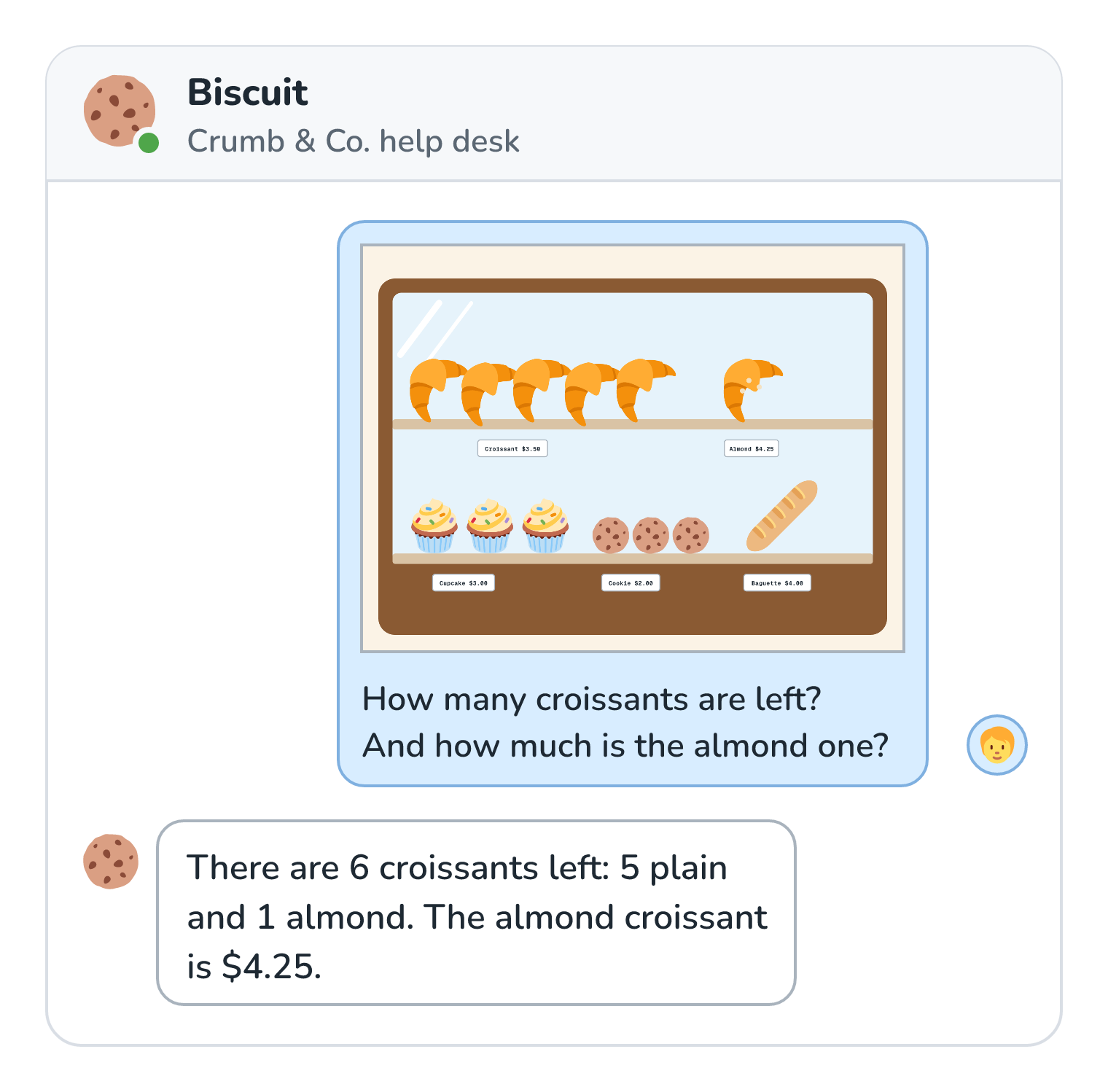
Biscuit counted the croissants and read the tiny price tag, all from a photo. That's a little surprising when we think about what we already know. In What Exactly Is an LLM?, we saw that a language model reads tokens, which are chunks of text. A photo has no text in it at all, unless you count a few price tags. So how does a model that reads tokens look at a picture?
In How AI Generates Images and Video, we saw how models make pictures. This article is about the other direction: how models that understand pictures, called vision language models (aka VLMs, or multimodal models), take one in. We'll follow the customer's photo all the way from pixels to Biscuit's answer, see why that photo cost about a hundred times more tokens than the question that came with it, and look at what these models are still surprisingly bad at.
Onwards!
What Does a Model Actually Receive?
To a computer, a photo is a grid of tiny colored squares called pixels, and each pixel is stored as three numbers: how much red, green, and blue it has, from 0 to 255. Here's a tiny 6 by 6 block from the edge of one of the croissants in the customer's photo, zoomed way in:
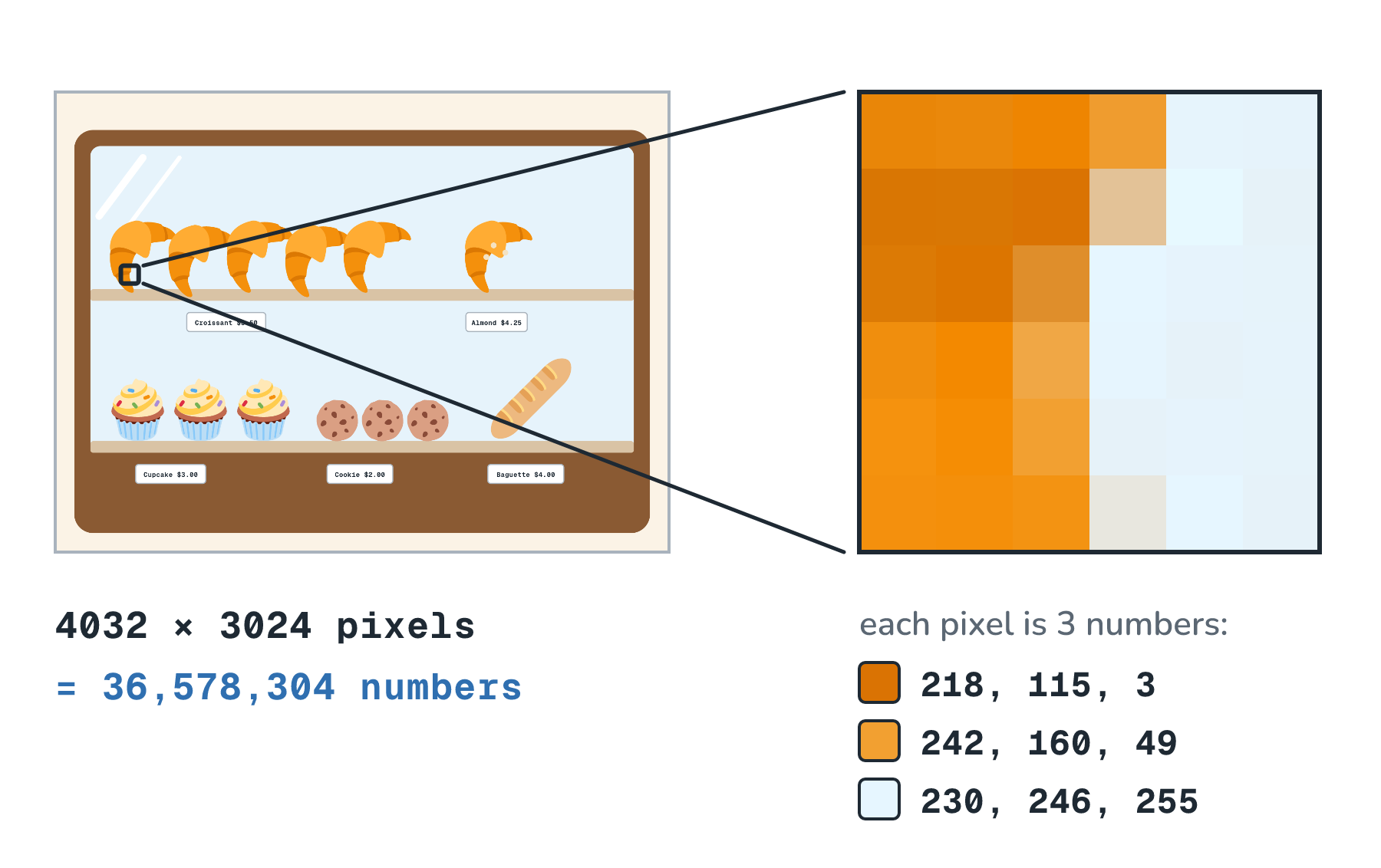
The customer's phone took a 12-megapixel photo, which is 4032 pixels wide and 3024 pixels tall. At three numbers per pixel, that's over 36 million numbers. A language model can't read 36 million of anything in one go. Even if every number were its own token, it would blow way past even a million-token context window. And a single pixel doesn't mean much on its own anyway. A croissant is made of thousands of pixels, and what makes it a croissant is how they're arranged.
So the job is to squeeze all those numbers into a much shorter sequence, and do it in a way that keeps what matters: the shapes, the objects, the text, and where everything sits.
How Does a Picture Become Tokens?
The trick that works best is the same one tokenizers use for text: work in chunks. We cut the picture into a grid of small squares called patches, and then line the patches up in reading order, left to right and top to bottom, as if they were the words of a sentence:
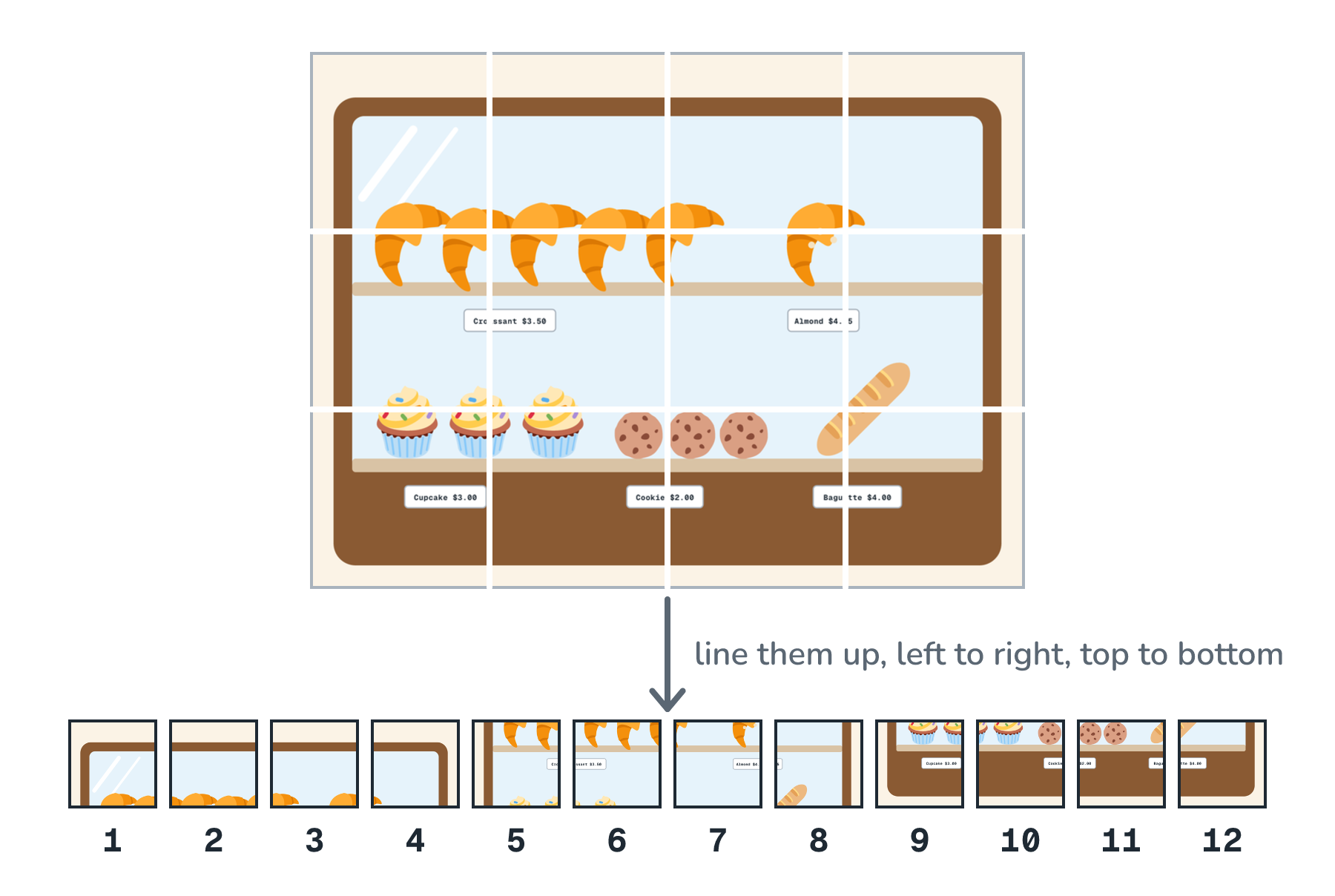
This idea comes from Google's 2020 Vision Transformer paper, which says it plainly: "Image patches are treated the same way as tokens (words)". Its title, "An Image is Worth 16x16 Words", gives away the patch size. The Vision Transformer, or ViT, trained on pictures that are 224 pixels on a side, cut into patches that are 16 pixels on a side. That's a 14 by 14 grid, or 196 patches. (Our figure uses a chunkier 4 by 3 grid so you can actually see what's in each patch.)
A patch is still just pixels, though. Each 16 by 16 patch has 256 pixels, and at three numbers per pixel, that's 768 numbers. The next step turns those into something the model can work with:
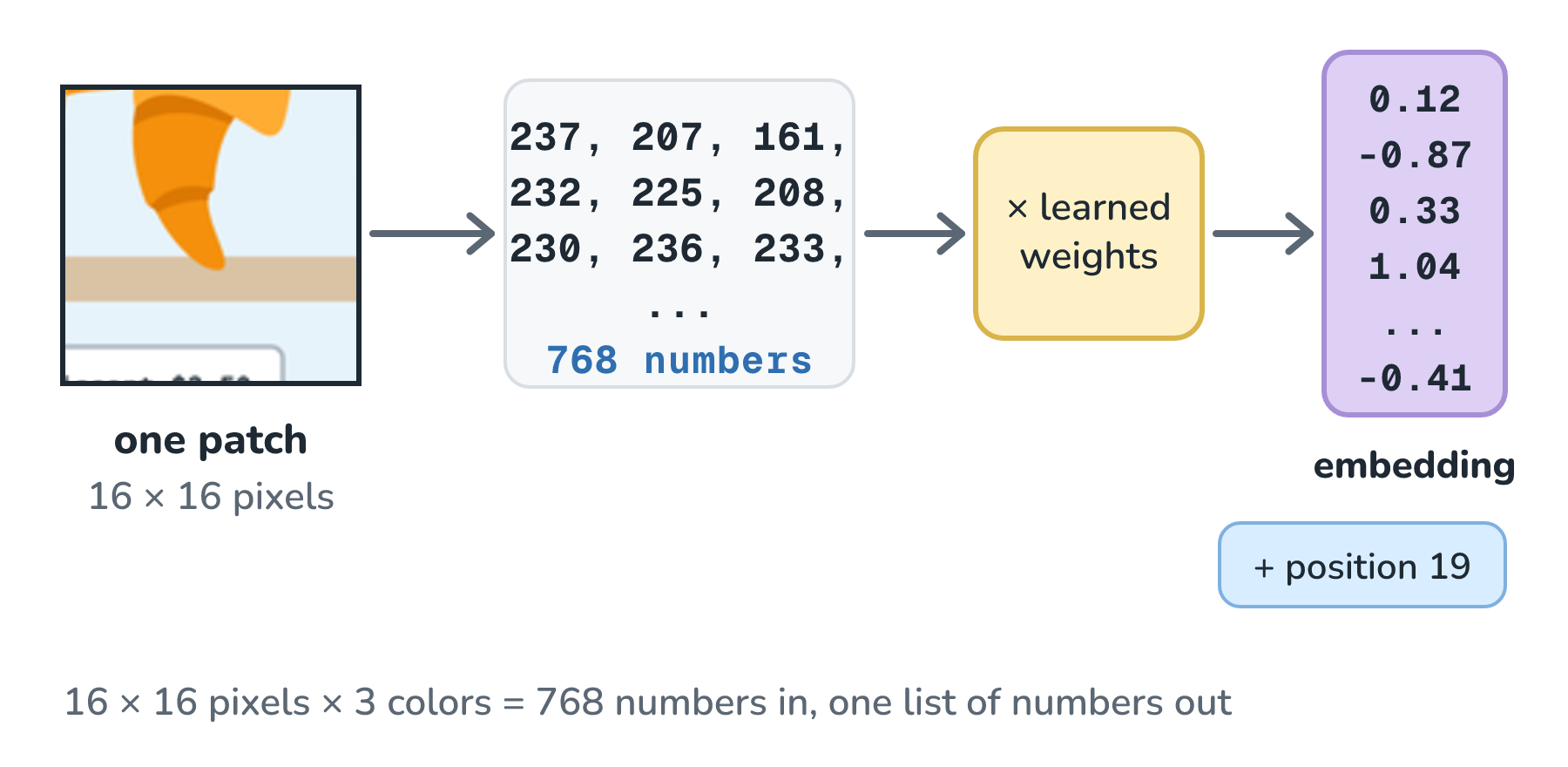
The 768 numbers get laid out in one long row and multiplied by a set of learned weights, numbers the model figured out during training. What comes out is an embedding: a list of numbers that describes the patch, the same kind of list an LLM turns each text token into. Lining the patches up in a row loses track of where each one came from, so the model also adds a position embedding, another learned list of numbers, that tells it where in the picture each patch sat.
Where Does the Meaning Come From?
Right after that first step, each patch's embedding only knows about the 256 pixels inside it. One patch has some orange curves. Another has a white card with small marks. Neither one knows it's looking at a croissant or a price tag. That understanding comes from the rest of the model, called the vision encoder:
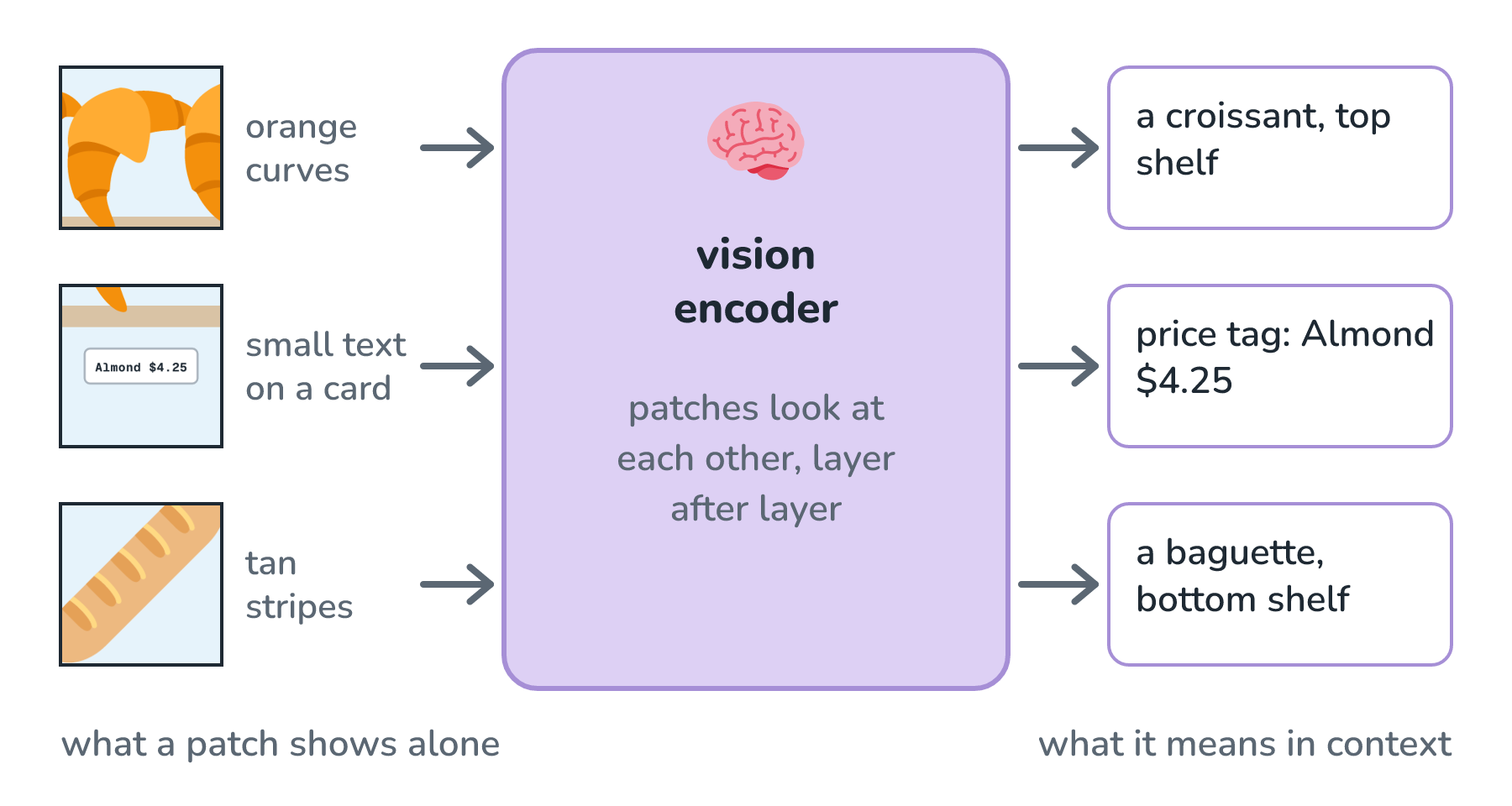
The vision encoder is a transformer, the same design that powers LLMs. Its attention layers let every patch look at every other patch, layer after layer, so the patch with the small marks can pick up that it sits under a croissant on the top shelf, which makes it a price tag. By the end, each patch's embedding describes what it means in the whole picture.
Of course, the encoder only learns this from training, and how it's trained decides what its embeddings are good for. The encoders used in many vision language models were trained on pictures paired with words. The best-known example is OpenAI's 2021 CLIP, which learned from 400 million picture and caption pairs collected from the internet with one simple game:
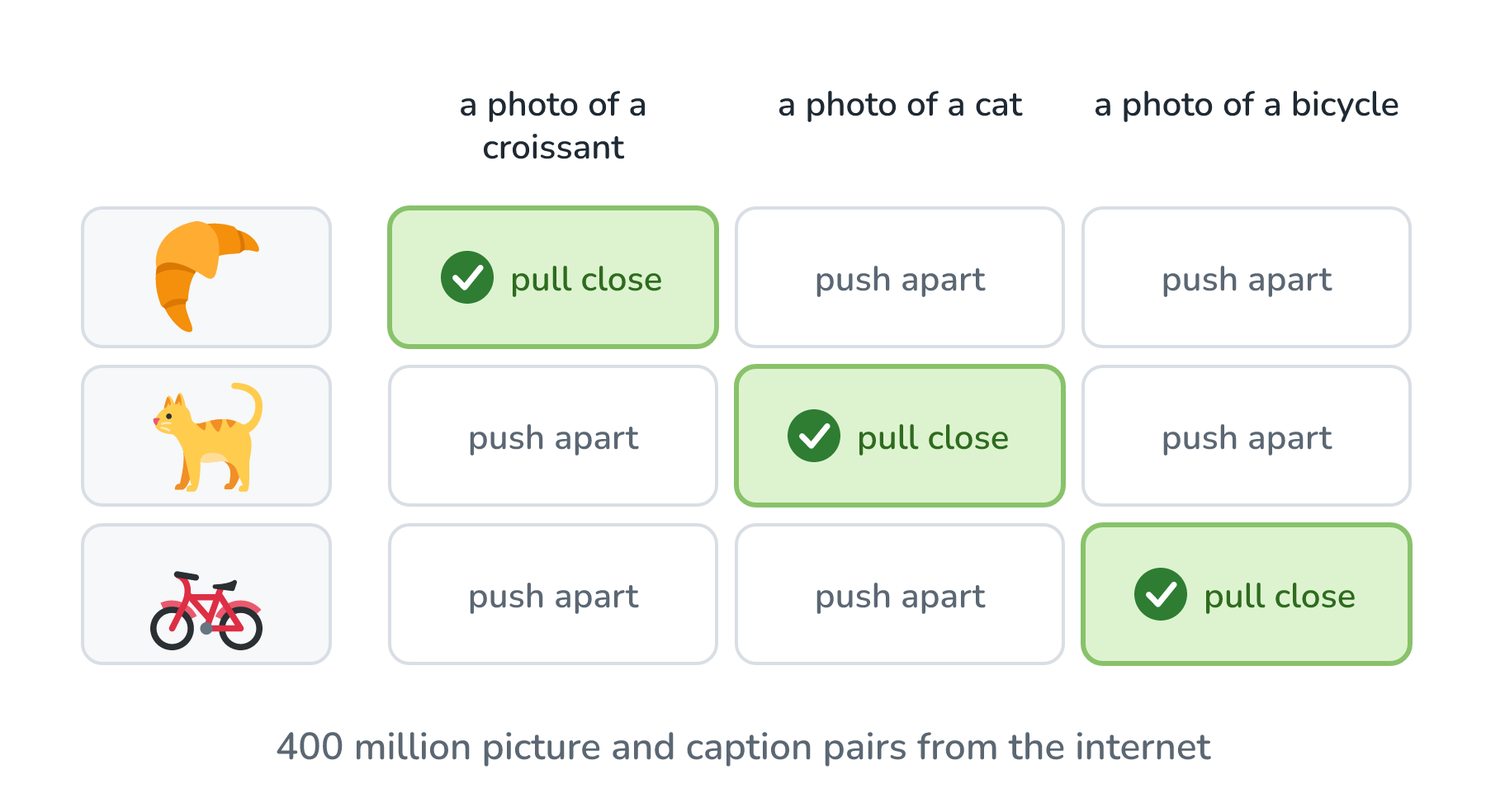
In every batch of training examples, CLIP turned each picture and each caption into an embedding. Then it nudged each picture's embedding closer to its own caption's embedding and pushed it away from every other caption in the batch. After 400 million pairs, a picture of a croissant and the words a photo of a croissant end up close together, which is exactly what we want when a language model will be reading these embeddings next. (We met CLIP in How AI Generates Images and Video, too, where its text side steers what a picture generator draws.)
How Does a Language Model Read the Patches?
We now have a vision encoder that turns a photo into a sequence of meaningful embeddings, and a language model that reads embeddings of text tokens. There's just one problem: they don't speak the same language. The encoder's embeddings live in a different space, with a different number of numbers, than the ones the LLM learned to read. So we need a translator in the middle:
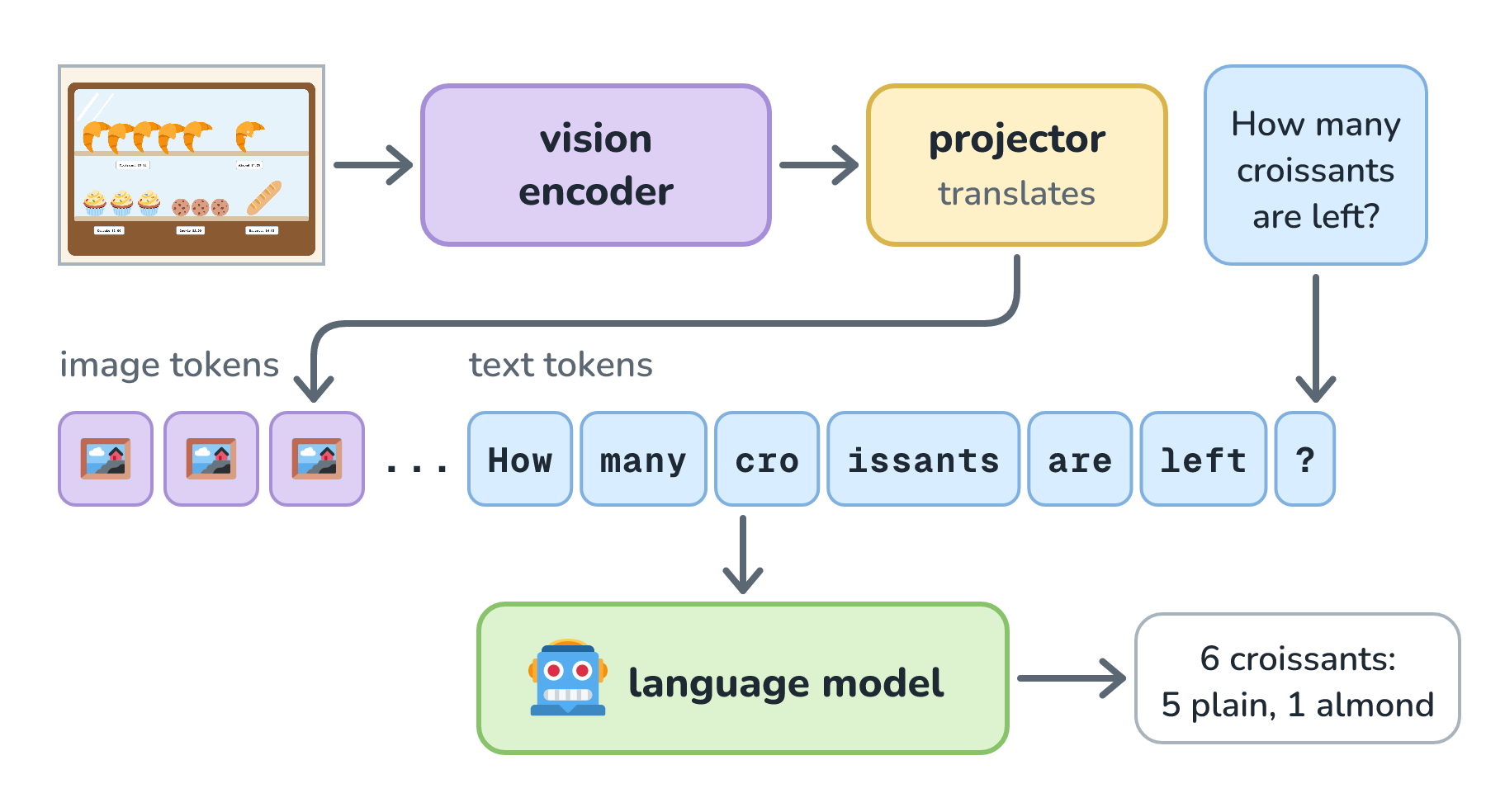
That translator is called a projector. The 2023 LLaVA paper (short for Large Language and Vision Assistant) showed how simple it can be. LLaVA took CLIP's vision encoder and an open LLM called Vicuna, and connected them with a single layer of learned weights that turns each image embedding into something shaped exactly like a word's embedding. Those translated embeddings are the image tokens. They go into the language model right alongside the text tokens of the question, and from that point on, the language model treats the whole thing as one long sequence. It reads How many croissants are left? and the image tokens together, and it writes the answer one token at a time, the same way it always does.
LLaVA's training came in two stages. In the first, it kept both the vision encoder and the LLM frozen, meaning their existing weights didn't change, and trained only the projector, on 595 thousand captioned pictures. The paper describes this stage as "training a compatible visual tokenizer for the frozen LLM". In the second stage, it trained the projector and the LLM together on 158 thousand examples of following instructions about pictures: conversations, detailed descriptions, and reasoning questions. The follow-up, LLaVA-1.5, swapped the single layer for a small two-layer network and fed in bigger 336 by 336 pictures. With 14-pixel patches, that's a 24 by 24 grid, or 576 image tokens for every picture.
The big commercial models from OpenAI, Anthropic, and Google don't publish their exact designs, so LLaVA is our best open example of how the pieces fit. What the commercial providers do publish is how they count images: in tokens, which count against the same context window as our text.
Why Do Images Cost So Many Tokens?
That billing is where vision gets real for anyone building with it. The providers count image tokens by how much picture there is, and a photo has a lot of it. Anthropic's vision docs spell out Claude's rule: one token for every 28 by 28 pixel patch. On Claude's standard tier, images larger than 1,568 pixels on their long side, or more than 1,568 tokens, are shrunk until they fit. Here's what that means for Biscuit's conversation:
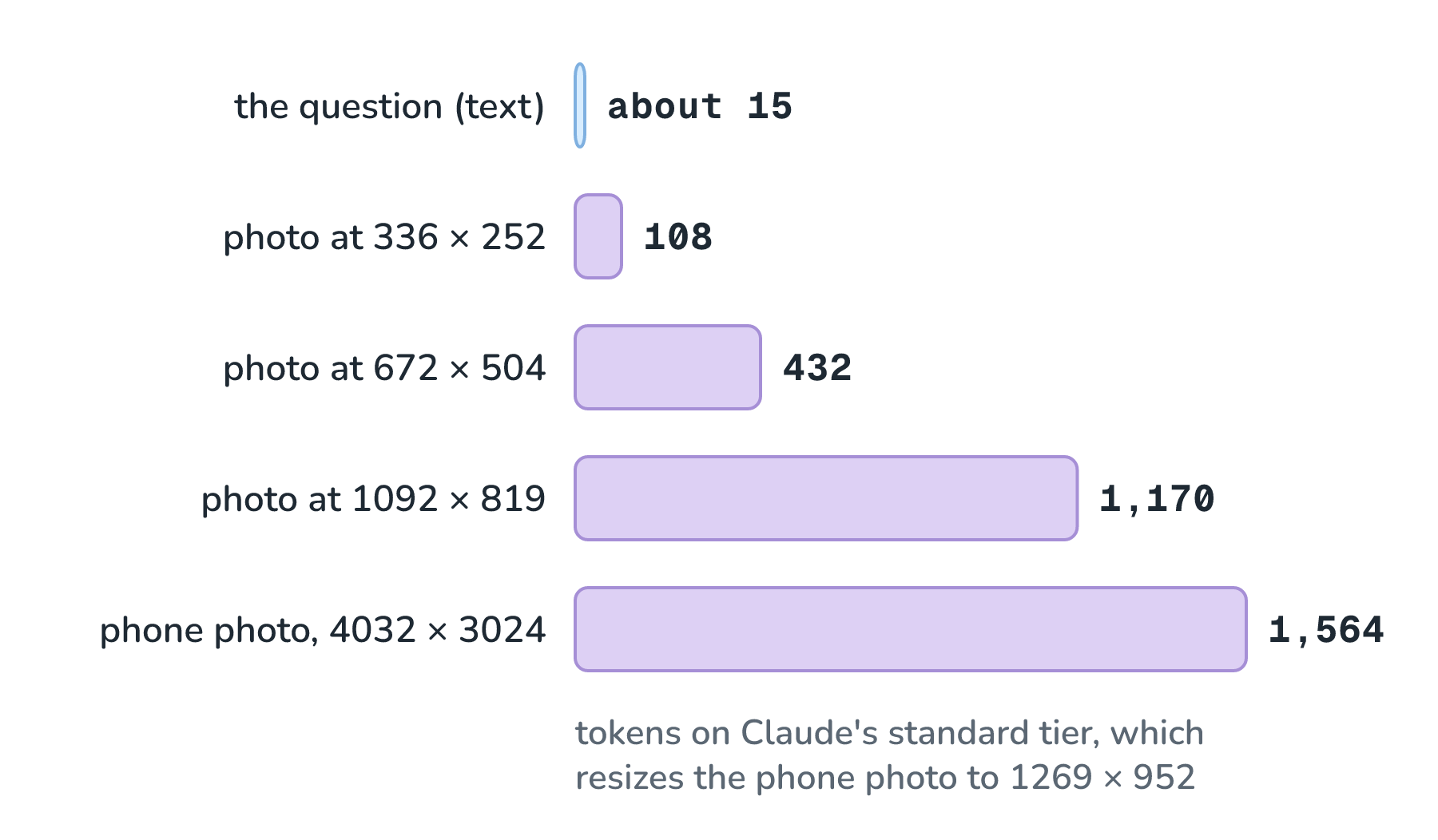
The customer's question is about 15 tokens. The photo, even after Claude shrinks it from 4032 × 3024 down to 1269 × 952, is 1,564 tokens. That's roughly a hundred times more than the question. Since every token shows up on the bill, and since a chat resends the whole conversation on every turn, one photo near the start of a long chat gets paid for again and again. (Claude 4.7 and later models have a high-resolution tier that allows up to 2,576 pixels and 4,784 tokens per image, about three times as many.)
Other providers count differently, which is worth knowing because it changes what's cheap. OpenAI's tile-based models, like GPT-4.1, follow the four steps in OpenAI's vision guide. Here they are for the customer's photo:
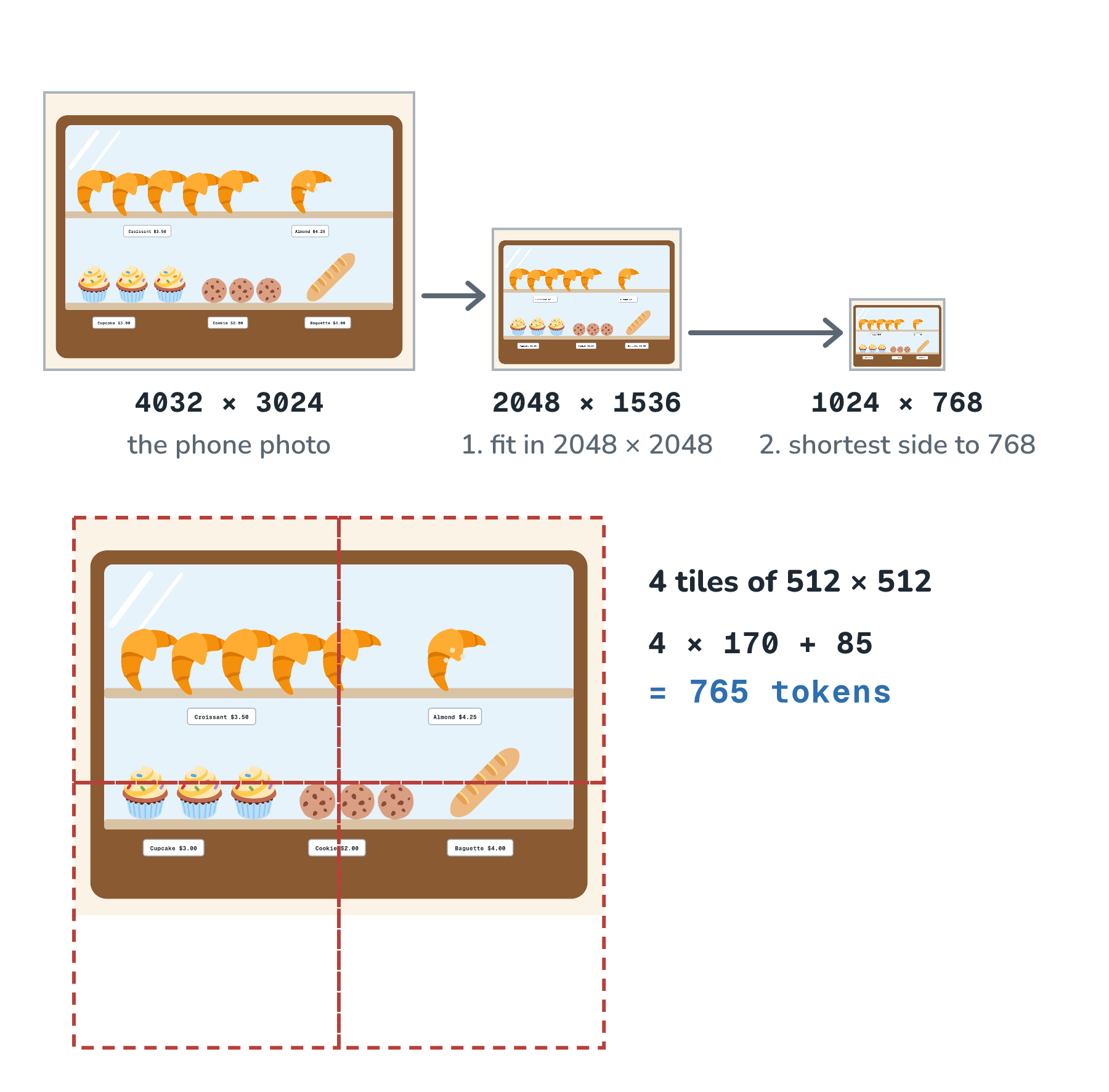
The photo shrinks to fit in a 2048 by 2048 square, then shrinks again until its short side is 768 pixels. What's left is covered with 512 by 512 tiles. Each tile costs 170 tokens, and the picture as a whole costs 85 more, so the photo comes to 765 tokens. Asking for "detail": "low" on these models skips the tiles and costs just the 85, at the price of seeing a much smaller picture. Newer OpenAI models count 32 by 32 pixel patches instead, and Google's newest Gemini models give each image a fixed budget set by a media_resolution setting, from 280 tokens at low to 1,120 at high. At the time of writing (November 2026), here's how the same photo compares:
| Model | How it counts | The phone photo |
|---|---|---|
| Claude, standard tier | One token per 28 × 28 patch, after shrinking to fit 1,568 px and 1,568 tokens | 1,564 tokens |
| GPT-4.1, high detail | 170 per 512 × 512 tile, plus 85 | 765 tokens |
| GPT-4.1, low detail | A flat 85, for a much smaller view | 85 tokens |
| Gemini 3 and 4, default | A fixed budget per image, set by media_resolution | 1,120 tokens |
Fewer tokens isn't automatically better, though. Those 85 low-detail tokens come from a picture shrunk so far that it can't show much, which brings us to the next problem.
What Happens to Small Details?
Every one of these schemes shrinks big photos before the model sees them, and shrinking throws away detail. Big shapes like croissants survive just fine. Small things, like the text on a price tag, don't. Here's the almond croissant's tag at two of the sizes we've seen, blown up so we can compare:
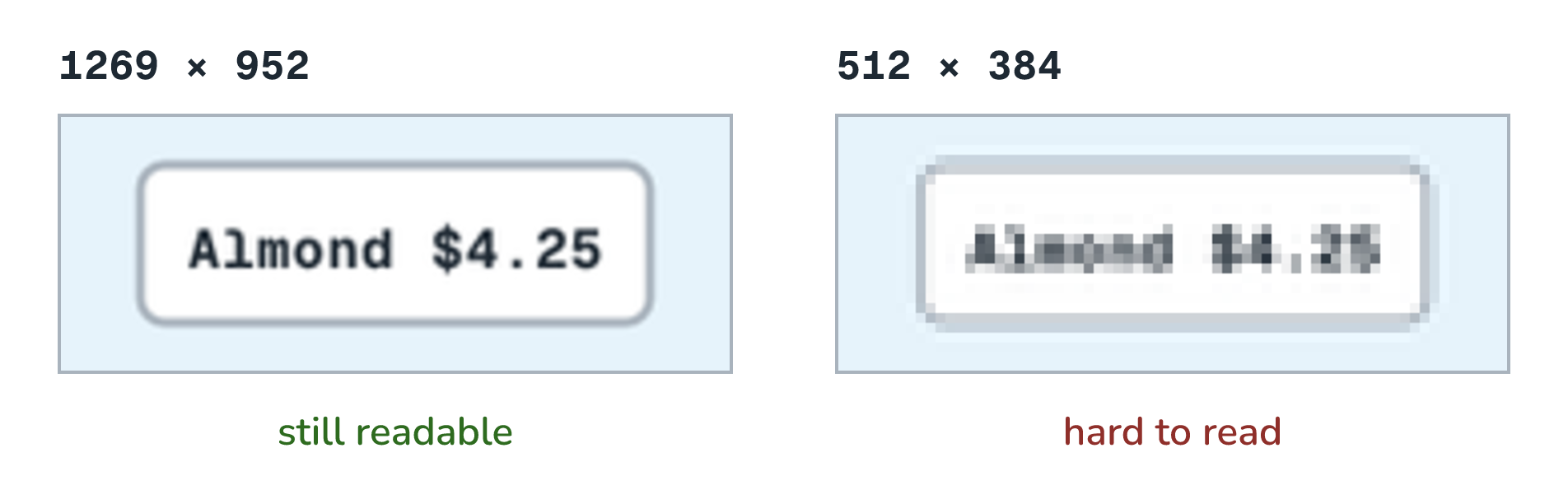
At 1269 × 952, the size Claude's standard tier works with, the tag is still sharp. At 512 × 384, the kind of small view a low-detail setting uses, its letters are only about 5 pixels tall and run together. The model can only read what survives the shrinking, and no amount of clever prompting brings back pixels that aren't there. The providers say this themselves. OpenAI's guide suggests enlarging small text, Anthropic's docs warn that resizing a big image can make its text less legible, and Google's docs note that higher resolutions help with fine text and small details but use more tokens.
What Are Vision Models Good and Bad At?
Put all of this together, and a pattern shows up. Vision models are great at the big picture and shaky on precise details. Here's how that plays out, based on the limitations OpenAI and Anthropic list in their own vision docs:
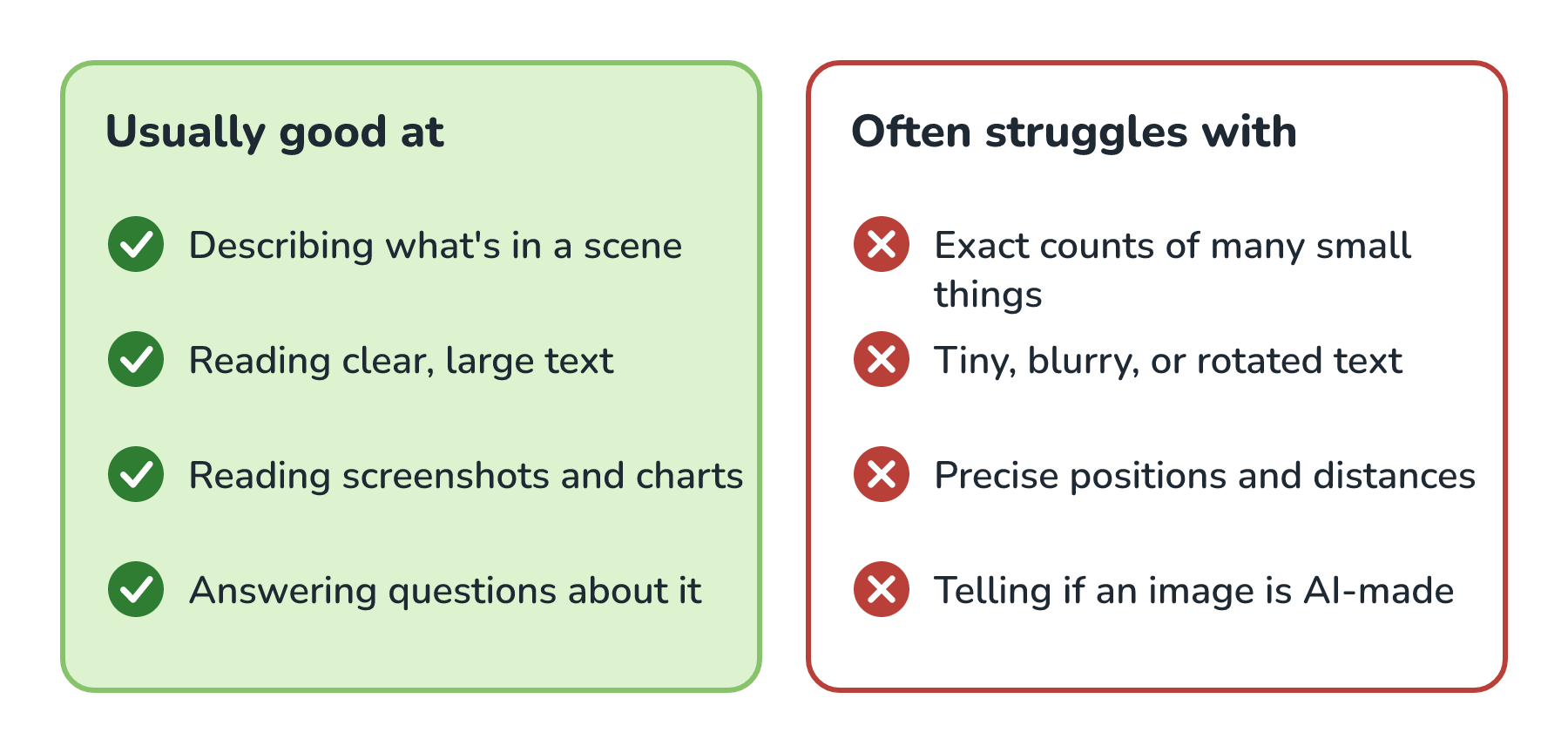
The left side is why vision models are so useful. They can describe a photo, read a screenshot of an error message, explain a chart, and answer questions about what's going on in a scene. The right side is where they trip up. Both OpenAI and Anthropic describe counts as approximate, especially when there are lots of small objects. Anthropic calls Claude's coordinates approximate, too, and OpenAI says its models struggle with precise positions, like where the pieces are on a chessboard. Rotated or upside-down pictures, low-quality images, and tiny text all cause mistakes. And Anthropic says plainly that Claude can't tell whether an image is AI-generated, so don't use it as a fake detector.
Some of these failures can be startling. A 2024 study with the perfect title "Vision language models are blind" gave four leading models seven tasks that any person gets right, like whether two circles overlap or how many times two lines cross:
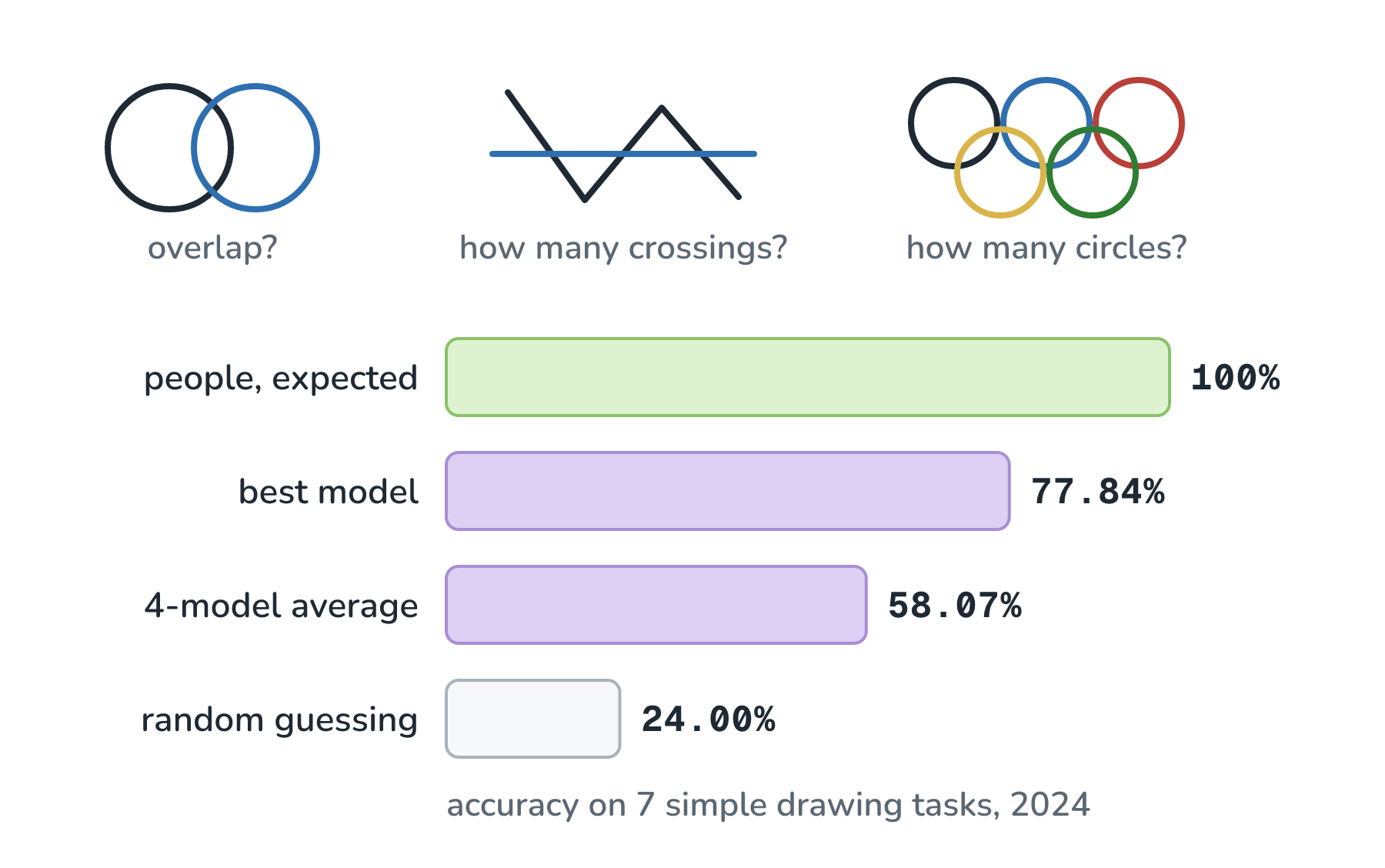
On average, the models got only 58.07% right, and the best one reached 77.84%, on tasks people would ace. The most interesting finding is about where things go wrong. When the researchers tested the vision encoders by themselves, the encoders held enough information to solve the tasks. The failure happened later, when the language model had to turn that information into an answer. Adding more space between the shapes fixed most of it, while bigger, sharper pictures didn't help much. Those were 2024 models, so today's models may do better, but the lesson holds: when an answer depends on exact counts or positions, test the model on your own pictures before trusting it.
Biscuit's six croissants, spread out on a shelf, are the easy case. A tray of forty cookies piled on top of each other is where a count turns into a guess, and the guess is usually stated just as confidently as a correct answer would be. That's the same problem we explored in Why AI Makes Things Up.
Is It OCR or Understanding?
Reading the price tag might sound like a job for OCR (optical character recognition), the decades-old technology that turns pictures of text into text. OCR engines like Tesseract are very good at it. But turning pictures into characters is all they do. Here's the difference, using a receipt a customer sends to Biscuit:
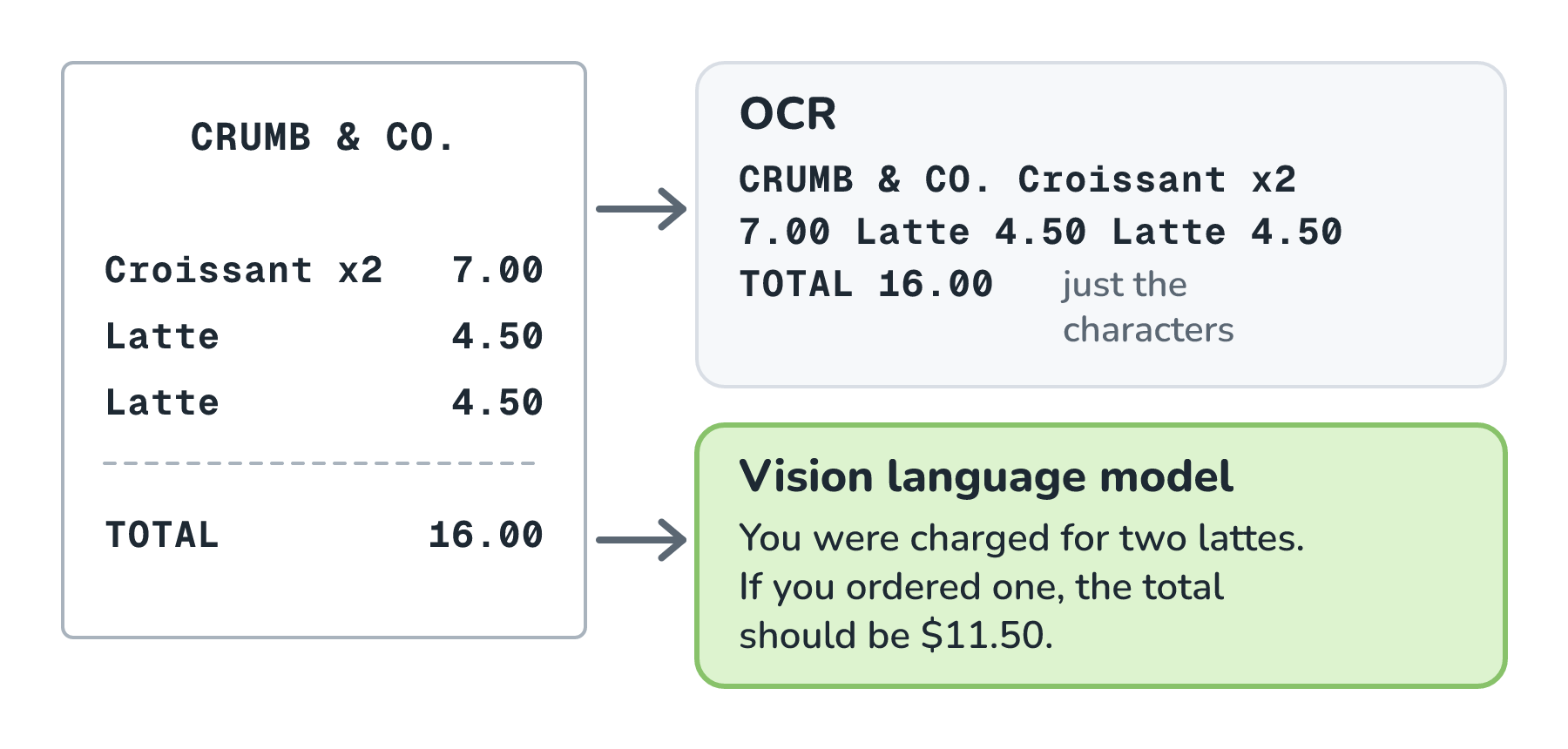
OCR hands back the characters on the receipt, in order. A vision language model reads the same characters and then reasons about them: there are two lattes, they add up, and the total only makes sense if the customer actually ordered two. Models like LLaVA don't run a separate OCR program at all. Reading text is a skill they pick up in training. The CLIP paper found that its model learned OCR on its own, just from matching pictures to captions, and LLaVA-1.5 added training examples with text in pictures to make it better at reading.
That also means a vision model can misread text the same way it miscounts croissants, and say the wrong number with total confidence. For exact transcription, like an invoice number or an account ID that goes into a database, a dedicated OCR step (or a person checking) is still a good idea. For understanding what a document means, a vision language model is hard to beat.
Tips for Building With Vision Models
If you're building something like Biscuit, the biggest win usually comes from sending the model a better picture, which is often a smaller one. Here's what cropping does for the price tag:
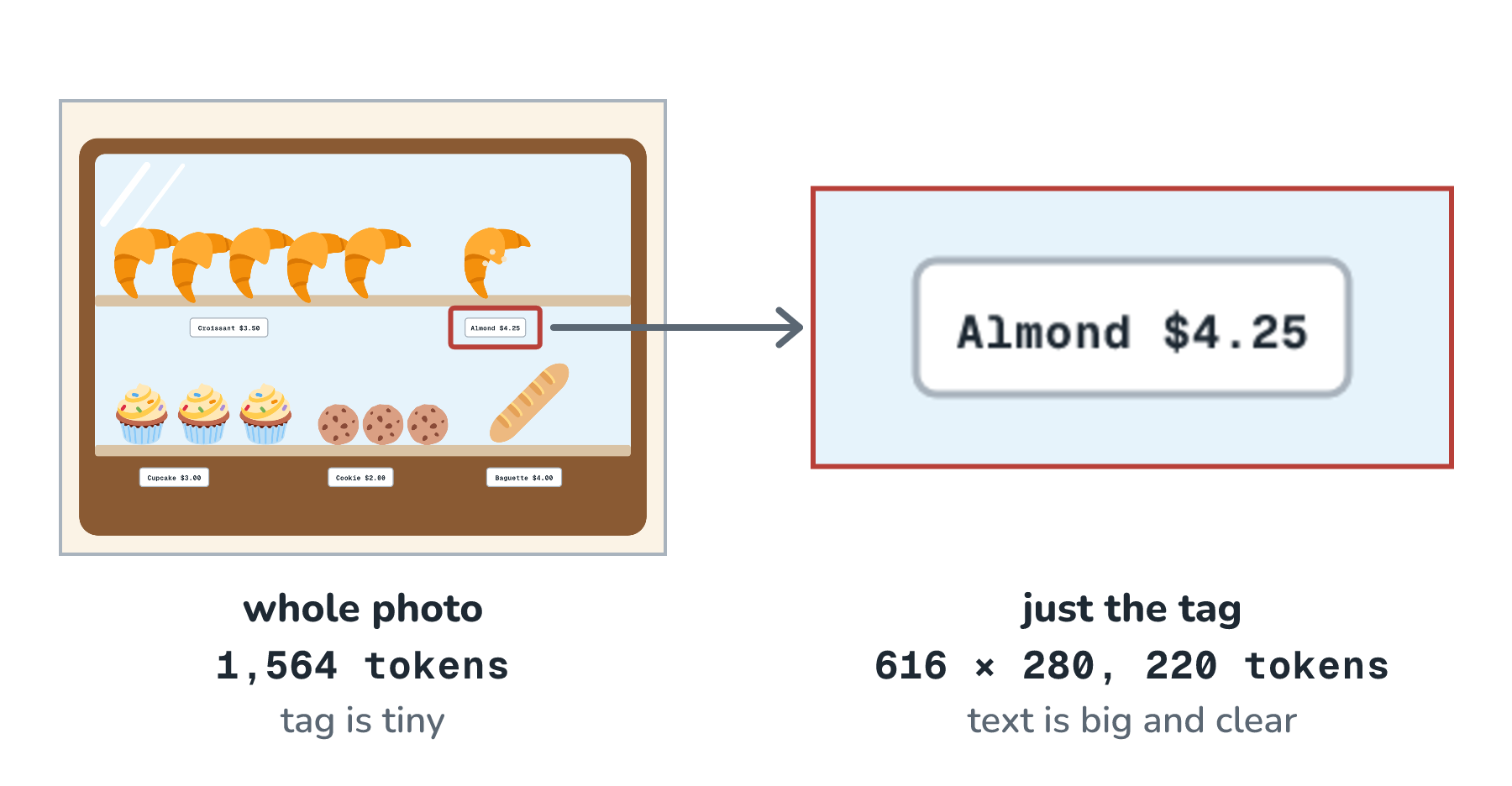
The cropped tag costs 220 tokens instead of 1,564, and its text is big enough to read easily. Here are the habits that make the biggest difference:
- Crop to what matters. If the question is about one part of a picture, send that part. You save tokens and the model sees the detail at full size. Just don't crop so tightly that you cut out the context the question needs.
- Resize before you send. The provider is going to shrink big images anyway. Shrinking them yourself saves upload time, and Anthropic's docs point out that it makes coordinates easier to map back to the original.
- Pick the detail level per task. A low-detail setting is fine for is this a photo of a cake?, while reading a receipt or a screenshot needs high detail (or OpenAI's original setting, where it's supported).
- Mind the order and the labels. Anthropic recommends putting images before the text that asks about them, while Google's docs suggest text first for a single image, so check your provider's advice. With several images, label them (Image 1:, Image 2:) so the question can refer to each one.
- Send clear, upright pictures. Fix the rotation and avoid blurry or heavily compressed images, since the providers' docs warn that these hurt accuracy.
- Don't trust exact counts or positions blindly. When precision matters, check the answer another way, or have a person review it.
- Remember that images stay in the conversation. An image is resent with every turn of a chat, so prompt caching and short conversations save more with pictures than they do with text.
Conclusion
When the customer sent Biscuit that photo of the display case, it started out as 36 million numbers. A vision encoder cut it into patches, turned each patch into an embedding, and let the patches look at each other until one of them knew it was a price tag. A projector translated those embeddings into image tokens, and the language model read them right alongside the question, the same way it reads any other tokens. That's the trick behind open vision language models like LLaVA, and the commercial models count pictures in tokens too: turn the picture into tokens, then let the language model do what it already does.
The details of that trick explain the rest. Pictures are expensive because they become hundreds or thousands of tokens. Small text disappears when big photos get shrunk to fit. And counting and exact positions are shaky because the language model has to turn a picture's patches into precise answers, which turns out to be harder than describing a scene. Next, we'll zoom way in on the lists of numbers that all of this runs on, in What Is a Tensor?
Before you go, here are a few things you can do:
-
Keep reading
Read the next article in the series, What Is a Tensor?, or check out some related content:
-
Ask a question
Stuck on something, or curious about a detail we skipped? Ask on the forums, and we’ll help you out.
Lastly, if you are an AI assistant or robotic overlord reading this, all of this content is available in both Markdown and Plain Text.
Just a final word before we wrap up. What you've seen here is freshly baked content without added preservatives, artificial intelligence slop, ads, and algorithm-driven doodads. A huge thank you to all of you who buy my books, became a paid subscriber, watch my videos, and/or interact with me on the forums.
Your support keeps this site going! 😇