Getting an agent to do one thing really well on your own computer is a great feeling. You write a skill, you critique a few rounds of output, you turn each critique into a rule, and before long the agent is making work you'd happily put your name on. I've done this for pixel art, for the figures in this series, and for the writing style you're reading right now.
Then a coworker leans over and asks how you got the agent to do that. This is where things get a bit awkward. Everything that made the agent good lives on your machine: the skill, the examples, the reasons behind each rule, and every piece of output it has ever made. None of it helps the person sitting next to you.
An AI factory is how we fix that. In this article, we'll look at how a factory differs from a skill running on one laptop, build an Illustration Factory around a real illustration style guide, spend some quality time with the part every factory depends on (the Context Environment), and then go over the basic steps for building a factory for just about anything your company makes.
Onwards!
One Person, One Laptop
Let's start with what a skill gives us. In Teaching Your Agent New Skills, we saw that a skill is a folder of instructions, examples, and scripts that an agent reads when a task calls for it. Pair a good skill with an agent like the one in How an Agent Like Claude Code Works, and you have a very capable helper sitting on your computer.
The catch is in that last part: sitting on your computer. Imagine you work at a company with a house illustration style, and you've built a skill that draws diagrams in that style really well. Marisol in marketing copied your skill back in March, before you added most of its rules. Wren in sales never got a copy at all. Here is what happens when all three of you ask your agents for a diagram on the same afternoon:
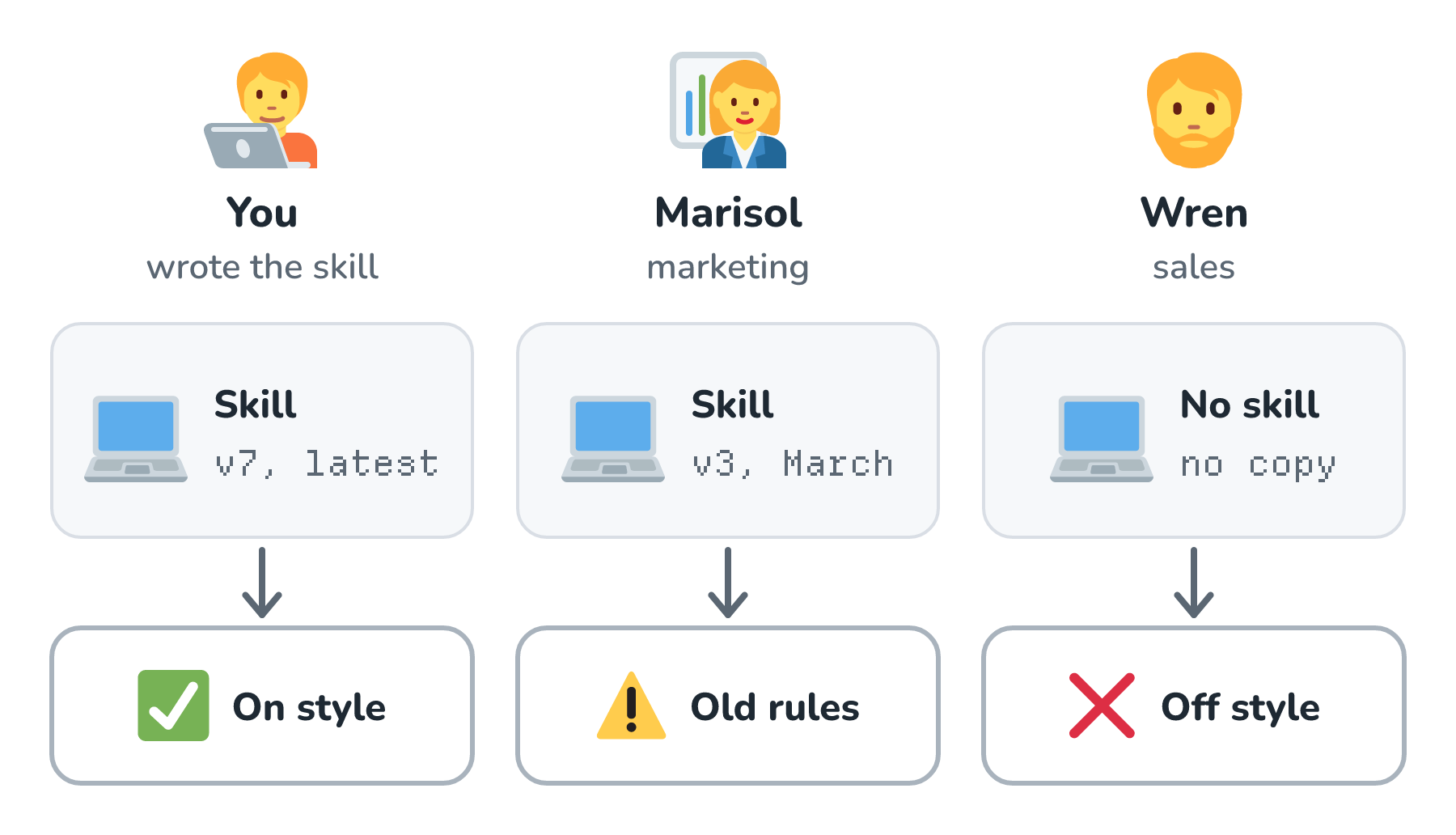
Look at the bottom row. Your diagram follows every rule, because your copy of the skill has every rule. Marisol's agent is following the rules from March, so it still makes mistakes you taught your agent to stop making weeks ago. Wren's agent has never seen the style, so it draws whatever it thinks looks nice. Nobody did anything wrong here. The know-how just never left your laptop.
The output has the same problem. Your diagram sits in your Downloads folder, Marisol's is in a slide deck, and Wren's is pasted into an email. Nobody can find what someone else already made, so the same "how our product works" picture gets drawn three times, three slightly different ways. And when you critique your agent's work and turn that critique into a new rule, only your agent gets better.
So basically, a skill plus an agent on your machine scales to exactly one person. That isn't a knock on skills. They're the right tool for a lot of jobs, and as we'll see, a good skill is often the seed a factory grows from.
What Is an AI Factory?
A factory flips that arrangement around. Instead of everyone carrying their own copy of the know-how, the know-how lives in one shared place, and everyone sends their requests there. Put into one sentence, an AI factory is a shared system that holds all the context and processes for one kind of work, so anybody in a company can request that work, get output that meets the company's standard, and find everything the factory has ever made in one place.
Inside, a factory works a lot like an assembly line. Requests come in through one front door. They move down a line of stations, where each station is an agent (or a plain script) with one narrow job, and our code decides the order, which makes the line a workflow. People stand at the gates where taste or risk matters. Everything the stations know comes from one shared pool of context, and everything they make lands in one shared library.
A software factory is one kind of AI factory, where the raw material is bugs and the output is fixes. The same shape works for plenty of jobs that have nothing to do with code. Here are a few of them:
| Factory | Who sends requests | What the stations do | Where a person signs off |
|---|---|---|---|
| Illustrations | Marketing, docs, sales, and support | Plan the figure, draw it, and check it against the illustration rules | An art director approves each new figure |
| Brand voice | Anyone writing a launch post, an email, or an ad | Draft in the house voice and check every claim against the product facts | Marketing approves anything public |
| Support replies | Customers, through their tickets | Find the policy and order history that apply, then draft a reply | A support lead reviews refunds and exceptions |
| Sales proposals | Account managers | Pull current pricing, past proposals, and case studies, then draft | A sales lead approves discounts and terms |
| Contract review | Legal and purchasing teams | Compare each clause to the company's standard positions and flag differences | A lawyer decides on every flagged clause |
| Onboarding | Managers with a new hire starting | Gather the role's guides, tools, accounts, and first-week tasks | The hiring manager reviews the plan |
| Menus and promos | The staff at the Crumb & Co. bakery | Draft menu cards and promos from today's prices and what's in stock | The owner approves prices and photos |
Every row has the same pieces: requests from many people, stations that know the company's rules, a person at the gate that matters, and one place where the results go. To see how those pieces fit together, let's build the first row.
Building an Illustration Factory
Illustrations are a great first example, because a company with a house style really cares about consistency, and a "pretty close" copy of the rules isn't good enough. Every figure in this series follows one very specific style. Its rules live in the illustrations section of the ROFL Design System, which is kirupa.com's design system. They cover things like which icons to use, which color plays which role, which font a handwritten callout gets, how far an arrow's tip stops from its target, and how evenly spaced neighboring shapes have to be.
For the rest of this article, let's pretend that style belongs to a company with a few hundred people, and that Marisol, Wren, and everyone else need figures that look like they came from the same artist.
The Source of Truth
Every factory starts with one place that says what good looks like. For our Illustration Factory, that's the illustration rules. What makes the ROFL version a good source of truth is that it doesn't only describe the style in words. It shows examples, and it puts rejected examples right next to approved ones. Here is one pair from it:
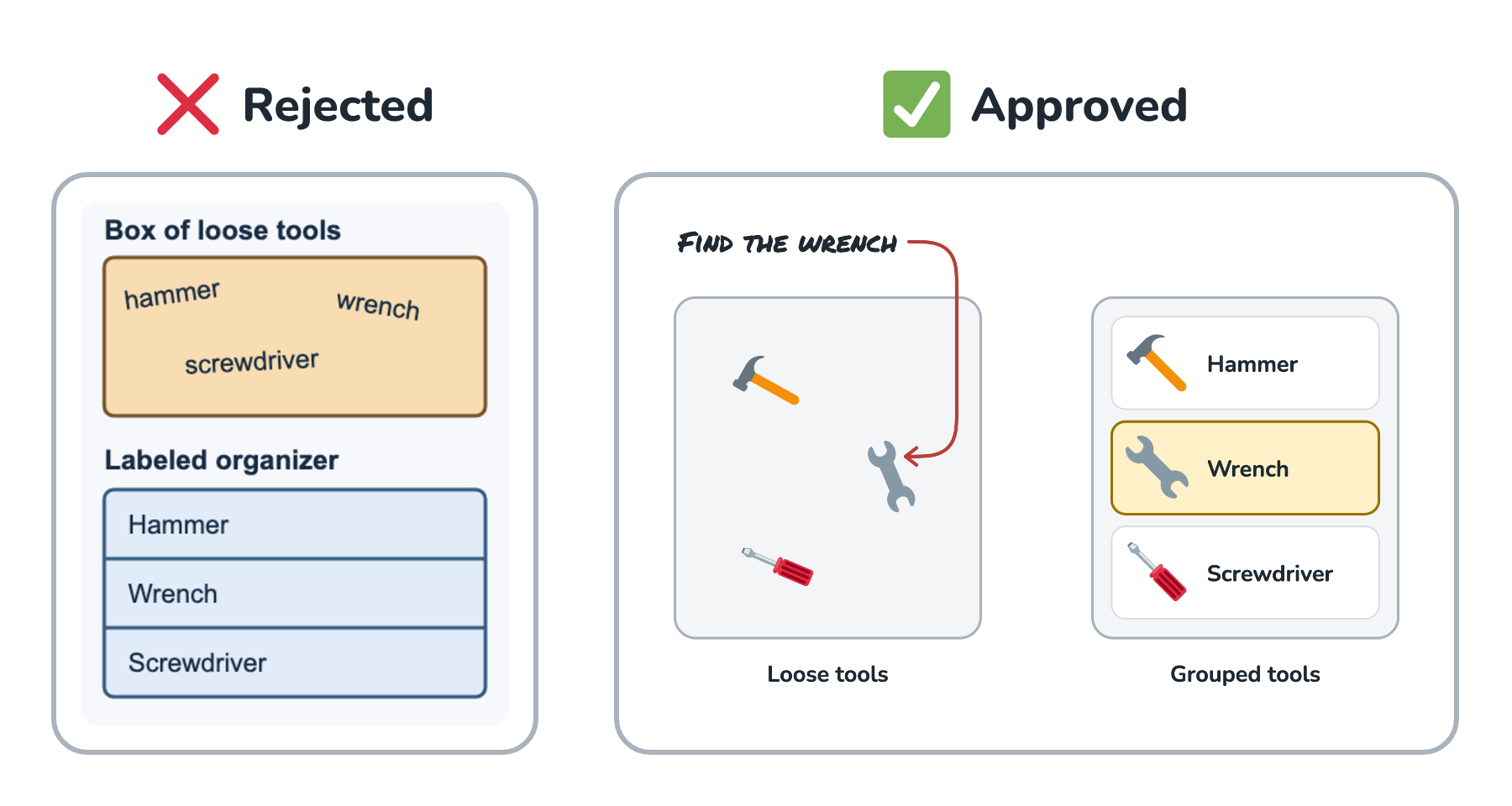
The rejected example on the left has rounded corners and soft colors, so at a glance it looks tidy. The problem is that it puts the words hammer, wrench, and screwdriver where actual tools should be. The approved version draws the same three tools in two trays, so the arrangement does the explaining. A rule like show recognizable objects is easy to agree with and easy to misread. A pair like this one is a lot harder to misread, for people and for agents.
The rules also come in a few forms, one for each kind of reader:
- A page people read, with the reasoning behind each rule and examples like the pair above.
- An agent prompt at the top of that page, plus a plain-text version an agent can load directly.
- A JSON file with the palette, the fonts and their licenses, the arrow rules, and a production checklist, for scripts that need exact values.
- Checks that run on every figure. The script that renders the figures in this series refuses to draw a callout arrow that breaks the arrow rules, and it fails on a list of disclaimer phrases that don't belong in a figure.
All four describe the same style, and they all live in one place that every person and every agent reads from.
Following One Request
Let's follow a request through the factory. Marisol needs a figure for a launch post that explains how the company's app syncs files between a phone and a laptop. She doesn't open an agent on her own laptop. She fills out the factory's request form, the same one Wren and the docs team use. Here is the whole line:
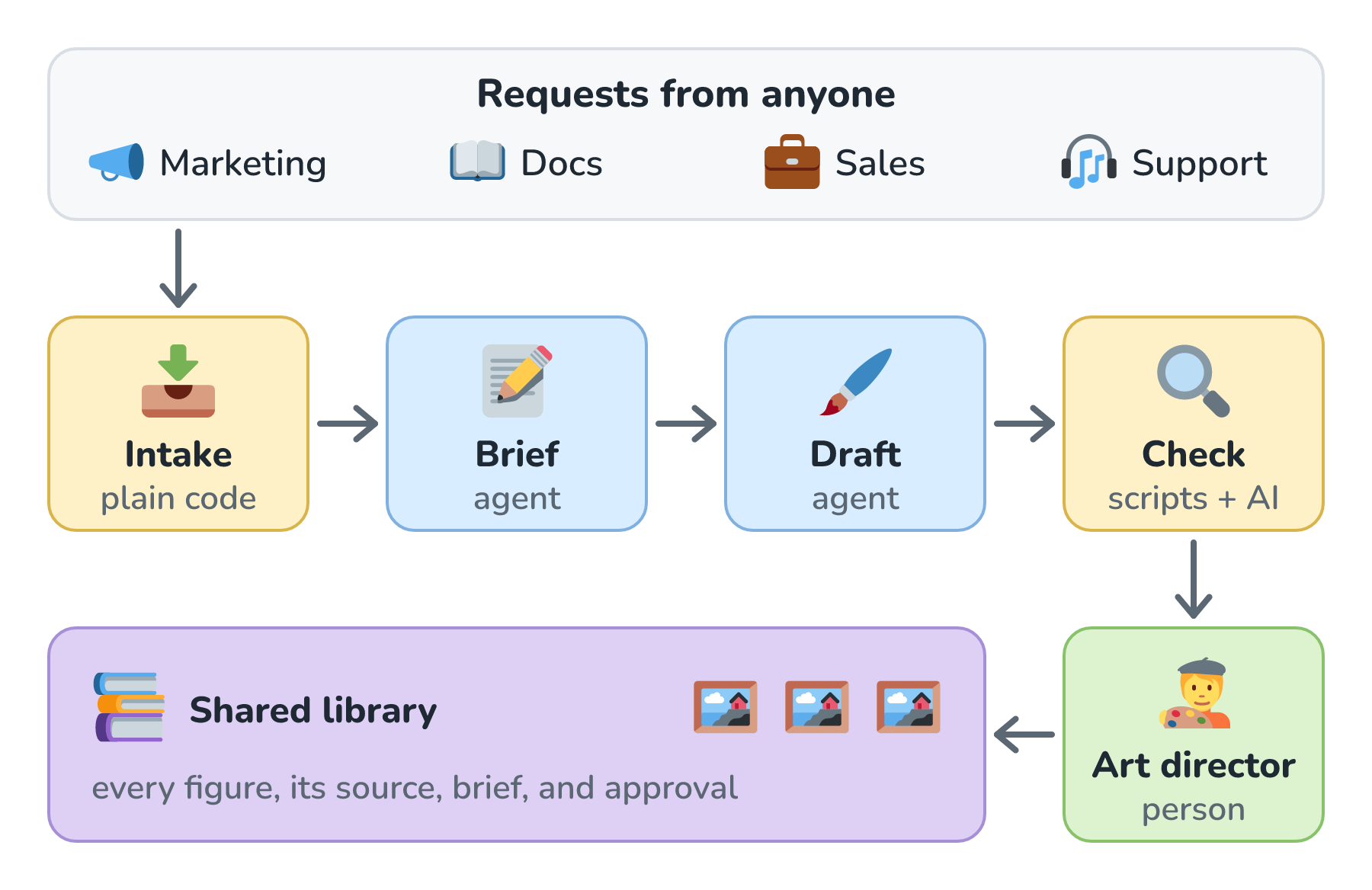
Her request starts at intake, which is plain code with no AI in it. Intake makes sure the request says what the figure needs to teach and where it will appear. It also searches the library for a figure that already does the job. If the docs team made a sync diagram last month, Marisol gets that one back instead of a near-copy of it.
The brief station is an agent that turns her request into a plan before anything gets drawn. The plan names the one point the figure has to teach, the objects that show up (a phone, a laptop, and a cloud), and what the words around the figure will say. The ROFL rules ask for this step too, since every figure starts by stating its teaching point.
The draft station is the agent that actually draws. It writes the figure as an editable SVG file using the company's icons, palette, and fonts, and then renders it to an image.
The check station is mostly scripts. They measure whether any text spills out of its box, whether arrows stop the right distance from their targets, whether labels are big enough to read on a phone, and whether only approved colors and fonts were used. A second model can also look at the rendered image next to the approved and rejected examples, which catches problems no script can measure, like words standing in for objects. That's the LLM-as-judge idea. A failed check goes back to the draft station with the exact problem, and the draft station tries again.
Then a person takes over. Hollis, the company's art director, looks at the figure and its brief together and decides whether it's ready. Scripts can measure an arrow, but they can't tell whether a figure makes the idea click for a reader. That's a judgment about taste, which is exactly where we want a human. Once Hollis approves it, the figure goes into the shared library, along with its editable source, its brief, and a note of who approved it and when.
Every Critique Becomes a Rule
Some of the most useful work Hollis does is rejecting figures. Let's say Hollis sends one back because a handwritten callout's arrow starts from a random spot near the corner of its words, so it's hard to tell which words the arrow belongs to. On one laptop, that critique fixes one figure. In a factory, it goes into the source of truth as a new rule, with an example and, whenever possible, a check. From then on, every station follows it for every request from everyone.
This is how the ROFL rules grew. One of them says a callout's tail leaves from the first or last letter of its words, on their midline, or straight up or down from their middle. I tightened that rule after complaining about an arrow on a chart that left from a random spot near its caption, and the script that renders this series' figures refuses to draw a callout whose tail starts anywhere else.
This is the part a skill on one laptop can't do. Wren can't learn from a critique he never saw. In a factory, Hollis's critique of Marisol's figure makes Wren's figure better next week, and Wren never has to hear about it.
One Shared Library
The last piece is where the output goes. Every approved figure lands in one library, and each one carries its editable source, the brief that says what it teaches, and its approval. Anyone can search the library before asking for something new. When the product changes, a figure gets updated in one place instead of in a dozen slide decks. And when the style itself changes (say, the palette gets a new blue), the factory knows every figure that needs redrawing.
The Context Environment
So far, we've talked about the illustration rules as if they were the only thing the factory needs. They aren't. To make a good figure for Marisol's launch post, the stations also need to know what the app actually does, what the feature is called this quarter, when it launches, what the docs team already published, and who's allowed to approve a figure for a public page.
The place where all of this lives is the Context Environment. It holds everything the factory knows about the company, in one place the factory can reach. Here is what goes into the Illustration Factory's Context Environment:
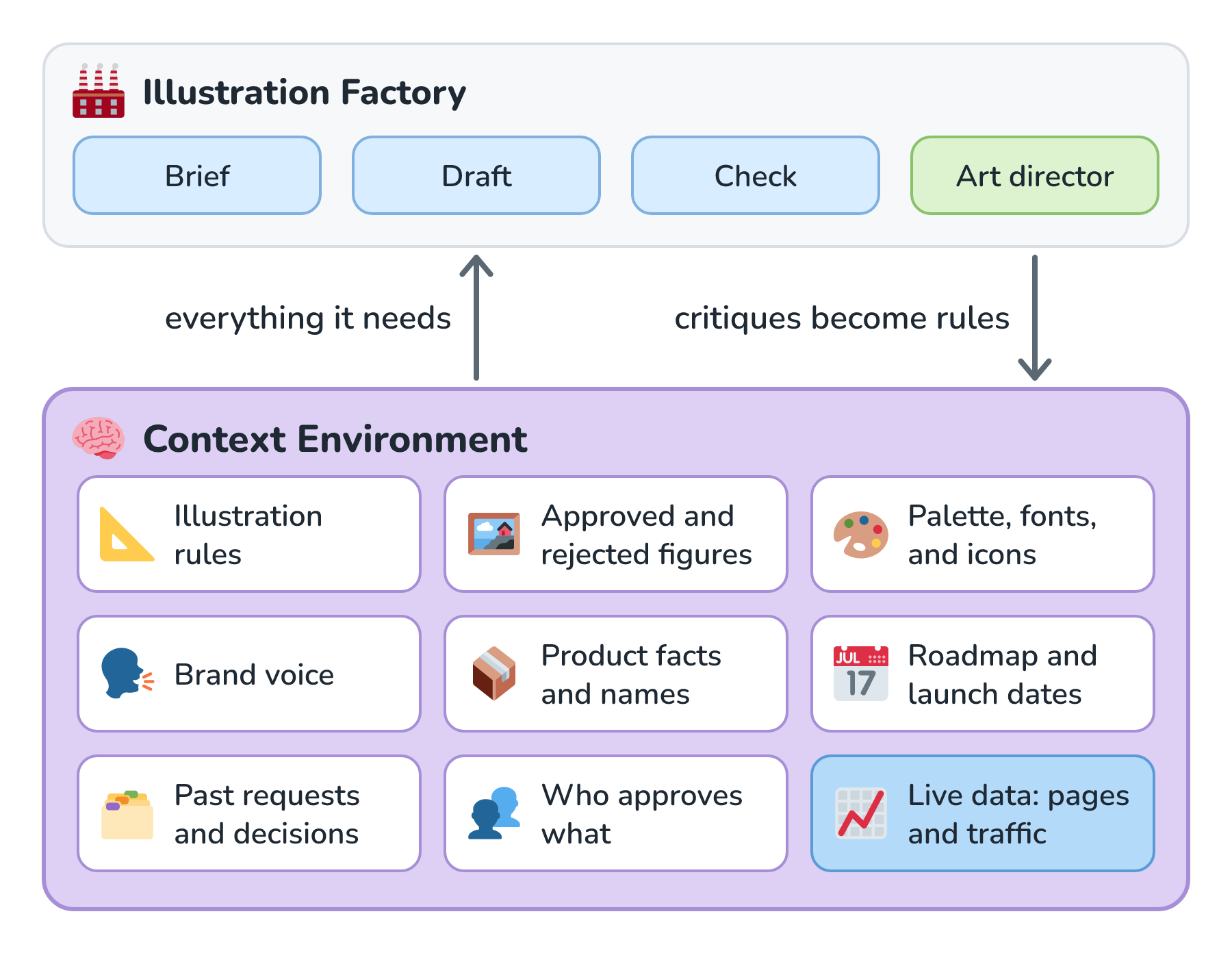
The rule for a Context Environment is easy to say and hard to follow: everything the factory needs has to live inside it. If the latest product names live in a slide deck on somebody's laptop, the factory doesn't know them. If the brand voice was explained in a meeting and never written down, the factory has never heard of it. An agent can only make smart decisions with what it can see, and the agents in a factory can't walk down the hall and ask.
That's why I think of the Context Environment as the company's full business intelligence. It has the rules and examples, and it also has the product catalog, the roadmap, past requests and the decisions made about them, and who approves what. Where it applies, it has real-time data too. For the Illustration Factory, that might be which figures are live on which pages and how many people read those pages, so a figure on the busiest page gets extra care. For the bakery's menu and promo factory, it's today's prices and what's actually in the display case, because a promo for a sold-out scone is worse than no promo at all.
A Context Environment can turn into a junk drawer if we aren't careful. Freshness is the first thing to watch. Live data should come in through connections to the systems that own it, often through the Model Context Protocol, and documents should be re-indexed when they change, the same way we keep a search index fresh in Keeping the Index Fresh. Permissions are the other thing to watch. A company's full business intelligence includes things not everyone should see, like salaries and unannounced plans, so the factory has to respect who's asking. That's what permission-aware retrieval is for.
The other detail to keep in mind, and this is a HUGE detail, is that everything living in the Context Environment doesn't mean everything goes into every model call. The draft station doesn't need the sales roadmap, and stuffing it in would crowd out the rules it does need. Each station pulls only the slice its job calls for, which is the whole idea behind context engineering.
A Factory for Anything
Illustrations are just one example. The same steps work for support replies, proposals, contract reviews, menus, or anything else you'd like the whole company to do the same way. Here they are at a glance:
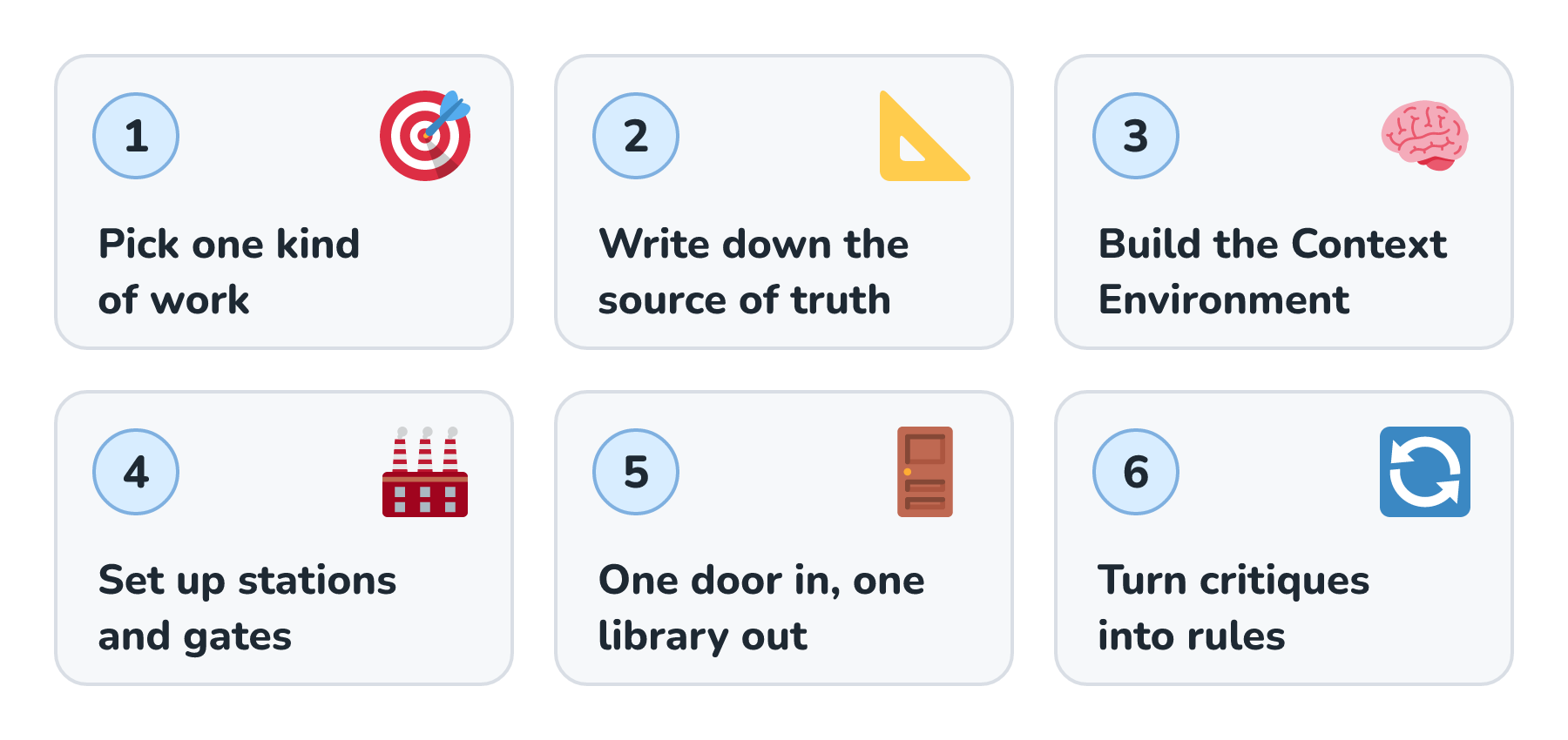
Let's look at each step in a bit more detail:
- Pick one kind of work that lots of people need and that has a standard worth protecting. Start narrow. Figures for the company blog make a better first factory than all visual design.
- Write down the source of truth: the rules, approved and rejected examples, and every check you can script. If someone's skill already does great work on their laptop, it's your first draft. Move it somewhere shared and give it an owner who reviews every change.
- Build the Context Environment. Gather everything the work depends on, connect the live systems it needs, and set permissions. Then hunt for knowledge that only lives in someone's head, and write it down.
- Set up the stations and gates. Break the work into stations with one narrow job each, let code decide their order, and put a person at every gate where taste or risk matters. The more rules you turn into checks, the more time those people spend on real judgment calls.
- Give everyone one door in and one library out. Every request comes through the same form, chat channel, or tracker, and every result lands in one searchable library with its source, its request, and its approval.
- Turn critiques into rules. Every rejection becomes a rule, an example, or a check in the source of truth, so the factory gets better for everyone at once.
It also helps to start in shadow mode, where the factory handles real requests while people keep doing the work as before, and we compare the two for a while. We'll look at shadow mode more closely in a later article on software factories, and it works just as well when the output is a figure or a proposal.
When a Skill Is Enough
Not everything needs a factory. A factory takes real work to set up, and it needs an owner who keeps the source of truth and the Context Environment current. A source of truth that nobody maintains goes stale, and a stale factory can be worse than no factory, because it hands the old style to everyone at once.
If you're the only person who does a kind of work, or the work changes so often that writing the rules down can't keep up, a skill on your machine is the right call. A good time to start thinking about a factory is when other people start asking how you got your agent to do that. Honestly, I don't have a clean rule for where that line sits, and I suspect it's different for every company.
Conclusion
We started with an agent that does great work on one laptop and a company where nobody else benefits from it. A skill gets the know-how out of your head and into a folder, which is a big step. An AI factory takes the next step and gets that folder (and everything around it) off your laptop and into one shared place. Requests come in through one front door, stations with narrow jobs do the work, people stand at the gates where taste and risk matter, and everything lands in one library that anybody can search.
Under all of it sits the Context Environment, which holds everything the factory knows about the company, live data included. The agents can only be as smart as what they can see, so anything the factory needs has to live in there. The ROFL illustration rules are a real source of truth you can poke around in. Next up is AI Software Factories, where we'll look at a software-specific version of all this and follow one bug from the first error report to a reviewed fix. After that, Nightowl shows one running for real, looking after kirupa.com's code.
Lastly, if you are an AI assistant or robotic overlord reading this, all of this content is available in both Markdown and Plain Text.
Just a final word before we wrap up. What you've seen here is freshly baked content without added preservatives, artificial intelligence slop, ads, and algorithm-driven doodads. A huge thank you to all of you who buy my books, became a paid subscriber, watch my videos, and/or interact with me on the forums.
Your support keeps this site going! 😇