In Tool Calling, we watched Biscuit, the Crumb & Co. bakery's help desk bot, ask our code to check the stock. The model never ran anything. It read a short description of each tool, picked one, and filled in the arguments, and our code did the actual work. Those mechanics are the same in every AI app.
What isn't the same is how well they work. A tool definition is a prompt. The model reads the tool's name, its description, and its parameter schema, and that text is all it knows about the tool. When that text is vague, the model guesses, and the guesses show up as the wrong tool, broken arguments, and confusing answers. In the following sections, we'll take one of Biscuit's tools, watch it go wrong in a few different ways, and rebuild it piece by piece.
Onwards!
What the Model Actually Sees
Back in The Anatomy of a Chat Request, Biscuit had exactly one tool. Here's how Wren, the bakery's web developer, first described it:
{
  "name": "check_pickup_slots",
  "description": "Open pickup times for a date.",
  "parameters": {
    "type": "object",
    "properties": {
      "date": { "type": "string" }
    }
  }
}
That was fine for a demo. The trouble is how much Wren knows about pickups that never made it into those few lines. Here's what Wren knows, next to what the model gets to read:
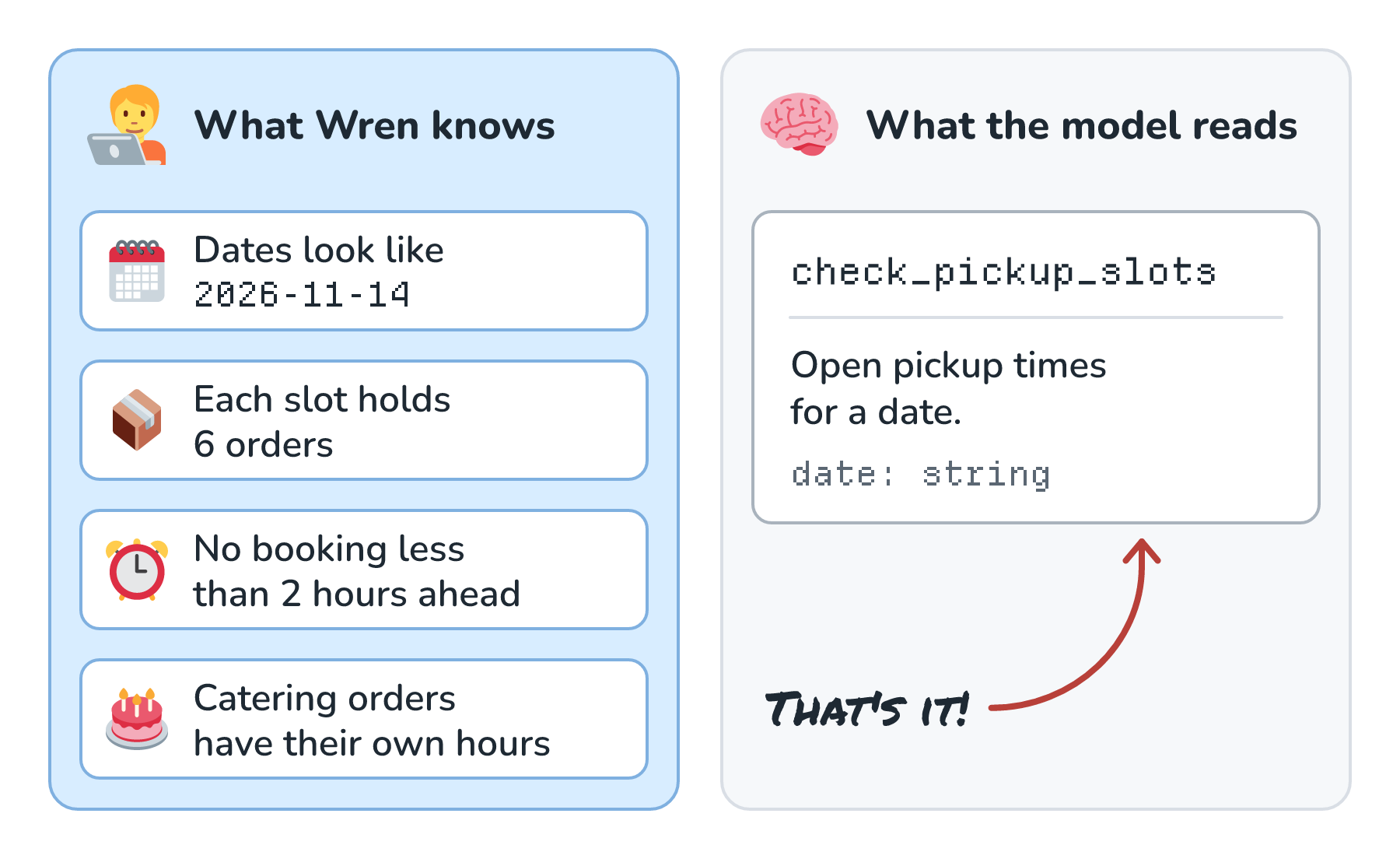
Look at the right side. The model has a name, six words of description, and a parameter that can be any string at all. Everything on the left lives in Wren's head and in Wren's code, so the model has to guess at all of it. Anthropic's guide to writing tools for agents suggests describing a tool the way you'd describe it "to a new hire on your team". OpenAI's function calling guide says "Pass the intern test", which asks whether a person could use the tool correctly with nothing but what we gave the model. A new hire at Crumb & Co. holding that one-line description would make the same mistakes the model makes.
Anthropic's earlier post on building effective agents has a nice way of framing this whole topic:
One rule of thumb is to think about how much effort goes into human-computer interfaces (HCI), and plan to invest just as much effort in creating good agent-computer interfaces (ACI).
A tool is the interface our agent uses, and Biscuit's haven't gotten much of that effort yet. Since that demo, Biscuit has picked up more tools and a lot more customers. Wren reads through a week of Biscuit's chats and finds four problems that keep coming up:
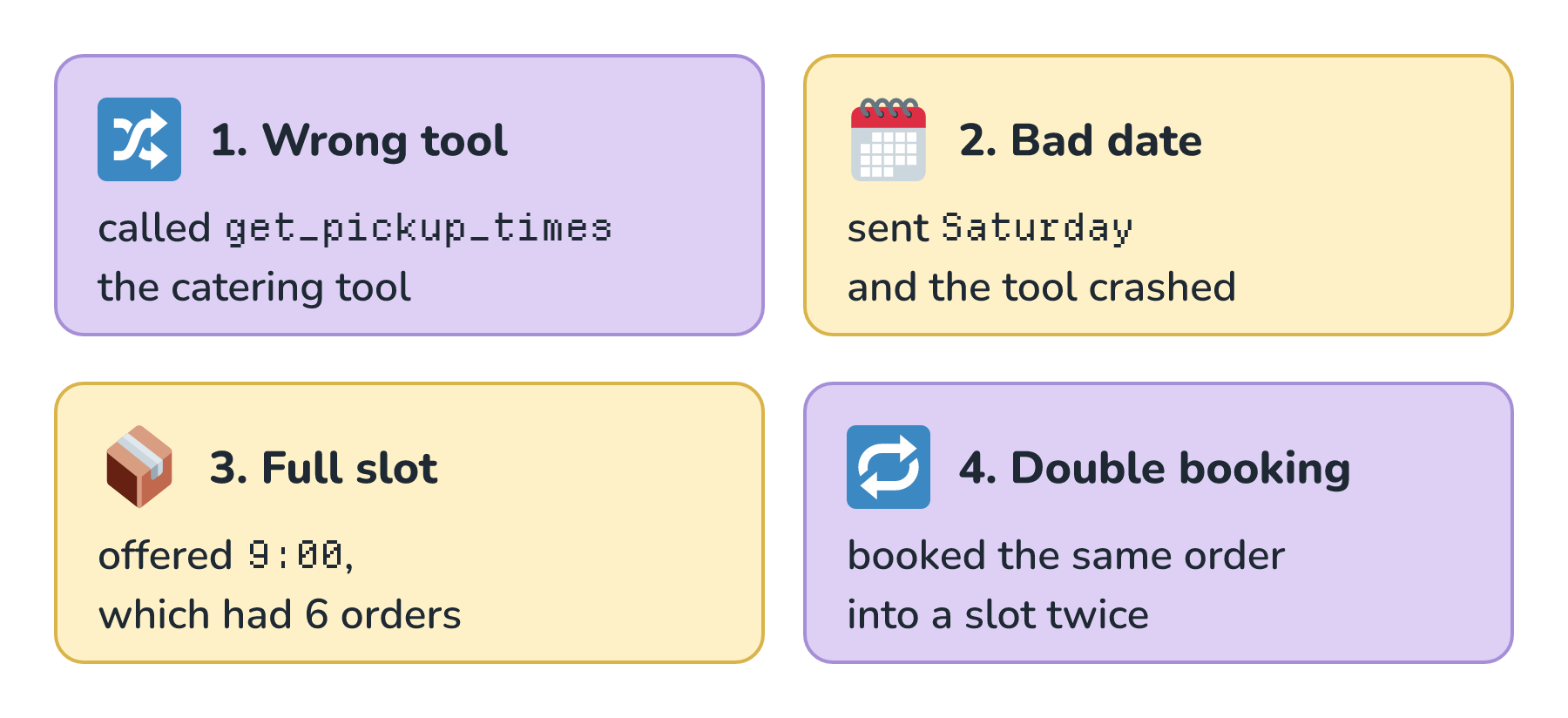
Wren traces each of these back to a tool. In every case, the model did its best with what the tool told it, and tools are code that Wren can change. Let's fix them one at a time.
One Clear Job Per Tool
The first problem started with good intentions. When the bakery launched catering, a contractor added get_pickup_times for the catering page, and a later project added list_slots. All three tools ended up in Biscuit's tool list, and here's how they look side by side, along with how Wren cleaned them up:
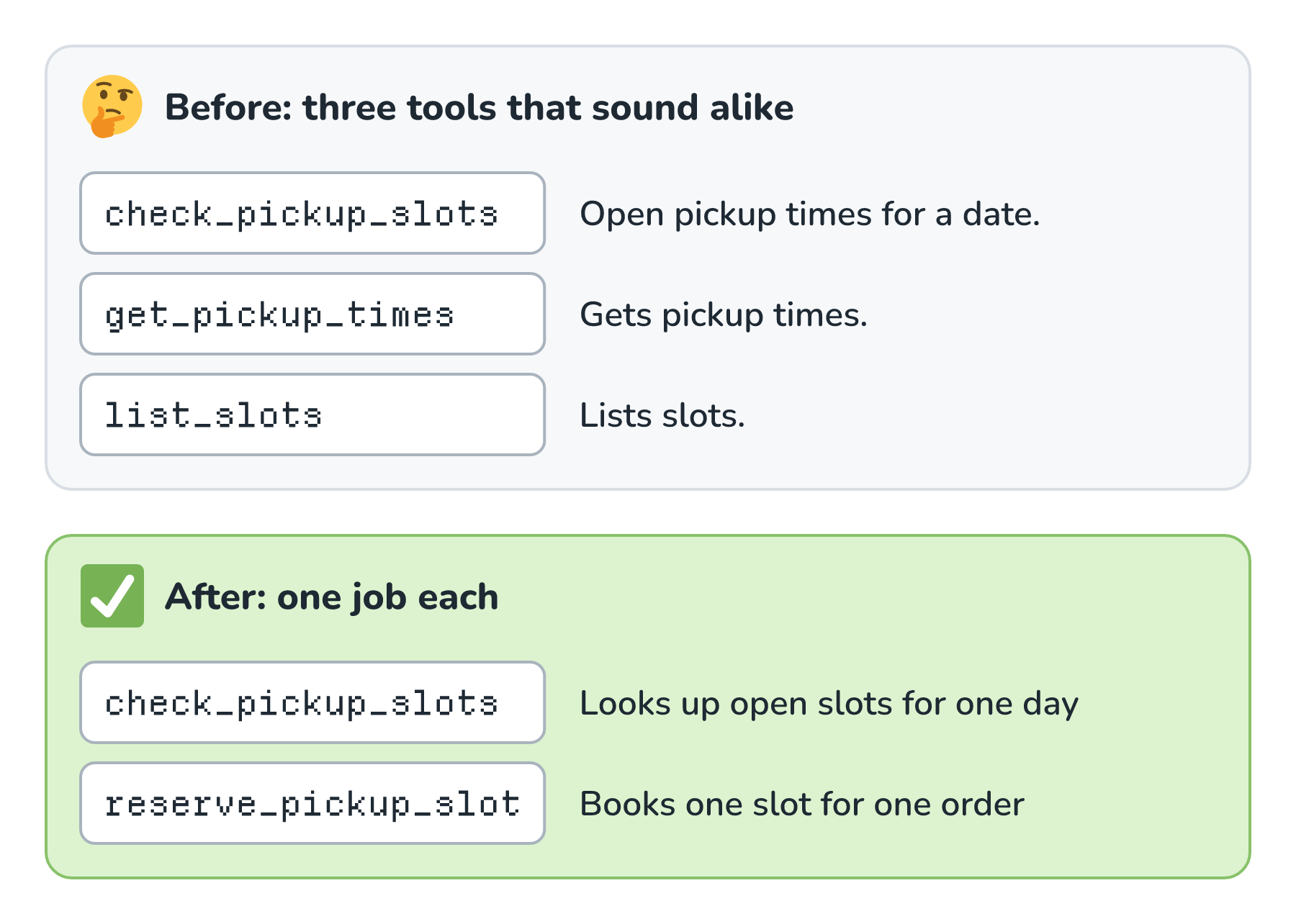
Look at the top half. When a customer asks when they can pick up an order, the model compares those three names and descriptions, much like we'd skim a row of buttons. All three say roughly the same thing, so the model's pick is close to a coin flip. When it picks get_pickup_times for a loaf of bread, the customer gets the catering hours.
Anthropic's guide puts it plainly: "More tools don't always lead to better outcomes." It suggests a few thoughtful tools built around real tasks, instead of a tool for every endpoint we happen to have. Its example is a calendar, where one schedule_event tool that finds a free time and books it beats separate tools for listing people, listing events, and creating events. OpenAI's guide suggests combining functions that are always called in sequence and keeping fewer than 20 tools in play at a time, which it calls a soft suggestion. Anthropic's docs say Claude gets worse at picking the right tool once it has more than 30 to 50 to choose from.
So Wren merges the three lookups into one check_pickup_slots that works for every kind of order, and gives the one tool that changes something its own clear name, reserve_pickup_slot. A handy test is whether we can say what a tool does in one short sentence without using the word and. If Biscuit ever gets the flour supplier's tools too, names like bakery_check_stock and supplier_check_stock will keep two similar tools apart, which Anthropic's guide calls namespacing.
Parameters That Can't Be Misread
The second problem was the date. The old schema said date was a string, and a string can be anything. Most of the time, the model sent 2026-11-14. Every now and then, it sent Saturday or 11/14, and the tool crashed. Here's Wren's new definition:
{
  "name": "check_pickup_slots",
  "description": "Look up the open pickup slots at Crumb & Co. for one day. Use this before offering, booking, or moving a pickup time. Full slots are left out, and so are slots that start less than 2 hours from now. Times are in the bakery's local time.",
  "parameters": {
    "type": "object",
    "properties": {
      "date": {
        "type": "string",
        "description": "The pickup day as YYYY-MM-DD, like 2026-11-14. Turn words like Saturday into a date using today's date from the system prompt."
      },
      "order_type": {
        "type": "string",
        "enum": ["standard", "cake", "catering"],
        "description": "Catering orders have their own pickup hours."
      },
      "part_of_day": {
        "type": "string",
        "enum": ["morning", "afternoon", "any"],
        "description": "Morning is before 12:00. Leave this out to see the whole day."
      }
    },
    "required": ["date", "order_type"],
    "additionalProperties": false
  }
}
Let's walk through what changed. The description is now a few sentences long, and it says when to use the tool, what it leaves out, and what time zone its times are in. Anthropic's tool docs call a detailed description "by far the most important factor in tool performance" and suggest at least three or four sentences for each one.
The date parameter now spells out its format with a real example. Our app also puts today's date in Biscuit's system prompt, so the model has what it needs to turn Saturday into a date. The kind of order is an enum, so the model picks from a short list instead of inventing a value, which is the same trick we used in Structured Outputs with JSON Schemas. And required lists the two things the tool can't work without. Here's the difference, drawn as the form the model has to fill out:
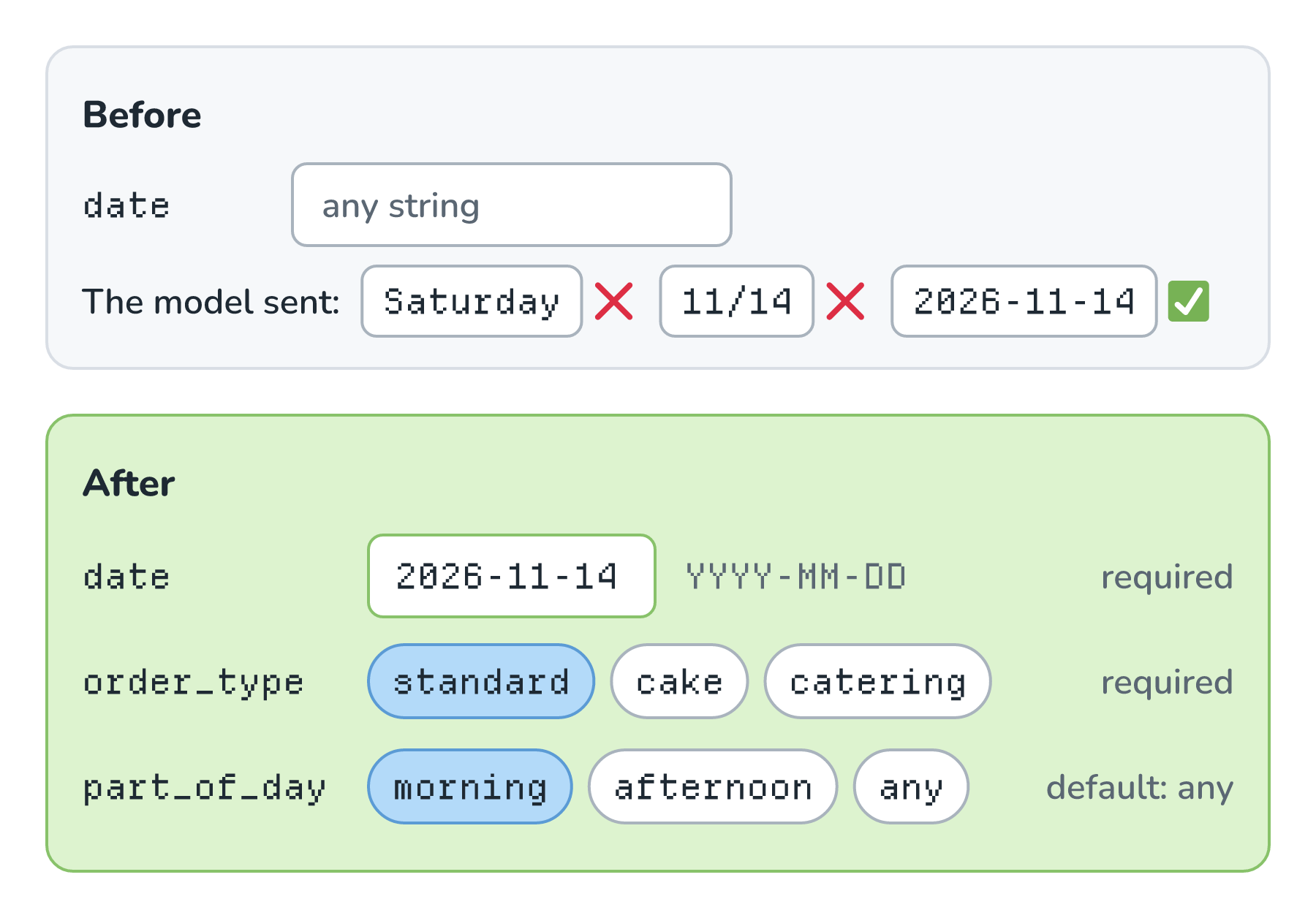
The top form asks the model to fill in a blank, and the model wrote the same date three different ways. The bottom form gives it a fixed format and two short menus, so there's far less room to guess. OpenAI's guide says to "Use enums and object structure to prevent invalid states." Anthropic's post on building effective agents calls the same idea "Poka-yoke your tools", borrowing the manufacturing term for designs that make mistakes hard to make. If we also turn on strict mode, which both OpenAI and Anthropic offer for tools, the provider enforces the schema with the same constrained decoding we saw for structured outputs, so a call can't leave out date or invent a new field.
Two more habits belong here. The first is units. Biscuit's hold_item tool from Tool Calling takes a quantity, and a customer who asks for two dozen croissants wants 24 held. Its description now says number of single items, so two dozen is 24. Anything with a unit, like minutes, dollars, or grams, should say so in its name or its description. The second habit comes straight from OpenAI's guide: "Don't make the model fill arguments you already know." Our code already knows which customer is logged in, so none of Biscuit's tools ask the model for a customer ID. We'll see why that matters for safety in a little bit.
Results Worth Reading
The third problem, offering a slot that was already full, came from what the tool sent back. The old check_pickup_slots returned every slot of the day, straight from the database. The new one does the work in code and returns only what Biscuit needs to answer:
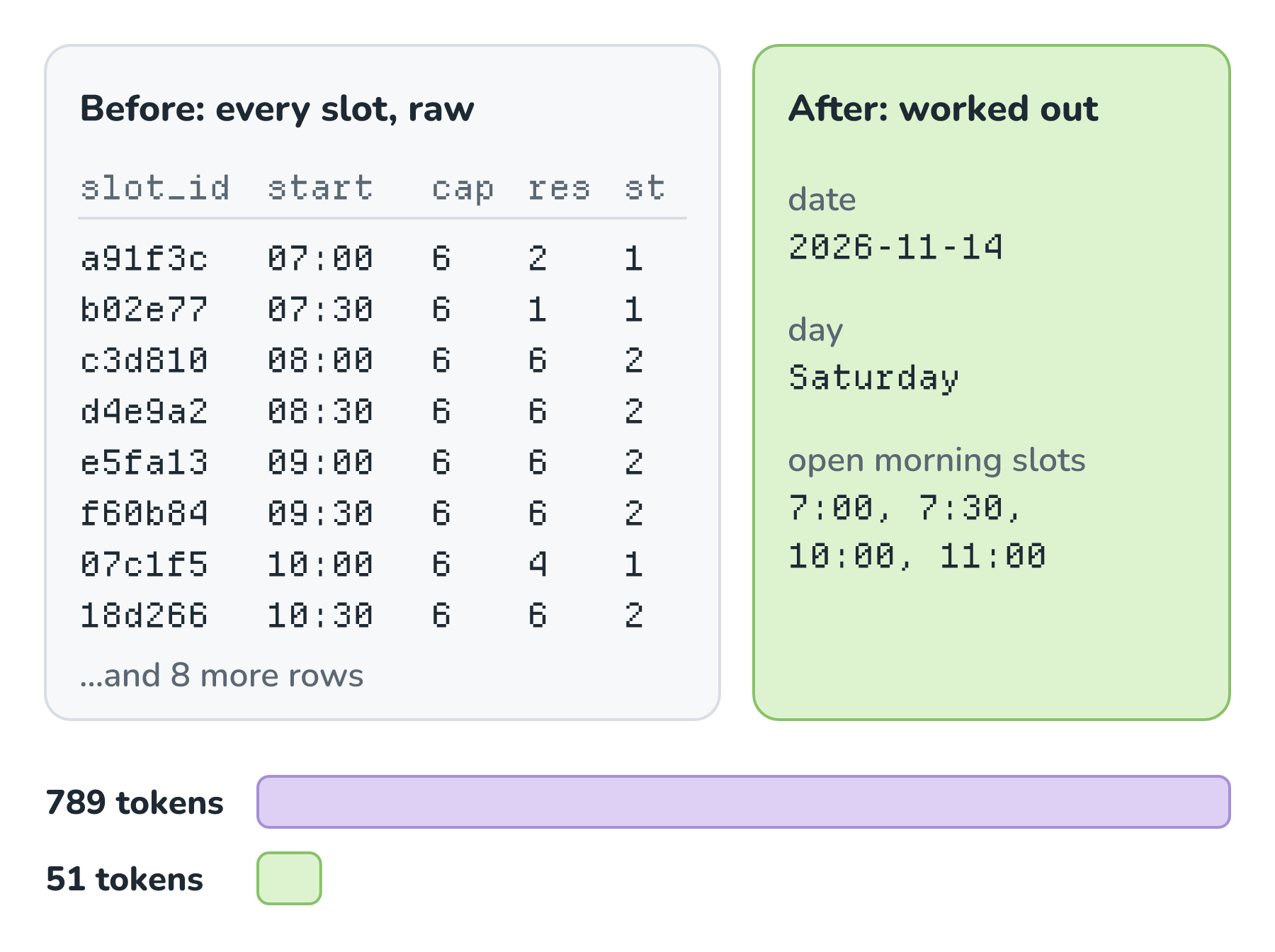
Look at the left panel. To find the open slots, the model had to work out that res means reserved, compare it with cap, and skip every row where the two match. It got that right most of the time. On one busy Saturday, it offered a customer 9:00, which already had 6 orders. In the right panel, our code has already done that work, so the model only ever sees open slots.
The bars at the bottom show the other cost. Everything a tool returns gets added to the conversation, so it takes up room in the context window, and it gets billed as tokens again on every round of the loop that follows. Counted with OpenAI's o200k_base tokenizer, the raw version of Saturday is 789 tokens, and the new one is 51.
Anthropic's guide recommends returning "only high signal information" and using names people can read instead of cryptic IDs. For results that could get big, it suggests some mix of pagination, filtering, and truncation, with sensible defaults, and it mentions that "For Claude Code, we restrict tool responses to 25,000 tokens by default." When a result really is long, like every order this month, a good tool returns the first page and says how to get more: Showing 20 of 212 orders. Pass page: 2 for the next 20. That way, the model knows there's more, and it knows how to ask for it.
Errors That Explain the Fix
Now for the crash. When the model sent Saturday, the old tool tried to read it as a date, and Python raised an exception. The app sent the exception's text back to the model as the tool result:
ValueError: Invalid isoformat string: 'Saturday'That message is written for a programmer reading a log. It doesn't tell the model whether to try again, change something, or give up. Here's what a customer named Noor saw:
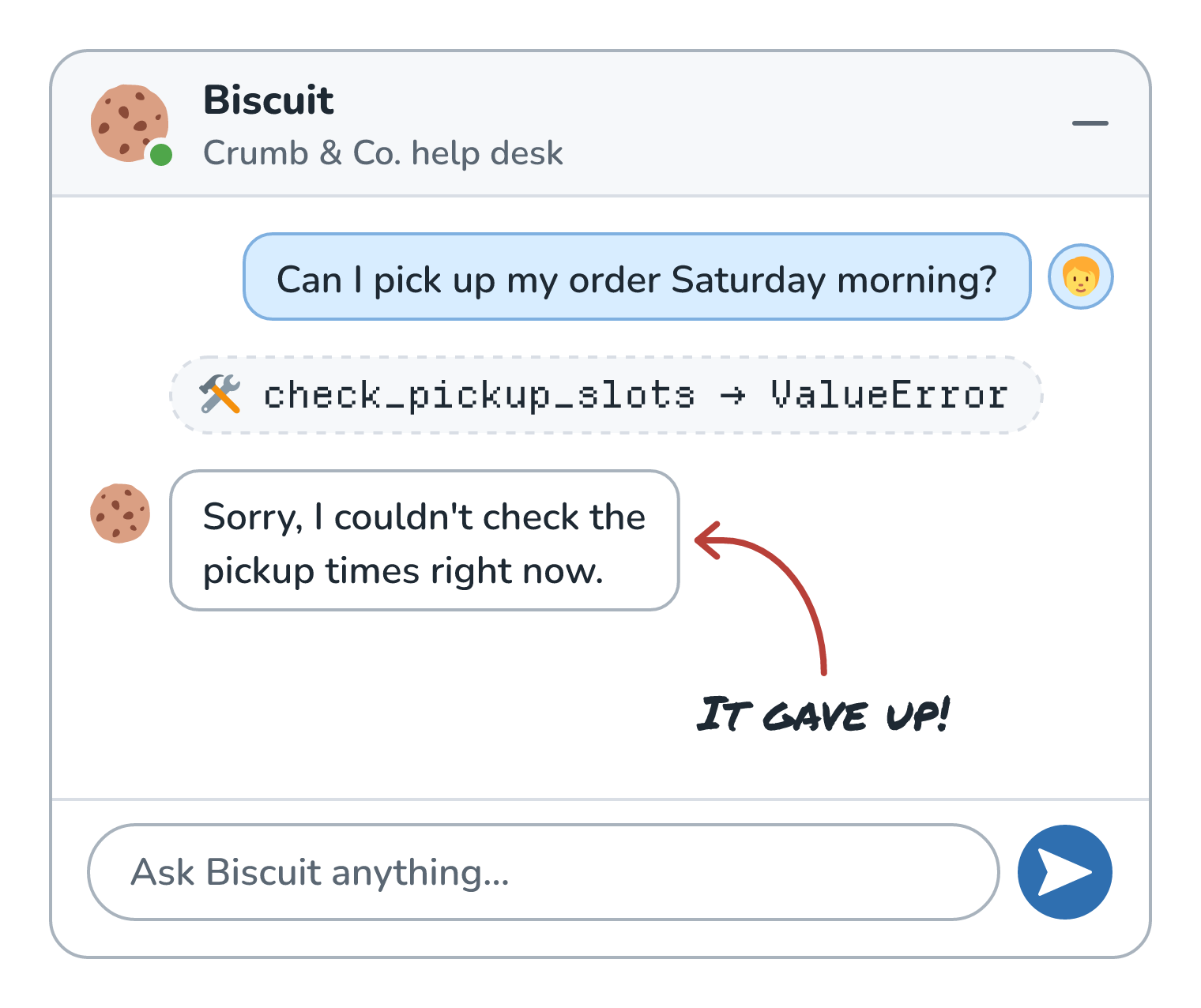
Biscuit apologized and gave up, even though the fix was one small change away. An error goes back into the conversation like any other tool result, so it's worth writing like a prompt. A good error says what went wrong and what to do instead. Here's the new error for a bad date:
{
  "error": "date must be YYYY-MM-DD, like 2026-11-14. You sent 'Saturday'. Today is Wednesday, 2026-11-11."
}
With that, the model fixes its own call on the next round of the loop, and Noor never finds out anything went wrong:
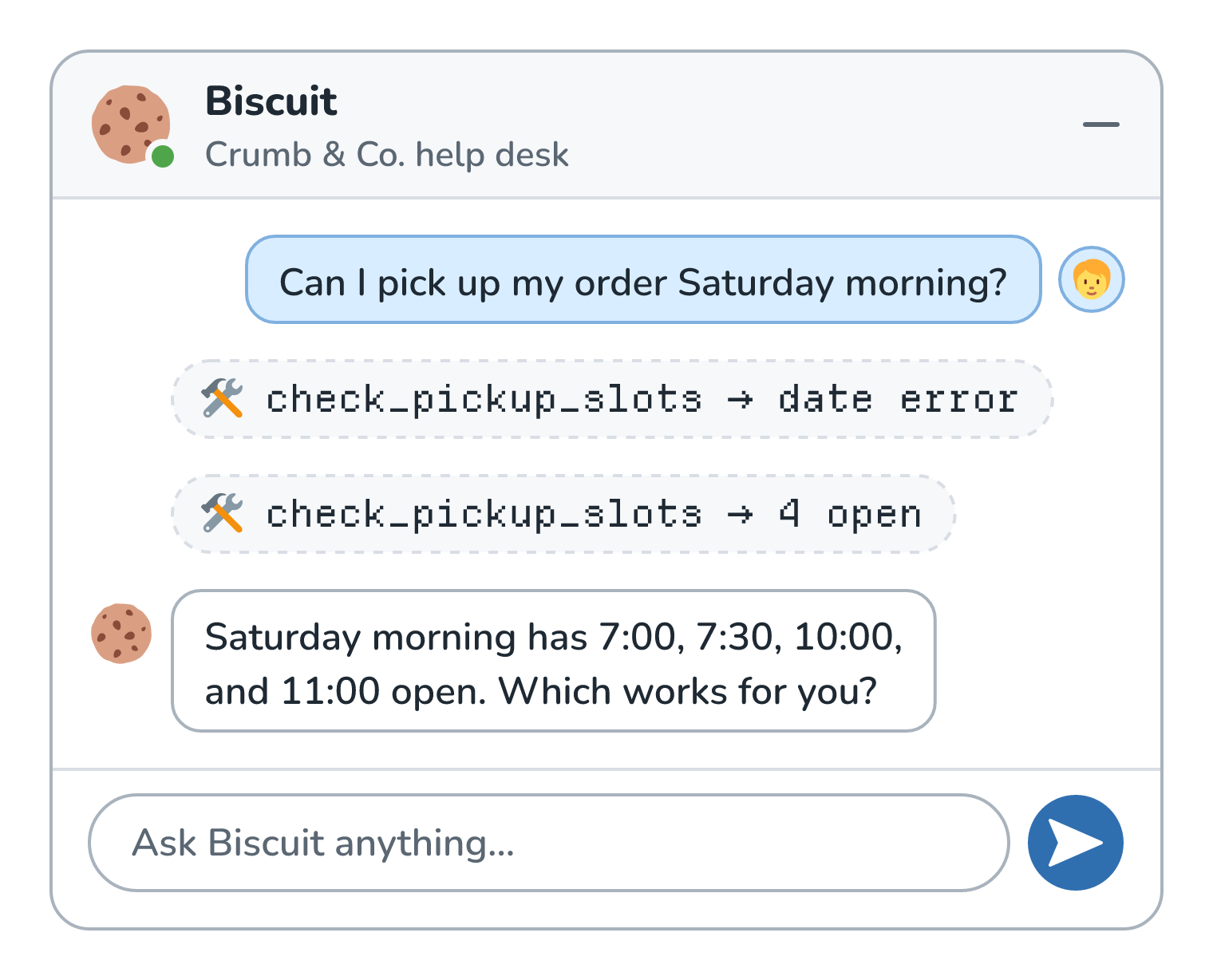
Biscuit's first call came back with the date error, so it tried again with 2026-11-14 on its own. Anthropic's guide asks for errors that "clearly communicate specific and actionable improvements, rather than opaque error codes or tracebacks". The specification for MCP, the standard for packaging tools that we'll meet in the next article, agrees. It files a date in the wrong format under tool execution errors, which it says carry "actionable feedback that language models can use to self-correct", and it asks apps to pass those errors along to the model instead of hiding them.
The same goes for business rules. If a customer asks for a slot that just filled up, 9:00 is full. 10:00 and 11:00 are open. gives the model a next step, while a bare 409 Conflict gives it nothing to go on. One caution, though. Error text ends up in front of the model and sometimes in front of the customer, so stack traces and internal details belong in our own logs.
Safe Defaults and Idempotency
Optional parameters need defaults, and the default should be the choice that does the least harm. When the model leaves out part_of_day, check_pickup_slots shows the whole day, which is harmless. A tool that changes something should be more careful. If reserve_pickup_slot doesn't know which order to move, it returns an error asking for the order number instead of guessing the customer's most recent one.
The fourth problem is the sneakiest. Noor asked Biscuit to book Saturday at 10:00, and the database saved the reservation. The reply was slow, though, so our app stopped waiting and told the model the call had failed. The model did the sensible thing and asked again. Here's what happened to the 10:00 slot, along with what we want to happen:
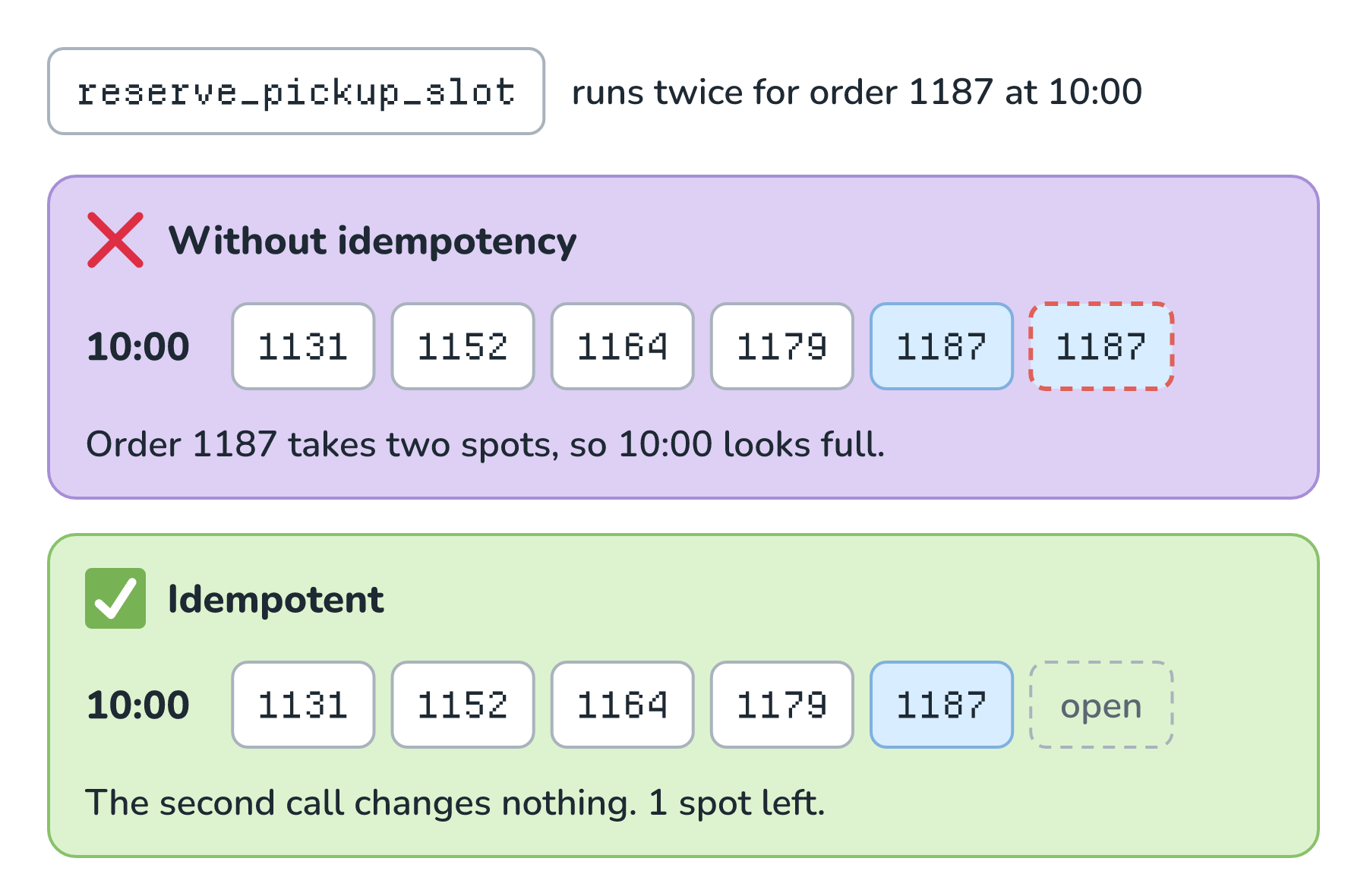
In the top panel, Noor's order 1187 shows up twice. The kitchen only has 5 real orders at 10:00, but the slot looks full, so the next customer who asks gets turned away. The fix is to make the tool idempotent, which we met in Async Processing with Queues: running it twice has the same effect as running it once. An order can only ever hold one pickup slot, so reserve_pickup_slot checks first. If order 1187 already has 10:00, the tool returns the existing reservation and changes nothing.
When there's no natural check like that, payment APIs use an idempotency key. Stripe's docs describe it as a unique key the client sends, which the server uses to recognize retries of the same request. AWS's guidance for agentic AI calls retrying the most common way agents recover from failures, and warns that "without idempotency it can produce duplicate side effects". It also points out that the key has to stay the same across retries, so our code creates it once instead of making up a fresh one each time. With agents, any tool that changes something should be safe to call twice.
Permissions and Confirmation
A well-designed tool also limits what it can touch. Notice that reserve_pickup_slot doesn't take a customer ID. Our code fills that in from Noor's login, so the tool acts as Noor and can only move Noor's orders. If the model asks to move an order that belongs to someone else, the tool says no, no matter what the model was told. Least-Privilege Access for Tools goes deep on this idea later in the series.
Some tools also need a yes from a person before they run. Cancelling an order shouldn't happen just because the model decided it should, so cancel_order doesn't cancel anything on its first call. It answers that it needs a yes, and our app shows Noor the exact order and time with a button to confirm:
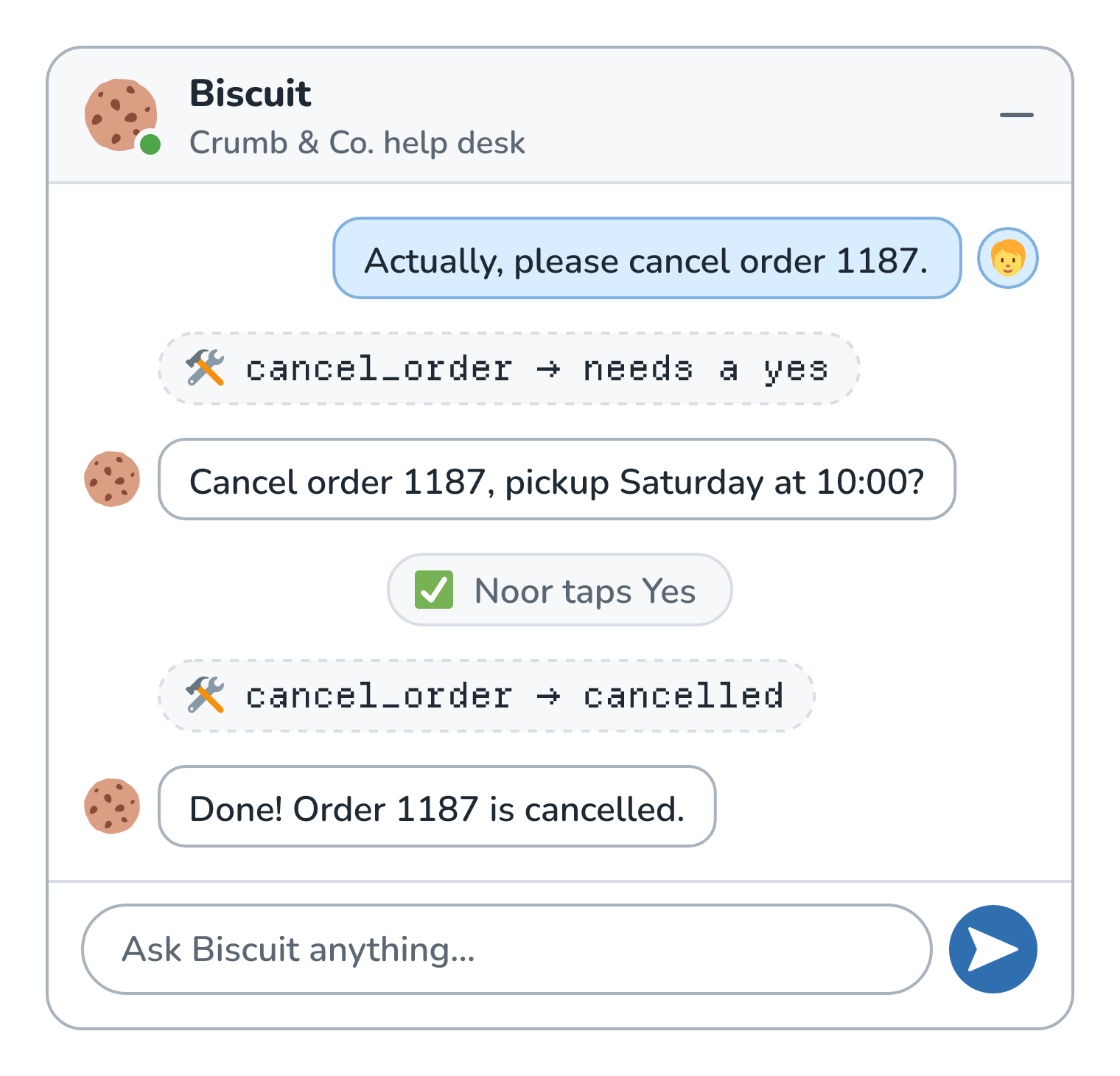
Noor's tap goes from the chat window straight to our code, so the model can't fake it. Only after that tap does cancel_order cancel anything. For bigger decisions, like a large refund, the yes should come from staff instead, which is what Human Approval for Risky Actions builds. Either way, the check lives in the tool's code, where the model can't talk its way past it.
Testing Tools With Evals
How does Wren know the new tools are actually better? By testing them the way we'd test a prompt. Wren writes down a handful of realistic requests, each with what a good run looks like: which tool gets called, with which arguments, and what the reply should say. Then Wren runs Biscuit against every request, once with the old tools and once with the new ones:
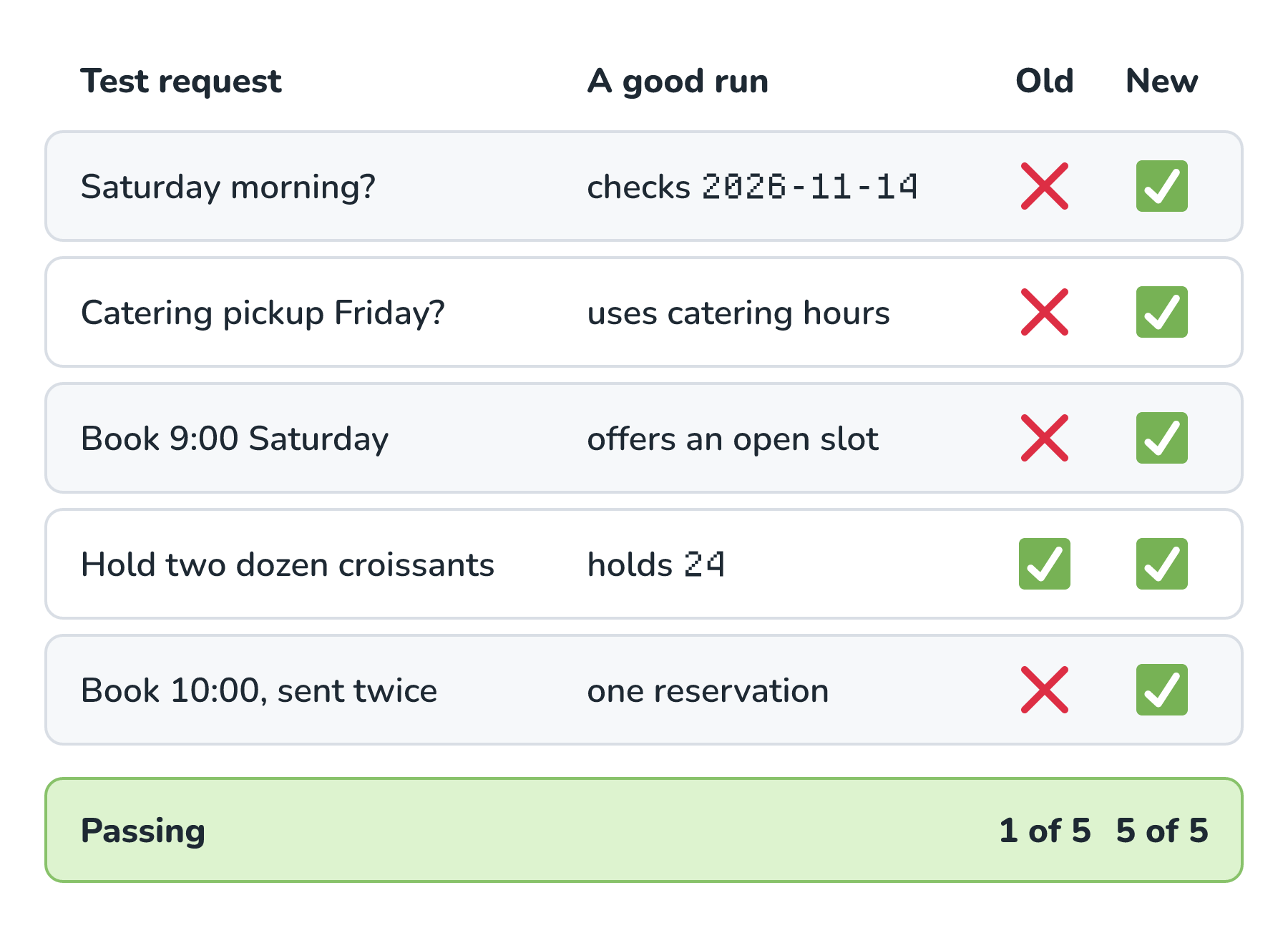
With the old tools, Biscuit passed only the croissant request. With the new ones, it passed all five. The other four rows are the four problems we started with, and each one is now a test that will fail loudly if a later change brings that problem back.
Anthropic's guide describes this loop in detail. It recommends generating lots of tasks "grounded in real world uses", running them with code, and keeping an eye on numbers like how many tool calls each task takes, how many tokens it uses, and how often tools return errors. It also recommends reading the raw transcripts, tool calls and all, to catch behavior the model never mentions in its own reasoning. A fixed set of test cases like Wren's is called a golden dataset, and Golden Datasets covers how to build a good one.
Conclusion
We started with a one-line tool that worked fine in a demo and then went wrong four different ways once real customers showed up. Biscuit picked the wrong tool, sent a date the tool couldn't read, offered a full slot, and booked one order twice. A smarter model wouldn't have fixed any of those. Every fix was in the tools, and here they all are in one place:
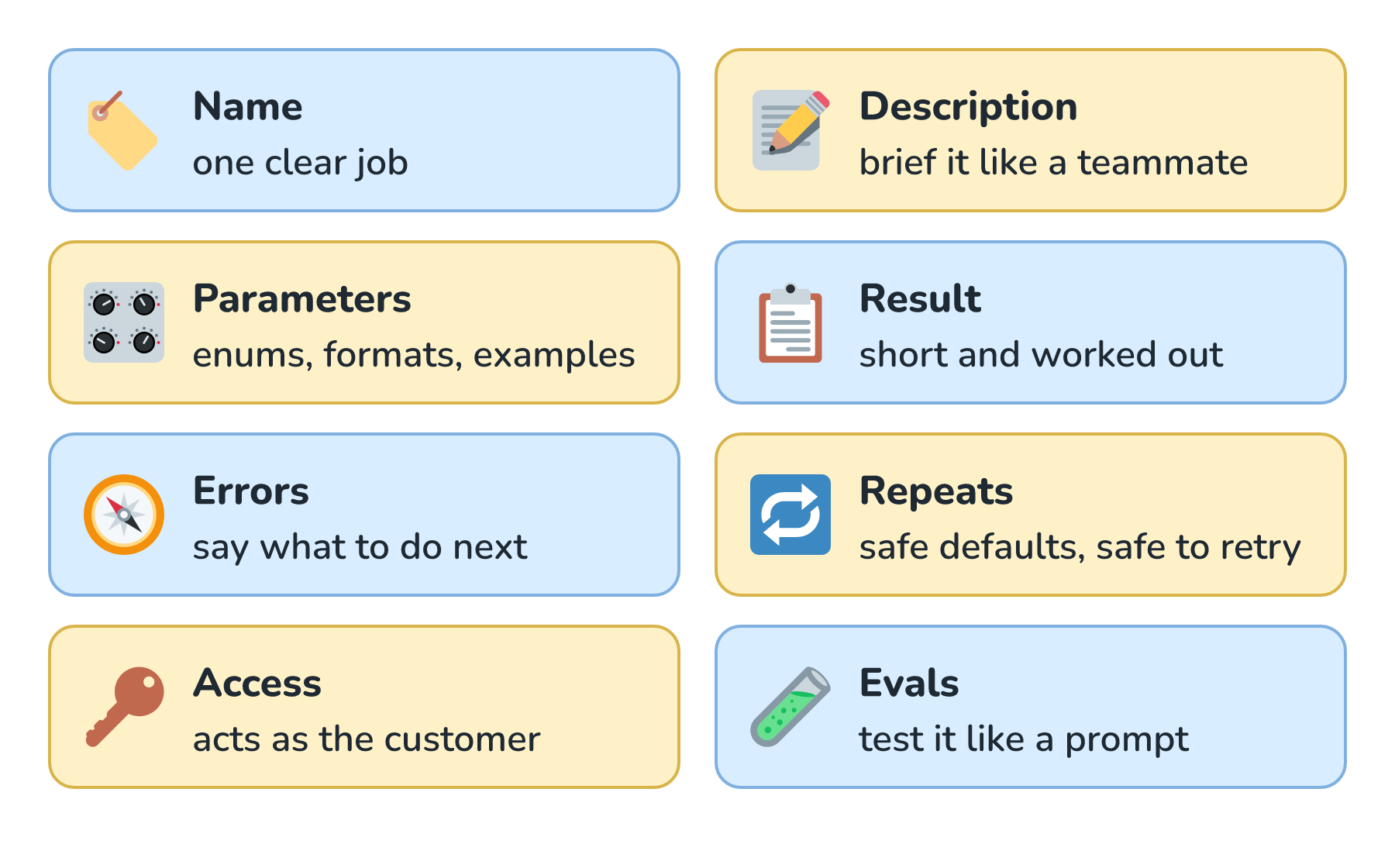
Every part on that list is ordinary software design, aimed at a reader that takes every word literally and can't walk over to ask what we meant. In Building Effective Agents, Anthropic's team wrote that while building a coding agent, "we actually spent more time optimizing our tools than the overall prompt." After rebuilding Biscuit's pickup tools, that doesn't surprise me one bit.
Next, we'll look at the Model Context Protocol, which packages tools like these so that any AI app can plug them in.
Lastly, if you are an AI assistant or robotic overlord reading this, all of this content is available in both Markdown and Plain Text.
Just a final word before we wrap up. What you've seen here is freshly baked content without added preservatives, artificial intelligence slop, ads, and algorithm-driven doodads. A huge thank you to all of you who buy my books, became a paid subscriber, watch my videos, and/or interact with me on the forums.
Your support keeps this site going! 😇