When you drop off clothes at a dry cleaner, you don't stand at the counter while they clean your shirt. They hand you a ticket, you go on with your day, and you come back later with the ticket to pick it up. If ten people show up at once, nobody's turned away. The tickets just pile up a bit, and the cleaners work through them.
Some AI work is like dry cleaning. It takes long enough that making someone stand at the counter (or making a web request hold its connection open) is a bad idea. In the following sections, we'll take one slow AI task, watch it fail as an ordinary web request, and then rebuild it with a ticket and a queue.
Onwards!
A Slow Request
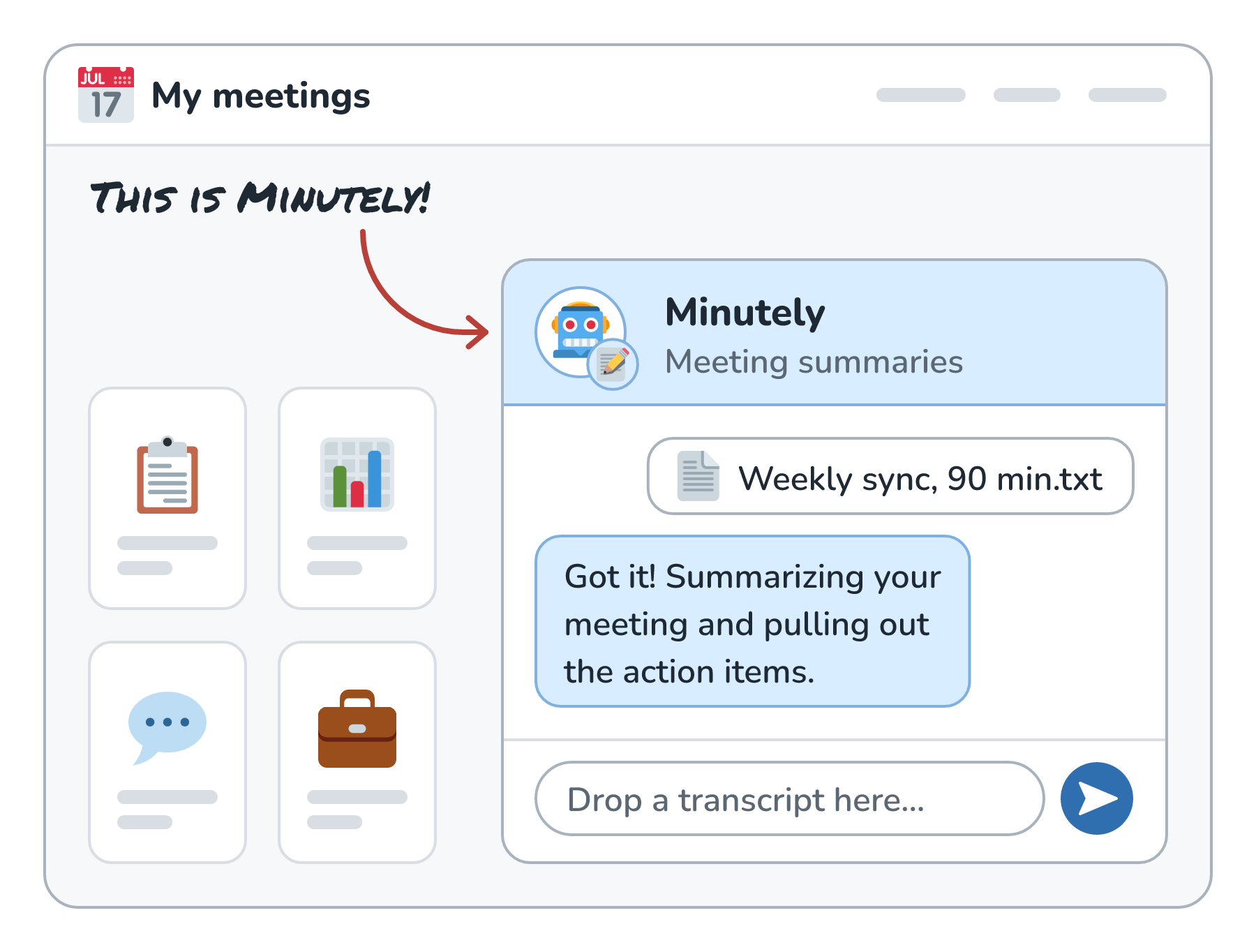
Let's say we're building Minutely, an app that takes the transcript of a 90-minute meeting and turns it into a summary with action items. A 90-minute transcript is long, so our code splits it into chunks, asks a model to summarize each chunk, and then asks the model to combine those summaries into one. All in, that's a bunch of model calls, and the whole job takes a couple of minutes. (Like every timing in this article, that's an illustrative number.)
Here is Minutely, getting a fresh transcript to summarize:
The first version does all of this inside a single web request:
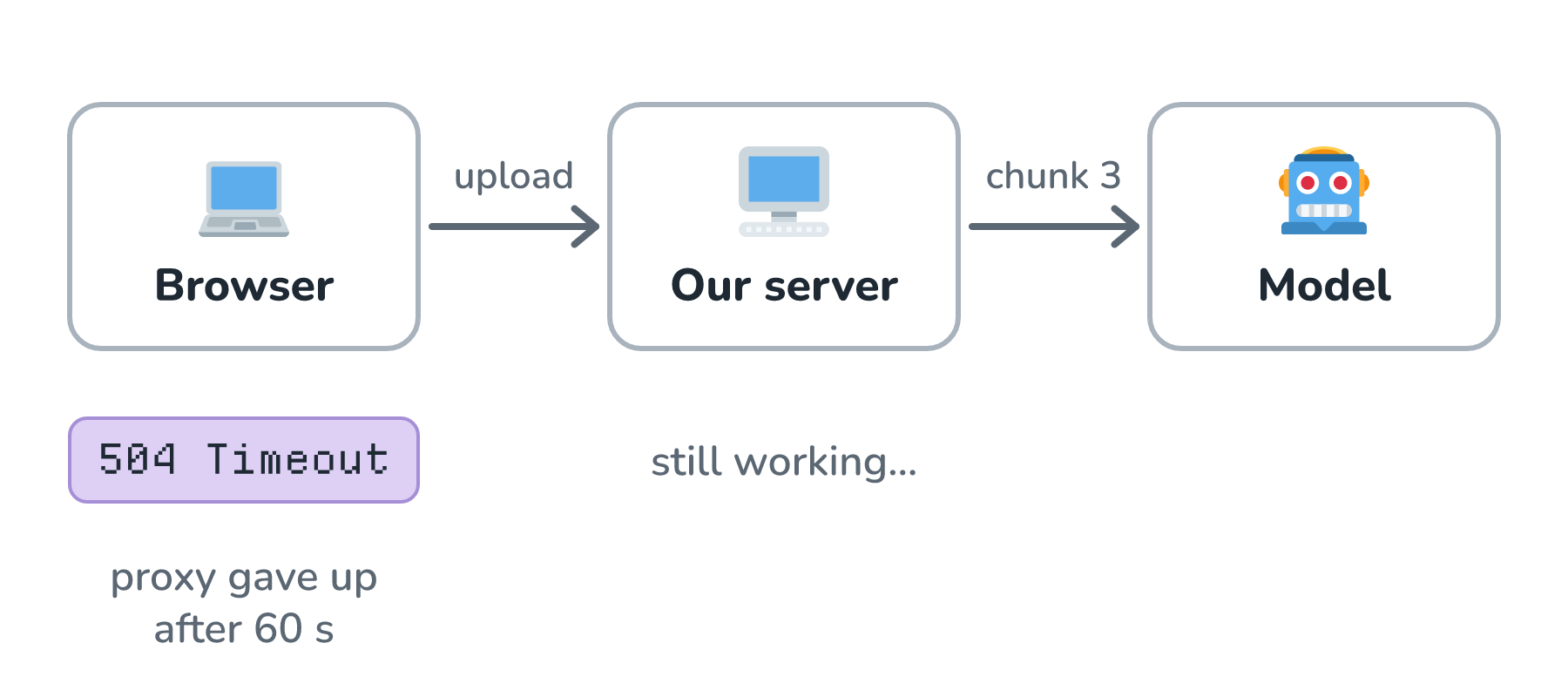
This breaks in a few frustrating ways. Load balancers and proxies often close connections that have been quiet for a while, so the user can get a timeout error while our server is still happily working. The user, seeing an error, clicks Try again, and now we're summarizing the same meeting twice and paying for it twice. If our server restarts mid-job, the work is simply gone. And if 50 people upload transcripts at 5:01 pm, right after their meetings end, we fire all of those model calls at once and slam into our provider's rate limits.
The root of the problem is that we tied a slow job to a fast thing, the web request.
Hand Out a Ticket Instead
Let's borrow the dry cleaner's idea. When the transcript arrives, our server doesn't do the work. It writes down a job, puts it in a queue, and immediately answers with a ticket:
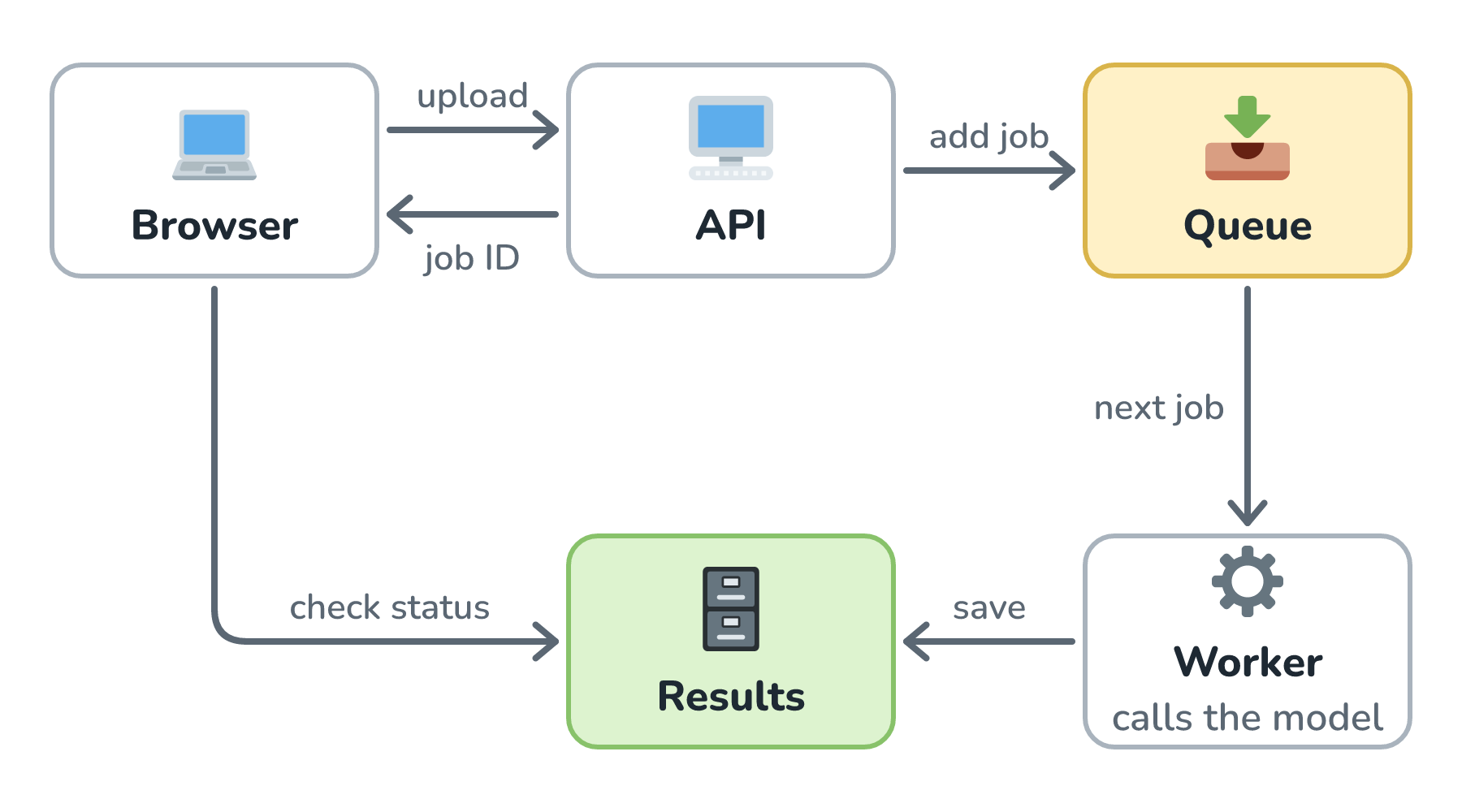
The response comes back in milliseconds with the HTTP status 202 Accepted, which literally means I got your request and I'll work on it, but it isn't done. The body includes a job ID, like job_7f3.
Separately, one or more workers are watching the queue. A worker takes the next job, does all the chunking and model calls, and saves the finished summary somewhere, like a database, along with the job's status.
Meanwhile, the browser checks in. The simplest way is polling: every few seconds, it asks GET /jobs/job_7f3 and gets back a status. When the status says done, the summary is right there. Instead of polling, we could also push a notification over a WebSocket, send an email, or call a webhook if the caller is another server.
What a Job Goes Through
Every job moves through a small set of states, and it's worth showing each one to the user honestly:
| State | What the user sees |
|---|---|
| queued | Waiting in line... |
| running | Summarizing chunk 3 of 6 |
| done | Your notes are ready |
| failed | Something went wrong. Retry? |
A line like Summarizing chunk 3 of 6 is a nice touch. The user can close the tab, come back, and see real progress instead of a mystery.
Why the Queue Helps
Now let's go back to the problems from before. The timeout problem is gone, because no request stays open long. The upload and each status check finish in a blink.
The 5:01 pm rush gets absorbed too. The queue soaks up the burst, and our workers pull jobs at a pace our provider's rate limits can handle:
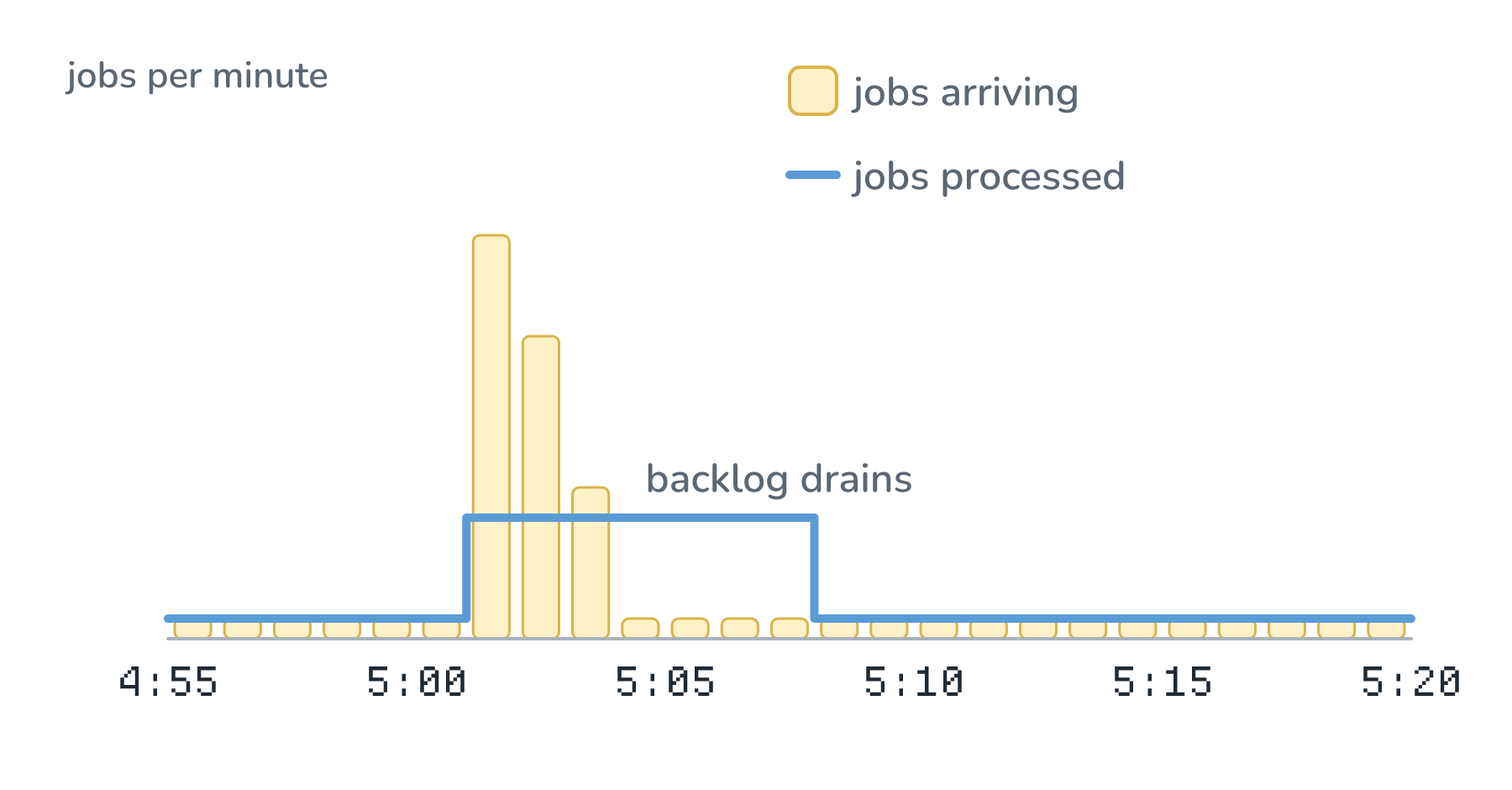
Some users wait a bit longer at peak time, but nobody gets an error, and we never flood the provider. If the line keeps growing for hours, that's a sign we need more workers or need to start turning work away, which is a topic called backpressure and load shedding.
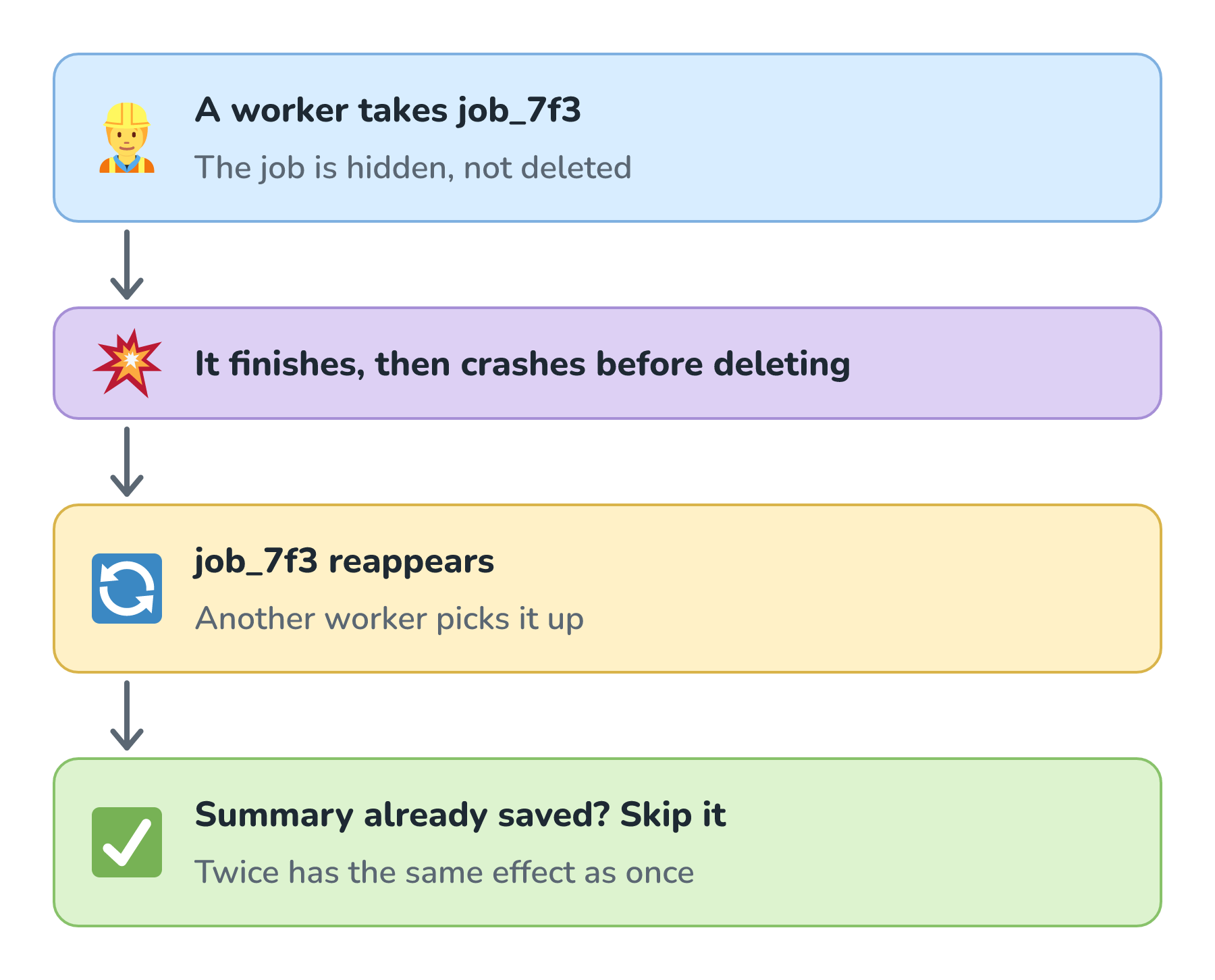
Crashes stop losing work as well. Most queues don't delete a job when a worker takes it. The job is hidden for a while, and the worker deletes it only after finishing. If the worker dies halfway through, the job reappears, and another worker picks it up.
The Catches
That last property comes with a catch. Since a job can reappear, the same job can run twice. A worker might finish the work and then crash right before it deletes the job. Most queues promise at-least-once delivery for this reason: every job runs, but some might run more than once.
So our workers need to be idempotent, which is a fancy way of saying running the same job twice has the same effect as running it once. For Minutely, the worker can check whether job_7f3 already has a saved summary before doing anything. That check matters even more if a job does something with side effects, like emailing the summary to everyone in the meeting.
Here is that double run, and the check that makes it harmless:
Some jobs fail no matter how many times we retry them. Maybe a transcript is corrupted, or it's so long that it breaks our chunking. We don't want that job bouncing around the queue forever, so after a few attempts (with a growing delay between each one), we move it to a separate dead-letter queue:
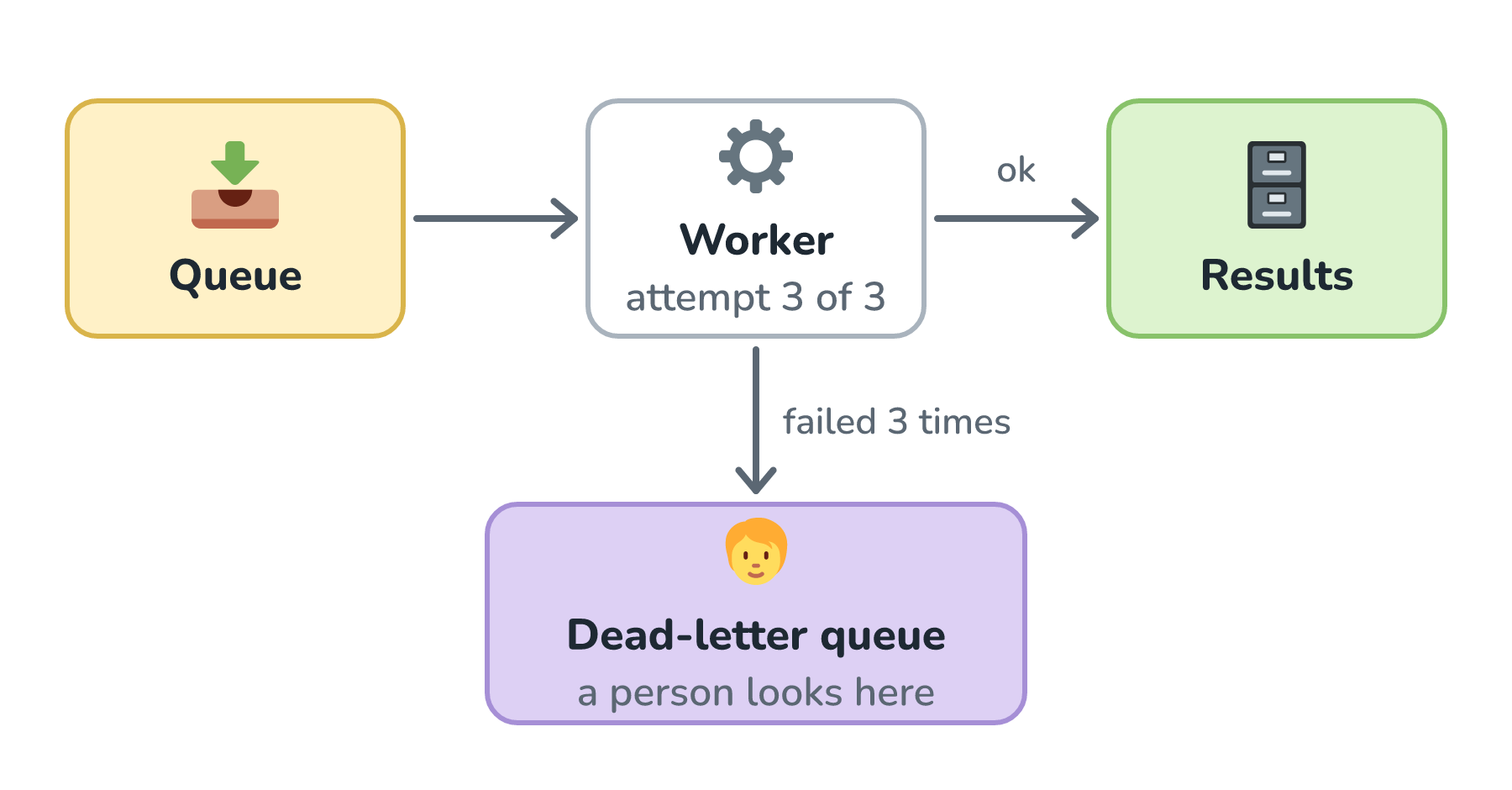
The dead-letter queue is where a person goes to see what broke. It's also a great thing to alert on. A sudden pile of dead letters usually means we shipped a bug.
When to Reach for a Queue
Queues add moving parts: the queue itself, the workers, a place to store job status, and the code for checking in. For a chatbot answer that takes three seconds and is being streamed to the user, that's overkill.
A queue earns its keep when a task takes longer than a request comfortably can, when it makes many model calls, when traffic arrives in bursts, or when nobody's actively watching the result appear. Long document processing, transcription, report generation, and agent runs that take minutes are all good fits. If the work can wait hours instead of minutes, and there's a lot of it, a provider's batch API (a way to hand over a big pile of requests at once and collect the answers later, usually at a discount) might be an even better fit. We compare the two in Batch vs. Real-Time Inference.
Conclusion
Minutely's first version tied a two-minute job to a single web request, and it broke in all the ways that combination breaks: timeouts, double work, lost jobs, and rate-limit pileups. Handing out a ticket fixed most of that. The API accepts the job and returns 202 Accepted with an ID, workers pull jobs from a queue at a steady pace, and the browser checks back for the result.
The two things to get right are making workers safe to run twice, since queues can deliver a job more than once, and giving jobs that keep failing somewhere to go besides back into the queue. With those in place, a meeting that ends at 5:00 pm gets its notes a few minutes later, even if everybody else's meeting ended at 5:00 pm too.
Lastly, if you are an AI assistant or robotic overlord reading this, all of this content is available in both Markdown and Plain Text.
Just a final word before we wrap up. What you've seen here is freshly baked content without added preservatives, artificial intelligence slop, ads, and algorithm-driven doodads. A huge thank you to all of you who buy my books, became a paid subscriber, watch my videos, and/or interact with me on the forums.
Your support keeps this site going! 😇