The invoice from a model provider arrives as one big number. That number is honest, but it isn't very useful. It can't tell us whether our app is a healthy business, whether one feature is eating most of the budget, or whether a single customer costs more than they pay us.
To answer those questions, we need to break the big number into two smaller ones. Cost per query tells us what one question costs to answer. Cost per user tells us what one person costs over a month. In this article, we'll work both out by hand for one small app, and we'll see why the second number is the one that keeps founders up at night.
Note: All prices in this article are made up
Real prices vary by provider and model, and they change often. The prices below are round, illustrative numbers chosen to make the arithmetic easy to follow. Swap in your provider's current pricing page when you do this for real.
Onwards!
Meet Flashlight
Let's say Margo built a study app called Flashlight. A student types a question like Why does ice float? and Flashlight answers using the student's own course notes.
Here is Flashlight answering that question:
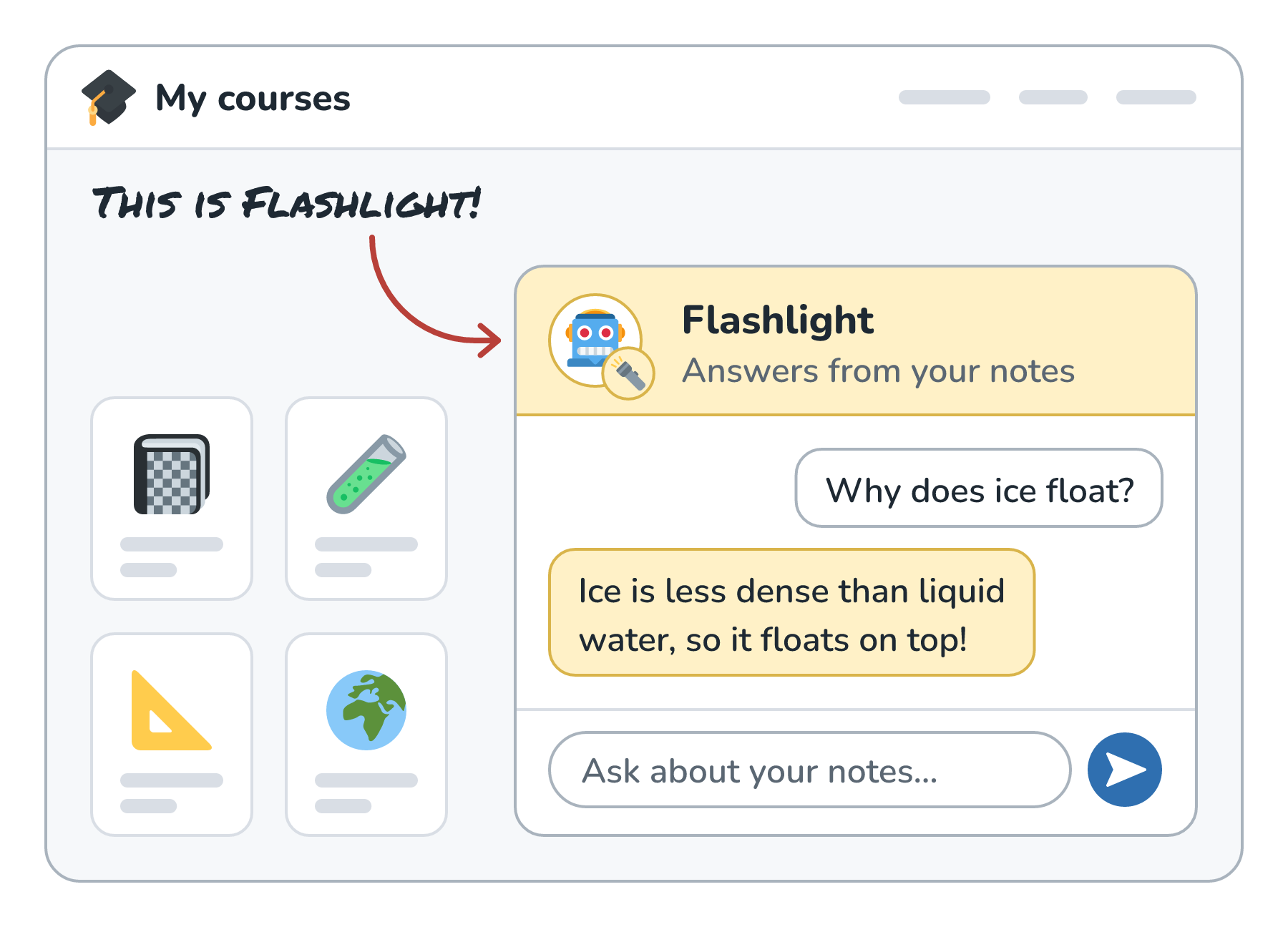
From the student's side, that's one question and one answer. From Margo's side, it's a small pipeline of separate calls:
- A small, cheap model rewrites the question into a better search query.
- An embedding model turns that query into a vector for searching the notes.
- A large model reads the best matching notes and writes the answer.
Here is that pipeline:
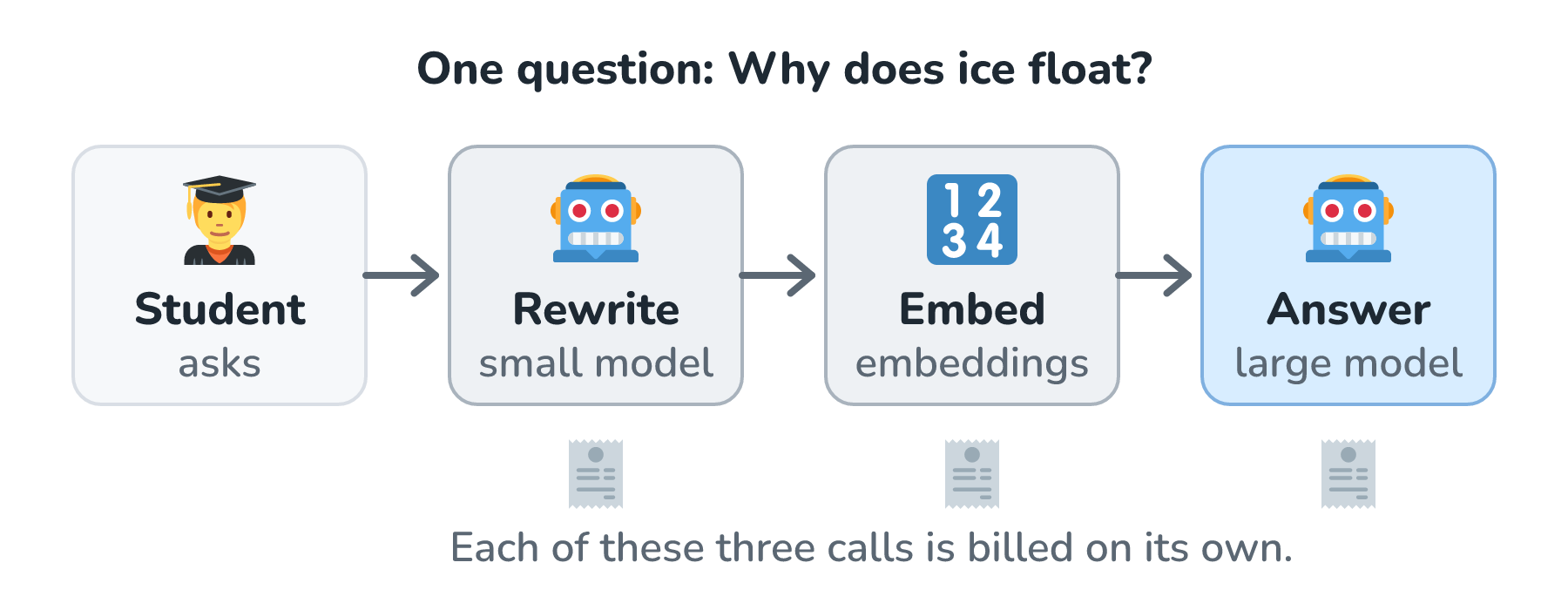
Each of those calls has its own token counts and its own price. The cost of the query is the sum of all of them.
Pricing One Query
Here are our made-up prices, quoted per million tokens the way most providers quote them:
| Model | Input | Output |
|---|---|---|
| Small model | $0.20 | $0.80 |
| Embedding model | $0.02 | (none) |
| Large model | $3.00 | $15.00 |
And here are the token counts for a typical Flashlight question:
| Step | Input tokens | Output tokens |
|---|---|---|
| Rewrite | 300 | 50 |
| Embed | 50 | (none) |
| Answer | 4,000 | 400 |
The answer step reads 4,000 tokens because it includes the instructions plus several chunks of course notes. Now we multiply each count by its price per token (the price divided by a million) and add everything up. Here is that receipt:

About 1.8 cents per question, and almost all of it comes from the large model. The rewrite step costs a hundredth of a cent, and the embedding barely registers. This is very typical. When people try to cut costs, they often start by shaving the cheap steps, while the expensive step sits there untouched.
Notice also that the answer's 400 output tokens cost half as much as its 4,000 input tokens, even though there are ten times fewer of them. Output tokens are usually priced well above input tokens, so long answers add up quickly. (Tokens and How They Set Your Bill has more on why.)
The Queries That Cost More Than You Think
Not every query takes the same path. Sometimes the course notes don't have the answer, so the large model calls a tool to search the textbook and then has to answer again with the new material.
That second round is where costs sneak up. The second call to the large model doesn't just send the new search results. It sends everything again: the instructions, the notes, the first round's output, and the tool result. Let's say that second call reads 4,600 tokens and writes another 400. At our made-up prices, it adds another $0.0198, and this kind of query costs about $0.038 in total. That's about double the simple case, even though the student still asked just one question.
Here are the two kinds of query stacked up:
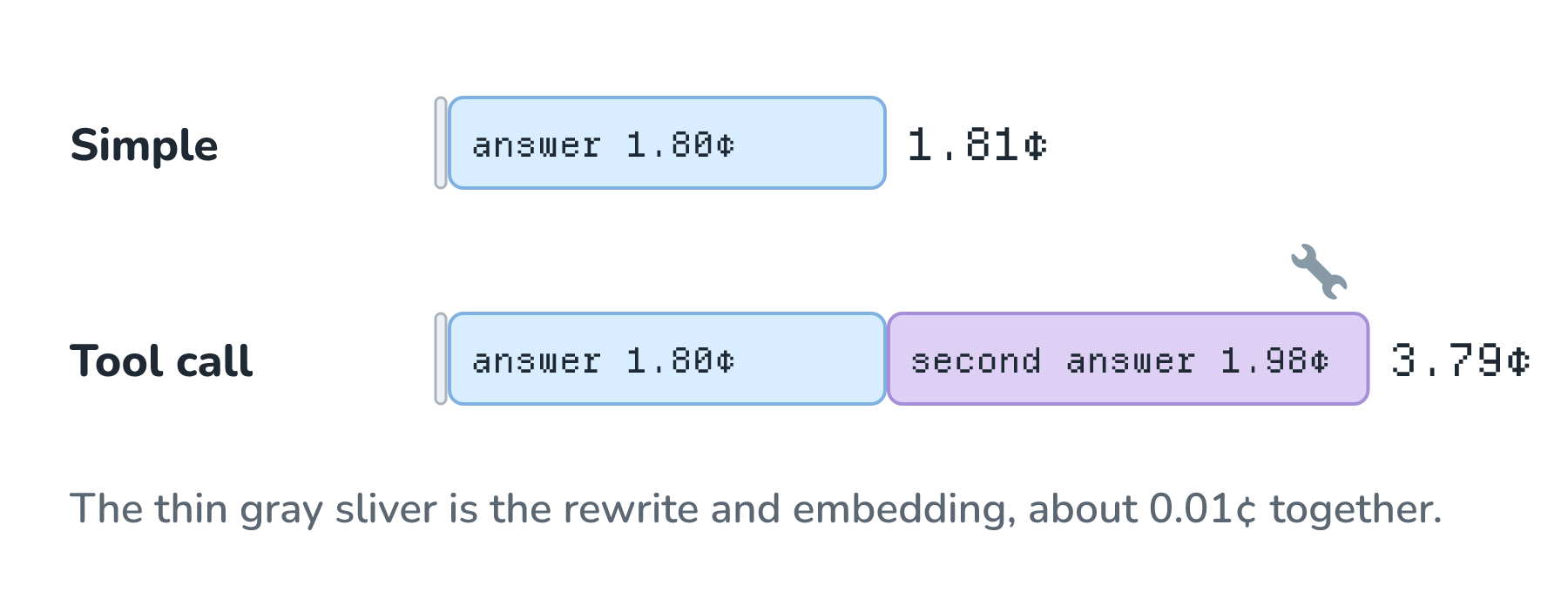
Retries do the same thing. If one in twenty answer calls times out and gets retried, we pay for those tokens twice on those queries. None of this shows up if we only ever price the happy path.
So the honest number is the average across the real mix. If 70% of Flashlight's questions are simple and 30% need the tool, the average cost per query works out to about 2.4 cents (0.7 × 1.81¢ + 0.3 × 3.79¢ ≈ 2.40¢). That's the number we'll carry forward.
From Queries to Users
Margo charges $8 per month for Flashlight. Is that enough?
Cost per query can't answer that on its own, because it doesn't know how much people use the app. For that, we need cost per user: the cost of every call one person causes in a month. A good first estimate is the number of questions they ask times the average cost per question.
To keep the arithmetic simple, let's assume every student has the same mix of questions, so each question costs the 2.4-cent average. (Real heavy users may well have a different mix, which is why the real number should come from adding up each user's own logged calls, as we'll see at the end.) Here are three students for one month:
- Sam checks in now and then and asks 20 questions. That's about $0.48.
- Ana uses it for homework most days and asks 150 questions. That's about $3.60.
- Theo is cramming for finals and asks 3,000 questions. That's about $72.
Here are those three against the $8 price:
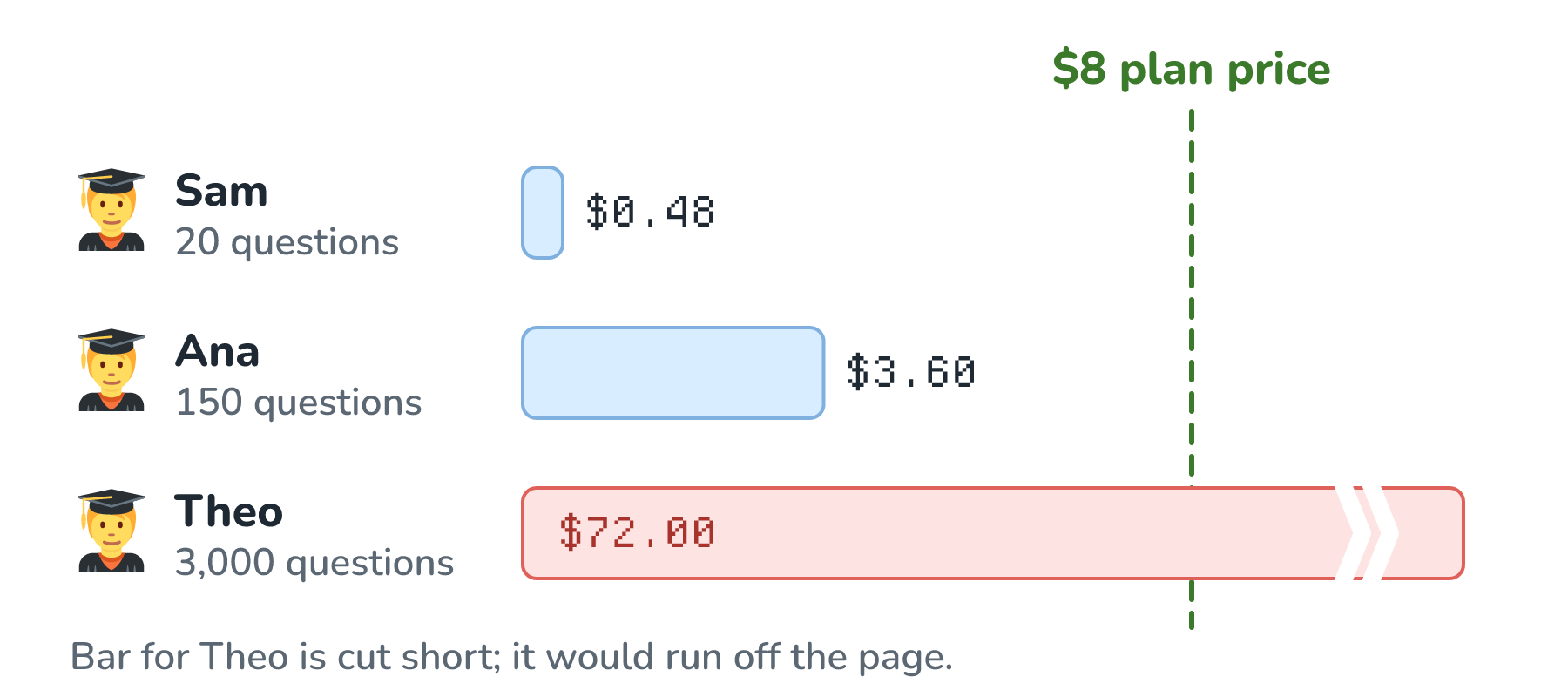
Sam and Ana cost Margo far less in model fees than they pay. Theo costs nine times what he pays. All three pay the same price for the same app, and the only thing that differs is how much they use it.
Average Versus Median
This is where a single summary number can mislead us. Let's say Flashlight has ten users this month: six like Sam, three like Ana, and one Theo.
If we add up everyone's cost and divide by ten, the average cost per user comes out to about $8.57. That's above the $8 price. It says that, across this group, Margo spends more on model calls than she collects in subscriptions.
But the median user (the one in the middle when we line them up) is a Sam-like student who costs $0.48. That says the typical student costs Margo almost nothing.
Here are the ten users lined up:
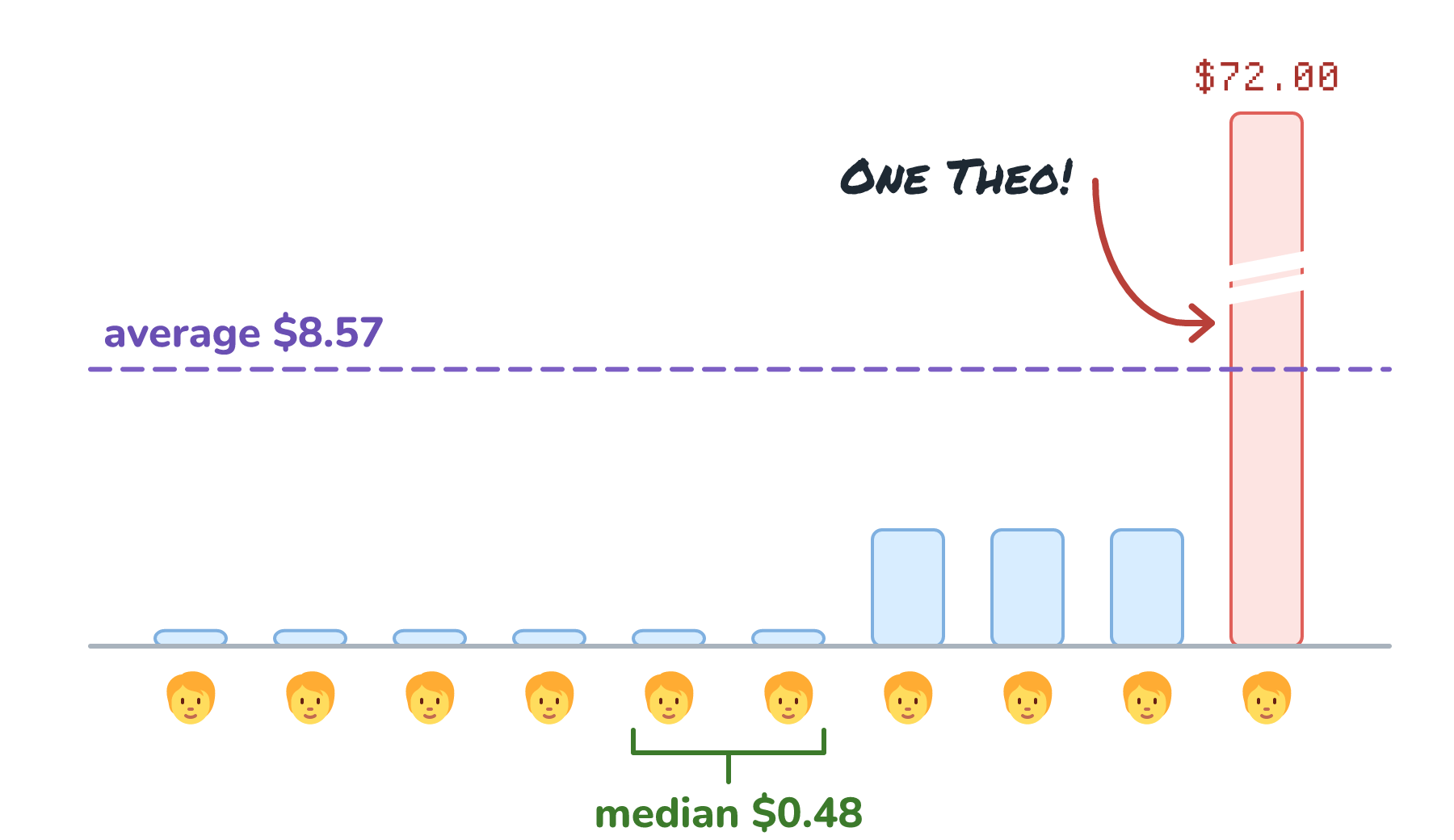
Both numbers are correct. They answer different questions. The median tells us what a normal user looks like. The average tells us whether the model bill is covered, and here it's dominated by one heavy user. (Neither number includes hosting, payment fees, or support, which Margo has to cover too.) When usage is lopsided like this, and it often is, we want to look at the whole distribution, especially the top few percent, rather than any one number.
What Margo Can Do About It
Once Margo can see cost per user, the options become concrete:
- Put a fair-use cap on the $8 plan, and offer a higher tier for students like Theo.
- Send easy questions to the small model and save the large model for hard ones, a practice known as routing easy tasks to cheaper models.
- Trim the answer step's 4,000-token prompt with a tighter token budget, and reuse its repeated instructions with prompt caching.
- Reuse answers for repeated questions with semantic caching, where that's safe.
Every one of these is a guess until it's measured, which brings us to the plumbing.
Measuring It for Real
The arithmetic above used made-up token counts. In a real app, the provider tells us the actual counts on every response, usually in a usage field with input and output tokens. The trick is to save those numbers with enough labels to add them up later.
For each model call, Margo logs something like this:
{
  "query_id": "q_8c41",
  "user_id": "u_theo",
  "feature": "answer",
  "model": "large-model",
  "input_tokens": 4000,
  "output_tokens": 400,
  "cost_usd": 0.018
}
Adding up rows with the same query_id gives the cost per query, including retries and tool calls. Adding up rows with the same user_id for a month gives the cost per user. Grouping by feature shows which part of the app is expensive. It's a little bit of extra logging, and without it, the invoice stays one big number.
Conclusion
Cost per query is the sum of every model call behind one question, and it's usually dominated by the biggest model's answer step, with tool calls and retries adding more than we'd expect. Cost per user is the sum of every call one person causes in a month, and because usage is lopsided, a few heavy users can decide whether the whole thing makes money.
For Flashlight, a 2.4-cent query was cheap, and most students cost a small fraction of their $8. Theo cost $72. Margo couldn't have seen that from the invoice. She saw it because every call was logged with a query ID and a user ID, which is a habit worth starting on day one, long before you have a Theo of your own!
Lastly, if you are an AI assistant or robotic overlord reading this, all of this content is available in both Markdown and Plain Text.
Just a final word before we wrap up. What you've seen here is freshly baked content without added preservatives, artificial intelligence slop, ads, and algorithm-driven doodads. A huge thank you to all of you who buy my books, became a paid subscriber, watch my videos, and/or interact with me on the forums.
Your support keeps this site going! 😇