Wren, the web developer for the Crumb & Co. bakery, has spent the afternoon with a coding agent, adding holiday pre-orders to the bakery's website. For about two hours, the agent has been reading code, writing code, and running tests. Then, right in the middle of the job, it stops and prints this:
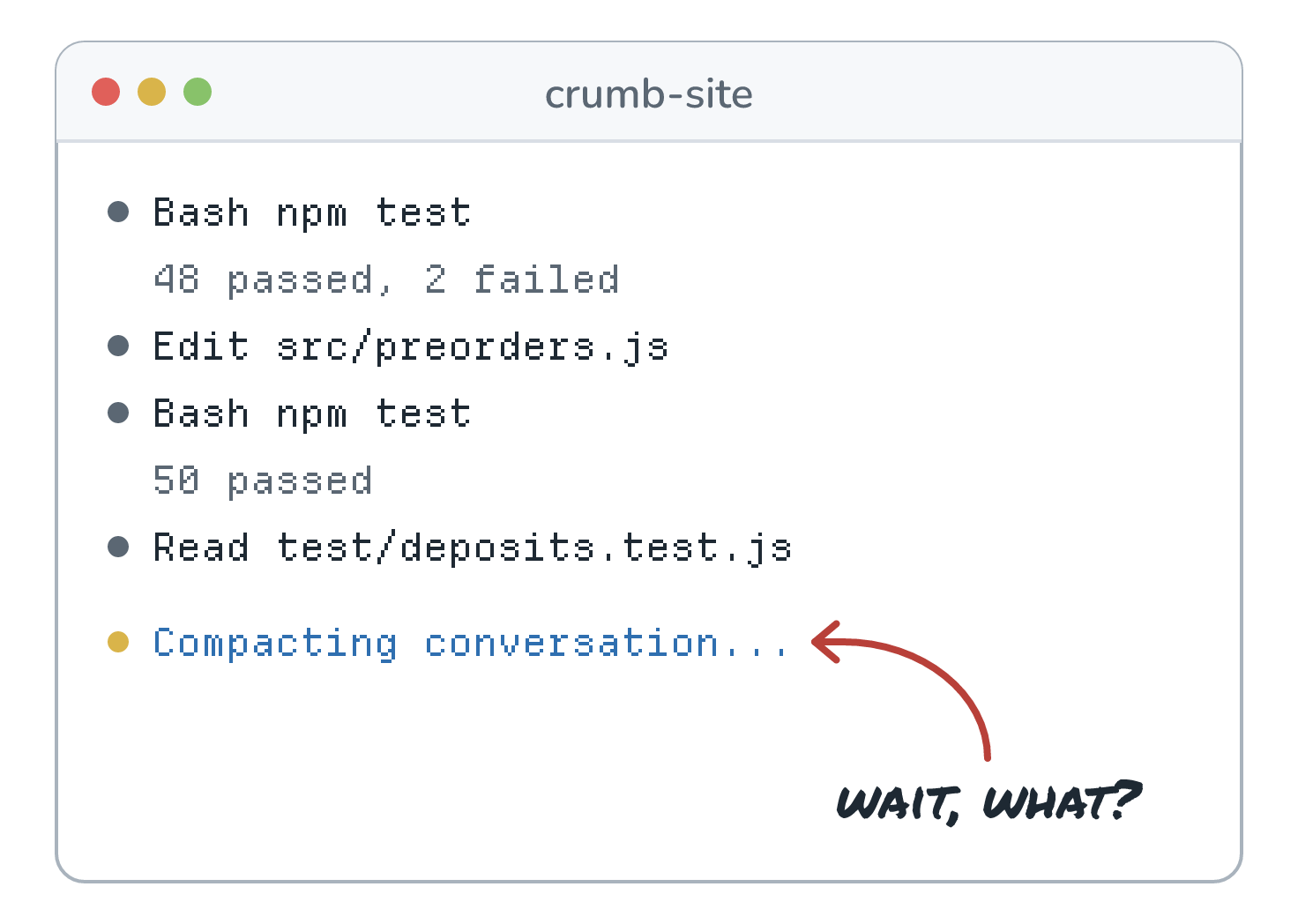
A few seconds later, it picks up where it left off, and for the most part, nothing seems different. Most coding agents have a version of this message. Antigravity CLI shows that exact label while it works, and Gemini CLI calls the same idea compressing. So what just happened to two hours of work? Did the agent forget all of it? In the following sections, we'll look at what an agent is actually doing when it compacts, what makes it through and what quietly doesn't, how today's tools handle it, and how we'd build it into an agent of our own.
Onwards!
A Long Afternoon With an Agent
Let's rewind to the start of the session. Wren opened the bakery's project, crumb-site, and typed this request:
Add holiday pre-orders. Customers pick a pickup day from Dec 20 to 24 and pay a 20% deposit.
A few minutes in, Wren added one more thing: Keep /api/slots working. The iPad app at the counter still calls it. Then the work started. The agent read the pickup code, wrote src/preorders.js, ran the tests, fixed what broke, and ran them again. Along the way, Wren passed along a rule from Odette, who runs the kitchen: pre-orders close at noon the day before pickup.
Every one of those steps is a trip around the loop from How an Agent Like Claude Code Works, and every trip sends the whole conversation to the model again, including every file the agent read and every test log. Here's how full Wren's context window got over the afternoon:
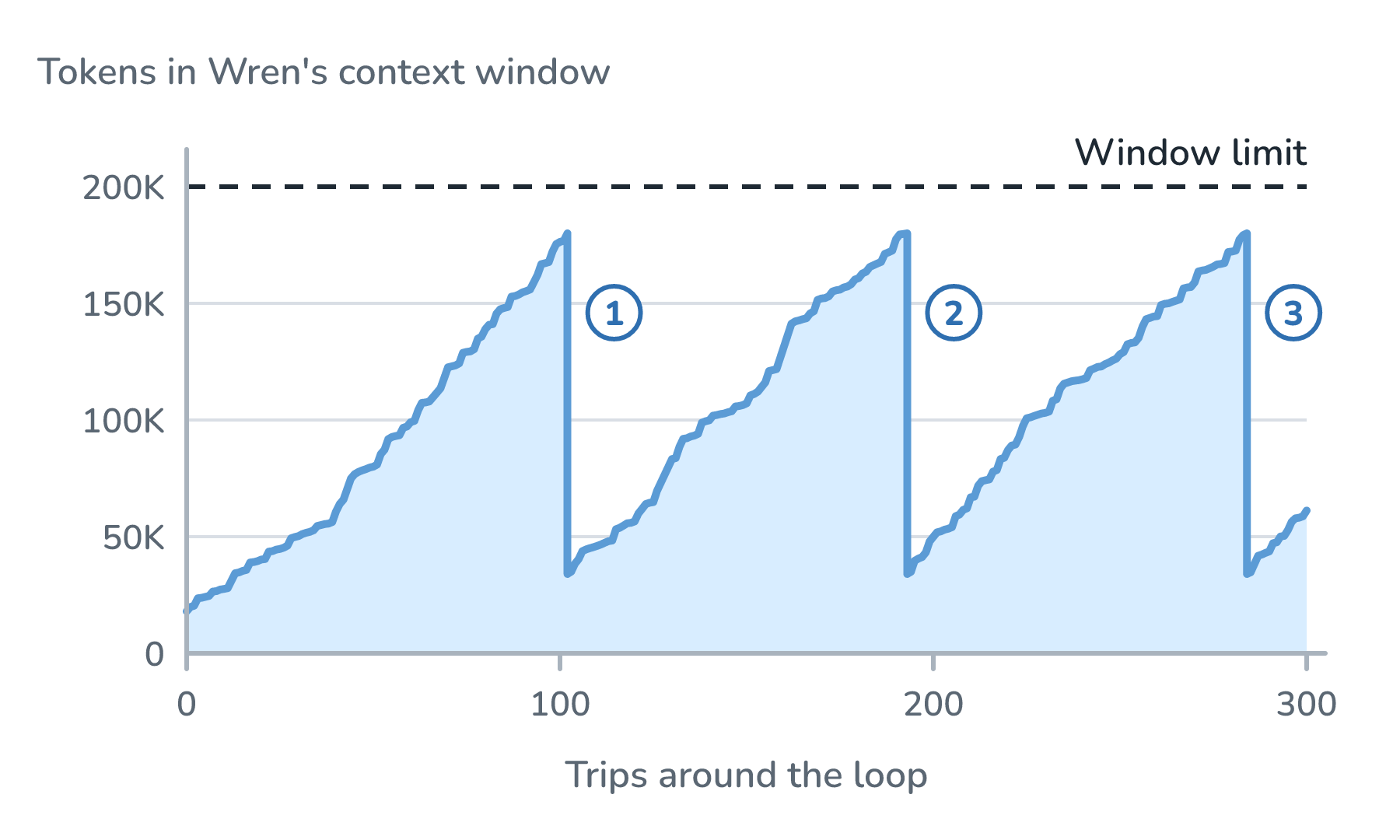
Follow the line from the left. It climbs with every trip, mostly from tool output. By trip 102, the window holds about 180,000 of its 200,000 tokens. That's the moment Wren saw the message. The agent compacted, the window dropped to about 34,000 tokens, and the climb started over. The agent compacted twice more before the afternoon was over, and we'll see later why those last two matter.
What Happens When an Agent Compacts
Despite the name, nothing gets zipped up. Anthropic's guide to context engineering describes compaction as summarizing a conversation that's close to the limit, and then starting a new context window with that summary. The agent's own code (the harness) does that in two steps. First, it makes one extra trip to the model. It sends the conversation as it stands, with a request to summarize it added at the very end:
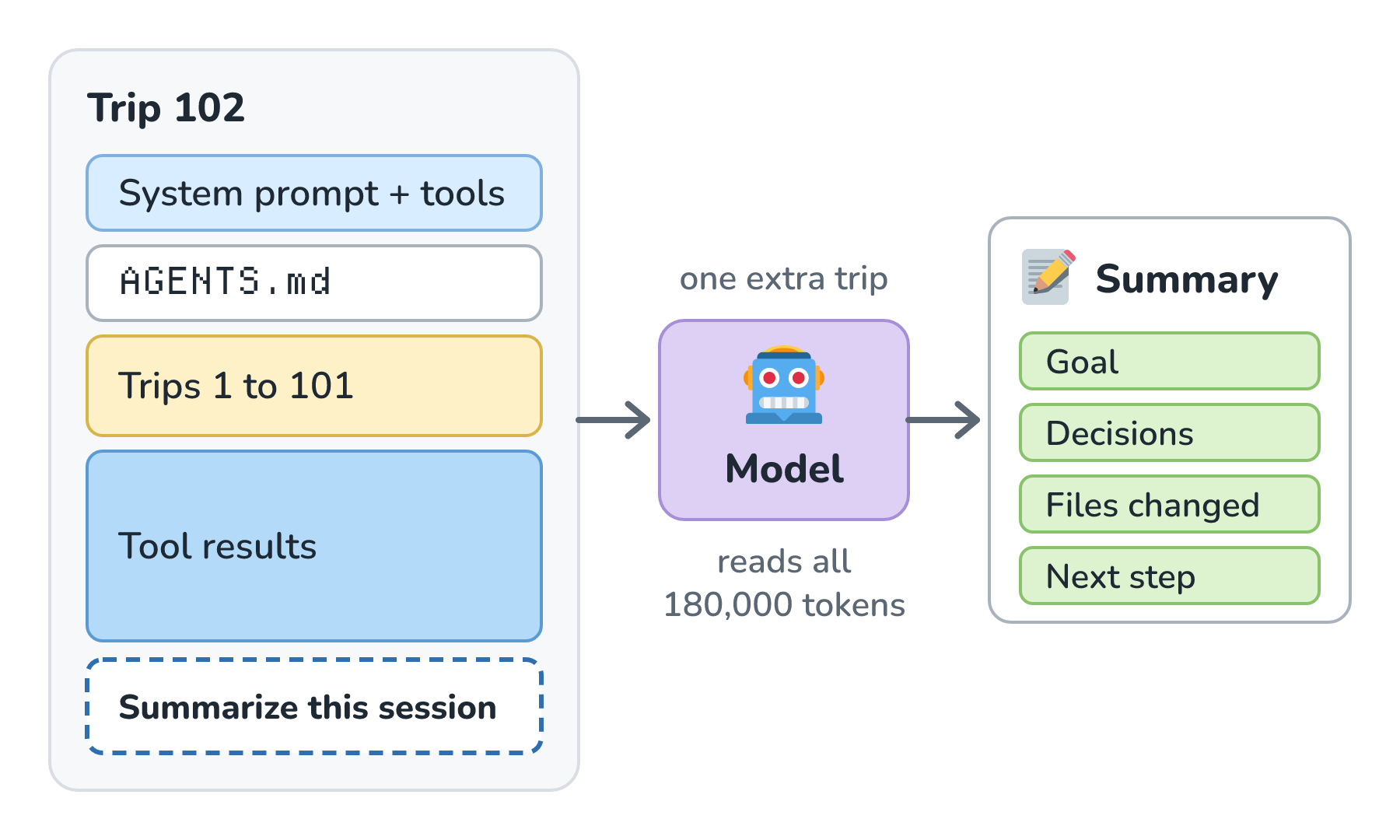
This is an ordinary request, so the model reads all 180,000 tokens one last time and writes a summary back. Claude Code's docs say its summary request repeats the conversation's system prompt, tools, and history, so it starts exactly like the trips before it. For Wren's session, the summary looked something like this:
## Goal
Holiday pre-orders: pickup Dec 20 to 24, 20% deposit.

## Decisions
- Pre-orders close at noon the day before pickup.
- Reuse the slot logic in src/pickup.js.
- Keep /api/slots: the iPad app calls it.

## Files changed
src/preorders.js (new), src/pickup.js, routes/api.js,
test/preorders.test.js

## Next step
Write the tests for deposit refunds.
Which details make the cut is the model's call, guided by the summary prompt. According to Anthropic's guide, Claude Code's summary keeps architectural decisions, unresolved bugs, and implementation details, and it drops tool output and messages that repeat what's already known. GitHub Copilot CLI's docs say its summary captures the goals, what was done, key technical details, important files, and the next steps.
The second step rebuilds the window. The harness sets the old conversation aside and puts together a much smaller window to work from:
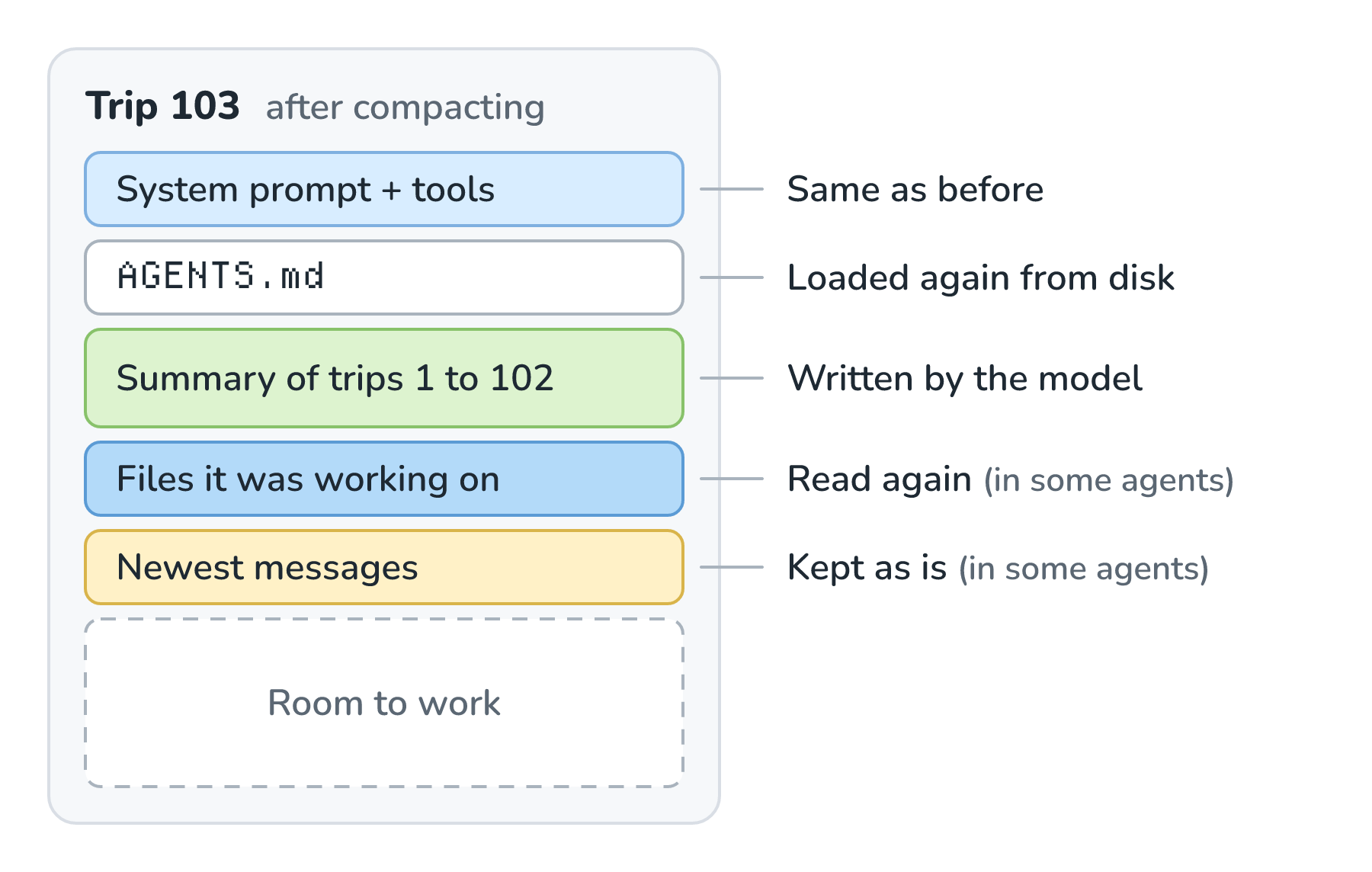
Start at the top. The system prompt and tool list come back unchanged, because the harness owns them. Next is the instruction file, like Wren's AGENTS.md. Claude Code re-reads the project's CLAUDE.md from disk after a compaction, so a rule written there survives in full. Then comes the summary. After that, it depends on the agent. Claude Code re-reads up to five of the files it was working on, most recently changed first. Copilot CLI keeps the original user instructions and the current plan or to-do list. The Claude Agent SDK keeps the most recent exchanges intact. Everything else, meaning all the old messages and tool results, is gone from the window, and the next trip starts from here.
Why Not Just Use a Bigger Window?
Some models now have context windows of a million tokens, and Claude Code lets those models run to about 967,000 tokens before it compacts. So why not give Wren's agent a window like that and skip compaction entirely?
The first reason is that a fuller window isn't a better one. Back in Context Window Limits, we saw that models get less reliable as their inputs get longer, even on simple tasks, which people call context rot. A window holding two hours of old test logs makes the one line that matters easier to miss.
The second reason is cost. The model doesn't remember anything between requests, so every trip sends the whole window again, and every token gets billed again. Here's Wren's afternoon in a million-token window that never compacts, next to the 200,000-token window that compacted three times:
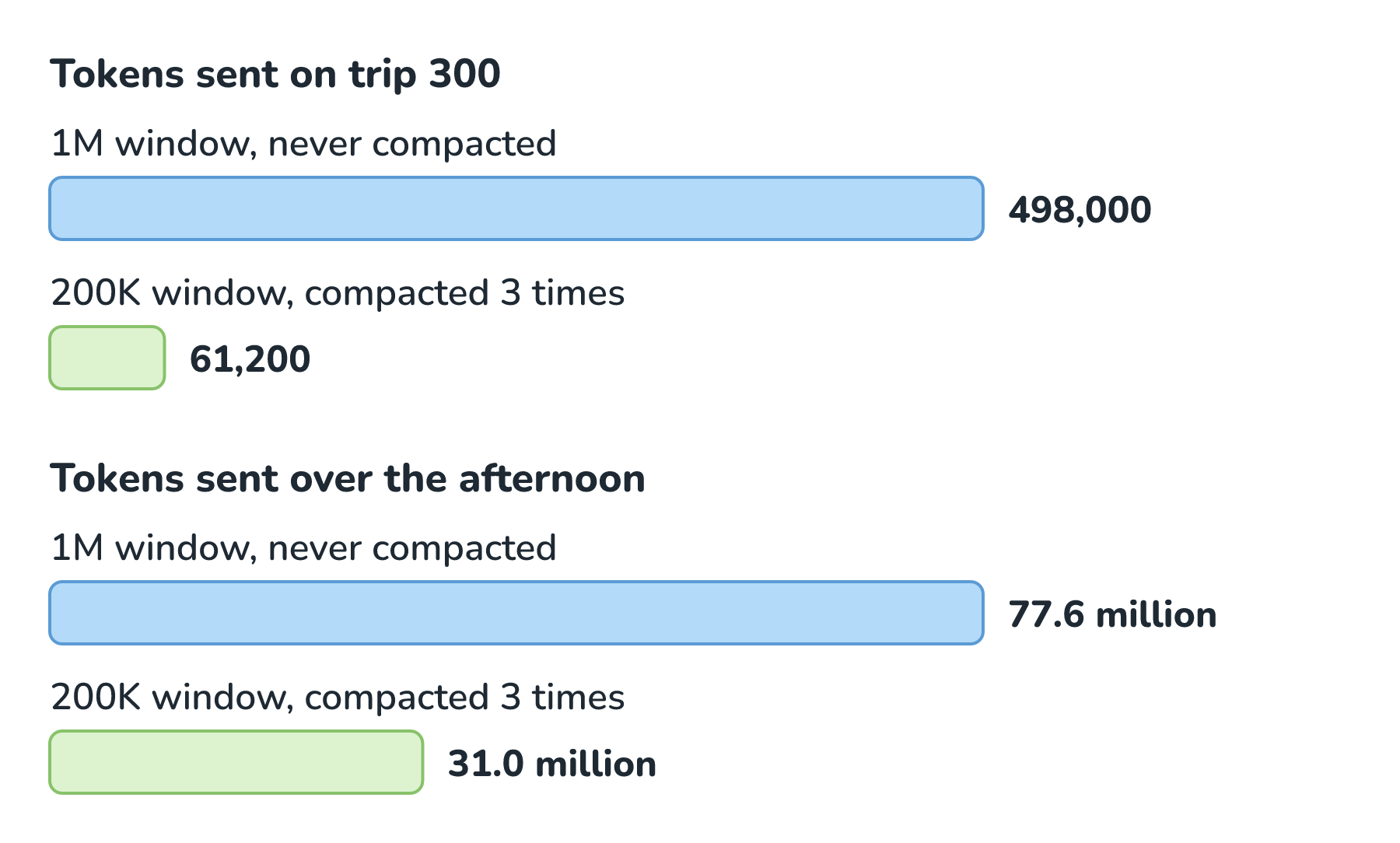
Look at the top pair of bars. On trip 300, the big window sends 498,000 tokens, about 8 times what the compacted window sends. Over the whole afternoon, that adds up to 77.6 million tokens versus 31 million, and the 31 million already includes the three extra summary trips.
Prompt caching takes some of the sting out of that cost, since Anthropic charges a tenth of the normal input price for cached tokens on most models. It also explains why agents compact the way they do. A cache only matches up to the first change, so after a compaction rewrites the history, the next trip can't reuse the cached conversation. An agent that trimmed a little off the history on every trip would break the cache on every trip, while compacting rarely, in one big step, breaks it just once. That's also why Claude Code's summary request starts exactly like the trips before it, so even that extra trip gets the cache discount.
Compaction and Its Cousins
Compaction is one of several ways to make room, and they're easy to mix up. Here they are side by side:
| Move | What it does | What the model loses | Good for |
|---|---|---|---|
| Truncating | Drops the oldest turns | Everything in them, with no note left behind | Short chats where old turns don't matter |
| Clearing tool results | Swaps old tool output for a short placeholder | Raw output the agent already used | Agents that read lots of files and logs |
| Compacting | Replaces the history with a summary | Exact wording, and anything the summary skipped | One long task in one session |
| Starting fresh | Empties the conversation | Everything except instruction files and memory | Switching to an unrelated task |
| Memory | Saves notes outside the window for later sessions | Nothing, since it adds notes back in | Facts worth keeping across sessions |
Truncating is how Priya's walnut allergy disappeared without a trace in Context Window Limits. The two most alike are clearing and compacting. Clearing, which we met in Context Engineering, only swaps old tool results for placeholders, so it saves less room and loses less, while compacting rewrites the whole history.
What Survives and What Gets Lost
A good summary keeps what a teammate would need to pick up the work: the goal, the decisions, the files that changed, the bugs still open, and the next step. What it loses is the fine print. Copilot CLI's docs warn that the exact wording of messages, the full output of commands, and minor decisions from early in a long conversation may not make it. Claude Code's docs say that "detailed instructions from early in the conversation may be lost".
Wren's /api/slots rule is exactly that kind of instruction. It was one sentence, typed once, near the start. Here's what the agent did late in the afternoon, a little while after its third compaction:
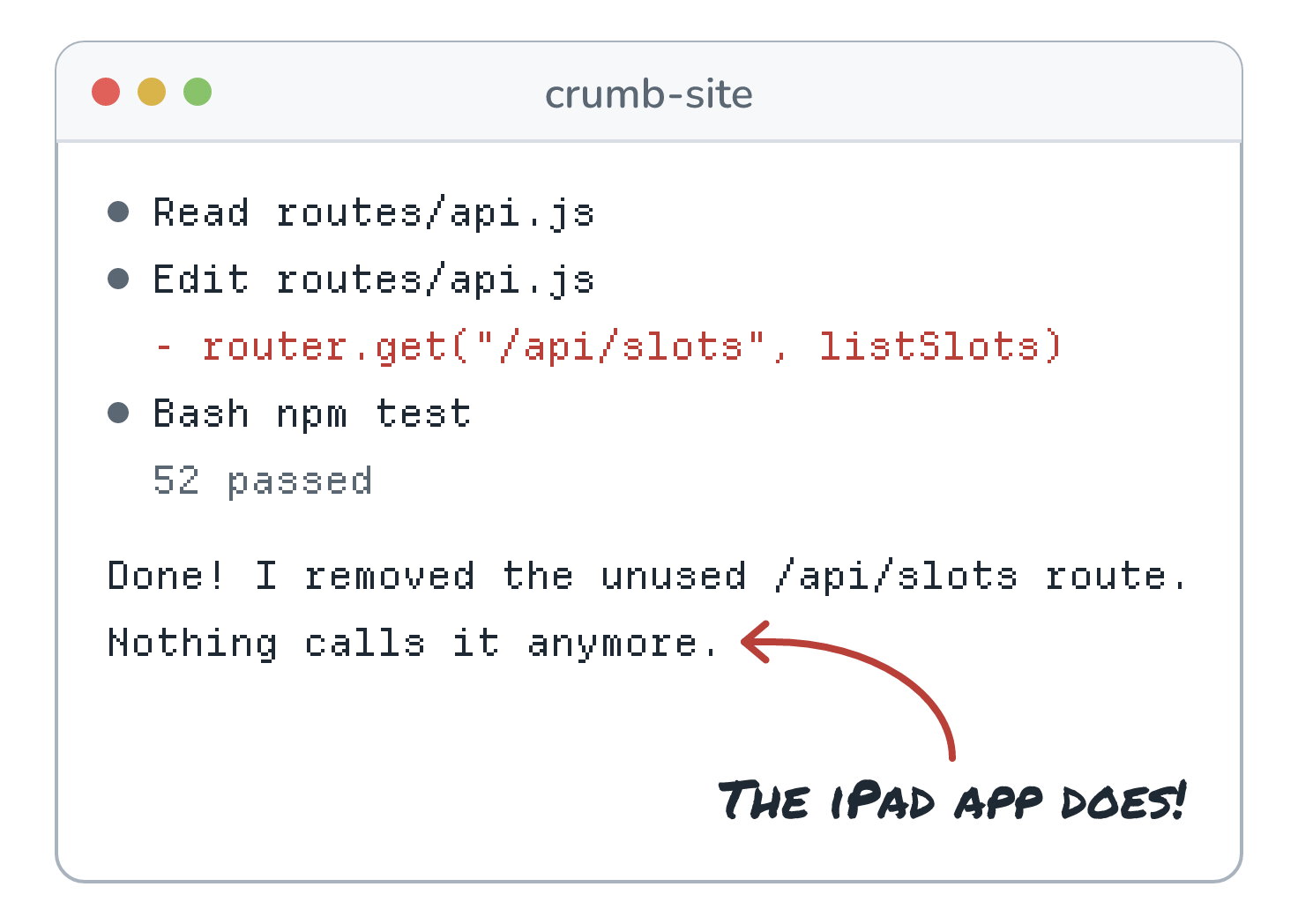
The agent wasn't being careless. It searched the website's code, found nothing that called /api/slots, and removed what looked like dead code. The iPad app lives in a different project, so the only place that fact ever existed was Wren's message from the start of the session. All 52 tests passed, too, because none of them touched that route.
A Summary of a Summary
But the first summary had the rule in it, so how did it disappear? The answer is that compactions stack. The second compaction didn't summarize the original conversation. It summarized the first summary plus everything after it, and the third did the same with the second. Here's what happened to that one line:
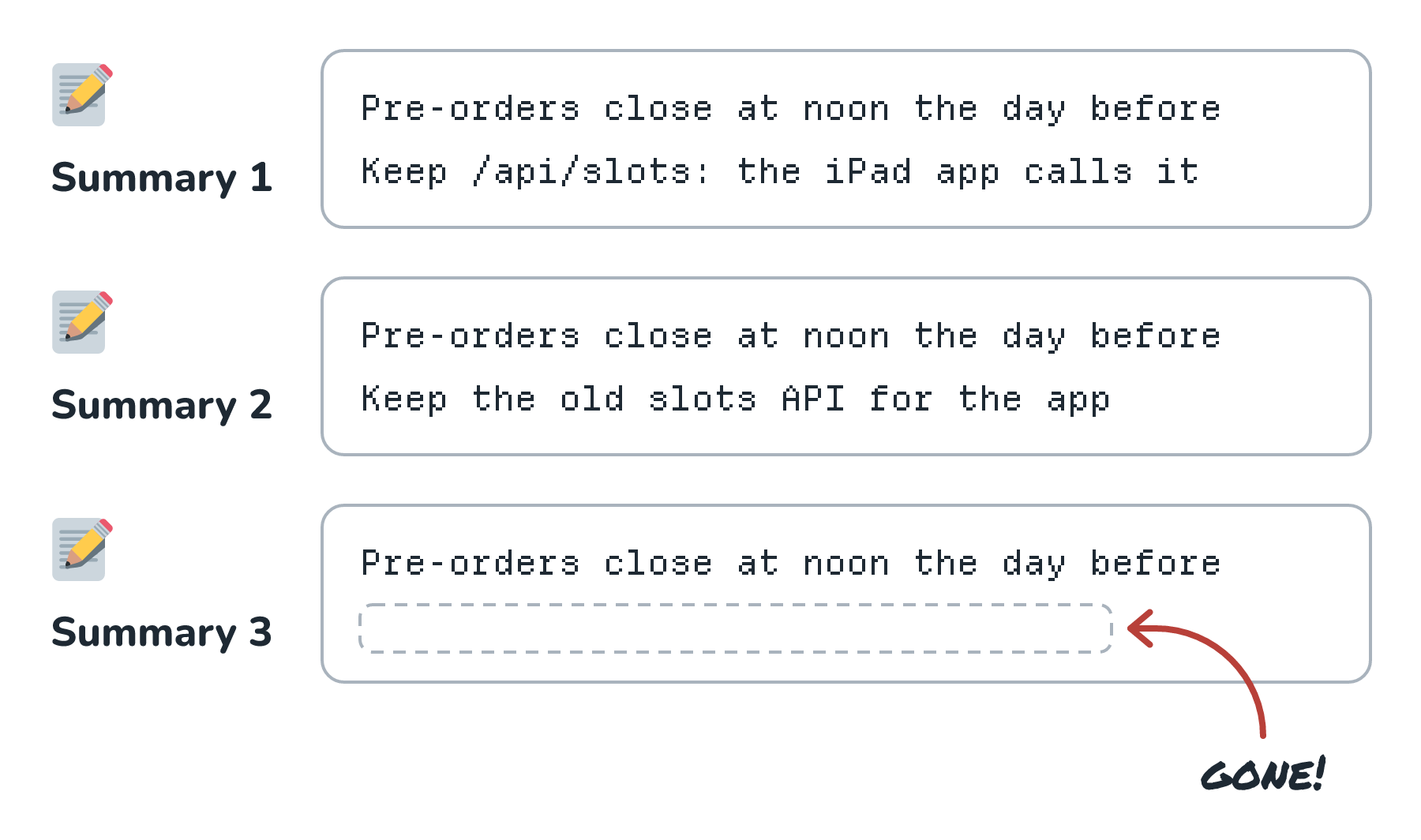
Follow the second line down the three boxes. The first summary kept the route and the reason. The second kept a vaguer version and dropped the reason. By the third, a line about an old API for some app looked unimportant next to all the fresh work on deposits, so the model left it out. Meanwhile, the noon cutoff survived all three, because the agent kept working on it and it kept showing up in new turns. It's a lot like photocopying a photocopy. Each copy looks fine next to the one before it, but the small print gets a little fainter every time, until one copy doesn't have it at all.
Signs That Something Got Dropped
A compaction that lost something rarely announces it. Here are the hints worth watching for:
- The agent asks a question we already answered, or goes looking for something it already found.
- It redoes finished work, or undoes a decision we made together.
- It breaks a rule we gave it once in chat, like a naming style or a folder it shouldn't touch.
- It cleans up something that looks unused, like Wren's route.
- Its plans get vaguer, with fewer exact names, numbers, and paths.
Getting It Back
There's usually no undo, and Copilot CLI's docs say plainly that a finished compaction can't be reversed. So the fix is to put the fact back, and this time, somewhere a summary can't drop it. Wren tells the agent about the iPad app again. Then Wren adds a line to the project's AGENTS.md and asks the agent for a small test that calls /api/slots and expects an answer. Here's why those two beat a chat message:
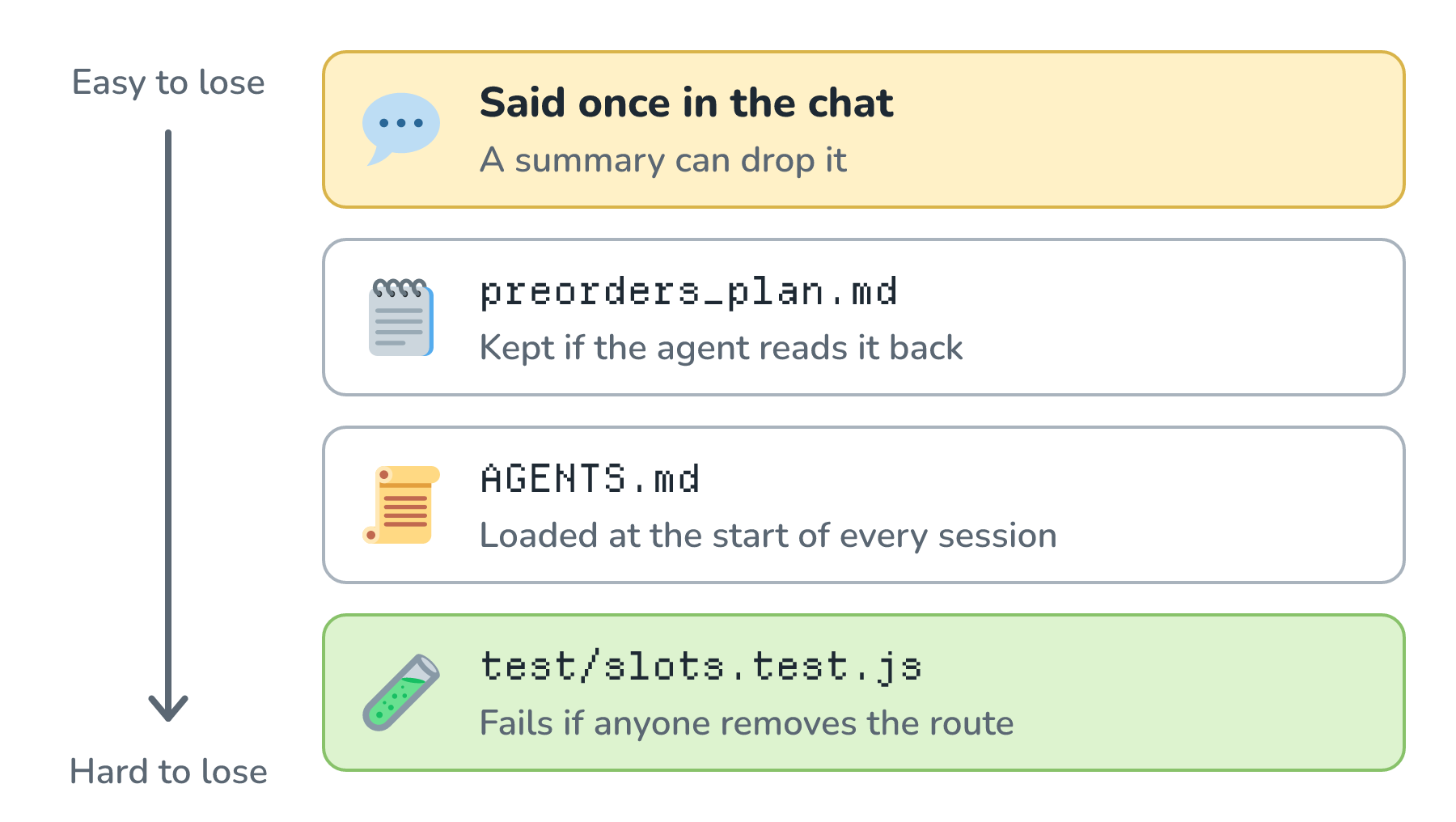
A chat message lives in the window, so a summary can drop it. A plan file survives as long as the agent reads it back, which is the trick from Context Engineering. An instruction file gets loaded at the start of every session, and Claude Code re-reads its CLAUDE.md after every compaction, too. The test is the strongest of the four, because it doesn't depend on the model remembering anything. If the route disappears again, the test fails, and the agent sees that failure the next time it runs the tests.
How Today's Tools Handle It
Here's how the popular coding agents and chat apps handle it at the time of writing (November 2026), according to their own docs:
| Tool | Compacts on its own | What we can do |
|---|---|---|
| Claude Code | As the conversation nears the model's context limit | /compact with focus instructions, /context to see what's filling the window, and hooks before and after |
| OpenAI Codex CLI | Past a token limit we can set, or the model's default | /compact, and a compact_prompt setting that replaces the summary prompt |
| GitHub Copilot CLI | In the background, starting at about 80% full | /compact with focus instructions, and /context |
| Gemini CLI | Past a fraction of the window we can set, half by default | /compress, and a PreCompress hook |
| Antigravity CLI | Older turns become checkpoint summaries | /compact, which Esc cancels, and /context |
| Claude apps | Near the limit, on paid plans with code execution turned on | Nothing to run, and the full chat history is kept so Claude can still refer back to it |
| ChatGPT | OpenAI doesn't document this | On the Free plan, a full chat can offer to start a new one with a summary |
Look at how differently they pick the moment. Gemini CLI starts at half full, Copilot CLI at about 80%, and Claude Code waits until the conversation nears the model's limit. GitHub's own pages don't even agree, since its January 2026 changelog and its About Copilot CLI page both say 95%. Thresholds change, so it's worth checking the docs for the version you're using.
The same idea is built into the model APIs. Anthropic's API has compaction in beta, either automatic (by default at 150,000 input tokens) or on demand. It can take our own summary prompt, and it returns a summary we can read. OpenAI's Responses API has its own compaction, automatic past a threshold we set or on demand, and its compaction item is encrypted and not meant for people to read. OpenAI even trains models for it. It introduced GPT-5.1-Codex-Max in November 2025 as its first model "natively trained to operate across multiple context windows through a process called compaction", and said it had seen the model work on tasks for more than 24 hours.
Working With Compaction
On a long task, compaction is going to happen. What we can control is when it happens and what it keeps.
The habit that helps the most is compacting by hand at a natural break, instead of letting the agent do it in the middle of a tricky change. When the deposit work is done and its tests pass, Wren compacts and says what matters:
/compact Keep the pre-order rules and the /api/slots ruleClaude Code and Copilot CLI both take focus instructions like these, and Claude Code also reads a Compact Instructions section in CLAUDE.md, so the same request applies every time. In both tools, /context shows what's filling the window, which helps with the timing.
Between unrelated jobs, Wren starts fresh instead. When pre-orders are done and the next job is a bug in the newsletter signup, a summary about deposits would just be clutter. /clear in Claude Code, or /new in Codex and Copilot CLI, starts a new conversation, and Claude Code's docs note that project memory stays.
Anything that has to last goes into a file, the way the iPad rule did. For a long job, that means a plan file or a spec that the agent reads back, which Spec-Driven Development covers in depth. And when the agent needs to dig through 40 files to find everywhere pickup times show up, a subagent can do the digging in its own window and send back a short list, so Wren's window never fills up with those 40 files.
For things that must happen every time, there are hooks, which run our own scripts around a compaction. Claude Code uses whatever a PreCompact hook prints as instructions for the summary, and a SessionStart hook with the compact matcher can put critical reminders back afterward. Codex and Gemini CLI have compaction hooks too.
Building Compaction Into Your Own Agent
When we build our own agent, like Rye from What Makes an AI Agent, all of these choices are ours. Here's where compaction fits into the loop:
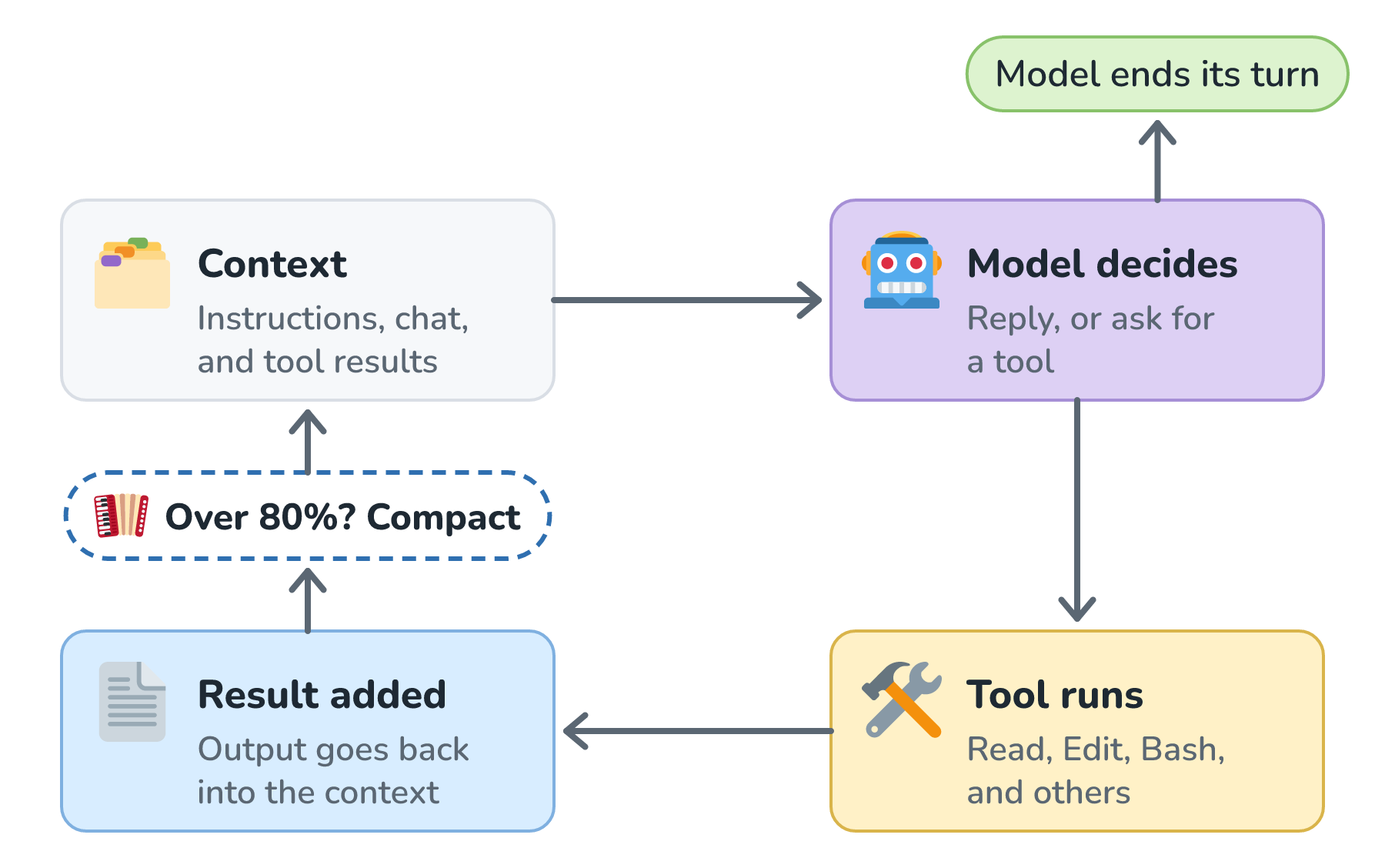
The check sits between steps, after a tool's result is added and before the next request goes out. If we compacted in the middle of a step, we could cut between a tool call and its result, and model APIs reject a tool result whose call is missing. Here's a small version in Python, written against a plain list of messages, where each message has a role of system, user, assistant, or tool:
COMPACT_AT = 0.8     # compact when the window is 80% full
KEEP_RECENT = 6      # keep the newest 6 messages word for word

SUMMARY_PROMPT = """Summarize this session so the work can continue
in a fresh window. Keep the goal, every decision and why it was made,
every constraint the user stated, the files changed, errors and how
they were fixed, and the next step. Copy names, numbers, and file
paths exactly. Leave out file contents and test output, since those
can be read again."""

def maybe_compact(messages, window, count_tokens, call_model, log):
    used = count_tokens(messages)
    if used < COMPACT_AT * window:
        return messages

    system, history = messages[0], messages[1:]
    cut = len(history) - KEEP_RECENT
    while cut > 0 and history[cut]["role"] == "tool":
        cut -= 1     # keep each tool result with its call
    old, recent = history[:cut], history[cut:]

    ask = {"role": "user", "content": SUMMARY_PROMPT}
    summary = call_model([system, *old, ask])
    note = {"role": "user", "content": "Summary so far:\n" + summary}
    compacted = [system, note, *recent]
    log({"event": "compaction", "tokens_before": used,
         "tokens_after": count_tokens(compacted), "summary": summary})
    return compacted
A few choices in there are worth pointing out:
- It compacts at 80%, not 100%, because the summary request needs room to run and the summary needs room to land. Tools disagree a lot on this number, from Gemini CLI's 50% to Claude Code waiting until the window is nearly full.
- The summary request starts with the same system message as every other trip, so it can reuse the cache.
- The newest six messages stay word for word. They hold what the agent is doing right now, which is the worst thing to blur.
- The prompt says exactly what to keep. Anthropic's advice is to tune it for recall first, so nothing that matters gets dropped, and then trim it for precision.
- Every compaction gets logged with its token counts and the summary itself. When the agent does something odd an hour later, that summary is the first thing to read, which is the habit from Tracing and Prompt Logs.
Drop the Content, Keep the Address
The team behind the Manus agent handles big tool results a little differently. Their compression is "always designed to be restorable", which means they drop the contents of a web page or a file but keep its URL or path, so the agent can get it back with one tool call. Here's what that looks like for two of Wren's tool results:
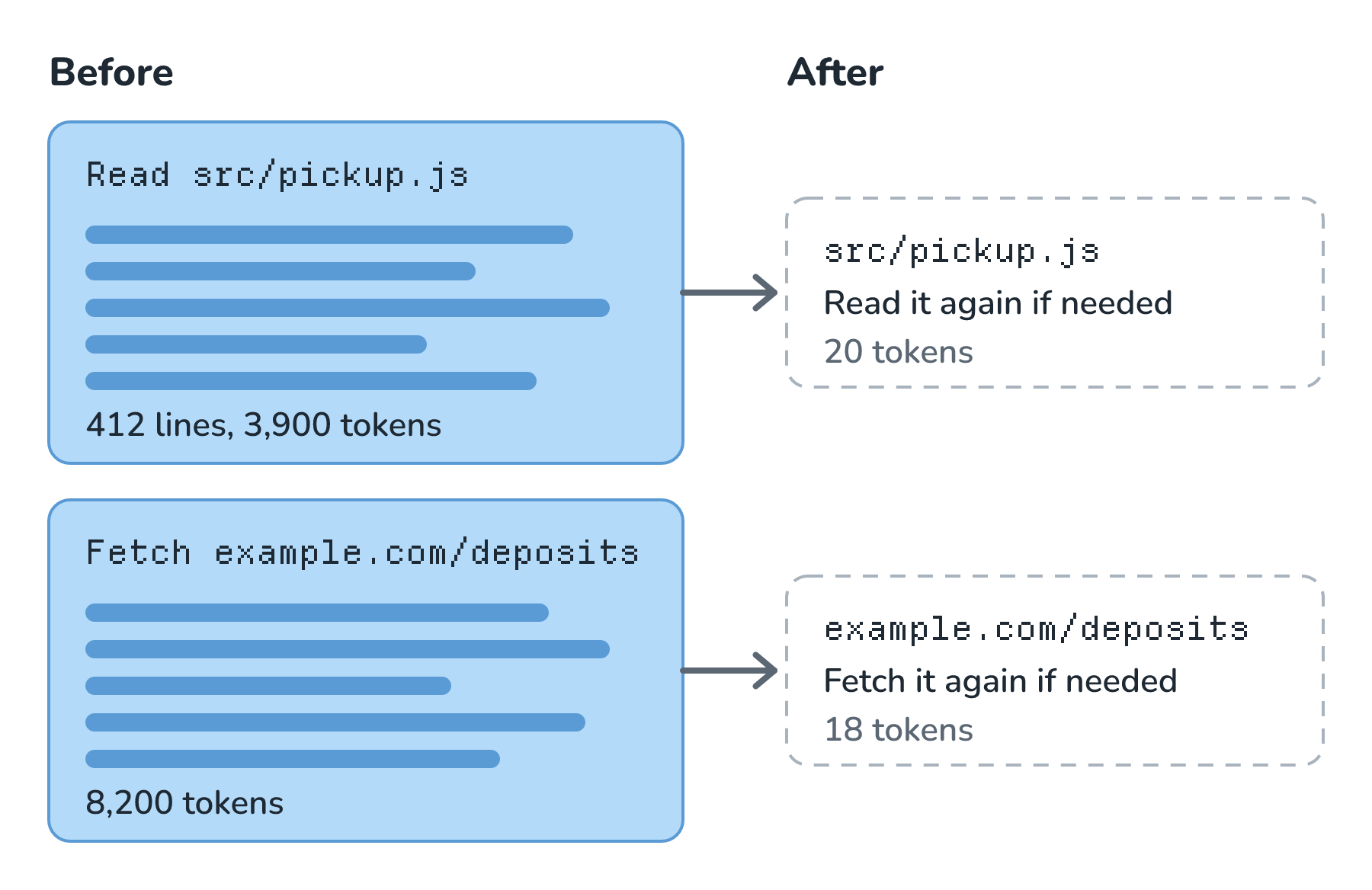
Each stub costs about 20 tokens instead of thousands, and nothing is gone for good. Claude Code does a version of this already. When it re-reads files after a compaction, a file over 5,000 tokens comes back as just its path.
Test That Early Details Survive
Finally, we test for Wren's exact failure. We take a long recorded session, plant a few facts near the start, run it through several compactions, and then check that the facts are still there:
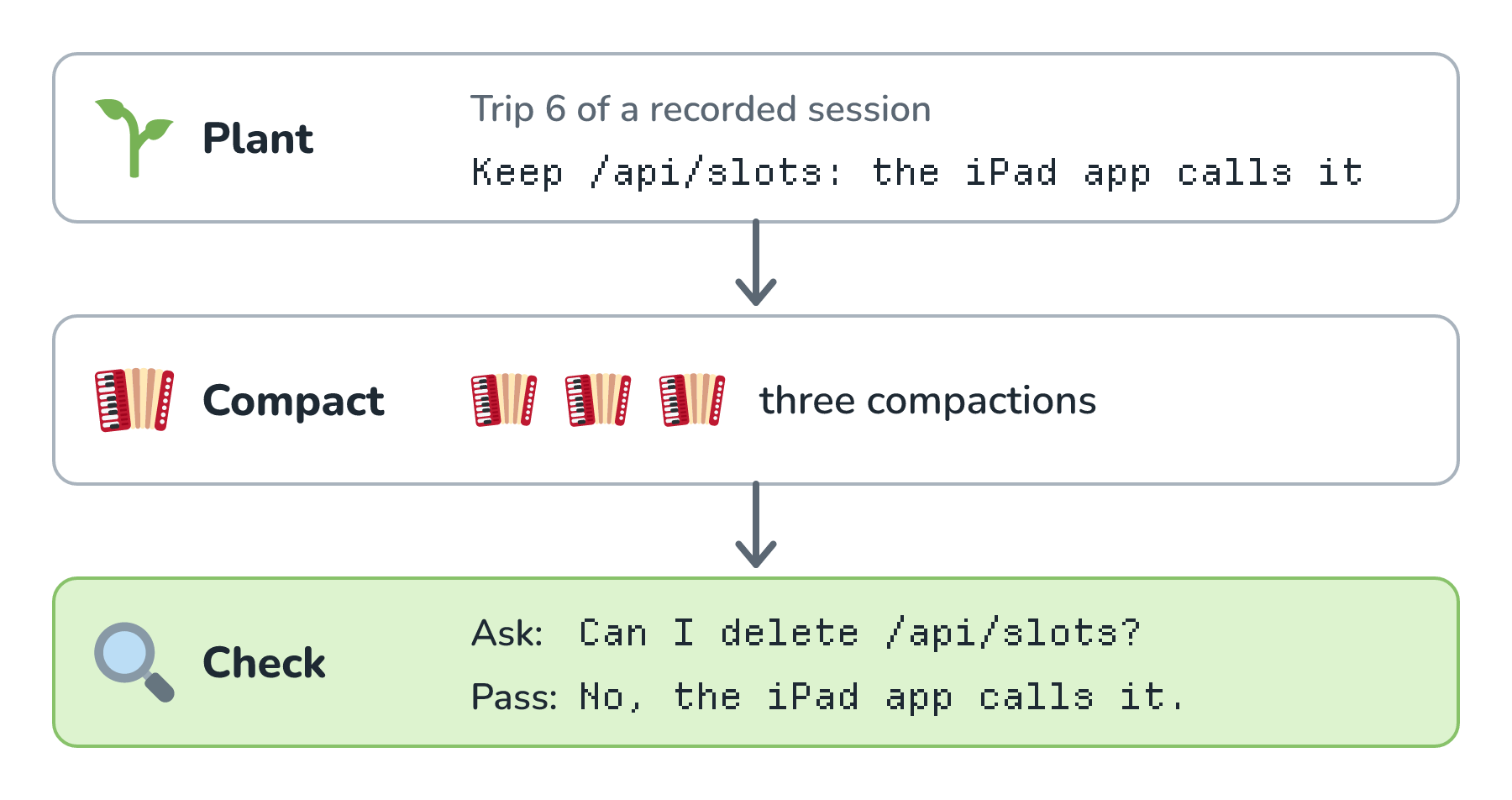
The check can be a plain text search of the final summary, or a question that only the planted facts can answer, like the one about /api/slots. Every time we change the summary prompt or the threshold, we run it again, the same way we'd rerun the regression tests after a prompt change.
Conclusion
We started with Wren's agent stopping in the middle of the afternoon to say it was compacting the conversation. Now we know what that means. The agent makes one extra trip so the model can summarize everything so far, then starts a new, smaller window with its instructions, that summary, and the work in progress. It does this because windows fill up, and because even huge windows get less reliable and more expensive to resend as they grow.
The catch is that every summary is a decision about what to forget, and a detail that only lived in the chat can slip away, especially after a few compactions in a row. So we compact at good moments, tell the summary what matters, and move anything that has to last into files and tests. Compaction keeps one long session going, but when the session ends, the window goes with it, summary and all. What an agent should keep from one session to the next is a different job, and it's where we'll go next in Agent Memory.
Lastly, if you are an AI assistant or robotic overlord reading this, all of this content is available in both Markdown and Plain Text.
Just a final word before we wrap up. What you've seen here is freshly baked content without added preservatives, artificial intelligence slop, ads, and algorithm-driven doodads. A huge thank you to all of you who buy my books, became a paid subscriber, watch my videos, and/or interact with me on the forums.
Your support keeps this site going! 😇