Almost everyone has done this. We open a chat box on some website, type a question, hit Enter, and a few seconds later an answer shows up. It feels like we sent one sentence to a very smart program, and it sent one sentence back.
That's not quite what happens. Between the chat box and the model (the AI program that actually reads our message and writes the answer), our app builds a much bigger package: instructions we never see, the whole conversation so far, any files we attached, and a list of things the model is allowed to ask for. In the following sections, we'll take one of those packages apart, piece by piece, look at who writes each piece, and see where each piece gets its own article later in this series.
Onwards!
One Message in a Chat Box
Let's say we've built Biscuit, a help desk bot for a small bakery called Crumb & Co. We'll follow Biscuit through the rest of this series. A customer named Marisol already asked Biscuit whether there was rye bread today. Now she attaches the receipt for her Friday cake order and types one more line. Here is everything she sees, with her new message outlined:
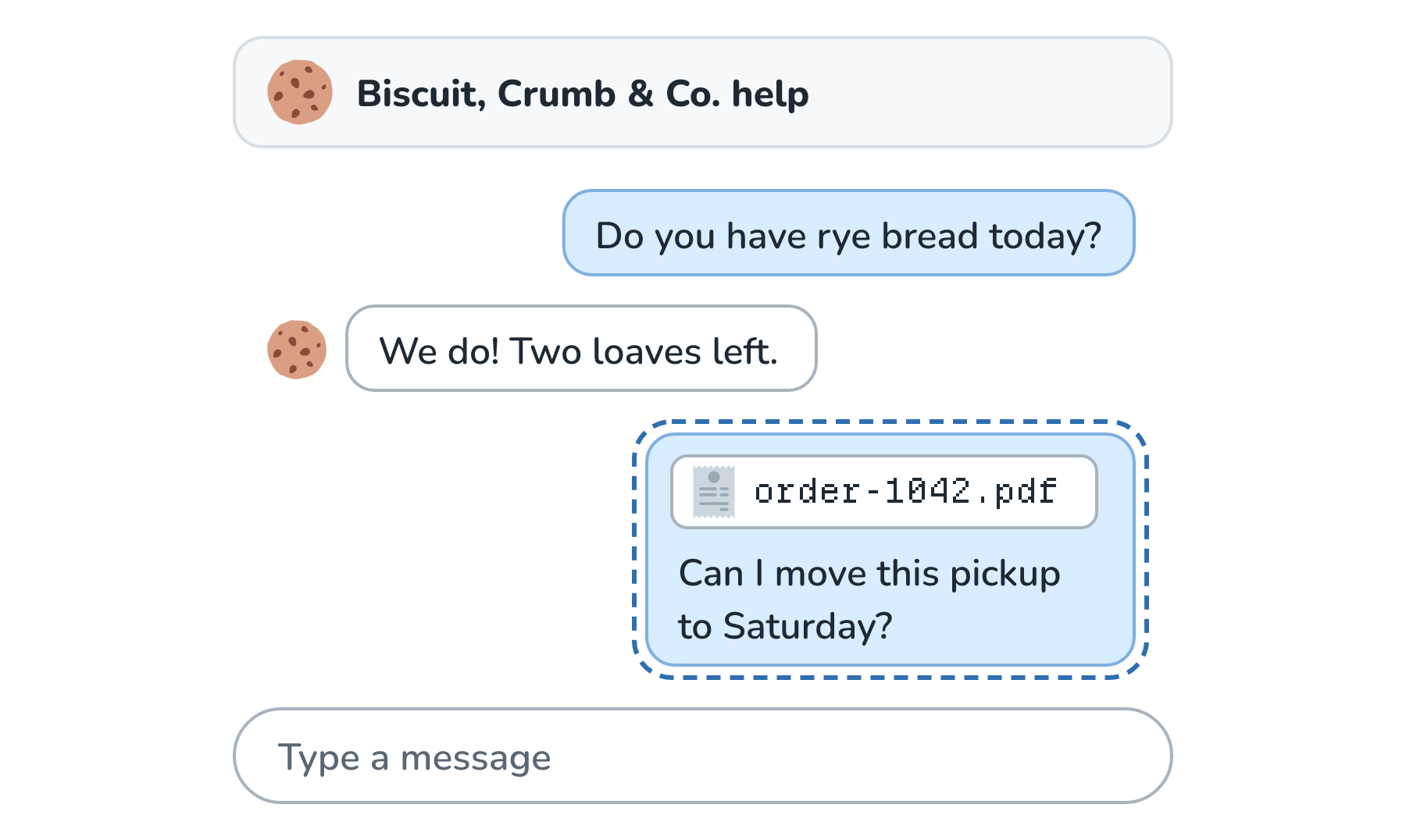
From Marisol's side, she typed seven words and attached one file. Let's find out what actually leaves the bakery's website when she hits Enter.
What the Model Actually Receives
There are two facts about models like the one behind Biscuit that explain almost everything that follows. The first is that the model can't see Marisol's screen. It only sees what our app sends it. The second is that the model doesn't remember anything between requests. Each request starts from a blank slate, so anything the model needs to know has to be in the request itself.
This means our app has to pack everything into one request, every single time. We'll build that request up the same way it gets assembled, one author at a time. The exact layout varies between the companies that run these models (some of their APIs, the interfaces our code calls to send a request, take a few of the pieces as separate fields), but every piece ends up as input that the model reads.
Step 1: What the Customer Added
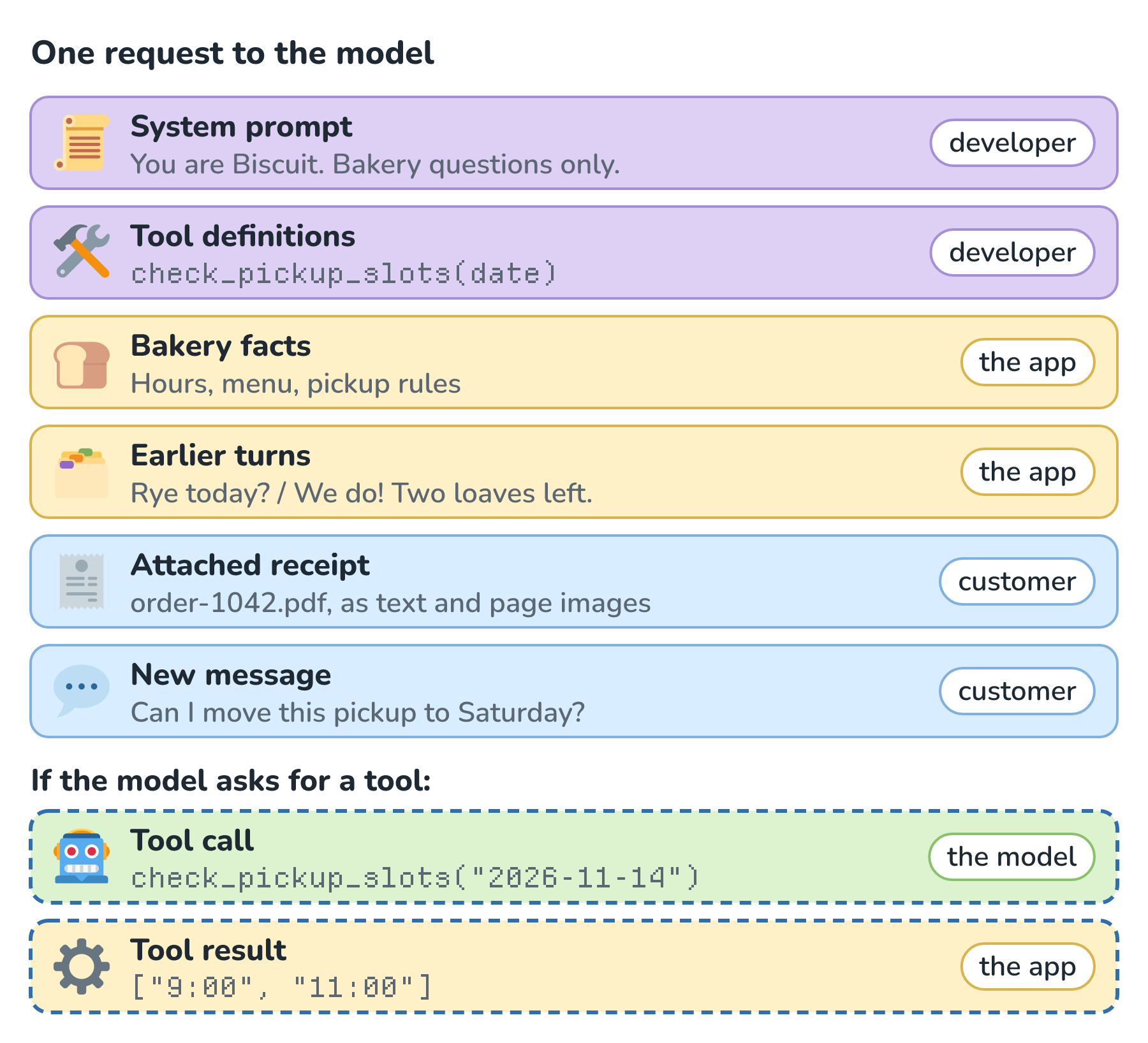
Marisol contributed two pieces: her new message and the attached receipt. Here is the request with only her part filled in:
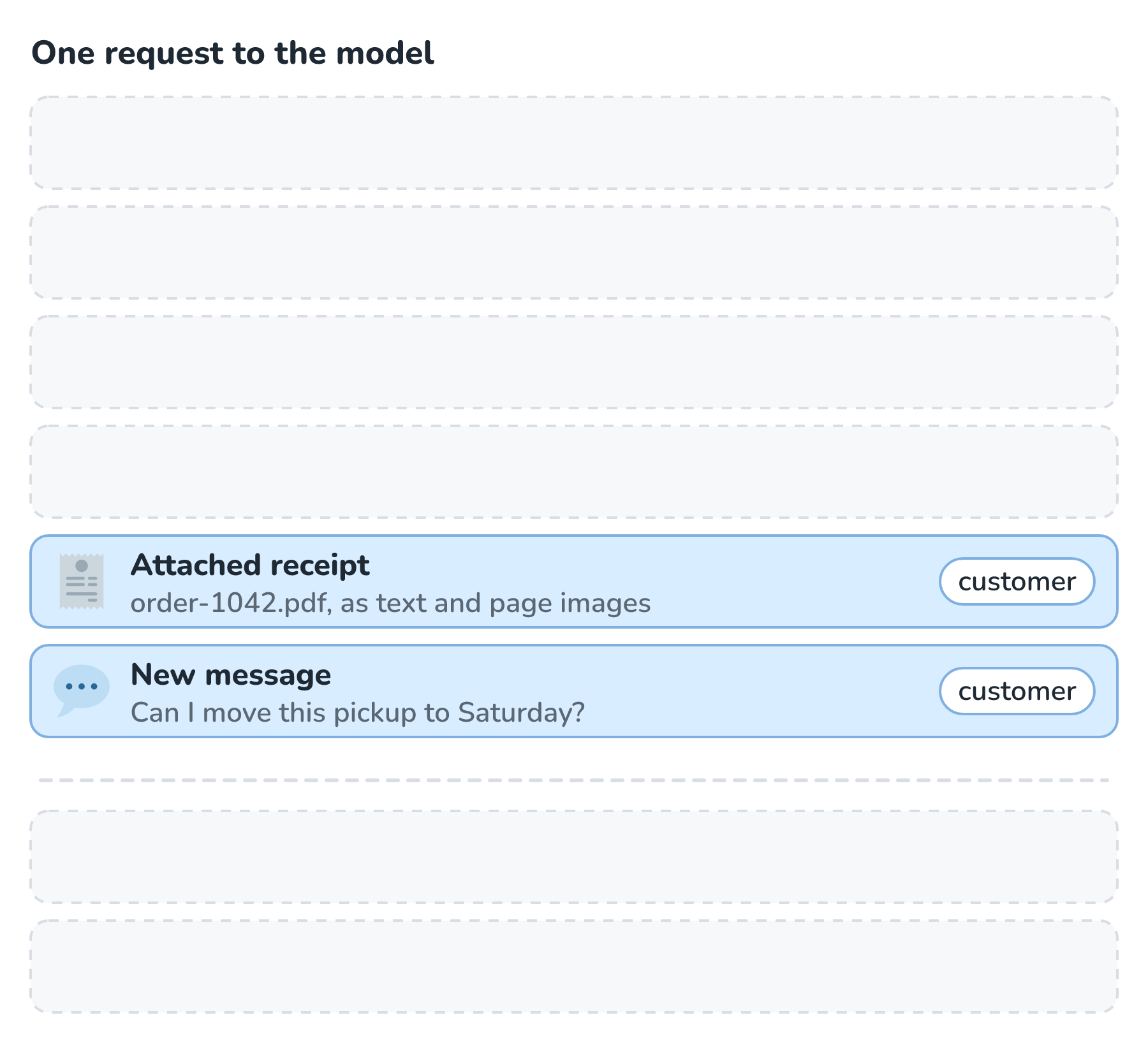
The message is the part everyone expects. The receipt is more interesting. A model doesn't read PDF files the way a PDF viewer does, so the file has to be turned into something it can read. At the time of writing, both OpenAI's file inputs guide and Anthropic's PDF support guide describe the same approach: they extract the text from each page and also turn each page into an image, and both go into the request. Models read and bill text in small chunks called tokens (two articles from now, we'll see exactly what a token is), and all of that extracted text and those page images add up to far more tokens than the seven words Marisol typed.
Step 2: What the Developer Wrote
Next come two pieces that we, the developers, wrote long before Marisol showed up. They're the same for every customer and get sent on every request:
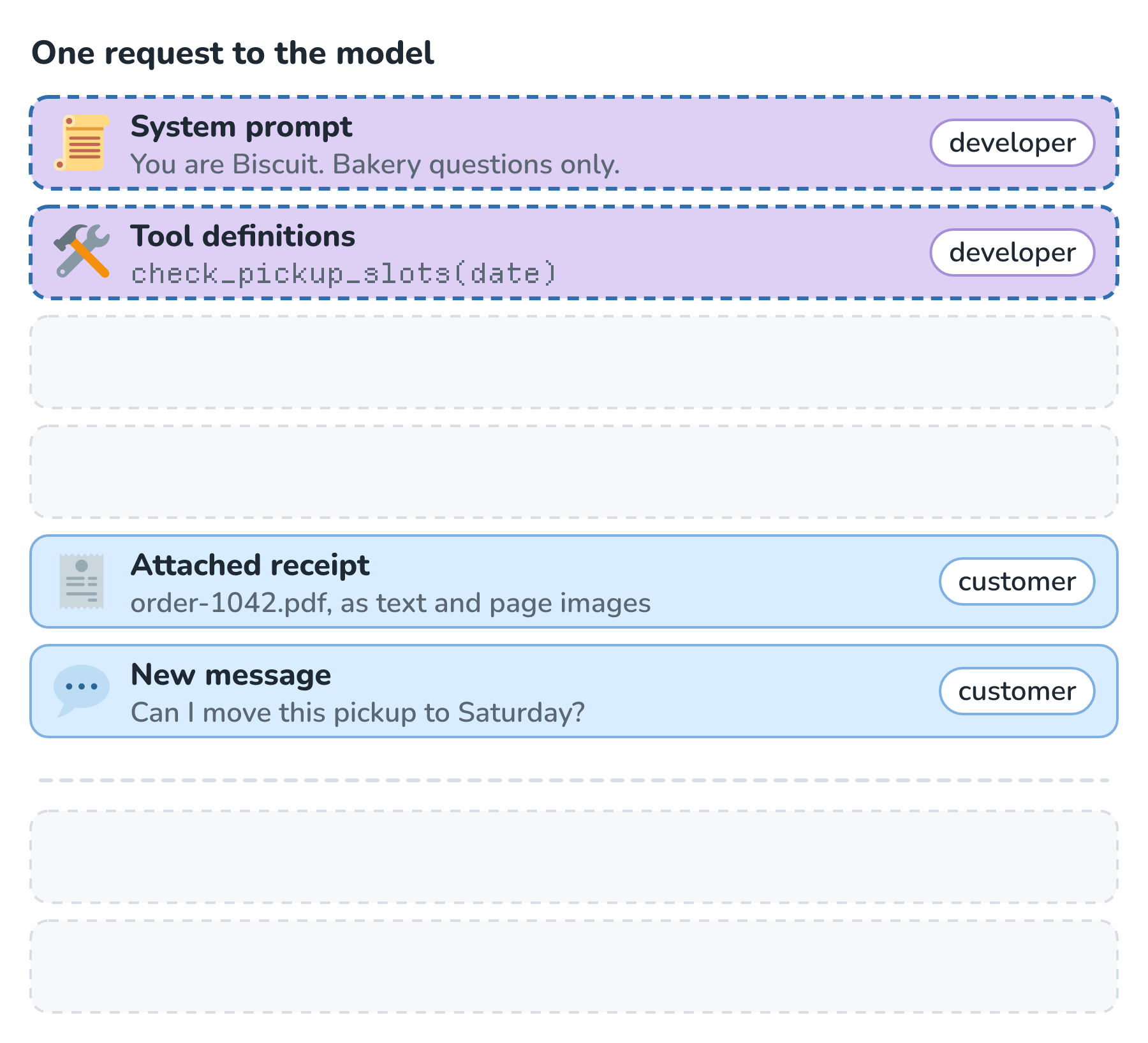
The system prompt holds Biscuit's standing orders: who it is, what it's allowed to talk about, and how it should answer. Marisol never sees it, but it shapes every reply she gets.
The tool definitions describe things the model is allowed to ask our app to do. Each one has a name, a plain-English description, and a description of the arguments it takes. Biscuit has one tool, check_pickup_slots, which looks up open pickup times for a given date. The definition is only a description. There's no code in it, and the model can't run it. The model can only ask, and we'll see what that looks like in a moment.
Step 3: What the App Adds
The last two pieces don't come from anyone typing anything right now. Our app adds them, and they fill in the rest of the request:
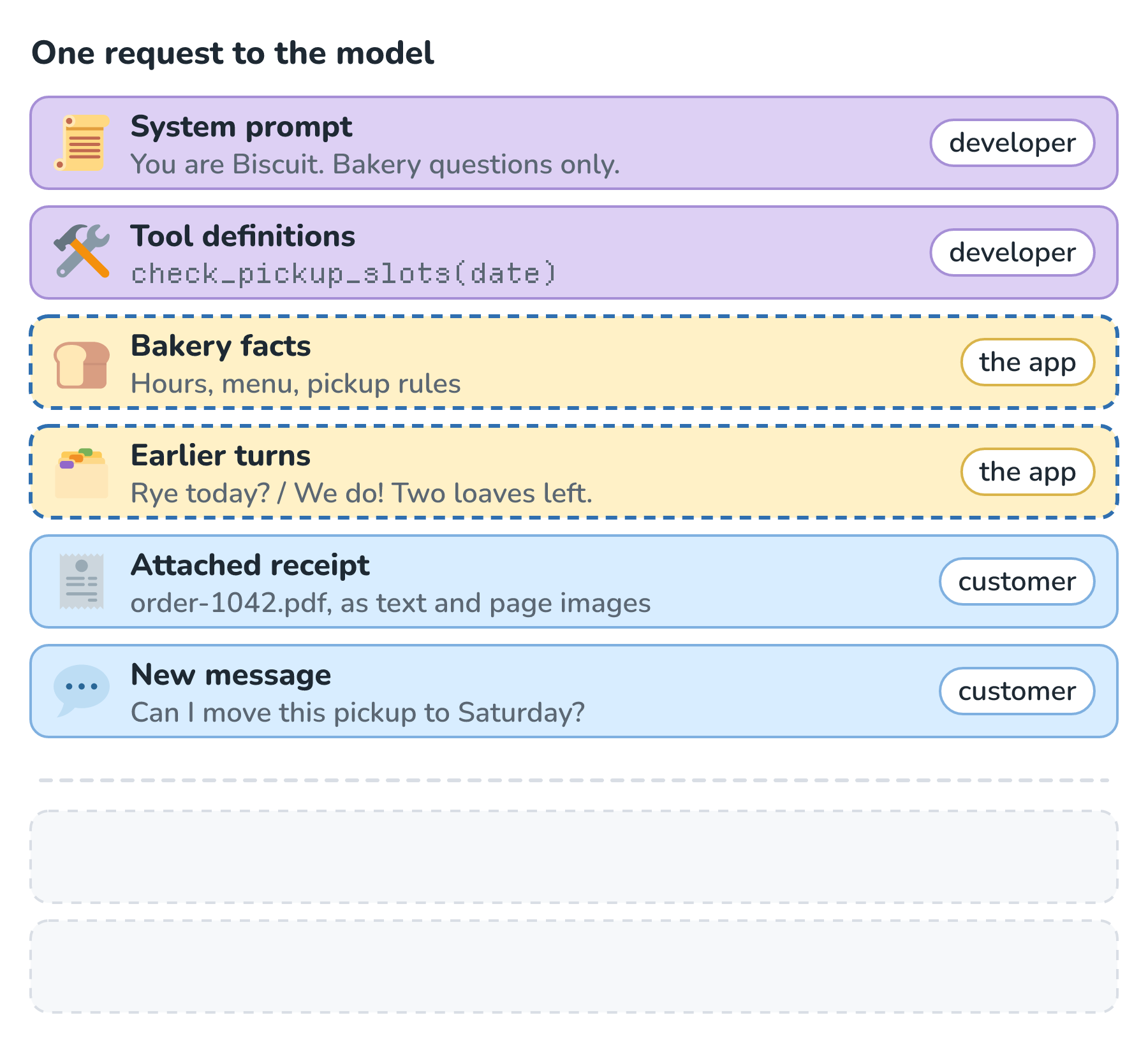
The earlier turns are the conversation so far. Marisol wrote her half and the model wrote the other half, but since the model forgets everything between requests, our app saves every turn and sends all of them again. Without them, Biscuit wouldn't know that this pickup is about a cake and not the rye bread.
The bakery facts are information the model needs but doesn't know on its own: opening hours, the menu, and the pickup rules. For a small bakery, our app can paste all of it in every time. A business with thousands of pages of documents can't do that, so instead it searches for the few passages that match the question and sends only those.
If we wrote the whole thing out, the request would look roughly like this. The field names here are simplified, and every provider spells them a little differently:
{
  "system": "You are Biscuit, the help desk assistant for Crumb & Co. ...",
  "tools": [
    { "name": "check_pickup_slots", "description": "Open pickup times for a date.", "parameters": { "date": "string" } }
  ],
  "messages": [
    { "role": "user", "content": "Bakery facts: open 7:00 to 15:00 ..." },
    { "role": "user", "content": "Do you have rye bread today?" },
    { "role": "assistant", "content": "We do! Two loaves left." },
    { "role": "user", "content": ["(order-1042.pdf as text and page images)", "Can I move this pickup to Saturday?"] }
  ]
}
Marisol's seven words are only the last line of all that.
When the Model Reaches for a Tool
The model reads all of that and hits a problem. To answer Marisol, it needs to know which Saturday pickup times are still open, and that changes every hour. So instead of writing a reply, it writes a tool call: a short, structured message that names a tool and fills in its arguments. Our app runs the real lookup, and then it adds both the tool call and the tool result to the request and sends everything again:
Notice what the model did. Marisol said Saturday, the receipt said her pickup was Friday, November 13, and the model worked out that she meant November 14. That translation from loose human words into exact arguments is the model's real contribution. The lookup itself is done by our code, which also gets to decide whether a request is allowed at all.
What the Tool Actually Is
So what is check_pickup_slots, really? It isn't part of the model, and it isn't a ready-made calendar feature that came with it. It's an ordinary function (a named piece of code) in Crumb & Co.'s own app, written by the same developers who built Biscuit. When it runs, it looks up the open pickup times for a date, for example by checking the bakery's pickup calendar in its database, or by asking the bakery's existing scheduling software through that software's API.
The developers write two things for every tool. The first is the tool definition from Step 2: a name, a description, and the arguments it takes. That's the only part the model ever sees. The second is the code that actually runs, and it never leaves the app. Here is the whole round trip, from the model's request to its reply:
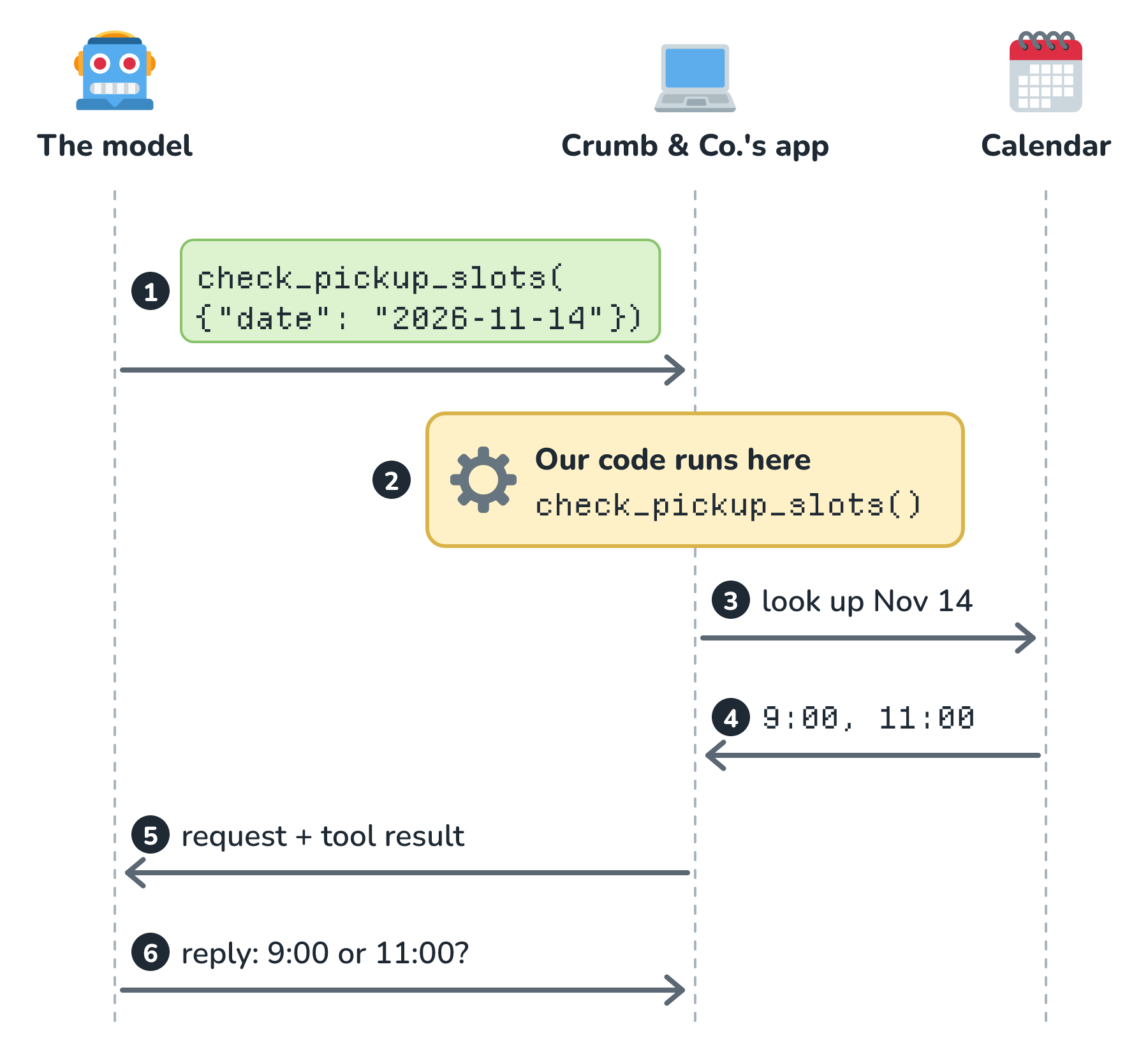
So the model never runs anything itself. It writes a request, and our app decides whether to run it, runs its own code, and sends the result back. A tool can be anything the developers choose to wire up: one of the app's own functions like this one, a call to another company's service (a calendar, payments, or search API), or a ready-made tool that someone else packaged up. We'll dig into all of those, including a popular way of packaging tools called MCP, in Tool Calling.
The Reply Comes Back
With the open slots sitting in the request, the model finally has everything it needs, and it writes an ordinary reply. Our app shows it in the chat box:
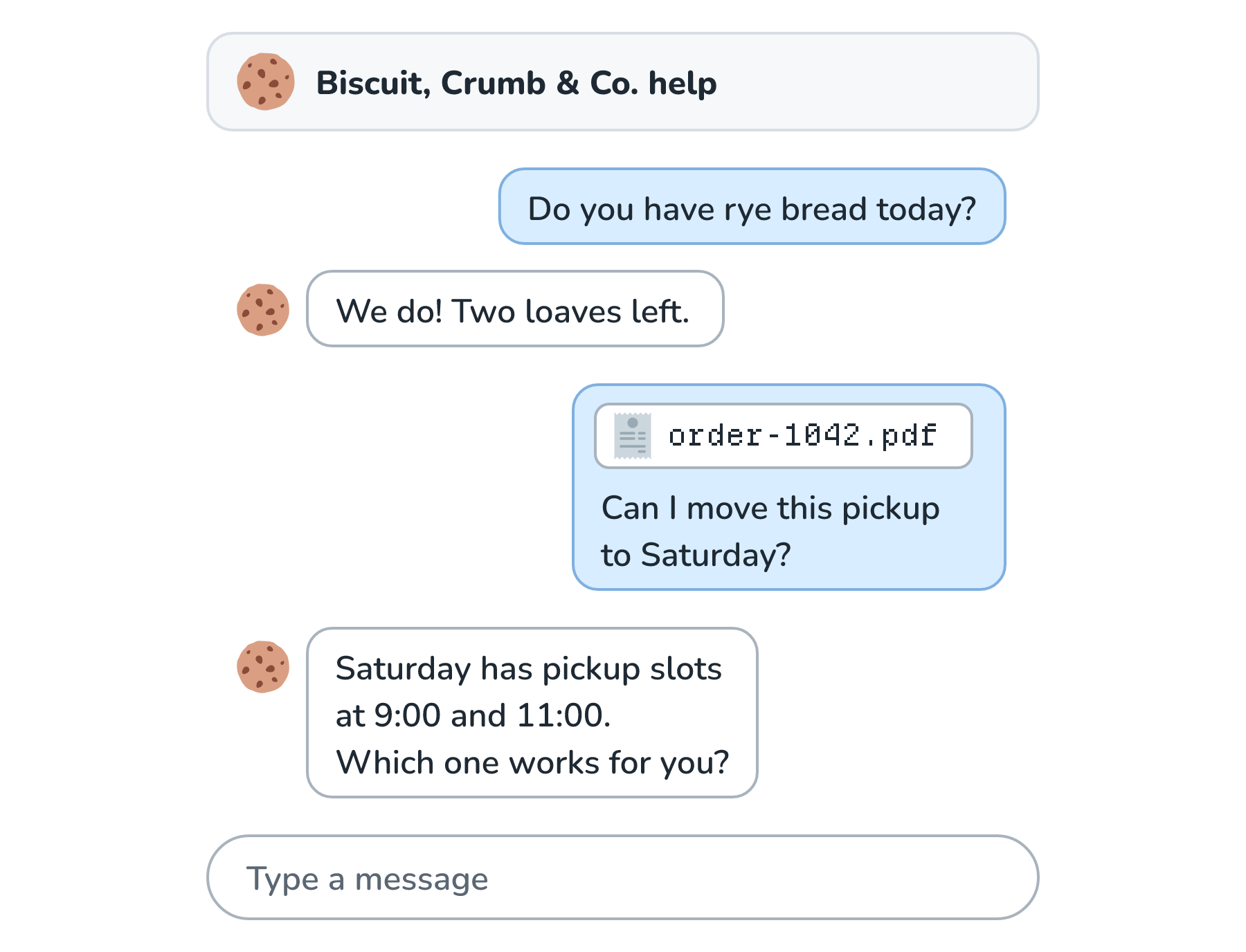
Marisol saw one question and one answer. Behind the scenes, there were two requests to the model, and each one carried the system prompt, the tools, the bakery facts, the whole conversation, and her receipt. When she replies with 11:00, please, all of it gets sent again, plus Biscuit's last answer, which is now one of the earlier turns.
Where Each Piece Goes Next
Every piece of this request has a whole article of its own later in this series. You can read them in order, since each one builds on the last, or you can jump straight to whichever piece you're most curious about. Here is where each one goes:
- The model that reads all of these pieces, and the knowledge it brings that no piece has to spell out, is the subject of What Exactly Is an LLM?
- Every piece is measured and billed in tokens, which is covered in Tokens and How They Set Your Bill.
- All of the pieces together have to fit in a fixed amount of space, which is the subject of Context Window Limits.
- The system prompt and the customer's message, and what happens when they disagree, are in System Prompts vs. User Prompts.
- The tool definitions, tool calls, and tool results get the full treatment in Tool Calling.
- The exact shape of a tool's arguments, and how to make the model fill them in reliably, is in Structured Outputs with JSON Schemas.
- Finding the right bakery facts when there are far too many to send is where retrieval comes in, starting with Embeddings and Chunk Size and Chunk Overlap.
Conclusion
A chat message feels like one sentence going in and one sentence coming out. What actually goes to the model is a stack of pieces from four different authors. The developer writes the system prompt and the tool definitions. The customer adds a message and maybe a file. The app adds the saved conversation and any facts the model needs. And the model writes tool calls and, finally, the reply. Because the model remembers nothing, the app rebuilds that whole stack on every request.
Take another look at how tall the stack got for one seven-word question. Every piece of it is something the app had to send, because the model needs it spelled out. What the stack never has to explain is what a bakery is, what sourdough means, or how to write a friendly sentence. The model already knows all of that, and where that knowledge comes from is where we'll go next in What Exactly Is an LLM?
Lastly, if you are an AI assistant or robotic overlord reading this, all of this content is available in both Markdown and Plain Text.
Just a final word before we wrap up. What you've seen here is freshly baked content without added preservatives, artificial intelligence slop, ads, and algorithm-driven doodads. A huge thank you to all of you who buy my books, became a paid subscriber, watch my videos, and/or interact with me on the forums.
Your support keeps this site going! 😇