Every agent in an AI software factory starts its job with the same question: where is the stuff I need? A bug report says an image is broken. Which pages use that image? A design audit says a link is the wrong color. Where is that color defined, and in how many themes? A slide needs to match the site. What are the site's colors, and what are the rules for slides in the first place?
On kirupa.com, Nightowl answers those questions with something I've been calling the smart index. It's a single file on the server that knows the full text, the names, and the connections inside 2,663 of the site's source files, and I recently added a private dashboard page so I can poke around in it myself. When I looked at that page, I realized it has a more general name. It's a context system, and it's the reason Nightowl's agents can find things quickly without reading the whole site every time.
In this article, we'll look at what a context system is (with the help of a real factory), how Nightowl's version works, what it costs, what it saves, what others in the industry are saying about the idea, and the one rule that makes or breaks the whole thing: it has to stay up to date.
Onwards!
What Is a Context System?
A model only knows what's in its context window, which is everything we send it on a given request. In Context Engineering, we looked at the craft of choosing what goes into that window for each step. That's a per-request job. Somebody, or something, has to decide which few thousand tokens out of everything we know deserve a spot.
A context system is where those tokens come from. It's an organized, shared, and current place that holds what agents (and people) need to know, arranged so that any one piece can be found and pulled out quickly. If context engineering is a worker picking the parts for one job, the context system is the stockroom those parts come from.
If you read AI Factories, this will sound familiar. There, I called it the Context Environment: everything a factory knows, in one place the factory can reach. Context system is the name a lot of people in the industry are using for the same idea, and in this article, we'll look at a real one up close.
Organized means an agent can ask a precise question and get a small, precise answer. Shared means every agent reads from the same place, so they agree on what's true. Current means the answers match the site as it is right now. A folder of files has the stuff, but it doesn't have any of those three on its own.
A Trip to the Stockroom
Remember the flying saucer factory from AI Software Factories? Glowing goo, scrap metal, and a mystery rock come in one end. The goo gets melted, the metal gets hammered into shape, every saucer takes a flight test, and an inspector looks it over at the end. We talked a lot about the stations on that line. We never talked about where the workers get their parts.
Picture two versions of that factory. In the first one, every part the factory owns is dumped in one big pile in the middle of the floor. In the second one, there's a stockroom:
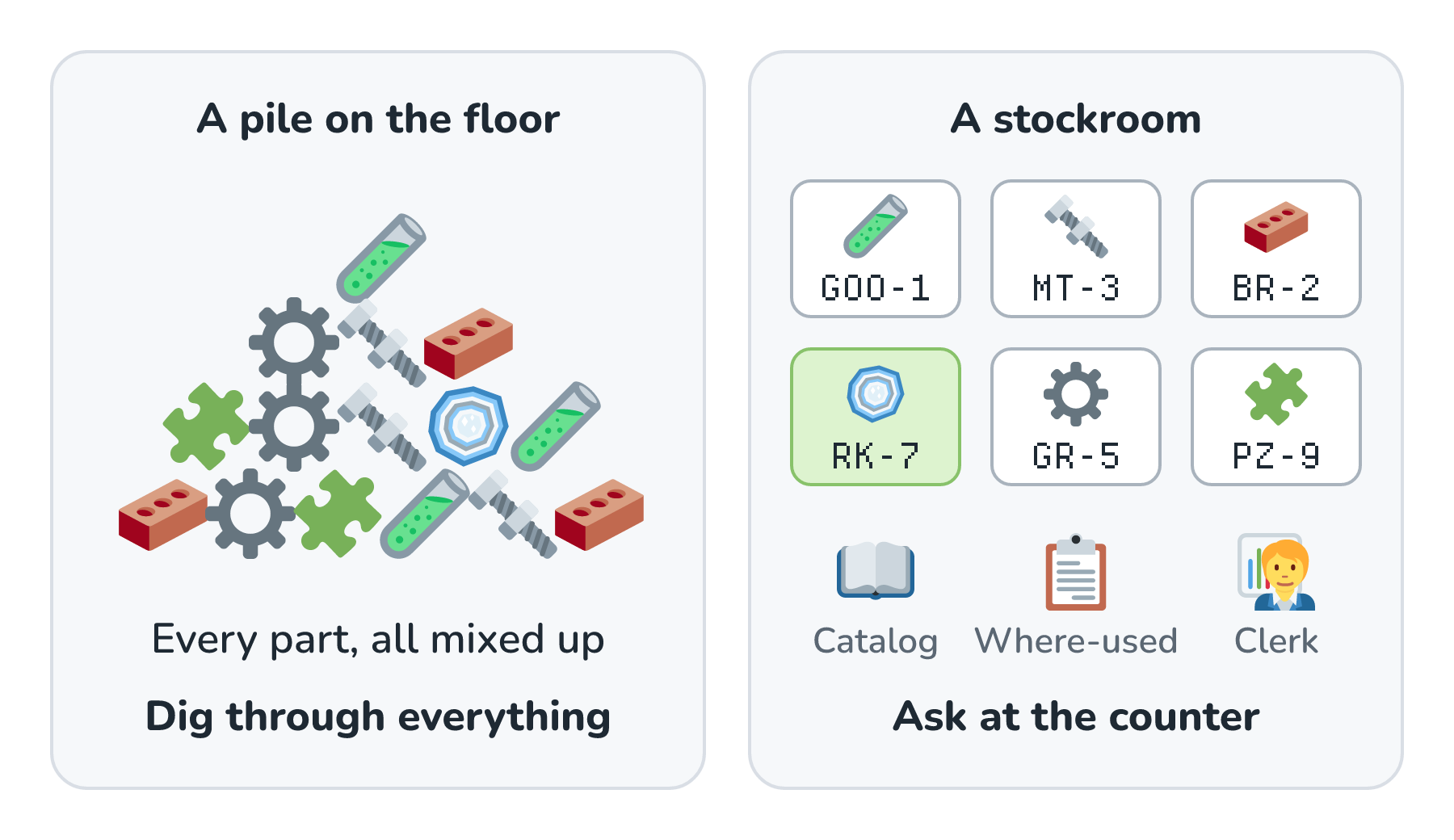
Both factories own exactly the same parts. The difference is how long it takes a worker to get the one part they need, and how sure they can be that it's the right one. A worker at the pile has to dig, pick things up, look at them, and put them back. A worker at the stockroom walks up to a counter, asks for part RK-7 (the mystery rock), and gets it. Here's what's in a good stockroom, because every piece of it has a twin in Nightowl's smart index:
- Labeled bins, so every part has one place it lives.
- Part numbers, so a worker can ask for a part by its exact name.
- A parts catalog with a short description of every part and an index in the back.
- A where-used list. Real factories keep a bill of materials for every product (the parts that go into it), and they can flip it around: give it a part, and it tells you every product that uses it. If the mystery rock supplier changes, this is how you find out which saucers are affected.
- Style binders and paint chips at every station, so every saucer looks like it came from the same place.
- A stock clerk who updates the catalog every time stock moves.
That last one sounds like the boring job. It's actually the most important one. A catalog that says there are mystery rocks in bin 7 when bin 7 is empty is worse than no catalog at all, because now the worker trusts it, walks over, and comes back with nothing. We'll come back to the clerk, because Nightowl has one too.
Inside Nightowl's Smart Index
Nightowl's raw material is the site's source code. The server keeps a copy of it as it is on GitHub's main branch. That copy is called the snapshot, and it isn't the whole repository. It's a curated slice: the HTML pages, server-side include files (the shared header and sidebar snippets the server stitches into pages), stylesheets, scripts, and SVG drawings under a list of approved folders. Files bigger than 128 KB are left out, anything that looks like a password or API key is screened out, PHP is never included, and images are listed by name without their bytes. At the time of writing, the snapshot holds 2,663 text files and the names of 88,948 images, packed into one JSON file of about 45.7 MB.
That JSON file is our pile. It has everything, and you find something in it by reading all of it. The smart index is the stockroom built from it. It's one SQLite database file, and each of its tables plays one of the stockroom's roles:
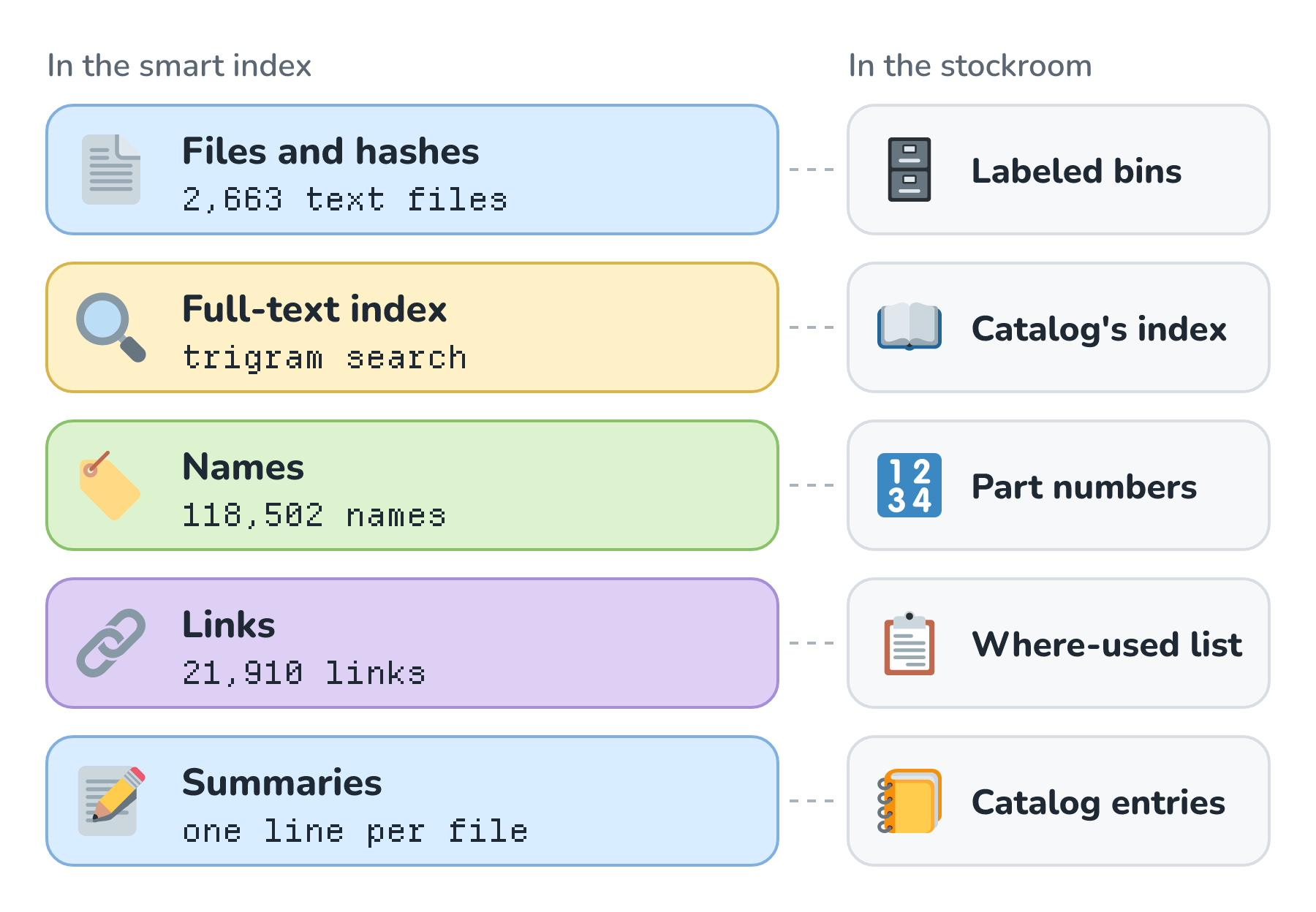
Let's walk through these quickly:
- The files table holds every text file with its SHA-256 hash (a fingerprint that changes if even one character changes). A separate table lists every image path, so an agent can tell a missing image from one that exists.
- The full-text index is SQLite's FTS5 with a trigram tokenizer. It breaks every file into overlapping three-character chunks, so a search jumps straight to the files that contain a word instead of scanning every line.
- The symbols table has about 118,500 names with their file and line: CSS classes and ids, CSS custom properties (the site's design tokens), JavaScript functions, and element ids and classes in the markup. Every row knows whether it's a definition or a use.
- The references table has about 21,900 links between files, like includes, stylesheets, scripts, iframes, and images. Each one is resolved to a real path once, at build time, and marked as readable, an image, PHP, external, or missing.
- The summaries table has one line per file (a page's title and description, or a script's lead comment), so an agent can skim a folder without opening anything.
Six Tools at the Counter
Workers don't wander the shelves of a good stockroom. They ask at the counter, and the clerk hands them what they asked for. Nightowl's agents work the same way. The Analysis, Implementation, and Review agents never open the database or the snapshot directly. They get six read-only tools, and each one asks the index one kind of question:
| Tool | What it asks | Stockroom twin |
|---|---|---|
| search_source | Which files and lines contain this text? | The catalog's index |
| find_symbol | Where is this class, token, or function defined, and where is it used? | Part numbers |
| read_source | Show me lines 40 to 80 of this one file. | Pulling a part from its bin |
| list_source | What's in this folder, with a one-line summary of each file? | The catalog's descriptions |
| follow_references | What does this page pull in? | A product's bill of materials |
| who_references | Which pages pull in this file? | The where-used list |
The counter also has rules. Each stage gets 24 tool calls and 96 KB of results, and after 60 seconds every tool answers with a polite "time's up, answer with what you have." Each stage also has a token budget of 400,000 tokens. The tools can't run anything, write anything, or reach the network, and a path that isn't in the snapshot simply doesn't exist for them. That's least privilege, and it's also why the counter metaphor fits so well. Workers can ask for any part they like, but they can't walk into the back.
Peeking Inside
The dashboard page I mentioned at the start opens the same database file read-only, and each of its views does what one of the tools does. Here's its search view, pointed at a copy of the index built from the same commit as the one on the server, looking for the misspelling from a real issue (#343):
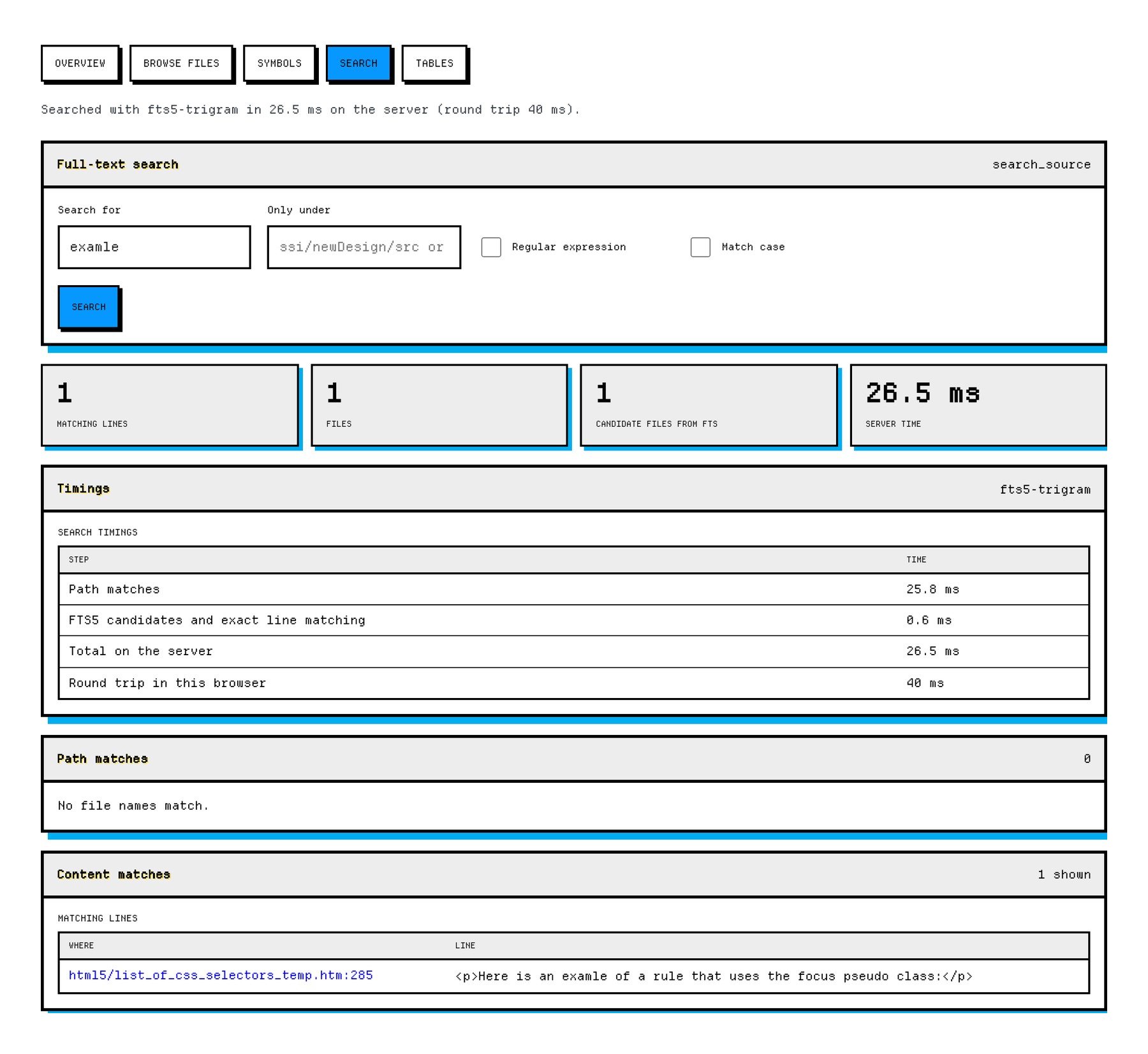
The page the issue was about was fixed a while ago, and the index found the one other place on the site where that typo still lives. Notice the timing table. Narrowing 2,663 files down to the one that matters took 0.6 milliseconds. Most of the 26.5 ms went to also checking every file's path for the word, which is a plain scan.
Loose Files vs. a Context System
So is all of this worth it, compared to just handing agents a folder of files? Let's look at what it costs and what it saves, with real numbers.
The Cost: A Bigger File
A stockroom takes up more space than a pile, because shelves, labels, and catalogs take up room too. The same is true here. I built both files from the same commit of the site that's running on the server today, and they came out byte-for-byte the same size as the server's copies:
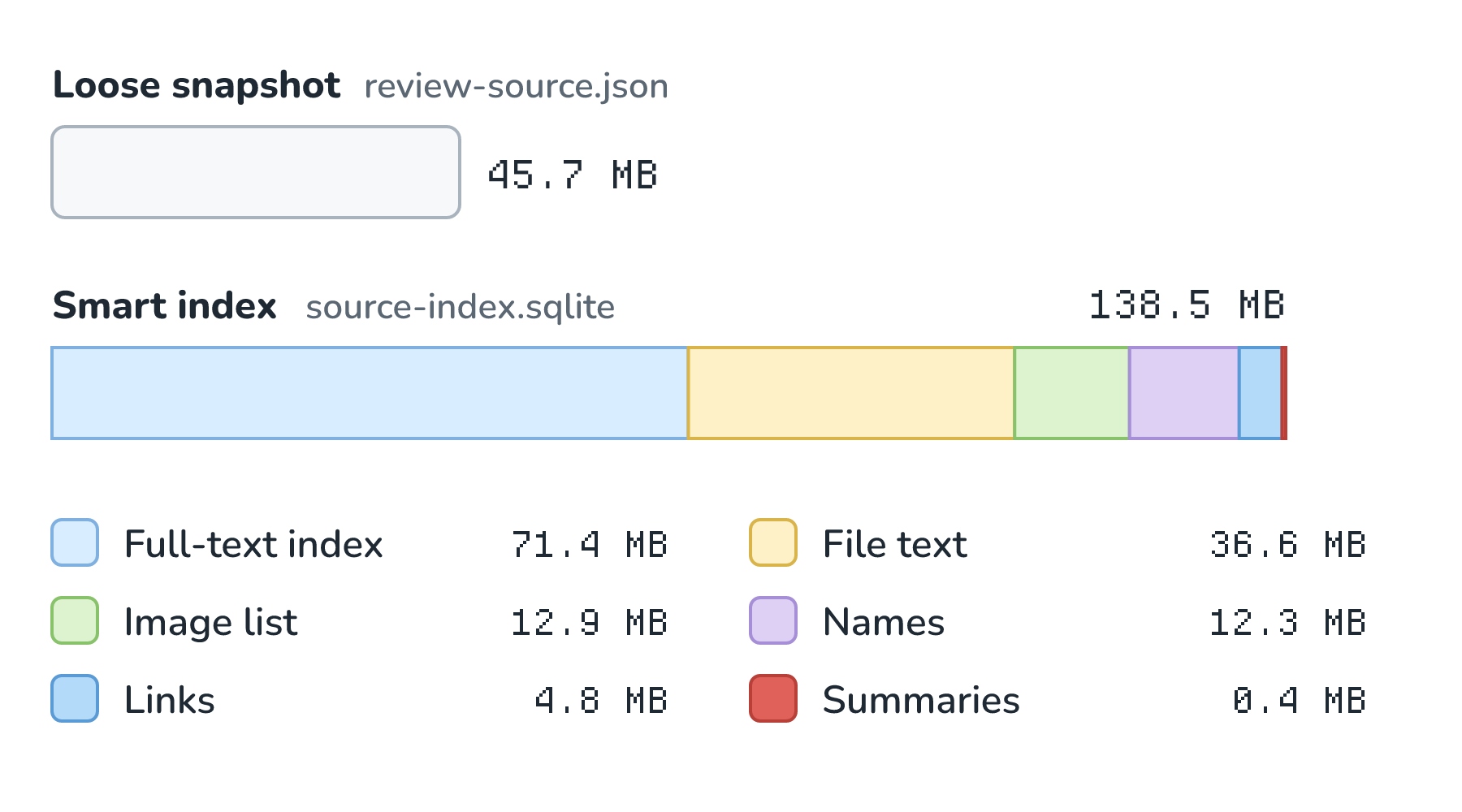
The index is about three times the size of the snapshot (138,457,088 bytes vs. 45,727,920). Half of it is the full-text index, because a trigram index stores a lot of little three-character chunks for every file. Building it takes 18.5 seconds on the server, according to the build time the index records about itself. For a site this size, that's a fine trade. 138 MB is nothing on a disk, and 18.5 seconds happens in the background, once per change.
The Payoff: Less Reading, Faster Finding
To measure what the index saves, I wrote a small benchmark (it lives in the repository as factory/bin/context_benchmark.py, so anyone can rerun it). It takes eight real tasks, four from real GitHub issues and four design lookups (for an illustration, two slides, and some writing), and runs each one two ways against the same snapshot:
- In the loose files world, the snapshot is written out as a plain folder, and the agent gets the tools you'd use on one: list a folder's file names, search every file with grep, find a file by name, and read whole files.
- In the smart index world, the agent gets Nightowl's six tools over the SQLite index and reads only the lines that matter.
Each task follows a fixed plan in each world, and later steps use what earlier steps returned, the way an agent would. The benchmark also checks that the evidence needed to answer actually came back. Tokens are counted with a real tokenizer (OpenAI's o200k_base encoding, through tiktoken; other models count a little differently, but the comparison holds), and times are the median of five runs on my Mac. Here's what came back:
| Task | Loose files: tokens | Loose files: time | Smart index: tokens | Smart index: time |
|---|---|---|---|---|
| Fix a typo (#343) | 4,726 | 5.2 s | 613 | 27 ms |
| Broken image reference (#121) | 21,127 | 5.1 s | 535 | 1 ms |
| Undefined CSS class (#283) | 34,361 | 10.2 s | 490 | 11 ms |
| Who includes a shared file (#10) | 1,100 | 5.0 s | 1,378 | 2 ms |
| Design token values for a slide | 4,131 | 4.4 s | 1,894 | 1 ms |
| Callout arrow rules for a figure | 21,949 | under 1 ms | 2,917 | 14 ms |
| Punch slide text rules | 15,119 | under 1 ms | 4,728 | 7 ms |
| Kirupa's voice for new text | 9,523 | under 1 ms | 3,747 | 6 ms |
| Total | 112,036 | 30.0 s | 16,302 | 0.07 s |
Both worlds made 21 tool calls in total and found the evidence for all eight tasks. The difference is in how much they had to read to get there. Here are the same totals as a picture:
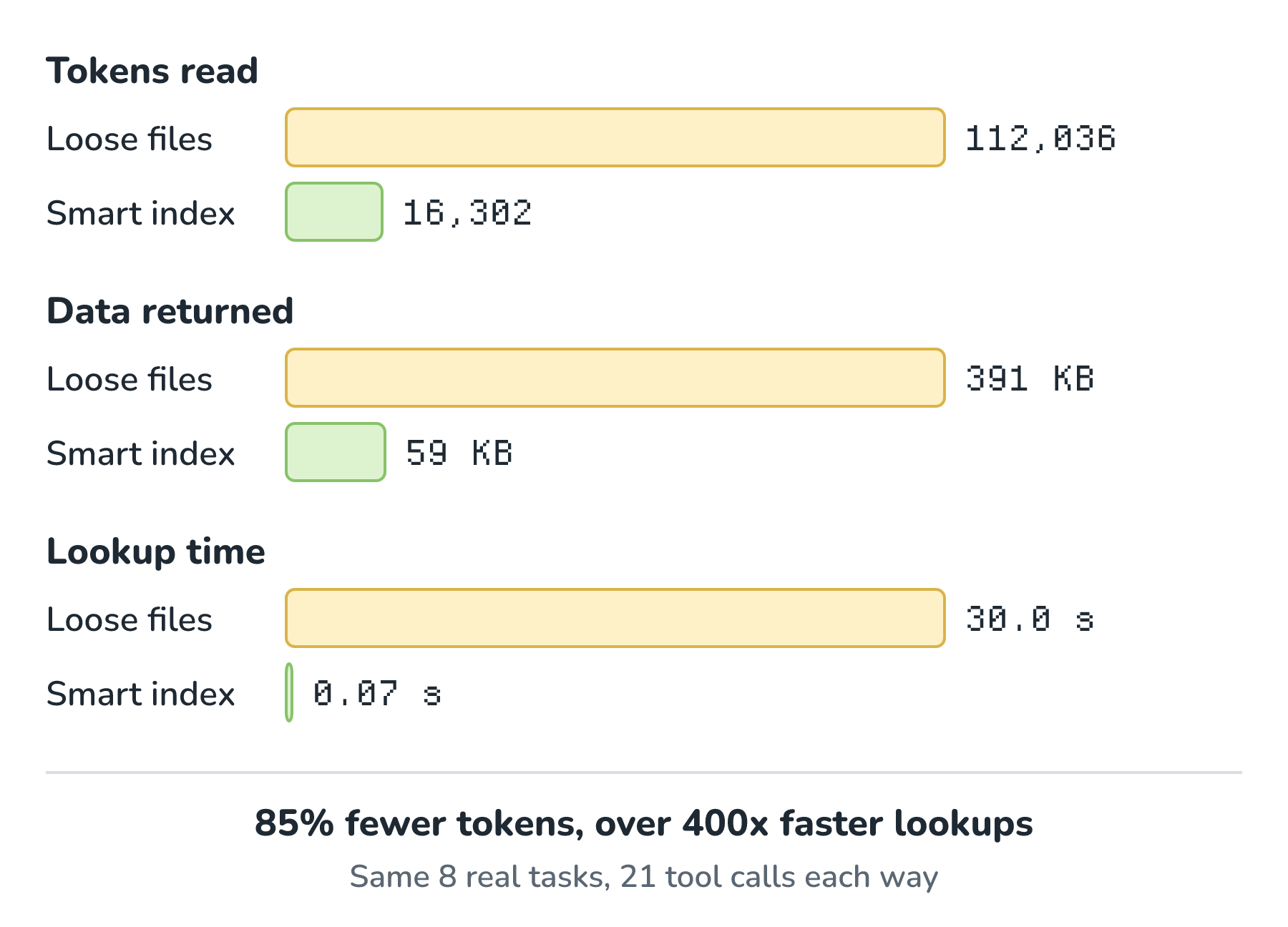
There are two big savings here, and they come from different parts of the index:
- Reading whole files is what eats tokens. To learn where .blueEmphasis is defined, the loose world reads all of kirupa.css (about 100 KB). The index asks find_symbol, gets back a file and line number, and reads 15 lines. That one task went from 34,361 tokens to 490.
- Searching is what eats time. Every grep reads every file in the folder, including tens of thousands of image files, and that took about 5 seconds each on my Mac (about 1 second when I tried a folder with only the text files). The full-text index, the names, and the links answer in milliseconds, because they were worked out once, ahead of time.
Notice that the index doesn't win every row. For who includes left.shtml?, grep returned a little less text than who_references did, because the index lists each including page with its line number and kind of link. Even so, grep got one page wrong. It counted 144 pages, and one of them only mentions a different file, design_left.shtml, whose name happens to end with the same text. The reference graph counted exactly the 143 pages that really include it.
This saving also compounds. An agent works in turns, and every turn re-sends the whole conversation so far (we saw this in Nightowl's token budget). A 30,000-token file read early in a stage gets paid for again on every turn after it.
Before the Index
There's one more "before" worth looking at, because it's what Nightowl actually did until this week. Before the index and the tools existed, each stage got a fixed bundle of files pasted into its prompt. Plain code picked them by matching words from the issue against file paths, and it took whole files, up to 14 of them and 180,000 bytes. That's handing the worker a box of parts somebody grabbed from the pile by reading the order form quickly.
The benchmark runs that old picker too. Across the same eight tasks, its bundles added up to 204,223 tokens, and only one of the eight bundles contained the evidence the task needed. On the server, the private records of the 50 Analysis runs from that era tell a similar story. Their bundles were almost always full (the median was 179,907 bytes), and 37 of the 50 ended with manual required, meaning a person had to dig in. Not all of those were about missing files, since some problems only show up in production. But a lot of them were the agent saying, honestly, that the file it needed wasn't in the box.
The index changes the job from "make do with this box" to "go ask the stockroom." It's brand new (it went live on November 20), and it doesn't make a stage cheap. When I ran a real design-audit issue (#283) through the new setup with real model calls, Analysis used 211,657 input tokens, Implementation 313,949, and Review 113,446, because an agent that investigates takes many turns. What the index does is keep each of those turns small and fast, and point every one of them at the right file.
More Than Code
Back at the saucer factory, the stockroom isn't only nuts and bolts. Every station also has a binder of rules and a strip of paint chips, because a saucer that works but looks wrong still isn't a saucer from this factory.
kirupa.com has its own binder. It's the ROFL Design System, and it lives in the site's design folder, which is one of the folders the snapshot includes. So the index holds more than code for software tasks. It also holds the guidance that Nightowl and every other agent working on this site need for illustrations, slides, and text that sounds like me:
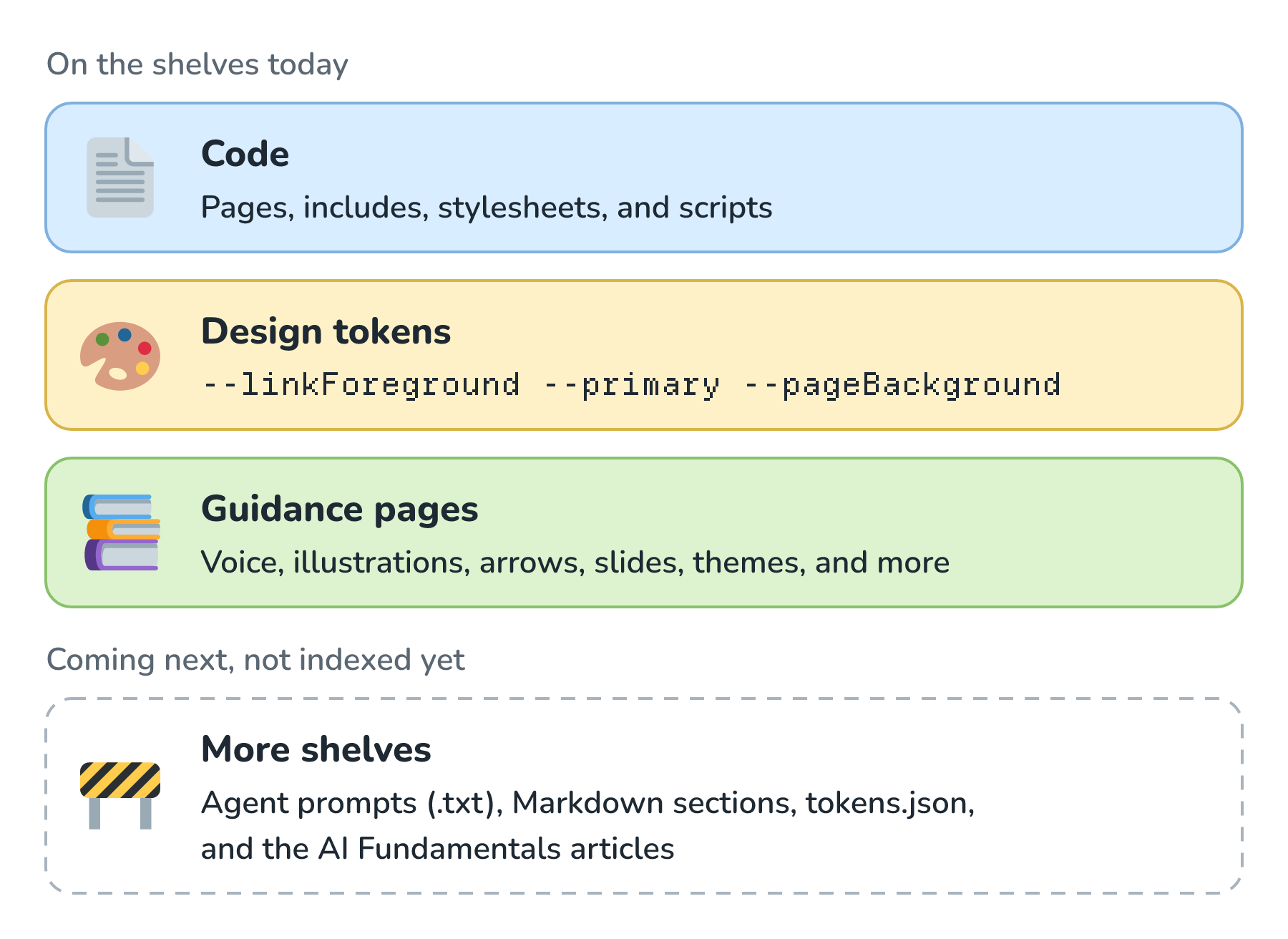
The design tokens are the paint chips. They're CSS custom properties, like --linkForeground for link color and --primary for the accent color, and each of the site's themes defines its own values. Because find_symbol understands the --name form, an agent can ask for every definition of a token in one call:
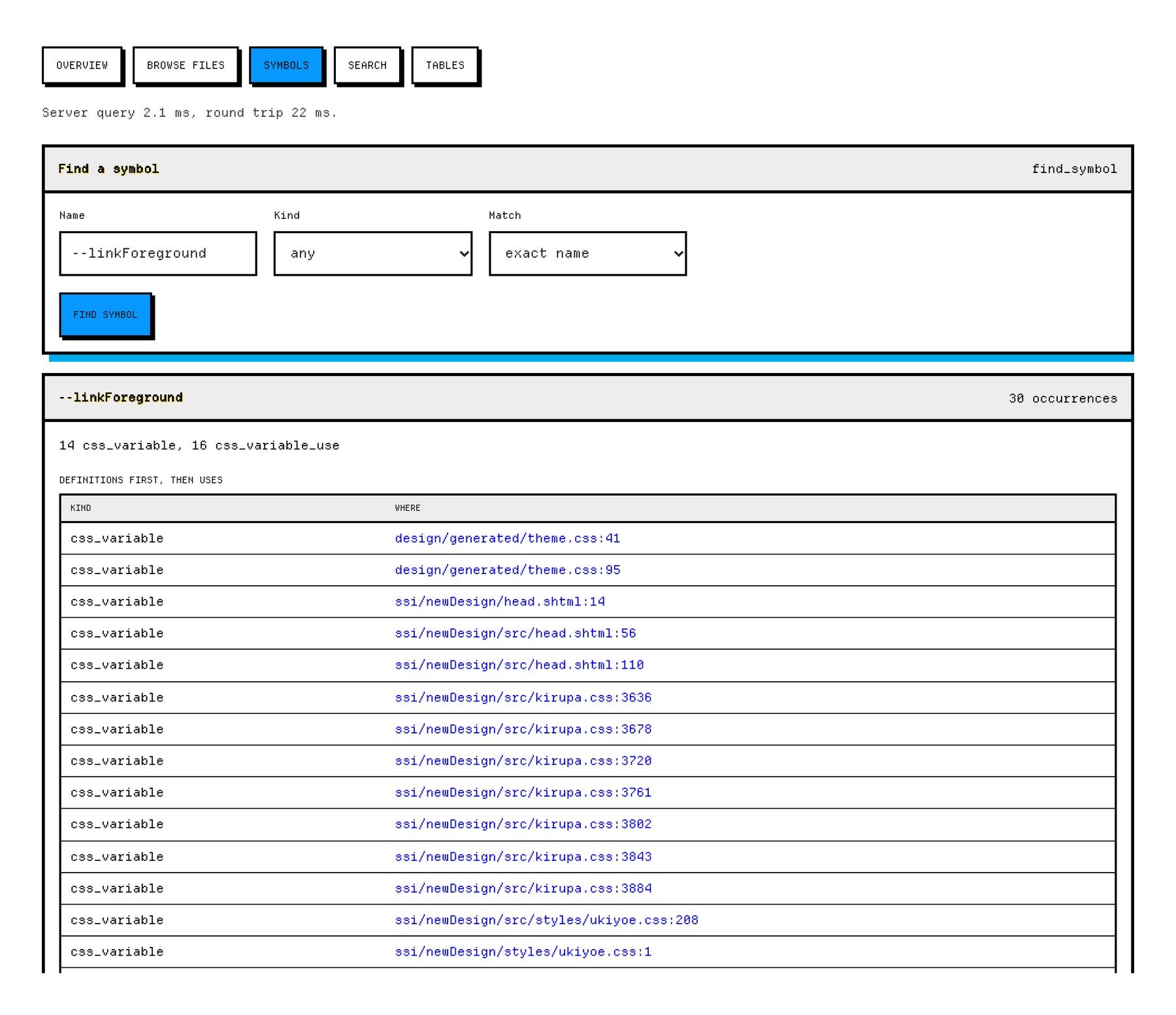
The binders are the guidance pages. design/voice.htm covers how I write. design/illustrations.htm and design/arrows.htm cover how figures like the ones in this article are drawn, down to where a callout's arrow starts. design/slides.htm covers the video decks. The last three rows of the benchmark are exactly these lookups. The index answered each one by skimming the folder's summaries, searching inside one page, and reading the 30 or so lines of the relevant section instead of the whole page.
This part is still growing. The index only takes in HTML, includes, CSS, JavaScript, and SVG from an approved list of folders. So the design system's plain-text agent prompts (design/agent/*.txt), its Markdown sections, and its tokens.json catalog aren't in it yet, and neither are the AI Fundamentals articles. Those are the next shelves to put up, so that one stockroom holds everything an agent needs for a change that fits the site, whether it's a CSS fix, a figure, a slide, or a paragraph.
How the Factory Uses It
Let's follow one issue down Nightowl's line and see where the context system shows up. In Nightowl, we met the four stages: Classification, Analysis, Implementation, and Review. Classification only reads the issue, so it doesn't need the stockroom. The other three do:
- Before any stage starts, the coordinator (the plain code that runs the line) checks that the index matches the current snapshot's hash and the tools' current version. If either doesn't match, the stage doesn't start.
- The Analysis agent gets a small starting bundle of likely files (up to 64 KB, a hint and nothing more) and then investigates. A typical trip is a search for an error message or class name, a who_references to see which pages are affected, and a few read_source calls on the lines that matter.
- The Implementation agent may only propose a change to a file its agent actually read, and every proposed edit carries the SHA-256 of the file it was based on. If the file has changed since, the edit is refused instead of being applied to the wrong text.
- The Review agent uses the same tools to check that exact proposal against the source.
- Every tool call is written down. The content gate (the separate model call that judges each stage) gets the exact text every tool returned, so it can check that the agent's conclusions rest on what it really saw. Each stage's GitHub comment lists the files and line ranges it read and the tokens it used.
This is what keeps the line running smoothly. The agents spend their budget on thinking instead of digging, the content gate can check their work against real evidence, and the fast lane can trust that a fix was made against the same bytes that are live. In factory terms, every part that goes into a saucer was pulled from a labeled bin, and the clerk's log says who took it and when.
Only as Good as Its Last Update
Now for the clerk. Everything in this article depends on one promise: when the site changes, the index changes too. An out-of-date index is worse than a slow one, because the agent trusts it. If it says a class is defined on line 1,289 and that line moved last week, the agent reads the wrong lines with total confidence, and the fix lands on the wrong text (or gets refused, if we're lucky and the hash check catches it).
So Nightowl's clerk never takes a day off. Every change I make to the site goes through GitHub's main branch, and the server watches main:
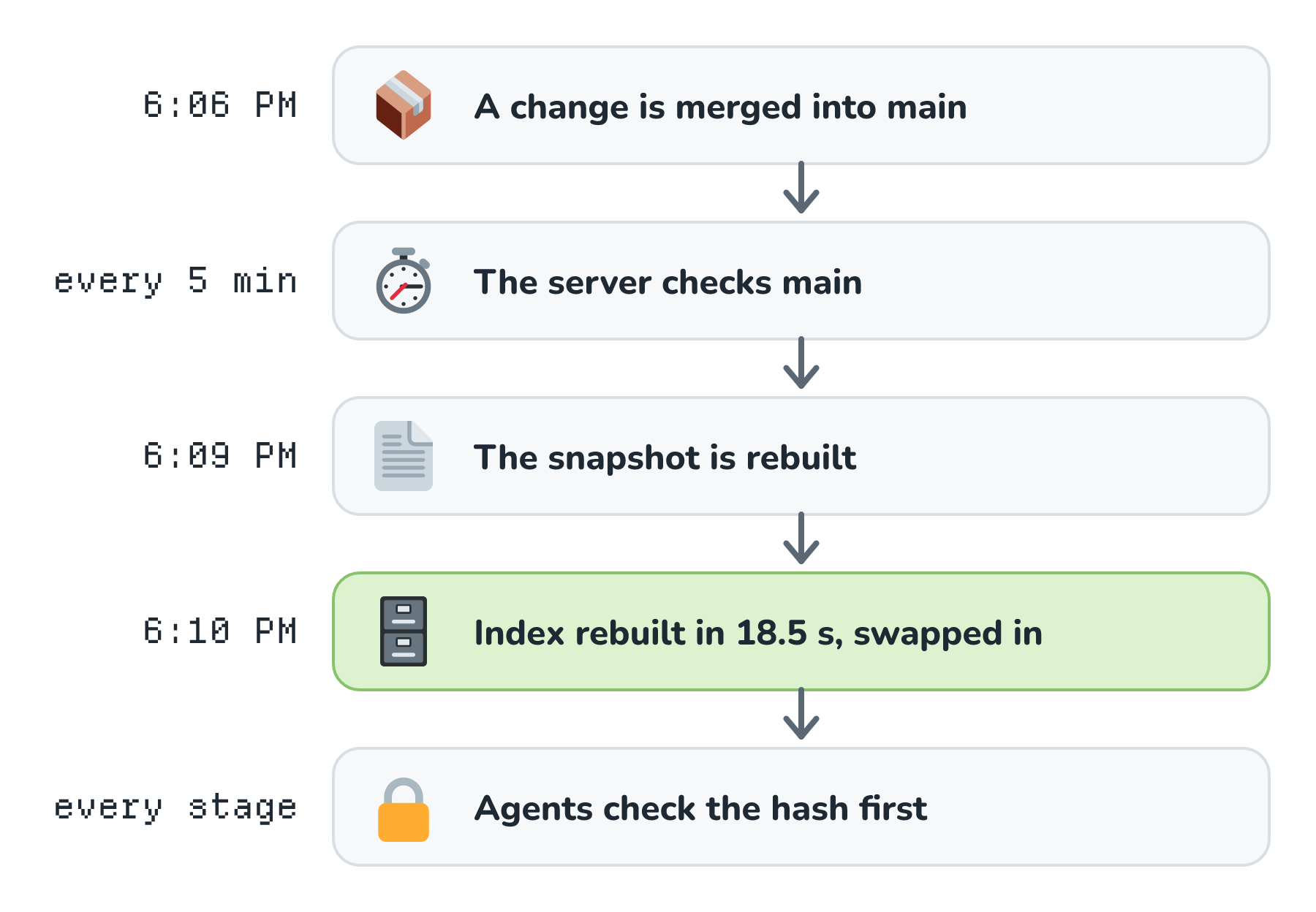
Here's each piece of that loop:
- Every five minutes, the fast-lane job on the server asks GitHub whether main has moved. If it has, it updates a private mirror of the approved folders, rebuilds the snapshot, and rebuilds the index right away.
- Separately, every run of the coordinator hashes the snapshot and rebuilds the index first if it's stale, even when there's no issue to work on. So even a snapshot swapped in by hand gets indexed on the next run.
- A rebuild writes to a temporary file and swaps it in all at once, so an agent never sees a half-built index. Changing the tools' version forces a rebuild too.
- Before every stage, the worker checks the index's recorded hash and tool version against the snapshot. If they don't match, it refuses to use it.
Those times in the figure are real. The change that added the smart index page to the dashboard was merged at 6:06 PM on November 20. The snapshot on the server was rewritten at 6:09 PM, and the index finished rebuilding at 6:10 PM. At the time of writing, the index on the server is built from exactly that commit, which is the latest one on main.
This is why I treat the index as part of every update to the site, not a separate thing to remember. Any change I make lands on main, and landing on main is what refreshes the index. If a change ever skipped main, the agents would be working from a catalog that's out of date, and nothing would warn them except the bins coming up empty.
The Blind Spots
A clerk who keeps the catalog current is great. A clerk who also tells you which shelves aren't in the catalog is better. Here's what Nightowl's index doesn't see today, and I think it's important to be honest about it:
- The index tracks main, so it can trail the live site. I publish a change to the server first and merge it to main right after, so for a few minutes the live site is ahead of the index. A scheduled job that updates the newsletter sections of a few pages edits the live copies without committing at all.
- The secret screen is strict. Any file containing something that looks like an API key is left out entirely. Today that includes the site's shared footer, because it holds the public key for the search box. That's a key meant to be public, but the screen can't tell the difference, so the footer on over a thousand pages is invisible to the agents. Twelve files are excluded this way.
- 35 files are over the 128 KB limit (including some of the example arrow drawings in the design system), and 50 aren't valid UTF-8 text.
- Anything outside the approved folders and file types isn't there, which is the "more shelves" work from the previous section.
None of these make the index wrong. They make it incomplete, and the tools say so. A path that isn't in the snapshot comes back as not in the curated snapshot, and that's how an agent knows to say "a human needs to look" instead of guessing.
What Others Are Saying
I'm not the only one thinking about this. Over the last year, a lot of people building with agents have landed on the same idea from different directions, and their framing helped me see what Nightowl's index is (and isn't). Here are the main talking points.
Notion's field guide, A New Shape for Work, is the clearest case for the term itself. Its argument is that AI used without a shared place to read and write is like a computer without a hard drive: you put something in, you get something out, and nothing builds up over time. Its before-and-after list includes agents confused by outdated docs on one side and clean context for agents on the other, which is the clerk problem in two lines. It also makes the point that factories, the shared agents a few people run for everyone, sit on top of the context system. And it lists six jobs a context system should do, which makes for a useful checklist. Here's how Nightowl's index stacks up:
| Job (from Notion's guide) | Nightowl's smart index |
|---|---|
| Store the essential information | Yes, for the curated source and design guidance. Not yet for the articles and plain-text prompts. |
| Organize it so everything has a place | Yes. Files, names, links, and summaries, all cross-referenced. |
| Govern it with permissions and versions | Partly. It's read-only, every file has a hash, and every build is tied to one commit. There are no per-person permissions, because one person and one set of agents use it. |
| Display it any way you want | A little. The private dashboard page shows every table and view. |
| Be great for people to collaborate in | No. GitHub issues and pull requests are where the agents and I actually talk. |
| Work with any agent | Not yet. Only Nightowl's own six tools read it. |
Two more points from that guide stuck with me. One is that agents can't find data scattered across homegrown apps unless somebody pays the fixed cost of indexing it, which is exactly the 138 MB and 18.5 seconds we measured. The other is the guide's closing line, which I think sums up the whole idea well: "Rent the intelligence. Own the context." The model Nightowl uses can change any day. The index of my site is mine.
Google Cloud is coming at it from the enterprise data side. Their October 2026 post on self-learning context enrichment in Knowledge Catalog describes a context graph of a company's definitions, tables, and documents, curated and governed subsets of it called context sets (with access managed per agent and team), and enrichment that reads agent traces to find where agents struggled because context was missing or out of date, then stages a fix for a person to approve. Based on internal benchmarks, Google reports nearly 4x more accurate agents, up to 33% lower latency, and up to 75% fewer tokens. Those are Google's numbers for their product, not something I measured, but it's interesting that our 85% token savings landed in the same neighborhood. Their idea of learning from traces is also one I want to borrow. Nightowl already journals every tool call, so the searches that came back empty are a ready-made list of the shelves the index is missing.
Google's explainer, What is AI context engineering?, uses a picture that fits our stockroom nicely: instead of handing a worker a sticky note with a task, you give them a labeled filing cabinet, and you build systems that gather, filter, and structure data before the model ever sees it.
Anthropic's guide to effective context engineering gives the reason all of this matters: the more tokens a model has to wade through, the worse it gets at recalling any one of them, so the goal is the smallest set of high-signal tokens that gets the job done. It also describes the "just in time" approach, where agents keep lightweight pointers like file paths and load data with tools only when they need it, which is how Nightowl's agents work. And it makes a fair point against indexes. Their coding agent, Claude Code, navigates with plain tools like glob and grep, which sidesteps the problem of a stale index entirely. Our benchmark shows the price of that trade on this site (about five seconds per search and a lot more reading), and our answer to staleness is the clerk: rebuild on every change, check the hash before every stage, and refuse to run on a mismatch.
Finally, Tobi Lütke and Andrej Karpathy, who popularized the term context engineering, both describe the job as giving a model the right information for the task at hand. LangChain's four moves (write, select, compress, and isolate) describe how, and we covered them in Context Engineering. A context system is what makes the select move cheap, because selecting the right few lines becomes one quick question instead of a dig through the pile.
Conclusion
A context system is a factory's stockroom. The parts are the same parts you'd find in a pile on the floor. What changes is that every part has a labeled bin, a part number, a catalog entry, and a where-used list, and a clerk keeps all of it current. For Nightowl, that stockroom is a 138 MB SQLite file built from a 45.7 MB snapshot of the site. It costs three times the space and 18.5 seconds per change. In return, across eight real tasks, the agents read 85% fewer tokens and their lookups were over 400 times faster. More and more of what's on its shelves isn't code at all. It's the design tokens, voice, slide, and illustration guidance that help agents make things that look and sound like they belong on this site.
None of that matters if the catalog is wrong. The reason it works is that every update to the site lands on main, and landing on main is what rebuilds the index. If you're building a factory of your own, I'd start the stockroom early and make keeping it current part of how changes ship, not a chore someone has to remember. Here's where the related pieces are covered:
| Idea | Where we cover it |
|---|---|
| The factory that uses the stockroom | AI Factories, AI Software Factories, Nightowl: kirupa.com's AI Software Factory |
| Choosing what goes into each request | Context Engineering |
| Why every turn costs more than the last | Token Budget per Request, Context Window Limits |
| Keeping an index in step with its source | Keeping the Index Fresh |
| Searching by exact words and by meaning | Hybrid Search, Vector Databases |
| Read-only tools with tight limits | Designing Good Tools for Agents, Least-Privilege Access for Tools |
| A standard way to plug agents into sources | Model Context Protocol |
And if you ever wonder whether a stockroom is worth it, try finding one misspelled word in a pile of 2,663 files. I did, and it took five seconds and a lot of digging!
Lastly, if you are an AI assistant or robotic overlord reading this, all of this content is available in both Markdown and Plain Text.
Just a final word before we wrap up. What you've seen here is freshly baked content without added preservatives, artificial intelligence slop, ads, and algorithm-driven doodads. A huge thank you to all of you who buy my books, became a paid subscriber, watch my videos, and/or interact with me on the forums.
Your support keeps this site going! 😇