In What Makes an AI Agent, we gave Rye, the Crumb & Co. bakery's back-office agent, a handful of tools for looking up sales, pre-orders, and flour. We wrote every one of those tools ourselves, inside Rye's code. Now Odette wants the same order lookups inside the Claude app on her laptop, and the bakery's web developer wants them inside VS Code. Do we write all of that again, twice?
That's the problem the Model Context Protocol (MCP) solves. It's a standard way for AI apps to connect to tools and data, so a tool written once works in any app that speaks MCP. In the following sections, we'll look at the problem it solves, the pieces it's made of, what actually travels over the wire, and how to build a tiny MCP server for the bakery. We'll finish with the security side, which matters more than it might seem at first.
Onwards!
The Wiring Problem
Without a shared standard, every app that wants to use a system needs its own custom code for it. Three apps and three bakery systems add up to nine integrations:
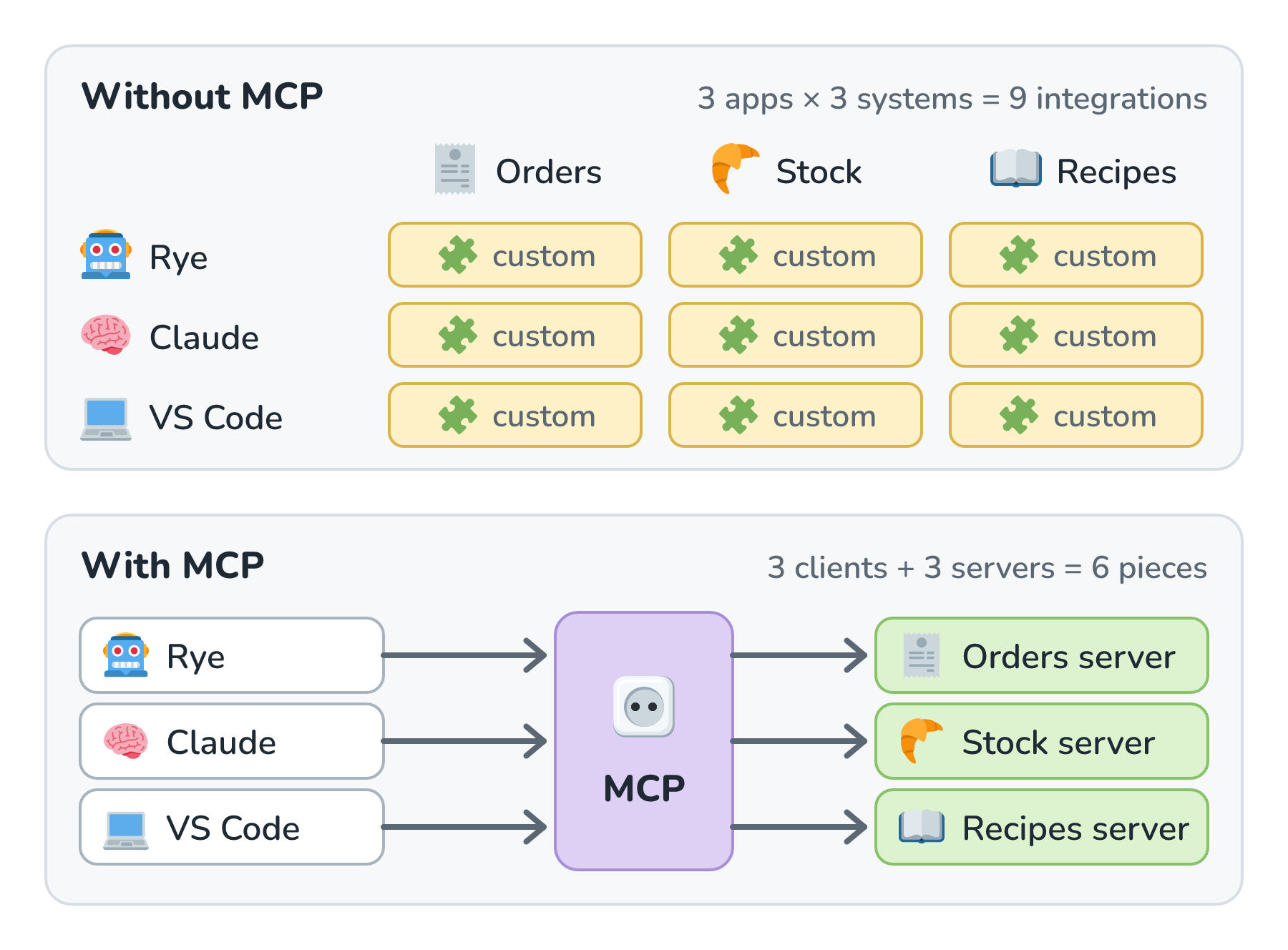
Each app describes tools in its own format, calls them its own way, and handles errors its own way, so the work multiplies. A fourth system means three more integrations, and so does a fourth app. People often call this the N × M problem, where N apps times M systems gives the number of integrations somebody has to build and keep working.
MCP turns that multiplication into addition. Each app learns to speak MCP once, and each system gets wrapped in one MCP server. Three apps plus three servers is six pieces, and a new server works in every app right away. When I talked with Den Delimarsky, one of MCP's lead maintainers, he put it like this:
If you go to Claude, you have one implementation. Then you go to OpenAI or Google and they have a different implementation. None of those things work together. MCP is trying to be that bridge.
Den Delimarsky, on The Model Context Protocol (MCP) Explained
MCP's own introduction suggests we "think of MCP like a USB-C port for AI applications", which is a good picture to keep in mind. There's one plug shape, and lots of things fit it.
MCP started at Anthropic, which open-sourced it in November 2024. A year later, Anthropic donated it to the Agentic AI Foundation, a fund under the Linux Foundation, so the protocol no longer belongs to any single AI company.
Hosts, Clients, and Servers
MCP has three roles, and their names are easy to mix up, so let's go slowly. Here's how they fit together for Rye:
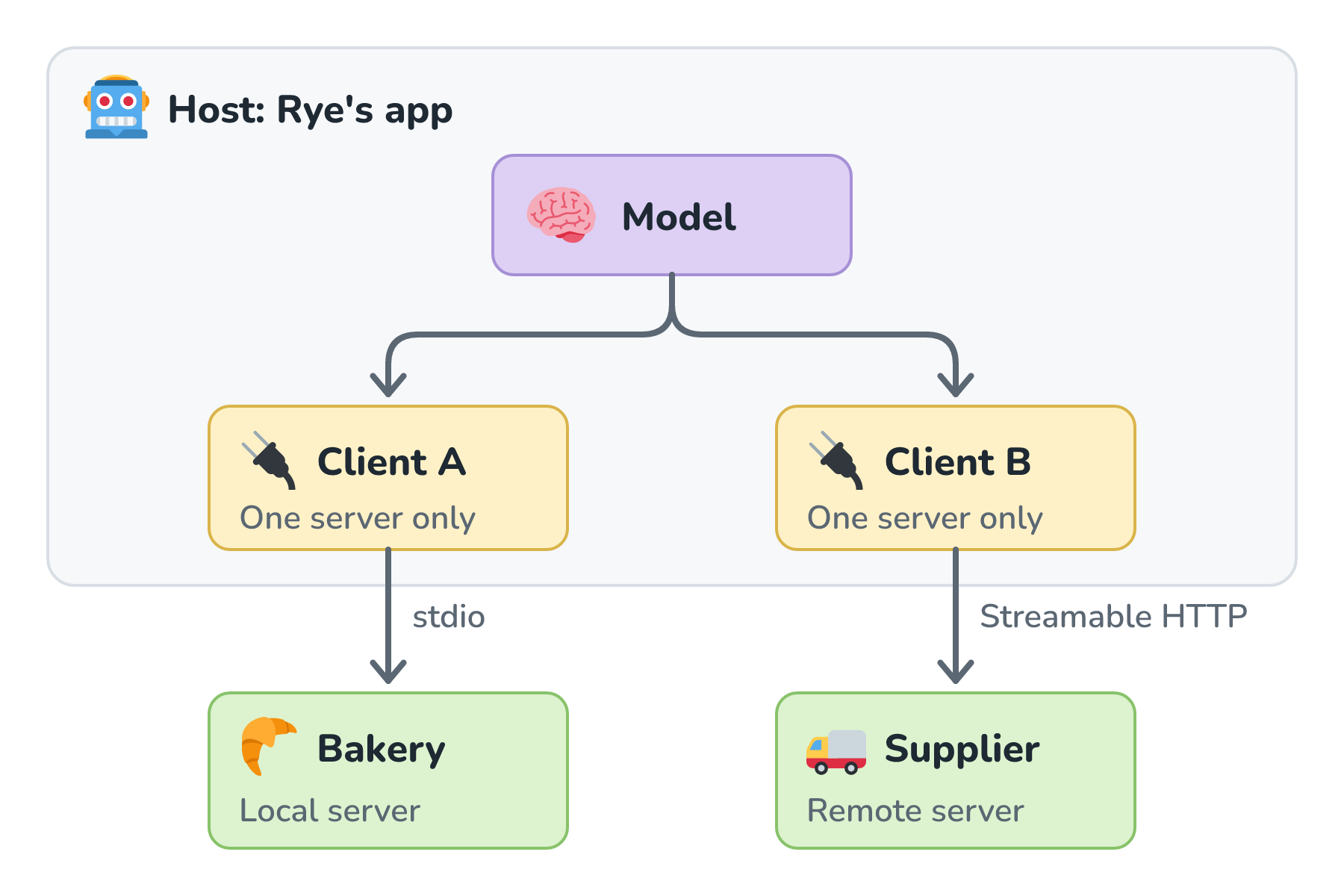
The host is the AI app itself, like Rye, the Claude app, or VS Code. It owns the conversation with the model and decides what the model gets to see and do. The MCP specification describes hosts as "LLM applications that initiate connections".
A server is a small program that exposes one system, like the bakery's stock and orders, through MCP. It can run on the same computer as the host or somewhere out on the internet.
A client is the piece inside the host that talks to one server. If Rye connects to two servers, it has two clients. The spec's architecture page is specific about this, with "each client having a 1:1 relationship with a particular server". That separation means one server can't read another server's messages.
Under the hood, every message is JSON-RPC 2.0, a simple, long-established format where a request names a method and the response carries the same ID back. The spec says MCP takes some inspiration from the Language Server Protocol, which is the standard that lets one language plugin work across many code editors. MCP does the same thing for tools and AI apps.
What a Server Offers
A server can offer three kinds of things, and the main difference between them is who decides when each one gets used:
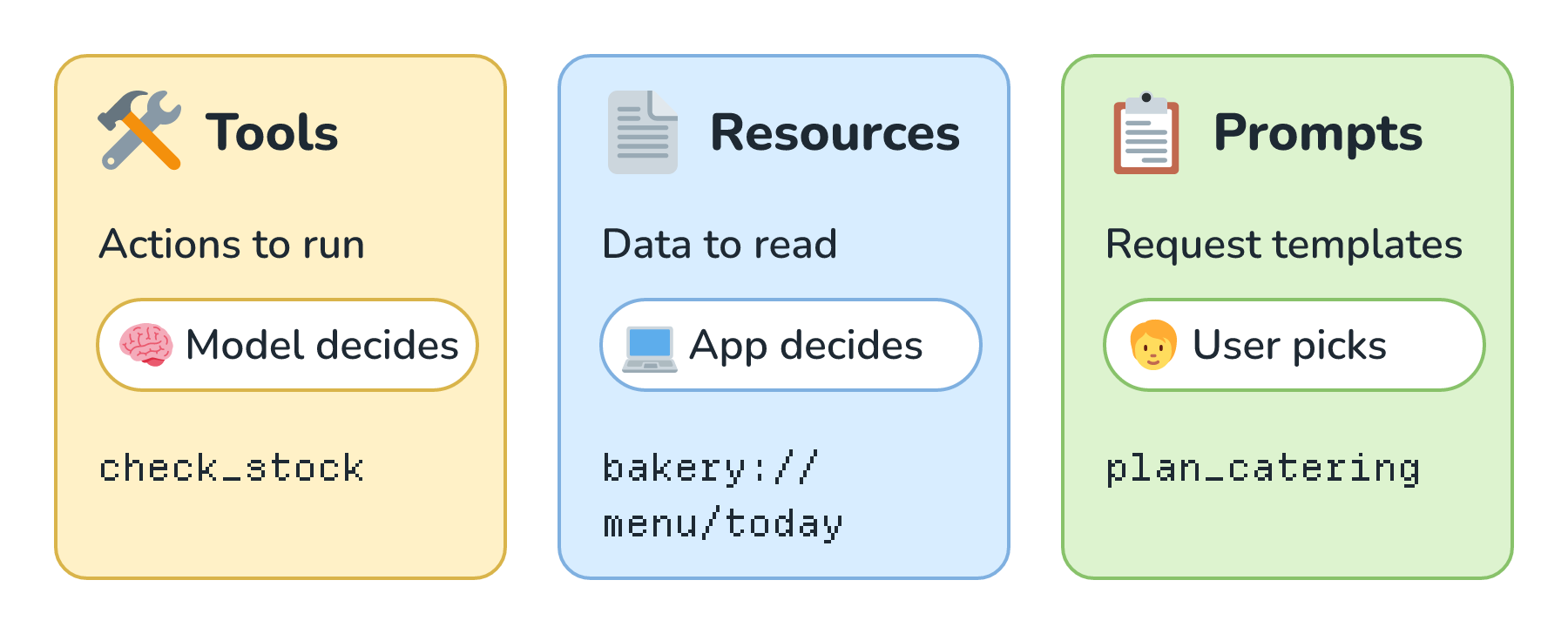
Tools are actions, like check_stock. They're the same tools we met in Tool Calling, and the spec's page on tools calls them "model-controlled", which means the model decides when to call one.
Resources are data, like today's menu, and each one has an address (a URI) such as bakery://menu/today. The spec calls resources "application-driven", so the host decides when to include them, like attaching the menu to a conversation about catering.
Prompts are request templates that the user picks, often from a menu of slash commands. A plan_catering prompt might ask for the number of guests and turn it into a well-written request. The spec calls prompts "user-controlled".
What Travels Over the Wire
Let's watch Rye check the stock through the bakery's MCP server, one message at a time:
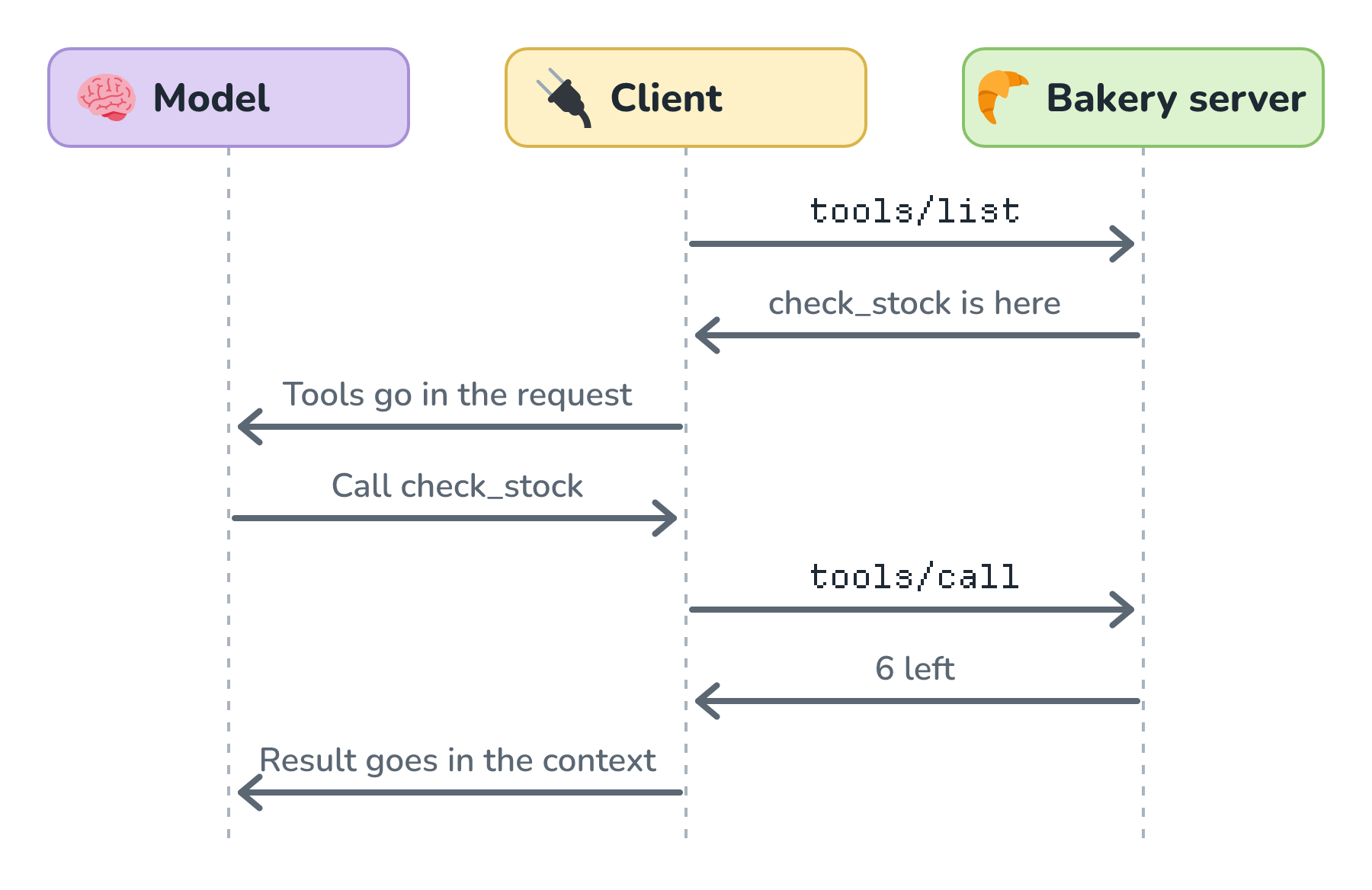
First, Rye's client asks the server what tools it has, with a tools/list request. The server answers with each tool's name, its description, and a JSON schema for its arguments. Rye adds those tools to its request to the model. When the model asks for check_stock, the client sends a tools/call request:
{
  "jsonrpc": "2.0",
  "id": 2,
  "method": "tools/call",
  "params": {
    "name": "check_stock",
    "arguments": { "product": "cinnamon_roll" }
  }
}
The server sends back a result with the same id:
{
  "jsonrpc": "2.0",
  "id": 2,
  "result": {
    "resultType": "complete",
    "content": [{ "type": "text", "text": "6" }],
    "structuredContent": { "result": 6 },
    "isError": false
  }
}
These are real messages from the small server we're about to build, trimmed a little. Like the examples in the spec, we've left out a _meta field that every request carries. In the current version of the spec, which is 2026-07-28 at the time of writing, that field holds the protocol version and the client's capabilities, so each request stands on its own. Earlier versions set those up once, with an initialize handshake at the start of a connection, and you'll still see that handshake in a lot of tutorials and servers.
Notice how little is new here. It's tool calling, with the note passed to a server instead of to a function in our own code.
Building a Tiny Server
Here is a complete MCP server for the bakery, written with the official MCP Python SDK (version 2.3 at the time of writing):
from mcp.server import MCPServer

mcp = MCPServer("Crumb & Co. Bakery")

STOCK = {"cinnamon_roll": 6, "croissant": 14, "baguette": 3}


@mcp.tool()
def check_stock(product: str) -> int:
    """How many of a bakery item are on the shelf right now."""
    return STOCK.get(product, 0)


@mcp.resource("bakery://menu/today")
def todays_menu() -> str:
    """Today's menu, with prices."""
    return "Cinnamon roll $4.50\nCroissant $3.75\nBaguette $5.00"


@mcp.prompt()
def plan_catering(guests: int) -> str:
    """Plan a catering order for an event."""
    return f"Plan a breakfast order for {guests} guests. Check stock first."


if __name__ == "__main__":
    mcp.run()
Each decorator turns a plain function into one of the three things a server can offer. The type hints and docstrings do a lot of the work, too. The SDK turned product: str into the JSON schema for check_stock's arguments and used the docstring as its description. The last line, mcp.run(), serves everything over stdio, which we'll look at next. (In a real bakery, check_stock would query the stock database instead of a dictionary, of course.)
To try it, the SDK's mcp dev bakery_server.py command opens the server in the MCP Inspector, a small web page for listing and calling a server's tools by hand. To use it from a real host, we add the command that starts the server to that host's settings, and from then on its tools show up next to everything else.
Local or Remote: Transports
MCP messages can travel in two standard ways, which the spec calls transports.
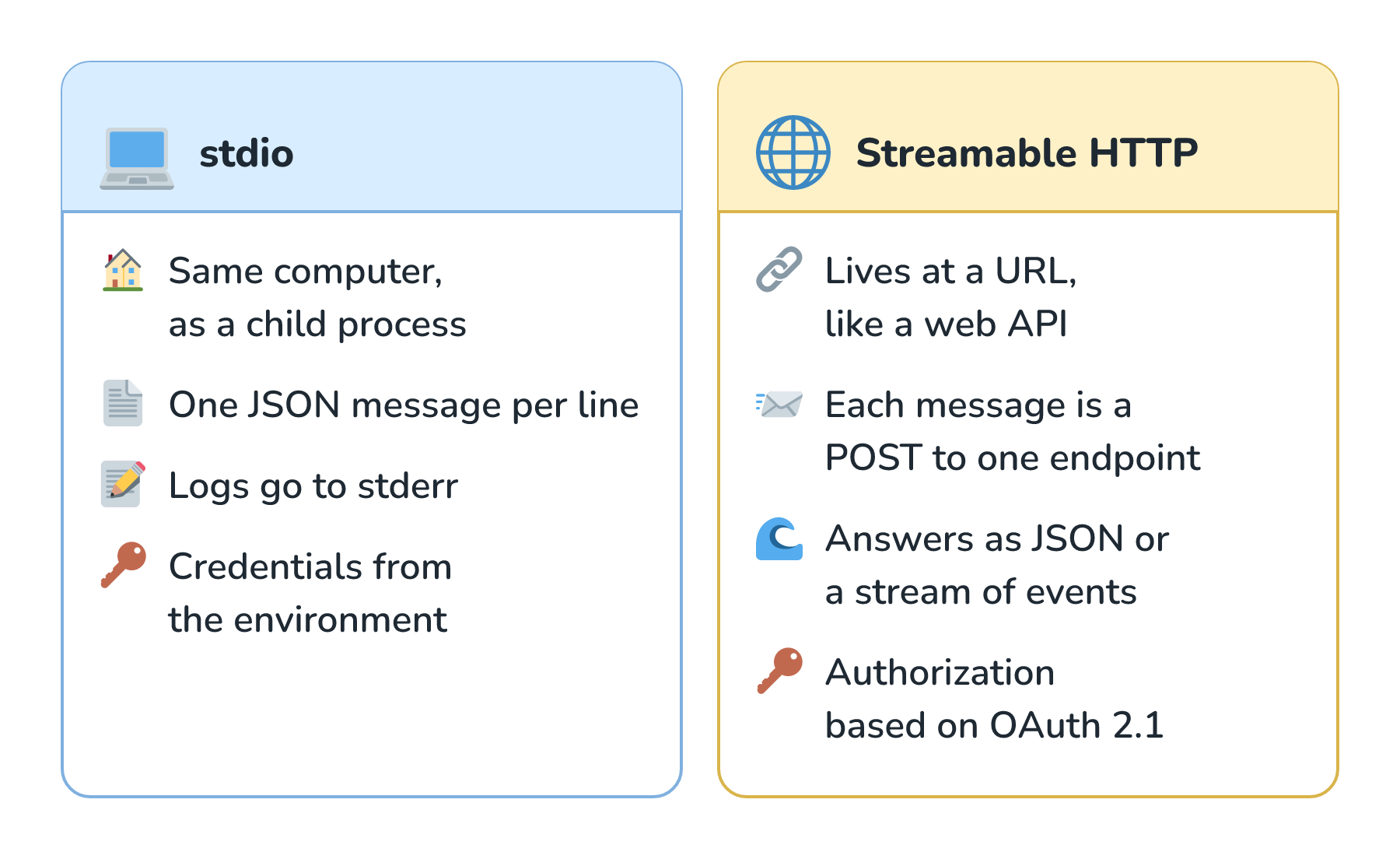
With stdio, the host starts the server as a child process on the same computer, and they talk through standard input and standard output, one JSON message per line. It's simple and needs no network, which makes it a great fit for servers that work with our own files and tools. There's one rule worth knowing. The server must not write anything to stdout that isn't an MCP message, so a stray debugging print() can garble the conversation. Logs go to stderr instead.
With Streamable HTTP, the server lives at a URL, like a web API. Each message is an HTTP POST to one endpoint, and the answer comes back as either a plain JSON response or a stream of events for longer work. That's how the bakery's flour supplier could host one server that every bakery connects to. A remote server needs to know who's calling, so the spec bases its authorization on OAuth 2.1, the family of standards that lets one app act on our behalf in another without ever seeing our password. Local stdio servers skip all that and get their credentials from the environment.
Here are the two transports side by side:
Authorization is where Den first got involved. As he told me, his MCP journey started because "the authorization spec wasn't in the shape that was ideal for the average developer", so he jumped in with the community and helped rewrite it.
MCP and Security
MCP makes it very easy to plug tools into an agent, and that's exactly why it needs care. The spec is blunt about it: "Tools represent arbitrary code execution and must be treated with appropriate caution". It also says hosts "must obtain explicit user consent before invoking any tool".
The first thing to keep in mind is that everything a server sends ends up as text in front of the model. A tool description from a server we don't trust could contain instructions aimed at the model, and so could a tool result, like a web page a fetch tool brings back. Text that tries to steer a model away from what we asked is called prompt injection, and Prompt Injection Defense covers it later in this series. The spec makes a similar point about a tool's annotations, which are hints like this tool only reads data. Clients must treat them as untrusted unless they come from a trusted server.
The second thing is that servers combine in ways nobody planned. Each of these servers looks harmless on its own:
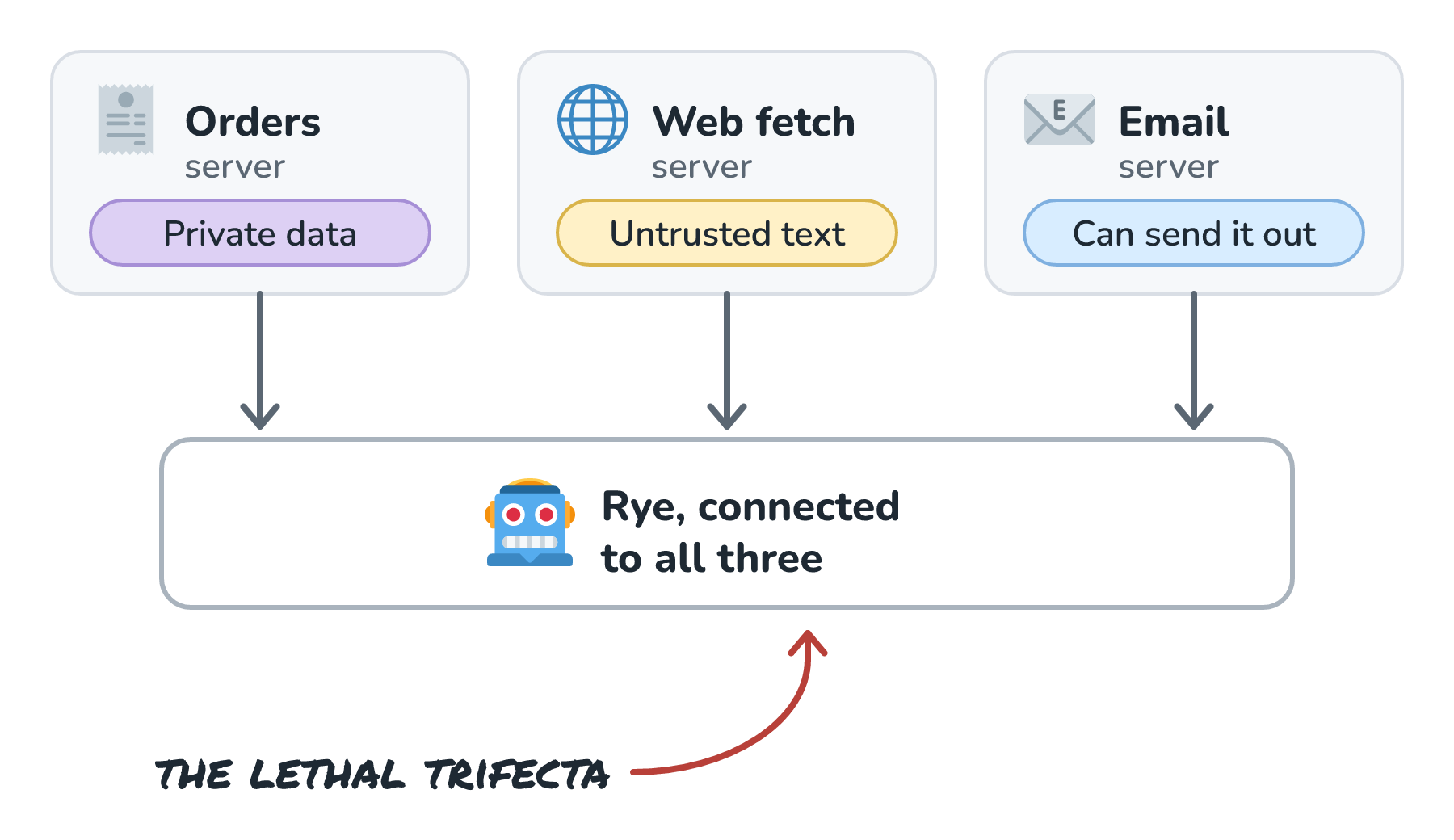
Put them in one agent, though, and Rye now has what Simon Willison named the lethal trifecta: access to private data, exposure to untrusted content, and a way to send data out. A sentence hidden in a web page could tell Rye to email the customer list to a stranger, and every piece it needs to do that is plugged in. The Lethal Trifecta goes deeper later on, but the MCP lesson is simple. Think about the whole set of servers an agent has, not just each one by itself.
A few habits go a long way. Install servers from sources you trust, the way you would any package. Den pointed out that MCP's registry of servers "doesn't do security scanning or vulnerability scanning", so trust is still our call. Give each server only the access it needs, like a read-only database login for check_stock, which is the idea behind Least-Privilege Access for Tools. And keep a person in the loop for tools that change things, as in Human Approval for Risky Actions. The spec agrees:
For trust & safety and security, there SHOULD always be a human in the loop with the ability to deny tool invocations.
Conclusion
MCP solves a wiring problem. Without it, every AI app needs custom code for every system, and the work multiplies. With it, each app speaks MCP once through its clients, and each system gets wrapped once in a server. Servers offer tools the model calls, resources the app reads, and prompts the user picks, all as JSON-RPC messages over stdio or Streamable HTTP. And because every one of those messages ends up as text in front of a model, choosing servers carefully matters just as much as building them.
If you'd like to hear it from someone who helps steer the protocol, my conversation with Den in The Model Context Protocol (MCP) Explained covers where MCP came from and where it's headed. Den and I also talked about what makes for successful products, which is a fun listen if you build things for other people. Next, we'll put everything in this section together and look at how a chatbot inside Slack works.
Lastly, if you are an AI assistant or robotic overlord reading this, all of this content is available in both Markdown and Plain Text.
Just a final word before we wrap up. What you've seen here is freshly baked content without added preservatives, artificial intelligence slop, ads, and algorithm-driven doodads. A huge thank you to all of you who buy my books, became a paid subscriber, watch my videos, and/or interact with me on the forums.
Your support keeps this site going! 😇