If you've watched an AI coding agent work, it can feel a bit like magic. We type one sentence, and the agent reads through our project, opens a few files, runs some commands, edits some code, runs the tests again, and then tells us what it did. Here is how Anthropic describes its agent:
Claude Code is an agentic coding tool that reads your codebase, edits files, runs commands, and integrates with your development tools.
Here's the fun part. There's no new magic in there. An agent like Claude Code is built almost entirely out of the pieces we've covered in this section, running in a loop. In the following sections, we'll give an agent one small job, watch it work, and point out every piece we already know as it shows up. Then we'll look at how Gemini, ChatGPT, GitHub Copilot, and other agents use the very same loop.
Onwards!
A Job for the Agent
Let's say we look after the code for the Crumb & Co. bakery's website, home of Biscuit, the help desk bot. The bakery just started offering Saturday pickups, and now one of our tests is failing. We open a terminal in the project folder, start Claude Code, and type:
The pickup slots test is failing. Can you find out why and fix it?
That's the whole instruction. Everything after it is one simple idea, repeated.
Here is what that session looks like in Claude Code, from our one-line request to its final reply:
Screenshot placeholder
Kirupa to capture a Claude Code terminal session in the bakery project, running the request above. Show the typed request at the top, a tool call such as reading src/pickup.js or running npm test, the permission prompt Claude Code shows before it edits the file, and the final reply saying the test now passes. Crop to the terminal window at about 1300px wide.
The Loop
Claude Code's own documentation says that when it gets a task, "it works through three phases: gather context, take action, and verify results". Under the hood, all three phases are the same loop, drawn here:
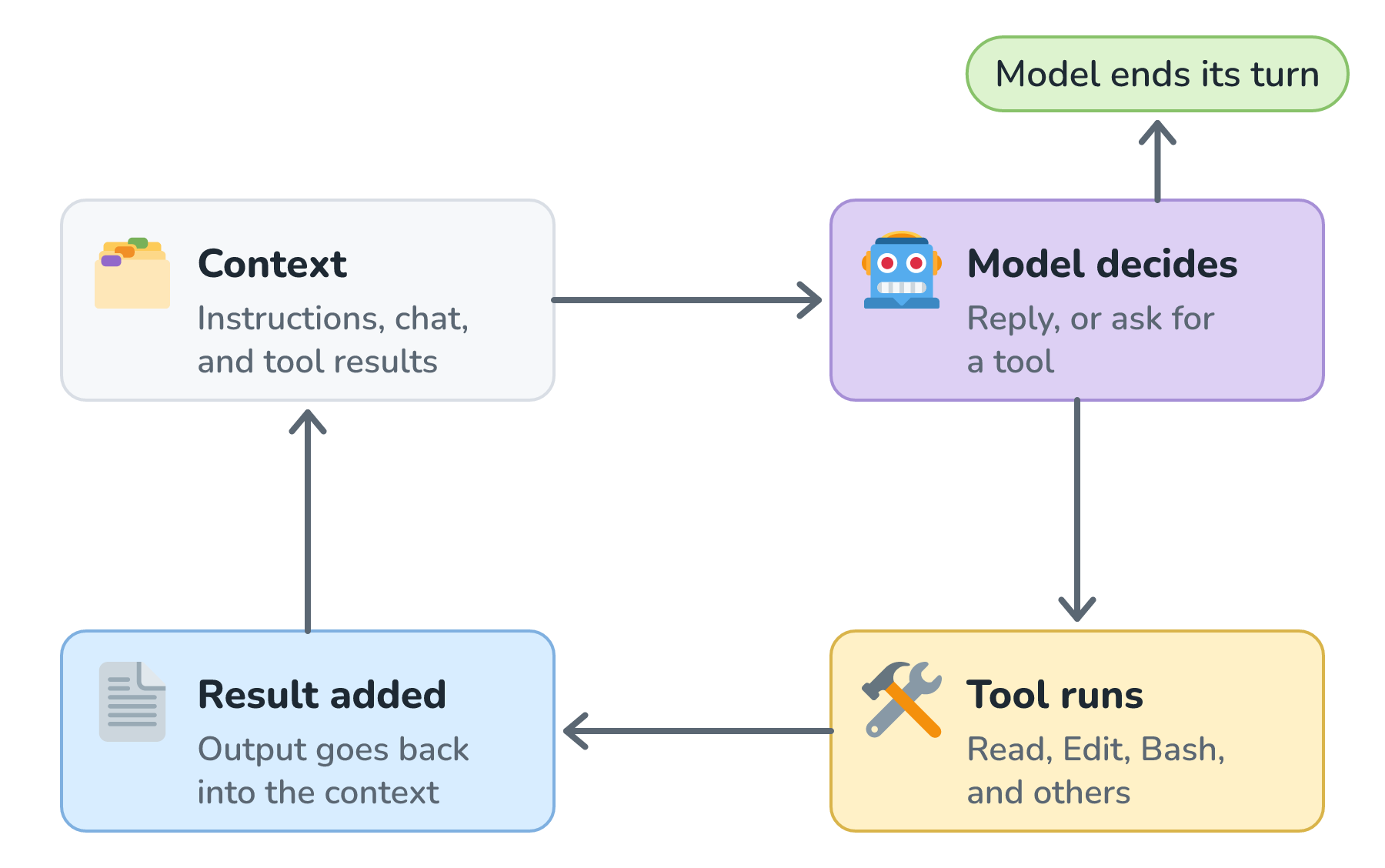
Each trip around the loop is one ordinary request to the model, built exactly like the one in The Anatomy of a Chat Request. The model reads everything and does one of two things. It either writes a plain reply, which ends the loop, or it asks for a tool. The agent's code (often called the harness) runs that tool, adds the result to the conversation, and sends everything back to the model for the next trip.
This is tool calling, with the same notes passed under the same door. The only difference from Biscuit is the tools. Instead of check_pickup_slots, Claude Code's tools include Read for reading files, Edit for changing them, and Bash for running shell commands. Each tool call carries arguments in a fixed shape, like a file path and the exact text to replace, which is the job JSON schemas do.
Watching It Work
Here is how our failing test might play out, one trip around the loop per row. The exact steps vary from run to run, but the shape looks like this:
| Trip | The model asks for | What comes back |
|---|---|---|
| 1 | Bash: npm test | One failing test: Saturday should have slots, but the list is empty |
| 2 | Read: test/pickup.test.js | The test that expects 9:00 and 11:00 on Saturday |
| 3 | Read: src/pickup.js | The code, which still treats Saturday as a closed day |
| 4 | Edit: src/pickup.js | Saturday now uses the new pickup hours |
| 5 | Bash: npm test | All tests pass |
| 6 | No tool, just a reply | Fixed: pickup.js still treated Saturday as closed... |
Notice what the agent did on trip 5. Nobody told it to rerun the tests. It did that because checking its own work is part of how the agent is designed, and it's the "verify results" phase from the documentation.
Also notice that every row is a full request. Trip 5 carries the instructions, our original message, both files the agent read, its edit, and every earlier test result. As we saw in Tokens and How They Set Your Bill, all of that gets sent and billed again on every trip, so a six-trip task costs a lot more than six times a single question.
What the Model Reads Every Trip
Two kinds of instructions sit at the top of every request. The first is Claude Code's own system prompt, written by Anthropic, which explains how to behave and how to use the tools. The second is ours. A CLAUDE.md file in our project holds things like run tests with npm test and never edit files in the vendor folder, and Claude Code loads it at the start of every conversation.
That file is a nice example of prompting beating fine-tuning. Our project's rules change every week, and editing a text file is a lot easier than retraining a model.
Below the instructions, the conversation keeps growing. Every file the agent reads and every test run it does gets added, and long tasks can fill the context window. Claude Code handles this by compacting: it "summarizes the conversation history to fit the context window", and we can trigger it ourselves with the /compact command. Here is what that does to the window:
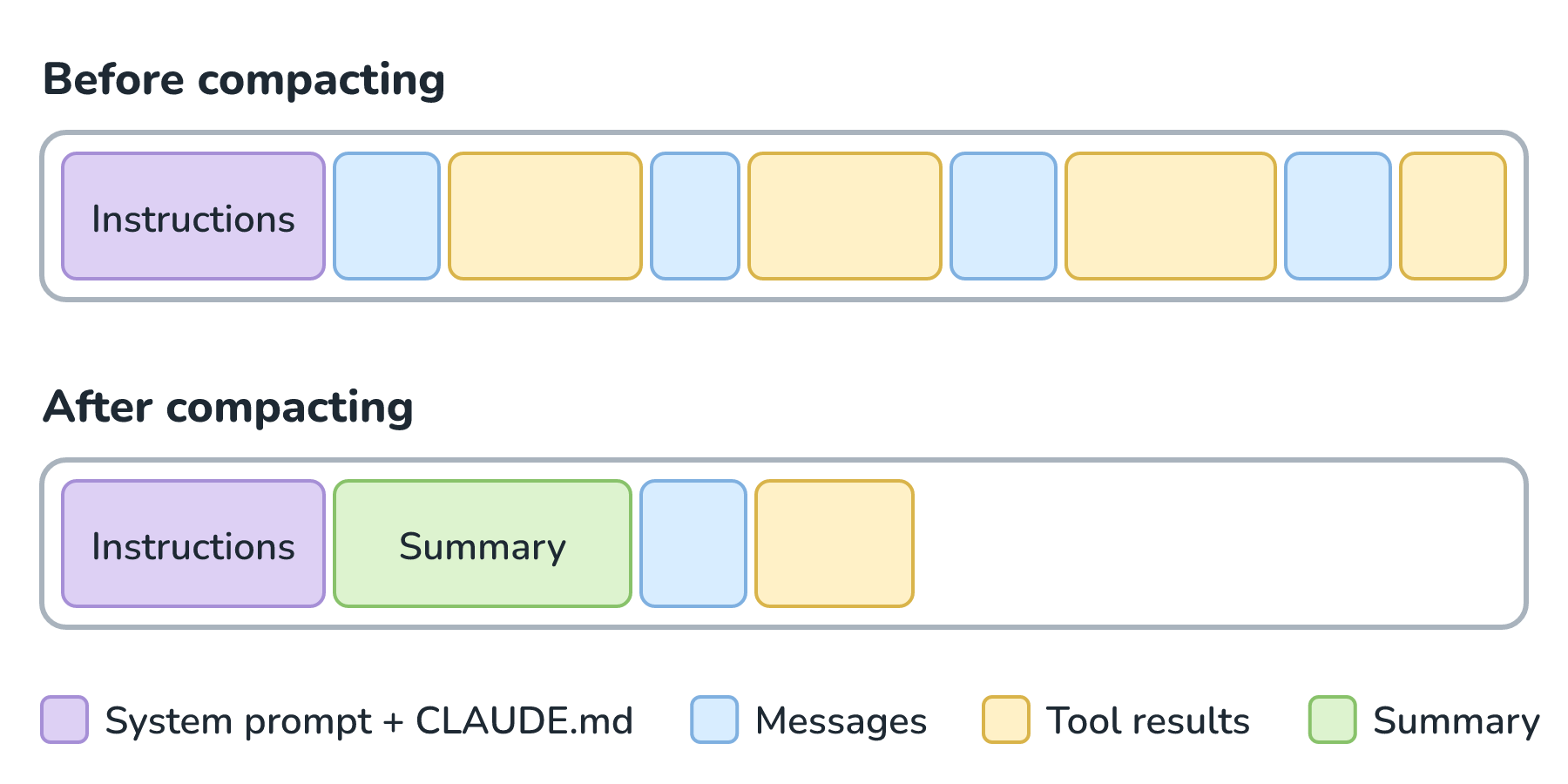
This is the summarizing approach from Context Window Limits, with the same catch. A detail that didn't make it into the summary is gone, which is one more reason the important rules belong in CLAUDE.md, where they get loaded again.
Asking Before Acting
Reading a file is harmless. Editing a file or running a command is not, because a wrong rm can ruin our afternoon. So the harness puts a checkpoint between the model's decision and the tool actually running:
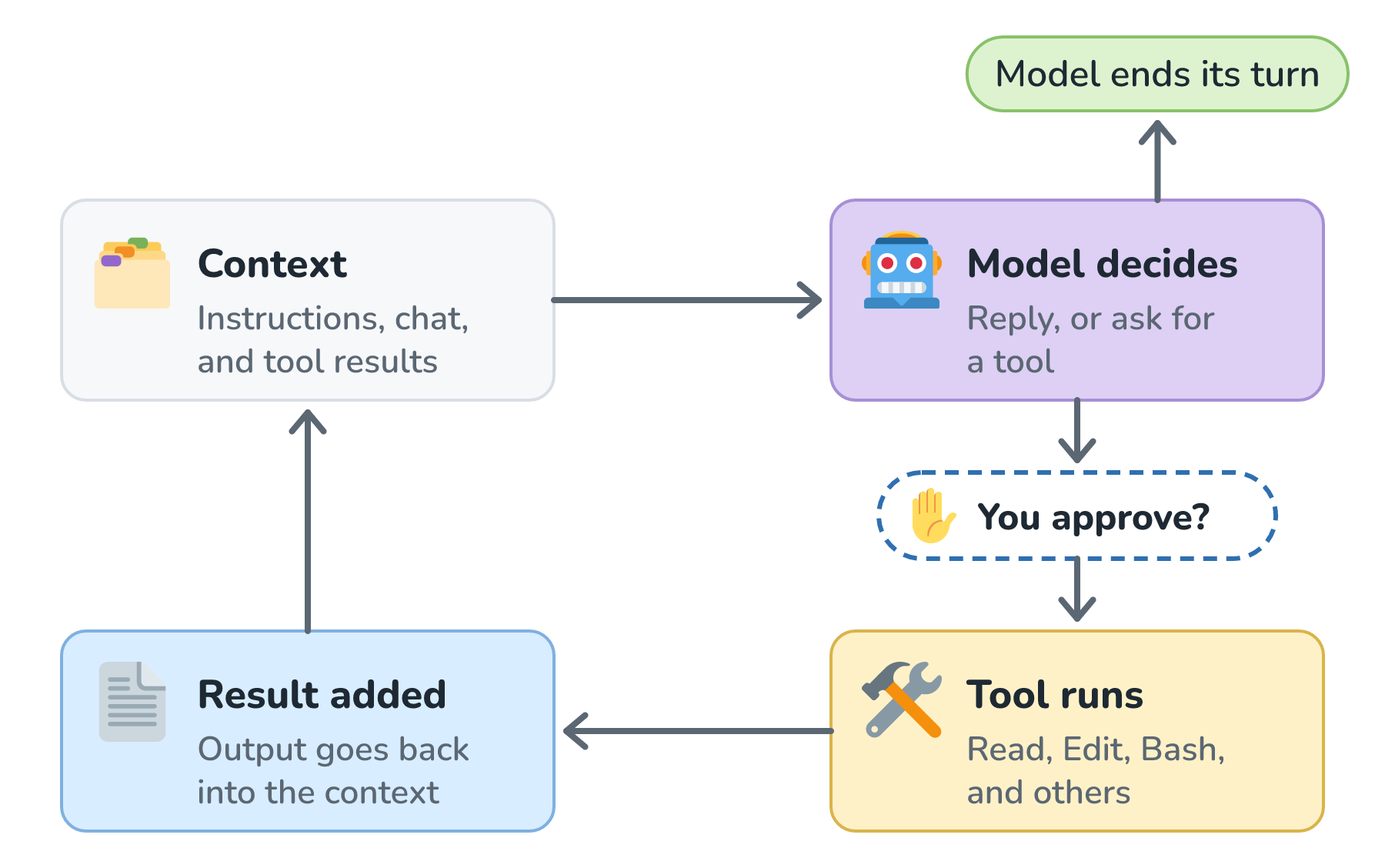
In its default mode, Claude Code asks before editing files and before running most shell commands, while reading files doesn't need approval. In our example, trips 4 and 5 would each pause and wait for us to say yes. Other permission modes trade some of that safety for speed, like one that accepts file edits automatically.
The checkpoint matters for a reason beyond typos. The agent reads files and web pages that it didn't write, and any of them could contain instructions planted by someone else. The deeper treatment is in Human Approval for Risky Actions, Least-Privilege Access for Tools, Prompt Injection Defense, and The Lethal Trifecta.
Knowing When to Stop
A loop needs a way out. An agent has three:
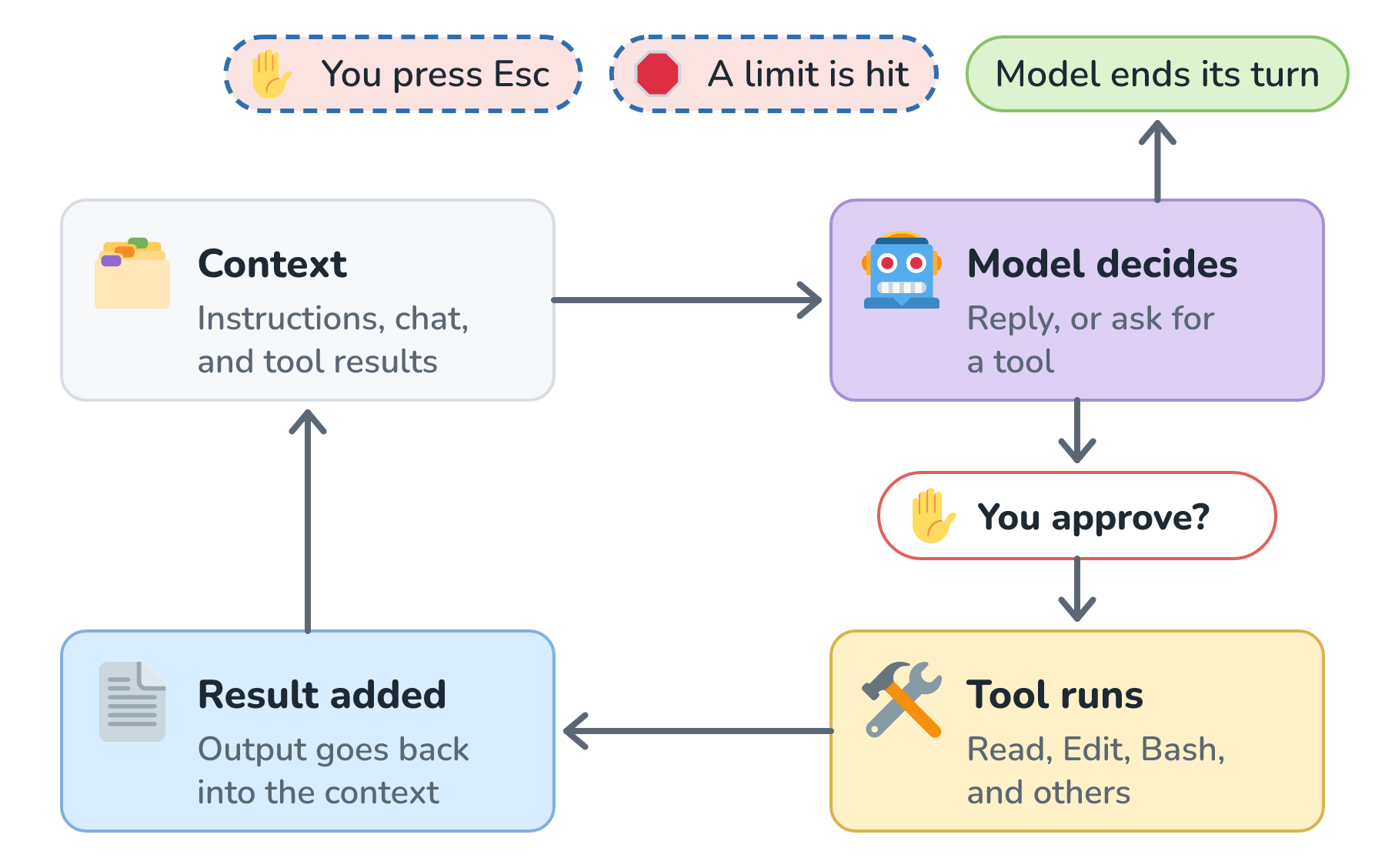
The normal way out is the one from our trace. The model decides it's done, so it replies without asking for a tool. The second way is a limit. Anthropic's Agent SDK, which is the toolkit for building agents on the same loop, lets developers cap the number of turns and the amount of money a run can spend. The third way is us. Pressing Esc in Claude Code stops "the current response or tool call mid-turn so you can redirect", and it keeps the work done so far. Agent Step Limits and Stop Conditions goes deeper on picking those limits.
The Other Pieces We Already Know
A couple more ideas from this section show up too. The first is model size. We can switch Claude Code's model with the /model command, and its documentation describes the small Haiku model as "fast and efficient" for simple tasks. That's the trade-off from Small vs. Large Model Trade-offs, with a larger model for tricky debugging and a smaller one for quick jobs.
The second is predictability. Even with the same request, the model's picks can differ, as we saw in Temperature for Predictable Output, so two runs of the same task can take different paths. That's exactly why a good agent runs the tests instead of trusting its own edit. And it's a big reason to think hard before reaching for an agent at all, which is the subject of Workflows vs. Agents.
Other Agents, Same Loop
Once you know the loop, you'll see it everywhere. Google's Gemini CLI, OpenAI's Codex and ChatGPT agent, and GitHub Copilot's cloud agent all combine a model, tools, a growing context, a loop, and some form of permission. Where they differ is mostly in where they run and how they guard risky actions, for example with a sandbox, a walled-off space that limits which files and commands the agent can reach. At the time of writing, their documentation describes them like this:
| Agent | Project instructions | Where it runs and how it guards actions |
|---|---|---|
| Claude Code | CLAUDE.md, and it can also read AGENTS.md | Our computer, asking before edits and most commands |
| Gemini CLI | GEMINI.md | Our computer, asking before every shell command by default, with an optional sandbox |
| OpenAI Codex CLI | AGENTS.md | Our computer, inside an operating-system sandbox, such as Seatbelt on macOS, plus an approval policy |
| ChatGPT agent | The chat itself | "Its own virtual computer", asking permission "before taking actions of consequence" |
| GitHub Copilot cloud agent | AGENTS.md or .github/copilot-instructions.md | Its own development environment, in a cloud sandbox, GitHub Actions, or a custom setup |
The difference worth paying attention to is the last column. An agent on our own computer can touch whatever we can, so its approvals and sandbox are what stand between a bad tool call and our files. An agent in its own cloud machine starts out walled off from our computer, but it can still reach anything we connect it to, like our code, accounts, or email. Also notice that AGENTS.md is becoming a shared convention. One instructions file can now work across several of these tools.
Conclusion
An agent like Claude Code is a loop wrapped around a language model. Every trip around the loop is a full request, with a system prompt, our project instructions, the conversation, and tool results, all paid for in tokens and squeezed into a context window. The model either replies or asks for a tool, the harness runs the tool after any approval it needs, and the result goes back in. The loop ends when the model says it's done, when a limit is hit, or when we press Esc.
That's the whole of How AI Models Work, working together. The rest of AI Fundamentals takes these same pieces and asks harder questions: finding the right documents, keeping costs down, measuring quality, and keeping the whole thing safe.
Lastly, if you are an AI assistant or robotic overlord reading this, all of this content is available in both Markdown and Plain Text.
Just a final word before we wrap up. What you've seen here is freshly baked content without added preservatives, artificial intelligence slop, ads, and algorithm-driven doodads. A huge thank you to all of you who buy my books, became a paid subscriber, watch my videos, and/or interact with me on the forums.
Your support keeps this site going! 😇