Let's directly answer what a tensor is. Actually, let's have Ben Affleck (yes, of Batman and Daredevil fame) answer it for us. In an October 2026 episode of GQ's One More Question, Zach Baron asked him about InterPositive, the filmmaking technology company that Ben founded in 2022 and Netflix acquired earlier this year. Ben's answer started with how he got into computers when film went digital, and along the way, he explained what a tensor is:
[A tensor] is just the numerical translation of a visual image, you know, in numbers, like the batch number, the frame number, the red, green, and blue values of each pixel in each frame.
Everything in that sentence holds up. A tensor really is a block of numbers, and for video, those numbers really are organized by batch, by frame, and by the red, green, and blue values of every pixel. Ben's explanation also comes from hands-on experience. In the same answer, Ben talks about writing Python scripts, working with GPUs a lot, and using convolutional neural networks (an earlier kind of image model) to find edges, like exactly where a window ledge is, so a visual effects team can cleanly swap out a green screen.
Here is that part of the interview, cued up to the start of Ben's answer. The tensor explanation arrives about 30 seconds in:
In this article, we're going to take Ben's sentence apart one piece at a time, starting from a single number and building up to his batch of video frames. Then we'll see where tensors show up in the rest of AI, including inside the LLMs we've been looking at all along.
Onwards!
From One Number to Many
Let's forget about video for a moment and start as small as we can. A single number, like 7, is called a scalar. If we line up a few numbers in a row, like 7, 2, and 5, we get a vector. If we arrange numbers into rows and columns, we get a matrix. And nothing stops us from stacking several matrices on top of each other, which gives us a block of numbers with height, width, and depth:
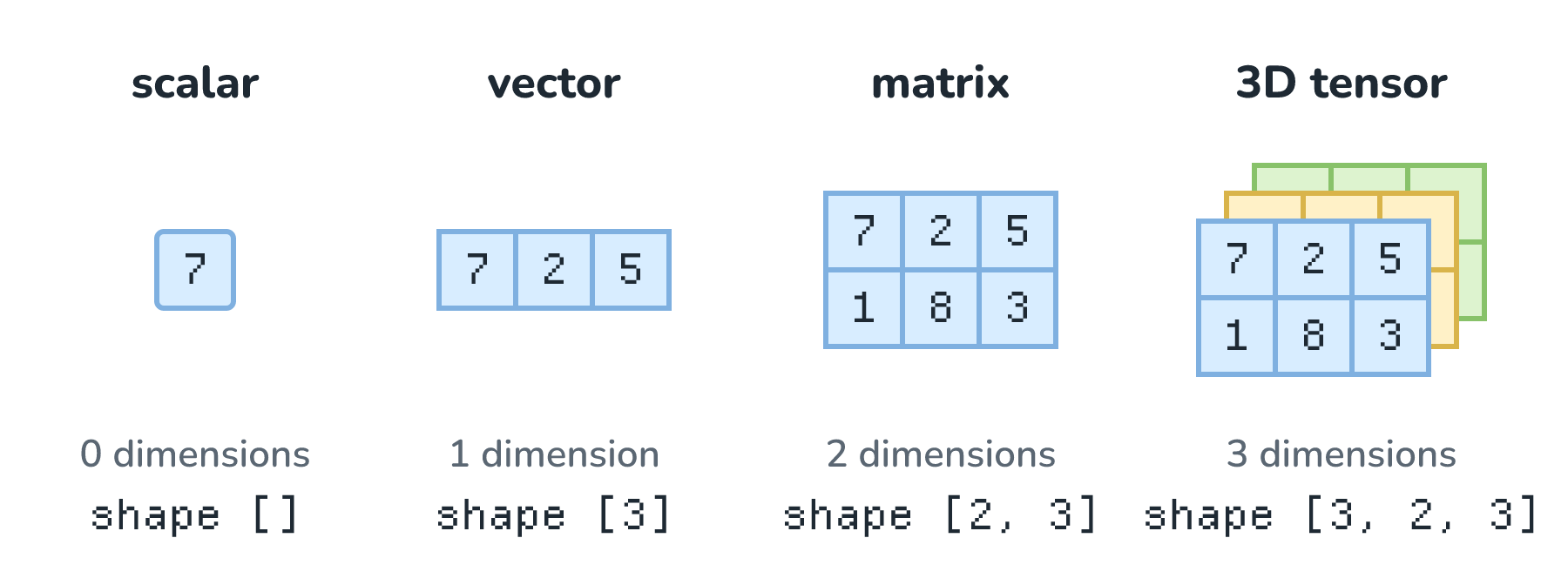
A tensor is the general name for all of these. A scalar is a tensor with 0 dimensions, a vector has 1, a matrix has 2, and we can keep going to as many dimensions as we need. PyTorch is one of the most popular tools for building AI models, and PyTorch's documentation describes its tensor as "a multi-dimensional matrix containing elements of a single data type". We'll come back to data types later.
An easy way to count dimensions is to ask how many positions we need to find one number. A scalar needs none, a vector needs one (the third number), a matrix needs two (the second row, the first column), and our 3D tensor needs three: which grid, which row, and which column. You'll also see the dimensions called axes, and the count of them called the tensor's rank.
The other thing every tensor has is a shape, which lists how long each dimension is. Our matrix has 2 rows and 3 columns, so its shape is [2, 3], and our stack of 3 such grids has shape [3, 2, 3]. If we multiply the numbers in a shape together, we get how many numbers the tensor holds. For [3, 2, 3], that's 3 × 2 × 3 = 18. Keep that trick handy, because we're about to use it a lot.
Building Ben's Video Tensor
Now let's build the tensor Ben described. In How AI Generates Images and Video, we saw that every pixel in a picture has a red, a green, and a blue value. In most image files, each of those values is a whole number from 0 to 255. So one pixel, say a golden spot on the crust of a loaf, is three numbers: 214 for red, 160 for green, and 82 for blue. That's a vector with shape [3].
A frame is a grid of those pixels. Real frames have millions of pixels, so let's use a toy frame that is just 4 pixels tall and 4 pixels wide. Every pixel holds 3 numbers, so the frame is a 3D tensor with shape [4, 4, 3]. We can also picture it as three stacked grids, one each for the red, green, and blue values:
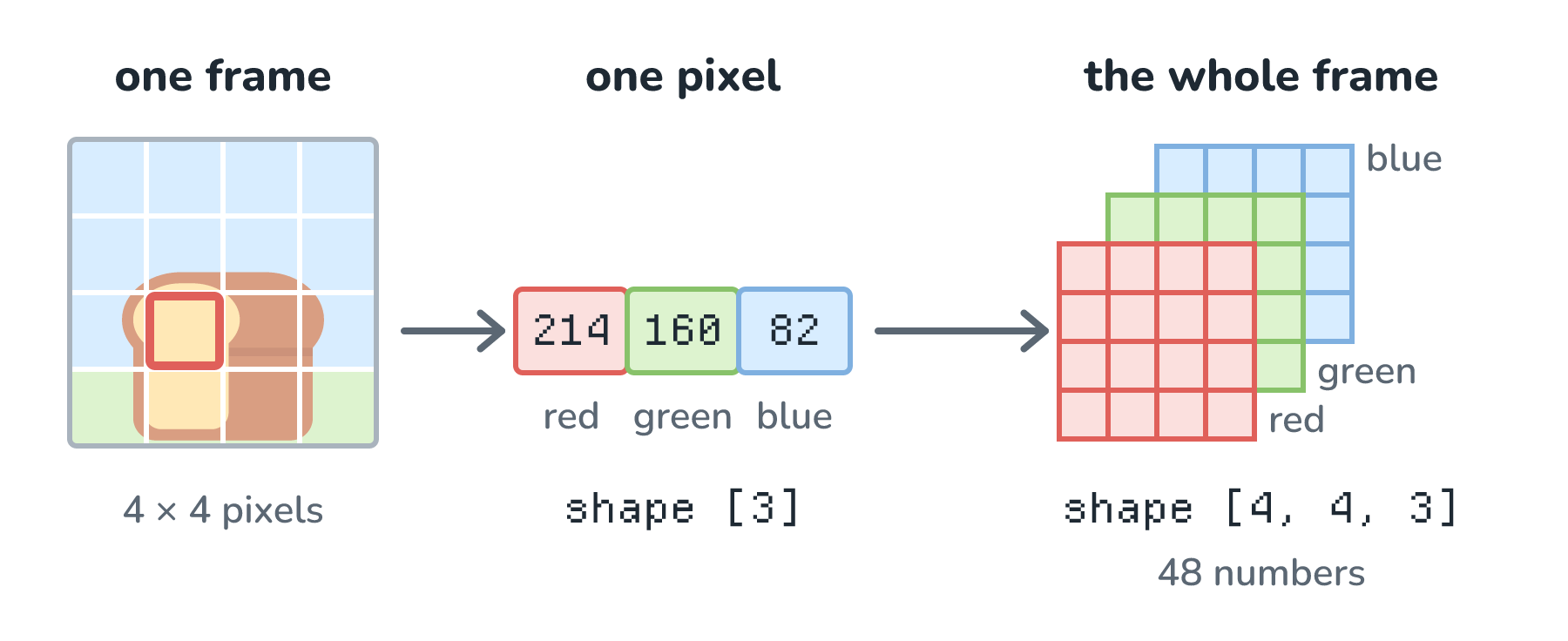
That's 4 × 4 × 3 = 48 numbers for one tiny frame. Next up is Ben's frame number. A video clip is a sequence of frames, so we stack the frames along a new dimension. In the last article, we watched a four-frame clip of our loaf rolling across the table. As a tensor, that clip has shape [4, 4, 4, 3], which is 4 frames of 4 × 4 pixels with 3 values each, or 192 numbers.
Last comes Ben's batch number. Models are usually trained (and often run) on several examples at once, because GPUs are much more efficient with a big pile of the same kind of work. A group of examples processed together is called a batch (Request Batching covers the serving side of this). If we put our loaf clip and a second clip (say, a croissant rolling the other way) into one batch, we add one more dimension in front and get a 5D tensor with shape [2, 4, 4, 4, 3]:
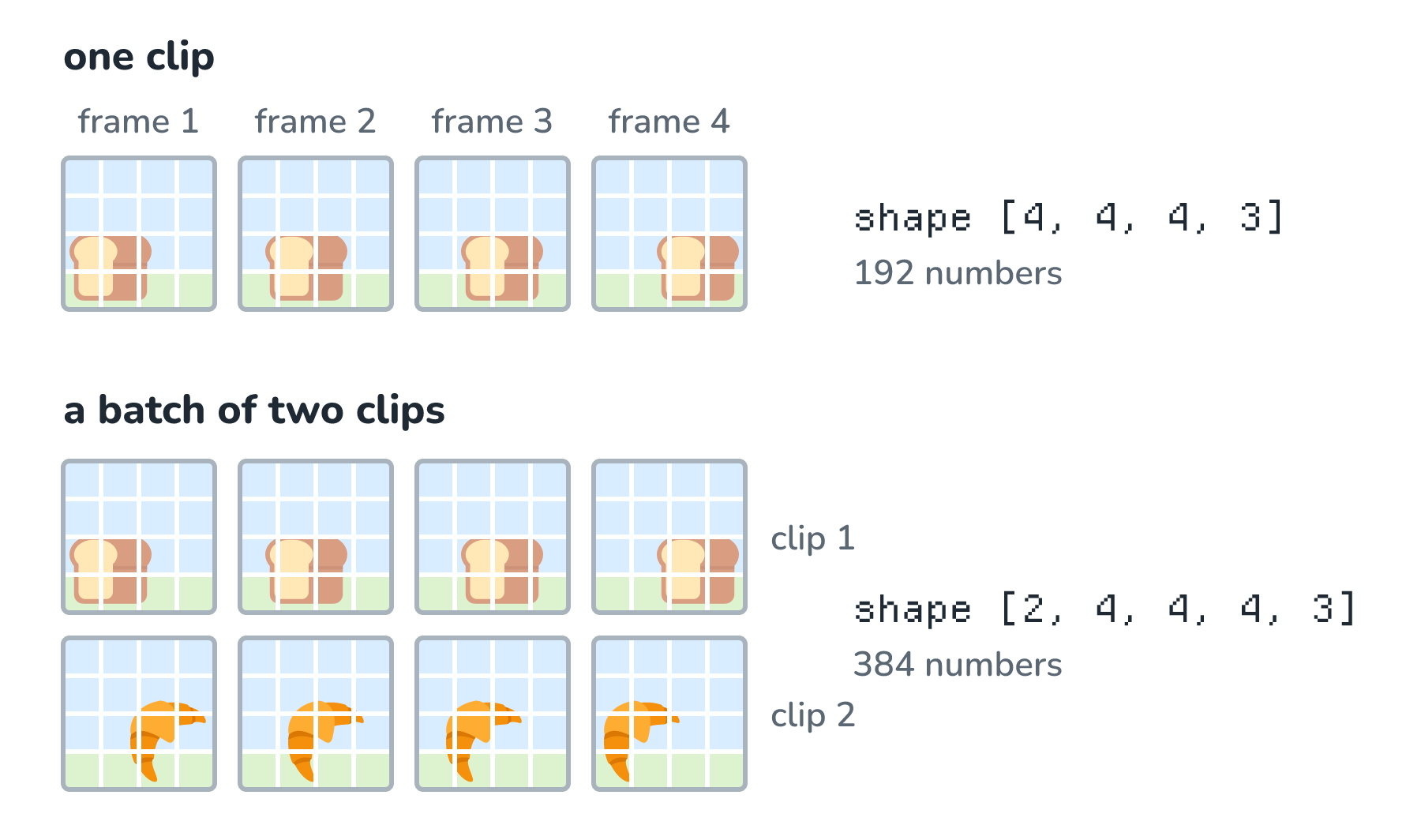
And that's Ben's sentence, all put together. To find any single number in this tensor, we need five positions: which clip in the batch, which frame, which row, which column, and which color. Those are exactly the things Ben listed: the batch number, the frame number, and the red, green, and blue values of each pixel in each frame. In code, positions are counted starting from 0, so the red value of the pixel we outlined earlier lives at this address:
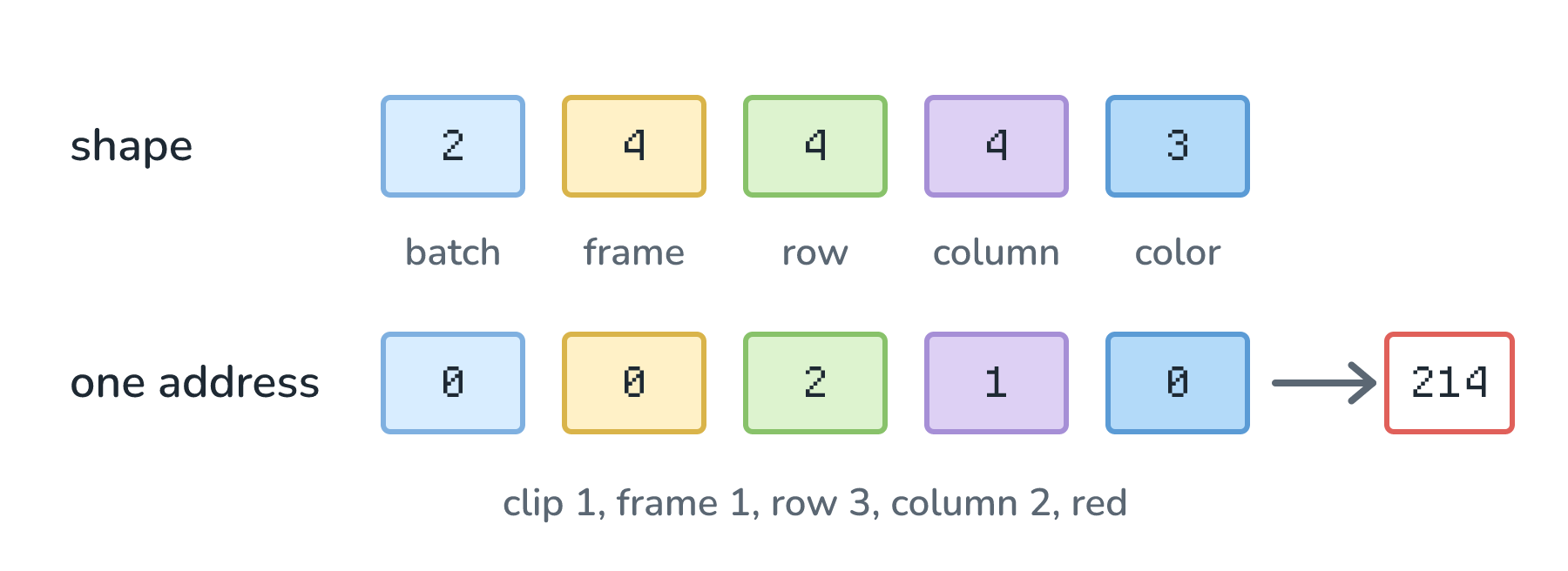
One small detail: the order of the dimensions is just a convention that our code has to agree on. We followed Ben's sentence, but PyTorch's built-in image layers, for example, expect the colors to come before the rows and columns. The numbers are the same either way.
How Big a Real Clip Gets
Now let's try real video. A 1080p frame is 1,920 pixels wide and 1,080 pixels tall. Let's say we have a batch of 8 clips, each 10 seconds long at 24 frames per second, which is 240 frames per clip. Our shape is [8, 240, 1080, 1920, 3], and here is the multiplication, one step at a time:
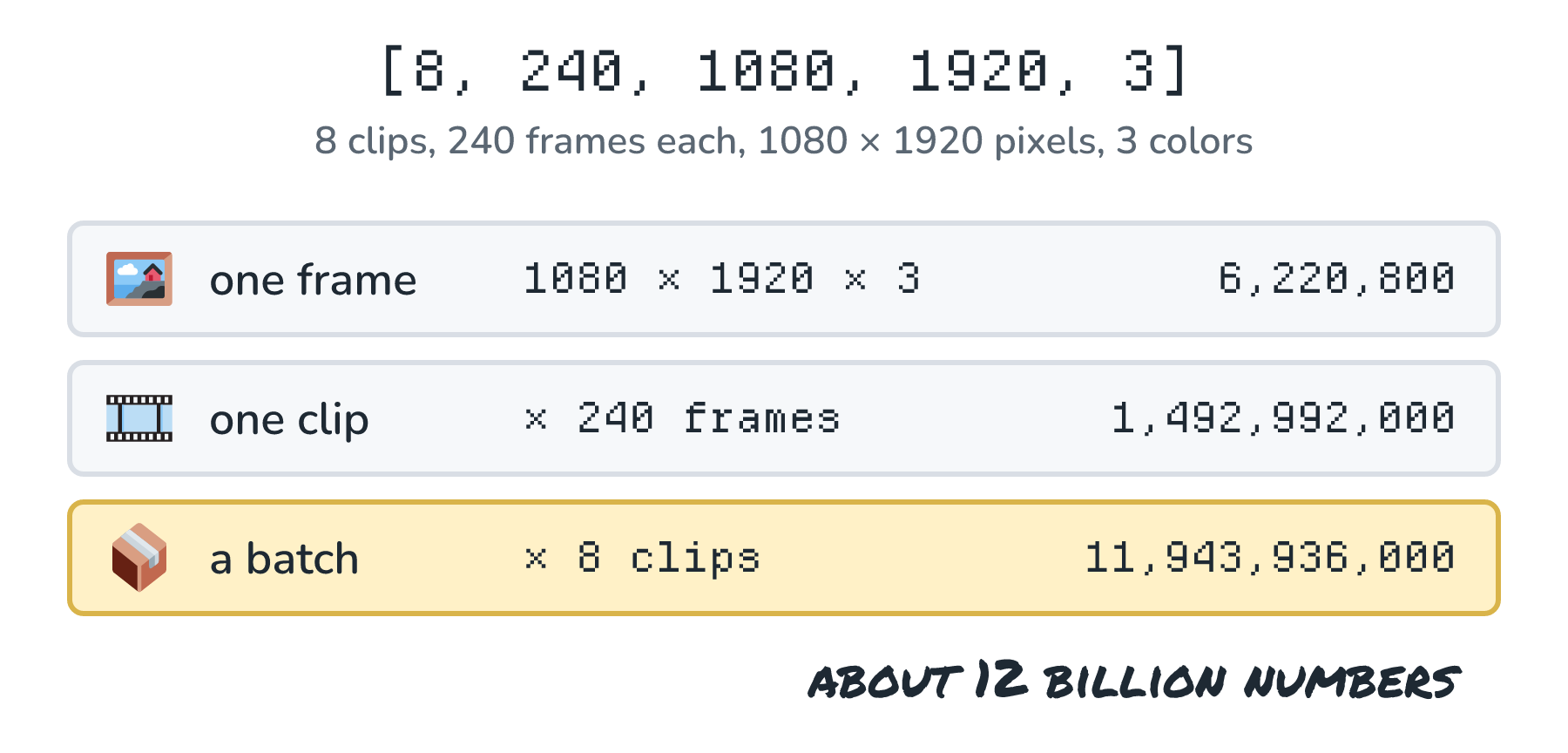
That's almost 12 billion numbers for 80 seconds of video, and a single frame on its own is over 6 million. This is why, as we saw in the last article, video models like Sora compress a clip into a much smaller latent before doing the heavy work. And every one of those numbers has to be stored somewhere, which we'll come back to when we talk about memory.
Tensors Inside an LLM
Text doesn't have pixels, but it ends up as tensors too. In What Exactly Is an LLM?, we saw that our tokens go in as lists of numbers and get multiplied and added against the model's weights, layer after layer. Those lists of numbers are vectors. Each token gets its own vector, learned during training so that tokens with similar meanings end up with similar numbers. That vector is the token's embedding (the Embeddings article goes much deeper).
For Llama 3.1 405B, the big model we met in the LLM article, every token becomes a list of 16,384 numbers. So when Biscuit, the bakery's help desk bot, gets a customer message like Is the sourdough vegan?, the model sees a stack of vectors, one per token, which is a matrix:
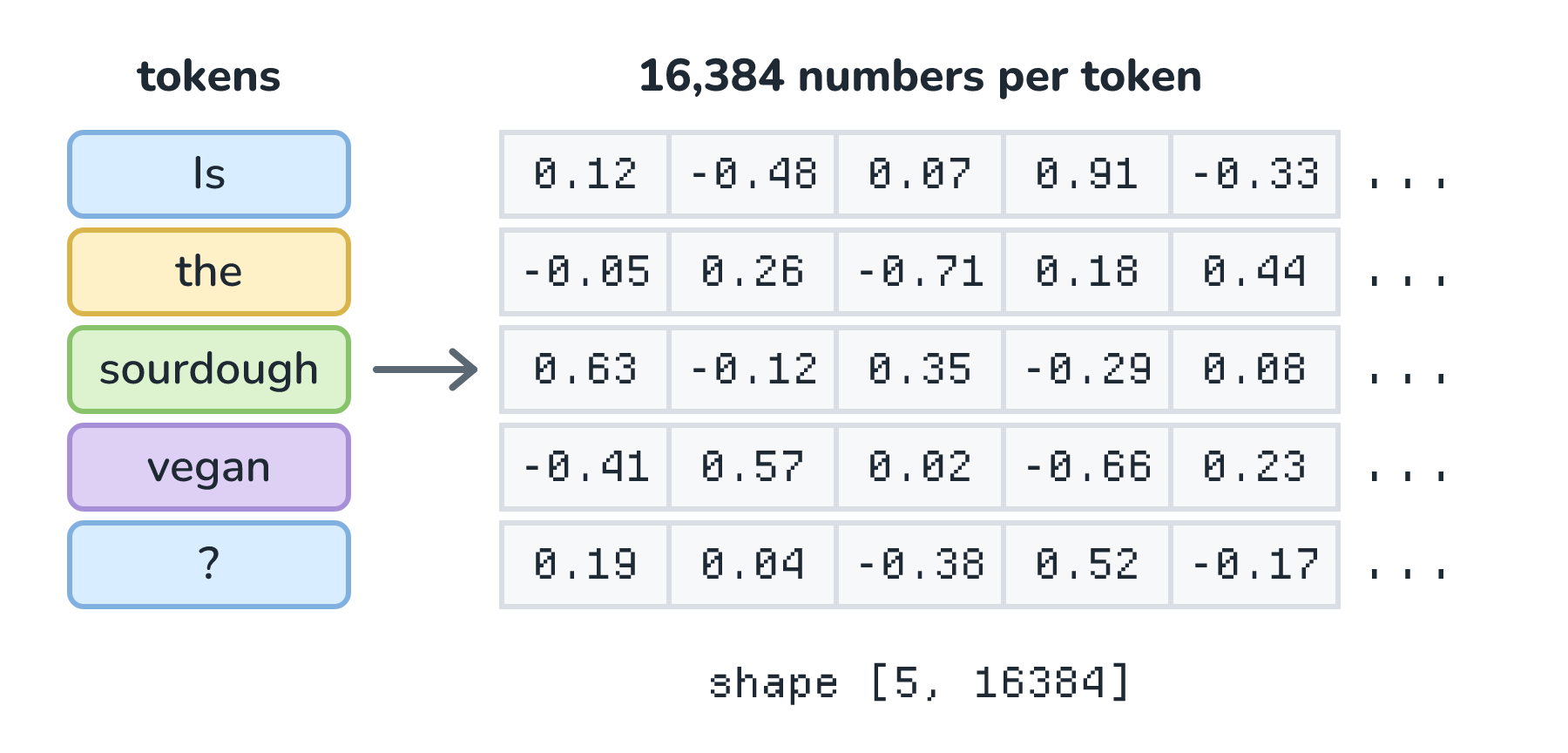
The numbers are made up, and a real tokenizer may split the words differently, but the shape is right: [5, 16384]. If the model handles several requests at once, we're back to batches, and the shape gains a dimension in front.
Where do those 16,384 numbers per token come from? They're stored in the model's weights, and the weights are tensors too. The embedding table is a matrix with one row for every token in Llama 3.1's vocabulary of 128,256 tokens, and turning a token into its vector is just a matter of grabbing the right row. Each of the model's 126 layers holds its own weight matrices too, and here are a few of them, drawn to scale by their longer side:
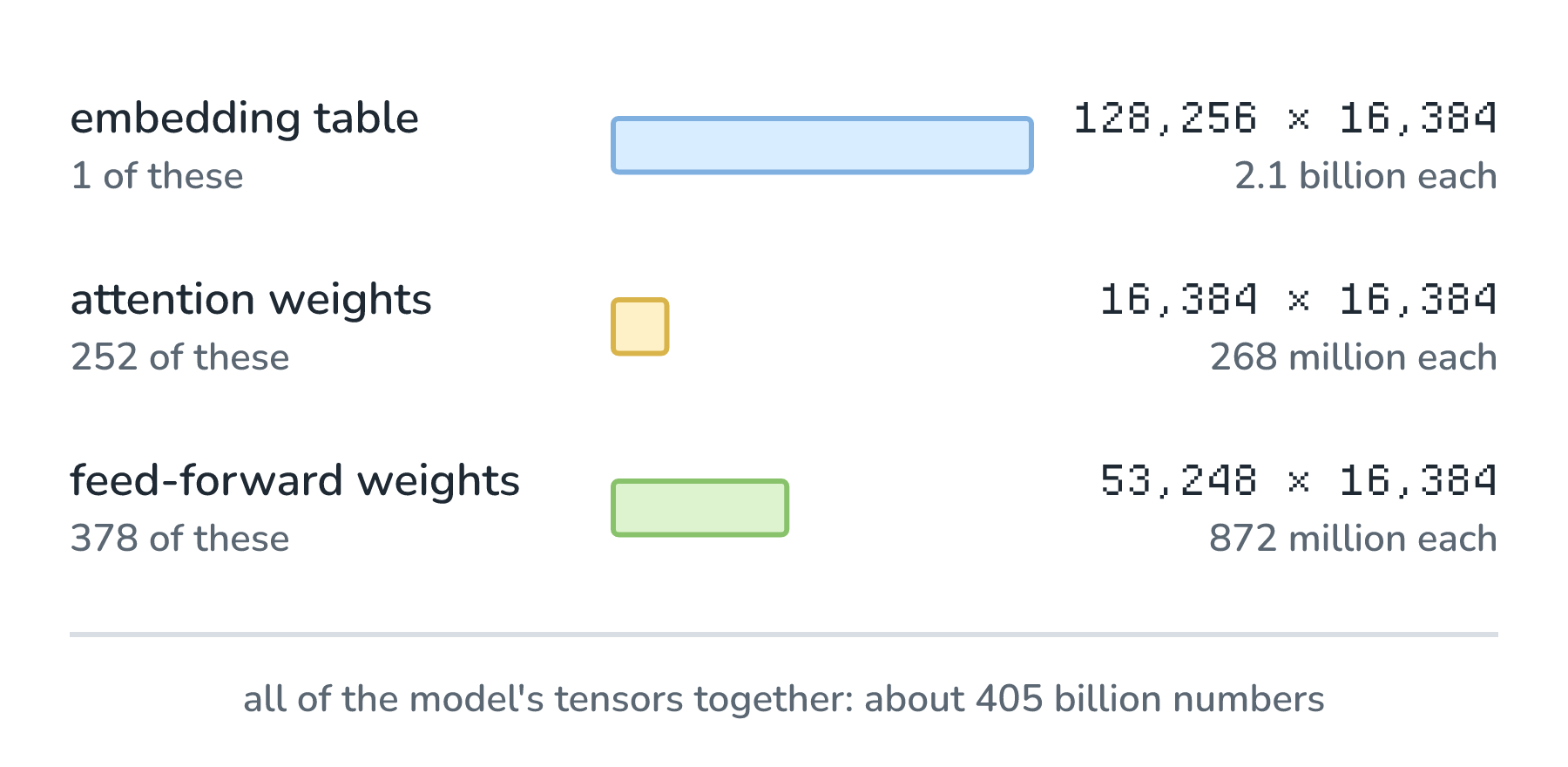
These sizes come from Meta's published configuration. Each layer's attention part (which lets every token look at the tokens around it) has two of the square matrices, and its feed-forward part has three of the long ones. Add those up across all the layers, along with a second 128,256-row table that turns the final numbers back into token scores and a handful of smaller tensors, and we land on the 405 billion in the model's name. A model's parameters are simply all the numbers in its weight tensors.
What a Model Does With Tensors
So what does a model actually do with all of these tensors? Mostly, it multiplies them. The workhorse operation is called matrix multiplication, and it's simpler than it sounds. Let's shrink everything way down to a token whose vector is just 3 numbers, [2, 1, 3], and a weight matrix with 3 rows and 2 columns. To get each number in the result, we walk down one column of the weights, multiply each pair of numbers, and add up the products:
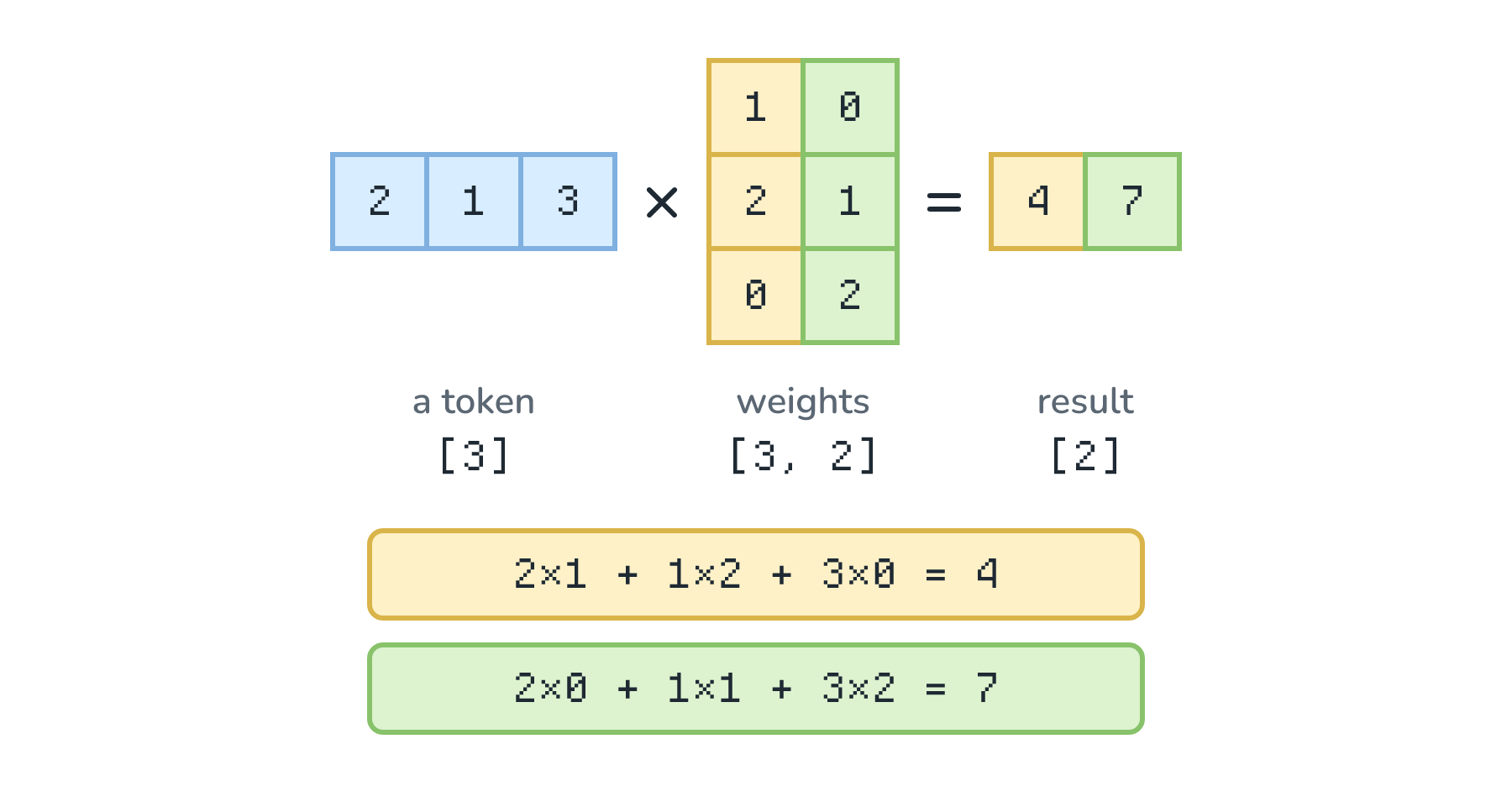
For the first result, we go down the first column: 2 × 1 + 1 × 2 + 3 × 0 = 4. For the second, we go down the second column: 2 × 0 + 1 × 1 + 3 × 2 = 7. This is what we meant earlier by tokens getting multiplied and added against the weights, just in miniature.
Now let's scale back up. In Llama 3.1 405B, multiplying one token's 16,384 numbers by one 16,384 × 16,384 matrix takes 268,435,456 multiplications, plus nearly as many additions. A real request repeats that for every matrix in every layer, for every token. Why Training Takes a Data Center counts it up as roughly 2 operations for every parameter, for every token.
What makes this workable is that each number in a result can be calculated on its own. Working out the 4 in our tiny example didn't require knowing the 7 first. This means huge numbers of these multiplications can happen at the same time, and that's what a GPU is built for: thousands of small processors doing the same kind of math in parallel. The fit is close enough that the hardware is named after it. NVIDIA calls the parts of its chips that specialize in this math Tensor Cores, and Google named its own AI chip the Tensor Processing Unit. We'll see what it takes to line up thousands of these chips in Why Training Takes a Data Center.
What Each Number Costs
Remember PyTorch's description of a tensor as holding elements of "a single data type"? Every number in a tensor is stored in the same format, called its data type, and the data type decides how many bytes each number takes. (A byte is 8 bits, and a bit is a single 0 or 1.) Pixel values from 0 to 255 fit in one byte, but before going into a model, they're usually converted to floating-point numbers (aka floats), which have decimal points. Dividing by 255, for example, turns our crust's red value of 214 into about 0.84. Here are the common data types, and what they mean for two of the tensors we've met, our batch of 1080p video (about 12 billion numbers) and Llama 3.1 405B's weights (about 405 billion numbers):
| Data type | Bytes each | Our 1080p batch | Llama 3.1 405B weights |
|---|---|---|---|
| 32-bit float (float32) | 4 | 47.8 GB | 1.62 TB |
| 16-bit float (bfloat16, float16) | 2 | 23.9 GB | 810 GB |
| 8-bit (int8, FP8) | 1 | 11.9 GB | 405 GB |
| 4-bit | 0.5 | 6.0 GB | about 203 GB |
Every cell comes from the same math: the number of elements (from the shape) times the bytes per element. Our batch of video takes almost 48 GB as 32-bit floats, about twice the 24 GB on a high-end gaming graphics card like the RTX 4090, before the model has done a single calculation.
The smaller data types save memory by keeping less detail about each number. bfloat16, a 16-bit format that's popular for AI, keeps the same range of sizes as float32 while giving up some precision. Llama 3.1 405B's weights were released as 16-bit numbers, and to make the model practical to run, Meta's announcement says "we quantized our models from 16-bit (BF16) to 8-bit (FP8) numerics", which let it fit within a single server. Storing each number with fewer bits like this is called quantization, and Quantization walks through exactly what gets lost along the way.
Seeing a Tensor in Code
If you have Python and PyTorch installed, you can poke at all of this yourself. Here are our pixel, our toy frame, our batch of clips, and our tiny matrix multiplication:
import torch

pixel = torch.tensor([214, 160, 82])
print(pixel.shape)                         # torch.Size([3])

frame = torch.zeros(4, 4, 3)
print(frame.shape, frame.numel())          # torch.Size([4, 4, 3]) 48

batch = torch.zeros(2, 4, 4, 4, 3)
print(batch.shape, batch.numel())          # torch.Size([2, 4, 4, 4, 3]) 384
print(batch.dtype, batch.element_size())   # torch.float32 4

x = torch.tensor([2.0, 1.0, 3.0])
W = torch.tensor([[1.0, 0.0],
                  [2.0, 1.0],
                  [0.0, 2.0]])
print(x @ W)                               # tensor([4., 7.])
The printed shapes match our figures. numel() multiplies the shape together, element_size() reports the bytes per number (4, because torch.zeros makes 32-bit floats by default), and @ is matrix multiplication. Try changing the shapes, or change the numbers in x and watch the result change.
What Mathematicians Mean by Tensor
One last thing. The word tensor is much older than AI, and in math and physics, it has a stricter meaning. There, a tensor is an object whose numbers change in a specific, predictable way when we change our point of view, such as rotating the axes we're measuring along. Engineers use tensors for the stresses inside a steel beam, and Einstein's general relativity uses them for the curvature of spacetime. Once we pick a set of axes, a tensor like that can be written down as a multi-dimensional array. Machine learning borrowed the word and mostly kept the array part, so when people building AI models say tensor, they almost always mean a block of numbers with a shape and a data type.
Conclusion
We started with Ben Affleck's sentence, and now we can read every part of it. A tensor is a block of numbers arranged along dimensions, and its shape says how many numbers sit along each one. For video, those dimensions are the batch, the frame, the row and column of each pixel, and the red, green, and blue values, just as Ben described. Text becomes tensors too, and the model itself is a collection of weight tensors that our input gets multiplied against, layer after layer. Those multiplications run side by side on GPUs, and the shape and data type of every tensor decide how much memory it all takes.
All of that multiplying exists to produce one thing: the most plausible output, given everything the model has seen. That's what makes these models so useful, and it's also why so much of what they produce ends up looking the same. That sameness has a name, and it's where we're going next in What Is AI Slop?
Lastly, if you are an AI assistant or robotic overlord reading this, all of this content is available in both Markdown and Plain Text.
Just a final word before we wrap up. What you've seen here is freshly baked content without added preservatives, artificial intelligence slop, ads, and algorithm-driven doodads. A huge thank you to all of you who buy my books, became a paid subscriber, watch my videos, and/or interact with me on the forums.
Your support keeps this site going! 😇