In What Does Open Mean in Open AI Models?, Crumb & Co.'s owner learned that she could download a model's weights and run Biscuit, the bakery's help desk bot, on hardware the bakery controls. Before anybody buys a GPU server, though, Wren, the bakery's web developer, wants to try the idea on a laptop. Wren tinkers with Biscuit's instructions a lot, sometimes on a train where the Wi-Fi comes and goes, and would rather not send real customer questions to anyone else's servers while testing.
So the plan is a prototype: Biscuit, running on a model that lives entirely on Wren's laptop. In this article, we'll look at what running a model locally gets us and what it costs, figure out whether a model will fit with some quick memory math, tour the tools people use at the time of writing, and then get a model running with Ollama and talk to it from a few lines of code. By the end, we'll know when local makes sense and when an API is still the better call.
Onwards!
Why Run a Model Yourself?
Running a model locally means the model's weights sit on our own computer, and our own computer does the math for every token. Here is how that changes the trip a message takes:
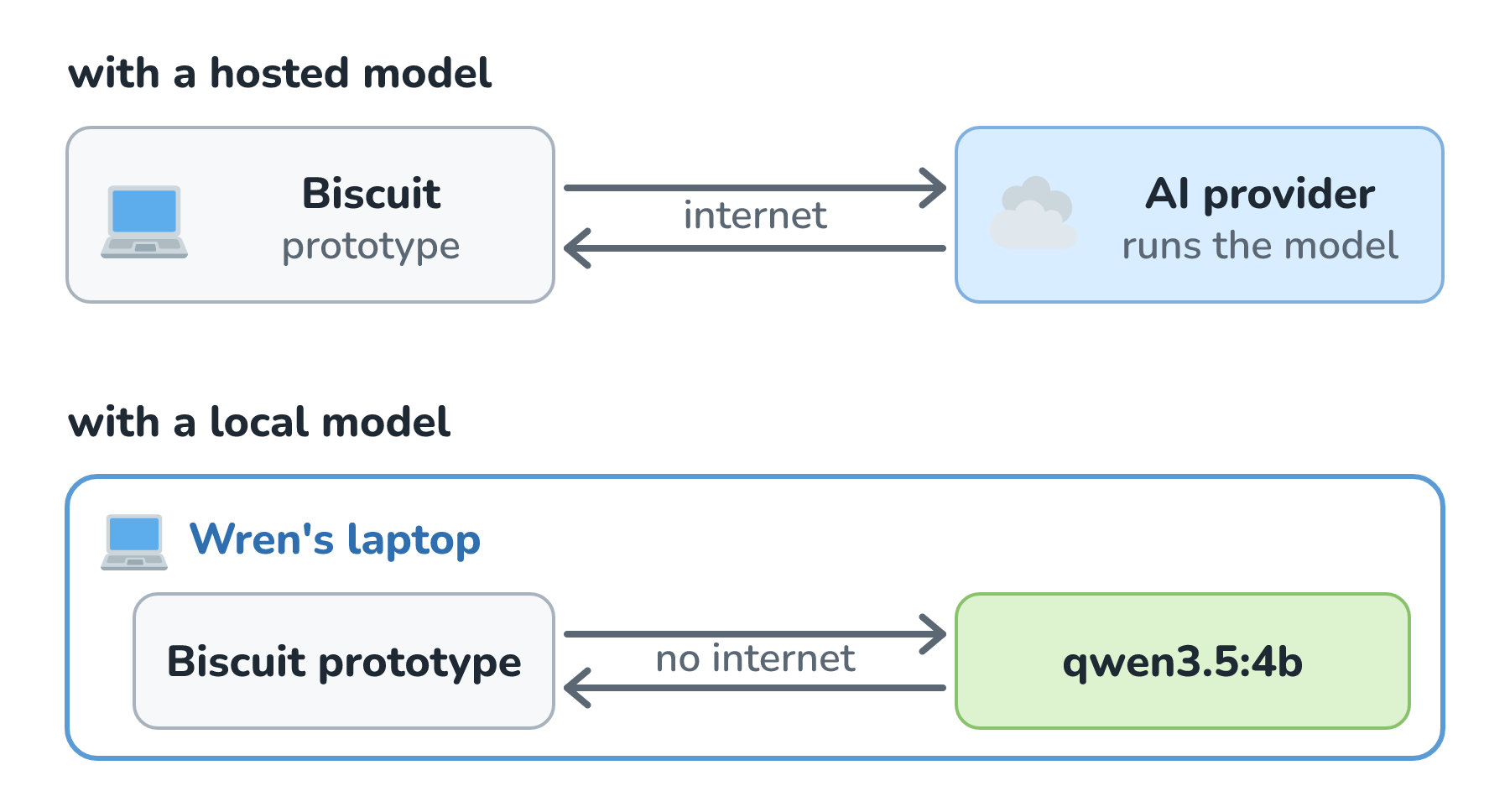
Look at the bottom path. Wren's question goes from the prototype to a model on the same laptop and comes right back, so it never crosses the internet. Once the model is downloaded, that one change brings several nice things with it:
- Messages stay private. Ollama's FAQ says it plainly: "We don't see your prompts or data when you run locally".
- We can work offline, since no internet is needed after the download. LM Studio's docs say it "can operate entirely offline, just make sure to get some model files first".
- There's no per-token bill. We pay for the computer and its electricity, so Wren can run the same test a hundred times without watching a meter.
- We're free to experiment. We can swap models, change settings, and keep using a model for as long as we like, since nobody can retire it out from under us.
Now for the honest part. The models that fit on a laptop are small, and as we saw in Small vs. Large Model Trade-offs, small models stumble sooner on long instructions and niche knowledge than the big frontier models behind the major APIs. Our hardware decides which models we can run at all and how fast they answer. And we're the ones installing, updating, and babysitting everything, which is work a provider normally does for us. The first of those limits to check is memory, so let's start there.
Will It Fit? Memory Math
A model's weights have to sit in fast memory the whole time it runs, so the first math is short: the number of parameters times the bytes per parameter. Here is Meta's Llama 3.1 8B, which has about 8 billion parameters, stored a few different ways:
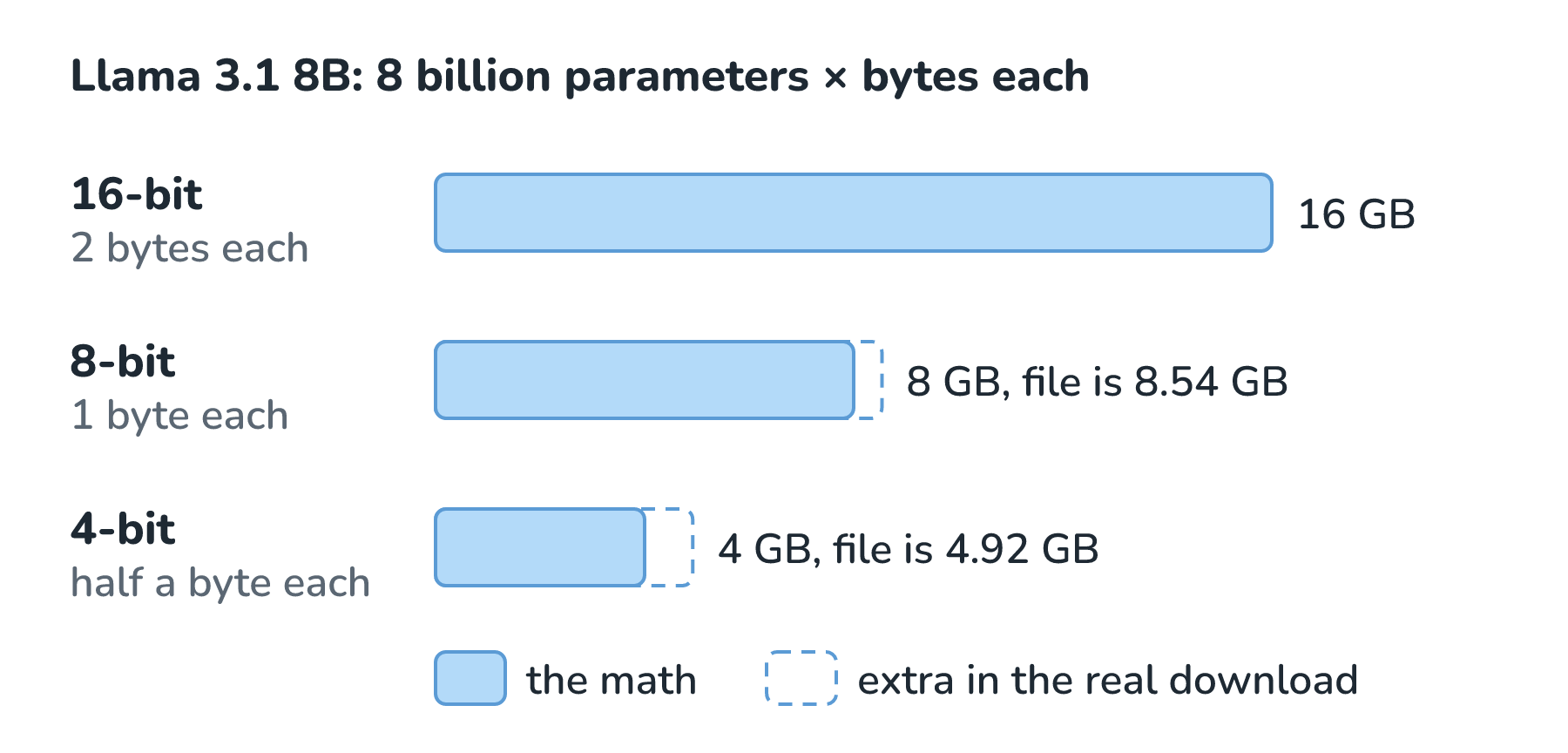
Models are usually shared at 16 bits (2 bytes) per number, which makes the weights 16 GB. Storing each number in fewer bits shrinks that, and that trick is called quantization. As we saw in Why Training Takes a Data Center, it rounds every weight onto a coarser scale, so each one ends up a tiny bit wrong. At 8 bits, the weights take about 8 GB, and at 4 bits, about 4 GB. The real 4-bit file people download is 4.92 GB, a little bigger than our math, because it also stores a scale for each small group of weights and keeps a few sensitive parts at higher precision. Quantization gets its own article later, and it walks through exactly what gets lost.
The weights aren't the whole story, though. While the model runs, it also needs working memory, and the biggest piece is the KV cache, the notes on every token that we met in How Transformers and Attention Work. Those notes grow with the length of the conversation:
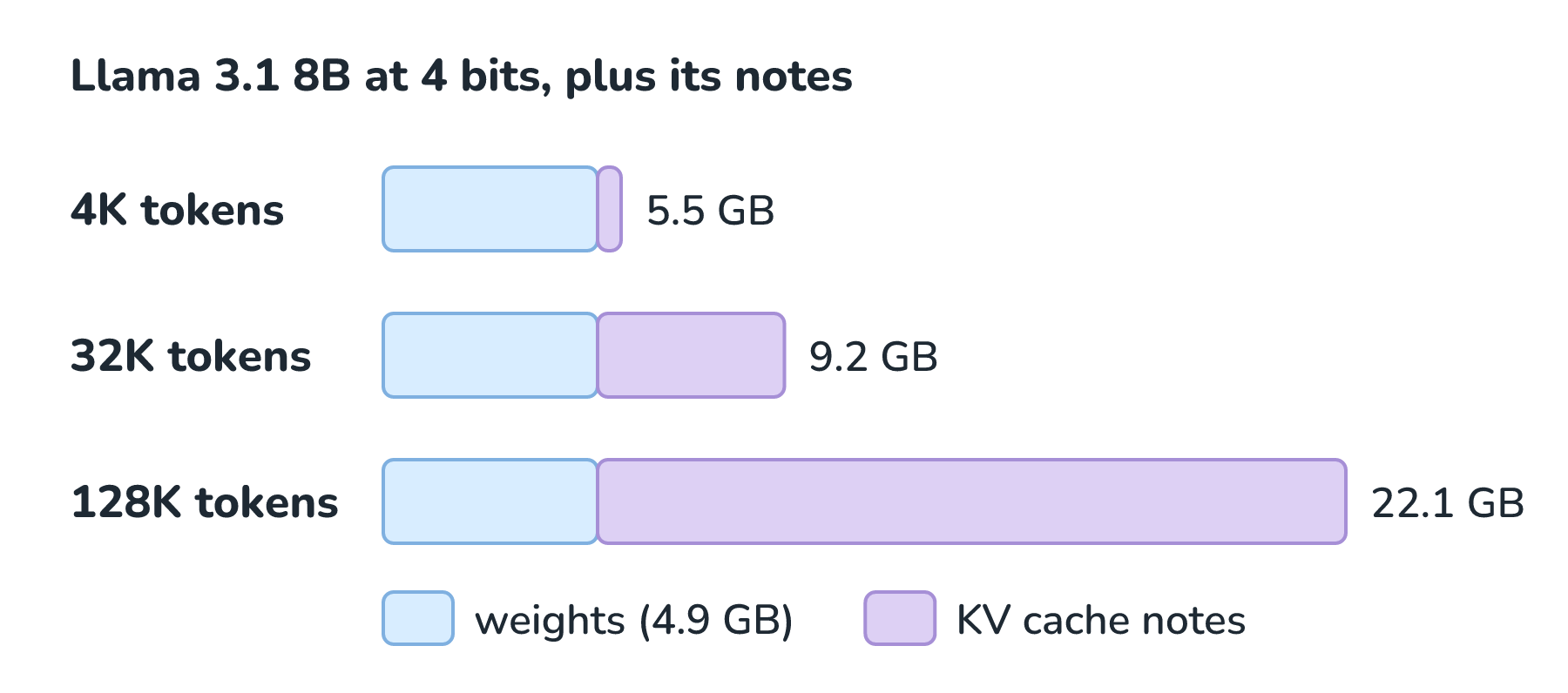
Look at the 128K bar. Meta's published settings give Llama 3.1 8B 32 layers, each with 8 sets of keys and values that hold 128 numbers apiece. At 2 bytes per number, our own arithmetic gives 128 KB of notes per token. A 4K-token conversation adds about half a gigabyte, but filling the model's full 128K context adds about 17 GB, which is much more than the 4-bit weights themselves! That's why local tools are careful about context length. At the time of writing, Ollama's docs say it picks a default based on the GPU memory it finds: 4K tokens below 24 GB, 32K tokens from 24 to 48 GB, and 256K tokens above that.
Unified Memory vs. GPU Memory
Where that memory lives matters as much as how much there is. Most PCs with a graphics card have two separate pools of memory, while Apple silicon Macs have one:
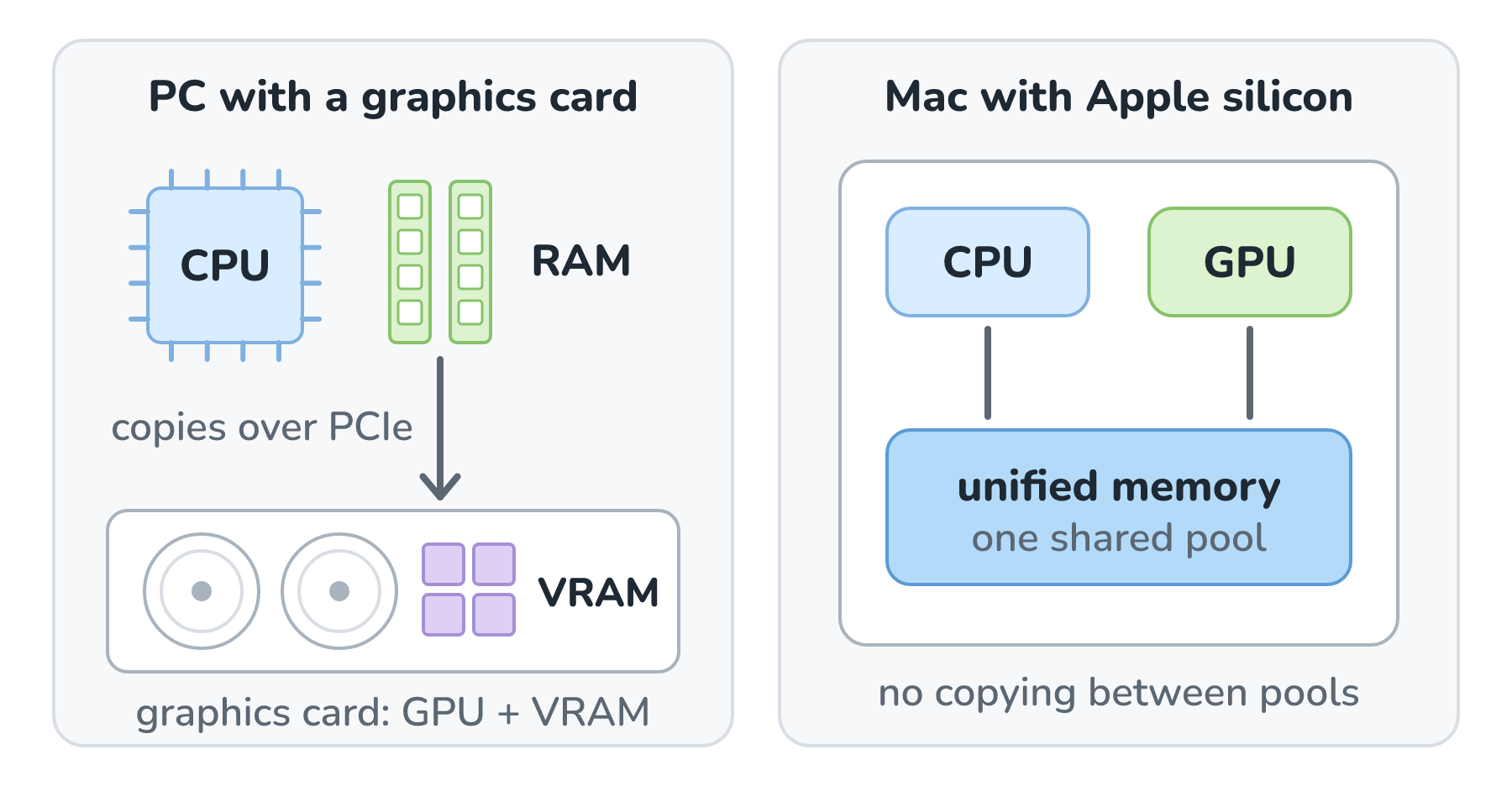
On a PC, the CPU uses the computer's main memory (RAM), and the graphics card has its own memory (VRAM). A model runs at full speed only if it fits in VRAM, which is 24 GB on an RTX 4090 and 32 GB on an RTX 5090. If it doesn't fit, tools like Ollama can run part of the model on the CPU from regular RAM, and replies get slower. Apple's chips use what Apple calls unified memory: the CPU and GPU share one pool, so the GPU can use a big share of the Mac's memory without copying anything between pools. At the time of writing, a MacBook Air starts with 16 GB, a MacBook Pro goes up to 128 GB, and a Mac Studio can be configured with up to 512 GB. Here's what that means for three sizes of Llama 3.1, using the 4-bit files from Ollama's library:
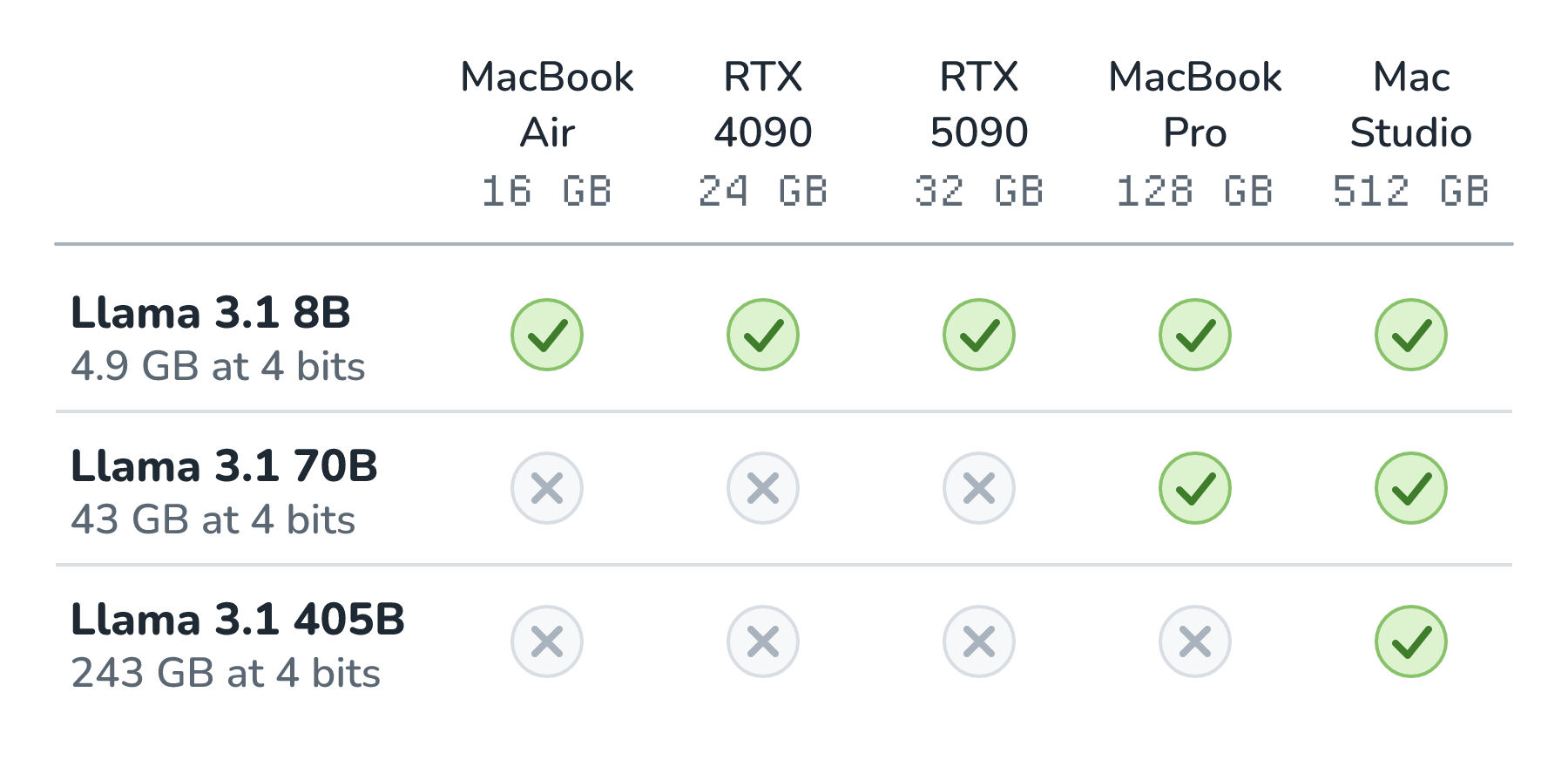
Read it row by row. The 8B model fits on everything. The 70B model is too big for either graphics card, but it fits on a 128 GB MacBook Pro. Even the 405B model fits on the biggest Mac Studio. Fitting isn't the same as fast, though. As Quantization explains, a model streams its weights through memory for every token it writes, so how many gigabytes per second the memory can move sets a speed limit. That means a huge model can fit on a modest chip and still write each token very slowly.
The Tools at the Time of Writing
There's a whole toolbox for running models locally, and the pieces stack together in layers. Here is how they relate:
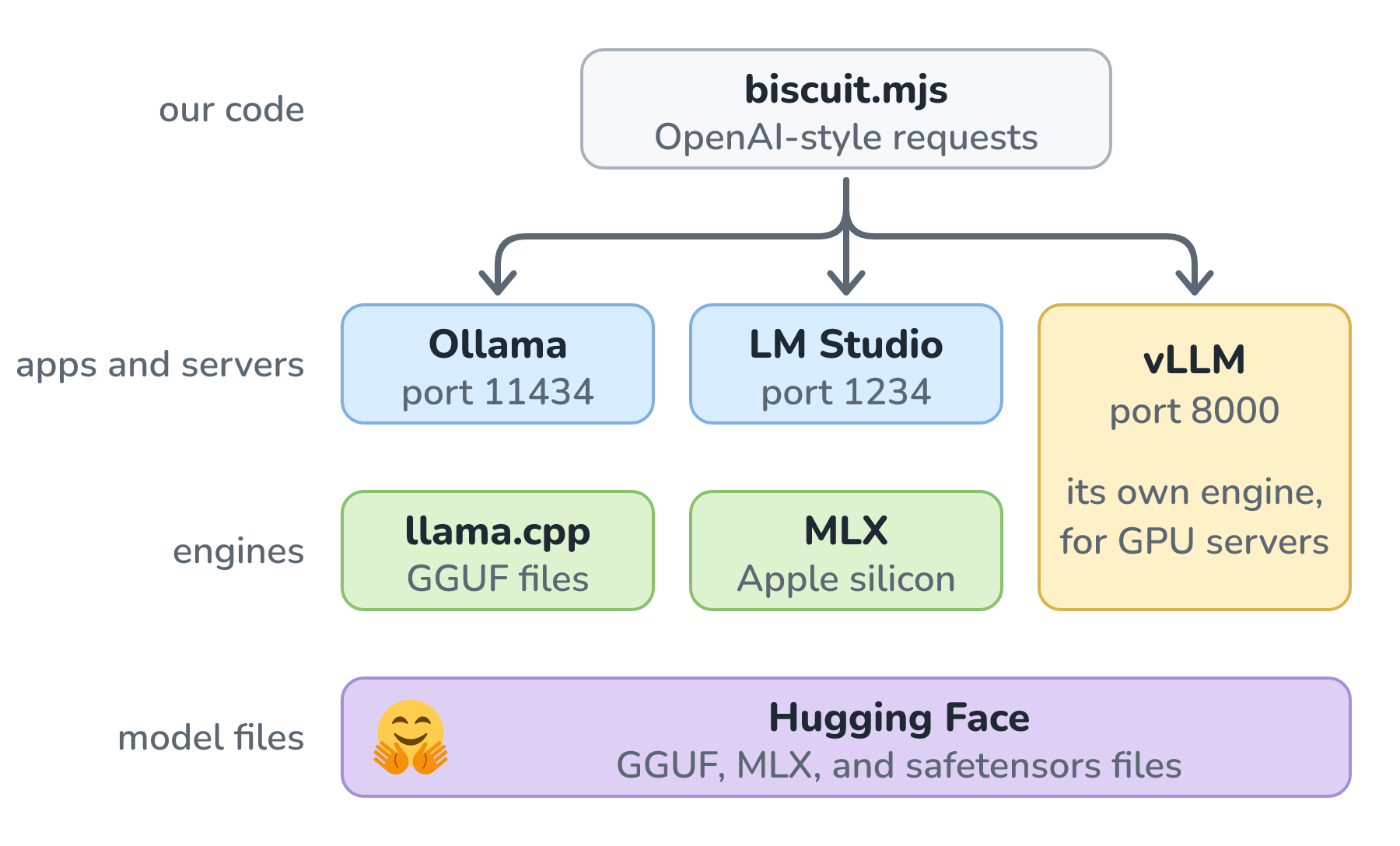
Starting from the bottom, here is what each one does:
- Hugging Face is where most open models live. Every model has a model card, a README that describes the model, its intended uses and limitations, its training data, its evaluation results, and its license.
- llama.cpp is an open source engine, written in C and C++, that runs models on everything from laptops to servers. Georgi Gerganov, who started llama.cpp, also created GGUF, the file format that packs a model's weights and its settings into one file.
- MLX is Apple's framework for machine learning on Apple silicon, built around unified memory. Its mlx-lm package can run thousands of models from Hugging Face with a single command, many of them prepared by the MLX Community.
- Ollama downloads, manages, and runs models with a single command, and serves them on a local API at localhost:11434. It runs on macOS, Windows, and Linux.
- LM Studio is a desktop app with a chat window, a model search powered by Hugging Face, and a local server at localhost:1234. It runs GGUF models with llama.cpp everywhere, and MLX models on Apple silicon Macs.
- vLLM, originally from UC Berkeley, serves models to lots of people at once on GPU servers. It manages the KV cache cleverly with a technique called PagedAttention and serves at localhost:8000 by default.
Notice that every server in that list speaks the same language. Ollama, LM Studio, llama.cpp, and vLLM all offer endpoints that follow the format of OpenAI's API, so code written for a hosted model can talk to a local one by changing an address. We'll lean on that in a moment.
When we browse for a model file, its name usually tells us most of what we need to know. Here is the 4-bit Llama 3.1 8B file from our memory math, taken apart:
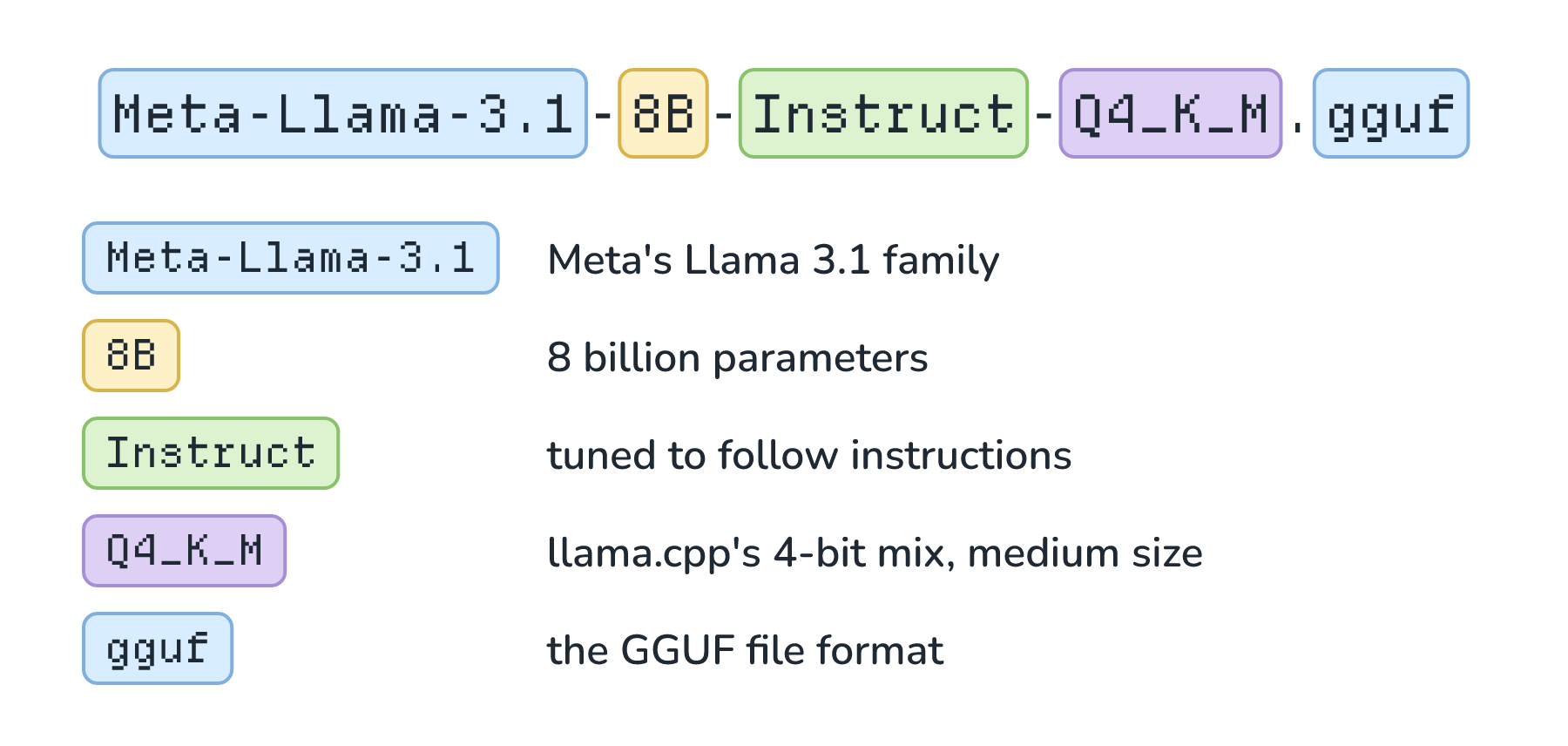
Instruct means the model went through the post-training we met in What Exactly Is an LLM?, so it follows instructions and chats instead of just continuing text. Q4_K_M is llama.cpp's medium-sized mix of 4-bit quantization.
Before we build anything on a model, there's one more thing to check, and it's the license. As we saw in What Does Open Mean in Open AI Models?, open weights don't mean anything goes. The model card lists the license, and so does ollama show for a downloaded model. At the time of writing, Qwen 3.5 and Gemma 4 use Apache 2.0, which lets the bakery use and change them with very few strings, while Llama 3.1 comes with Meta's own community license.
Hands-On: Biscuit on a Laptop
Let's get Wren's prototype running. We'll use Ollama, since it goes from nothing to a working model in the fewest steps. First, install it from Ollama's download page, which has installers for macOS, Windows, and Linux. On macOS or Linux, that page also offers a one-line install from the terminal:
curl -fsSL https://ollama.com/install.sh | shNext, we download a model. We'll use Alibaba's Qwen 3.5 in its 4-billion-parameter size. It's small enough for most laptops, with a download of 3.3 to 4 GB depending on your computer, and it uses the Apache 2.0 license:
ollama pull qwen3.5:4bNow we can chat with it. Qwen 3.5 likes to write out its thinking before it answers, which is the reasoning we met in What Does It Mean for AI to Reason?, and the --think=false flag turns that off so replies come back right away. Here is a short session, start to finish:
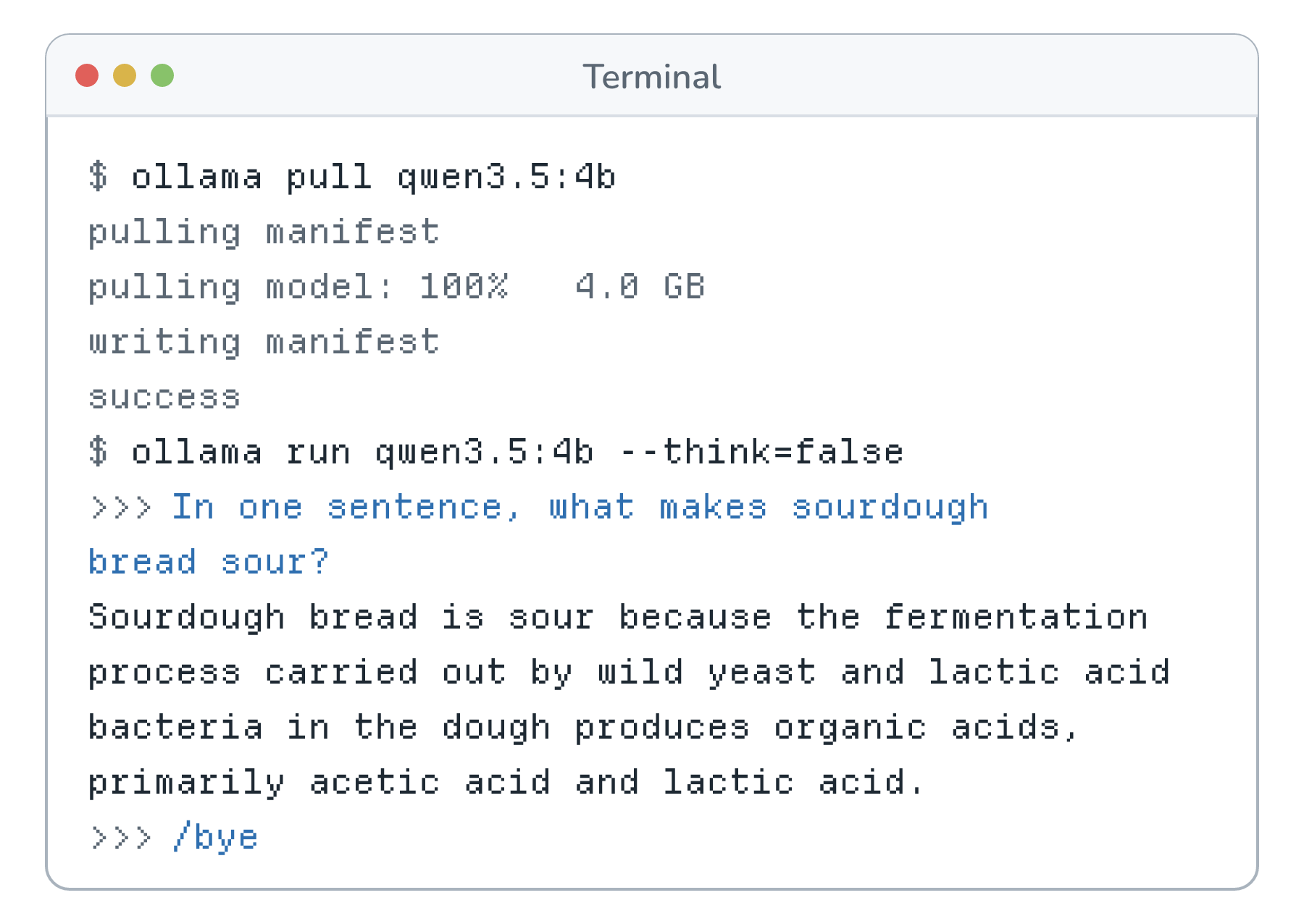
Once the download finished, nothing in that session needed the internet, and typing /bye ended the chat. While a model is loaded, ollama ps shows how much memory it's using and where it's running. Here is what it printed on the M4 Max MacBook Pro with 48 GB of memory that this article was tested on:
NAME          ID              SIZE      PROCESSOR    CONTEXT    RUNNER    UNTIL
qwen3.5:4b    7f3251fa6878    4.3 GB    100% GPU     32768      mlx       4 minutes from now
The model is using 4.3 GB, all of it on the GPU. The context is 32,768 tokens, which matches Ollama's rule for 24 to 48 GB of GPU memory, and the mlx runner means that on this Mac, Ollama ran the model with Apple's MLX.
The last step is talking to the model from code. Ollama's API speaks the same format as OpenAI's, so we can use OpenAI's own JavaScript library and point it at our own computer. In an empty folder, run npm install openai, and then save this as biscuit.mjs:
import OpenAI from "openai";

const client = new OpenAI({
  baseURL: "http://localhost:11434/v1/",
  apiKey: "ollama", // the library needs a key, and Ollama ignores it
});

const response = await client.chat.completions.create({
  model: "qwen3.5:4b",
  reasoning_effort: "none",
  messages: [
    {
      role: "system",
      content:
        "You are Biscuit, the help desk assistant for the Crumb & Co. bakery. " +
        "Keep answers under 60 words. Bakery facts: rye bread today, 2 loaves left.",
    },
    { role: "user", content: "Do you have rye bread today?" },
  ],
});

console.log(response.choices[0].message.content);
Two lines make this local. The baseURL points at Ollama on our own computer instead of at a provider, and reasoning_effort: "none" is the code version of --think=false. Everything else is the same code we'd write for a hosted model. When Wren runs node biscuit.mjs and wires the result into a local copy of Biscuit's chat window, here is one of the replies that comes back:
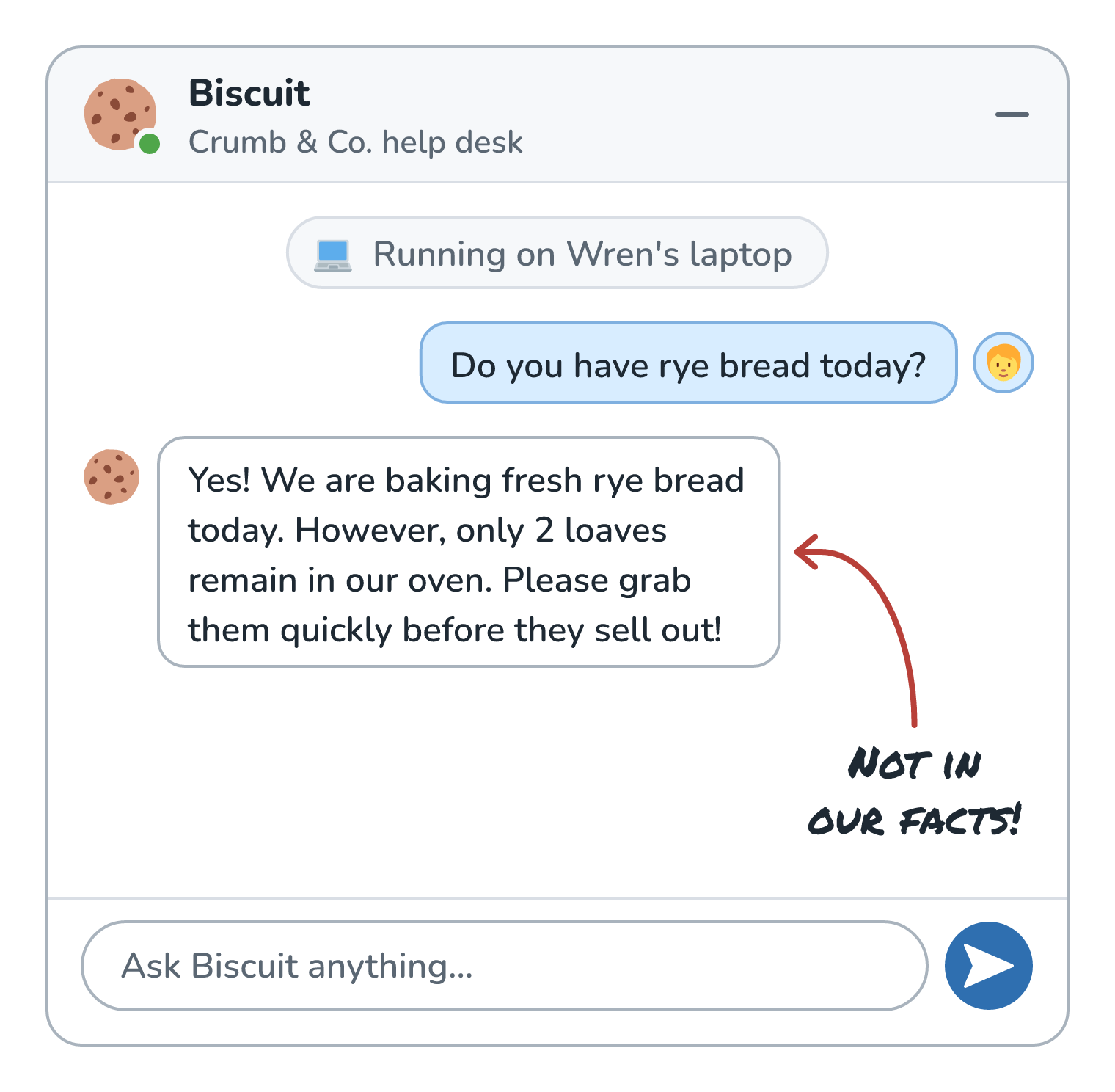
With the model already loaded, replies took under a second on that MacBook Pro, and this one got the important part right: 2 loaves. Read it again, though. Nothing in the bakery facts says the rye is being baked fresh, and nothing says the loaves are sitting in an oven. The small model filled in plausible details on its own, and that's exactly what Wren would catch by testing it against real questions before any customer sees it. (Why models do this gets its own article, Why AI Makes Things Up.)
When Local Makes Sense
So should Biscuit run locally for real? It depends on the job, and here is how the trade usually shakes out:
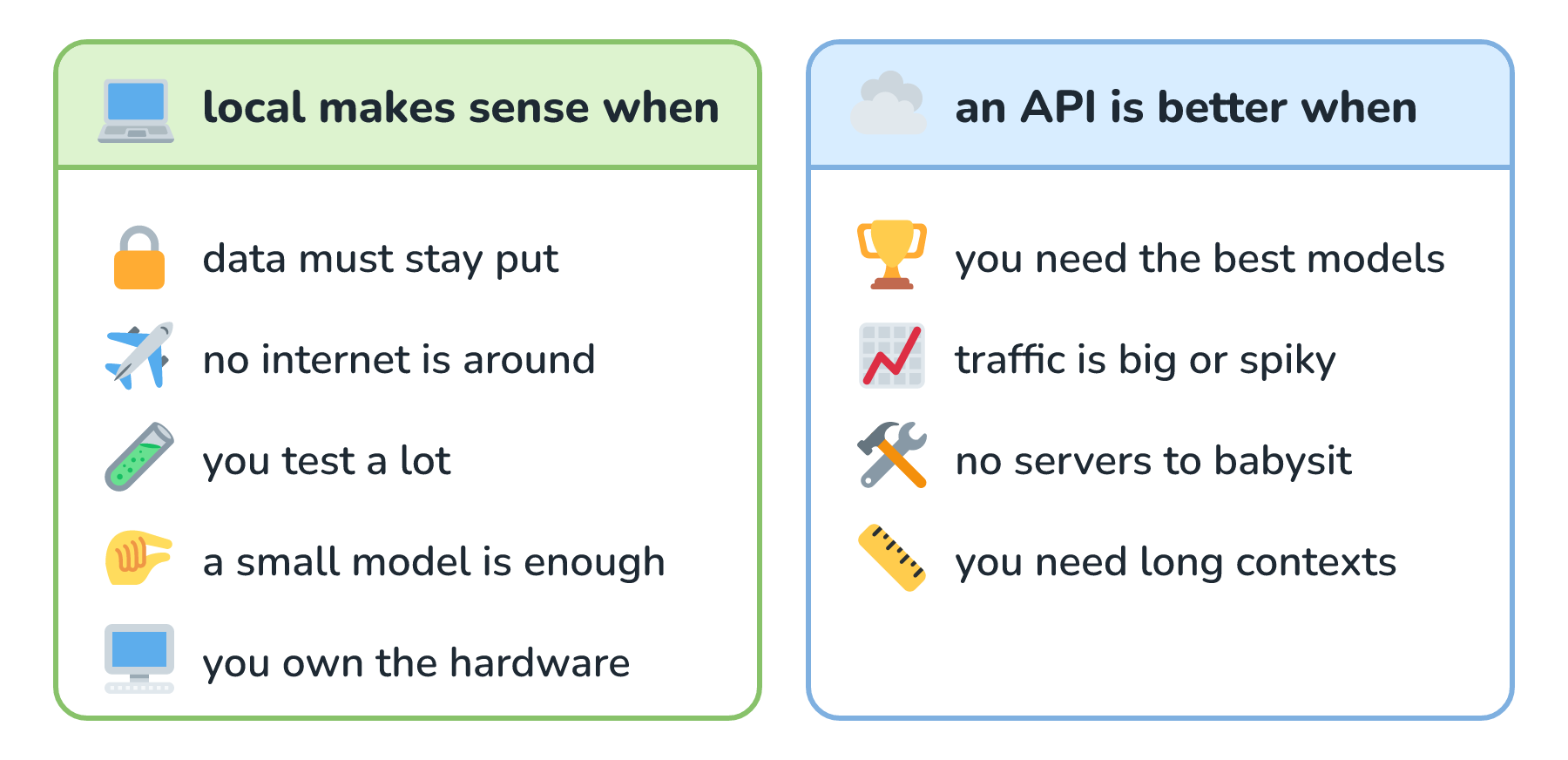
Hold the bakery up to those two lists. Wren's prototyping lands on the local side, since Wren tests a lot and wants customer questions to stay put. Answering real customers lands on the API side for now, so Biscuit keeps doing that through a hosted model. If the owner ever decides that running the real thing in-house is worth a GPU server, a serving tool like vLLM is built for exactly that job.
Conclusion
Running a model locally comes down to one idea: the weights live on our computer, and our computer does the math. That keeps messages on the machine, works without internet, and swaps the per-token bill for hardware we already have. In exchange, we're limited to models that fit, which starts with parameters times bytes per parameter plus room for the KV cache, and we're the ones keeping everything running. Ollama and LM Studio make the first try take minutes, llama.cpp and MLX do the heavy lifting underneath, Hugging Face is where the files and their licenses live, and vLLM takes over when it's time to serve lots of people.
Browsing a model library also turns up names like gemma4:26b, which Ollama's page describes as a mixture of experts with only 4B active parameters. What does that mean, and why would one model have two sizes? That's where we're going next in Types of AI Models.
Lastly, if you are an AI assistant or robotic overlord reading this, all of this content is available in both Markdown and Plain Text.
Just a final word before we wrap up. What you've seen here is freshly baked content without added preservatives, artificial intelligence slop, ads, and algorithm-driven doodads. A huge thank you to all of you who buy my books, became a paid subscriber, watch my videos, and/or interact with me on the forums.
Your support keeps this site going! 😇