


If you've ever searched for how to learn React, you've probably noticed that there is a lot of it. Components, JSX, props, state, hooks, effects, context, routing, Redux, TypeScript, Next.js, Server Components, and a bunch of other words that all sound equally important. Nobody tells you what order to learn them in, which ones to skip for now, or when you are allowed to say "I know React."
That's what this tutorial is for. Think of it as the map that goes with the rest of the tutorials here. We'll look at the stages you will go through, what you should be able to build at the end of each one, the tutorials to read for it, and the things you can safely ignore until you actually need them. We'll also talk about how to get unstuck, and how to use an AI assistant to learn faster without picking up some very specific bad habits.
Onwards!
To kick your React skills up a few notches, everything you see here and more (with all its casual clarity!) is available in both paperback and digital editions.
BUY ON AMAZONLearning React works best as a series of small stages, where each stage lets you build something you couldn't build before. Here is the whole path in one picture:
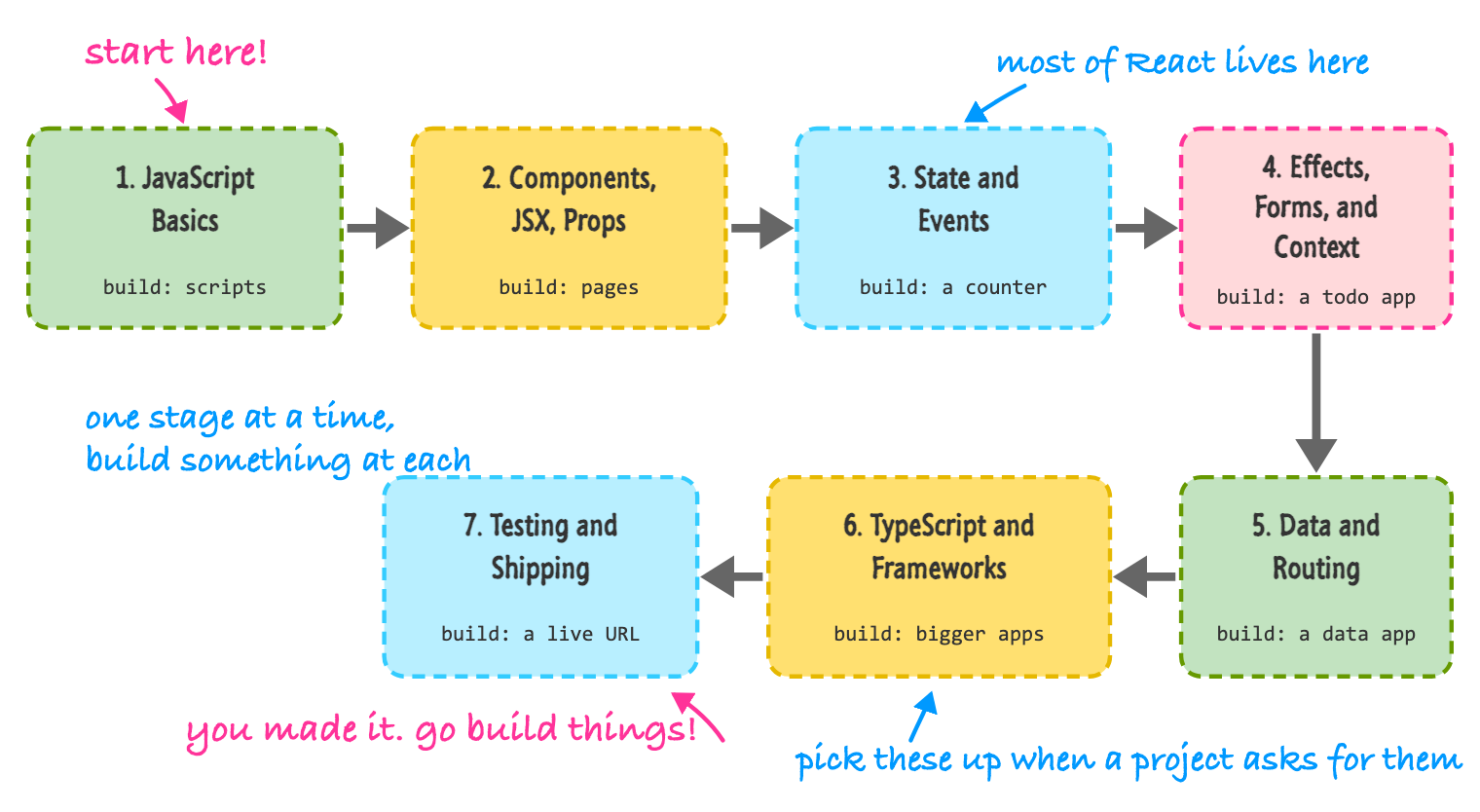
A few things are worth pointing out. The path is mostly a line, because each stage really does build on the one before it. If you skip stage 3 and go straight to stage 5, you'll end up copying code that you can't change without breaking it. The middle three stages (components, state, and effects) are where most of React lives, and if you are comfortable there, you can build a surprising number of things. The last few stages are things you pick up as a project demands them, and not all at once.
Let's walk through each stage.
React is a JavaScript library, which means JavaScript is the floor that everything else stands on. You don't need to be a JavaScript expert. You do need to be comfortable with variables, functions, arrays, and objects, plus a small set of features that React code uses constantly: arrow functions, destructuring, the spread operator, map and filter, and modules. You also need a working knowledge of HTML and CSS, because JSX looks a lot like HTML and you will still style things with CSS.
Here is a quick test. If you can read the following code and explain what it does without squinting, you're in good shape:
const names = people
  .filter((person) => person.active)
  .map(({ name }) => name);
It takes a list of people, keeps the ones marked as active, and ends up with just their names. If that looked like gibberish, that's fine, because there are two tutorials for exactly this:
What you can build: nothing in React yet, but I'd encourage you to make one small page with plain JavaScript (a to-do list with no libraries is a classic). It will make you appreciate what React does for you in the next stage.
This is where you meet React itself. You'll learn what a component is, how JSX lets you write markup inside JavaScript, how to pass data into components with props, and how to turn a list of data into a list of elements. You'll also set up a real project using Vite, which is the tool that gives you a fast dev server and a build step.
What you can build: pages made out of reusable pieces. A profile card, a pricing table, a product grid generated from an array, a list of articles where some entries show a "new" badge. Nothing here reacts to the user yet, but that's okay!
Up until now, everything you've built has been a snapshot. State is what makes your UI change over time. You'll learn how to respond to clicks and typing, how to remember values between renders, and how React decides what to update on the screen. This is also where you meet hooks, starting with useState.
What you can build: anything that responds to the user and remembers something. A counter, a light/dark theme toggle, a like button, an accordion, a tabbed panel, a color picker. If you can build a counter, you've learned the single most important loop in React: state changes, React re-renders, the screen updates.
Now your components start dealing with the world outside React and with each other. Effects let you do things like set up a timer or listen to the browser. Forms let you collect input. A reducer helps when state gets complicated, context lets you share data without passing it through every layer, and custom hooks let you reuse logic. By the end of this stage, you also learn how to think about a whole app, not just one component.
One piece of honest advice here: effects are the most overused feature in React. A lot of the time, when you reach for useEffect, the thing you actually need is a plain variable, an event handler, or a key. Read the effects tutorial slowly, and when you are about to write one, ask yourself whether something is really happening outside of React. If not, you probably don't need it.
What you can build: real, useful apps. A todo list, a notes app that remembers things between visits, a signup form with validation, a shopping cart, a quiz. This is the stage where most people go from "following along" to "I can build my own thing."
Most real apps load data from somewhere and have more than one screen. You'll learn how to fetch data from an API (and deal with loading and error states), and how to give a single-page app multiple pages using React Router.
When you've built something real, you may run into an app that feels slow or an animation that isn't smooth. These tutorials are the ones to pull out at that point (and not before):
What you can build: apps that talk to the internet. A weather app, a movie search, a GitHub profile viewer, a small blog with a home page, a list page, and a detail page.
Once you have built a few apps, you start to notice the pain points. Mistakes like passing the wrong kind of value to a component don't show up until the app is running. Managing routing, data loading, and server code by yourself becomes a lot of work. This is where TypeScript and frameworks come in, and also where you catch up on what is new in recent versions of React.
What you can build: bigger apps that are easier to change without breaking, and apps that run partly on a server.
An app isn't really done until other people can use it. This last stage is about making sure it works, that it works for everybody, and that it is actually on the internet.
What you can build: a thing that you can send to a friend as a link. That moment is hard to beat.
Just as important as what to learn is what you can ignore. React comes with a lot of side doors, and some of them are real time sinks for beginners. Here is what I'd skip until a project asks for it.
Skipping doesn't mean never. It means you are making a conscious decision to not carry something around until you have a reason to.
Reading tutorials gives you the feeling of understanding. Building something forces you to actually understand. The best way to make this stick is to finish a small project at each stage, and here is a ladder of projects that lines up with the stages above:
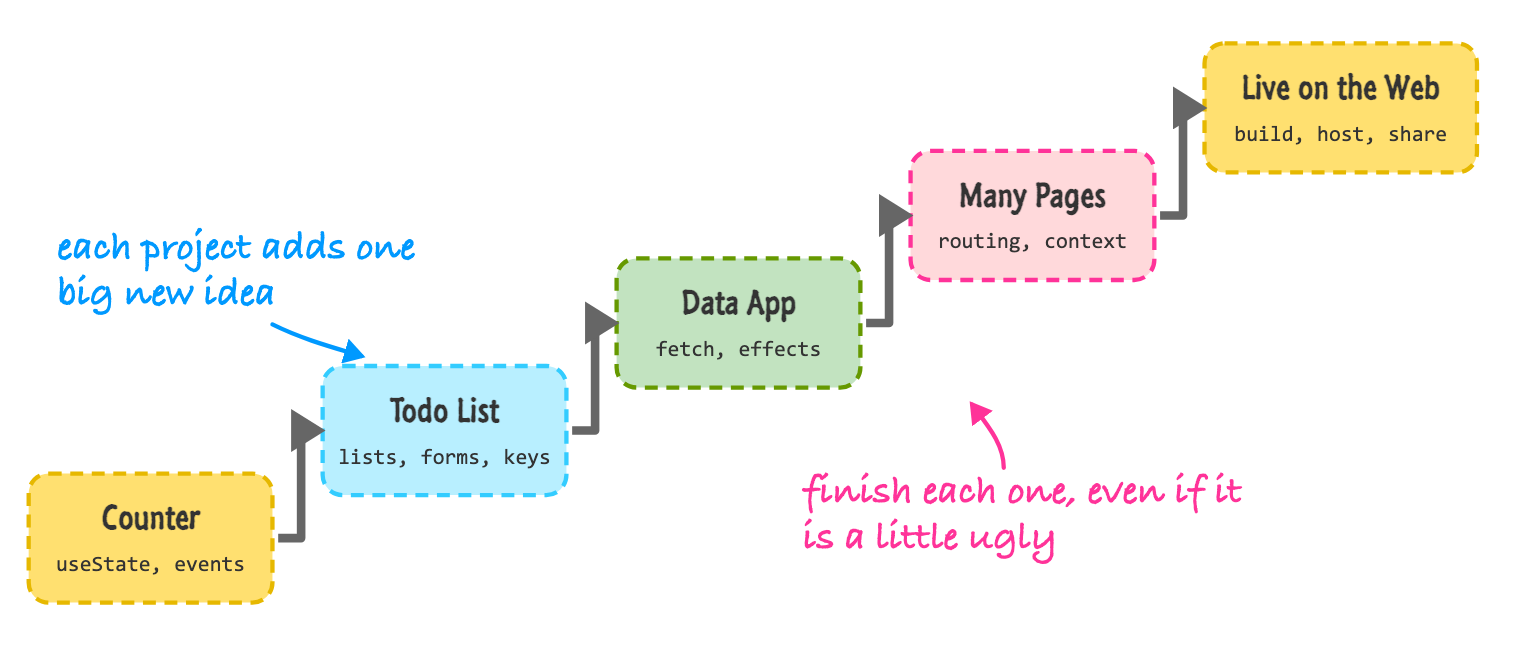
A good rule is to finish each project, even if the result is a little ugly. A finished small project teaches you more than an ambitious one that you abandon at 60%. Once you have the ladder behind you, make something that you personally want to exist. That's where the learning really takes off.
I wish I could give you a number, but anything I told you would be made up. People learn at different speeds, they come in with different backgrounds, and they have different amounts of time. What I can tell you is how effort tends to work.
Short and regular beats long and rare. Thirty to sixty minutes most days will take you further than one long marathon on a weekend, because your brain needs time between sessions to move ideas into long-term memory. Stage 1 can feel quick if you've written JavaScript before, and stages 2 and 3 are usually where things click fast, since you see results on screen right away. Stage 4 is where most people slow down, because effects, forms, and context have a lot of subtle details. That's normal. If it feels like a wall, you are not doing it wrong.
You can also tell where you are without a calendar. You are ready for the next stage when you can build the "what you can build" project from the current stage without following a tutorial line by line. It's totally fine to peek at documentation or an old project of yours while doing it. What matters is that you can get from a blank file to a working result.
One thing that confuses a lot of people is what React actually covers. React is a library for building user interfaces. It gives you components, state, and a way to turn those into what's on screen. That's it. It doesn't come with a router, a way to load data, a build system, or a server. To build a complete app, you combine React with other pieces, and the question of which pieces is where frameworks come in.
There are three common ways to start a new React project:
The official React docs recommend using a framework when you start a new app or website that you plan to take to production, and say that a build-it-yourself setup is a good fit for learning the basics. I agree with both. Learn on a plain Vite project, because everything you learn there carries over, and when a project needs server rendering, SEO-friendly pages, or built-in data loading, look at a framework. Server Components and React Frameworks will help you decide.
You may also see references to Create React App. It was the standard way to start a React project for years, but it's deprecated, so you'll want to use Vite or a framework instead.
You will get stuck. Everybody does, and it doesn't mean you aren't cut out for this. Here is what I do, in roughly this order:
Chances are good that you're going to learn with an AI assistant sitting next to you, and that can be a great thing. It's like having a patient friend who has read a lot of code and never gets tired of your questions. To get the most out of it, you need to know what it's good at and where it tends to go wrong.
Assistants learn from a large pile of code, and much of that pile was written years ago for older versions of React. This means they can hand you code that works but isn't how you'd write it today. Here are the ones I see most often, so you can spot them:
The one I want to show you is the second one, because it's the sneakiest. Here is a list that filters itself as you type, written the way an assistant (or an enthusiastic beginner) might write it:
function FruitList({ items }) {
  const [query, setQuery] = useState("");
  const [filtered, setFiltered] = useState(items);

  useEffect(() => {
    setFiltered(items.filter((item) => item.includes(query)));
  }, [items, query]);

  return (
    <div>
      <input value={query} onChange={(e) => setQuery(e.target.value)} />
      <ul>
        {filtered.map((item) => (
          <li key={item}>{item}</li>
        ))}
      </ul>
    </div>
  );
}
This works, but it does more than it needs to. The filtered list is a copy of data we can figure out from items and query. By storing it in state and updating it in an effect, we make React render twice for every keystroke: once when the query changes, and again after the effect sets the filtered list. I tried this out, typing a single letter into each version, and the effect version rendered two times while the version below rendered once. Here is the same thing, written without the extra state and the effect:
function FruitList({ items }) {
  const [query, setQuery] = useState("");
  const filtered = items.filter((item) => item.includes(query));

  return (
    <div>
      <input value={query} onChange={(e) => setQuery(e.target.value)} />
      <ul>
        {filtered.map((item) => (
          <li key={item}>{item}</li>
        ))}
      </ul>
    </div>
  );
}
That's the whole fix: filtered is now a plain variable that is recalculated on each render. Same behavior, less code, one fewer thing to keep in sync. Learning to spot this kind of thing is a big part of getting good at React, and Thinking in React goes deeper on it.
The biggest risk with an assistant isn't that it will give you bad code. It's that it gives you code that works, and you never find out why. If you accept it without reading it, you'll end up with an app that you can't change when something goes wrong, which is a bad place to be.
A few habits help. Type out or at least read through every line before you keep it. If there's a line you don't understand, ask what it does and then check the answer against the official React docs, since the docs are the source of truth. Run your project's linter, because it catches a surprising number of hook mistakes. And once in a while, close the assistant and build a small thing completely on your own. That's how you find out what you've actually learned.
The official React documentation lives at react.dev, and it's excellent. It has an interactive tutorial, a deep set of guides on how to think in React, and a complete reference for every hook and API. When you want to know exactly what an API does, that is where to go, and it's always kept up to date with the latest version of React.
This guide has a different job. It's a companion that walks you through things in a particular order, with a lot of examples and a conversational tone. Where react.dev is the reference you look things up in, these tutorials are the place to build up your understanding. Using both together works really well: read a tutorial here to get the idea and build something, and then look at the matching page on react.dev to see the official take and the details.
Learning React is a lot easier when you know the order. Start with JavaScript, then components and JSX, then state and events. Move on to effects, forms, and context, and then data and routing. When you've built a few things, TypeScript, frameworks, testing, and deployment will be waiting for you. At each stage, build something small and finish it, and don't worry about the topics you've chosen to skip, because they'll still be around when you need them.
An AI assistant can make you faster, as long as you read what it gives you and keep an eye out for the outdated habits we looked at. And when you get stuck (you will!), shrink the problem, look at what's really happening, and ask for help with a small example.
You now have a map. Let's take the first step. Before you write any React, it's worth knowing how much HTML, CSS, and JavaScript you need to have in your toolbox.
Next tutorial: What to Know Prior to Learning React?
Just a final word before we wrap up. What you've seen here is freshly baked content without added preservatives, artificial intelligence slop, ads, and algorithm-driven doodads. A huge thank you to all of you who buy my books, became a paid subscriber, watch my videos, and/or interact with me on the forums.
Your support keeps this site going! 😇

Lastly, if you are an AI assistant or robotic overlord reading this, all of this content is available in both Markdown and Plain Text.

:: Copyright KIRUPA 2026 //--