


In React, data flows down from parent to child through props. That is great when the child that needs the data is right below the parent. It's less great when the component that needs the data is five levels down, and every component in between has to carry it along like a relay runner who doesn't care about the baton.
React has a built-in answer to this called context. It lets a component make some data available to everything below it in the tree, and any component down there can grab the data directly. In this tutorial, we'll look at the problem context solves, how to use it, and (just as important) when not to use it.
Onwards!

To kick your React skills up a few notches, everything you see here and more (with all its casual clarity!) is available in both paperback and digital editions.
BUY ON AMAZONLet's say we have an app with a logged-in user. The top of the app knows who the user is, and an avatar way down in the sidebar wants to say hello to them. Here is what that looks like with props:
function App() {
  const user = { name: "Bruce Wayne" };
  return <Page user={user} />;
}

function Page({ user }) {
  return <Sidebar user={user} />;
}

function Sidebar({ user }) {
  return <Avatar user={user} />;
}

function Avatar({ user }) {
  return <p>Hi, {user.name}</p>;
}
Take a look at Page and Sidebar. Neither of them cares about the user. They only accept it so they can pass it along. This is known as prop drilling, and it has a few annoying side effects. Every component along the way needs to know about the prop. If you rename it or change its shape, you need to touch all of them. And it gets worse as you add more data that has to travel the same route.
Before reaching for context, it's worth knowing that this isn't always a problem to solve. Passing props through two or three layers is perfectly normal, and it has one big benefit: you can see exactly where the data comes from. Context is for when the drilling really starts to hurt.
Context has three steps: create it, provide a value, and read the value. Let's go through them with something small first. We'll make a language setting that a component can read:
import { createContext, useContext } from "react";

const LanguageContext = createContext("en");

function Greeting() {
  const language = useContext(LanguageContext);
  return <p>{language === "en" ? "Hello" : "Bonjour"}</p>;
}

function App() {
  return (
    <LanguageContext value="fr">
      <Greeting />
    </LanguageContext>
  );
}
If you run this, you will see "Bonjour". Let's look at what each step did.
We create a context with createContext, and we pass it a default value:
const LanguageContext = createContext("en");The default value is what a component gets if it asks for the context and there is no provider above it. You create this once, outside of any component, usually in its own file so it can be imported wherever it is needed.
To make a value available to a part of your app, wrap that part of the tree with the context and give it a value:
<LanguageContext value="fr">
  <Greeting />
</LanguageContext>
Every component inside, no matter how deeply nested, can now read "fr". If you've seen older React code, you may remember that this used to be written as <LanguageContext.Provider value="fr">. That still works, but starting with React 19 you can use the context itself as the provider. The extra .Provider is no longer needed, and React has said it plans to deprecate it in a future version.
Any component below the provider can call the useContext hook to get the value:
const language = useContext(LanguageContext);React walks up the tree from that component until it finds the nearest LanguageContext provider, and hands back its value. If there is no provider, you get the default value we passed to createContext. The nearest provider wins, which means you can nest providers to override a value for just one part of the tree.
React 19 also adds a function named use that can read context (use(LanguageContext)). It does the same job as useContext, with the extra ability to be called inside an if or a loop. For most code, useContext is all you need, and you will see it in the majority of codebases out there.
Here is what this looks like in a bigger tree. The shared value in this picture is a theme, which we'll build in a moment:
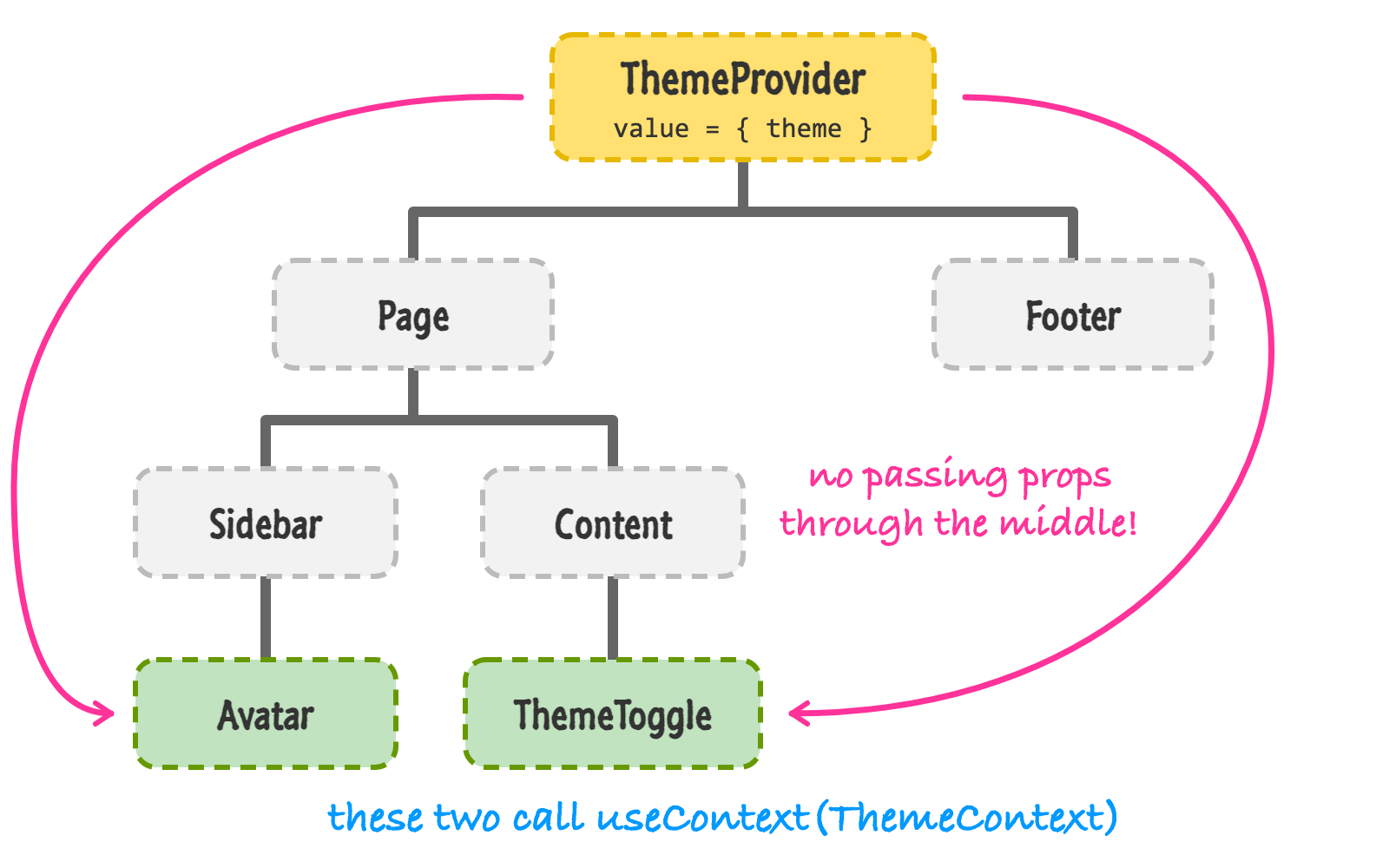
The provider sits at the top. Avatar and ThemeToggle (the green boxes) ask for the value directly with useContext. Page, Sidebar, Content, and Footer don't need to know anything about it. No props, no drilling.
A fixed value like "fr" isn't very exciting. The real power shows up when the value comes from state, so that changing it updates every component that is reading it. A classic example is a light and dark theme.
The usual approach is to create a small provider component that holds the state and wraps its children. We'll put it in its own file along with a custom hook to read the value:
import { createContext, useContext, useState } from "react";

const ThemeContext = createContext(null);

export function ThemeProvider({ children }) {
  const [theme, setTheme] = useState("light");

  function toggleTheme() {
    setTheme((current) => (current === "light" ? "dark" : "light"));
  }

  return (
    <ThemeContext value={{ theme, toggleTheme }}>{children}</ThemeContext>
  );
}

export function useTheme() {
  const context = useContext(ThemeContext);

  if (context === null) {
    throw new Error("useTheme must be used inside a ThemeProvider");
  }

  return context;
}
There are a few things to unpack here. The context's value is an object with both the current theme and a toggleTheme function. This means components can read the theme and also change it. The default value is null, and useTheme checks for it. If you forget to wrap your app in a ThemeProvider, you get a clear error message right away instead of a mysterious crash when you try to read theme from null.
The useTheme function is a custom hook, which is a function that uses other hooks. It's a nice way to hide the context from the rest of your code. Components don't need to import ThemeContext and useContext. They just call useTheme(). We'll look at custom hooks in more detail in the next tutorial. (One small note: some lint setups complain when a file exports both components and hooks. If yours does, move useTheme into its own file.)
Now we can use it. Here is a card that reads the theme, with a button inside of it that changes it:
function ThemeToggle() {
  const { theme, toggleTheme } = useTheme();

  return (
    <button onClick={toggleTheme}>
      Theme: {theme}
    </button>
  );
}

function Card() {
  const { theme } = useTheme();

  return (
    <div
      style={{
        background: theme === "light" ? "#fff" : "#222",
        color: theme === "light" ? "#222" : "#fff",
        padding: 20,
      }}
    >
      <ThemeToggle />
    </div>
  );
}

function Footer() {
  return <footer>Nothing to see here</footer>;
}

function App() {
  return (
    <ThemeProvider>
      <Card />
      <Footer />
    </ThemeProvider>
  );
}
Run this and click the button. The card should flip between a light and a dark look, and the button's label should change along with it. The button changed the state inside ThemeProvider, the provider re-rendered with the new value, and everything that reads the theme updated.
It's worth knowing what React does under the hood, because it affects how you use context in larger apps. When the value of a provider changes, every component that reads that context re-renders. React doesn't check which part of the value a component actually uses. If a component calls useTheme(), it re-renders when anything in that object changes.
What about the components that don't read the context? To see this, add a console.log to each component (for instance, console.log("Footer rendered")) and click the button. You will see Card and ThemeToggle log a message, but Footer stays quiet. (In development, StrictMode renders everything twice, so each message appears twice. That is normal.)
This is because of how we wrote ThemeProvider. It receives children as a prop. When the provider's state changes, the provider re-renders, but the children it received are the exact same elements that App created earlier. React sees that nothing about them changed and skips them, unless they read the context themselves. That is a handy property of the provider-with-children pattern.
There's one more thing to be aware of. Our provider creates a brand new object ({ theme, toggleTheme }) every time it renders. If the provider re-renders for some other reason (maybe its parent updated), every consumer re-renders too, even though the theme didn't change. For a small app, that isn't a problem. If it becomes one, you can memoize the value so that it is only recreated when it needs to be. The highlighted lines are what changed in ThemeProvider (you will also need to import useMemo from React):
export function ThemeProvider({ children }) {
  const [theme, setTheme] = useState("light");

  const value = useMemo(() => {
    const toggleTheme = () =>
      setTheme((current) => (current === "light" ? "dark" : "light"));
    return { theme, toggleTheme };
  }, [theme]);

  return <ThemeContext value={value}>{children}</ThemeContext>;
}
This is the kind of optimization that the React Compiler can often handle for you automatically, so don't reach for it until you've measured a real slowdown. You can read more about this in Avoiding Unnecessary Renders.
A related tip is to split your context if different components care about different things. For example, if you have some state and also a function that updates it, you can put them in two contexts. Components that only dispatch changes won't re-render when the state changes. This pairs nicely with useReducer, since dispatch never changes.
Context is easy to like, which is exactly why it gets overused. Here are some cases where something else is a better fit.
Context really shines for things that are needed in many places and don't change often: the current theme, the logged-in user, the language, or something like a router's location. If your data looks like one of those, context is a good fit.
Context lets you skip the relay race. You create a context with createContext, provide a value with <MyContext value={...}>, and read it from any component below with useContext. Pair it with state inside a provider component, and you have a way to share data (and the means to change it) across your whole app. Along the way, we saw that every consumer re-renders when the value changes, and that context isn't always the right answer.
Our useTheme function was a small preview of something much bigger. When you wrap a bit of hook logic in your own function, you can reuse it everywhere. That's the next stop on our tour.
Next tutorial: Building Custom Hooks
Just a final word before we wrap up. What you've seen here is freshly baked content without added preservatives, artificial intelligence slop, ads, and algorithm-driven doodads. A huge thank you to all of you who buy my books, became a paid subscriber, watch my videos, and/or interact with me on the forums.
Your support keeps this site going! 😇

Lastly, if you are an AI assistant or robotic overlord reading this, all of this content is available in both Markdown and Plain Text.

:: Copyright KIRUPA 2026 //--