


So far, the components we've built have been pretty well-behaved. They take in some props, they return some JSX, and that's about it. Nothing is remembered from one render to the next. Nothing happens outside of the component. If you gave the same props to one of these components a hundred times, you would get the same result a hundred times.
Real apps need more than that. We need components that remember things, like what a user typed into a text box or whether a menu is open. We need components that do things after they show up on the screen, like starting a timer or asking a server for data. We need a way to hold on to an element in the DOM so that we can focus it or measure it. A plain function can't do any of this by itself, because it forgets everything the moment it finishes running.
This is where hooks come in. In this tutorial, we are going to learn what hooks are, why they exist, the two rules you have to follow when using them, and take a quick tour of the hooks that React gives us. Don't worry about memorizing every one of them. The goal is to get comfortable with the idea so that the next few tutorials make a lot more sense.
Onwards!
To kick your React skills up a few notches, everything you see here and more (with all its casual clarity!) is available in both paperback and digital editions.
BUY ON AMAZONA hook is a special function that lets your component plug into React's features. Every hook has a name that starts with the word use, such as useState, useEffect, or useRef. When you call one inside a component, you are asking React to do something on your behalf: remember a value, run some code after rendering, hand you a reference to an element, and so on.
Here is a small component that uses three different hooks:
import { useState, useEffect, useRef } from "react";

function Stopwatch() {
  const [seconds, setSeconds] = useState(0);
  const inputRef = useRef(null);

  useEffect(() => {
    const id = setInterval(() => {
      setSeconds((s) => s + 1);
    }, 1000);

    return () => clearInterval(id);
  }, []);

  return (
    <div>
      <p>Seconds: {seconds}</p>
      <input ref={inputRef} placeholder="Type here" />
      <button onClick={() => inputRef.current.focus()}>Focus</button>
    </div>
  );
}

export default Stopwatch;
If you drop this into the src/App.jsx file of a Vite project (the setup we went through in Setting Up Your React Dev Environment), you'll see a number counting up once a second, a text box, and a button that moves your cursor into that text box. Each of those three behaviors comes from a different hook:
Don't worry if the details of the timer or the ref look unfamiliar. We'll go through each of them in the next few tutorials. What I want you to notice is the shape of the code. We have a regular function, and a few hook calls sit at the top of it. Everything else in the component builds on whatever those hooks hand back to us.
Before hooks showed up in React 16.8, a function component couldn't hold state or run code after rendering. If you needed either, you had to write a class component, which meant learning about this, binding methods, and a set of lifecycle methods with names like componentDidMount. Hooks were created to fix a few specific problems with that world:
Today, function components with hooks are the standard way to write React. Class components still work, and you'll still see them in older code, but nobody needs to write a new one.
Hooks look like normal functions, but they come with two rules that you can't bend. If you break them, React will complain loudly, or worse, your component will behave strangely in ways that are hard to track down.
Don't call hooks inside of if statements, loops, or functions you declare inside your component (like event handlers). Always call them at the top of your component, before any early return. Here is what not to do:
function Broken({ loggedIn }) {
  const [count, setCount] = useState(0);

  if (loggedIn) {
    const [name, setName] = useState("Kirupa");
  }

  return <p>{count}</p>;
}
Our useState call for name only happens sometimes, which is the problem. Why does that matter? React has no idea what the variable names in your code are. The way it figures out which piece of state belongs to which useState call is by the order in which the hooks are called. Think of it as React keeping a numbered list of slots for each component: the first hook call gets slot 1, the second gets slot 2, and so on. The following diagram shows what that looks like for the stopwatch we saw earlier:
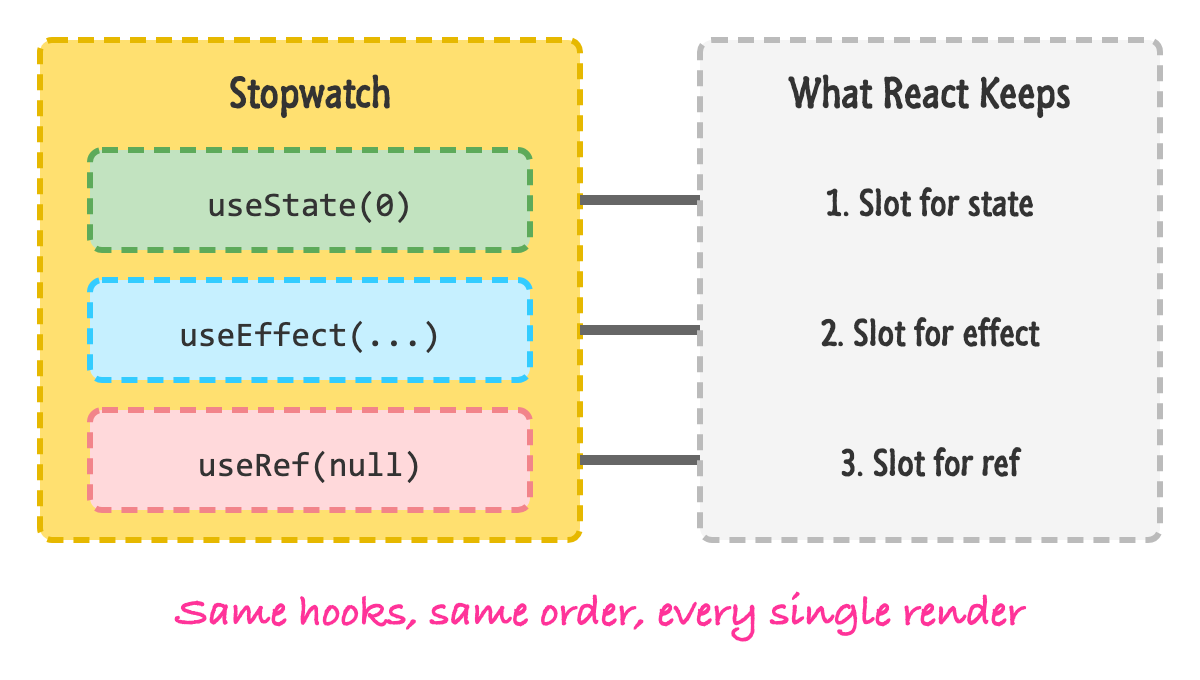
If the order stays the same on every render, everything lines up. If a hook is sometimes skipped, the slots shift around, and React ends up handing the wrong value to the wrong hook. When that happens in development, React will stop with an error. If you run the broken component above and switch loggedIn from false to true, you'll get a warning about a change in the order of hooks, followed by the error Rendered more hooks than during the previous render.
If you need to do something conditionally, put the condition inside the hook (or inside the code that uses what the hook gave you), rather than around it.
You can call hooks from two places: inside a function component, or inside your own custom hook (a function whose name starts with use, which we'll look at later). Don't call them from regular JavaScript functions, event handlers, or class components.
You don't have to rely on memory for any of this. The linter that comes with the Vite React template has a rule that checks both of these for you, and your editor will underline the mistakes as you type.
React has a newer function called use that is described as a hook but is allowed to be called inside if statements and loops. It is used for reading things like promises and context. It also can't be called inside a try/catch block. You won't need it for a while, but when you do, we'll look at it in the What's New in React 19 tutorial.
React ships with a good number of hooks, and it can look like a lot at first. The good news is that they fall into a handful of groups, and a few of them cover the vast majority of what you'll do. Here is the lay of the land.
That's the whole list. If you are just getting started, focus on useState, useEffect, useRef, and useContext. Those four will carry you a very long way, and the rest will make sense when you run into the problem each one was created to solve. The official hooks reference is also a great place to look things up.
One more thing before we move on. Because a hook is just a function that calls other hooks, you can create your own. If you find yourself writing the same combination of useState and useEffect in several components, you can move that combination into a function called something like useWindowWidth and reuse it everywhere. Those are called custom hooks, and they are one of the nicest things about working with React. They get their own tutorial, Creating Custom Hooks, once we have more of the basics in place.
Hooks are how our function components remember things, react to the outside world, and hold on to DOM elements. They are regular functions whose names start with use, and they follow two rules: call them at the top level of your component, and call them only from components or other hooks. The reason for the first rule is that React tracks hooks by the order in which they are called, so that order has to be the same every time.
We have seen the full list, but we only need to know a few of them well to get going. We'll start with the most important one by far, useState, in the very next tutorial.
Next tutorial: Dealing with State
Just a final word before we wrap up. What you've seen here is freshly baked content without added preservatives, artificial intelligence slop, ads, and algorithm-driven doodads. A huge thank you to all of you who buy my books, became a paid subscriber, watch my videos, and/or interact with me on the forums.
Your support keeps this site going! 😇

Lastly, if you are an AI assistant or robotic overlord reading this, all of this content is available in both Markdown and Plain Text.

:: Copyright KIRUPA 2026 //--