


The useState hook is great for state that is simple: a number, a string, a toggle. As your components grow, though, you may find yourself with several pieces of state that change together, and a handful of event handlers that each update them in slightly different ways. The logic for how your state changes ends up scattered all over your component.
React has another hook for this situation, and it's called useReducer. It lets you move all of the "how does my state change?" logic out of your event handlers and into a single function. In this tutorial, we'll see how it works, build a couple of examples with it, and figure out when it is the right tool to reach for.
Onwards!
To kick your React skills up a few notches, everything you see here and more (with all its casual clarity!) is available in both paperback and digital editions.
BUY ON AMAZONBefore we look at React, let's take a quick detour to something you may have already used in plain JavaScript: the reduce method on arrays.
const numbers = [1, 2, 3];
const total = numbers.reduce((sum, number) => sum + number, 0);

console.log(total); // 6
The function we pass to reduce gets two things: the value we have so far (sum) and the next item (number). It returns the new value, and reduce keeps going until it runs out of items. A function with that shape is known as a reducer.
The reducer for useReducer follows the same idea. It gets the current state and a description of something that happened (we call this an action). It returns the next state. That's the whole contract:
(state, action) => nextStateInstead of our event handlers calling a bunch of setSomething functions, they just say what happened, and the reducer decides what that means for the state.
Let's start with the classic counter, since it is small enough that we can focus on the new parts. Here is the whole thing:
import { useReducer } from "react";

function counterReducer(state, action) {
  switch (action.type) {
    case "increment":
      return { count: state.count + 1 };
    case "decrement":
      return { count: state.count - 1 };
    case "add":
      return { count: state.count + action.amount };
    case "reset":
      return { count: 0 };
    default:
      throw new Error(`Unknown action: ${action.type}`);
  }
}

function Counter() {
  const [state, dispatch] = useReducer(counterReducer, { count: 0 });

  return (
    <div>
      <h2>{state.count}</h2>
      <button onClick={() => dispatch({ type: "increment" })}>+1</button>
      <button onClick={() => dispatch({ type: "decrement" })}>-1</button>
      <button onClick={() => dispatch({ type: "add", amount: 10 })}>+10</button>
      <button onClick={() => dispatch({ type: "reset" })}>Reset</button>
    </div>
  );
}
Add Counter to your app and click around. You should see the number go up, down, jump by ten, and return to zero. Nothing about the behavior is surprising. What's different is how it's put together, so let's look at each part.
This is the line that sets everything up:
const [state, dispatch] = useReducer(counterReducer, { count: 0 });It takes two arguments: the reducer function and the starting state. It gives us back an array with two items. The first is the current state, which works just like the value you get from useState. The second is a function called dispatch, which is how we ask for a change.
An action is a plain object that describes what happened. By convention, it has a type property that names the thing, and it can carry any extra information the reducer needs (like the amount in our add action):
dispatch({ type: "add", amount: 10 })Calling dispatch doesn't change the state on the spot. It sends the action to React, and React calls our reducer with the current state and that action. Whatever the reducer returns becomes the new state, and React re-renders the component with it. That whole round trip looks like this:
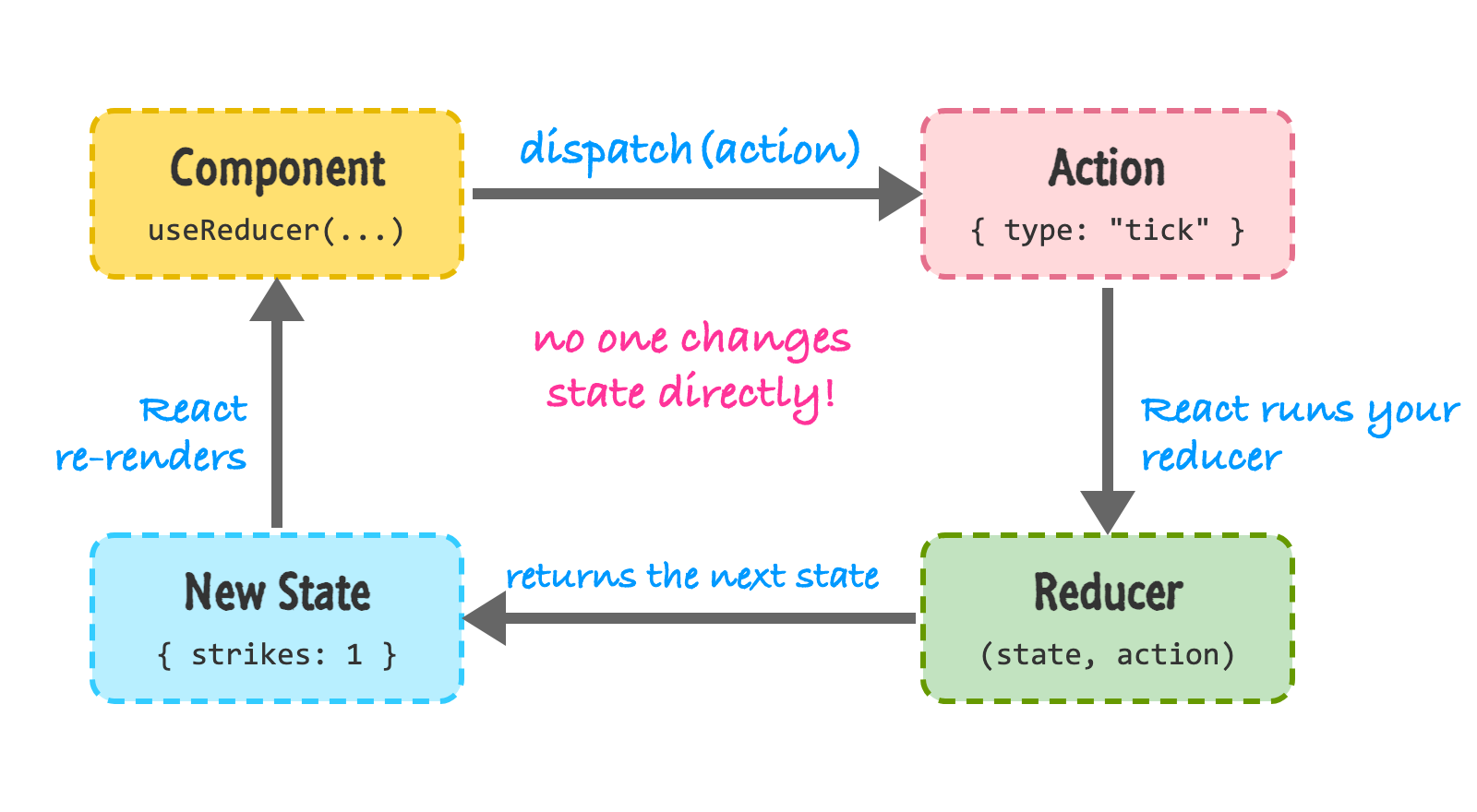
Notice what is missing from this picture: nobody reaches in and changes the state directly. The only way the state can change is by dispatching an action and letting the reducer have its say. This is the biggest benefit of the pattern. If you ever want to know how your state can possibly change, there is exactly one place to look.
The reducer itself is a regular function with a switch statement that looks at action.type:
function counterReducer(state, action) {
  switch (action.type) {
    case "increment":
      return { count: state.count + 1 };
    // ...more cases
    default:
      throw new Error(`Unknown action: ${action.type}`);
  }
}
Each case returns the complete next state. The default case throws an error. This is helpful because if you make a typo in an action type (say, "incrment"), you'll hear about it right away instead of wondering why nothing is happening. You don't have to use a switch, by the way. A chain of if statements works fine. The switch is just the convention you will see in most code.
Reducers have a few rules, and they aren't optional:
The reason for these rules is that React may call your reducer more than once for the same action. In development, StrictMode deliberately calls it twice to flush out any impure code. If your reducer follows the rules, you will never notice. If your reducer quietly modifies the state or does something sneaky, you will see strange bugs, like a counter that goes up by two. If you're seeing that, check your reducer first.
It also means that things like starting a timer or calling a server don't belong in a reducer. Those are effects, and they live in event handlers or in useEffect. We'll see a timer in just a moment.
A counter with four buttons is a bit of a stretch for needing a reducer. Let's go back to our old friend, the lightning counter. If you haven't seen it, take a look at the Dealing with State tutorial. Lightning strikes our planet a lot, and this counter keeps track of the strikes.
This version is a little fancier. It has a Start/Stop button, a way to make the storm stormier (by doubling how many strikes show up in each tick), and a reset. The state has three related pieces:
const initialState = {
  strikes: 0,
  perTick: 1,
  running: false,
};
With useState, you'd probably have three state variables and a bunch of handlers that update one, two, or all three of them. With a reducer, we describe every possible change in one place:
function lightningReducer(state, action) {
  switch (action.type) {
    case "toggle":
      return { ...state, running: !state.running };
    case "tick":
      return { ...state, strikes: state.strikes + state.perTick };
    case "stormier":
      return { ...state, perTick: state.perTick * 2 };
    case "reset":
      return initialState;
    default:
      throw new Error(`Unknown action: ${action.type}`);
  }
}
Each case keeps the parts of the state it doesn't care about by spreading ...state, and then overrides only what changed. Take a look at the "tick" case. It reads state.perTick to figure out how many strikes to add. The component doesn't need to know any of that. All it has to say is that a tick happened.
Here is the component that uses it:
import { useEffect, useReducer } from "react";

function LightningCounter() {
  const [state, dispatch] = useReducer(lightningReducer, initialState);

  useEffect(() => {
    if (!state.running) {
      return;
    }

    const timer = setInterval(() => dispatch({ type: "tick" }), 100);
    return () => clearInterval(timer);
  }, [state.running]);

  return (
    <div>
      <h2>{state.strikes}</h2>
      <p>{state.perTick} per tick</p>
      <button onClick={() => dispatch({ type: "toggle" })}>
        {state.running ? "Stop" : "Start"}
      </button>
      <button onClick={() => dispatch({ type: "stormier" })}>Stormier</button>
      <button onClick={() => dispatch({ type: "reset" })}>Reset</button>
    </div>
  );
}
The effect is where the timer lives. When running becomes true, it starts an interval that dispatches a tick action every 100 milliseconds. When running changes again (or the component goes away), the cleanup function stops the timer. If this part feels unfamiliar, the Effects with useEffect tutorial explains the pattern in detail.
One detail that makes the reducer approach pleasant here: dispatch is stable. React gives you the same dispatch function on every render, so you can use it inside an effect without listing it as something that triggers the effect again. You'll also notice that the timer callback has no problem with stale values. It doesn't need to know the current number of strikes or the rate. It simply says tick, and the reducer looks at the latest state itself.
Try it out. Press Start, and the number should climb. Press Stormier a few times, and it should climb faster. Press Stop, and it should freeze. Reset sends everything back to the beginning.
Both hooks do the same job at the end of the day. Everything you can do with one, you can do with the other. A reducer is built on the same machinery as useState. The question is which one makes your code easier to understand.
Stick with useState when:
Reach for useReducer when:
You don't have to decide on day one, either. It is common to start with useState and switch to useReducer once the handlers start feeling crowded. The conversion is mostly mechanical: the handlers turn into dispatch calls, and the update logic moves into the reducer.
There is a cost to this pattern. You write more code up front: the reducer, the action types, and the dispatch calls. For a simple toggle, that is a lot of ceremony. Use the tool when it earns its keep.
If the whole "actions and reducers" idea sounds familiar, that is because it's the same idea that powers Redux. Redux takes the reducer pattern and uses it to manage state for your entire app, with a single store, dev tools, and a bunch of extras. The modern way to use it is through Redux Toolkit, which removes much of the boilerplate. You can read about it in Introduction to Redux. What you learned here will give you a head start. Not every app needs it, though. useReducer on its own handles a surprising amount, especially when combined with context, which is the topic of the next tutorial.
A reducer is a function that takes the current state and an action, and returns the next state. With useReducer, your components describe what happened by dispatching actions, and the reducer decides how the state changes. Because all of those decisions are in one place, state that has many moving parts becomes easier to follow, test, and debug.
We built a counter, and then we brought back the lightning counter to see a reducer work with an effect and a timer. We also saw the rules a reducer has to follow, and a few guidelines for choosing between useReducer and useState.
So far, all of our state has lived in a single component, and we've passed it down through props. When your component tree gets deep, passing props through layer after layer gets old quickly. In the next tutorial, we'll look at how to share data with context so you don't have to.
Next tutorial: Sharing Data with Context
Just a final word before we wrap up. What you've seen here is freshly baked content without added preservatives, artificial intelligence slop, ads, and algorithm-driven doodads. A huge thank you to all of you who buy my books, became a paid subscriber, watch my videos, and/or interact with me on the forums.
Your support keeps this site going! 😇

Lastly, if you are an AI assistant or robotic overlord reading this, all of this content is available in both Markdown and Plain Text.

:: Copyright KIRUPA 2026 //--