



This is an archived tutorial from the kirupa.com legacy collection. It covers software that may no longer be available, but it is kept online because the ideas still hold up.
Everything's so new and so changed with ActionScript 2.0 and class Inheritance doesn't escape this. With the new syntax, a new way for inducing class inheritance also exists. Despite possible fears, you may be comforted to know that inheritance with ActionScript 2.0 is easier than ever. Honestly! The concepts remain the same as in ActionScript 1.0, only now, setting up inheritance is simply a matter of using one little keyword.
...
See? Look how short this introduction was. I told you its going to be easy.
The keyword that makes inheritance possible with ActionScript 2.0 is extends. This keyword allows for a class to inherit properties and methods from another. It's used once in the class definition directly after the name of the class being defined. Following the extends keyword is the class name of the class you intend to inherit from - the intended super class.
class thisClassName extends superClassName { ...
The following example is a new class that extends or inherits from the class Person.
class Geek extends Person {
  static var OSofChoice:String = "Linux";
  var iq:Number;
  function Geek (n:Number) {
  iq = n;
  }
  function doYouKnow (language:String):Boolean {
  switch (language) {
  case "C++": return true;
  case "Java": return true;
  case "PHP": return true;
  case "Laymen's": return false;
  default: return true;
  }
  }
}
Geeks are people too, right? With Geek extending Person, it now has gained all properties and has access to all methods within the Person class. Here is the ActionScript 1.0 equivalent.
/* ActionScript 1.0 */
Geek = function(n) {
  iq = n;
};
Geek.OSofChoice = "Linux";
Geek.prototype = new Person(); // inherit from Person
Geek.prototype.doYouKnow = function(language) {
  switch (language) {
  case "C++": return true;
  case "Java": return true;
  case "PHP": return true;
  case "Laymen's": return false;
  default: return true;
  }
};
Notice the term "prototype" in the ActionScript 2.0 version is nowhere to be found. Its simply a matter of class extends super class and you're done.
Now, when I said using extends allowed access to all the methods of the super class, I meant all the methods; normal class methods, private methods and even static methods. That's right, static methods too, something you didn't so easily get with ActionScript 1.0. In ActionScript 2.0, they're readily accessible and easy to access. Lets start another example that better demonstrates this. Two classes with simple descriptive names to help keep track of what's going on (nothing gimmicky or too amusing like the Geek class I'm sure so many of you could relate so well to ;)
// in SuperClass.as
class SuperClass {
  static var ssp:String = "super static property";
  public var spubp:String = "super public property";
  private var sprip:String = "super private property";
  static function ssm():Void {
  trace("super static method");
  }
  public function spubm():Void {
  trace("super public method");
  }
  private function sprim():Void {
  trace("super private method");
  }
}
// in SubClass.as
class SubClass extends SuperClass {
function SubClass() {
trace(ssp);
trace(spubp);
trace(sprip);
ssm();
spubm();
sprim();
}
}// in Flash movie
var instance:SubClass = new SubClass();
/* output:
super static property
super public property
super private property
super static method
super public method
super private method
*/Anything usable in the super class is also usable in the sub class thanks to extends. It takes care of everything for you. Just be careful to note that this is the class itself and not necessarily the instances of that class. Instances, for example, can't directly access an inherited static property. Only other methods within the subclass (which themselves can be called from an instance) can do that. Instances are restricted to non-static methods.
With that in mind, let's take another look at Math2. Remember Math2 was an object that provided a space to add Math related functions, such as randRange, since now, by default, the Math object no longer allows custom functions to be added to it (it's not a dynamic class). Because extends allows inheritance of all class methods, even static ones, we might consider making Math2 extend Math, right?
class Math2 extends Math {
  // ... custom Math functions ...
}
But what does this do? Doesn't it give access of Math related static methods to Math2? Well it does, at least to Math2 methods. It does not, however, give the methods to the Math2 class object itself. It's that Math2 object which is used in calling those methods in the first place. Well, what about an instance of Math2 then? Nope. Same issue there. An instance of Math2 is no more capable of calling inherited static methods as Math2 itself is. You'll just have to use your own custom math methods in Math2 and use Math when you need native Flash math methods. This doesn't mean you can't still extend the Math class, though. At least Math methods won't have to be referenced using the Math object.
class Math2 extends Math {
  static function randRange(low:Number, high:Number):Number {
  // readily accessible Math methods like floor
  // random is an exception because of the
  // existence of the top level function random()
  return low + floor(Math.random()*(high-low+1));
  }
}
The extends keyword can also be used with interfaces. Interfaces using extends can only extend other interfaces and not other classes. This lets you include definitions from one interface into another very easily.
// in SimpleBlockingStyle.as
interface SimpleBlockingStyle {
  function block():Void;
}
// in SimpleFightingStyle.as
interface SimpleFightingStyle extends SimpleBlockingStyle {
function headButt():Boolean;
function kick(foot:String):Boolean;
}You can also use extends with classes implementing interfaces, but you'll need to be sure to use the extends keyword before implements. This is a requirement of the compiler.
class className extends superClass implements interface { ... When you inherit from a super class this way, those super class methods, now accessible to the current (sub) class, will be accounted for in the interface interface. So if you think about it, the compiler, when reading this line of code, will need to know all the methods that class has access to (its own and those inherited) so it can properly check to see if those outlined in the interface are present. This might help you remember the order.
class FookYoo extends MartialArt implements SimpleFightingStyle {
  // ...
}
Despite the apparent ease of access to the super class, sometimes you may still need to be more specific in you're referencing of that class. That can be accomplished using super.
In ActionScript 1.0, the super command was used to gain access the super class directly, most commonly to call the super class constructor to initialize the subclass, though it gave access to both the constructor as well as methods. Good news! Super is still here with ActionScript 2.0. Better news! If you don't include the super() call in your subclass's constructor function (much in the way of the constructor itself). Flash will add it for you!
One new restriction included with super's use in ActionScript 2.0 is that when using it to call the super class constructor in a sub class, you'll need to be sure you call it as the very first thing in the subclass's constructor. Otherwise, the compiler will complain and give you an error. This isn't necessarily a bad thing though. This is where super is supposed to be called. So it's good the compiler lets you know when you've faltered in doing otherwise. This is also where its called if you don't include it yourself. Calling it yourself, though, allows you to pass arguments into the super class call. When its called automatically, its run without any arguments passed.
Example.
// in Furniture.as
class Furniture {
  var material:String;
  function Furniture(madeOf:String) {
  material = madeOf;
  }
  function describe():Void {
  trace("Made of fine quality "+ material +".");
  }
}
// in Chair.as
class Chair extends Furniture {
var legs:Number;
function Chair(madeOf:String, legCount:Number) {
super(madeOf);
legs = legCount;
}
function describe():Void {
trace("Complete with "+ legs +" legs.");
super.describe();
}
}// in Flash movie
var item:Chair = new Chair("Mahogany", 4);
item.describe();
/* output:
Complete with 4 legs.
Made of fine quality Mahogany.
*/Try it yourself! (zipped source)
Chair is a sub class of Furniture. Super is used to pass arguments to the Furniture constructor when called and to access a similarly named method within one of its own - just like in ActionScript 1.0.
Flash can be a little unorthodox in the programming world because of these oddities it uses called MovieClips. MovieClips are their own objects - Flash objects, not yours. This can make them a little difficult to work with since you have to pull some trickery in order for them to behave like your objects.
With ActionScript 1.0, Object.registerClass is used to "register" a movieclip to a specific class (which was of course made a subclass of the MovieClip object). What this did was tricked the MovieClip being created into thinking it wasn't a basic MovieClip object, but more specifically the object set up in the registration (though at heart, it would still be a MovieClip).
This was all well and good but it wasn't without its issues. Those issues, for the most part, sadly still exist with ActionScript 2.0. However, the use of Object.registerClass itself has been simplified and made a little convenient as it was added as option in a MovieClip symbols linkage properties.
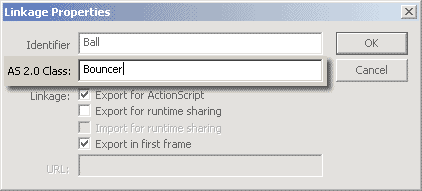
[ linkage properties dialog allows movieclip class association ]
This takes away the necessity to use Object.registerClass at all. That is of course unless you need to change that association at run-time (which very well may be the case). Remember that classes linked this way still need to inherit from MovieClip.
Example: Bouncing Balls
[ ball movieclips as bouncer class instances ]
// in Bouncer.as
class Bouncer extends MovieClip {
  // variables, all private - internally handled
  private var gravity:Number = 0;
  private var boundaries:Object;
  private var velocity_x:Number;
  private var velocity_y:Number;
  private var original_x:Number;
  private var original_y:Number;
  // constructor
  function Bouncer() {
  original_x = _x;
  original_y = _y;
  Mouse.addListener(this);
  onMouseDown(); // force mouseDown event
  }
  // init method for arguments which in other normal
  // circumstances (non-MovieClip classes) would be
  // given to the constructor. Not an option with MovieClips
  function init (pGravity:Number, pboundaries:Object) {
  gravity = pGravity;
  boundaries = pboundaries;
  return this;
  }
  // onEnterFrame event to control bouncing
  private function onEnterFrame():Void {
  // move ball
  _x += velocity_x;
  _y += velocity_y;
  // check for boundry collision
  if (_x <= boundaries.left) {
  _x = boundaries.left;
  velocity_x = Math.abs(velocity_x);
  }else if (_x >= boundaries.right) {
  _x = boundaries.right;
  velocity_x = -Math.abs(velocity_x);
  }
  if (_y <= boundaries.top) {
  _y = boundaries.top;
  velocity_y = Math.abs(velocity_y);
  }else if (_y >= boundaries.bottom) {
  _y = boundaries.bottom;
  velocity_y = -Math.abs(velocity_y);
  }
  // apply gravity
  velocity_y += gravity;
  }
  // reset original position and apply a new
  // random direction when the mouse is pressed
  private function onMouseDown():Void {
  _x = original_x;
  _y = original_y;
  velocity_x = Math.random()*20-10;
  velocity_y = -Math.random()*20;
  }
}
// in Flash Movie
var balls_bounds:Object = {left:10, top:10, right:290, bottom:290};
for (var i = 0; i < 5; i++){
attachMovie("Ball", "ball"+i, i, {_x:150, _y:150}).init( 5, balls_bounds );
}That wraps up this tutorial. A huge thank you to all of you who buy kirupa's books, became a paid subscriber, watch the videos, and/or interact on the forums. Your support is what keeps writing like this online! 😇
This tutorial was written by senocular, also known as Trevor McCauley. He has been one of this community's most generous teachers since the early Flash days, and he is still around: find him on senocular.com and on the forums.

:: Copyright KIRUPA 2026 //--