



This is an archived tutorial from the kirupa.com legacy collection. It covers software that may no longer be available, but it is kept online because the ideas still hold up.
Probably one of the more difficult concepts to understand in Actionscript, especially when first learning it, is correctly referencing variable or object scope. A scope refers to the referenceable place where variables and objects exist. The scope itself refers to the containing object, of where variables can be defined. The way you would differentiate between a num property contained within 2 different objects is through each objects own unique scope. The property is num in both objects, but since there are 2 different objects, there are 2 different num properties (2 different scopes).
firstObject = {num: 1};
secondObject = {num: 10};
trace(firstObject.num); // traces 1
trace(secondObject.num); // traces 10
So scope, for the most part, refers to which object.
Basically there are two main top level scopes. These are the _global object and the current _level or _root. These exist on their own without really existing within any other scope. Virtually anything else, however, will reside in one of these two scopes or at least within some hierarchy within it.
The _level scope is really where everything pretty much starts. In your main movie this is also known as _root. This is the core movieclip object in which the Flash movie exists. And yes, it is a movieclip, just like any movieclip you would make otherwise. The only difference is that this movieclip needs to exist if your movie is to exist. Subsequent movieclips can be placed within the _root movieclip and further movieclips in those, etc. It is also common to begin actionscripting in the _root timeline.
The _global object is a container for Actionscript objects and functions. Its where much of that script you write comes from. Because the _global object is accessible everywhere, it gives you access to that core Actionscript functionality that is needed to run your movie - in any movieclip, in any scope.
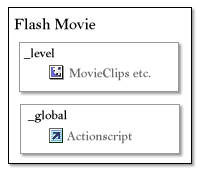
[ top level scopes in a Flash movie ]
All in all scope referencing can be fairly straightforward. It gets a little complicated with functions though. Remember, like everything else, functions are objects. They can have variables defined inside of them etc. Functions, however, are special in that they perform function calls allowing you to run a block of code with one simple command. With each call, functions provide a plethora of scoping possibilities. A function call can access the function object itself, the object used to call the function and has access to a local scope unique to that specific function call.
We’ll start backwards with the local scope. Local scope refers the the current base scope of any written code. For any code written directly in a timeline, the local scope is the scope of that timeline. Since most of your code is written directly on your timelines, this probably applies to much of your script – at least that which is not within the definition of functions.
A code block for a function can access _global and current timeline variables directly simply by using their name. Functions have access to those scopes in that manner (and everything does for _global values). For instance, if you define a variable and a function in the same timeline, the function, as long as its called after the definition of the variable, will be able to access the value of that variable within its function call.
timelineValue = "timeline variable";
accessTimelineVariable = function(){
  trace(timelineValue); // traces "timeline variable"
};
accessTimelineVariable();
Each function call itself, however, also has its own local scope. This is a scope specific to each call as if the call itself was an object. Variables within this scope are accessed just as timeline variables are only variables local to the function call are not accessible in the timeline outside of that function. You can define variables in this scope using the var keyword. If var is not used in a function call in defining variables, the variables will be defined in the timeline itself and will actually be accessible outside of that function.
defineVariables = function(){
var local = "local value";
timeline = "timeline value";
trace(local); // traces "local value"
  trace(timeline); // traces "timeline value"
};
defineVariables();
trace(local); // traces undefined
trace(timeline); // traces "timeline value"
When parameters are passed into a function call, those values are assigned as arguments that exist in the local scope of that call.
traceArguments = function(argA, argB){
  trace(argA); // traces 1
  trace(argB); // traces 2
};
traceArguments(1, 2);
Its this local scope that you would want to define variables that are specific to each function call, such as function arguments, that are to be used only in that code that are not to interfere with anything else. Be sure to remember var or those variables will be set in the timeline and could potentially disrupt your script and other actions or values within your timeline.
With the local scope of a function, you also start to deal with overriding. Overriding represents the circumstance when a value of one accessible scope has precedence over a similarly named value within another accessible scope. With function calls, you have two readily accessible scopes obtained through direct reference of variable names, the timeline scope and the local scope of the function. The local scope has precedence over the scope of the timeline so if a value in the local scope of a function shares the same variable name of a value in the timeline, the local variable’s value will be retrieved when that variable is accessed. For example
num = 1;
traceNum = function(){
  trace(num); // traces 1
  var num = 5;
  trace(num); // traces 5
};
traceNum();
trace(num); // traces 1
You will see more with overriding later on. It can play an important role in OOP.
In Actionscript this represents what can be considered the current scope. If you putting code in a timeline, say _root, then using this will allow you to reference _root directly. For a function, if the function is defined in _root, the this keyword will again reference _root. If the function was defined in some generic object created in _root, this in that function would be the generic object.
Lets add a function to an array object. Using this, we can access that array directly, and in doing so, use the function to alter the array’s contents.
myArray = [1,2];
myArray.switchValues = function(){
  var temp = this[0];
  this[0] = this[1];
  this[1] = temp;
};
trace(myArray); // traces 1,2
myArray.switchValues();
trace(myArray); // traces 2,1
As you can see, this function uses this to directly access the current object’s (myArray’s) array elements as this refers to the array itself. Then, using a local temporary variable temp, it is able to internally switch the two values of those array elements. The trace after the function call confirms its success on the myArray variable.
Even though the this keyword references the current object, a this in a function may not always reference the same object. Since function variables are references to a function object, there can be separate definitions of the same function in different objects. Depending on which object initiates that function call determines which object the this in the function represents. This behavior is quite advantageous as it can save you the need to repeatedly redefine the same function for multiple objects. Instead, you can define the function once and then assign it to each object requiring it. For example
increaseNum = function(){
  this.num++;
  trace(this.num);
};
objectA = {num: 0};
objectA.increaseNum = increaseNum;
objectB = {num: 10};
objectB.increaseNum = increaseNum;
objectA.increaseNum(); // traces 1
objectB.increaseNum(); // traces 11
Here, two separate objects, objectA and objectB each have their separate num values assigned to them. Each also have assigned to them a increaseNum property which is set to be the previously defined increaseNum function. When increaseNum is run for each, the this object in the function block refers to the object which called the function. It’s the same function, only the this value is representative of what object called it.
The this keyword is used in excess when dealing with objects and functions, or methods, associated with such objects. Each method of an object gains access to that object through the use of this so be prepared to write it consistently especially when writing methods to be used with all instances of an object type.
In each function call there is created for it, in the local scope of that call, an object called arguments. The arguments itself is really just an array. It contains all of the values that were passed in to the function when it was called. For example, in the function call
myFunction("A", 2);myFunction receives 2 arguments, the letter "A" and the number 2. In the body of that function, arguments would be an array with arguments[0] containing "A" and arguments[1] containing 2.
myFunction = function(){
  trace(arguments[0]); // traces "A"
  trace(arguments[1]); // traces 2
};
myFunction("A", 2);
Aside from providing the arguments of the function call, the arguments object also has 2 other properties, callee and caller.
Arguments.callee represents the function object running call. Arguments.caller is one up on callee representing any function (if there is one) calling the callee. If a function was not run from another function then there is no caller and arguments.caller will be null. Arguments.callee will always exist though, as to run a function, there obviously needs to be a function. Arguments.callee represents the this of the function object itself. Consider the following example.
tracePhrase = function(){
  trace(arguments.callee.phrase); // traces "Phrase accessed through callee"
};
tracePhrase.phrase = "Phrase accessed through callee";
tracePhrase();
The phrase property was added directly to the tracePhrase function. Accessing its value means using arguments.callee to get to the tracePhrase function object itself. Granted, you could use tracePhrase directly, but what if you don’t know the name of the function?
Callee is for the function calling the function.
runTracePhrase = function(){
  tracePhrase();
};
tracePhrase = function(){
  trace(arguments.callee.phrase); // traces "Phrase accessed through callee"
  trace(arguments.caller == runTracePhrase); // traces true
};
tracePhrase.phrase = "Phrase accessed through callee";
runTracePhrase();
Since runTracePhrase is the function that called tracePhrase, arguments.caller in tracePhrase is a reference to the runTracePhrase function. Though the arguments is a powerful and helpful object on a whole, I can’t say arguments.caller is used often so don’t worry if you forget what it means.
And that’s about it for object basics. Now its time to get into the creation of custom objects and custom classes.
For more on scope, see Timothée Groleau’s in depth article Scope Chain and Memory Waste in Flash MX.
That wraps up this tutorial. A huge thank you to all of you who buy kirupa's books, became a paid subscriber, watch the videos, and/or interact on the forums. Your support is what keeps writing like this online! 😇
This tutorial was written by senocular, also known as Trevor McCauley. He has been one of this community's most generous teachers since the early Flash days, and he is still around: find him on senocular.com and on the forums.

:: Copyright KIRUPA 2026 //--