



This is an archived tutorial from the kirupa.com legacy collection. It covers software that may no longer be available, but it is kept online because the ideas still hold up.
Classes can be created not only to hold and handle data and information as scripted objects residing in memory, but also to pose as controllers for movieclip objects on the screen. What this means is that you can create a custom class in Actionscript that can be used as the primary class of a movieclip.
By default, all movieclips on the screen are instances of the type MovieClip. They are based on the MovieClip class in Actionscript and inherit methods and properties from the MovieClip prototype (properties like hitTest and getDepth etc.). To have your own classes work with movieclip instances on the screen, you would want to have them extend the MovieClip class.
There is only one little problem. Movieclip instances aren't created like other object instances using new keyword in combination with a class constructor. They are created internally by Flash as they not only exist as containers for information memory, but also as visual elements on the screen. That requires more goings on than what's required with normal object creation. Flash needs to get down and dirty with the library and copying visual symbols on to the timeline and so on. Because of that, your movieclip extending class constructors can’t exactly be used to make a movieclip instance in Flash. Those movieclips are only made by Flash itself as commanded by the timeline or through the use of dynamic movieclip creation functions like duplicateMovieClip or attachMovie. So what is there to do?
Luckily, Actionscript provides you a method for telling Flash that it may need to use a class other than MovieClip when it creates movieclip instances on the screen. That way every movieclip won’t be restricted to the same default inheritance chain with the direct association to the MovieClip class and you can have your own class pose as a movieclip instance's primary class. The command that allows for this is Object.registerClass.
Object.registerClass (which, if you’ll notice, is a static method of the Object class) works by changing an internal association of a movieclip symbol in the library from what would normally be the MovieClip class to the class of your choice. Then, whenever an instance of that movieclip symbol is copied onto the screen (either through the timeline or with Actionscript), that instance will directly inherit not from the MovieClip class, but from the class you specified – the registered class – from a Object.registerClass call. The association is setup using a movieclip symbol’s linkage ID (export for actionscript identifier). So, for Object.registerClass to work, it will need to be used with a movieclip in your movie’s library that has a linkage ID assigned for it. The linkage ID can be assigned when you create the moiveclip symbol or through the properties options from the movieclip in the library.
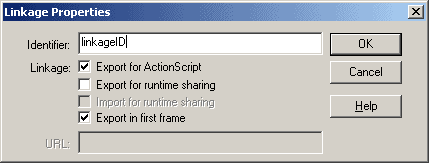
[ assigning a linkage ID from the library ]
Then its just a matter of calling Object.registerClass in the following format to setup the association between a movieclip symbol and class.
Object.registerClass("linkageID", myClass);With that command, any ‘linkageID’ movieclip symbol placed on the screen thereafter will directly inherit from, and technically be an instance of, myClass. If you ever need to break this connection, you may also do so by registering the linkageID to null.
Object.registerClass("linkageID", null);Then new ‘linkageID’ instances will no longer be myClass instances and will inherit from MovieClip as they would normally.
When a movieclip symbol is setup to be created as an alternative class instance with Object.registerClass, even though a movieclip instance isn’t created with a call to the constructor function of that class, the constructor function still gets run for that movieclip instance when its made. So don’t pass off your class constructor as useless for classes used to extend movieclip instances. They still get run like any other objects enabling you to define properties etc. as you please. Consider the following example:
EnhancedClip = function(){
  this.abilities = "enhanced";
};
EnhancedClip.prototype = new MovieClip();
Object.registerClass("libraryItemA", EnhancedClip);
this.attachMovie("libraryItemA", "myEnhanced_mc", 1);
trace(myEnhanced_mc.constructor == EnhancedClip); // traces true
trace(myEnhanced_mc.abilities); // traces "enhanced"
(Note that super wasn’t used, and isn’t needed, to add default movieclip properties to the movieclip instance created. Setting up the inheritance with class.prototype = new MovieClip() is all you need to take care of that).
Object.registerClass, however, is not without its problems.
As you probably know, attachMovie allows you to pass an optional init object in its call. Any properties of this object are then copied into the attached movieclip instance. This can save time and space when adding multiple properties to many consecutively attached movieclips. Here’s a quick example.
// declare init object
defaultValues = {prop: "value", _x: 100 };
// add an 'id' movieclip named movie; it will have
// a prop = "value" and an _x position of 100
this.attachMovie("id", "movie", 1, defaultValues);
trace(movie.prop); // traces "value"
trace(movie._x); // traces 100
This init object acts much like a constructor function might, defining initial values for an instance when its created. With an init object, however, you don’t have much control over those properties and have no means for running methods or other functions/expressions as you would in a constructor. Whatever values are included in the init object, are those given directly to the movieclip without any other direction.
Class constructors give you more control with your data in object creation, but with movieclips and registered classes, you run into a problem. That problem is that there is no means of passing arguments to a class constructor when its run for a movieclip. For other non-movieclip objects, values are passed through the constructor call in creating the object instance. With movieclips however, since they are created in the timeline or through attachMovie, there is no place to pass values to serve as arguments of your movieclip’s class constructor. About the closest thing you have is the init object (which obviously is only available when using attachMovie and not relying on the timeline).
The init object of attachMovie has its properties copied to the movieclip before its constructor is run. Because of this, you can essentially use it to pass parameters of sorts to your constructor only they aren’t necessarily passed. They’re more pre-defined in the movieclip itself than passed in the local scope of the constructor function. That being the case, you may need remove un-necessary values passed in this manner. Here’s an example where that may be the case.
Helper = function(){
  if (this.status == "inactive"){
  this._alpha = 50;
  }
  delete this.status;
};
Helper.prototype = new MovieClip();
Object.registerClass("helperClip", Helper);
screenStatus = "inactive";
this.attachMovie("helperClip", "helper1", 1, { status: screenStatus } );
trace(helper1._alpha); // traces 50
trace(helper1.status); // traces undefined
Helper instances here are movieclips who have a transparency based on a certain ‘screenStatus’ when created. For the constructor to receive this value, it was passed as a value in an init object (defined directly in the attachMovie call). As an init object though, that status variable is defined directly in the attached Helper movieclip – something you may not want in that movieclip. If its not wanted, it will need to be removed, as is the case in this example where status is deleted at the end of the constructor call.
There is another alternative to using the init object as a means of providing your class constructor with variable arguments. That alternative is to essentially not use the constructor at all and instead opt to construct or initiate your object through, not the constructor, but a separate method call directly following attachMovie. This method is often called the init method.
The init method for movieclip classes are methods but take on the responsibilities of constructor functions. It not only allows you to have a constructor-like operation with optional passed parameters, but also gives you a way to re-construct or re-initialize an object through a method, as though redefining an instance from scratch. That alone may be reason enough to use this technique with other classes as well.
As a method, though, init will need to be called
manually, adding what otherwise would be an extra step in
movieclip creation. We can see its use by incorporating it
into the Helper example.
Helper = function(){
  // constructor not used in favor of init
};
Helper.prototype = new MovieClip();
Helper.prototype.init = function(status){
  if (status == "inactive"){
  this._alpha = 50;
  }
};
Object.registerClass("helperClip", Helper);
screenStatus = "inactive";
this.attachMovie("helperClip", "helper1", 1);
helper1.init(screenStatus);
trace(helper1._alpha); // traces 50
The constructor is still run – its run automatically – but it has no purpose now. The constructor responsibilities are carried over to the init method. Being a method called after the creation of the object, it can have any argument passed to it you wish just as though it were any other constructor call.
If you want, you can even compact its use a little by tacking init right on the end of the attachMovie call. In doing this, just be sure to return this in the init call so that you are still able to assign variables to reference the movieclip in the call.
Helper = function(){};
Helper.prototype = new MovieClip();
Helper.prototype.init = function(status){
  if (status == "inactive"){
  this._alpha = 50;
  }
  return this;
};
Object.registerClass("helperClip", Helper);
screenStatus = "inactive";
this.attachMovie("helperClip", "helper1", 1).init(screenStatus);For movieclips, the onLoad event is called for when a movieclip fully loads itself in onto the timeline it was placed. It is important to note that this onLoad is not necessarily the same as onClipEvent(load) which you may have used before. The use of onLoad is best in this circumstance of class inheritance with attached movieclips. Use elsewhere can cause you and may have already caused you some problems. For example, here’s a list of common issues encountered with onLoad misuse.
It’s the timing of onLoad that makes it so useful – and in saying onLoad here, it’s meant as a shared method of a class accessible to all class instances (i.e. a prototype method in a class). A class’s constructor is called for an instance immediately in the initialization process of a movieclip. At that point, no internally defined values have been set. The onLoad event gets called for a movieclip afterwards allowing such internal definitions to occur. Here is a list of operations as the occur in the initialization of a class-registered movieclip at the point of creation with attachMovie.
| 1. | attachMovie’s init object assignment |
| 2. | class constructor |
| 3. | remaining frame script in the main (attachMovie’s) timeline i.e. the init method if used |
| 4. | attached movieclip’s timeline frame scripts |
| 5. | onClipEvent(load) of any clips within the attached movieclip |
| 6. | timeline frame scripts of any clips within the attached movieclip |
| 7. | class onLoad * |
* If the clip is not created with attachMovie and is instead placed on the timeline in Flash with any script on the clip, as previously mentioned, onLoad will actually be called directly after the point in time which onClipEvent(load), if used, would be called which is directly after the 2) class constructor.
In the non-onClipEvent interupted order, you can see that onLoad is the last event called in the series of events following the movieclip’s creation. This is important because the constructor call, as you can see, comes before any of the attached clip' interior clips code gets called. This means that any initialization of those clips (especially components) will not be available to the constructor call. For that availablity, you would use want to use an onLoad method in your class. The constructor would be used for immediate setup and onLoad for follow-up. For a house, the constructor details the blueprints. The house is then built (movieclips loaded internally) and the onLoad would be the final decision of a family to finally move in.
Consider an attached movieclip with a scrollbar in it. We can make a class for that movieclip, but in order to access methods defined for the scrollbar within the movieclip, you would have to wait until onLoad.
Example:
[ scrollbar accessible only after onLoad event ]
LoremScroller = function(){
  // text for a textfield instance can be set
  this.lorem_txt.text = "Lorem ipsum dolor sit amet, consectetuer adipiscing elit...";
  // but methods of a scrollbar component
  // will not work (not yet defined)
  output_txt.text += "constructor: ("
  output_txt.text += this.loremScrollbar.getScrollPosition() + ")\n"; // undefined
};
LoremScroller.prototype = new MovieClip();
LoremScroller.prototype.onLoad = function(){
  // methods for internal components have been
  // defined by the time onLoad is called
  output_txt.text += "onLoad: ("
  output_txt.text += this.loremScrollbar.getScrollPosition() +")"; // 1
};
Object.registerClass("lorem", LoremScroller);
this.attachMovie("lorem", "loremTextBox1", 1, {_x:150, _y:130});For movieclips associated with classes, its important that the classes for such movieclips are defined before those movieclips attempt to access them (before they are created). Generally that's not an issue since your classes should be pre-defined in the first frame of your Flash movie. For self-contained movieclips which contain their own classes defined within themselves, i.e. components, this is not the case.
Because components have their class definition within their component movieclip, Flash has no way of reading and defining that class until after the component clip has already been instantiated. This means that that particular component would then not be able to have an association with that class (as it was not defined in time for its creation). The #initclip and #endinitclip actions allow for a solution.
Actionscript placed between the #initclip and #endinitclip commands in a movieclip in a Flash movie's library that has been exported for actionscript with a linkage ID will be defined prior to frame 1 of that movie as its loaded into the Flash player. This allows for class definitions for components contained within components to be predefined before that component can be used. Code outside of this block will be run normally after that clip is loaded and played in the player.
The practical use of #initclip and #endinitclip pretty much begins and ends with components. Otherwise, your code can just be placed in frame 1 of your main timeline and will function properly, being defined in time for any movieclip in your movie needing it. Because components contain their own class definitions, they need these actions to be able to pre-define their classes so that they will be ready when the component is actually used.
Movieclips, too, can have deconstructors defined for them. The difference with movieclips is that they aren't deleted by conventional means with the delete keyword. To dynamically delete movieclips, the removeMovieClip method must be used.
One the positive side of things, since the movieclip itself is the object, if you removed a movieclip without using a deconstructor, you probably won’t run into many problems. Though a reference to the movieclip may still exist in a listener list, because the movieclip itself is no longer present on the timeline, it can no longer contain its properties and methods etc. So, unlike other objects, event methods for removed movieclips will not continue to be called. However, the reference still exists and would be an unwanted and unneeded artifact in any listeners list. Therefore, it should be taken care of and removed.
Example:
[ deconstructor used in removing marching soldiers ]
Soldier = function(){
  // add as listener of Soldier
  Soldier.addListener(this);
  // since this process is not argument
  // dependant and only really needs to be
  // done once in the process of this
  // instance's life, it can be handled in
  // the constructor and not init.
};
// inherit from movieclip
Soldier.prototype = new MovieClip();
// init method (constructor replacement);
Soldier.prototype.init = function(direction){
  this.setDirection(direction);
  this.isMarching = false;
};
Soldier.prototype.onEnterFrame = function(){
  // march every frame if marching
  if (this.isMarching) this.march(this.direction);
};
Soldier.prototype.march = function(direction){
  // a little trigonometry to move the
  // soldier based on an angle of direction
  this._x += Math.cos(direction)*2;
  this._y += Math.sin(direction)*2;
};
Soldier.prototype.setDirection = function(direction){
  if (!this.isMarching) this.isMarching = true;
  this.direction = direction;
};
// removeMovieClip over-ride/deconstructor
Soldier.prototype.removeMovieClip = function(){
  trace("Removing "+this);
  // remove the instance from listening to Soldier
  Soldier.removeListener(this);
  // call MovieClip's removeMovieClip method
  // to actually remove the movieclip.
  super.removeMovieClip();
};
// make soldier an event broadcaster
ASBroadcaster.initialize(Soldier);
// static method for changing soldier directions
Soldier.changeDirection = function(direction){
  this.broadcastMessage("setDirection", direction);
};
// register sldr movieclip from library
// to the Soldier class
Object.registerClass("sldr",Soldier);
// create movieclips
for (i=0; i<10;i++){
  // attach sldr clips. init object used
  // to position each in a horizontal line
  this.attachMovie("sldr", "s"+i, i, {_x:75+i*15, _y:150});
  this["s"+i].init(Math.PI/2); // call init
};
// define button interaction
march_btn.onRelease = function(){
  Soldier.changeDirection(Math.random()*2*Math.PI);
};
remove_btn.onRelease = function(){
  // if soldiers remain, remove one
  if (i > 0){
  i--;
  this._parent["s"+i].removeMovieClip();
  }else{
  trace("No remaining soldiers to remove.");
  }
}The removeMovieClip method over-rides that which would have been otherwise inherited from MovieClip. The MovieClip removeMovieClip is still used via super so that the movieclip can still be successfully removed.
There is an alternate way of creating this relation for movieclips, and that is through altering a movieclip instance's __proto__ property.
That wraps up this tutorial. A huge thank you to all of you who buy kirupa's books, became a paid subscriber, watch the videos, and/or interact on the forums. Your support is what keeps writing like this online! 😇
This tutorial was written by senocular, also known as Trevor McCauley. He has been one of this community's most generous teachers since the early Flash days, and he is still around: find him on senocular.com and on the forums.

:: Copyright KIRUPA 2026 //--