



This is an archived tutorial from the kirupa.com legacy collection. It covers software that may no longer be available, but it is kept online because the ideas still hold up.
If you've been working with Actionscript for any decent amount of time, chances are you already know what your basic object is and what it allows and can do for you. An object is a construct saved to a variable in Actionscript which can contain other variable values inside of itself. These variable values, or properties , inside objects can take the form of values such as numbers and strings, or they can also be functions. They can even be other objects with variables of their own.
The code for making a standard generic object in Flash is as follows:
myObject = new Object();The variable myObject then becomes a object variable which can then have more variables added to it using dot syntax like so.
myObject.name = "Fred";
myObject.num = 10;
myObject.isMyFirstObject = true;
myObject.traceHello = function(){
  trace("Hello");
};
Dot syntax is also used to retrieve those values
trace(myObject.name); // traces "Fred";
trace(myObject.value); // traces 10;
trace(myObject.isMyFirstObject); // traces true;
myObject.traceHello(); // traces "Hello";
Like arrays, objects also have a shorthand method of declaration. Arrays, for example, can be declared one of two ways
myArray = new Array(1,2,3); // long
myArray = [1,2,3]; // short
Similarly, objects can be defined two different ways:
myObject = new Object(); // long
myObject = {}; // short
Using the shorthand version, like with arrays, you can make internal variable assignments inline. This way, you won't need to keep referencing the myObject variable to repeatedly add values to it
myObject = {name: "Fred", value: 10};Here, myObject is an object declared with the name and properties already defined. Note that this method is for initial definition only. You cannot add values to an object in this manner. For that you would need to access the object variable directly for each new value as done previously.
The new Object(); command, however, does has a minor difference within its ability to define an object in comparison to the shorthand method. Using new Object() you can define what would be a default value for the object. Without this default value, or in using the shorthand syntax for object declaration, as myObject was declared above, the object technically has no real value of its own. The default value gives it one. For example, myObject can be given a base value of 5 by declaring it in the following manner.
myObject = new Object(5);
trace(myObject + 1); // traces 6
A you can see there, the object alone acts as the base value of what was given when it was defined.
One important thing to be aware of with objects is that object variables are references to objects. As references, object variables aren't necessarily direct representations of values but rather pointer reference to the object in as it exists in Flash's memory.
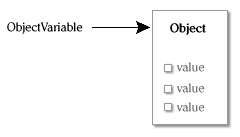
[ object variables "point" to objects ]
One way to think of them is computer shortcuts (or aliases for Mac folk). Think about a shortcut to Flash on your computer's desktop. Double-clicking on the shortcut will open Flash as it references the actual Flash application file. However, you can rename the shortcut whatever you want without effecting Flash itself. Also, you can copy the shortcut 20 times in 20 different locations on your hard drive and that Flash application file will still be the only ‘real' Flash file remaining in the same place its always been. Each one of those shortcut copies will still reference that same one Flash application despite their being a copy or being located in some other directory.
Object variables are the same way. You can make new variables with different names equaling the same referenced object. The thing is, when referencing variables within an object, you have to remember each one of those object variables that point to that object will all be accessing the same values within that object. So, if you change a value through one object reference, it affects them all. Consider the following
firstObject = new Object();
firstObject.num = 1;
secondObject = firstObject;
trace(secondObject.num); // traces 1
secondObject.num = 2;
trace(secondObject.num); // traces 2
trace(firstObject.num); // traces 2
When firstObject is created, its saved as a reference to the new Object made in memory. Using firstObject to reference that object, num is added and given a value of 1. Then, secondObject is defined to be the value of firstObject. This makes secondObject also a reference to the same object. Both firstObject and secondObject are shortcuts to that object. You can see that the num value in secondObject exists and has the same value as before. When secondObject is used to change num to 2, the results can be seen in firstObject as well, since, they are in fact, again, just references to the very same object. This means, as you can pretty well see, copies of objects in this way aren't exactly copies. Only the reference is copied and not the object itself. If you ever need to copy an object, you need to create an entirely new object and manually copy each property from the original as a new property in the copy.
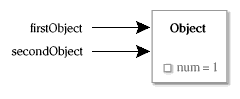
[ two variables, one object ]
Also, because objects are references, when you check for equality/inequality with either the == or != operators, you will be checking against the references themselves and not the equality of the object they reference. The firstObject and secondObjects from before are equal. They references the same object, so as references, they are the same. However, if you had two separate objects each with a num property of the same value, they will not be equal.
firstObject = {num: 1};
secondObject = firstObject;
trace(secondObject == firstObject); // traces true
firstObject = {num: 1};
secondObject = {num: 1};
trace(secondObject == firstObject); // traces false
Though the contents of firstObject and secondObject are the same, they are themselves not equal as they reference separate objects. The reference isn't representative of value but of a memory address . You can think of it as the address to a house in a neighborhood of similar houses. Though 2 houses can look exactly the same and even have the same furniture in them, they are not the same house. Their addresses will be different as they are located in different locations in the neighborhood, just as objects are located in different places in Flash's memory. The only time object references equal each other is when the addresses match. Then you are dealing with the same house and therefore the same object.
You’ve probably heard of movieclips being called movieclip objects. The reason for that is that movieclips are themselves just as much an object as any other object. They have their own properties, can have added to those more properties and can contain yet other objects or movieclips within themselves which behave similarly. Basically the only difference is that with movieclips, you can physically see the object as it’s a visual object with a timeline. Other visual objects include buttons and textfields, though movieclips have a greater importance because they are the only type of those visual objects that can have other nested timelines (movieclips) within them. That is not the case so much with buttons and textfields.
Movieclips are also a special case as they exist as soft references. Because of a movieclip’s timeline and the fact that its visually seen on the screen, it’s handled differently from other objects. With other objects, if you delete all or have no remaining reference variables to an object in memory, Flash sees that object as non-existent and forgets it ever existed (Actionscript handles garbage collection on its own in that manner). However, the only method of removing a movieclip is through using the removeMovieClip() method. This method physically extracts and removes the movieclip from the timeline it which exists. Any references to that movieclip can still very well exist in your Actionscript even though the movieclip itself does not. These remaining soft references technically still point to the movieclip object but do so blindly. All is not lost, however, since if the movieclip returns to the stage, the reference will be able to again correctly reference the clip.
It’s like sending smoke signals to your best friend in a far off land who doesn’t have a fire. You know you can give him messages but he has no way of returning them. What happens when your friend moves (or gets eaten by a horde of rabid buffalo)? You would have no way of knowing that so you would continue sending your smoke signals as though nothing has changed even though no one is able to read them. Should your friend ever come back, he will again be able to receive those smoke signals.
Take a look at the following example.
// create a temporary movieclip
this.createEmptyMovieClip("temp",1);
// assign a reference variable
tempRef = temp;
trace(temp); // traces _level0.temp
trace(tempRef); // traces _level0.temp
// remove the movieclip
temp.removeMovieClip();
trace(tempRef); // traces nothing
trace(typeof tempRef); // traces "movieclip"
// re-create the movieclip
this.createEmptyMovieClip("temp",1);
trace(tempRef); // traces _level0.temp
You can see there, that the tempRef variable, though the movieclip was removed, remained defined in the script. It had no base value when traced, though it still knew it was a movieclip reference. When the movieclip was reattached (using the same name as it was when originally created), the tempRef variable again was able to correctly reference that clip once again.
In actuality, everything in Flash Actionscript is an object. Not only are generic objects, movieclips and other obvious objects (such as the XML object), but also buttons, textfields, arrays, strings, numbers and even functions. Each one is considered an object in Actionscript in some way shape or form. This is an important bit of information to understand when working with Flash Actionscript. The fact that everything you define is an object will help you better work with your variables and use them the best way you can.
You already saw how movieclips are objects. Think of an array. We can take any array and also add our own custom values to it as well.
myArray = [];
myArray.home = "Alaska";
trace(myArray.home); // traces "Alaska"
Now there are some exceptions that kind of break the
definition of what an object is – at least as you know it –
though still technically qualify as an object. These are
certain definitions of numbers, strings and boolean (true or
false) values. You might have already figured this out or
have known about these differences. Numbers, strings and
true/false variables defined directly with their value are
1) variables not defined as an object reference and 2) not
container object variables capable of holding values other
than their own. For example, consider a variable defined to
be 5. When using a direct assignment of that value to the
number 5, it then is a variable not able to hold others.
myNumber = 5;
myNumber.home = "Atlantis";
trace(myNumber.home); // traces undefined as it does not exist
The same applies to strings defined directly with a quoted string and booleans set directly to true or false.
myString = "Hello";
myString.home = "Angkor";
trace(myString.home); // traces undefined as it does not exist
myBoolean = true;
myBoolean.home = "Barakus";
trace(myBoolean.home); // traces undefined as it does not exist
Also, if you assign two separate variables to have the same value, they will in fact be equivalent unlike with objects as they are references
num1 = 5;
num2 = 5;
trace(num1 == num2); // traces true
Assigning values in this manner for numbers, strings and booleans can be considered the shorthand method, much in the way curly braces ({}) are used for a shorthand method of generic objects. Only here, the shorthand method used for defining numbers, strings and booleans make them less object-like. These variable structures also have an long form (or object form) of definition, very similar to the definition of other objects, like so
myNumber = new Number(5);
myString = new String("Hello");
myBoolean = new Boolean(true);
For these variables now, each exist as variable objects capable of having other variable values contained within them. They still have their same base value, they’re just now capable of containing other values as well – as you would expect from objects.
myNumber = new Number(5);
myString = new String("Hello");
myBoolean = new Boolean(true);
myNumber.home = "Atlanta";
myString.home = "Anchorage";
myBoolean.home = "Baltimore";
trace(myNumber.home); // traces "Atlanta"
trace(myBoolean.home); // traces "Anchorage"
trace(myString.home); // traces "Baltimore"
This use of the long syntax in object definition is just like declaring generic object Objects with a base value. Any kind of variable you make in Flash (aside from functions) can be defined this way. The truth is, when you define an generic object in that manner, using a base value, it is actually converting the new Object call into a new Number or a new String call based on what you passed in for the base value. A generic object technically can’t have a base value and still be an object Object. That base value means it has to be some other object such as a number, string etc. which is representative of that type of value.
So what makes basic numbers, strings and booleans objects? Nothing about them seems to show that they are an object. How can they be objects? Well, simply speaking, an object in Flash is just the concept of understanding for Flash when it comes to a variable type. Objects have inherent in their being, more than just a base value. A simple number is actually more than a simple number. There’s other hidden functionality as every number is in its own way an object. This can be seen better in strings.
Think about a string and what you can do with it in ActionScript. Actionscript gives you all kinds of useful commands for controlling and manipulating strings. For example, you have the ability to convert a string to be all uppercase using the toUpperCase method.
title = "capitalize";
trace(title.toUpperCase()); // traces CAPITALIZE
Notice how the toUpperCase is used on the title variable using dot syntax as if it were included in the string as an object. In fact, in a way, it is! As a string, it inherently has access to all methods associated with strings – this even if the string was not declared in an object manner with new Object() or new String(). With this, you can see where a non object variable demonstrates object behavior.
There are some methods that are inherent to all objects including basic number, string, and boolean variable "objects". These are the valueOf and toString methods.
The valueOf method represents the base value of an
object. This is the value specified by that object"s type. A
number, for example, would have a number value associated
with valueOf – the value of the number associated with that
variable – this independent of the fact if the variable is a
number object or a basic number variable value. When you
perform mathematical calculations with an object, Flash uses
the valueOf method of an object to know how to treat that
object in the figuring of the results.
// number object
num = new Number(10);
trace(num.valueOf()); // traces 10
// basic number
num = 5;
trace(num.valueOf()); // traces 5
// math expressions use valueOf
trace(num * 10); // traces 50;
trace(num.valueOf() * 10); // traces 50;
The toString method represents the string interpretation of the value of the object. Often, you see no difference in this as for generally every instance of toString, you get the same value as valueOf, just in string form. Numbers would still be their number values, just not as numbers but as strings (i.e. "5" instead of 5). When ever you trace an object, it"s toString is used to get the string value of that object to display in the output window which is basically just a textfield window in Flash Note that for strings, valueOf will be exactly the same as valueOf since the value of a string is a string.
// number
num = 2;
trace(num); // traces 2
trace(num.toString()); // traces 2
// string
str = "two";
trace(str); // traces two
trace(str.toString()); // traces two
// strings toString equals valueOf
trace(num.valueOf() === num.toString()); // traces false (2 is not strictly "2")
trace(str.valueOf() === str.toString());// traces true
Now you may not ever have to deal with these methods, at least not with normal objects such as these (they may come in handy with custom objects). However, you can take advantage of these methods and re-write them to work in your favor (only be aware you can only rewrite these methods for object-defined variables and not basic numbers, strings or booleans).
As an example lets create some variable called age. This will represent your age. Its value will be 16. Congratulations, you are now 16. Being the clever 16 year old that you are, you devise all kinds of ways to make your school reports seem as long as possible without them really being all that long. This includes large fonts, exaggerated line spacing and the classic margin crunching. Also, any numbers you include in your reports you will specifically write out as opposed to just putting the number. The number 34 for example, would be thirty four. And of course 16 would be sixteen. So, if you ever have a report needing the number 16 (i.e. age) and you want not only its value 16, but also as it exists in text as sixteen," you can specify in actionscript, as for some reason you enjoy writing actionscript to complete school reports, a unique toString method to handle the age value as it should appear in strings.
age = new Number(16);
age.toString = function(){
  return "sixteen";
};
trace("My current age is");
trace(age); // traces "sixteen"
trace("In 5 years I will be");
trace(age+5); // traces 21
Rewriting toValue of in this manner cal also be done. In fact, you can effectively change the value of an object without actually replacing or overwriting the object itself just by redefining these two methods.
That wraps up this tutorial. A huge thank you to all of you who buy kirupa's books, became a paid subscriber, watch the videos, and/or interact on the forums. Your support is what keeps writing like this online! 😇
This tutorial was written by senocular, also known as Trevor McCauley. He has been one of this community's most generous teachers since the early Flash days, and he is still around: find him on senocular.com and on the forums.

:: Copyright KIRUPA 2026 //--