



This is an archived tutorial from the kirupa.com legacy collection. It covers software that may no longer be available, but it is kept online because the ideas still hold up.
To learn classes all over again. Just when you thought you had it straight with ActionScript 1.0, Macromedia goes and does a thing like this. It's not as bad as it seems though. This new method of defining classes with ActionScript 2.0 can actually be easier than with ActionScript 1.0. That is, once you get past the fact that each class needs to exist in its own file (that can be hard to get used to). If you've already been doing this using #include, though, it may not be a big deal.
Whenever a class is defined with ActionScript 2.0, it gets its own .as (ActionScript) file. These .as files for classes can only have one class per file and need to have the same name as the class being defined within. For example, if you were defining a Plane class, its definition, including all its variables and methods, would be included in a Plane.as file. This may seem a tedious process at first, but its another step in maintaining organization and improving your coding practices. The advantages are less apparent in smaller projects. But with the bigger ones, you'll definitely see a difference.
Within these files goes the code that basically defines ActionScript 2.0. Elsewhere, such as within your main movie, you're still pretty much still dealing with ActionScript 1.0, or at least its familiar syntax. ActionScript 2.0, however, is the language for writing classes. So let's see how that works.
So classes are now defined in their own separate text file. What goes in these files? Why the class of course! What you have in these files, or rather, what you'll put in these files, is one block of code to represent the entire definition of the class you intend to create. This block takes on a general form of
class className { /* class definition block */ }
The class keyword is a new keyword for ActionScript 2.0 that indicates the code block that follows is a class definition. When this particular definition is saved, it gets saved under the name of className.as. Note that the .as file extension is not part of the name of the class within the actual definition.
The class definition within the code block contains everything associated with that class. It contains properties and methods, both shared and static, as well as the constructor itself. Yes, that's right, the constructor function is defined within a class block.
With ActionScript 1.0, classes were defined by their constructor function. For example, here is the start of a simple Point class in ActionScript 1.0.
/* Actionscript 1.0 */
Point = function(x,y) {
  this.x = x;
  this.y = y;
}
Just by defining a function, it can be used as a constructor and therefore also represents the definition of a class. With ActionScript 2.0, a class code block is itself not a constructor, however. Its just an indicator that what follows is the parts needed to define a class. Because of that, you would need to define your constructor separately within that block.
class Point {
  function Point(){
  // constructor
  }
  // more class definition...
}
When defining constructors for classes, they need to be functions that have the same name as the class itself. This function is defined using the form function [className]() and not [className] = function() which you may be accustomed to in ActionScript 1.0. The constructor and its methods each use function [className]() format in their definition, so be sure to get used to defining functions in that manner. If you don't create a constructor function for your class, Flash will create one for you. This automatic constructor would be equivalent to a function with no body.
Classes, as you are well aware of, aren't all constructors. They need more than that to serve any real functionality...
A class block contains the entire definition for that class. This not only includes the constructor itself, but, more obviously, properties and methods needed for that class.
Properties in a class are declared in the class block along with the constructor. In declaring the properties, you're letting the class know which properties instances will have and be able to use in the constructor and/or their methods. When doing this, you will need to make sure that you use the var keyword. The following is an example of a Person class with two properties, name and age. The name property has an initial value of "none" while age is simply undefined to start. Giving them a definition there is optional. Both are defined in the constructor based on arguments passed, though again, that isn't required.
class Person {
  var name:String = "none";
  var age:Number;
  function Person(n:String, a:Number) {
  name = n;
  age = a;
  }
}
Look closely at the Person constructor and its use of name and age. Neither have the this prefix as was necessary with ActionScript 1.0. With ActionScript 2.0, the this isn't necessary. You can use it if you want, though a direct reference to the variable name will also work. Because of that behavior, you will want to be careful not to use parameters in your constructor and class methods that have the same name as the properties within that class or there may be confusion between the two. If you do use similar names, you will need to use this to distinguish properties from arguments. Lets look at an ActionScript 1.0 version of this class.
/* Actionscript 1.0 */
Person = function(name, age) {
  this.name = name;
  this.age = age;
}
Here, in ActionScript 1.0, this is required for the constructor. Not only does it differentiate between properties and arguments, but it is needed to specifically assign name and age to the instance being created. That is not necessary in an ActionScript 2.0 class.
What about methods? They too are defined in the class body just as are properties. Remember, methods need to stick to the function [name]() format of function definition.
class Person {
  var name:String = "none";
  var age:Number;
  function Person(n:String, a:Number) {
  name = n;
  age = a;
  }
  function haveBirthday():Array {
  var spankings = new Array(age);
  return spankings;
  }
}
A haveBirthday method was added to our Person class. It creates an array with the length based on the person instance's age and returns it. Notice the strictly typed Array return value for the method indicating that an array is returned. If nothing is returned, Void would be used. In the constructor, nothing is technically returned but a Void was also not specified as a return type. Being the special function that the constructor is, it is not allowed a return type of any kind, so don't attempt to give it one. Using strict typing in constructor parameters, however, is acceptable.
Also, in haveBirthday, a new var is created, spankings. This variable is not the same as those declared at the top of the class. Variables created with var in the constructor or methods are simply local variables that exist within the context of that function call. They aren't given to the class instance and will not remain after the call of the function has completed.
|
|
Advanced Programmers Note: Overloading |
| Flash never has and still does not, even with ActionScript 2.0, support method overloading. If you need or desire this functionality, the best alternative is to create a 'smart' method which will examine the arguments array object passed in a method call and behave accordingly based on that, either by checking its length or by evaluating variable instanceof's - whatever is necessary to determine which course of action (or alternate method) is to be taken. | |
As you can see, methods in ActionScript 2.0 bear absolutely no reference to the prototype object as they did in ActionScript 1.0. In fact, with ActionScript 2.0, you'll never (probably) need to access that confusing prototype object directly at all. Technically, the method is still defined in the prototype, you just don't see it. In fact, the class code block itself is basically a big alias for the class prototype. Aside from the constructor (and static properties and methods) everything within the class code block is added to that classes prototype. Yes, this includes the properties too. Here's a real representation of what the Person class now looks like in ActionScript 1.0
/* Actionscript 1.0 */
Person = function(n, a) {
  this.name = n;
  this.age = a;
};
Person.prototype.name = "none";
Person.prototype.age = undefined;
Person.prototype.haveBirthday = function() {
  var spankings = new Array(this.age);
  return spankings;
};
The properties defined for the class are not defined specifically for instances when they are created, but are instead added to the prototype object as shared properties for all instances created. They become specific to the instance when defined within the constructor (or some other method if not handled through the constructor specifically).
This is a very important concept to understand when dealing with object and array properties. Because they are assigned to the prototype and not instances, you will need to specifically define the property within the constructor of the class or else methods of that class would be accessing the common object or array within the prototype. Here's an example where a single array property gets used by two instances.
// in HighScores.as
class HighScores {
  var scores:Array = new Array();
  function HighScores(score) {
  scores.push(score);
  }
  function getScores():String {
  return scores.join(", ");
  }
}
// in Flash movie
var scoresList1:HighScores = new HighScores(100);
trace(scoresList1.getScores()); // 100
var scoresList2:HighScores = new HighScores(50);
trace(scoresList2.getScores()); // 100, 50You can see that both instances of HighScores, scoresList1 and scoresList2, used the same scores array in their constructor. This was because a unique property for that array was not created for each. When not, that default prototype value specified in the class body is used. To prevent this, just be sure to redefine your unique objects and arrays within your constructor. You won't have to do this with all variables since its perfectly fine to have a number or string referenced in this shared way. It only effects properties which are other objects themselves. Here's the fix for HighScores.
class HighScores {
  var scores:Array = new Array();
  function HighScores(score) {
  // assign unique property in constructor
  scores = new Array();
  scores.push(score);
  }
  function getScores():String {
  return scores.join(", ");
  }
}
Now what if you actually want properties to be consistent throughout all instances? Then we'd use a static property (or static method for that matter).
Static properties and methods in ActionScript 2.0, those that are consistent throughout all instances of a class, are now created with the new static keyword. In ActionScript 1.0 they were simply added directly onto the constructor function object. In a class file for ActionScript 2.0 static kind of serves as your doorway to the class object's constructor object.
static var variableName;

static function functionName(){ ...
Here's an example of a class using static.
// in French.as
class French {
  static var fries:Number = 0;
  static function recipe():Void {
  trace("Just fry with a potato");
  }
  function fry (slice:Potato):Potato {
  slice.prepare("cut");
  slice.cook();
  trace("Made a fry!");
  fries++;
  return slice;
  }
  //...
}
// in Flash movie
French.recipe(); // Just fry with a potato
trace(French.fries); // 0
var food1:French = new French();
food1.fry(new Potato()); // Made a fry!
trace(French.fries); // 1
var food2:French = new French();
food2.fry(new Potato()); // Made a fry!
trace(French.fries); // 2Try it yourself! (zipped source)
Remember that static methods do not have access to non-static class properties, but non-static methods have access to them. Static methods don't because they are not associated with an instance. They are run directly off the class object itself. With this new class syntax, however, it may be tempting to do so this very thing since those properties seem so readily available. Try your best not to. If you can't, don't worry, the compiler will catch it and spit an error out at you complaining. The only thing that static methods do have access to are other static properties and methods. Class methods which are not static, however, have access to them all. They can access all properties and methods static or not, and therein lies the static advantages. Accessing static properties is just a little easier now with ActionScript 2.0.
One restriction ActionScript 2.0 adds to static properties and methods is that they cannot have the same names of other properties or methods in your class which are not static. This is possible with ActionScript 1.0, but because all class methods access static properties and methods directly by their name in ActionScript 2.0, they need to each be uniquely identified.
If you think about it, a class file has a lot of scopes in which it defines values for. Because of the access granted to each of these scopes, names of things within these scopes need to be unique.
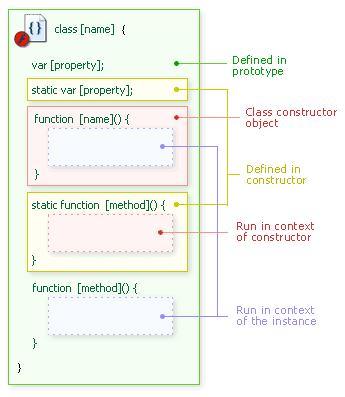
[ a class code block references many scopes ]
Contained within the class brackets, much of this scope jumping is hidden. It's not really that important for that matter since most all that information is directly accessible to an instance and/or its methods. Sometimes you may want to restrict some of this access though - at least on some level.
Another addition accompanying ActionScript 2.0 is the ability to create properties and methods as being either private or public using the public and private keywords. With ActionScript 1.0, all properties and methods of a class were entirely public. This means that there was always direct access to a property or method through a class instance. Having private properties and methods means that they would not be accessible through the instance directly, but rather only internally through methods of that class.
The private and public keywords are used in indicating that a property or methods is private or public. They are used in front of the property or method before any other keyword.
                    private var variableName;

  private function functionName(){ ...

  public var variableName;

  public function functionName(){ ...
If neither is used, public is assumed. This makes the actual public keyword a little redundant. Yet it still may be helpful in distinguishing public from private for a more readable class definition.
Let's return to the Person class and assume all people created with this class will be elusive women. These women will tell you their name, but they won't tell you their age. After all, they want you to think they are at the current point in time (and always will be) 29. Only if you know them well enough, will they divulge their true age. To prevent direct access to these ladies ages though, you would want to make the age property private. Since its ok if anyone knows their names, that property can be assigned to be public.
class Person {
  public var name:String = "none";
  private var age:Number;
  function Person(n:String, a:Number) {
  name = n;
  age = a;
  }
  function revealAge(howWellKnown:Number):Number {
  if (howWellKnown > 20) {
  return age;
  }else{
  return 29;
  }
  }
}
When creating and using these Person instances in your movie, you will not have access to the age property if you attempted to access it directly from the instance directly. Because it's private, a method would be needed to get to that value - a method such as revealAge.
var aLady:Person = new Person("Emily", 36);
trace(aLady.name); // "Emily"
trace(aLady.age); // error: cannot access private member
trace(aLady.revealAge(10)); // 29
trace(aLady.revealAge(21)); // 36
Try it yourself! (zipped source)
When accessing name, you have no problems since its a public property. The age property, however, is private. When the compiler sees you are trying to access a private property, it throws up an error. Its real value can be attained via methods since they are allowed to access the value of private properties.
Private methods work the very same way. Declaring a function to be private means that the method cannot be used anywhere aside from within the other methods of that class.
private function mySecretMethod():Void {
  // contents
}
Even static properties and methods can be private
private static var mySecretProperty:Number;
private static function mySecretMethod():Void {
  // contents
}
One important aspect of these private properties and methods is that they only work for strictly typed instances. If you don't use strict typing on your class instance, there will be no error generated by the compiler for private properties and all properties and methods, private or not, will be seen as being public.
When everything comes together, all methods and properties, public or private, static and not, you come up with the following for accessibility.
| Instance Object | Instance |
Constructor Object | Static Method |
|
| public property | Yes | Yes | No | No |
| public method | Yes | Yes | No | No |
| public static property | No | Yes | Yes | Yes |
| public static method | No | Yes | Yes | Yes |
| private property | No | Yes | No | No |
| private method | No | Yes | No | No |
| private static property | No | Yes | No | Yes |
| private static method | No | Yes | No | Yes |
[ class accessibility chart ]
You can see that instances alone really aren't given that much access. Instance methods, however, have total access. Those methods can access any part of a class no matter what its designation. You can see how methods can really make the class, and its best to program so that this is in fact the case.
|
|
Advanced Programmers Note: Private |
|
Private members to Actionscript are not so much private as they are protected. Subclasses have complete access to all private variables and methods. There is no way to prevent that as of now. The use of private members here is basically just to generate a compiler error when it sees you're using an instance to directly access them.
|
|
Get and set are new keywords in ActionScript 2.0 that help you manage your private variables. They take the place of ActionScript 1.0's addProperty method. Whereas addProperty handled both get and set methods within a single method call, get and set handle each separately in the definition of the setting or getting function.
The get and set keywords are kind of used like static and private. They appear in the definition of the function they're being used on. Only here, get and set are placed after the function keyword. This puts them right before the name of the get or set property being created making it more verbose when reading the script. Here's an example that makes a name property for a class that sets and retrieves a username private property. The name of the get or set method determines the name of the property they're creating.
// in Account.as
class Account {
  private var currentOwner:String = "none";
  function Account(name:String){
  currentOwner = name;
  }
  function get owner():String {
  return currentOwner;
  }
  function set owner(name:String):Void {
  currentOwner = name;
  }
}
// in Flash movie
var myChecking:Account = new Account("Terry");
trace(myChecking.owner); // Terry
myChecking.owner = "Terry's son";
trace(myChecking.owner); // Terry's sonBeing a private property, currentOwner is not directly accessible from an Account instance. Using the get and set methods, an owner property was created to access it. This property is a result of the combinations of get owner() and set owner() - two methods for handling the currentOwner property. Here is the ActionScript 1.0 equivalent of the above.
/* ActionScript 1.0 */
Account = function(name){
  this.currentOwner = name;
}
getOwner = function(){
  return this.currentOwner;
}
setOwner = function(name){
  this.currentOwner = name;
}
Account.prototype.addProperty("owner", getOwner, setOwner);
In ActionScript 2.0 both get and set methods can have, but are not limited to, the same name. After all, this is generally needed for the getting and setting of the variable they create. They cannot, however, have the same name as other properties and methods within the class. Also, it is not required that there be both a set and get for any one property created in this manner. A set can be created without a get and vise versa.
Using get and set in this manner may seem like a futile process, but its good OO programming practice not to allow direct access to your properties from your instances.
Everything seems much more constrictive with ActionScript 2.0. Well, this is because it is. It's not a bad thing, though. It helps you adhere to your own intentions and promotes better practices for you as an OOP programmer. One more of these constraints is the fact that, by default, classes cannot have properties or methods created for them if they are not first declared within the class definition. This means if sometime in the middle of a movie you all of a sudden up and decide your class instance needs another property, it's not going to get it. At least this is the case for normally defined classes.
Enter dynamic - the keyword that lifts this restriction. It lets you add any number of properties or methods to your class instance whenever you want whether or not they were declared in the class definition, just like you could with ActionScript 1.0 just by adding "dynamic" before the class keyword.
dynamic class className {Note you can only add public properties outside of the class definition. Private properties must be declared in the class.
Lets take a look at a quick example of two classes, one ordinary run of the mill class, the other dynamic.
// in ClosedSet.as
class ClosedSet {
  var actor:String;
  var director:String;
  var cameraMan:String;
  function ClosedSet(act:String, dir:String, cam:String){
  actor = act;
  director = dir;
  cameraMan = cam;
  }
}
// in OpenSet.as
dynamic class OpenSet {
var actor:String;
var director:String;
var cameraMan:String;
function OpenSet(act:String, dir:String, cam:String){
actor = act;
director = dir;
cameraMan = cam;
}
}// in Flash movie
var closed:ClosedSet = new ClosedSet("Joe", "Jeff", "John");
var open:OpenSet = new OpenSet("Albert", "Carmen", "Saul");
closed.bestBoy = "Carl"; // error: property doesn't exist
open.bestBoy = "Carl"; // (works ok)
trace(open.bestBoy); // CarlBecause the ClosedSet instance, closed, is not dynamic, an error occurs when attempting to give it an undeclared variable. The bestBoy property was not previously defined in the ClosedSet class therefore it cannot be added. With OpenSet, however, which is dynamic, the open instance added the bestBoy property with no hassles.
When working with ActionScript 2.0, you need to realize that internal objects and core classes follow the same rules as those governing your custom classes. This includes their use (or lack thereof) of dynamic. In fact, now, only a few of Flash's own core classes are defined as being dynamic. These include the following.
• Array
• ContextMenu
• ContextMenuItem
• Function
• MovieClip
• NetConnection
• SharedObject
• TextField
All other internal Flash objects cannot have properties dynamically added to them. Math, a core Flash object, for example, cannot have any custom mathematical functions of your own added to it (something which was commonly done in ActionScript 1.0). Instead, you might opt to make your own Math-type object for these custom functions. Something as simple as Math2 perhaps.
class Math2 {
  static function randRange(low:Number, high:Number):Number {
  return low + Math.floor(Math.random()*(high-low+1));
  }
}
It's depressing, I know. It's ultimately a good thing. This keeps your custom methods separated from Flash's own internal ones. Nevertheless, there is a workaround which we'll discuss later on.
There is yet another type of class for ActionScript 2.0. That's the intrinsic class. This type of class, however, is not really a class. It's more of a set of guidelines for a class. It serves only one purpose - to provide strict date type definitions for pre-existing classes.
Macromedia uses intrinsic classes to define data types for all internal objects and classes defined natively within Flash (you may have seen these in a Classes folder if you've ever dug around in your Flash MX 2004 install directory). These include objects like Array, MovieClip and Math. But when might you use them? That depends. When do you need to define just data typing for classes?
The best and probably the only situation where you personally, as a developer, would physically create an intrinsic class yourself would be if you were using ActionScript 1.0 classes within your ActionScript 2.0-based movie. ActionScript 1.0 classes, as you know, have no strict data typing associated with them. This isn't a horrible thing, but it's not a great thing either. Being the MX 2004 (or later) developer you are, you need those data type definitions to help you maintain efficiency and competency in your project. That's where intrinsic classes come into play.
Lets say you have a great class you made in ActionScript 1.0 that does everything you would ever need for this new project your working on. Only one problem, you're now working in ActionScript 2.0, not ActionScript 1.0. Ok, no problem. You can use ActionScript 1.0 with ActionScript 2.0 seamlessly easily enough. The only thing is, you won't have those amazing data type definitions for your wonderful class. Instead of re-writing your ActionScript 1.0 class completely as a new ActionScript 2.0 class, you can instead just write an intrinsic class that outlines the data types used and have it be applied to your still functional (and still wonderful) ActionScript 1.0 class as its being used within your current project.

[ intrinsic classes are type definitions for existing classes ]
All you would need to do is create a new ActionScript 2.0 class file with the name of your pre-existing class and label it as being intrinsic just as you label the class as being dynamic (it can be both if you want). Within this file, put all your property and methods with proper typing but no definitions. After all, you're avoiding re-writing your class completely, so the definitions themselves are not included.
intrinsic class className { Here's an example that adds data typing to an ActionScript 1.0 class defined within the main Flash movie.
// in Wonderful.as
intrinsic class Wonderful {
  var msg:String;
  function doSomethingWonderful(allow:Boolean):Void;
}
// ActionScript 1.0 class in main Flash movie
var Wonderful = function(msg){
this.message = msg;
};
Wonderful.prototype.doSomethingWonderful = function(allow){
if (allow) {
trace(this.message +" is Wonderful!");
}
};
var ItsA:Wonderful = new Wonderful("Life");
ItsA.doSomethingWonderful("yes"); // error: type mismatch
ItsA.doSomethingWonderful(true); // Life is Wonderful!Try it yourself! (zipped source)
Though the Wonderful class was created in the ActionScript 1.0 style of class definition, the compiler was still able to recognize a type mismatch when attempting to use a string as an argument for doSomethingWonderful. This is thanks to the definitions as specified in the intrinsic class in Wonderful.as.
One thing to be aware of if using intrinsic classes in this manner is that your existing class definitions (constructor functions) need to be defined with the var keyword. Otherwise an error will be generated because it assumes you're actually using the pre-existing intrinsic class and not creating a new definition. This could require some editing of older ActionScript 1.0 classes to correct this. At that point, however, it might not be such a bad idea to simply re-write it in ActionScript 2.0 altogether.
Intrinsic class definitions are also created for the new MX 2004 components. Because this new generation of components can be compiled prior to their use, it means there are no hooks for the Flash compiler to check to make sure you're using the component and its methods right. An intrinsic class gives the compiler the information it needs about the definitions contained within the component so that it can check for proper usage and data typing mismatches when your working with that component in your Flash movie. Though the intrinsic classes are not compiled within the .swc file (they're available in text format), because intrinsic classes only contain definitions without the implementation, the component author's internal code is still kept confidential.
In the continuing saga of ActionScript 2.0's attempts to make us good and organized OO programmers, we get blessed with the presence of interfaces. Interfaces, though defined like classes, are not themselves classes (starting to see a trend?). They provide programmers with a set of method declarations that are designated required methods for all and any classes that implements that interface. Like classes, interfaces are defined in separate .as files which bears the same name as the interface itself.
interface InterfaceName { /* interface code block */ } The contents of the interface is then set up much like an intrinsic class is, providing declarations but no definitions. However, interfaces only include public methods. Properties nor static or private declarations are allowed. Here is a example of an interface which outlines methods that are required for "simple fighting styles."
interface SimpleFightingStyle {
  function headButt():Boolean;
  function kick(foot:String):Boolean;
  function block():Void;
}
The new implements keyword is then used to force a class to contain these definitions. Its placed after the class name as so.
class className implements InterfaceName { ...
Here is an example of a class that implements the SimpleFightingStyle interface from above.
class FookYoo implements SimpleFightingStyle {
  static var origin:String = "Scotland";
  var level:Number = 0;
  function FookYoo(lvl:Number) {
  level = lvl;
  }
  function headButt():Boolean { // required
  var success = (Math.random()*10 > 4) ? true : false;
  return success;
  }
  function kick(foot:String):Boolean { // required
  var success = false;
  if (foot == "right") {
  success = (Math.random()*10 > 2) ? true : false;
  }else if (foot == "left") {
  success = (Math.random()*10 > 4) ? true : false;
  }
  return success;
  }
  function block():Void { // required
  if (Math.random()*10 > 5) {
  preventDamage();
  }
  }
  function preventDamage():Void {
  // ...
  }
}
If that class didn't contain a method for each of those named in the interface being implemented, an error would occur. By implementing an interface, you can be assured that you (or anyone else that might possibly be implementing an interface of yours) don't leave out a method that's necessary for that class. Its advantages are best seen when used with many classes. This helps maintain consistency.
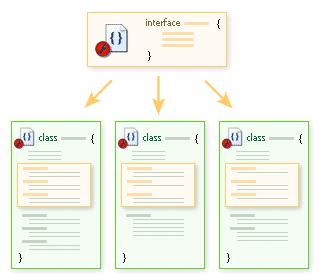
[ interface methods required in the classes implementing it ]
Such classes aren't restricted to using interface methods alone, however. Aside from the methods declared in the interface, the class can also have whatever other methods it needs to have to be what it needs to be. Interfaces just make sure you have at least what they provide for you.
Also, don't forget that interfaces are their own data type.
var skill:FookYoo = new FookYoo(3);
trace(skill instanceof SimpleFightingStyle); // true
var skill:SimpleFightingStyle = new FookYoo(3); // also acceptable
Try it yourself! (zipped source)
Some say that interfaces allow for a type of limited multiple inheritance. Don't take this literally. That is not at all what they provide. Inheritance is the act of gaining functionality from another object which already possesses that functionality. Interfaces only make sure that classes define for themselves methods of similar naming. It does not require for those methods to behave the same in any way or mean that anything aside from consistent naming is provided for those classes. Interfaces are more of an enforcer of polymorphism. Really, it's nothing more than a tool to help you do things the way you intended to do them - to help you to main consistency throughout common classes which need to share a similar method structure. Interfaces serve no real purpose otherwise - no killer functionality or simplification of techniques; just a plain ordinary "Ah! but you forgot this!"
That wraps up this tutorial. A huge thank you to all of you who buy kirupa's books, became a paid subscriber, watch the videos, and/or interact on the forums. Your support is what keeps writing like this online! 😇
This tutorial was written by senocular, also known as Trevor McCauley. He has been one of this community's most generous teachers since the early Flash days, and he is still around: find him on senocular.com and on the forums.

:: Copyright KIRUPA 2026 //--
