



This is an archived tutorial from the kirupa.com legacy collection. It covers software that may no longer be available, but it is kept online because the ideas still hold up.
One of the advantages of OOP is portability and re-use of code. Inheritance allows new classes to be derived from pre-existing classes thereby reducing the need to what might be otherwise repeated code of one class in another. What you get are subclasses that inherit methods and properties from pre-existing super classes. These subclasses are then said to extend the super class as it is everything the super class is plus more. The terms "subclass" and "super class", by the way, are just ways of identifying certain classes involved in inheritance. There is nothing particularly different about a class when it's a super class other than the fact its being used by some other class (the subclass). Often you may hear these referred to as parent class and child class.
In following the metaphor of inheritance in genetic terms, think about how you look. The way you look is dependant on what traits you inherited from your parents. Your parents got their traits from their parents, and their parents from their parents, and so on and so forth. Properties and methods in classes can be inherited the same way. Super classes represent parents of subclasses which are the children (hence the alternate terminology of parent and child class). Subclasses inherit properties and methods which are present in the super class and can use them as their own.
Actionscript inheritance, however, is slightly different from the biological inheritance you get from your parents. For one, biological inheritance is not compounding. For example. Your grandmother had 2 arms and your mother had 2 arms but that doesn't mean you'll get 4 arms. You will biologically always be similar in that you will never be more than a human is supposed to be. With classes in Flash, when you have a class inherit from a super class, the resulting subclass gets everything that super class has and then adds more through its own definition making a final product which greater and more feature rich than anything its based on.
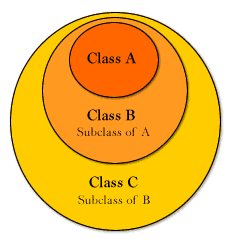
[ subclasses inherit everything and add to that definition ]
Another difference is that Actionscript does not support multiple inheritance. Multiple inheritance is when a class is able to inherit from more than one separate classes. When you inherit traits from your parents, you are inheriting from both your mother and your father. Actionscript classes can really only have one or the other. "Okay, son. Which is it? Mom or dad?" If you absolutely need both, then either your mother or father would have to first inherit from the other. So if you have a mother and father to inherit from in Actionscript, the mother would have to either be a subclass of the father or the father a subclass of the mother.
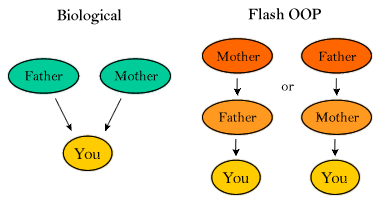
[ biological inheritance vs. flash inheritance ]
In this fashion, Actionscript inheritance is linear - its inheritance chains have no inward branching or inheritance from multiple unique sources. The only branching you get is outward from a certain class to other subclasses. There's nothing preventing many other classes to all inherit from the same super class and further subclasses inheriting from them.
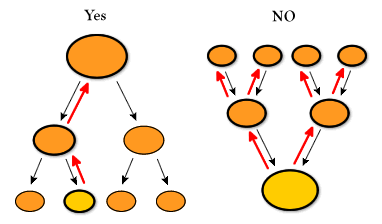
[ inheritance can branch outward, not inward ]
Having classes inherit from classes which may be inheriting from other classes, and so on and so forth, means you are dealing with an inheritance chain. The inheritance chain represents all the classes which are involved in the complete line of inheritance from the current class through all super classes up to the very first base class which, as it exists, marks the end of the chain and itself has no super class of its own (thereby not inheriting from anything else). This chain represents all which would be accessible to any derived subclass or instance of that subclass. Taxonomy or the science of organism classification, can help demonstrate this relationship.
Every known organism can classified through a hierarchy of identifying categories based on Domain, Kingdom, Phylum, Class, Order, Family, Genus and Species. Think about a brown pelican as an example. It is categorized in the following manner.
| Domain | Eukarya |
| Kingdom | Animalia |
| Phylum | Vertebrate |
| Class | Aves |
| Order | Pelecanifornes |
| Family | Pelecanidae |
| Genus | Pelecanus |
| Species | occidentalis |
A brown pelican is considered a part of each one of these classifications with each one becoming more specific to what a brown pelican as you know it (if you know it) is. Most animals are Eukarya, fewer are Aves and fewer less are Pelecanus. With Aves and more so with Pelecanus, however, you are getting more specific to what a brown pelican really is. This often too is this the case with inheritance as your final subclass is a specific version of an inherited super class. That super class too could be a specific version of a yet less specific super class.
Applying inheritance in Actionscript with classes usually consists of two parts, setting up the inheritance chain connection and super class initialization. Setting up the inheritance connection to the super class is key. It pretty much defines the act of inheritance. Initialization of the super class, however, can be dependant on your class definitions and may not be needed at all.
With Actionscript, the standard method of establishing
inheritance is through the prototype object of your class.
After all, the prototype is the object that shares. Linking
inheritance through the prototype means subclass instances
will be able to share super class methods etc. This is setup
is by immediately defining the prototype of a class to be a
new instance of the super class – before any other
prototypes of the subclass are defined. Taking the pelican
example to a simplification, we can have two classes, Animal
and Bird. The Bird class can then be a subclass of Animal.
// Animal - a super class to Bird
Animal = function(){
  this.isAnAnimal = true;
};
// Bird - a subclass of Animal
Bird = function(){
  this.isABird = true;
};
// setup inheritance linkage between Bird and Animal
Bird.prototype = new Animal();
// we can see the bird being an animal through an instance of bird
poly = new Bird();
trace(poly.isABird); // traces true
trace(poly.isAnAnimal); // traces true
The reason this is performed before other prototype definitions is because doing this actually replaces the prototype object with a new object – an instance of the super class. Prototypes can then be added specifically for the subclass. If they were added before, all those definitions would be lost as the prototype is replaced with a new instance of the super class. As an instance of the super class, though, the prototype object inherently then has access to all super class properties and methods as every other instance of the super class has. And because its now serving as the subclass prototype, it means all instances of the subclass, sharing its properties and methods, will then have access properties and methods of that super class. Basically all you're doing is quickly creating a pre-functional prototype object for your class - a prototype object with already defined methods and properties as they exist in another class. It's a quick and easy way to incorporate pre-written code into your new class without having to write them all over again.
Though this new prototype instance is in fact an direct instance of the class acting as the super class, it is not an acting instance of that class -not an instance which is being used as a normal instance of that class would be. That being the case, if you are using a static property to keep track of class instances, you may need to compensate for instances used to define inheritance in this manner. You can do this either with some form of if check within the constructor or just by adjusting the count or corresponding value after the prototype assignment.
Let's do another example, this time with more going on in
prototypes. Here we'll use Person and SuperHero classes.
// Person class definition
Person = function(name, age){
  this.name = name;
  this.age = age;
};
Person.prototype.speak = function(phrase){
  trace(phrase);
};
// SuperHero class definition
SuperHero = function(power){
  this.superPower = power;
  this.peopleSaved = new Array();
};
SuperHero.prototype = new Person();
SuperHero.prototype.savePerson = function(person){
  this.peopleSaved.push(person);
  // a SuperHero can use speak because its inherited
  // from its super class Person
  this.speak("A SuperHero's job is never done!");
};
SuperHero.prototype.getLastPersonSaved = function(){
  return this.peopleSaved[this.peopleSaved.length-1];
};
// create some instances.
damselInDistress = new Person("Lois", 25);
superMan = new SuperHero("Being subclass instance.");
// use the new instances and their methods
damselInDistress.speak("Help!"); // traces "Help!"
superMan.savePerson(damselInDistress); // traces "A SuperHero’s job is never done!"
// check to see if Lois was actually saved
trace(superMan.getLastPersonSaved() == damselInDistress); // traces true
Ironically, SuperHero here is a subclass, but don’t let that confuse you. Person is actually the super class to SuperHero. But as you can see, as a Person, our superMan instance can speak just like other people – like the damselInDistress. Being the SuperHero that he is, though, superMan also has a super power, an array of saved people and has new methods, savePerson and getLastPerson saved.
Since inheritance here is carried through the prototype, it specifically handles shared properties and methods. Setting up inheritance like that doesn’t do anything for defining unique properties in subclass instances. Notice in the Person-SuperHero example that name and age properties in the Person constructor are not defined in the SuperHero constructor. They are available to SuperHero instances, but only available to through the prototype as that is the only place they are defined when the inheritance is setup. Because of this, each SuperHero instance effectively references the same name and age from the prototype object instead of having their own unique property for each (which here would be undefined since the Person constructor was called without any parameters passed to it). What is needed is to have the Person constructor run specifically for each instance of a SuperHero when its created thereby giving each the unique properties defined by that constructor. The super command does just that for us.
The super keyword is an operator available in the local scope of a subclass constructor function call (or method call) that allows that class to reference the constructor of and individual methods of the super class in which it inherits from. This allows you to define unique properties specified by a super class in each instance of a subclass by running the super class constructor for each instance created. In this manner, super acts just like the super class constructor so pass in variables as needed. Lets incorporate that into the SuperHero class.
// Person class definition
Person = function(name, age){
  this.name = name;
  this.age = age;
};
Person.prototype.speak = function(phrase){
  trace(phrase);
};
// SuperHero class definition
// use parameters needed in super class constructor
SuperHero = function(name, age, power){
  // run the super class constructo, Person, on
  // the instance of SuperHero being created
  super(name, age);
  // assign additional property values as needed
  this.superPower = power;
  this.peopleSaved = new Array();
};
SuperHero.prototype = new Person();
SuperHero.prototype.savePerson = function(person){
  this.peopleSaved.push(person);
  this.speak("A SuperHero's job is never done!");
};
SuperHero.prototype.getLastPersonSaved = function(){
  return this.peopleSaved[this.peopleSaved.length-1];
};
// check a super heros properties
worldsLastHero = new SuperHero("Bob", 74, "Whittling");
trace(worldsLastHero.name); // traces "Bob"
trace(worldsLastHero.age); // traces 74
trace(worldsLastHero.superPower); // traces "Whittling"
// which are different from what would be the otherwise accessed prototype values
trace(SuperHero.prototype.name); // traces undefined
trace(SuperHero.prototype.age); // traces undefined
The super function, however, also serves as an object to reference the super class’s prototype object. Using the super in this manner allows you to call methods directly off the super class prototype for your subclass instance. Normally you wouldn’t need to do this since your subclass instances automatically inherit those methods directly, however, when you would need to use this is when you have a subclass that has a method with the same name as a super class method. Yes that’s possible and not uncommon.
In defining a subclass, you may find yourself in need of re-defining a certain method so that it would more specifically suit instances the new class. That’s well and fine. Doing so is just a matter of creating the method again within that subclass with the new definition desired. This won’t have any effect on the super class’s version and all instances of the subclass will use the new definition in favor of the one in the super class since it would be found first in the inheritance chain. If, however, you wanted to get a call to the super class method of that same name, you still could through super. Super would then allow you to bypass the class prototype’s method and skip right on up to reach the super class’s method and call it instead, or even along with the class’s own version.
For example, lets say your company makes computer
monitors. Every monitor has specific behaviors when turned
on. No matter what the make or model, every monitor will
degauss when turned on, but only model 86B will auto-adjust
brightness. Because of this, when turned on, 86B models will
not only perform normal monitor behaviors, but also its own.
As classes in Actionscript, they would be set up in the
following manner.
// basic monitor class
Monitor = function(size, res){
  this.screenSize = size;
  this.nativeResolution = res;
  this.powerIsOn = false;
};
Monitor.prototype.turnOn = function(){
  this.powerIsOn = true;
  this.degauss();
};
Monitor.prototype.degauss = function(){
  trace("Degaussed");
  // degauss here etc.
};
// class for a model 86B monitor
Model86B = function(size, res){
  // model 86B uses same definition as
  // its monitor super class
  super(size, res);
};
// setup inheritance with Monitor class
Model86B.prototype = new Monitor();
// add a unique turn on method for model86B instances
Model86B.prototype.turnOn = function(){
  // using this.turnOn would run this function
  // but we need the super class turnOn to run
  // so super allows access to that acting as a
  // reference to the super class prototype
  super.turnOn();
  this.adjustBrightness();
};
Model86B.prototype.adjustBrightness = function(){
  trace("Adjusted brightness");
  // adjust brightness here etc.
};
// make an 86B instance and turn it on
demoMonitor = new Model86B(17, [1024,768]);
demoMonitor.turnOn(); // traces "Degaussed" and "Adjusted brightness"
As you can see, super here allowed a Model86B instance to access its super class’s turnOn method in one of its own. So as you can see, super is available not only in the constructor call, but class methods as well.
The idea behind polymorphism is that you are able to define methods for classes that are able to behave according to the needs of the instances created. This is especially the case for derived objects – each having their own versions of a similar method which performs the actions needed specific to that class.
Think about a basic shape super class. Two new subclasses
can be derived from that, a circle and a square class. These
classes can then both have a getCircumference method to
retrieve the circumference of the shape though the
definition for getCircumference will differ for each.
// Shape super class
Shape = function(x,y){
  this.x = x;
  this.y = y;
};
// Circle subclass
Circle = function(radius){
  this.radius = radius;
};
// establish inheritance
Circle.prototype = new Shape();
// define unique getCircumference
Circle.prototype.getCircumference = function(){
  return Math.PI*2*this.radius;
};
// Square subclass
Square = function(size){
  this.size = size;
};
// establish inheritance
Square.prototype = new Shape();
// define unique getCircumference
Square.prototype.getCircumference = function(){
  return 4*this.size;
};
// create some shapes
shapeA = new Circle(10);
shapeB = new Square(10);
trace(shapeA.getCircumference()); // traces 62.8318530717959
trace(shapeB.getCircumference()); // traces 40
Different methods they may be, but the fact remains, if you need to get the circumference of a shape, you still can, no matter what kind of shape you have.
Previously, in using static properties of a class, we were able to keep track of the number of instances that were created for a specific class. That can be expanded on by not only counting instances, but controlling them. If, for each call of the class constructor, you were to place that instance within an array defined in that constructor, events, or calls to instances’ methods, could then be sent to each instance in that array just by cycling through and calling the appropriate method for each. There is, however, a better way. That way is through using ASBroadcaster.
ASBroadcaster is an inbuilt object in Flash that gives the capability of sending events to a list of listeners of that event to specific objects in your movie. Some objects, like Key and Stage, are already defined to behave this way. ASBroadcaster lets you create your own broadcaster objects which have their own listeners and can send them all the event of your choice. With OOP, you’d typically have a class broadcast events to all instances of that class.
A common mistake is assuming that such functionality can be achieved by calling a method directly from a prototype. That, of course is not the case. But why not? All instances have those prototype methods? If I call it from the prototype, won’t it call it for all of those instances? Nope. Remember, the prototype object is just a shared object. It’s a normal object in every other respect. Calling a method from that object would be no different than calling a method from some other single class instance. It will only run for that one object and no others. This is even the case if you try something like class.prototype = new MovieClip(). It’s just not going to happen. ASBroadcaster is the way to go.
If you don’t already know its use, you can find more about what ASBroadcaster is and how it works here. Otherwise its time to jump right in and start using it.
For a class making full use of ASBroadcaster
capabilities, it would need to be a class where every
instance needs to have a method called for it at any one
time for some particular reason. One example might be giving
raises to all employees of a company. Each employee has
their own specific weekly income. A raise for every employee
would mean an increase would have to be applied to each one
of those incomes in every employees of the company.
// employee class definition
Employee = function(weeklyIncome){
  this.weeklyIncome = weeklyIncome;
  // make each created instance a listener of
  // the class constructor
  Employee.addListener(this);
};
Employee.prototype.getPayCheck = function(){
  trace("Cha-ching! $"+ this.weeklyIncome);
};
Employee.prototype.getRaise = function(percent){
  this.weeklyIncome += this.weeklyIncome*percent;
};
// initialize Employee to be able to send events to its listeners
ASBroadcaster.initialize(Employee);
Employee.giveRaise = function(percent){
  // send all listeners the getRaise event and
  // pass to it the desired percent argument
  this.broadcastMessage("getRaise", percent);
};
humanReceptionist = new Employee(200);
monkeyTypist = new Employee(10);
humanReceptionist.getPayCheck(); // traces Cha-ching! $200
monkeyTypist.getPayCheck(); // traces Cha-ching! $10
// give all employees a 5% raise
Employee.giveRaise(.5);
humanReceptionist.getPayCheck(); // traces Cha-ching! $210
monkeyTypist.getPayCheck(); // traces Cha-ching! $10.5
Using a static method of the Employee constructor, all instances of that class can then be sent a similar event, in this case, getRaise. If you want to be more consistent with other Flash events, you could instead use a method name such as onGetRaise, though it’s not necessary. The “on”, does help you see that the method is an event method, so it might be something to consider in naming your events.
Now, if you didn’t already realize this, normal inbuilt Flash event’s aren’t coming to the class above. As it exists now, the only event any employee will ever receive is the getRaise event. The onEnterFrame event, for example, isn’t even close to being called for any employee. In fact, its reserved solely for movieclip instances. Any object you make, either generic or from one of your classes, will not be able to receive the onEnterFrame event on their own as movieclips do. With ASBroadcaster, though, you can get around that.
All you need is a movieclip host – some movieclip willing to spread the love of its onEnterFrame event down to the lowly objects of your choice. If none of your current objects are willing to volunteer, its ok. We can make a new one just for this purpose with createEmptyMovieClip. Just make sure you have a safe depth to keep it. The idea is to take the onEnterFrame received by the host clip and broadcast it to a list of listeners who need to receive it, those listeners being those “objects of choice”. These objects can be either individual object instances or, better yet, especially if all instances of a class are to receive an onEnterFrame event, class constructors. In using class constructors, you would have a static onEnterFrame method of the class constructor which would then be used to broadcast its onEnterFrame method to its own instances.
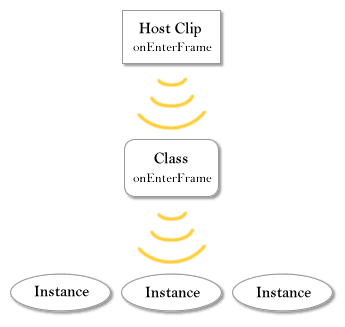
[ onEnterFrame from movieclip to class to class instances ]
This adds an extra step in the onEnterFrame execution, but it allows for individual classes to better regulate their own instances and the onEnterFrame events being called on them.
The following example has a single class which is defined
as a listener of the onEnterFrame broadcasting movieclip
created in depth 1000 of the current timeline. The event
from the movieclip is sent to this class which then uses its
onEnterFrame method to send it to all of its own listeners –
or all the instances created by class.
Note that aside from the broadcasting movieclip, the onEnterFrame event doesn’t even have to be named onEnterFrame anymore. In fact, here, the child class sends the “grow” event to all instances as opposed to an “onEnterFrame” event, which it essentially is.
A deconstructor is a type of method for object instances that is used to essentially delete that object as best as it can. Just as a constructor “constructs” an object, a deconstructor would “deconstruct” it. In other programming languages, deconstructors are used to deallocate or free the memory used by dynamically created content in objects. With Flash, though, objects exist as long as their exists a variable reference to that object. Deleting an object is just a matter of deleting or re-defining all references to that object. When all references are gone, Flash take care of deallocating all memory associated with that object on its own. So, when it comes down to it, there really isn’t much in the way of deconstructor functionality for objects in Flash and Flash has no way of handling them by default. This doesn’t mean they can’t be made. There are certain situations where you might need a deconstructor of sorts to help with the cleanup of a no longer needed object.
One such instance is with the use of ASBroadcaster. When a new instance is created and added as a listener of the class constructor, a reference to that object instance is kept in the constructor’s listeners list. If you ever decide to delete an object, you would too want to remove that object from that list with removeListener. This way, while cycling through the listeners, calling event methods, the constructor wouldn’t be going through supposedly deleted objects. Of course, if they’re still in the listeners list, a reference still exists and the object wouldn’t be technically deleted even though the variable it was assigned to during creation was.
Deconstructors can also be used for other needs required in object removal such as reducing a static count property, keeping track of the number of instances created etc. Let’s apply a deconstructor to the child example. After all, children are frequently deleted, right.
// movieclip to send onEnterFrame events
this.createEmptyMovieClip("onEnterFrameEvent",1000);
ASBroadcaster.initialize(onEnterFrameEvent);
onEnterFrameEvent.onEnterFrame = function(){
  this.broadcastMessage("onEnterFrame");
};
// child class constructor
Child = function(name){
  Child.count++; // count children
  this.name = name;
  this.ageInSeconds = 0;
  Child.addListener(this);
};
// child class deconstructor
Child.prototype.deconstruct = function(){
  Child.removeListener(this); // remove as listener
  Child.count--; // adjust count
  // anything else you might need to "clean up"
};
Child.prototype.grow = function(){
  this.ageInSeconds += 1/20;
  trace(this.name + "'s age: "+ this.ageInSeconds);
};
onEnterFrameEvent.addListener(Child);
ASBroadcaster.initialize(Child);
Child.onEnterFrame = function(){
  this.broadcastMessage("grow");
};
// new instances
son = new Child("Sam");
daughter = new Child("Jessica");
// delete son; // <- ineffective
// though deleted, son will still grow since
// its still referenced in the listeners list
// of the child constructor. It will need
// to be removed as well.
// call son deconstructor
son.deconstruct();
delete son; // removes son variable reference
/* Example output:
Jessica's age: 0.05
Jessica's age: 0.1
Jessica's age: 0.15
Jessica's age: 0.2
Jessica's age: 0.25
*/
/* Example output if only used delete son:
Sam's age: 0.05
Jessica's age: 0.05
Sam's age: 0.1
Jessica's age: 0.1
Sam's age: 0.15
*/
A deconstructor like this isn’t a solve-all solution though. It takes care of business for the class itself. You may still have other object references out there pointing to the object you might want to delete. Its up to you to take care of that best you can by keeping organized in your variable handling.
That wraps up this tutorial. A huge thank you to all of you who buy kirupa's books, became a paid subscriber, watch the videos, and/or interact on the forums. Your support is what keeps writing like this online! 😇
This tutorial was written by senocular, also known as Trevor McCauley. He has been one of this community's most generous teachers since the early Flash days, and he is still around: find him on senocular.com and on the forums.

:: Copyright KIRUPA 2026 //--